change time LEXUS NX300 2020 Service Manual
[x] Cancel search | Manufacturer: LEXUS, Model Year: 2020, Model line: NX300, Model: LEXUS NX300 2020Pages: 468, PDF Size: 10.24 MB
Page 350 of 468

3506-3. Do-it-yourself maintenance
LEXUS NX300 Owners Manual_USA_M78389_en
4Press or of the meter con-
trol switches and select .
5
Press or of the meter con-
trol switches, select the “Vehicle
Settings” and then press .
6
Press or of the meter con-
trol switches, select the “TPMS”
and then press and hold the .
The “Tire Pressure Recalibrating. Please
Wait Until Complete” will be displayed on
the multi-information display and the tire
pressure warning light will blink slowly 3
times.
When the message disappears, initializa-
tion is complete.
■Initializing the tire pressure warning sys-
tem
Initialize the system with the tire inflation
pressure adjusted to the specified level
■The initialization operation
●Make sure to carry out initialization after
adjusting the tire inflation pressure. Also,
make sure the tires are cold before carry-
ing out initialization or tire inflation pres-
sure adjustment.
●If you have accidentally turned the engine
switch off during initialization, it is not
necessary to press the reset switch again
as initialization will restart automatically
when the engine switch has been turned
to IGNITION ON mode for the next time.
●If you accidentally press the reset switch
when initialization is not necessary, adjust
the tire inflation pressure to the specified
level when the tires are cold, and conduct
initialization again.
■Warning performance of the tire pres-
sure warning system
The warning of the tire pressure warning
system will change in accordance with the
conditions under which it was initialized. For
this reason, the system may give a warning
even if the tire pressure does not reach a
low enough level, or if the pressure is higher
than the pressure that was adjusted to when
the system was initialized.
■When initialization of the tire pressure
warning system has failed
Initialization can be completed in a few min-
utes. However, in the following cases, the
settings have not been recorded and the
system will not operate properly. If repeated
attempts to record tire inflation pressure
settings are unsuccessf ul, have the vehicle
inspected by your Lexus dealer.
●When initializing the tire pressure warn-
ing system, the tire pr essure warning light
does not blink 3 times.
●After carrying out the initialization proce-
dure, the tire pressure warning light
blinks for 1 minute then stays on after
driving for 20 minutes.
The tire pressure warning valve and
transmitter is equipped with a unique
WARNING
■When initializing the tire pressure
warning system
Do not initializing tire inflation pressure
without first adjusting the tire inflation
pressure to the spec ified level. Other-
wise, the tire pressure warning light may
not come on even if the tire inflation pres-
sure is low, or it may come on when the
tire inflation pressure is actually normal.
Registering ID codes
Page 393 of 468

3937-2. Steps to take in an emergency
LEXUS NX300 Owners Manual_USA_M78389_en
7
When trouble arises
4Lower the vehicle.
5
Firmly tighten each wheel nut two
or three times in the order shown in
the illustration.
Tightening torque:
76 ft· lbf (103 N· m, 10.5 kgf· m)
6Stow the flat tire, tire jack and all
tools.
■The compact spare tire
●The compact spare tire is identified by the
label “TEMPORARY USE ONLY” on
the tire sidewall.
Use the compact spare tire temporarily,
and only in an emergency.
●Make sure to check the tire inflation pres-
sure of the compact spare tire. ( P.413)
■After completing the tire change
The tire pressure warning system must be
reset. ( P.349)
■When using the compact spare tire
As the compact spare tire is not equipped
with a tire pressure warning valve and trans-
mitter, low inflation pressure of the spare
tire will not be indicated by the tire pressure warning system. Also, if you replace the
compact spare tire afte
r the tire pressure
warning light comes on, the light remains
on.
■When the compact spare tire is
equipped
The vehicle becomes lower when driving
with the compact spare tire compared to
when driving with standard tires.
■If you have a flat front tire on a road cov-
ered with snow or ice
Install the compact spare tire on one of the
rear wheels of the vehicle. Perform the fol-
lowing steps and fit tire chains to the front
tires:
1
Replace a rear tire with the compact
spare tire.
2
Replace the flat front tire with the tire
removed from the rear of the vehicle.
3
Fit tire chains to the front tires.
WARNING
■When using the compact spare tire
●Remember that the sp are tire provided
is specifically designed for use with
your vehicle. Do not use your spare
tire on another vehicle.
●Do not use more than one spare tire
simultaneously.
●Replace the spare tire with a standard
tire as soon as possible.
●Avoid sudden acceleration, abrupt
steering, sudden br aking and shifting
operations that cause sudden engine
braking.
Page 399 of 468

3997-2. Steps to take in an emergency
LEXUS NX300 Owners Manual_USA_M78389_en
7
When trouble arises
ACCESSORY mode.
3Firmly depress the brake pedal and
check that message shown on the
multi-information display.
4 Press the engine switch.
In the event that the engine still cannot be
operated, contact your Lexus dealer.
■Stopping the engine
Set the parking brake, shift the shift lever to
P and press the engine switch as you nor-
mally do when stopping the engine.
■Electronic key battery
As the above procedure is a temporary
measure, it is recomme nded that the elec-
tronic key battery be replaced immediately
when the battery is depleted.
■Alarm
Using the mechanical key to lock the doors
will not set the alarm system. If a door is
unlocked using the mechanical key when
the alarm system is set, the alarm may be
triggered.
■Changing engine switch modes
Release the brake pedal and press the engine switch in step
3 above.
The engine does not start and modes will be
changed each time the switch is pressed.
( P.166)
Page 428 of 468
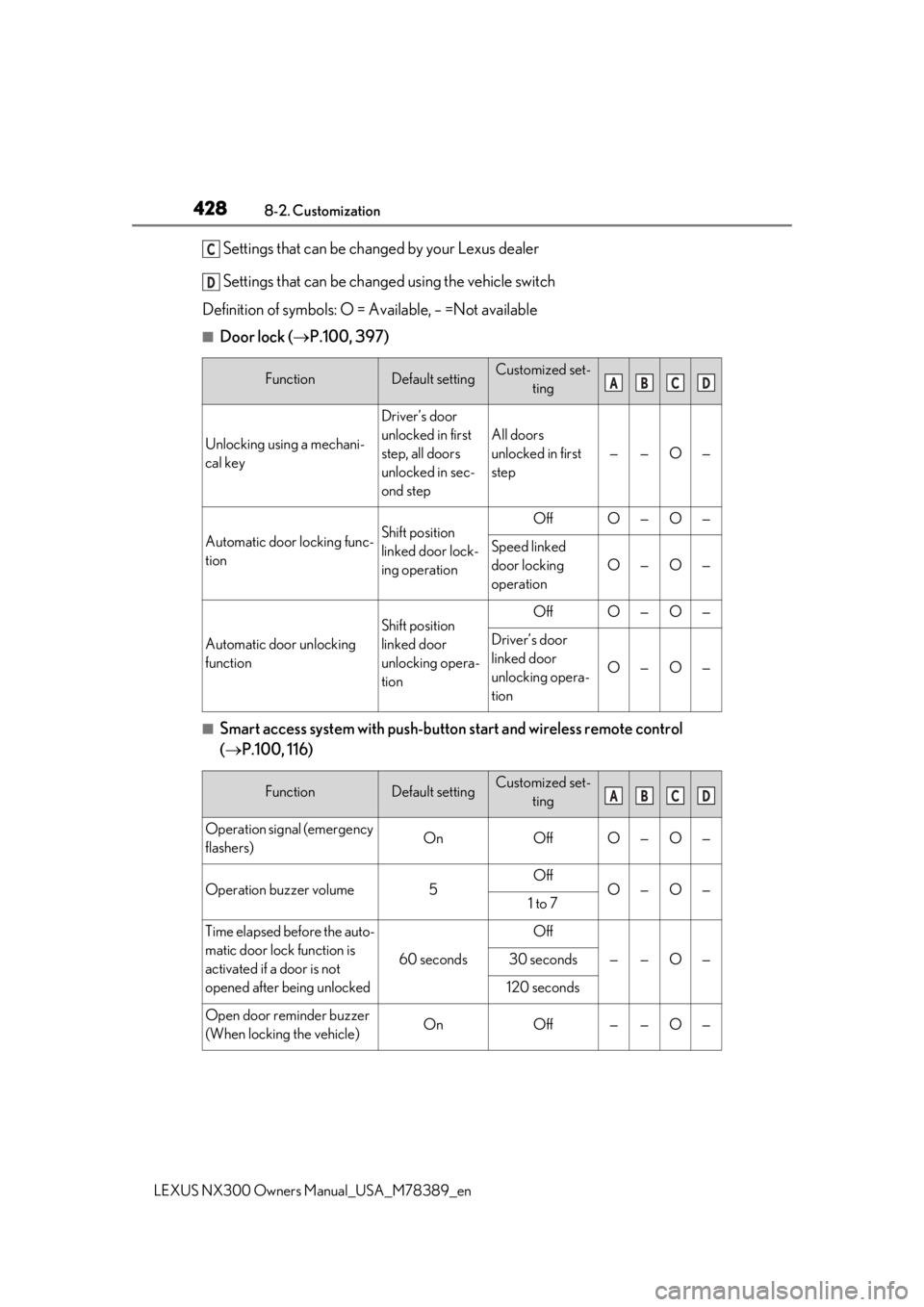
4288-2. Customization
LEXUS NX300 Owners Manual_USA_M78389_en
Settings that can be changed by your Lexus dealer
Settings that can be changed using the vehicle switch
Definition of symbols: O = Available, – =Not available
■Door lock ( P.100, 397)
■Smart access system with push-butto n start and wireless remote control
( P.100, 116)
FunctionDefault settingCustomized set-
ting
Unlocking using a mechani-
cal key
Driver’s door
unlocked in first
step, all doors
unlocked in sec-
ond step
All doors
unlocked in first
step
——O—
Automatic door locking func-
tionShift position
linked door lock-
ing operationOffO—O—
Speed linked
door locking
operation
O—O—
Automatic door unlocking
function
Shift position
linked door
unlocking opera-
tionOffO—O—
Driver’s door
linked door
unlocking opera-
tion
O—O—
FunctionDefault settingCustomized set-ting
Operation signal (emergency
flashers)OnOffO—O—
Operation buzzer volume5OffO—O—1 to 7
Time elapsed before the auto-
matic door lock function is
activated if a door is not
opened after being unlocked
60 seconds
Off
——O—30 seconds
120 seconds
Open door reminder buzzer
(When locking the vehicle)OnOff——O—
C
D
ABCD
ABCD
Page 433 of 468

4338-2. Customization
LEXUS NX300 Owners Manual_USA_M78389_en
8
Vehicle specifications
■Moon roof*1 ( P.140)
*1: If equipped
*2: This function cannot be cust omized unless power window op erations, using the wireless
remote control or mechanical key, is enabled.
■Turn signal lever ( P.172)
■PKSA (Parking Support Alert)* ( P.235)
*:If equipped
■Intuitive parking assist* ( P.236)
*:If equipped
FunctionDefault settingCustomized set-
ting
Mechanical key linked opera-
tion
*2OffOn——O—
Wireless remote control
linked open or Tilt up opera-
tions
*2OffOn——O—
FunctionDefault settingCustomized set-ting
The number of times the turn
signal lights flash automati-
cally when the turn signal
lever is moved to the first
position during a lane change
3
4
——O—
5
6
7
Off
FunctionDefault settingCustomized set-ting
Buzzer volume21—OO—3
FunctionDefault settingCustomized set-ting
Display setting (When intui-
tive parking assist is operat-
ing)
OnOff—OO—
ABCD
ABCD
ABCD
ABCD