Driver assist LEXUS NX300 2020 Owner's Manual
[x] Cancel search | Manufacturer: LEXUS, Model Year: 2020, Model line: NX300, Model: LEXUS NX300 2020Pages: 468, PDF Size: 10.24 MB
Page 227 of 468
2274-5. Using the driving support systems
LEXUS NX300 Owners Manual_USA_M78389_en
4
Driving
WARNING
●Assisting the driver to operate the
vehicle
The dynamic radar cruise control with
full-speed range does not include func-
tions which will prevent or avoid colli-
sions with vehicles ahead of your vehicle.
Therefore, if there is ever any possibility
of danger, the driver must take immedi-
ate and direct control of the vehicle and
act appropriately in order to ensure the
safety of all involved.
■Situations unsuitable for dynamic
radar cruise control with full-speed
range
Do not use dynamic radar cruise control
with full-speed range in any of the follow-
ing situations.
Doing so may result in inappropriate
speed control and could cause an acci-
dent resulting in death or serious injury.
●Roads where there are pedestrians,
cyclists, etc.
●In heavy traffic
●On roads with sharp bends
●On winding roads
●On slippery roads, such as those cov-
ered with rain, ice or snow
●On steep downhills , or where there
are sudden changes between sharp up
and down gradients
Vehicle speed may exceed the set
speed when driving down a steep hill.
●At entrances to freeways and highways
●When weather conditions are bad
enough that they may prevent the sen-
sors from detectin g correctly (fog,
snow, sandstorm, heavy rain, etc.)
●When there is rain, snow, etc. on the
front surface of the radar or front cam-
era
●In traffic conditions that require fre-
quent repeated acceleration and
deceleration
●When your vehicle is towing a trailer
or during emergency towing
●When an approach warning buzzer is
heard often
Page 235 of 468

2354-5. Using the driving support systems
LEXUS NX300 Owners Manual_USA_M78389_en
4
Driving
*:If equipped
■Intuitive parking assist (if
equipped)
Ultrasonic sensors are used to detect
static objects in the detection area
when driving at a low speed or backing
up. ( P.236)
■Adjusting the buzzer volume
The buzzer volume can be adjusted on
the multi-information display.
Use the meter control switches to
change settings. ( P.82)
1 Press or to select .
2 Press or to select “PKSA”
and then press .
3 Press or to select and
then press .
Each time the switch is pressed, the volume
level change between 1, 2, and 3.
■Muting buzzer
P.237
PKSA (Parking Support
Alert)*
The Parking Support Alert system
consists of the following functions
that operate when driving at a low
speed or backing up, such as when
parking. When the system deter-
mines that a collision with a
detected object, such as a wall is
high, a warning operates to urge
the driver to take evasive action.
PKSA (Parking Support Alert)
system
Setting the buzzer volume
Page 236 of 468
2364-5. Using the driving support systems
LEXUS NX300 Owners Manual_USA_M78389_en
*:If equipped
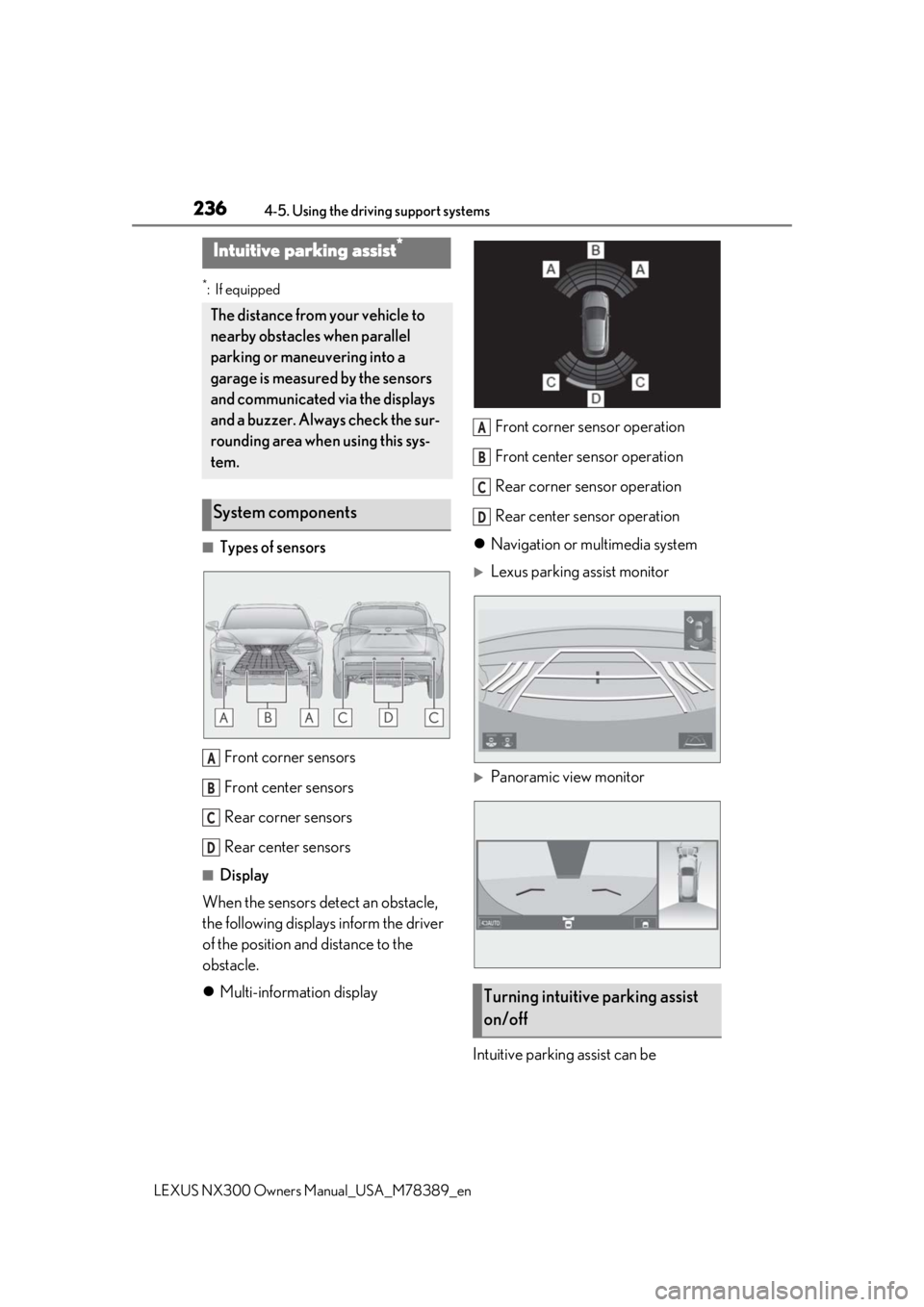
■Types of sensors
Front corner sensors
Front center sensors
Rear corner sensors
Rear center sensors
■Display
When the sensors detect an obstacle,
the following displays inform the driver
of the position and distance to the
obstacle.
Multi-information display Front corner sensor operation
Front center sensor operation
Rear corner sensor operation
Rear center sensor operation
Navigation or multimedia system
Lexus parking assist monitor
Panoramic view monitor
Intuitive parking assist can be
Intuitive parking assist*
The distance from your vehicle to
nearby obstacles when parallel
parking or maneuvering into a
garage is measured by the sensors
and communicated via the displays
and a buzzer. Always check the sur-
rounding area when using this sys-
tem.
System components
A
B
C
D
Turning intuitive parking assist
on/off
A
B
C
D
Page 250 of 468

2504-5. Using the driving support systems
LEXUS NX300 Owners Manual_USA_M78389_en
*:If equipped
BSM main switch
Pressing the switch turns the system on or off. When the switch is set to on, the
switch’s indicator
illuminates and the
buzzer sounds. This swit ch is for both Blind
Spot Monitor function and Rear Cross
Traffic Alert function.
BSM outside rear view mirror indi-
cators
Blind Spot Monitor function:
When a vehicle is dete cted in a blind spot
of the outside rear view mirrors or
approaching rapidly from behind into a
blind spot, the outside rear view mirror
indicator on the detected side will illumi-
nate. If the turn signal lever is operated
toward the detected side, the outside rear
view mirror indicator will flash.
Rear Cross Traffic Alert function:
When a vehicle approaching from the right
or left at the rear of the vehicle is detected,
both outside rear view mirror indicators
will flash.
Rear Cross Traffic Alert buzzer
(Rear Cross Traffic Alert function
only)
When a vehicle approaching from the right
or left rear of the vehicle is detected, a
buzzer sounds from behind the right-hand
rear seat.
Navigation/multimedia system
screen (Rear Cross Traffic Alert
function only)
If a vehicle approaching from the right or
left at the rear of th e vehicle is detected,
the Rear Cross Traffic Alert icon
( P.255) for the detected side will be dis-
played.
■The BSM outside rear view mirror indi-
cators visibility
When under strong sunlight, the BSM out-
side rear view mirror indicator may be diffi-
cult to see.
BSM (Blind Spot Monitor)*
The Blind Spot Monitor uses the
sensors installed behind the rear
bumper. The system is intended to
assist the driver check areas that
are not easily vi sible. The system
has the following two functions:
The Blind Spot Monitor function
Assists the driver in making the decision
when changing lanes
The Rear Cross Traffic Alert func-
tion
Assists the driver when backing up
These functions use the same sen-
sors.
System components
A
B
C
D
Page 255 of 468

2554-5. Using the driving support systems
LEXUS NX300 Owners Manual_USA_M78389_en
4
Driving
Detection areas
■Rear Cross Traffic Alert icon dis-
play (if equipped)
When a vehicle approaching from the
right or left at the rear of the vehicle is
detected, the following will be dis-
played on the navigation/multimedia
system screen.
Lexus parking assist monitor
A vehicle is approaching from the left
or right at the rear of the vehicle
Panoramic view monitor
A vehicle is approaching from the left
or right at the rear of the vehicle
■The Rear Cross Traffic Alert function detection areas
The areas that vehicles can be detected in are outlined below.
To give the driver a more consistent
time to react, the bu zzer can alert for
faster vehicles from farther away.
Example:
B
Page 257 of 468

2574-5. Using the driving support systems
LEXUS NX300 Owners Manual_USA_M78389_en
4
Driving
●Instances of the Rear Cross Traffic Alert
function unnecessary detecting a vehicle
and/ or object may increase in the follow-
ing situations:
• When a vehicle passes by the side of your vehicle
• When the parking space faces a street and vehicles are being driven on the
street
• When the distance between your vehicle and metal objects, such as a guardrail,
wall, sigh, or parked vehicle, which may
reflect electrical waves toward the rear of
the vehicle, is short
WARNING
■Cautions regarding the use of the sys-
tem
The driver is solely responsible for safe
driving. Always drive safely, taking care
to observe your surroundings.
The Rear Cross Traffic Alert function is
only an assist and is not a replacement for
careful driving. Driver must be careful
when backing up, even when using Rear
Cross Traffic Alert function. The driver’s
own visual confirmation of behind you
and your vehicle is necessary and be sure
there are no pedestrians, other vehicles,
etc., before backing up. Failure to do so
could cause death or serious injury.
According to conditions, the system may
not function correctly. Therefore the
driver’s own visual confirmation of safety
is necessary.
Page 260 of 468

2604-5. Using the driving support systems
LEXUS NX300 Owners Manual_USA_M78389_en
■ABS (Anti-lock Brake System)
Helps to prevent wheel lock when the
brakes are applied suddenly, or if the
brakes are applied while driving on a
slippery road surface
■Brake assist
Generates an increased level of brak-
ing force after the brake pedal is
depressed when the system detects a
panic stop situation
■VSC (Vehicle Stability Control)
Helps the driver to control skidding
when swerving sudden ly or turning on
slippery road surfaces.
■Enhanced VSC (Enhanced Vehi-
cle Stability Control)
Provides cooperative control of the
ABS, TRAC, VSC and EPS.
Helps to maintain directional stability
when swerving on slippery road sur-
faces by controlling steering perfor-
mance.
■Trailer Sway Control
Helps the driver to control trailer sway
by selectively applying brake pressure
for individual wheels and reducing
driving torque when trailer sway is
detected.
■TRAC (Traction Control)
Helps to maintain drive power and pre-
vent the drive wheels from spinning
when starting the vehicle or accelerat-
ing on slippery roads
■Active Cornering Assist (ACA)
Helps to prevent the vehicle from drift-
ing to the outer side by performing
inner wheel brake control when
attempting to accele rate while turning
■Hill-start assist control
Helps to reduce the backward move-
ment of the vehicle when starting on an
uphill
■EPS (Electric Power Steering)
Employs an electric motor to reduce
the amount of effort needed to turn the
steering wheel
■Dynamic Torque Control AWD
system (if equipped)
Automatically switches from front-
wheel drive to all-wheel drive (AWD)
according to the driving conditions,
helping to ensure reliable handling and
stability. Examples of conditions where
the system will switch to AWD are
when cornering, going uphill, starting
off or accelerating, and when the road
surface is slippery due to snow, rain,
etc.
Driving assist systems
To keep driving safety and perfor-
mance, the following systems oper-
ate automatically in response to
various driving situations. Be aware,
however, that these systems are
supplementary and should not be
relied upon too heavily when oper-
ating the vehicle.
Summary of the driving assist
systems
Page 262 of 468

2624-5. Using the driving support systems
LEXUS NX300 Owners Manual_USA_M78389_en
■Sounds and vibrations caused by the
ABS, brake assist, VSC, Trailer Sway
Control, TRAC and hill-start assist con-
trol systems
●A sound may be heard from the engine
compartment when the brake pedal is
depressed repeatedly, when the engine is
started or just after the vehicle begins to
move. This sound does not indicate that a
malfunction has occurred in any of these
systems.
●Any of the following conditions may
occur when the above systems are oper-
ating. None of these indicates that a mal-
function has occurred.
• Vibrations may be felt through the vehicle
body and steering.
• A motor sound may be heard also after the vehicle comes to a stop.
• The brake pedal may pulsate slightly after the ABS is activated.
• The brake pedal may move down slightly
after the ABS is activated.
■Active Cornering Assist operation
sounds and vibrations
When the Active Cornering Assist is oper-
ated, operation sounds and vibrations may
be generated from the brake system, but
this is not a malfunction.
■EPS operation sound
When the steering wheel is operated, a
motor sound (whirring sound) may be
heard. This does not indicate a malfunction.
■Reduced effectiveness of the EPS sys-
tem
The effectiveness of the EPS system is
reduced to prevent the system from over-
heating when there is frequent steering
input over an extended period of time. The
steering wheel may feel heavy as a result.
Should this occur, re frain from excessive
steering input or stop the vehicle and turn
the engine off. The EPS system should
return to normal within 10 minutes.
■Automatic reactivation of TRAC, Trailer
Sway Control and VSC systems
After turning the TRAC, Trailer Sway Con-
trol and VSC systems off, the systems will
be automatically re-enabled in the following
situations:
●When the engine switch is turned off
●If only the TRAC system is turned off, the
TRAC will turn on when vehicle speed
increases
If both the TRAC and VSC systems are
turned off, automatic re-enabling will not
occur when vehicle speed increases.
■Operating conditions of Active Corner-
ing Assist
The system operates when the following
occurs.
●TRAC/VSC can operate
●The driver is attempting to accelerate
while turning
●The system detects that the vehicle is
drifting to the outer side
●The brake pedal is released
■Operating conditions of hill-start assist
control
When the following four conditions are met,
the hill-start assist control will operate:
●The shift lever is in a position other than P
or N (when starting off forward/back-
ward on an upward incline)
●The vehicle is stopped
●The accelerator pedal is not depressed
●The parking brake is not engaged
■Automatic system cancelation of hill-
start assist control
The hill-start assist control will turn off in any
of the following situations:
●The shift lever is shifted to P or N
●The accelerator pedal is depressed
●The parking brake is engaged
●2 seconds at maximum elapsed after the
brake pedal is released
WARNING
■The ABS does not operate effectively
when
●The limits of tire gripping performance
have been exceeded (such as exces-
sively worn tires on a snow covered
road).
Page 372 of 468
3727-2. Steps to take in an emergency
LEXUS NX300 Owners Manual_USA_M78389_en
and operate the brakes. The vehicle’s
wheels, drivetrain, axles, steering and
brakes must be in good condition.
To have your vehicle towed by another
vehicle, the towing eyelet must be
installed to your vehicle. Install the tow-
ing eyelet by following the specified
procedure.
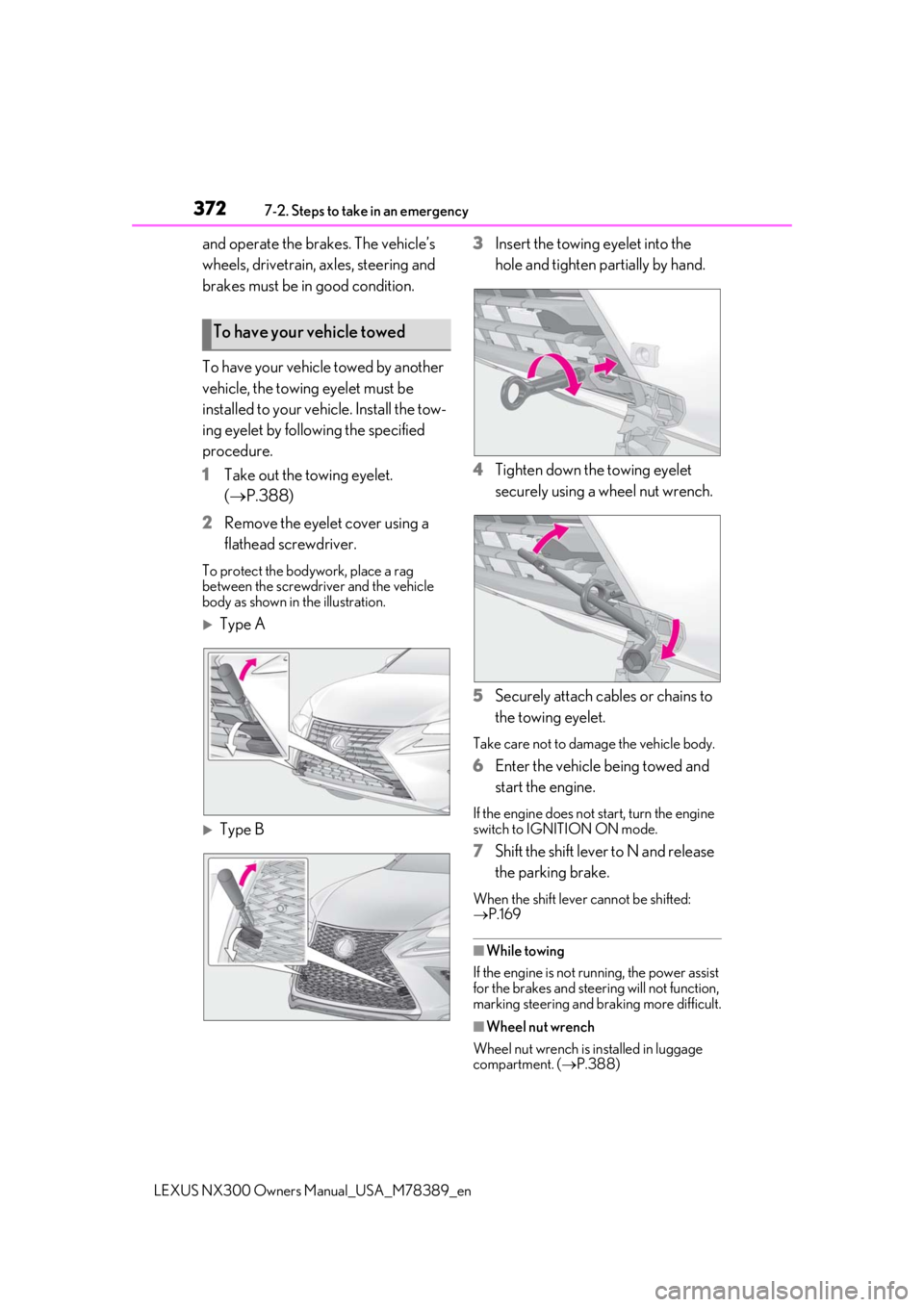
1 Take out the towing eyelet.
(P.388)
2 Remove the eyelet cover using a
flathead screwdriver.
To protect the bodywork, place a rag
between the screwdriver and the vehicle
body as shown in the illustration.
Type A
Type B 3
Insert the towing eyelet into the
hole and tighten partially by hand.
4 Tighten down the towing eyelet
securely using a wheel nut wrench.
5 Securely attach cables or chains to
the towing eyelet.
Take care not to damage the vehicle body.
6Enter the vehicle being towed and
start the engine.
If the engine does not start, turn the engine
switch to IGNITION ON mode.
7Shift the shift lever to N and release
the parking brake.
When the shift lever cannot be shifted:
P.169
■While towing
If the engine is not running, the power assist
for the brakes and steering will not function,
marking steering and braking more difficult.
■Wheel nut wrench
Wheel nut wrench is installed in luggage
compartment. ( P.388)
To have your vehicle towed
Page 385 of 468
3857-2. Steps to take in an emergency
LEXUS NX300 Owners Manual_USA_M78389_en
7
When trouble arises
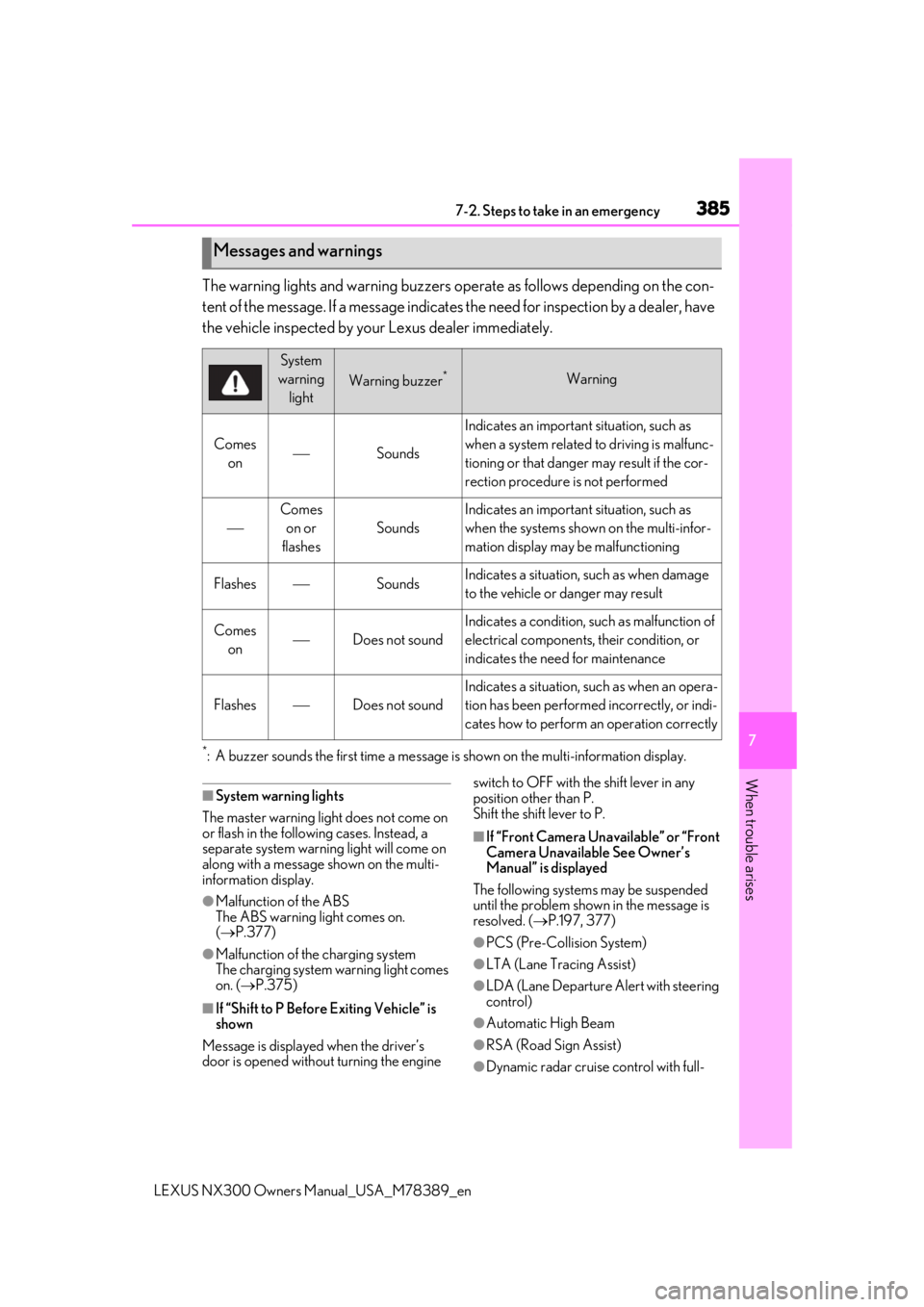
The warning lights and warning buzzers op erate as follows depending on the con-
tent of the message. If a message indicates the need for inspection by a dealer, have
the vehicle inspected by your Lexus dealer immediately.
*: A buzzer sounds the first time a message is shown on the multi-information display.
■System warning lights
The master warning light does not come on
or flash in the following cases. Instead, a
separate system warning light will come on
along with a message shown on the multi-
information display.
●Malfunction of the ABS
The ABS warning light comes on.
( P.377)
●Malfunction of the charging system
The charging system warning light comes
on. ( P.375)
■If “Shift to P Before Exiting Vehicle” is
shown
Message is displayed when the driver’s
door is opened withou t turning the engine switch to OFF with the shift lever in any
position other than P.
Shift the shift lever to P.
■If “Front Camera Unav
ailable” or “Front
Camera Unavailable See Owner’s
Manual” is displayed
The following systems may be suspended
until the problem shown in the message is
resolved. ( P.197, 377)
●PCS (Pre-Collision System)
●LTA (Lane Tracing Assist)
●LDA (Lane Departure Alert with steering
control)
●Automatic High Beam
●RSA (Road Sign Assist)
●Dynamic radar cruise control with full-
Messages and warnings
System
warning light
Warning buzzer*Warning
Comes onSounds
Indicates an important situation, such as
when a system related to driving is malfunc-
tioning or that danger may result if the cor-
rection procedure is not performed
Comes on or
flashes
Sounds
Indicates an important situation, such as
when the systems shown on the multi-infor-
mation display may be malfunctioning
FlashesSoundsIndicates a situation, such as when damage
to the vehicle or danger may result
Comes onDoes not sound
Indicates a condition, such as malfunction of
electrical components, their condition, or
indicates the need for maintenance
FlashesDoes not sound
Indicates a situation, such as when an opera-
tion has been performed incorrectly, or indi-
cates how to perform an operation correctly