ECU LEXUS NX300 2020 Owner's Guide
[x] Cancel search | Manufacturer: LEXUS, Model Year: 2020, Model line: NX300, Model: LEXUS NX300 2020Pages: 468, PDF Size: 10.24 MB
Page 65 of 468
651-3. Lexus Enform
LEXUS NX300 Owners Manual_USA_M78389_en
1
For safety and security
with a wide range of needs, such as:
towing, flat tire, fuel delivery, etc. For a
description of the Roadside Assistance
services and their limitations, please
see the Safety Connect Terms and
Conditions, which are available at
Lexus.com.
Important! Read this information about
exposure to radio frequency signals
before using Safety Connect;
The Safety Connect system installed in
your vehicle is a low-power radio trans-
mitter and receiver. It receives and also
sends out radio frequency (RF) signals.
In August 1996, the Federal Commu-
nications Commission (FCC) adopted
RF exposure guidelines with safety lev-
els for mobile wireless phones. Those
guidelines are consistent with the
safety standards previously set by the
following U.S. and international stan-
dards bodies.
ANSI (American National Stan-
dards Institute) C95.1 [1992]
NCRP (National Council on Radia-
tion Protection and Measurement)
Report 86 [1986]
ICNIRP (International Commission
on Non-Ionizing Radiation Protec-
tion) [1996]
Those standards were based on com-
prehensive and periodic evaluations of
the relevant scientific literature. Over
120 scientists, engi neers, and physi- cians from universities, and govern-
ment health agencies and industries
reviewed the available body of
research to develop the ANSI Stan-
dard (C95.1).
The design of Safety Connect com-
plies with the FCC guidelines in addi-
tion to those standards.
Safety information for Safety
Connect
Page 67 of 468
671-3. Lexus Enform
LEXUS NX300 Owners Manual_USA_M78389_en
1
For safety and security
*:If equipped
■Availability of service
Lexus Enform Service Connect is not avail-
able in some countries or areas.
■Lexus Enform Serv ice Connect Infor-
mation
Availability of functions of the Lexus Enform
Service Connect is dependent on network
reception level.
■Safety information for Lexus Enform
Service Connect
Refer to the safety information for Safety
Connect: P.65
Lexus Enform Service Con-
nect*
Lexus Enform Service Connect
uses embedded telematics hard-
ware to collect an d transmit vehicle
data that allows Lexus to provide:
Vehicle Health Report (VHR)
(Safety Recalls, Service Cam-
paigns, Current Vehicle Alerts,
Required Maintenance, and Vehi-
cle Condition Status)
Maintenance Notifications
Vehicle Alert Notifications
For details about this service and
how to register, refer to
http://www.lexus.com/enform/
.
The Lexus Enform Service Con-
nect is achieved by using a Data
Communication Module (DCM)
built in the vehicle.
Page 68 of 468

681-4. Theft deterrent system
LEXUS NX300 Owners Manual_USA_M78389_en
1-4.Theft deterrent system
The indicator light flashes after the
engine switch has been turned off to
indicate that the system is operating.
The indicator light stops flashing after
the engine switch has been turned to ACCESSORY or IGNITION ON
mode to indicate that the system has
been canceled.
■System maintenance
The vehicle has a maintenance-free type
engine immobilizer system.
■Conditions that may cause the system to
malfunction
●If the grip portion of the key is in contact
with a metallic object
●If the key is in close proximity to or touch-
ing a key registered to the security sys-
tem (key with a built-in transponder chip)
of another vehicle
■Certification for the en gine immobilizer system
For vehicles sold in the U.S.A.
Engine immobilizer system
The vehicle’s keys have built-in tran-
sponder chips that prevent the
engine from starting if a key has not
been previously registered in the
vehicle’s on-board computer.
Never leave the keys inside the
vehicle when you leave the vehicle.
This system is designed to help pre-
vent vehicle theft but does not guar-
antee absolute security against all
vehicle thefts.
Operating the system
Page 69 of 468

691-4. Theft deterrent system
LEXUS NX300 Owners Manual_USA_M78389_en
1
For safety and security
For vehicles sold in Canada
WARNING
■Certifications for the engine immobi-
lizer system
Changes or modifications not expressly
approved by the party responsible for
compliance could void the user’s author-
ity to operate the equipment.
NOTICE
■To ensure the system operates cor-
rectly
Do not modify or remove the system. If
modified or removed, the proper opera-
tion of the system cannot be guaranteed.
Page 71 of 468
711-4. Theft deterrent system
LEXUS NX300 Owners Manual_USA_M78389_en
1
For safety and security
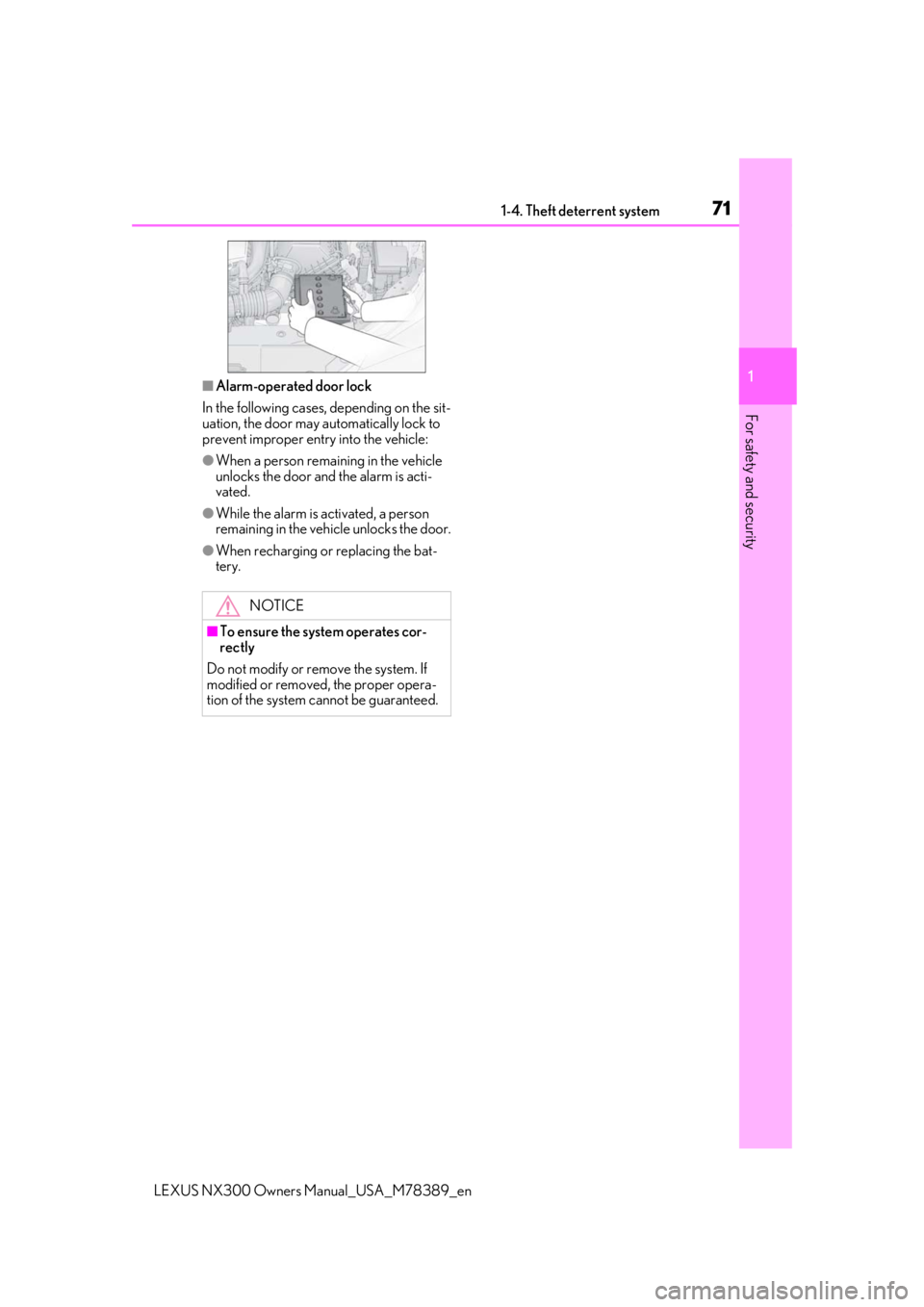
■Alarm-operated door lock
In the following cases, depending on the sit-
uation, the door may automatically lock to
prevent improper entry into the vehicle:
●When a person remaining in the vehicle
unlocks the door and the alarm is acti-
vated.
●While the alarm is activated, a person
remaining in the vehicle unlocks the door.
●When recharging or replacing the bat-
tery.
NOTICE
■To ensure the system operates cor-
rectly
Do not modify or remove the system. If
modified or removed, the proper opera-
tion of the system cannot be guaranteed.
Page 77 of 468
772-1. Instrument cluster
LEXUS NX300 Owners Manual_USA_M78389_en
2
Vehicle status information and indicators*1: These lights turn on when the engine
switch is turned to the IGNITION ON
mode to indicate that a system check is
being performed. They will turn off after
the engine is started, or after a few sec-
onds. There may be a malfunction in a
system if the lights do not turn on, or
turn off. Have the vehicle inspected by
your Lexus dealer.
*2: This light illuminates on the multi-infor-mation display.
*3: The light flashes to indicate that the sys-tem is operating.
*4: The light comes on when the system is turned off.
*5: When the outside temperature is approximately 37°F (3°C) or lower, the
indicator will flash for approximately 10
seconds, then stay on.
*6: In order to confirm operation, the BSM outside rear view mirror indicators illu-
minate in the following situations:
When the engine switch is turned to
IGNITION ON mode while the BSM
main switch is set to ON.
When the BSM main switch is set to
ON while the engine switch is in IGNI-
TION ON mode.
If the system is func tioning correctly, the
BSM outside rear view mirror indica-
tors will turn off after a few seconds.
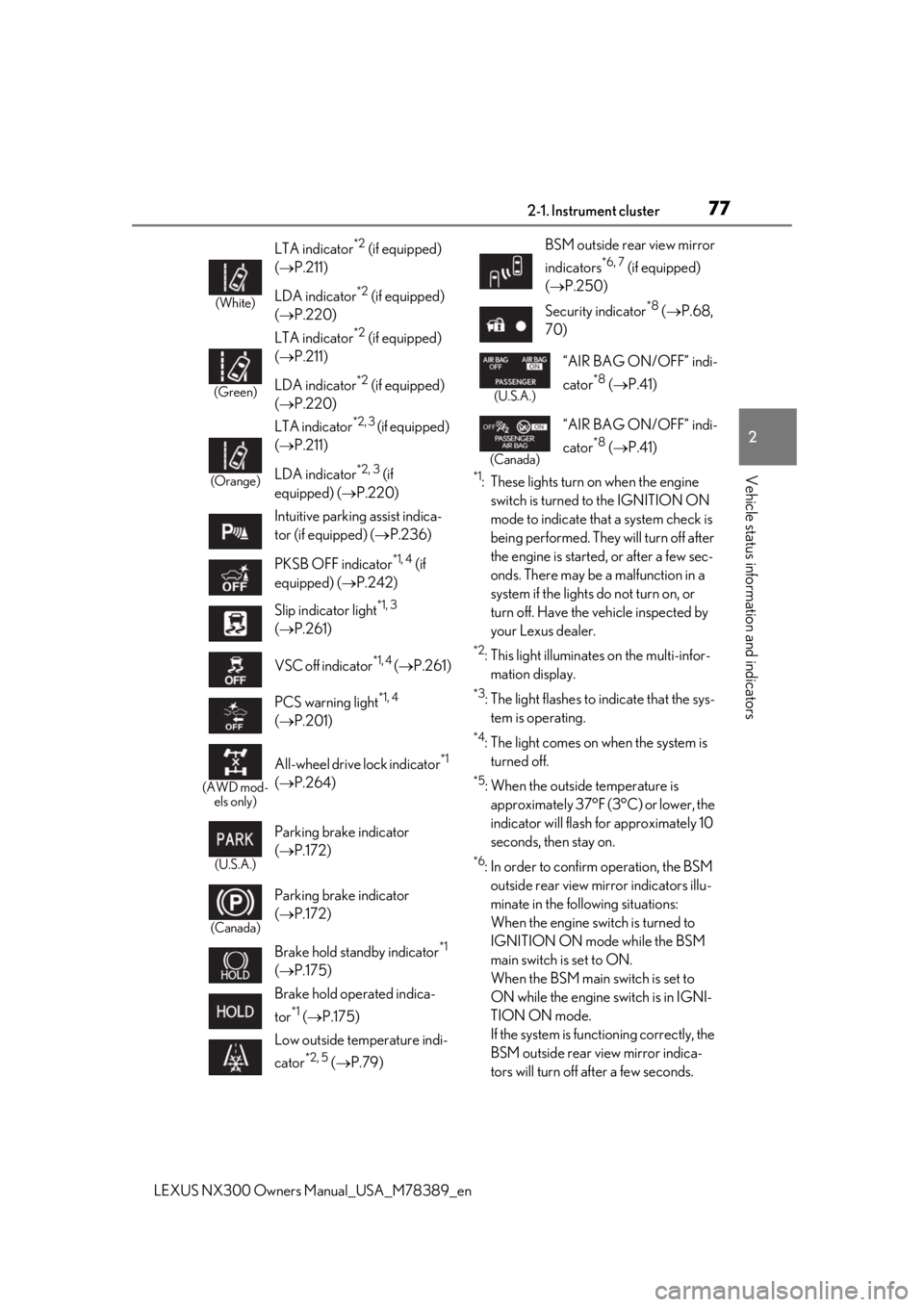
(White)
LTA indicator*2 (if equipped)
( P.211)
LDA indicator
*2 (if equipped)
( P.220)
(Green)
LTA indicator*2 (if equipped)
( P.211)
LDA indicator
*2 (if equipped)
( P.220)
(Orange)
LTA indicator*2, 3 (if equipped)
( P.211)
LDA indicator
*2, 3 (if
equipped) ( P.220)
Intuitive parking assist indica-
tor (if equipped) ( P.236)
PKSB OFF indicator
*1, 4 (if
equipped) ( P.242)
Slip indicator light
*1, 3
( P.261)
VSC off indicator
*1, 4 ( P.261)
PCS warning light
*1, 4
( P.201)
(AWD mod-
els only)
All-wheel drive lock indicator*1
( P.264)
(U.S.A.)
Parking brake indicator
( P.172)
(Canada)
Parking brake indicator
( P.172)
Brake hold standby indicator
*1
( P.175)
Brake hold operated indica-
tor
*1 ( P.175)
Low outside temperature indi-
cator
*2, 5 ( P.79)
BSM outside rear view mirror
indicators
*6, 7 (if equipped)
( P.250)
Security indicator
*8 ( P.68,
70)
(U.S.A.)
“AIR BAG ON/OFF” indi-
cator
*8 ( P.41)
(Canada)
“AIR BAG ON/OFF” indi-
cator
*8 ( P.41)
Page 100 of 468

1003-2. Opening, closing and locking the doors
LEXUS NX300 Owners Manual_USA_M78389_en
3-2.Opening, closing and locking the doors
■Using the smart access system with
push-button start
Carry the electronic key to enable this
function.
1 Grip the driver’s door handle to
unlock the door. Grip any passen-
ger door handle to unlock all the
doors.
*
Make sure to touch the sensor on the back
of the handle.
The doors cannot be unlocked for 3 sec-
onds after the doors are locked.
2Touch the lock sensor (the indenta-
tion on the surface of the door han-
dle) to lock all the doors.
Check that the door is securely locked.
*: The door unlock settings can be
changed.
■Using the wireless remote control
1 Locks all the doors
Check that the door is securely locked.
2Unlocks all the doors
Pressing the button unlocks the driver’s
door. Pressing the button again within 3
seconds unlocks the other doors.
Press and hold to open the windows and
moon roof
*1, 2
*1
: If equipped
*2: This setting must be customized at your
Lexus dealer.
■Switching the door unlock function
It is possible to set which doors the entry
function unlocks using the wireless remote
control.
1 Turn the engine switch off.
2 When the indicator light on the key sur-
face is not on, press and hold ,
or for approximately 5
seconds while pre ssing and holding
.
The setting changes each time an operation
is performed, as shown below. (When
changing the setting continuously, release
the buttons, wait for at least 5 seconds, and
repeat step 2 .)
Side doors
The vehicle can be locked and
unlocked using the entry function,
wireless remote control or door
lock switch.
Unlocking and locking the doors
from the outside
Page 101 of 468

1013-2. Opening, closing and locking the doors
LEXUS NX300 Owners Manual_USA_M78389_en
3
Before driving
For vehicles with alarm: To prevent unin-
tended triggering of the alarm, unlock the
doors using the wireless remote control and
open and close a door once after the set-
tings have been changed. (If a door is not
opened within 60 seconds after is
pressed, the doors will be locked again and
the alarm will automatically be set.)
In a case that the alarm is triggered, imme-
diately stop the alarm. ( P.70)
■Locking the doors from the outside with-
out a key
1 Move the inside lock button to the lock
position.
2 Close the door.
The door cannot be locked if the engine
switch is in ACCESSORY or IGNITION
ON mode, or the electronic key is left
inside the vehicle.
The key may not be detected correctly and
the door may be locked.
■Impact detection door lock release sys-
tem
In the event that the vehicle is subject to a
strong impact, all the doors are unlocked. Depending on the force of the impact or the
type of accident, however, the system may
not operate.
■Operation signals
Doors:
A buzzer sounds and the emergency flash-
ers flash to indicate that the doors have
been locked/unlocked. (Locked: Once;
Unlocked: Twice)
Windows and moon roof:
A buzzer sounds to indicate that all win-
dows and moon roof are opening.
■Security feature
If a door is not opened within approximately
60 seconds after the vehicle is unlocked,
the security feature automatically locks the
vehicle again.
■Open door warning buzzer
If the vehicle speed reaches 3 mph (5
km/h), the master warning light flashes and
a buzzer sounds to indicate that door(s) or
the hood in not fully closed.
The open door(s) or hood is displayed on
the multi-information display.
■Welcome light illumination control
The side marker, parking, tail and license
plate lights automatically turn on at night
when the doors are unlocked using the
entry function or wireless remote control if
the light switch is in the position.
■When the door cannot be locked by the
lock sensor on the surface of the door
handle
When the door cannot be locked even if the
lock sensor on the surface of the door han-
dle is touched by a finger, touch the lock
sensor with the palm.
When gloves are being worn, remove the
gloves.
Multi-information display/BeepUnlocking function
Exterior: Beeps 3 times
Interior: Pings once
Holding the driver’s
door handle unlocks
only the driver’s door.
Holding any of the
passenger door han- dles unlocks all the doors.
Exterior: Beeps twice
Interior: Pings once
Holding a door han-dle unlocks all the doors.
Page 104 of 468

1043-2. Opening, closing and locking the doors
LEXUS NX300 Owners Manual_USA_M78389_en
Back door
The back door can be opened using
the back door open switch, smart
access system with push-button
start or wireless remote control.
WARNING
■Caution while driving
●Keep the back door closed while driv-
ing.
If the back door is left open, it may hit
nearby objects while driving or lug-
gage may be unexpectedly thrown out,
causing an accident.
In addition, exhaust gases may enter
the vehicle, causing death or a serious
health hazard. Make sure to close the
back door before driving.
●Before driving the vehicle, make sure
that the back door is fully closed. If the
back door is not fully closed, it may
open unexpectedly while driving,
causing an accident.
●Never let anyone sit in the luggage
compartment. In the event of sudden
braking or a collision, they are suscep-
tible to death or serious injury.
■When children are in the vehicle
Observe the following precautions.
Failure to do so may result in death or
serious injury.
●Do not allow children to play in the lug-
gage compartment.
If a child is accidentally locked in the
luggage compartment, they could
have heat exhaustion or other injuries.
●Do not allow a child to open or close
the back door.
Doing so may cause the back door to
move unexpectedly, or cause the
child’s hands, head, or neck to be
caught by the closing back door.
■Operating the back door
Observe the following precautions.
Failure to do so may cause parts of the
body to be caught, resulting in death or
serious injury.
●Remove any heavy loads, such as snow
and ice, from the back door before
opening it. Failure to do so may cause
the back door to suddenly shut again
after it is opened.
●When opening or closing the back
door, thoroughly check to make sure
the surrounding area is safe.
●If anyone is in the vicinity, make sure
they are safe and let them know that
the back door is about to open or
close.
●Use caution when opening or closing
the back door in windy weather as it
may move abruptly in strong wind.
●Vehicles without power back door:
The back door may suddenly shut if it is
not opened fully. It is more difficult to
open or close the back door on an
incline than on a level surface, so
beware of the back door unexpectedly
opening or closing by itself. Make sure
that the back door is fully open and
secure before using the luggage com-
partment.
●Vehicles with power back door: The
back door may suddenly shut if it is not
opened fully, while on a steep incline.
Make sure that the back door is
secured before using the luggage
compartment.
Page 105 of 468

1053-2. Opening, closing and locking the doors
LEXUS NX300 Owners Manual_USA_M78389_en
3
Before driving
■Smart access system with push-
button start
Carry the electronic key to enable this
function.
1
Locks all the doors
Check that the door is securely locked.
2Unlocks all the doors
The doors cannot be unlocked for 3 sec-
onds after the doors are locked.
■Wireless remote control
P.97
■Door lock switches
P.102
■Open
Raise the back door while pressing up
the back door opener switch.
WARNING
●When closing the back door, take
extra care to prevent your fingers, etc.,
from being caught.
●When closing the back door, make
sure to press it lightly on its outer sur-
face. If the back door handle is used to
fully close the back door, it may result
in hands or arms being caught.
●Do not pull on the back door damper
stay (vehicles without power back
door) ( P.106) or back door spindle
(vehicles with power back door)
( P.113) to close the back door, and
do not hang on the back door damper
stay (vehicles without power back
door) or back door spindle (vehicles
with power back door).
Doing so may cause hands to be
caught or the back door damper stay
(vehicles without power back door) or
back door spindle (vehicles with
power back door) to break, causing an
accident.
●If a bicycle carrier or similar heavy
object is attached to the back door, it
may suddenly shut again after being
opened, causing someone’s hands,
head or neck to be caught and injured.
When installing an accessory part to
the back door, using a genuine Lexus
part is recommended.
Unlocking and locking the back
door from the outside
Unlocking and locking the back
door from the inside
Opening/closing the back door
(vehicles without power back
door)