ECU LEXUS NX300 2020 Workshop Manual
[x] Cancel search | Manufacturer: LEXUS, Model Year: 2020, Model line: NX300, Model: LEXUS NX300 2020Pages: 468, PDF Size: 10.24 MB
Page 158 of 468
1584-1. Before driving
LEXUS NX300 Owners Manual_USA_M78389_en
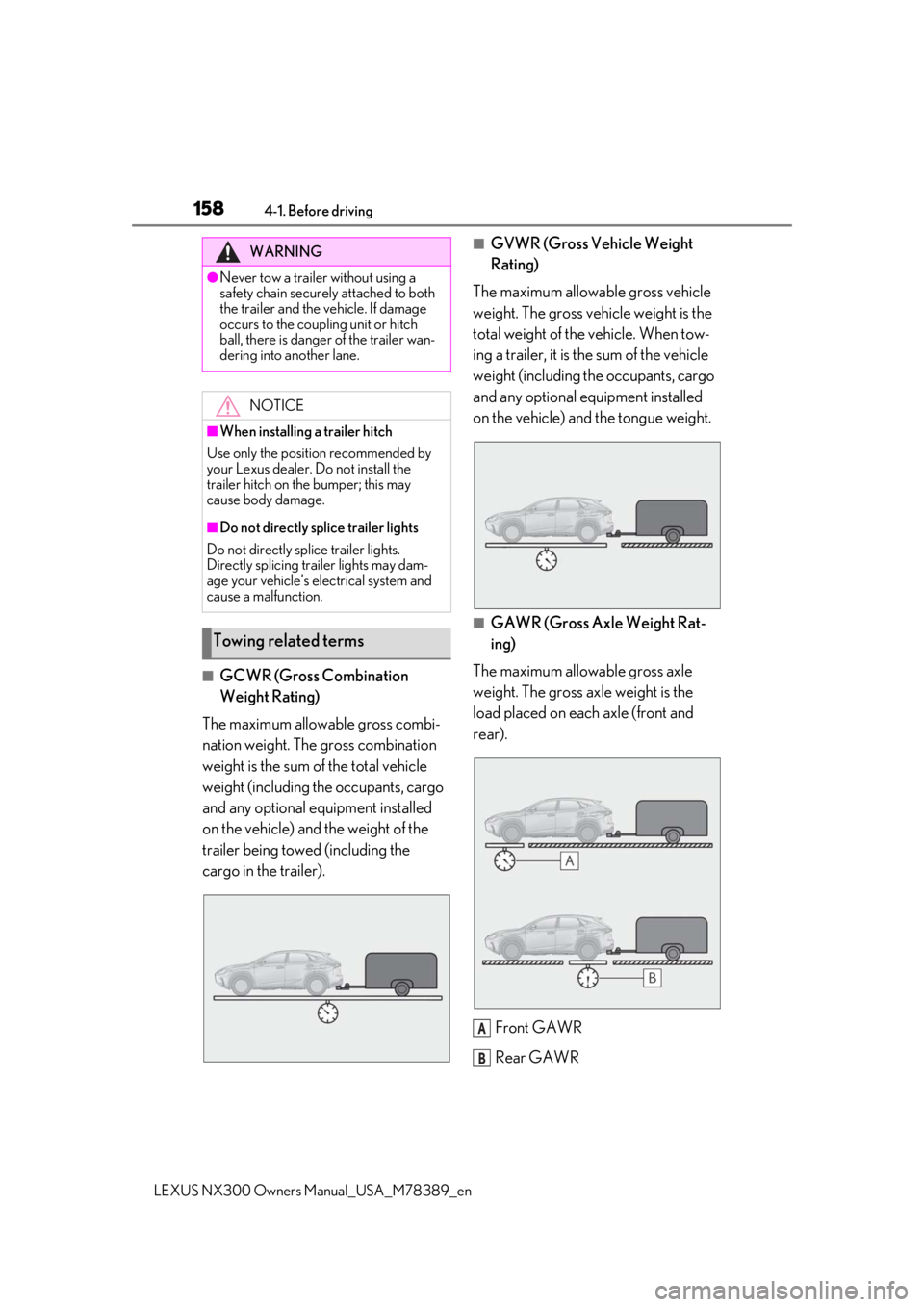
■GCWR (Gross Combination
Weight Rating)
The maximum allowable gross combi-
nation weight. The gross combination
weight is the sum of the total vehicle
weight (including the occupants, cargo
and any optional equipment installed
on the vehicle) and the weight of the
trailer being towed (including the
cargo in the trailer).
■GVWR (Gross Vehicle Weight
Rating)
The maximum allowable gross vehicle
weight. The gross vehicle weight is the
total weight of the vehicle. When tow-
ing a trailer, it is the sum of the vehicle
weight (including the occupants, cargo
and any optional equipment installed
on the vehicle) and the tongue weight.
■GAWR (Gross Axle Weight Rat-
ing)
The maximum allowable gross axle
weight. The gross axle weight is the
load placed on each axle (front and
rear).
Front GAWR
Rear GAWR
WARNING
●Never tow a trailer without using a
safety chain securely attached to both
the trailer and the vehicle. If damage
occurs to the coupling unit or hitch
ball, there is danger of the trailer wan-
dering into another lane. NOTICE
■When installing a trailer hitch
Use only the position recommended by
your Lexus dealer. Do not install the
trailer hitch on the bumper; this may
cause body damage.
■Do not directly splice trailer lights
Do not directly splice trailer lights.
Directly splicing trailer lights may dam-
age your vehicle’s electrical system and
cause a malfunction.
Towing related terms
A
B
Page 165 of 468
1654-2. Driving procedures
LEXUS NX300 Owners Manual_USA_M78389_en
4
Driving
4-2.Driving procedures
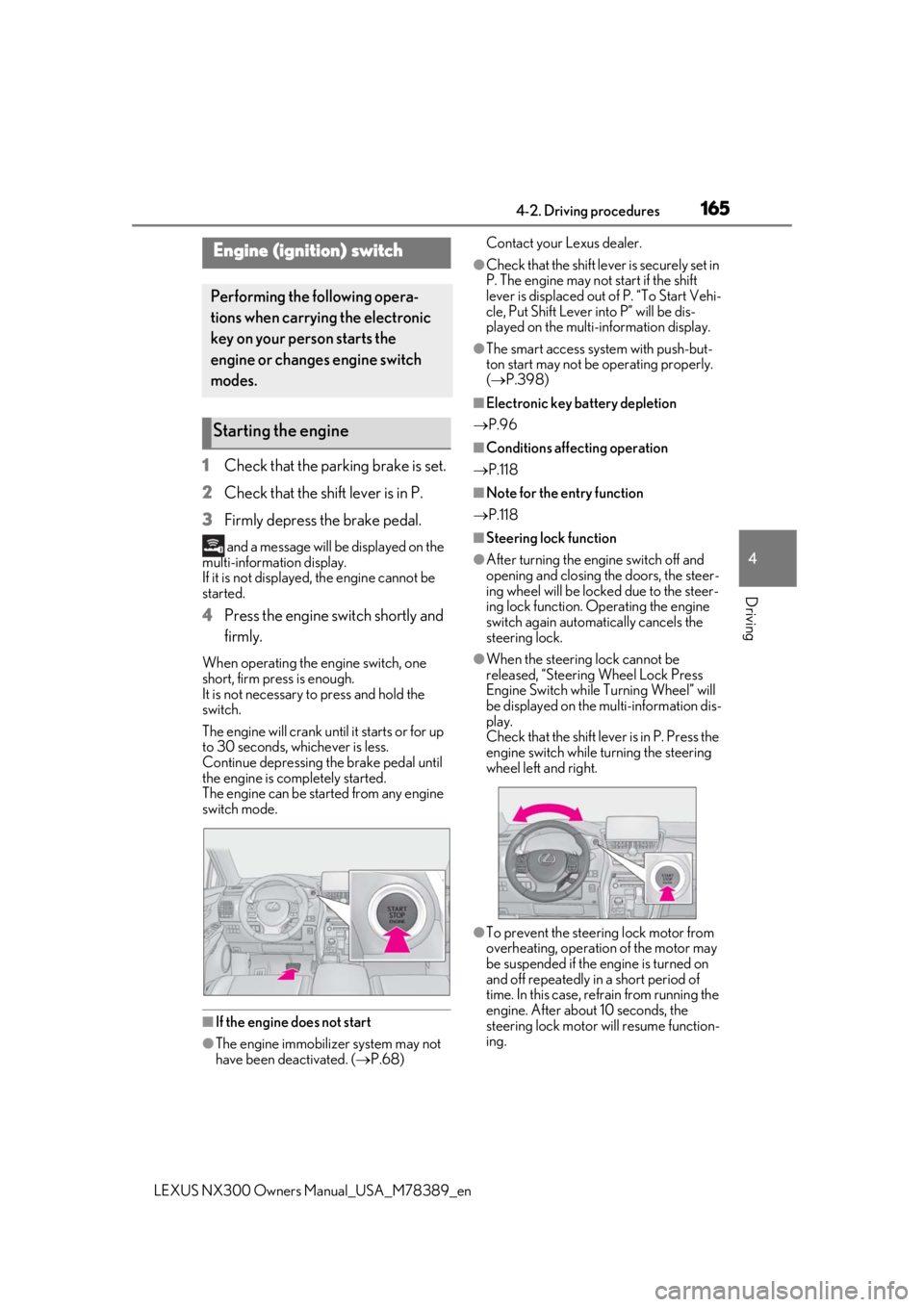
1Check that the parking brake is set.
2 Check that the shift lever is in P.
3 Firmly depress the brake pedal.
and a message will be displayed on the
multi-information display.
If it is not displayed, the engine cannot be
started.
4 Press the engine switch shortly and
firmly.
When operating the engine switch, one
short, firm press is enough.
It is not necessary to press and hold the
switch.
The engine will crank until it starts or for up
to 30 seconds, whichever is less.
Continue depressing the brake pedal until
the engine is completely started.
The engine can be started from any engine
switch mode.
■If the engine does not start
●The engine immobilizer system may not
have been deactivated. ( P.68) Contact your Lexus dealer.
●Check that the shift leve
r is securely set in
P. The engine may not start if the shift
lever is displaced out of P. “To Start Vehi-
cle, Put Shift Lever into P” will be dis-
played on the multi-information display.
●The smart access system with push-but-
ton start may not be operating properly.
( P.398)
■Electronic key battery depletion
P.96
■Conditions affecting operation
P.118
■Note for the entry function
P.118
■Steering lock function
●After turning the engine switch off and
opening and closing the doors, the steer-
ing wheel will be lock ed due to the steer-
ing lock function. Operating the engine
switch again automatically cancels the
steering lock.
●When the steering lock cannot be
released, “Steering Wheel Lock Press
Engine Switch while Turning Wheel” will
be displayed on the multi-information dis-
play.
Check that the shift lever is in P. Press the
engine switch while turning the steering
wheel left and right.
●To prevent the steering lock motor from
overheating, operation of the motor may
be suspended if the engine is turned on
and off repeatedly in a short period of
time. In this case, refrain from running the
engine. After about 10 seconds, the
steering lock motor will resume function-
ing.
Engine (ignition) switch
Performing the following opera-
tions when carryin g the electronic
key on your person starts the
engine or changes engine switch
modes.
Starting the engine
Page 180 of 468
1804-3. Operating the lights and wipers
LEXUS NX300 Owners Manual_USA_M78389_en
tion will be disabled.
When any of the following are performed,
the battery-saving function is canceled
once and then reactivated. All the lights will
turn off automatically 20 minutes after the
battery-saving function has been reacti-
vated:
●When the headlight switch is operated
●When a door is opened or closed
■Customization
Settings (e.g. light sens or sensitivity) can be
changed. (Customizable features: P.427)
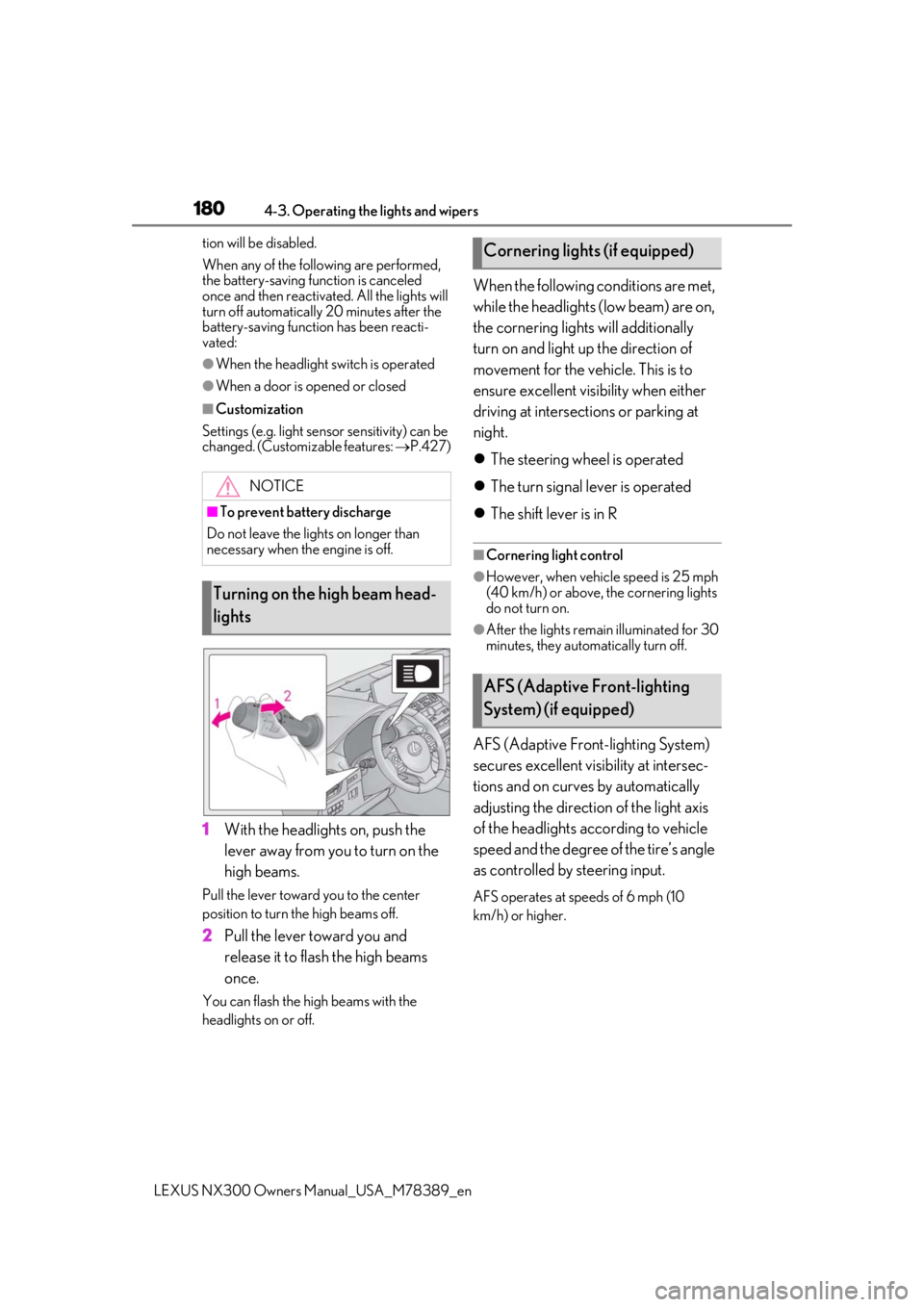
1With the headlights on, push the
lever away from you to turn on the
high beams.
Pull the lever toward you to the center
position to turn the high beams off.
2Pull the lever toward you and
release it to flash the high beams
once.
You can flash the high beams with the
headlights on or off.
When the following conditions are met,
while the headlights (low beam) are on,
the cornering lights will additionally
turn on and light up the direction of
movement for the vehicle. This is to
ensure excellent visibility when either
driving at intersections or parking at
night.
The steering wheel is operated
The turn signal lever is operated
The shift lever is in R
■Cornering light control
●However, when vehicle speed is 25 mph
(40 km/h) or above, the cornering lights
do not turn on.
●After the lights remain illuminated for 30
minutes, they automatically turn off.
AFS (Adaptive Front-lighting System)
secures excellent visibility at intersec-
tions and on curves by automatically
adjusting the direction of the light axis
of the headlights according to vehicle
speed and the degree of the tire’s angle
as controlled by steering input.
AFS operates at speeds of 6 mph (10
km/h) or higher.
NOTICE
■To prevent battery discharge
Do not leave the lights on longer than
necessary when the engine is off.
Turning on the high beam head-
lights
Cornering lights (if equipped)
AFS (Adaptive Front-lighting
System) (if equipped)
Page 184 of 468
1844-3. Operating the lights and wipers
LEXUS NX300 Owners Manual_USA_M78389_en
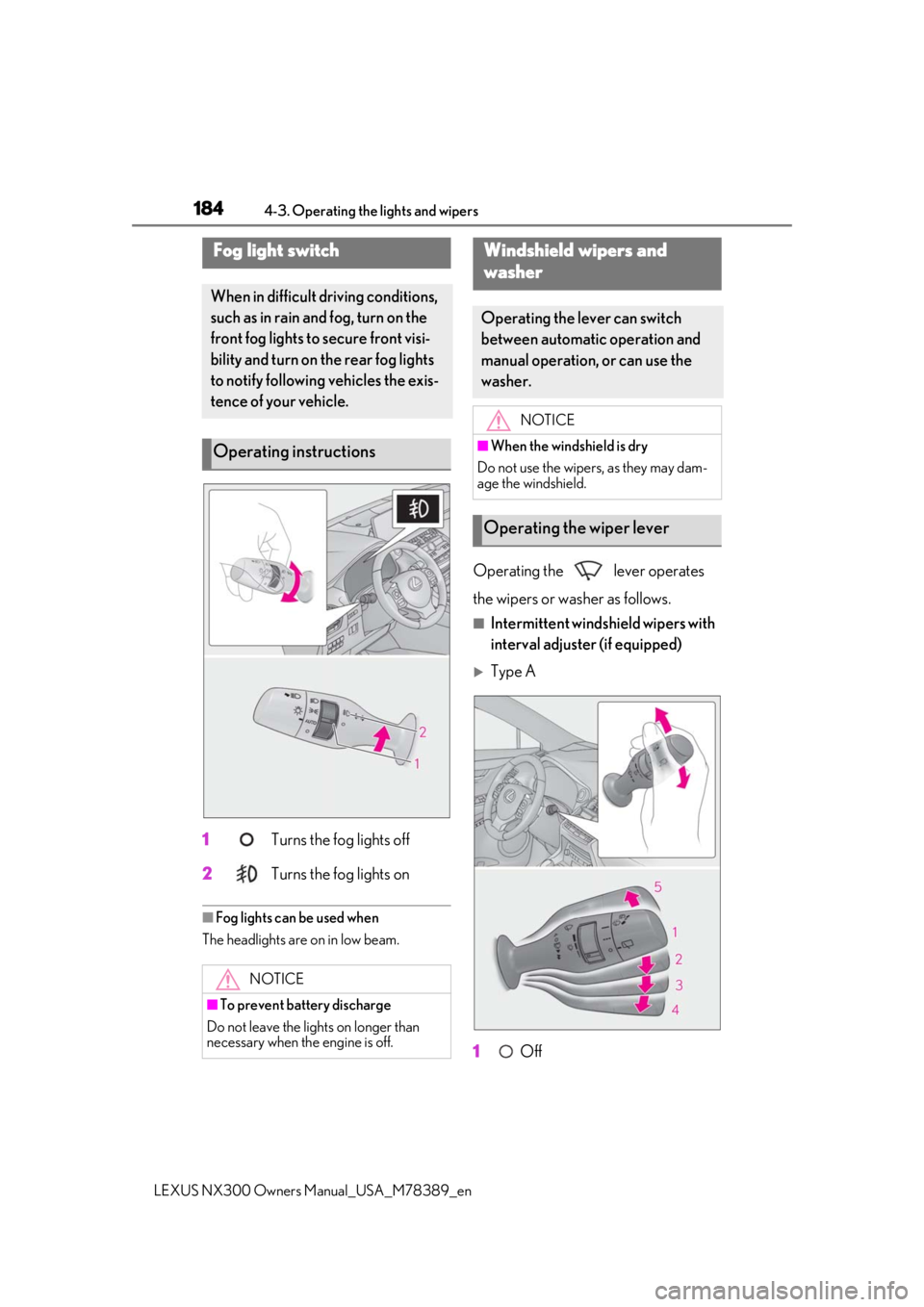
1 Turns the fog lights off
2
Turns the fog lights on
■Fog lights can be used when
The headlights are on in low beam.
Operating the lever operates
the wipers or washer as follows.
■Intermittent windshield wipers with
interval adjuster (if equipped)
Type A
1
Off
Fog light switch
When in difficult driving conditions,
such as in rain and fog, turn on the
front fog lights to secure front visi-
bility and turn on the rear fog lights
to notify following vehicles the exis-
tence of your vehicle.
Operating instructions
NOTICE
■To prevent battery discharge
Do not leave the lights on longer than
necessary when the engine is off.
Windshield wipers and
w
asher
Operating the lever can switch
between automatic operation and
manual operation, or can use the
washer.
NOTICE
■When the windshield is dry
Do not use the wipers, as they may dam-
age the windshield.
Operating the wiper lever
Page 191 of 468
1914-4. Refueling
LEXUS NX300 Owners Manual_USA_M78389_en
4
Driving
4-4.Refueling
Turn the engine switch off and
ensure that all the doors and win-
dows are closed.
Confirm the type of fuel.
■Fuel types
P.416
■Fuel tank opening for unleaded gasoline
To help prevent incorrect fueling, your vehi-
cle has a fuel tank opening that only accom-
modates the special nozzle on unleaded
fuel pumps.
■If the malfunction indicator lamp illumi-
nates
The malfunction indicator lamp may illumi-
nate erroneously if refueling is performed
repeatedly when the fuel tank is nearly full.
1With all doors unlocked, press the
center of the rear edge of the fuel
filler door.
Push inward and take your hand away to
slightly open the fuel filler door. Then open
Opening the fuel tank cap
Before refueling the vehicle
WARNING
■When refueling the vehicle
Observe the following precautions while
refueling the vehicle. Failure to do so may
result in death or serious injury.
●After exiting the vehicle and before
opening the fuel door, touch an
unpainted metal surface to discharge
any static electricity. It is important to
discharge static electricity before refu-
eling because sparks resulting from
static electricity can cause fuel vapors
to ignite while refueling.
●Always hold the grips on the fuel tank
cap and turn it slowly to remove it.
A whooshing sound may be heard
when the fuel tank cap is loosened.
Wait until the sound cannot be heard
before fully removing the cap. In hot
weather, pressurized fuel may spray
out of the filler neck and cause injury.
●Do not allow anyone that has not dis-
charged static electricity from their
body to come close to an open fuel
tank.
●Do not inhale vaporized fuel.
Fuel contains substances that are
harmful if inhaled.
●Do not smoke while refueling the vehi-
cle.
Doing so may cause the fuel to ignite
and cause a fire.
●Do not return to the vehicle or touch
any person or object that is statically
charged. This may cause static elec-
tricity to build up, re sulting in a possible
ignition hazard.
■When refueling
Observe the following precautions to
prevent fuel overflowing from the fuel
tank:
●Securely insert the fuel nozzle into the
fuel filler neck.
●Stop filling the tank after the fuel noz-
zle automatically clicks off.
●Do not top off the fuel tank.
NOTICE
■Refueling
Do not spill fuel during refueling.
Doing so may damage the vehicle, such
as causing the emission control system to
operate abnormally, damaging fuel sys-
tem components or the vehicle’s painted
surface.
Opening the fuel tank cap
Page 253 of 468

2534-5. Using the driving support systems
LEXUS NX300 Owners Manual_USA_M78389_en
4
Driving
The range of the detection area extends to:
Approximately 11.5 ft. (3.5 m) from
the side of the vehicle
The first 1.6 ft. (0.5 m) from the side of the
vehicle is not in the detection area
Approximately 9.8 ft. (3 m) from
the rear bumper
Approximately 3.3 ft. (1 m) forward
of the rear bumper
■The Blind Spot Monitor function is oper-
ational when
●The BSM main switch is set to on
●Vehicle speed is greater than approxi-
mately 10 mph (16 km/h).
■The Blind Spot Monitor function will
detect a vehicle when
●A vehicle in an adj acent lane overtakes
your vehicle.
●Another vehicle enters the detection
area when it changes lanes.
●You overtake a vehicle in adjacent lane
slowly.
■Conditions under wh ich the Blind Spot
Monitor function will not detect a vehi-
cle
The Blind Spot Monitor function is not
designed to detect the following types of
vehicles and/or objects:
●Small motorcycles, bicycles, pedestrians,
etc.*
●Vehicles traveling in the opposite direc-
tion
●Guardrails, walls, signs, parked vehicles
and similar stationary objects*
●Following vehicles that are in the same
lane*
●Vehicles driving 2 lanes across from your
vehicle*
●Vehicles which are being overtaken rap-
idly by your vehicle*
*
: Depending on conditions, detection of a vehicle and/or object may occur.
■Conditions under which the Blind Spot
Monitor function may not function cor-
rectly
●The Blind Spot Monitor function may not
detect vehicles correctly in the following
situations:
• When the sensor is misaligned due to a
strong impact to the sensor or its sur-
rounding area
• When mud, snow, ice, a sticker, etc. is
covering the sensor or surrounding area
on the rear bumper
• When driving on a road surface that is
wet with standing water during bad
weather, such as heavy rain, snow, or fog
• When multiple vehicles are approaching
with only a small gap between each vehi-
cle
• When the distance between your vehicle
and a following vehicle is short
• When there is a significant difference in speed between your vehicle and the vehi-
cle that enters the detection area
• When the difference in speed between your vehicle and another vehicle is
changing
• When a vehicle enters a detection area traveling at about the same speed as your
vehicle
• As your vehicle starts from a stop, a vehi- cle remains in the detection area
• When driving up and down consecutive steep inclines, such as hills, dips in the
road, etc.
• When driving on roads with sharp bends,
A
B
C
Page 254 of 468
2544-5. Using the driving support systems
LEXUS NX300 Owners Manual_USA_M78389_en
consecutive curves, or uneven surfaces
• When vehicle lanes are wide, or when driving on the edge of a lane, and the
vehicle in an adjacent lane is far away
from your vehicle
• When towing a trailer (vehicles with tow-
ing package)
• When items such as a bicycle carrier are installed on the rear of the vehicle
• When there is a significant difference in height between your vehicle and the
vehicle that enters the detection area
• Immediately after the Blind Spot Monitor function is turned on
●Instances of the Blind Spot Monitor func-
tion unnecessarily detecting a vehicle
and/or object may increase in the follow-
ing situations:
• When the sensor is misaligned due to a strong impact to the sensor or its sur-
rounding area
• When the distance between your vehicle and a guardrail, wall, etc. that enters the
detection area is short
• When driving up an d down consecutive
steep inclines, such as hills, dips in the
road, etc.
• When vehicle lanes are narrow, or when driving on the edge of a lane, and a vehi-
cle traveling in a lane other than the adja- cent lanes enters the detection area
• When driving on roads with sharp bends, consecutive curves, or uneven surfaces
• When the tires are slipping or spinning
• When the distance between your vehicle and a following vehicle is short
• When a bicycle carrier or other acces- sory is installed to the rear of the vehicle
• When towing a trailer (vehicles with tow-
ing package)
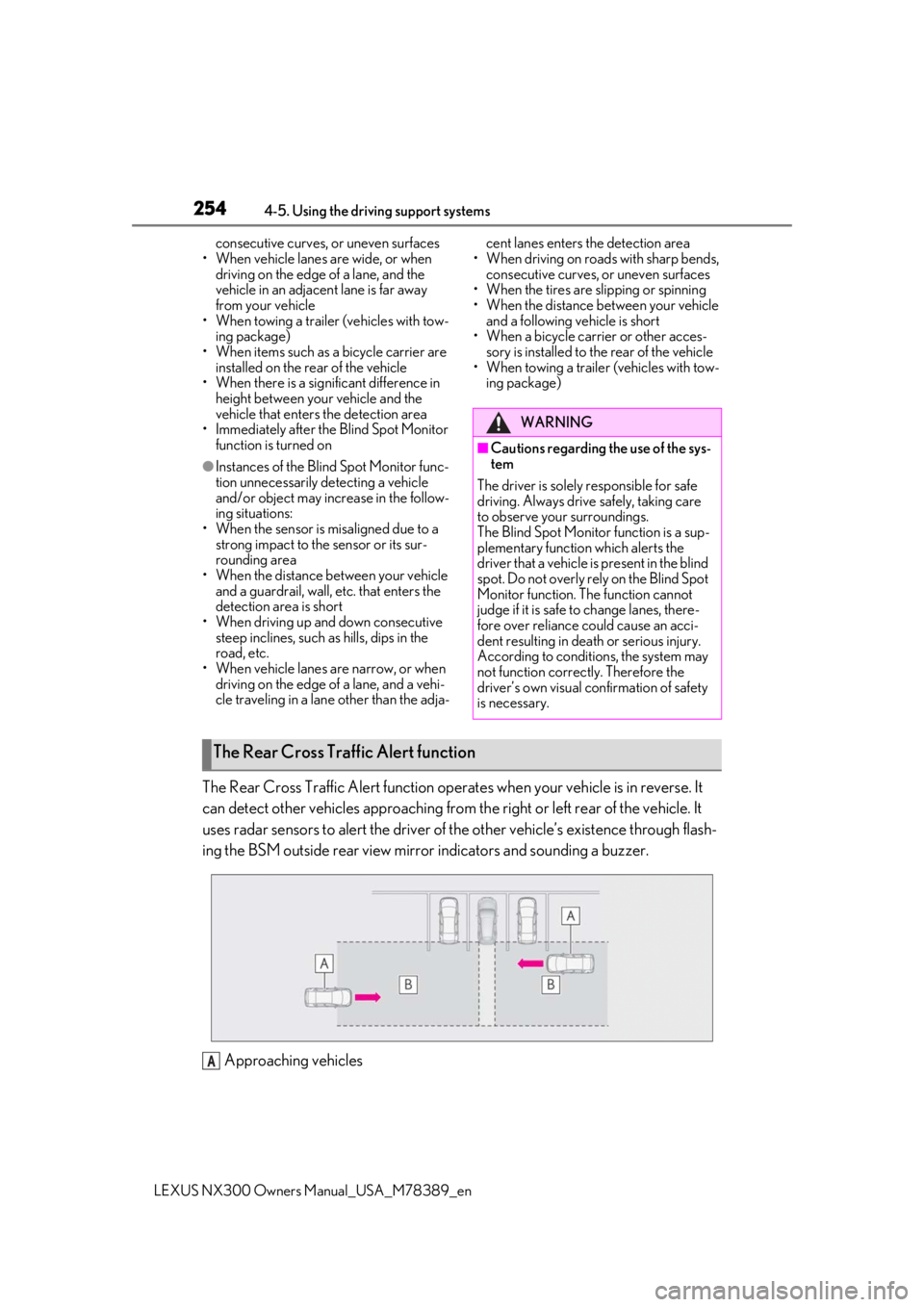
The Rear Cross Traffic Alert function operates when your vehicle is in reverse. It
can detect other vehicles approaching from the right or left rear of the vehicle. It
uses radar sensors to alert the driver of the other vehicle’s existence through flash-
ing the BSM outside rear view mirror indicators and sounding a buzzer.
Approaching vehicles
WARNING
■Cautions regarding the use of the sys-
tem
The driver is solely responsible for safe
driving. Always drive safely, taking care
to observe your surroundings.
The Blind Spot Monitor function is a sup-
plementary function which alerts the
driver that a vehicle is present in the blind
spot. Do not overly rely on the Blind Spot
Monitor function. The function cannot
judge if it is safe to change lanes, there-
fore over reliance could cause an acci-
dent resulting in death or serious injury.
According to conditions, the system may
not function correctly. Therefore the
driver’s own visual confirmation of safety
is necessary.
The Rear Cross Traffic Alert function
A
Page 295 of 468
2955-4. Using the storage features
LEXUS NX300 Owners Manual_USA_M78389_en
5
Interior features
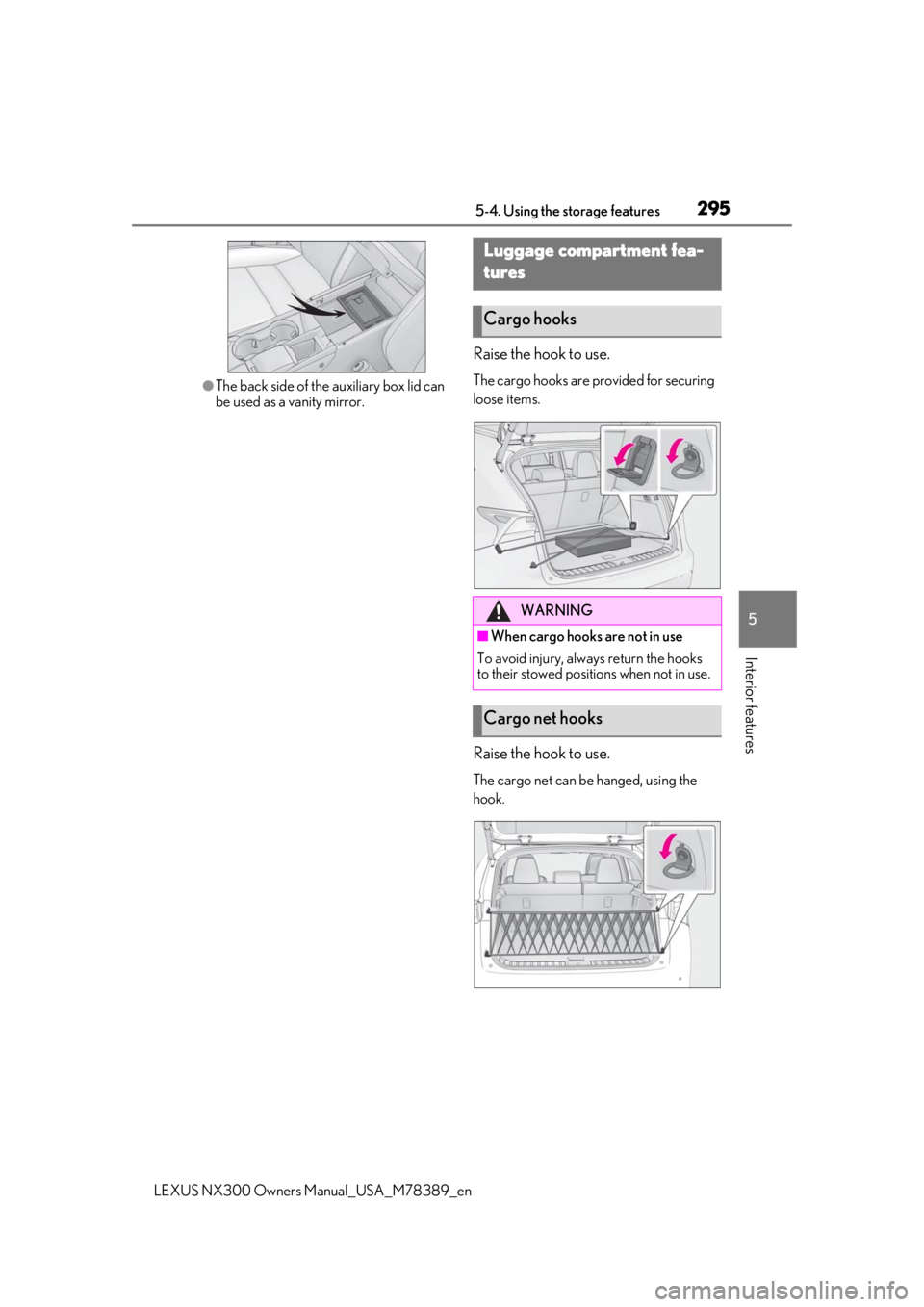
●The back side of the auxiliary box lid can
be used as a vanity mirror.
Raise the hook to use.
The cargo hooks are provided for securing
loose items.
Raise the hook to use.
The cargo net can be hanged, using the
hook.
Luggage compartment fea-
tures
Cargo hooks
WARNING
■When cargo hooks are not in use
To avoid injury, always return the hooks
to their stowed positions when not in use.
Cargo net hooks
Page 297 of 468
2975-4. Using the storage features
LEXUS NX300 Owners Manual_USA_M78389_en
5
Interior features
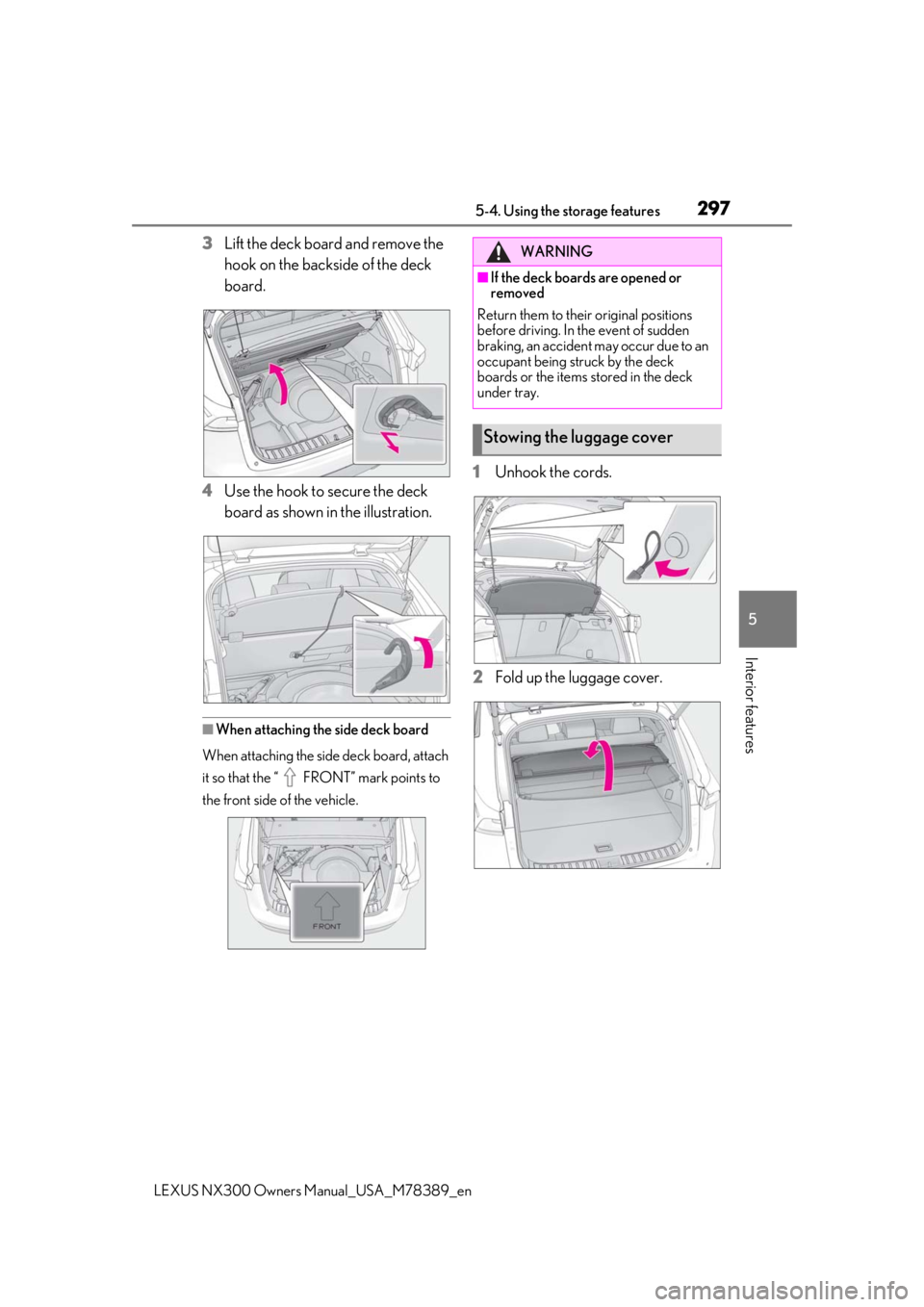
3Lift the deck board and remove the
hook on the backside of the deck
board.
4
Use the hook to secure the deck
board as shown in the illustration.
■When attaching the side deck board
When attaching the side deck board, attach
it so that the “ FRONT” mark points to
the front side of the vehicle.
1Unhook the cords.
2
Fold up the luggage cover.
WARNING
■If the deck boards are opened or
removed
Return them to their original positions
before driving. In the event of sudden
braking, an accident may occur due to an
occupant being struck by the deck
boards or the items stored in the deck
under tray.
Stowing the luggage cover
Page 309 of 468
3095-5. Using the other interior features
LEXUS NX300 Owners Manual_USA_M78389_en
5
Interior features
*:If equipped
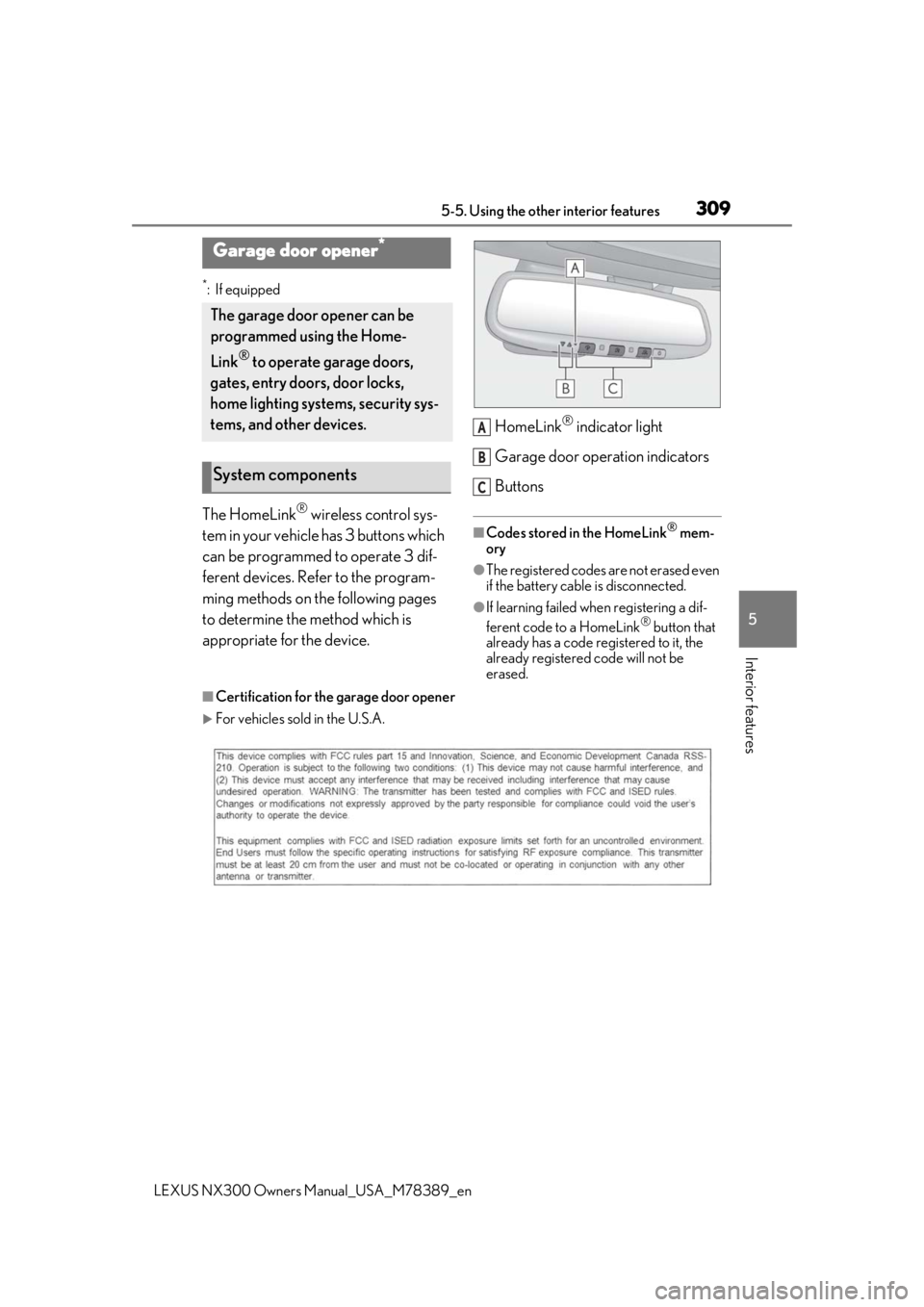
The HomeLink® wireless control sys-
tem in your vehicle has 3 buttons which
can be programmed to operate 3 dif-
ferent devices. Refer to the program-
ming methods on the following pages
to determine the method which is
appropriate for the device. HomeLink
® indicator light
Garage door operation indicators
Buttons
■Codes stored in the HomeLink® mem-
ory
●The registered codes are not erased even
if the battery cable is disconnected.
●If learning failed when registering a dif-
ferent code to a HomeLink® button that
already has a code registered to it, the
already registered code will not be
erased.
■Certification for the garage door opener
For vehicles sold in the U.S.A.
Garage door opener*
The garage door opener can be
programmed using the Home-
Link
® to operate garage doors,
gates, entry doors, door locks,
home lighting systems, security sys-
tems, and other devices.
System components
A
B
C