wheel LEXUS NX300 2020 Workshop Manual
[x] Cancel search | Manufacturer: LEXUS, Model Year: 2020, Model line: NX300, Model: LEXUS NX300 2020Pages: 468, PDF Size: 10.24 MB
Page 220 of 468

2204-5. Using the driving support systems
LEXUS NX300 Owners Manual_USA_M78389_en
LDA indicator
The illumination condition of the indicator
informs the driver of the system operation
status.
Illuminated in white:
LDA system is operating.
Illuminated in green:
Steering wheel assistance of the steering
assist function is operating.
Flashing in orange:
Lane departure alert function is operating.
Operation display of steering
wheel operation support
Displayed when the mu lti-information dis-
play is switched to the driving assist system
information screen.
Indicates that steering wheel assistance of
the steering assist function is operating.
Lane departure alert function dis-
play
Displayed when the mu lti-information dis-
play is switched to the driving assist system
information screen.
Inside of displayed lines is white
Indicates that the system is recognizing
white (yellow) lines or a course
*. When the
vehicle departs from it s lane, the white line
displayed on the side the vehicle departs
from flashes orange.
Inside of displayed lines is black
Indicates that the system is not able to rec-
ognize white (yellow) lines or a course
* or
is temporarily canceled.
*: Boundary between asphalt and the side of the road, such as grass, soil, or a curb
■Operation conditions of each function
●Lane departure alert function
This function operates when all of the fol-
lowing conditions are met.
• LDA is turned on.
• Vehicle speed is ap proximately 32 mph
(50 km/h) or more.
• System recognizes white (yellow) lane
lines or a course
*. (When a white [yellow]
line or course* is recognized on only one
side, the system will operate only for the
Indications on multi-information
display
A
B
C
Page 221 of 468

2214-5. Using the driving support systems
LEXUS NX300 Owners Manual_USA_M78389_en
4
Driving
recognized side.)
• Width of traffic lane is approximately 9.8
ft. (3 m) or more.
• Turn signal lever is not operated.
• Vehicle is not being driven around a sharp curve.
• No system malfunctions are detected. ( P.222)
*: Boundary between asphalt and the side
of the road, such as grass, soil, or a curb
●Steering assist function
This function operates when all of the fol-
lowing conditions are me t in addition to the
operation conditions for the lane departure
alert function.
•Setting for “Steering Assist” in of the
multi-information display is set to “On”.
( P.82)
• Vehicle is not accelerated or decelerated
by a fixed amount or more.
• Steering wheel is not operated with a steering force level su itable for changing
lanes.
• ABS, VSC, TRAC and PCS are not oper- ating.
• TRAC or VSC is not turned off.
• Hands off steering wheel warning is not displayed. ( P.221)
●Vehicle sway warning function
This function operates when all of the fol-
lowing conditions are met.
• Setting for “Sway Warning” in of the
multi-information display is set to “On”.
( P.82)
• Vehicle speed is approximately 32 mph
(50 km/h) or more.
• Width of traffic lane is approximately 9.8
ft. (3 m) or more.
• No system malfunctions are detected. ( P.222)
■Temporary cancelation of functions
When operation conditions are no longer
met, a function may be temporarily can-
celed. However, when the operation condi-
tions are met again, operation of the
function is automatically restored.
( P.220)
■Steering assist function
●Depending on the vehicle speed, lane
departure situation, road conditions, etc.,
the driver may not feel the function is
operating or the function may not oper-
ate at all.
●The steering control of the function is
overridden by the driver’s steering wheel
operation.
●Do not attempt to test the operation of
the steering assist function.
■Lane departure alert function
●The warning buzzer may be difficult to
hear due to external noise, audio play-
back, etc. Also, it may be difficult to feel
steering wheel vibrations due to the road
conditions, etc.
●If the edge of the course* is not clear or
straight, the lane departure alert function
may not operate.
●Do not attempt to test the operation of
the lane departure alert function.
*: Boundary between asphalt and the side
of the road, such as grass, soil, or a curb
■Hands off steering wheel warning
In the following situations, a warning mes-
sage urging the driver to hold the steering
wheel and the symbol sh own in the illustra-
tion are displayed on the multi-information
display to warn the dr iver.The warning stops
when the system determines that the driver
holds the steering wheel. Always keep your
hands on the steering wheel when using this
system, regardle ss of warnings.
●When the system determines that the
driver is driving with out holding the steer-
ing wheel while the sy stem is operating
If the driver continues to keep their hands
off of the steering wheel, the buzzer sounds,
Page 222 of 468

2224-5. Using the driving support systems
LEXUS NX300 Owners Manual_USA_M78389_en
the driver is warned and the function is tem-
porarily canceled. This warning also oper-
ates in the same way when the driver
continuously operates the steering wheel
only a small amount.
The buzzer also sounds even if the alert
type is set to .
●When the system determines that the
vehicle may not turn and instead depart
from its lane while driving around a curve
Depending on the vehicle condition and
road conditions, the warning may not oper-
ate. Also, if the system determines that the
vehicle is driving around a curve, warnings
will occur earlier than during straight-lane
driving.
●When the system determines that the
driver is driving without holding the steer-
ing wheel while the st eering wheel assist
of the steering assist function is operating
If the driver continue s to keep their hands
off of the steering wheel and the steering
wheel assist is operating, the buzzer sounds
and the driver is warned. Each time the
buzzer sounds, the continuing time of the
buzzer becomes longer.
The buzzer also sounds even if the alert
type is set to .
■Vehicle sway warning function
When the system determines that the vehi-
cle is swaying while the vehicle sway warn-
ing function is operating, a buzzer sounds
and a warning message urging the driver to
rest and the symbol shown in the illustration
are simultaneously displayed on the multi-
information display. Depending on the vehicle and road condi-
tions, the warning may not operate.
■Warning message
If the following warning message is dis-
played on the multi-in formation display and
the LDA indicator illuminates in orange, fol-
low the appropriate troubleshooting proce-
dure. Also, if a different warning message is
displayed, follow the instructions displayed
on the screen.
●“Lane Departure Alert Malfunction Visit
Your Dealer”
The system may not be operating properly.
Have the vehicle inspected by your Lexus
dealer.
●“Lane Departure Alert Unavailable”
The system is temporarily canceled due to a
malfunction in a sensor other than the front
camera. Turn the LDA system off, wait for a
little while, and then turn the LDA system
back on.
●“Lane Departure Alert Unavailable at
Current Speed”
The function cannot be used as the vehicle
speed exceeds the LDA operation range.
Drive slower.
●“Lane Departure Alert Unavailable
Below Approx 50km/h”
The LDA system cannot be used as the
vehicle speed is less than approximately 32
mph (50 km/h). Drive the vehicle at
approximately 32 mph (50 km/h) or more.
■Customization
Function settings can be changed. (Cus-
tomizable features: P.427)
Page 234 of 468

2344-5. Using the driving support systems
LEXUS NX300 Owners Manual_USA_M78389_en
lane
●Vehicles with small rear ends (trailers
with no load on board, etc.)
●Motorcycles travelin
g in the same lane
●When water or snow thrown up by the
surrounding vehicles hinders the detect-
ing of the sensor
●When your vehicle is pointing upwards
(caused by a heavy load in the luggage
compartment, etc.)
●Preceding vehicle has an extremely high
ground clearance
■Conditions under which the vehicle-to-
vehicle distance control mode may not
function correctly
In the case of the following conditions,
operate the brake pedal (or accelerator
pedal, depending on the situation) as nec-
essary.
As the sensor may not be able to correctly
detect vehicles ahead, the system may not
operate properly.
●When the road curves or when the lanes are narrow
●When steering wheel operation or your
position in the lane is unstable
●When the vehicle ahead of you deceler-
ates suddenly
●When driving on a road surrounded by a
structure, such as in a tunnel or on a
bridge
●While the vehicle speed is decreasing to
the set speed after the vehicle acceler-
ates by depressing the accelerator pedal
Page 260 of 468

2604-5. Using the driving support systems
LEXUS NX300 Owners Manual_USA_M78389_en
■ABS (Anti-lock Brake System)
Helps to prevent wheel lock when the
brakes are applied suddenly, or if the
brakes are applied while driving on a
slippery road surface
■Brake assist
Generates an increased level of brak-
ing force after the brake pedal is
depressed when the system detects a
panic stop situation
■VSC (Vehicle Stability Control)
Helps the driver to control skidding
when swerving sudden ly or turning on
slippery road surfaces.
■Enhanced VSC (Enhanced Vehi-
cle Stability Control)
Provides cooperative control of the
ABS, TRAC, VSC and EPS.
Helps to maintain directional stability
when swerving on slippery road sur-
faces by controlling steering perfor-
mance.
■Trailer Sway Control
Helps the driver to control trailer sway
by selectively applying brake pressure
for individual wheels and reducing
driving torque when trailer sway is
detected.
■TRAC (Traction Control)
Helps to maintain drive power and pre-
vent the drive wheels from spinning
when starting the vehicle or accelerat-
ing on slippery roads
■Active Cornering Assist (ACA)
Helps to prevent the vehicle from drift-
ing to the outer side by performing
inner wheel brake control when
attempting to accele rate while turning
■Hill-start assist control
Helps to reduce the backward move-
ment of the vehicle when starting on an
uphill
■EPS (Electric Power Steering)
Employs an electric motor to reduce
the amount of effort needed to turn the
steering wheel
■Dynamic Torque Control AWD
system (if equipped)
Automatically switches from front-
wheel drive to all-wheel drive (AWD)
according to the driving conditions,
helping to ensure reliable handling and
stability. Examples of conditions where
the system will switch to AWD are
when cornering, going uphill, starting
off or accelerating, and when the road
surface is slippery due to snow, rain,
etc.
Driving assist systems
To keep driving safety and perfor-
mance, the following systems oper-
ate automatically in response to
various driving situations. Be aware,
however, that these systems are
supplementary and should not be
relied upon too heavily when oper-
ating the vehicle.
Summary of the driving assist
systems
Page 261 of 468

2614-5. Using the driving support systems
LEXUS NX300 Owners Manual_USA_M78389_en
4
Driving
■AVS (Adaptive Variable Suspen-
sion System) (if equipped)
By independently controlling the
damping force of the shock absorbers
for each of the 4 wheels according to
the road and driving conditions, this
system helps riding comfort with supe-
rior vehicle stabilit y, and helps good
vehicle posture. If Sport S+ mode is
selected using the dr iving mode select
switch, the damping force will become
more suitable for sporty driving.
( P.258)
■PCS (Pre-Collision System)
P.199
■BSM (Blind Spot Monitor) (if
equipped)
P.250
■When the TRAC/VSC/Trailer Sway
Control systems are operating
The slip indicator light will flash while the
TRAC/VSC/Trailer Sway Control systems
are operating.
■Disabling the TRAC system
If the vehicle gets stuck in mud, dirt or snow,
the TRAC system may reduce power from
the engine to the wheels. Pressing to
turn the system off may make it easier for
you to rock the vehicle in order to free it.
To turn the TRAC system off, quickly press
and release . The “Traction Co
ntrol Turned Off” will be
shown on the multi-information display.
Press again to turn the system back on.
■Turning off both TRAC, VSC and Trailer
Sway Control systems
To turn the TRAC, VSC and Trailer Sway
Control systems off, press and hold for
more than 3 seconds while the vehicle is
stopped. The VSC OFF indicator light will
come on and the “Traction Control Turned
Off” will be shown on the multi-information
display.
* Press again to turn the system
back on.
*: On vehicles with pre-collision system, pre-collision brake assist and pre-colli-
sion braking will also be disabled. The
PCS warning light will come on and the
message will be shown on the multi-infor-
mation display. ( P.205)
■When the message is displayed on the
multi-information display showing that
TRAC has been disabled even if has
not been pressed
TRAC is temporary deactivated. If the infor-
mation continues to show, contact your
Lexus dealer.
Page 262 of 468

2624-5. Using the driving support systems
LEXUS NX300 Owners Manual_USA_M78389_en
■Sounds and vibrations caused by the
ABS, brake assist, VSC, Trailer Sway
Control, TRAC and hill-start assist con-
trol systems
●A sound may be heard from the engine
compartment when the brake pedal is
depressed repeatedly, when the engine is
started or just after the vehicle begins to
move. This sound does not indicate that a
malfunction has occurred in any of these
systems.
●Any of the following conditions may
occur when the above systems are oper-
ating. None of these indicates that a mal-
function has occurred.
• Vibrations may be felt through the vehicle
body and steering.
• A motor sound may be heard also after the vehicle comes to a stop.
• The brake pedal may pulsate slightly after the ABS is activated.
• The brake pedal may move down slightly
after the ABS is activated.
■Active Cornering Assist operation
sounds and vibrations
When the Active Cornering Assist is oper-
ated, operation sounds and vibrations may
be generated from the brake system, but
this is not a malfunction.
■EPS operation sound
When the steering wheel is operated, a
motor sound (whirring sound) may be
heard. This does not indicate a malfunction.
■Reduced effectiveness of the EPS sys-
tem
The effectiveness of the EPS system is
reduced to prevent the system from over-
heating when there is frequent steering
input over an extended period of time. The
steering wheel may feel heavy as a result.
Should this occur, re frain from excessive
steering input or stop the vehicle and turn
the engine off. The EPS system should
return to normal within 10 minutes.
■Automatic reactivation of TRAC, Trailer
Sway Control and VSC systems
After turning the TRAC, Trailer Sway Con-
trol and VSC systems off, the systems will
be automatically re-enabled in the following
situations:
●When the engine switch is turned off
●If only the TRAC system is turned off, the
TRAC will turn on when vehicle speed
increases
If both the TRAC and VSC systems are
turned off, automatic re-enabling will not
occur when vehicle speed increases.
■Operating conditions of Active Corner-
ing Assist
The system operates when the following
occurs.
●TRAC/VSC can operate
●The driver is attempting to accelerate
while turning
●The system detects that the vehicle is
drifting to the outer side
●The brake pedal is released
■Operating conditions of hill-start assist
control
When the following four conditions are met,
the hill-start assist control will operate:
●The shift lever is in a position other than P
or N (when starting off forward/back-
ward on an upward incline)
●The vehicle is stopped
●The accelerator pedal is not depressed
●The parking brake is not engaged
■Automatic system cancelation of hill-
start assist control
The hill-start assist control will turn off in any
of the following situations:
●The shift lever is shifted to P or N
●The accelerator pedal is depressed
●The parking brake is engaged
●2 seconds at maximum elapsed after the
brake pedal is released
WARNING
■The ABS does not operate effectively
when
●The limits of tire gripping performance
have been exceeded (such as exces-
sively worn tires on a snow covered
road).
Page 263 of 468
2634-5. Using the driving support systems
LEXUS NX300 Owners Manual_USA_M78389_en
4
Driving
WARNING
●The vehicle hydroplanes while driving
at high speed on wet or slick roads.
■Stopping distance when the ABS is
operating may exceed that of normal
conditions
The ABS is not designed to shorten the
vehicle’s stopping di stance. Always main-
tain a safe distance from the vehicle in
front of you, especially in the following
situations:
●When driving on dirt, gravel or snow-
covered roads
●When driving with tire chains
●When driving over bumps in the road
●When driving over roads with potholes
or uneven surfaces
■TRAC/VSC may not operate effec-
tively when
Directional control and power may not
be achievable while driving on slippery
road surfaces, even if the TRAC/VSC
system is operating. Drive the vehicle
carefully in conditions where stability and
power may be lost.
■Active Cornering Assist does not
operate effectively when
●Do not overly rely on Active Corner-
ing Assist. Active Cornering Assist
may not operate effectively when
accelerating down slopes or driving on
slippery road surfaces.
●When Active Cornering Assist fre-
quently operates, Active Cornering
Assist may temporarily stop operating
to ensure proper operation of the
brakes, TRAC and VSC.
■Hill-start assist control does not oper-
ate effectively when
●Do not overly rely on hill-start assist
control. Hill-start assist control may
not operate effectively on steep
inclines and roads covered with ice.
●Unlike the parking brake, hill-start
assist control is not intended to hold
the vehicle stationary for an extended
period of time. Do not attempt to use
hill-start assist control to hold the vehi-
cle on an incline, as doing so may lead
to an accident.
■When the TRAC/VSC/ Trailer Sway
Control is activated
The slip indicator light flashes. Always
drive carefully. Reckless driving may
cause an accident. Exercise particular
care when the indicator light flashes.
■When the TRAC/VSC/Trailer Sway
Control systems are turned off
Be especially careful and drive at a speed
appropriate to the road conditions. As
these are the systems to help ensure
vehicle stability and driving force, do not
turn the TRAC/VSC/Trailer Sway Con-
trol systems off unless necessary. Trailer
Sway Control is part of the VSC system
and will not operate if VSC is turned off
or experiences a malfunction.
■Replacing tires
Make sure that all ti res are of the speci-
fied size, brand, tread pattern and total
load capacity. In addition, make sure that
the tires are inflated to the recom-
mended tire inflation pressure level. The
ABS, TRAC, Trailer Sway Control and
VSC systems will not function correctly if
different tires are installed on the vehicle.
Contact your Lexus dealer for further
information when replacing tires or
wheels.
■Handling of tires and the suspension
Using tires with any kind of problem or
modifying the suspensi on will affect the
driving assist systems, and may cause a
system to malfunction.
Page 264 of 468
2644-5. Using the driving support systems
LEXUS NX300 Owners Manual_USA_M78389_en
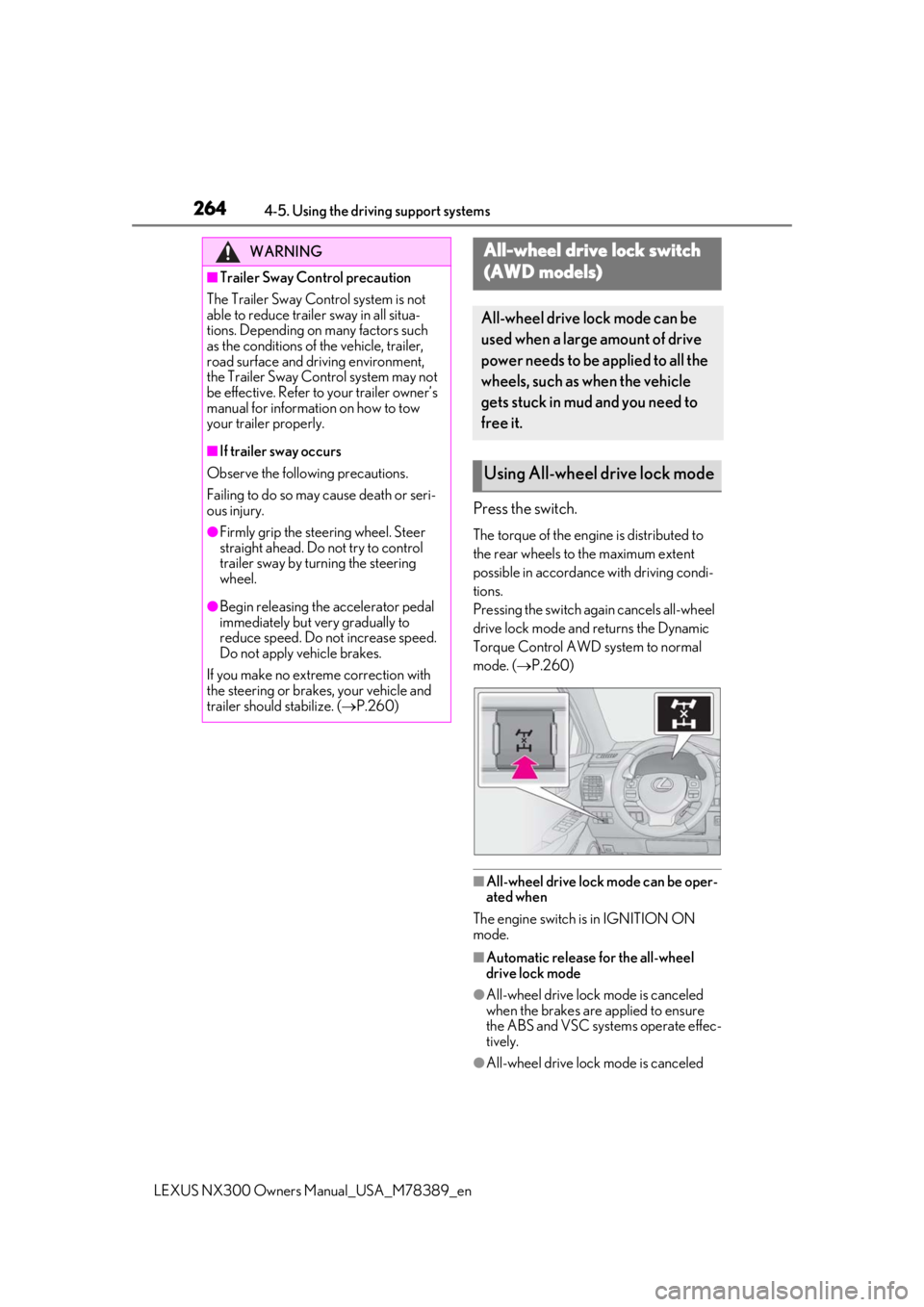
Press the switch.
The torque of the engine is distributed to
the rear wheels to the maximum extent
possible in accordance with driving condi-
tions.
Pressing the switch again cancels all-wheel
drive lock mode and returns the Dynamic
Torque Control AWD system to normal
mode. ( P.260)
■All-wheel drive lock mode can be oper-
ated when
The engine switch is in IGNITION ON
mode.
■Automatic release for the all-wheel
drive lock mode
●All-wheel drive lock mode is canceled
when the brakes are applied to ensure
the ABS and VSC systems operate effec-
tively.
●All-wheel drive lock mode is canceled
WARNING
■Trailer Sway Control precaution
The Trailer Sway Control system is not
able to reduce trailer sway in all situa-
tions. Depending on many factors such
as the conditions of the vehicle, trailer,
road surface and driving environment,
the Trailer Sway Control system may not
be effective. Refer to your trailer owner’s
manual for information on how to tow
your trailer properly.
■If trailer sway occurs
Observe the following precautions.
Failing to do so may cause death or seri-
ous injury.
●Firmly grip the steering wheel. Steer
straight ahead. Do not try to control
trailer sway by turning the steering
wheel.
●Begin releasing the accelerator pedal
immediately but very gradually to
reduce speed. Do not increase speed.
Do not apply vehicle brakes.
If you make no extreme correction with
the steering or brakes, your vehicle and
trailer should stabilize. ( P.260)
All-wheel drive lock switch
(
AWD models)
All-wheel drive lock mode can be
used when a large amount of drive
power needs to be applied to all the
wheels, such as when the vehicle
gets stuck in mud and you need to
free it.
Using All-wheel drive lock mode
Page 266 of 468

2664-6. Driving tips
LEXUS NX300 Owners Manual_USA_M78389_en
4-6.Driving tips
Use fluids that are appropriate to
the prevailing outside temperatures.
• Engine oil
• Engine coolant
• Washer fluid
Have a service technician inspect
the condition of the battery.
Have the vehicle fitted with four
snow tires or purchase a set of tire
chains for the front tires
*.
Ensure that all tires are the same size and
brand, and that chains match the size of the
tires.
*: Tire chains cannot be mounted on the
225/60R18 tires.
Snow tires should be used instead.
Perform the following according to the
Winter driving tips
Carry out the necessary prepara-
tions and inspections before driving
the vehicle in winter. Always drive
the vehicle in a manner appropriate
to the prevailing weather condi-
tions.
Preparation for winter
WARNING
■Driving with snow tires
Observe the following precautions to
reduce the risk of accidents.
Failure to do so may result in a loss of
vehicle control and cause death or seri-
ous injury.
●Use tires of the specified size.
●Maintain the recommended level of air
pressure.
●Do not drive in excess of 75 mph (120
km/h), regardless of the type of snow
tires being used.
●Use snow tires on all, not just some
wheels.
■Driving with tire chains
Observe the following precautions to
reduce the risk of accidents.
Failure to do so may result in the vehicle
being unable to be driven safely, and may
cause death or serious injury.
●Do not drive in excess of the speed
limit specified for the tire chains being
used, or 30 mph (50 km/h), which-
ever is lower.
●Avoid driving on bumpy road surfaces
or over potholes.
●Avoid sudden acceleration, abrupt
steering, sudden br aking and shifting
operations that cause sudden engine
braking.
●Slow down sufficiently before entering
a curve to ensure that vehicle control is
maintained.
●Do not use LDA (Lane Departure
Alert with steering control) (if
equipped).
●Do not use LTA (Lane Tracing Assist)
(if equipped).
NOTICE
■Repairing or replacing snow tires
Request repairs or replacement of snow
tires from Lexus dealers or legitimate tire
retailers.
This is because the removal and attach-
ment of snow tires affects the operation
of the tire pressure warning valves and
transmitters.
Before driving the vehicle