ECO LEXUS NX300 2020 Manual PDF
[x] Cancel search | Manufacturer: LEXUS, Model Year: 2020, Model line: NX300, Model: LEXUS NX300 2020Pages: 468, PDF Size: 10.24 MB
Page 174 of 468

1744-2. Driving procedures
LEXUS NX300 Owners Manual_USA_M78389_en
the switch again. (P.379)
■Parking brake operation
●When the engine switch is not in IGNI-
TION ON mode, the parking brake can-
not be released using the parking brake
switch.
●When the engine switch is not in IGNI-
TION ON mode, automatic mode (auto-
matic brake setting and releasing) is not
available.
■If “Parking Brake Overheated Parking
Brake Unavailable” is displayed on the
multi-information display
If the parking brake is operated repeatedly
over a short period of time, the system may
restrict operation to prevent overheating. If
this happens, refrain from operating the
parking brake. Normal operation will return
after about 1 minute.
■Parking brake operation sound
When the parking brake operates, a motor
sound (whirring sound) may be heard. This
does not indicate a malfunction.
■Parking brake indicator light and park-
ing brake lamp
●Depending on the engine switch mode,
the parking brake indicator light and
parking brake lamp will turn on and stay
on as described below:
IGNITION ON mode: Comes on until
the parking brake is released.
Not in IGNITION ON mode: Stays on
for approximately 15 seconds.
●When the engine switch is turned off with
the parking brake set, the parking brake
indicator light and parking brake lamp
will stay on for about 15 seconds. This
does not indicate a malfunction.
■Changing the mode
When changing the automatic mode on/off,
the message will be shown on the multi-
information display and the buzzer sounds.
■Parking the vehicle
P.146
■Parking brake engaged warning buzzer
A buzzer will sound if the vehicle is driven with the parking brake engaged. “Release
Parking Brake” is displayed on the multi-
information display.
■Warning messages and buzzers
Warning messages and buzzers are used to
indicate a system malfunction or to inform
the driver of the need for caution. If a warn-
ing message is shown on the multi-informa-
tion display, read the message and follow
the instructions.
■If the brake system warning light comes
on
P.376
■Usage in winter time
P.267
WARNING
■When parking the vehicle
Do not leave a child in the vehicle alone.
The parking brake may be released unin-
tentionally and there is the danger of the
vehicle moving that may lead to an acci-
dent resulting in death or serious injury.
■Parking brake switch
Do not set any objects near the parking
brake switch. Objects may interfere with
the switch and may lead the parking
brake to unexpectedly operate.
NOTICE
■When parking the vehicle
Before you leave the vehicle, shift the
shift lever to P, set the parking brake and
make sure that the vehicle does not
move.
■When the system malfunctions
Stop the vehicle in a safe place and
check the warning messages.
Page 177 of 468

1774-2. Driving procedures
LEXUS NX300 Owners Manual_USA_M78389_en
4
Driving
*:If equipped
1Louder
2 Lower
The indicator comes on when the ASC
system is on.
When the dial is turned to the lowest
volume, the ASC system will be turned
off and the indicator will go off.
■Operating conditions
When the driving mode select switch is not in Eco mode.
■Temporary cancelation of the ASC sys-
tem functions
The ASC system may be temporarily can-
celed depending on the driving conditions,
such as when the tires slip due to sudden
acceleration.ASC (Active Sound Con-
trol)*
The ASC system is an electronic
sound system that generates
engine sound, conveying the
kinetic situations of the vehicle’s
acceleration and deceleration to
the driver throug h the speakers
inside the instrument panel.
The vehicle’s response to the
driver’s accelerati on behavior and
shift operations are also conveyed
in sound.
When Sport mode is selected, the
sound conveyed to the driver will be
louder.
Controlling volume
Page 179 of 468

1794-3. Operating the lights and wipers
LEXUS NX300 Owners Manual_USA_M78389_en
4
Driving
turn on. (P.179)
■AUTO mode can be used when
The engine switch is in IGNITION ON
mode.
■Daytime running light system
●The daytime running lights illuminate
using the same lights as the parking lights
and illuminate brighter than the parking
lights.
●To make your vehicle more visible to
other drivers during daytime driving, the
daytime running lights turn on automati-
cally when all of the following conditions
are met. (The daytime running lights are
not designed for use at night.)
• The engine is running
• The parking brake is released
• The headlight switch is in the
(type B), or
* position
*: When the surroundings are bright
The daytime running lights remain on after
they illuminate, even if the parking brake is
set again.
●For the U.S.A.: Dayt ime running lights
can be turned off by operating the switch.
●Compared to turning on the headlights,
the daytime running light system offers
greater durability and consumes less
electricity, so it can help improve fuel
●If a turn signal light is in use, the daytime
running light, on the same side, is turned
off. For emergency flashers, both are
turned off.
■Headlight control sensor
The sensor may not function properly if an
object is placed on th e sensor, or anything
that blocks the sensor is affixed to the wind-
shield.
Doing so interferes with the sensor detect-
ing the level of ambient light and may cause
the automatic headlight system to malfunc-
tion.
■Automatic light off system
●When the headlights come on: The head-
lights and tail lights turn off 30 seconds
after a door is opened and closed if the
engine switch is turned to ACCESSORY
mode or turned off. (The lights turn off
immediately if on the key is
pressed after all the doors are locked.)
●When only the tail lights come on: The tail
lights turn off automatically if the engine
switch is turned to ACCESSORY mode
or turned off and the driver’s door is
opened.
To turn the lights on again, turn the engine
switch to IGNITION ON mode, or turn the
light switch off once and then back to or .
■Light reminder buzzer
A buzzer sounds when the engine switch is
turned off or turned to ACCESSORY
mode and the driver’s door is opened while
the lights are turned on.
■Automatic headlight leveling system (if
equipped)
The level of the headlights is automatically
adjusted according to the number of pas-
sengers and the loadin g condition of the
vehicle to ensure that the headlights do not
interfere with other road users.
■Battery-saving function
In order to prevent the battery of the vehicle
from discharging, if the headlights and/or
tail lights are on when the engine switch is
turned off the battery saving function will
operate and automatically turn off all the
lights after approximately 20 minutes.
When the engine switch is turned to IGNI-
TION ON mode, the battery-saving func-
Page 189 of 468
1894-3. Operating the lights and wipers
LEXUS NX300 Owners Manual_USA_M78389_en
4
Driving
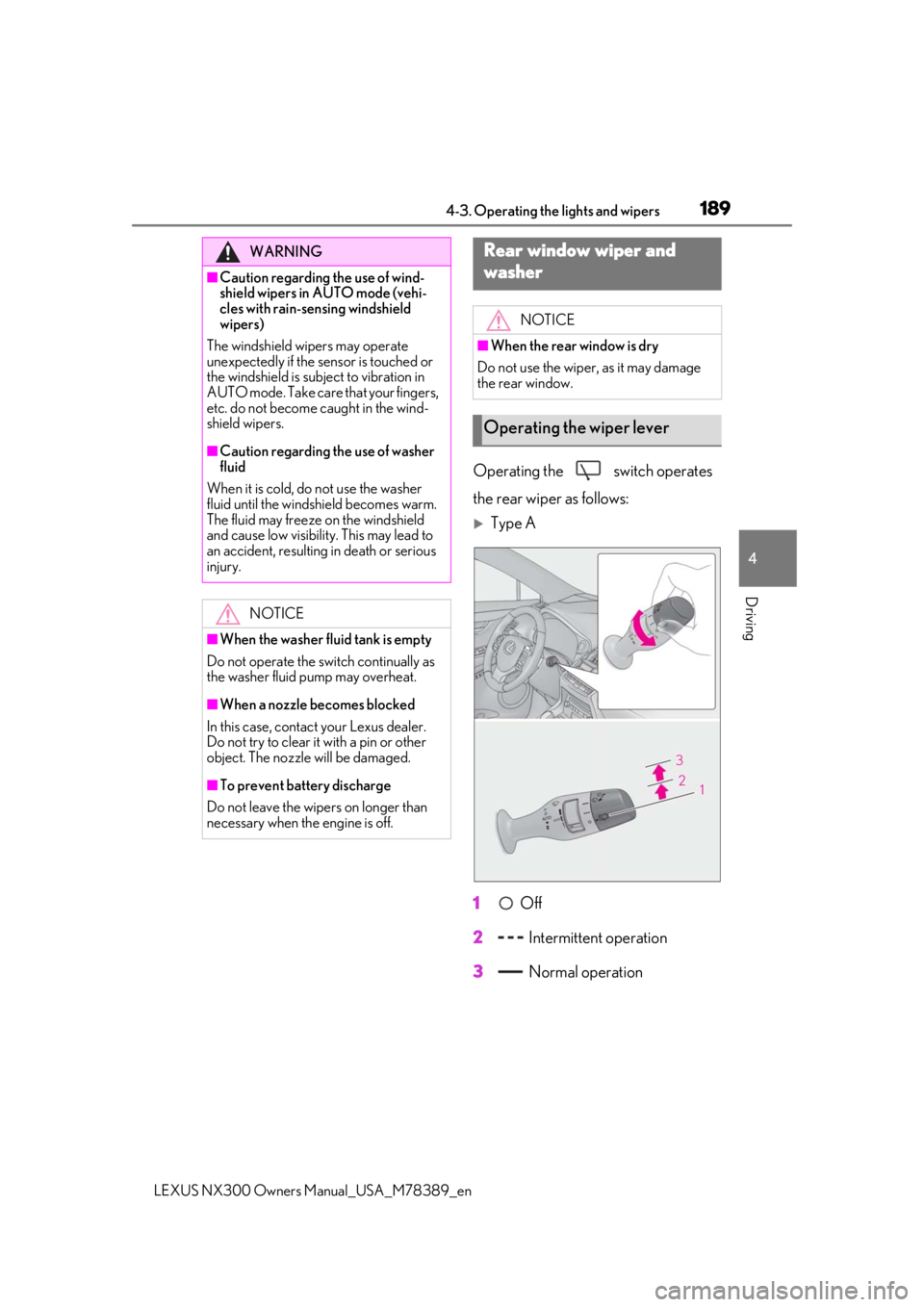
Operating the switch operates
the rear wiper as follows:
Type A
1
Off
2
Intermittent operation
3
Normal operation
WARNING
■Caution regarding the use of wind-
shield wipers in AUTO mode (vehi-
cles with rain-sen sing windshield
wipers)
The windshield wipers may operate
unexpectedly if the sensor is touched or
the windshield is subject to vibration in
AUTO mode. Take care that your fingers,
etc. do not become caught in the wind-
shield wipers.
■Caution regarding the use of washer
fluid
When it is cold, do not use the washer
fluid until the windshield becomes warm.
The fluid may freeze on the windshield
and cause low visibility. This may lead to
an accident, resulting in death or serious
injury.
NOTICE
■When the washer fluid tank is empty
Do not operate the switch continually as
the washer fluid pump may overheat.
■When a nozzle becomes blocked
In this case, contact your Lexus dealer.
Do not try to clear it with a pin or other
object. The nozzle will be damaged.
■To prevent battery discharge
Do not leave the wipers on longer than
necessary when the engine is off.
Rear window wiper and
w
asher
NOTICE
■When the rear window is dry
Do not use the wiper, as it may damage
the rear window.
Operating the wiper lever
Page 190 of 468
1904-3. Operating the lights and wipers
LEXUS NX300 Owners Manual_USA_M78389_en
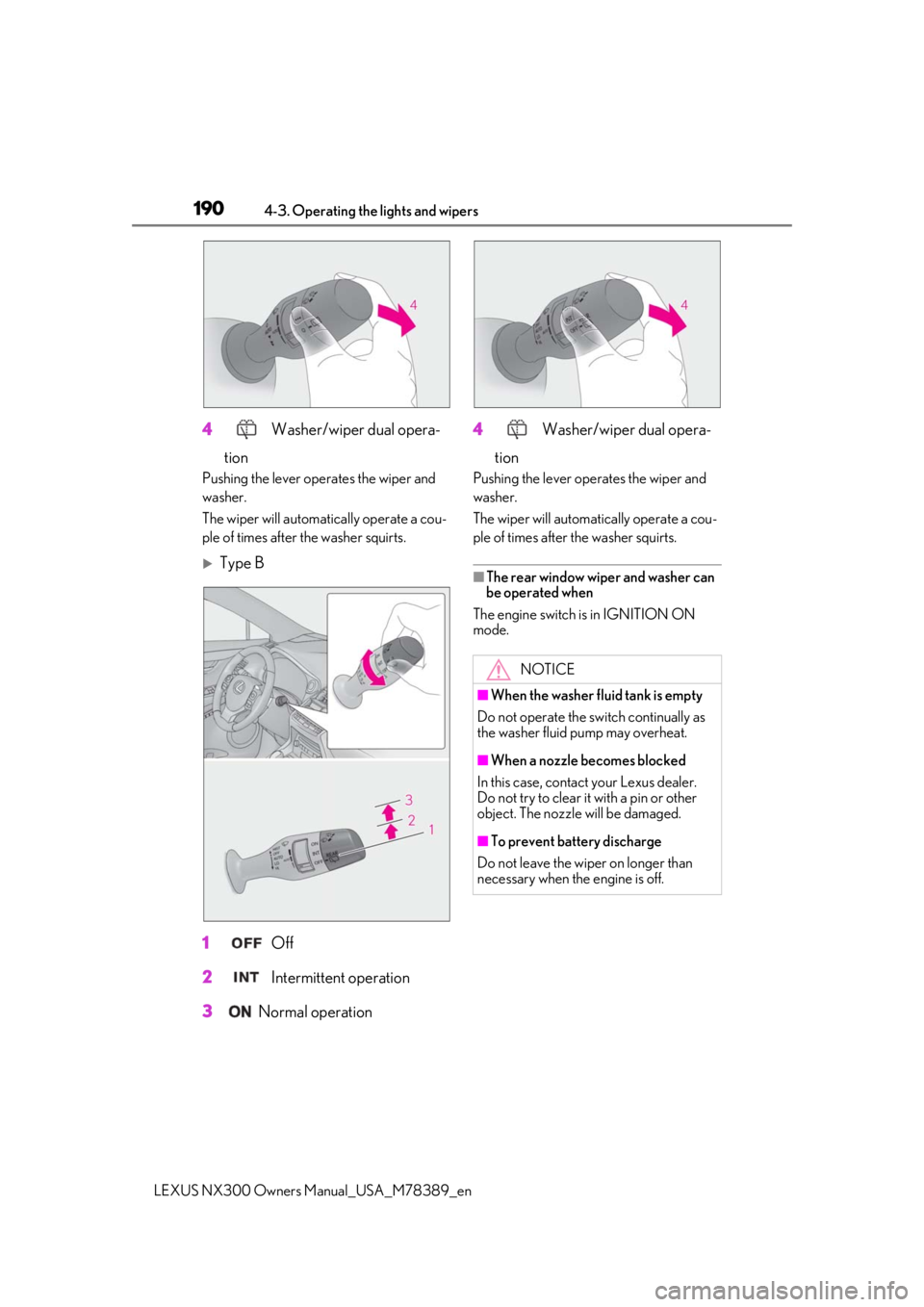
4 Washer/wiper dual opera-
tion
Pushing the lever operates the wiper and
washer.
The wiper will automatically operate a cou-
ple of times after the washer squirts.
Type B
1
Off
2
Intermittent operation
3
Normal operation 4
Washer/wiper dual opera-
tion
Pushing the lever oper ates the wiper and
washer.
The wiper will automatically operate a cou-
ple of times after the washer squirts.
■The rear window wiper and washer can
be operated when
The engine switch is in IGNITION ON
mode.
NOTICE
■When the washer fluid tank is empty
Do not operate the switch continually as
the washer fluid pump may overheat.
■When a nozzle becomes blocked
In this case, contact your Lexus dealer.
Do not try to clear it with a pin or other
object. The nozzle will be damaged.
■To prevent battery discharge
Do not leave the wiper on longer than
necessary when the engine is off.
Page 193 of 468

1934-5. Using the driving support systems
LEXUS NX300 Owners Manual_USA_M78389_en
4
Driving
4-5.Using the driving support systems
■PCS (Pre-Collision System)
P.199
■LTA (Lane Tracing Assist)
P.206
■LDA (Lane Departure Alert with
steering control)
P.215
■Automatic High Beam
P.181
■RSA (Road Sign Assist)
P.223
■Dynamic radar cruise control with
full-speed range
P.225 Two types of sensors, located behind
the front grille and windshield, detect
information necessary to operate the
drive assist systems.
Radar sensor
Front camera
Lexus Safety System+ 2.0
The Lexus Safety System+ 2.0 con-
sists of the following drive assist sys-
tems and contributes to a safe and
comfortable driving experience:
Driving assist system
WARNING
■Lexus Safety System+ 2.0
The Lexus Safety System+ 2.0 is
designed to operate under the assump-
tion that the driver w ill drive safely, and is
designed to help reduce the impact to
the occupants and the vehicle in the case
of a collision or assist the driver in normal
driving conditions.
As there is a limit to the degree of recog-
nition accuracy and control performance
that this system can provide, do not
overly rely on this system. The driver is
always responsible for paying attention
to the vehicle’s surroundings and driving
safely.
Sensors
WARNING
■To avoid malfunction of the radar sen-
sor
Observe the following precautions.
Otherwise, the radar sensor may not
operate properly, possibly leading to an
accident resulting in death or serious
injury.
A
B
Page 197 of 468

1974-5. Using the driving support systems
LEXUS NX300 Owners Manual_USA_M78389_en
4
Driving
■If a warning message is displayed on the multi-information display
A system may be temporarily unavailable or there may be a malfunction in the system.
●In the following situations, perform the actions specified in the table. When the normal
operating conditions are detected, the message will disappear and the system will
become operational.
If the message does not disappea r, contact your Lexus dealer.
SituationActions
When the area around a sensor is covered
with dirt, moisture (fogged up, covered with
condensation, ice, etc. ), or other foreign
matterTo clean the part of the windshield in front of
the front camera, use the windshield wipers
or the windshield defogger of the air condi-
tioning system ( P.280).
Page 198 of 468
1984-5. Using the driving support systems
LEXUS NX300 Owners Manual_USA_M78389_en
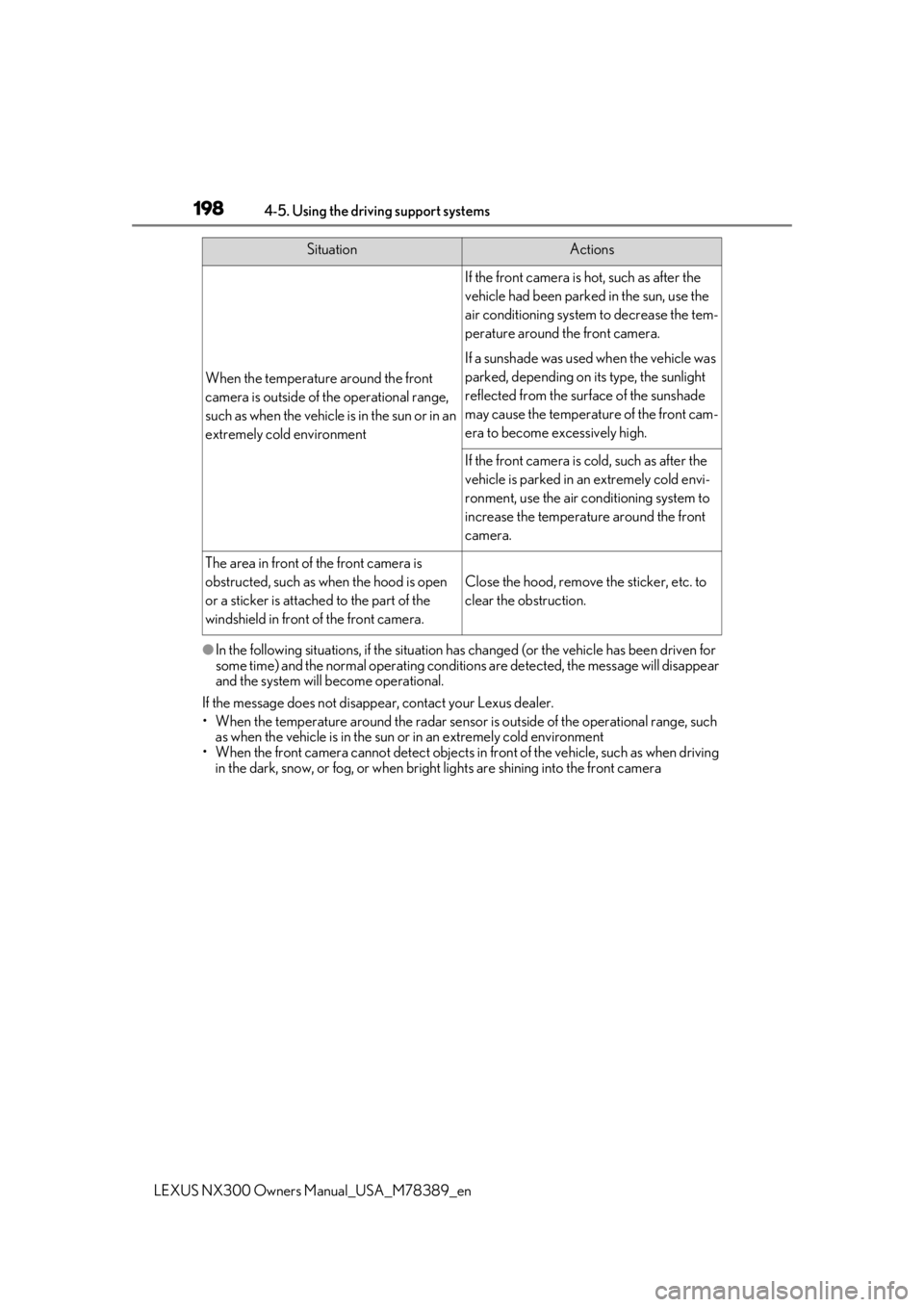
●In the following situations, if the situation has changed (or the vehicle has been driven for
some time) and the normal operating conditio ns are detected, the message will disappear
and the system will become operational.
If the message does not disappea r, contact your Lexus dealer.
• When the temperature around the radar sensor is outside of the operational range, such as when the vehicle is in the sun or in an extremely cold environment
• When the front camera cannot detect objects in front of the vehicle, such as when driving
in the dark, snow, or fog, or when brig ht lights are shining into the front camera
When the temperature around the front
camera is outside of th e operational range,
such as when the vehicle is in the sun or in an
extremely cold environment
If the front camera is hot, such as after the
vehicle had been parked in the sun, use the
air conditioning system to decrease the tem-
perature around the front camera.
If a sunshade was used when the vehicle was
parked, depending on its type, the sunlight
reflected from the surface of the sunshade
may cause the temperature of the front cam-
era to become excessively high.
If the front camera is cold, such as after the
vehicle is parked in an extremely cold envi-
ronment, use the air conditioning system to
increase the temperature around the front
camera.
The area in front of the front camera is
obstructed, such as when the hood is open
or a sticker is attached to the part of the
windshield in front of the front camera.
Close the hood, remove the sticker, etc. to
clear the obstruction.
SituationActions
Page 200 of 468

2004-5. Using the driving support systems
LEXUS NX300 Owners Manual_USA_M78389_en
WARNING
■Limitations of the pre-collision system
●The driver is solely responsible for safe
driving. Always drive safely, taking
care to observe your surroundings.
Do not use the pre-collision system
instead of normal braking operations
under any circumstances. This system
will not prevent collisions or lessen col-
lision damage or injury in every situa-
tion. Do not overly rely on this system.
Failure to do so may lead to an acci-
dent, resulting in death or serious
injury.
●Although this system is designed to
help avoid a collision or help reduce
the impact of the collision, its effective-
ness may change according to various
conditions, therefore the system may
not always be able to achieve the same
level of performance.
Read the following conditions care-
fully. Do not overly rely on this system
and always drive carefully.
• Conditions under which the system may operate even if there is no possi-
bility of a collision: P.203
• Conditions under which the system may not operate properly: P.204
●Do not attempt to test the operation of
the pre-collision system yourself.
Depending on the objects used for
testing (dummies, cardboard objects
imitating detectable objects, etc.), the
system may not operate properly, pos-
sibly leading to an accident.
■Pre-collision braking
●When the pre-collision braking func-
tion is operating, a large amount of
braking force will be applied.
●If the vehicle is stopped by the opera-
tion of the pre-collision braking func-
tion, the pre-collision braking function
operation will be canceled after
approximately 2 seco nds. Depress the
brake pedal as necessary.
●The pre-collision braking function may
not operate if certain operations are
performed by the driver. If the acceler-
ator pedal is being depressed strongly
or the steering wheel is being turned,
the system may determine that the
driver is taking evasive action and pos-
sibly prevent the pre-collision braking
function from operating.
●In some situations, while the pre-colli-
sion braking function is operating,
operation of the function may be can-
celed if the accelerator pedal is
depressed strongly or the steering
wheel is turned and the system deter-
mines that the driver is taking evasive
action.
●If the brake pedal is being depressed,
the system may determine that the
driver is taking evasive action and pos-
sibly delay the operat ion timing of the
pre-collision braking function.
■When to disable the pre-collision sys-
tem
In the following situations, disable the
system, as it may not operate properly,
possibly leading to an accident resulting
in death or serious injury:
●When the vehicle is being towed
●When your vehicle is towing another
vehicle
●When transporting the vehicle via
truck, boat, train or similar means of
transportation
●When the vehicle is raised on a lift with
the engine running and the tires are
allowed to rotate freely
●When inspecting the vehicle using a
drum tester such as a chassis dyna-
mometer or speedmeter tester, or
when using an on vehicle wheel bal-
ancer
●When a strong impact is applied to the
front bumper or front grille, due to an
accident or other reasons
Page 202 of 468
2024-5. Using the driving support systems
LEXUS NX300 Owners Manual_USA_M78389_en
■Operational conditions
The pre-collision system is enabled and the system determines that the possibility of a frontal
collision with a detect ed object is high.
Each function is operational at the following speed
●Pre-collision warning
●Pre-collision brake assist
●Pre-collision braking
The system may not operate in the following situations:
●If a battery terminal has been disconnected and reconnected and then the vehicle has not
been driven for a certain amount of time
●If the shift lever is in R
●When the VSC OFF indicator is illuminated (only the pre-collision warning function will
be operational)
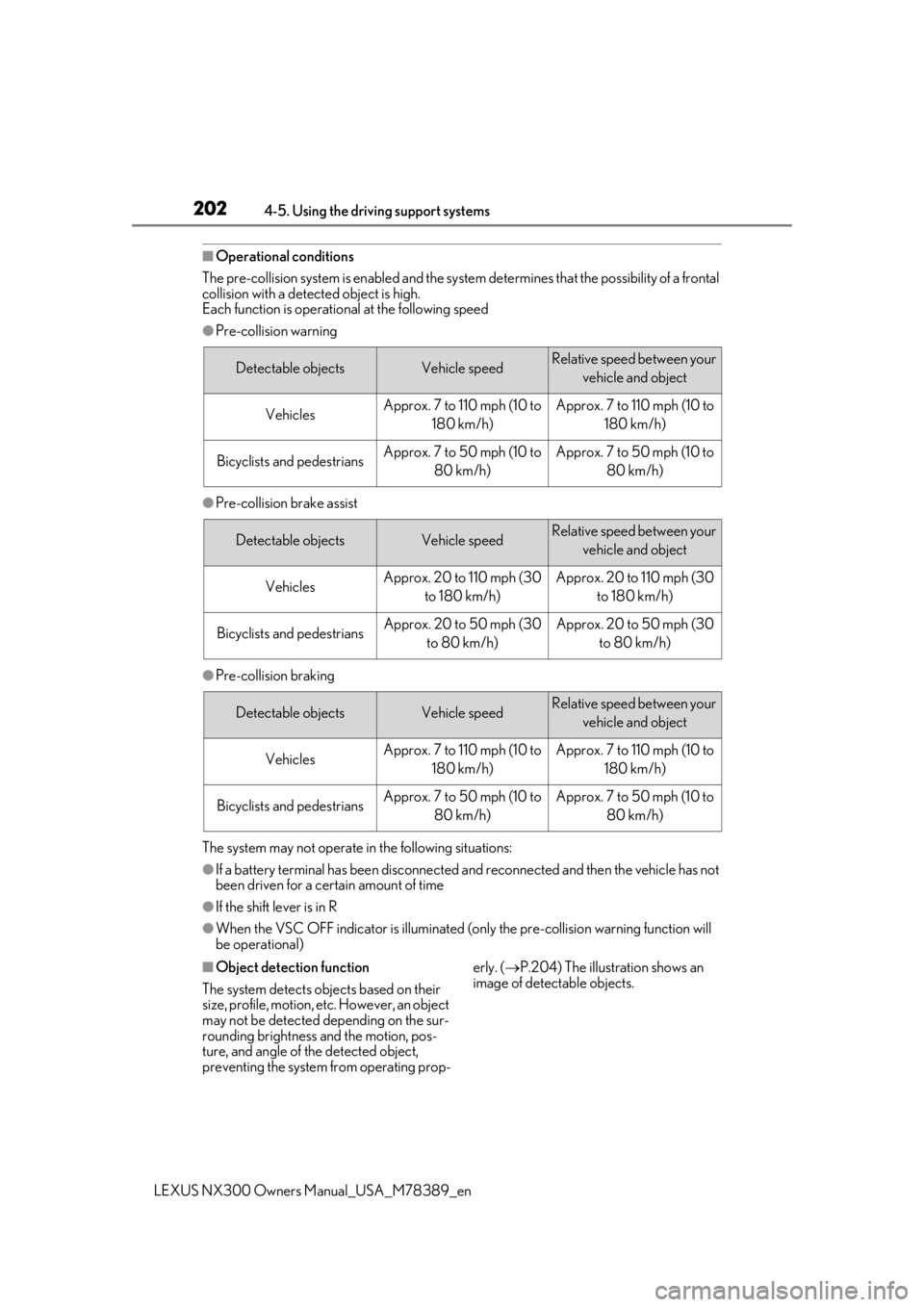
■Object detection function
The system detects ob jects based on their
size, profile, motion, etc. However, an object
may not be detected depending on the sur-
rounding brightness and the motion, pos-
ture, and angle of the detected object,
preventing the system from operating prop- erly. (
P.204) The illustration shows an
image of detectable objects.
Detectable objectsVehicle speedRelative speed between your
vehicle and object
VehiclesApprox. 7 to 110 mph (10 to 180 km/h)Approx. 7 to 110 mph (10 to 180 km/h)
Bicyclists and pedestriansApprox. 7 to 50 mph (10 to 80 km/h)Approx. 7 to 50 mph (10 to 80 km/h)
Detectable objectsVehicle speedRelative speed between your vehicle and object
VehiclesApprox. 20 to 110 mph (30 to 180 km/h)Approx. 20 to 110 mph (30 to 180 km/h)
Bicyclists and pedestriansApprox. 20 to 50 mph (30 to 80 km/h)Approx. 20 to 50 mph (30 to 80 km/h)
Detectable objectsVehicle speedRelative speed between your vehicle and object
VehiclesApprox. 7 to 110 mph (10 to 180 km/h)Approx. 7 to 110 mph (10 to 180 km/h)
Bicyclists and pedestriansApprox. 7 to 50 mph (10 to 80 km/h)Approx. 7 to 50 mph (10 to 80 km/h)