navigation system LEXUS NX300h 2015 User Guide
[x] Cancel search | Manufacturer: LEXUS, Model Year: 2015, Model line: NX300h, Model: LEXUS NX300h 2015Pages: 681, PDF Size: 9.14 MB
Page 114 of 681
114 2. Instrument cluster
NX300h_U_OM78007U ■
Trip information
Navigation system screen
Press the “MENU” button on the Remote Touch, then select “Info” on the
“Menu” screen, and then select “Fuel Consumption”. If the “Energy Monitor” or “Past Record” screen is displayed, select “Trip Informa-
tion”.
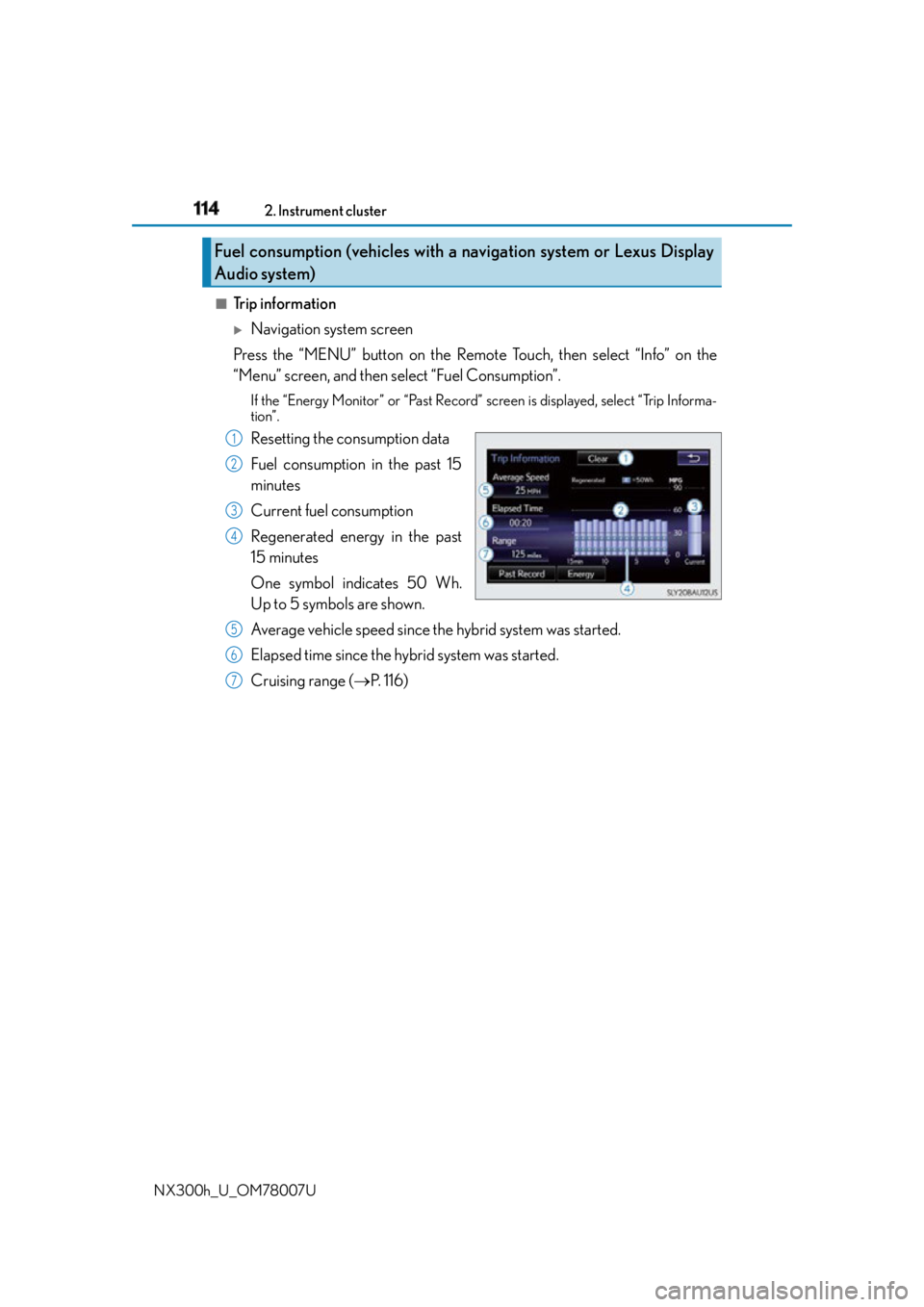
Resetting the consumption data
Fuel consumption in the past 15
minutes
Current fuel consumption
Regenerated energy in the past
15 minutes
One symbol indicates 50 Wh.
Up to 5 symbols are shown.
Average vehicle speed since the hybrid system was started.
Elapsed time since the hybrid system was started.
Cruising range ( P. 1 1 6 )Fuel consumption (vehicles with a navigation system or Lexus Display
Audio system) 1
2
3
4
5
6
7
Page 115 of 681
1152. Instrument cluster
2
Instrument cluster
NX300h_U_OM78007U
Lexus Display Audio screen
Press the “MENU” button on the Lexus Display Audio controller, then select
“Info” on the “Menu” screen, and then select “Fuel Consumption”.If the “Trip Information” screen does not appear, move the controller to the right
and select “Trip Information”.
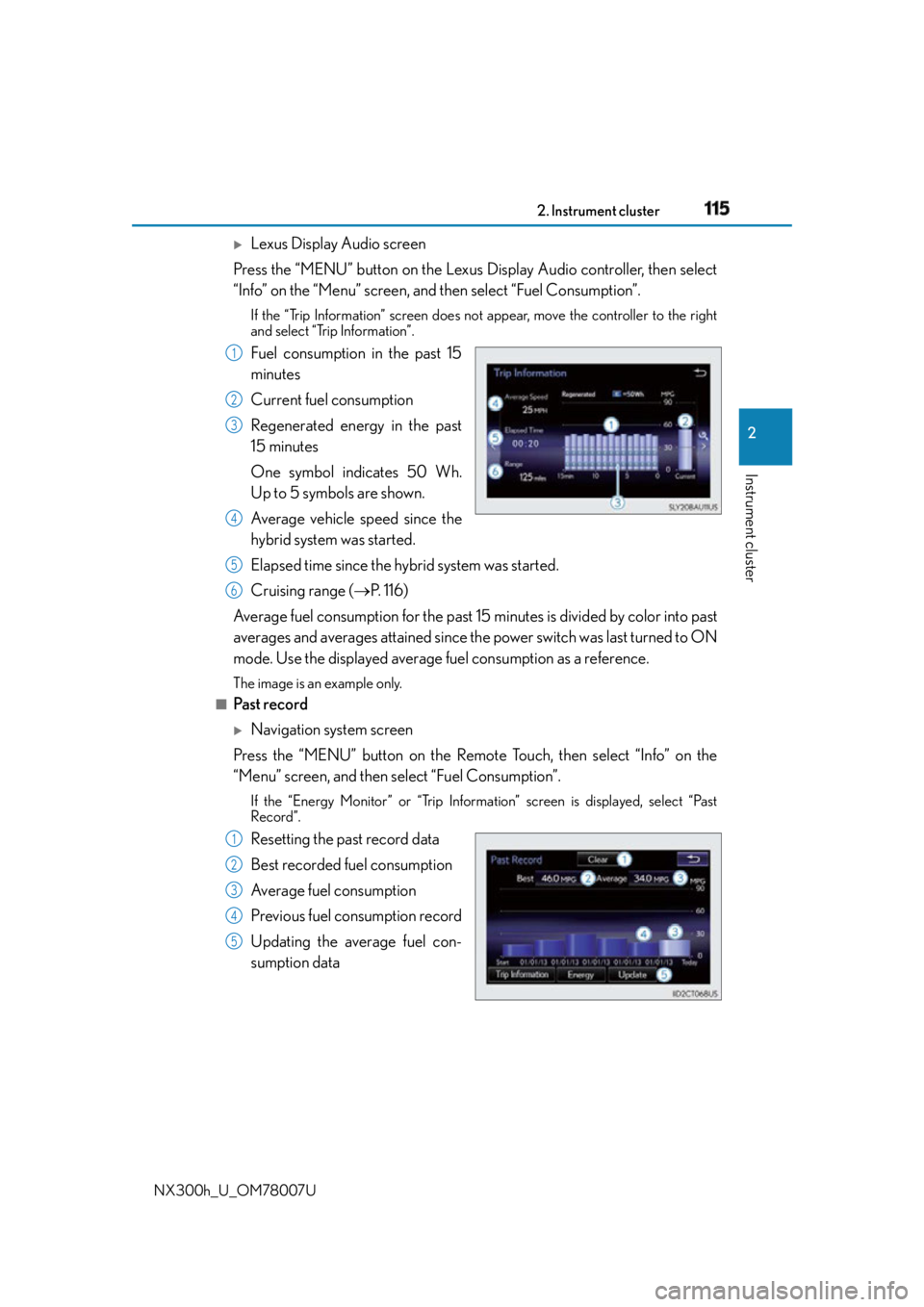
Fuel consumption in the past 15
minutes
Current fuel consumption
Regenerated energy in the past
15 minutes
One symbol indicates 50 Wh.
Up to 5 symbols are shown.
Average vehicle speed since the
hybrid system was started.
Elapsed time since the hybrid system was started.
Cruising range ( P. 1 1 6 )
Average fuel consumption fo r the past 15 minutes is divided by color into past
averages and averages attained since th e power switch was last turned to ON
mode. Use the displayed average fuel consumption as a reference. The image is an example only.■
Past record
Navigation system screen
Press the “MENU” button on the Remote Touch, then select “Info” on the
“Menu” screen, and then select “Fuel Consumption”. If the “Energy Monitor” or “Trip Information” screen is displayed, select “Past
Record”.
Resetting the past record data
Best recorded fuel consumption
Average fuel consumption
Previous fuel consumption record
Updating the average fuel con-
sumption data 1
2
3
4
5
6
1
2
3
4
5
Page 116 of 681
116 2. Instrument cluster
NX300h_U_OM78007U
Lexus Display Audio screen
Press the “MENU” button on the Lexus Display Audio controller, then select
“Info” on the “Menu” screen, and then select “Fuel Consumption”.If the “Past Record” screen does not appe ar, move the controller to the right and
select “Past Record”.
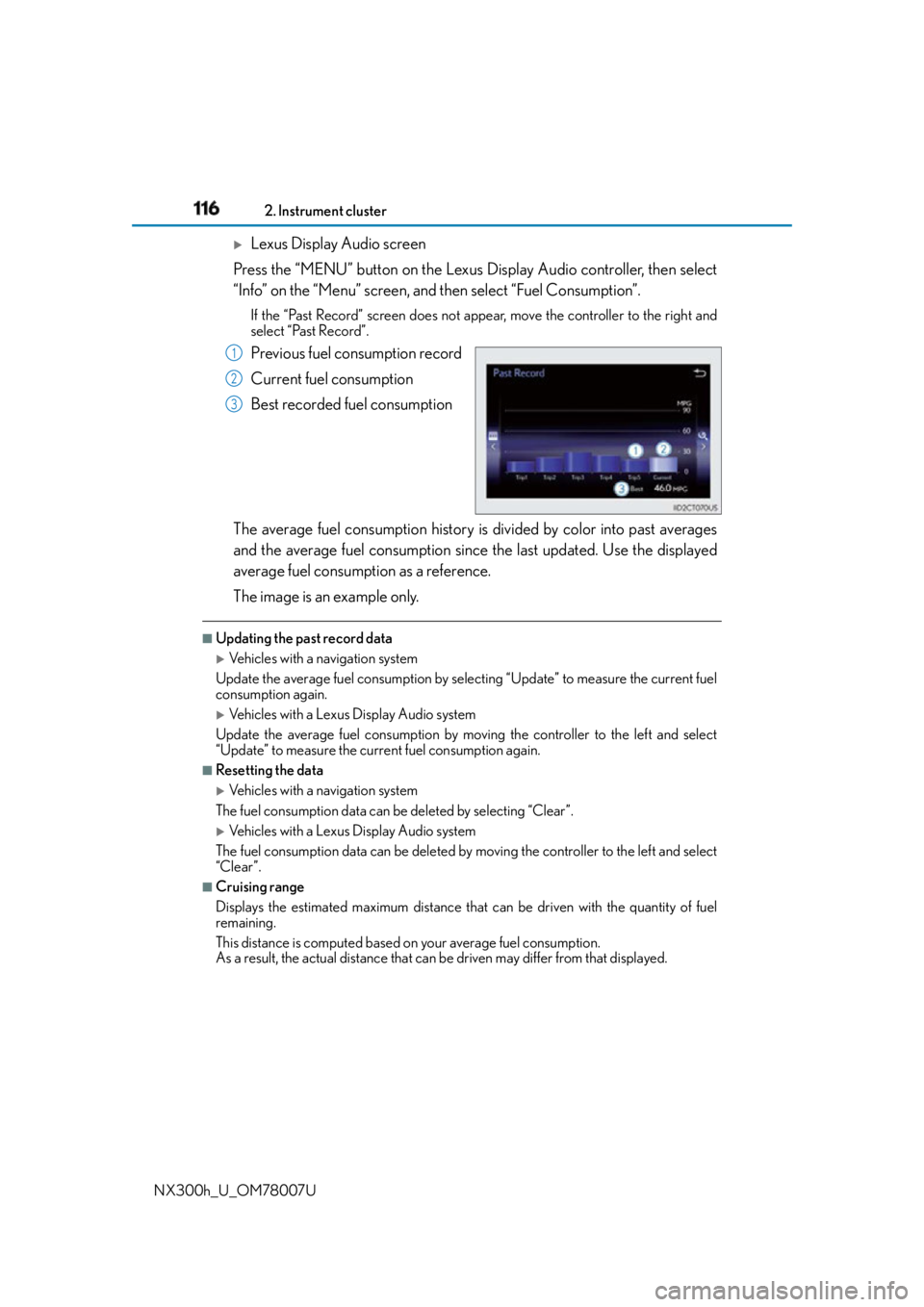
Previous fuel consumption record
Current fuel consumption
Best recorded fuel consumption
The average fuel consumption history is divided by color into past averages
and the average fuel consumption since the last updated. Use the displayed
average fuel consumption as a reference.
The image is an example only. ■
Updating the past record data
Vehicles with a navigation system
Update the average fuel consumption by selecting “Update” to measure the current fuel
consumption again.
Vehicles with a Lexus Display Audio system
Update the average fuel consumption by moving the controller to the left and select
“Update” to measure the current fuel consumption again. ■
Resetting the data
Vehicles with a navigation system
The fuel consumption data can be deleted by selecting “Clear”.
Vehicles with a Lexus Display Audio system
The fuel consumption data can be deleted by moving the controller to the left and select
“Clear ”. ■
Cruising range
Displays the estimated maximum distance that can be driven with the quantity of fuel
remaining.
This distance is computed based on your average fuel consumption.
As a result, the actual distance that can be driven may differ from that displayed.1
2
3
Page 132 of 681
132 3-2. Opening, closing and locking the doors
NX300h_U_OM78007U ON (operate) and OFF (stop) can be swit ched between by the “settings display”
( P. 102) of the multi-information display.
Pressing or of the meter control switches ( P. 103), selects .
ON and OFF will be switched over with presses of on the meter control
switch.
When OFF is selected and the operations of the power back door is made to
stop, select and turn ON from the “settings display” of multi-informa-
tion display, and unless it is put in a sy stem operating state, the operation of the
power back door will not return. (No re turn in the power switch operation)
The open position of the powe r back door can be adjusted.
When setting with the switch
Stop the back door in the desirable position. ( P. 130, 131)
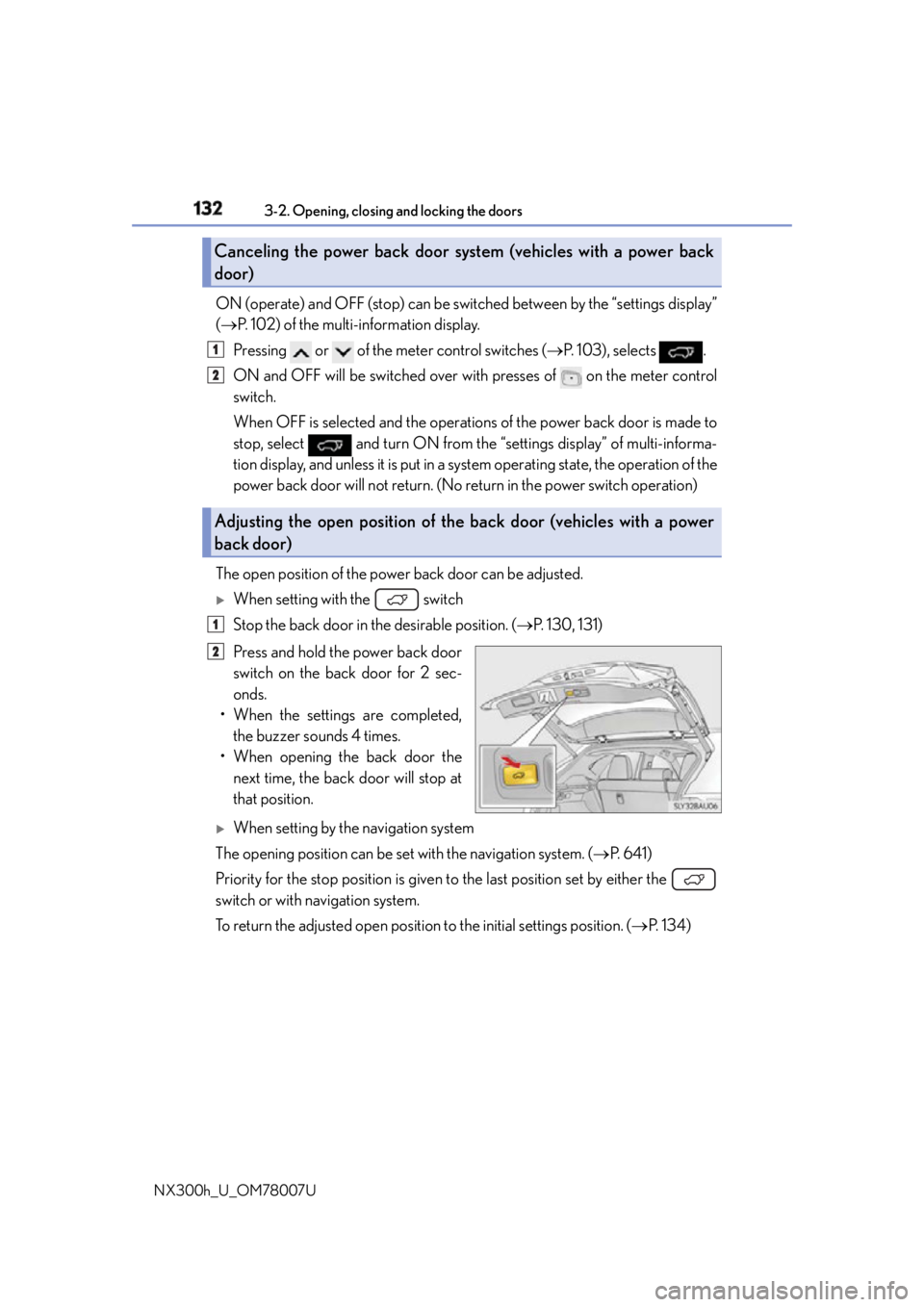
Press and hold the power back door
switch on the back door for 2 sec-
onds.
• When the settings are completed,
the buzzer sounds 4 times.
• When opening the back door the
next time, the back door will stop at
that position.
When setting by the navigation system
The opening position can be set with the navigation system. ( P. 6 4 1 )
Priority for the stop position is given to the last position set by either the
switch or with navigation system.
To return the adjusted open position to the initial settings position. ( P. 1 3 4 )Canceling the power back door sy stem (vehicles with a power back
door)
Adjusting the open position of th e back door (vehicles with a power
back door) 1
2
1
2
Page 280 of 681
280 4-5. Using the driving support systems
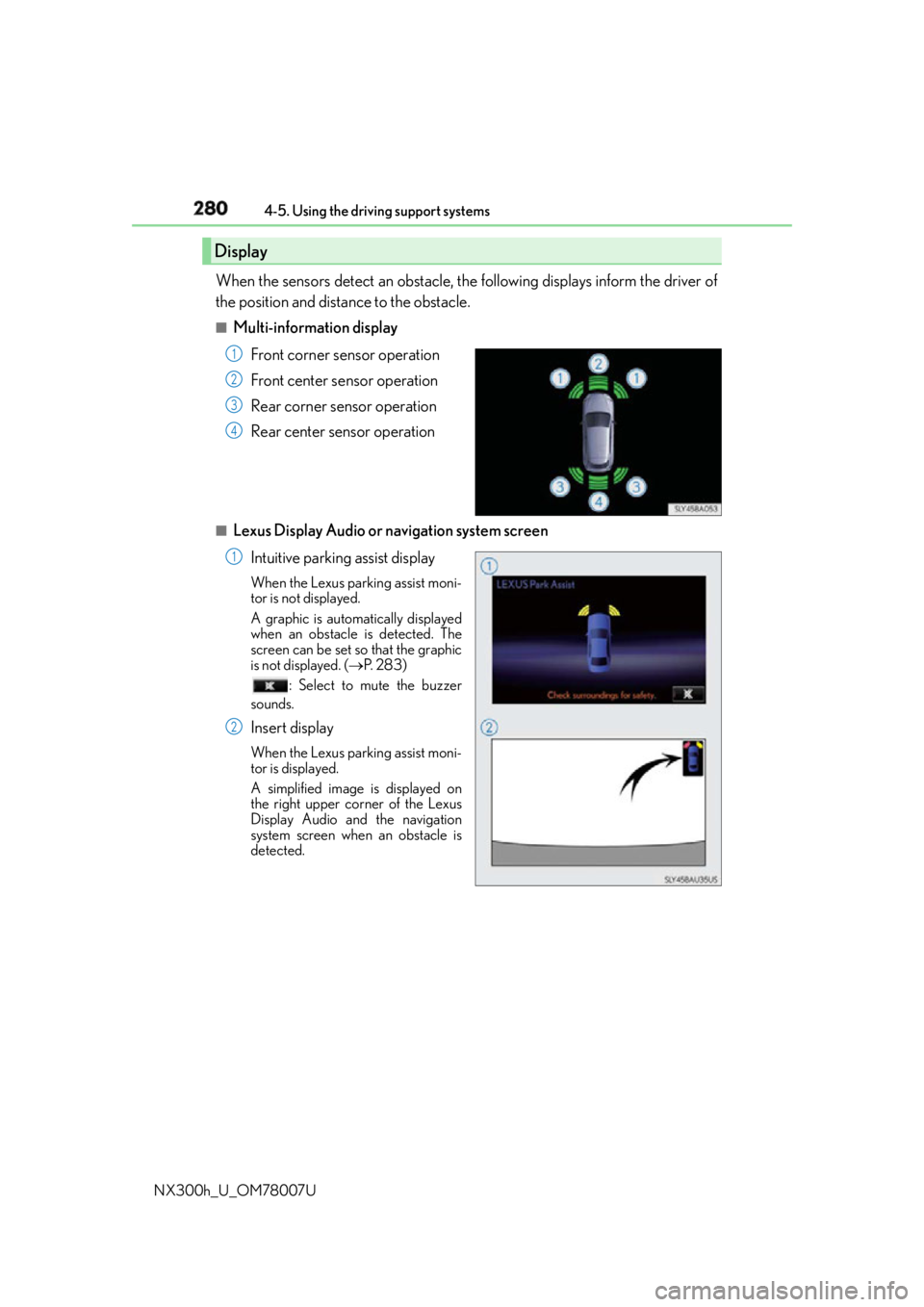
NX300h_U_OM78007U When the sensors detect an obstacle, the following displays inform the driver of
the position and distance to the obstacle. ■
Multi-information display
Front corner sensor operation
Front center sensor operation
Rear corner sensor operation
Rear center sensor operation■
Lexus Display Audio or navigation system screen
Intuitive parking assist displayWhen the Lexus parking assist moni-
tor is not displayed.
A graphic is automatically displayed
when an obstacle is detected. The
screen can be set so that the graphic
is not displayed. ( P. 2 8 3 )
: Select to mute the buzzer
sounds.
Insert display When the Lexus parking assist moni-
tor is displayed.
A simplified image is displayed on
the right upper corner of the Lexus
Display Audio and the navigation
system screen when an obstacle is
detected.Display 1
2
3
4
1
2
Page 281 of 681
2814-5. Using the driving support systems
4
Driving
NX300h_U_OM78007U ■
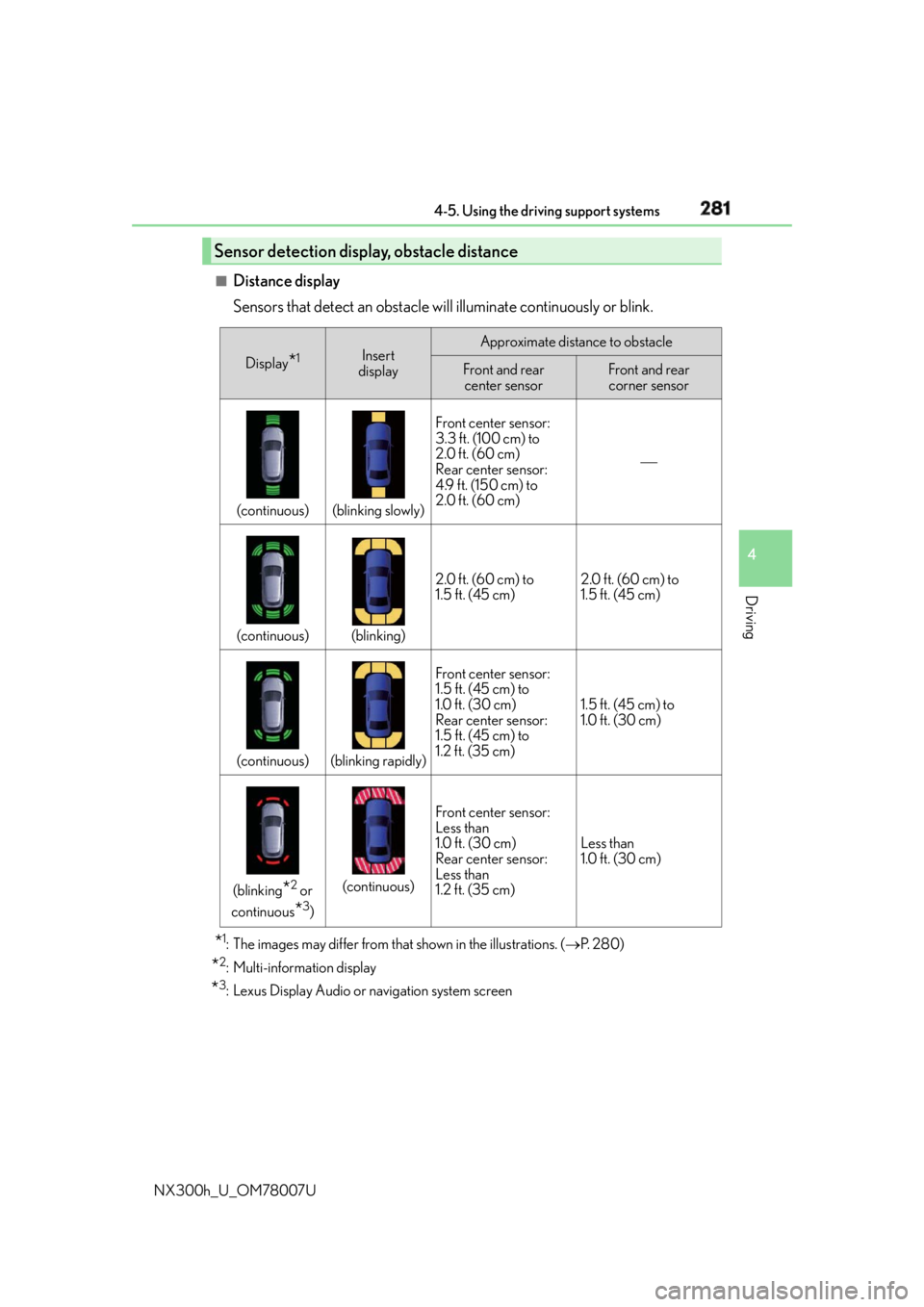
Distance display
Sensors that detect an obstacle w ill illuminate continuously or blink.
* 1
: The images may differ from that shown in the illustrations. ( P. 2 8 0 )
* 2
: Multi-information display
* 3
: Lexus Display Audio or navigation system screenSensor detection display, obstacle distance Display
* 1
Insert
display Approximate distance to obstacle
Front and rear
center sensor Front and rear
corner sensor
(continuous) (blinking slowly) Front center sensor:
3.3 ft. (100 cm) to
2.0 ft. (60 cm)
Rear center sensor:
4.9 ft. (150 cm) to
2.0 ft. (60 cm)
(continuous) (blinking) 2.0 ft. (60 cm) to
1.5 ft. (45 cm) 2.0 ft. (60 cm) to
1.5 ft. (45 cm)
(continuous) (blinking rapidly) Front center sensor:
1.5 ft. (45 cm) to
1.0 ft. (30 cm)
Rear center sensor:
1.5 ft. (45 cm) to
1.2 ft. (35 cm) 1.5 ft. (45 cm) to
1.0 ft. (30 cm)
(blinking
* 2
or
continuous
* 3
) (continuous) Front center sensor:
Less than
1.0 ft. (30 cm)
Rear center sensor:
Less than
1.2 ft. (35 cm) Less than
1.0 ft. (30 cm)
Page 283 of 681
2834-5. Using the driving support systems
4
Driving
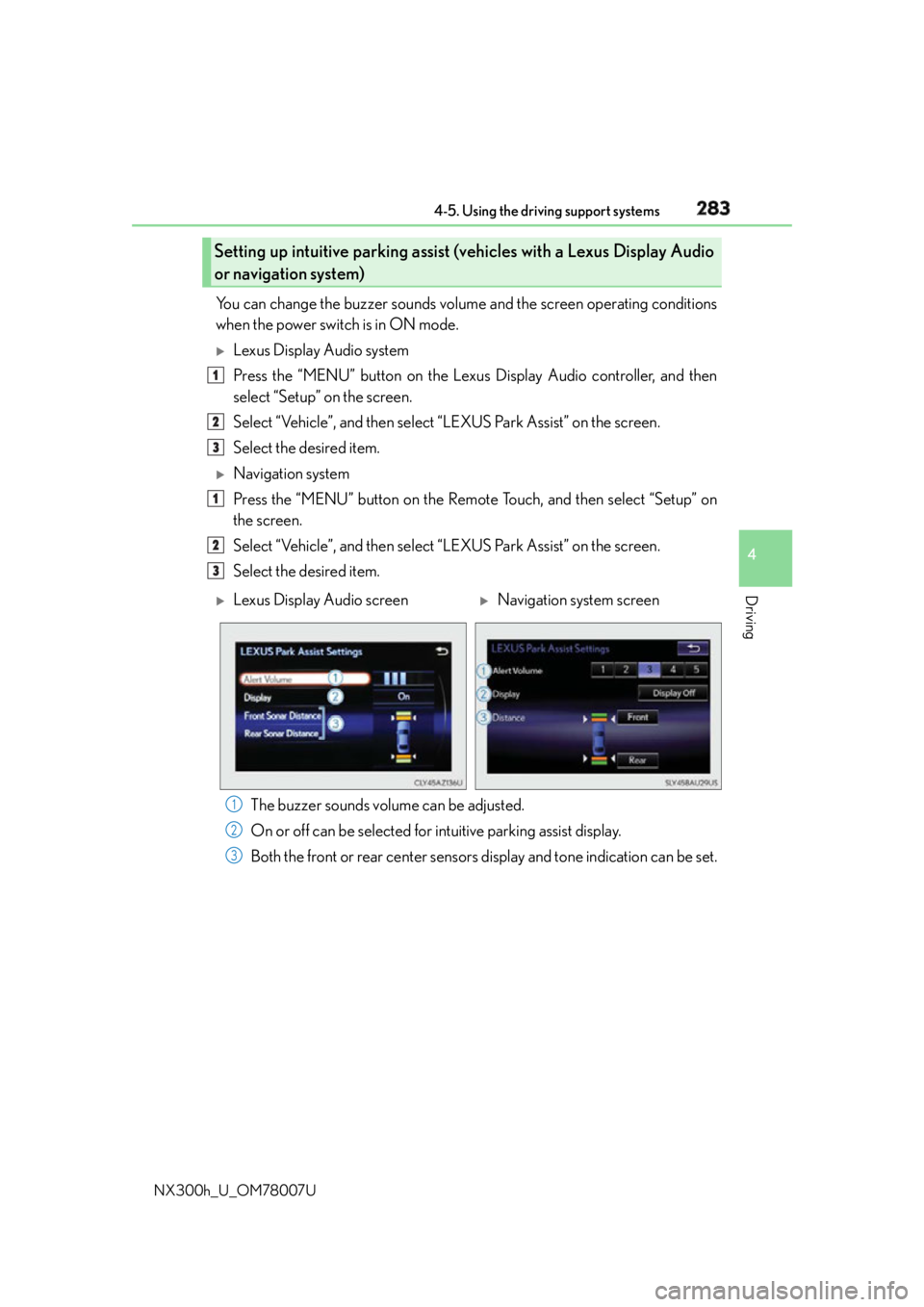
NX300h_U_OM78007U You can change the buzzer sounds volu me and the screen operating conditions
when the power switch is in ON mode.
Lexus Display Audio system
Press the “MENU” button on the Lexus Display Audio controller, and then
select “Setup” on the screen.
Select “Vehicle”, and th en select “LEXUS Park Assist” on the screen.
Select the desired item.
Navigation system
Press the “MENU” button on the Remote Touch, and then select “Setup” on
the screen.
Select “Vehicle”, and th en select “LEXUS Park Assist” on the screen.
Select the desired item.
The buzzer sounds volume can be adjusted.
On or off can be selected for intuitive parking assist display.
Both the front or rear center sensors display and tone indication can be set.Setting up intuitive parking assist (v ehicles with a Lexus Display Audio
or navigation system) 1
2
3
1
2
3
Lexus Display Audio screen
Navigation system screen
1
2
3
Page 287 of 681
2874-5. Using the driving support systems
4
Driving
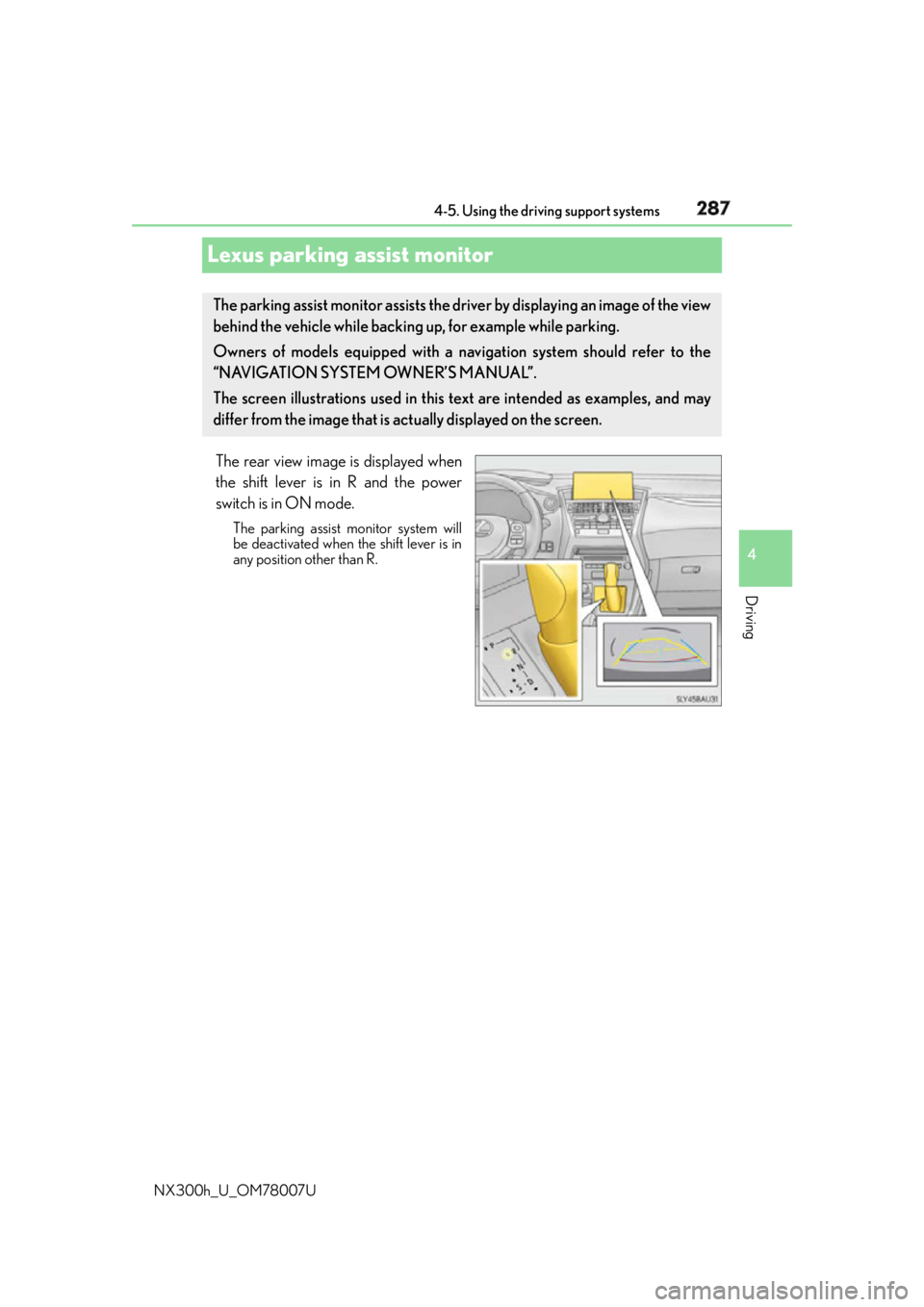
NX300h_U_OM78007ULexus parking assist monitor The rear view image is displayed when
the shift lever is in R and the power
switch is in ON mode. The parking assist monitor system will
be deactivated when the shift lever is in
any position other than R.The parking assist monitor assists the driv er by displaying an image of the view
behind the vehicle while backing up, for example while parking.
Owners of models equipped with a navi gation system should refer to the
“NAVIGATION SYSTEM OWNER’S MANUAL”.
The screen illustrations used in this text are intended as examples, and may
differ from the image that is ac tually displayed on the screen.
Page 342 of 681
342 5-1. Basic Operations
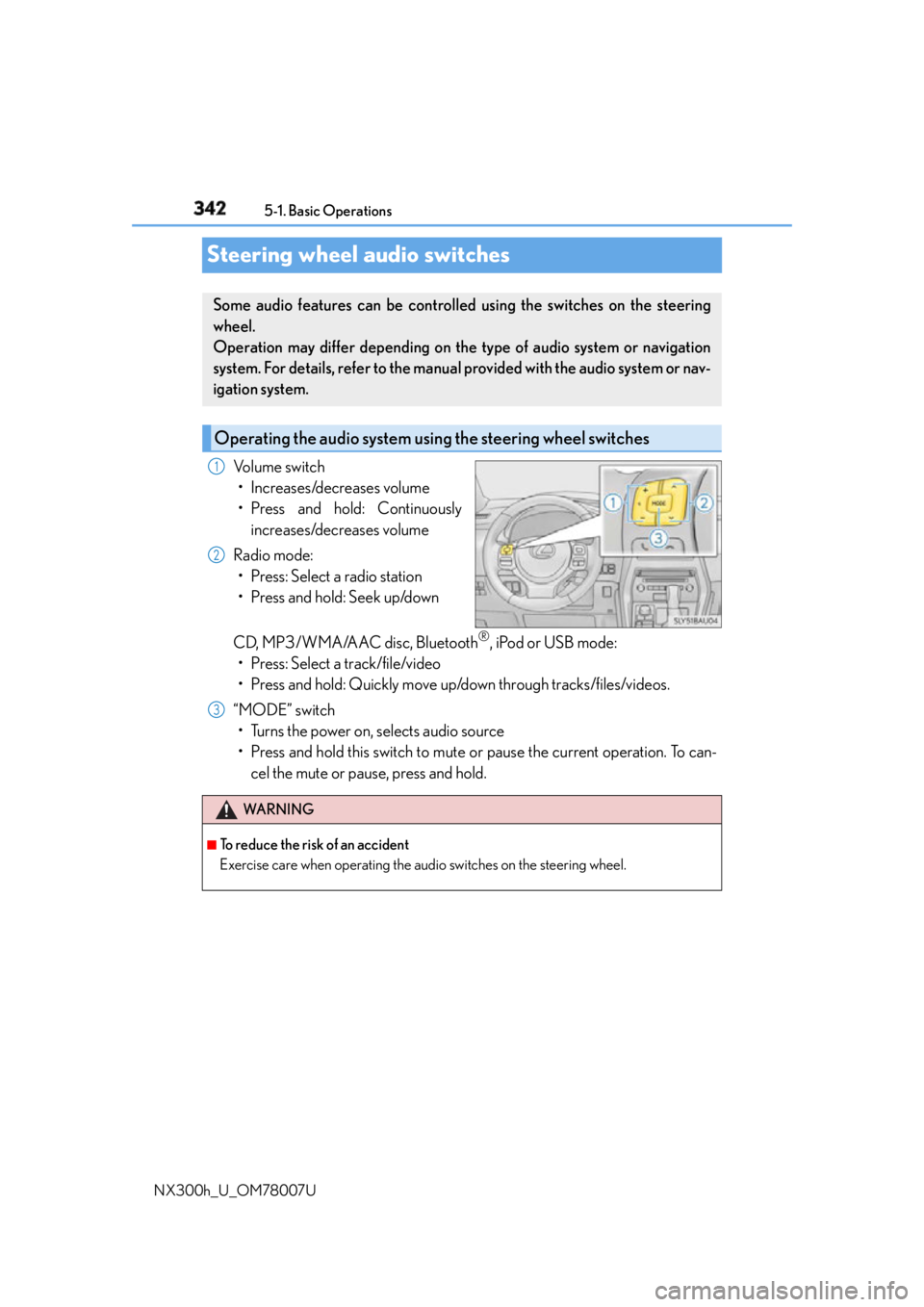
NX300h_U_OM78007USteering wheel audio switches Volume switch
• Increases/decreases volume
• Press and hold: Continuously
increases/decreases volume
Radio mode:
• Press: Select a radio station
• Press and hold: Seek up/down
CD, MP3/WMA/AAC disc, Bluetooth ®
, iPod or USB mode:
• Press: Select a track/file/video
• Press and hold: Quickly move up/down through tracks/files/videos.
“MODE” switch
• Turns the power on, selects audio source
• Press and hold this switch to mute or pause the current operation. To can-
cel the mute or pause, press and hold.Some audio features can be controlled using the switches on the steering
wheel.
Operation may differ depending on th e type of audio system or navigation
system. For details, refer to the manual provided with the audio system or nav-
igation system.
Operating the audio system us ing the steering wheel switches1
2
WA R N I N G ■
To reduce the risk of an accident
Exercise care when operating the audio switches on the steering wheel. 3
Page 430 of 681
430 6-1. Using the air conditioning system and defogger
NX300h_U_OM78007UAutomatic air conditioning system Air outlets and fan speed are automatica lly adjusted according to the temper-
ature setting.
Vehicles with a Lexus Display Audio sy stem: Press the “MENU” button on the
Lexus Display Audio controller, then select “Climate” to display the air condi-
tioning control screen.
For details on the Lexus Display Audio controller, refer to “Lexus Display
Audio controller” on P. 338.
Vehicles with a navigati on system: Press the “MENU” button on the Remote
Touch, then select “Climate” to display the air conditioning control screen.
For details on the Remote Touch, refer to the “NAVIGATION SYSTEM
OWNER’S MANUAL”.