power steering LEXUS NX300h 2015 Owner's Manual
[x] Cancel search | Manufacturer: LEXUS, Model Year: 2015, Model line: NX300h, Model: LEXUS NX300h 2015Pages: 681, PDF Size: 9.14 MB
Page 205 of 681
2054-2. Driving procedures
4
Driving
NX300h_U_OM78007U WA R N I N G ■
When starting the hybrid system
Always start the hybrid system while sittin g in the driver’s seat. Do not depress the
accelerator pedal while starting the hy brid system under any circumstances.
Doing so may cause an accident resu lting in death or serious injury.■
Caution while driving
If hybrid system failure occurs while the vehicle is moving, do not lock or open the
doors until the vehicle reaches a safe and comp lete stop. The steering lock function will
activate and this may lead to an accident, resulting in death or serious injury. ■
Stopping the hybrid system in an emergency
If you want to stop the hybrid system in an emergency while driving the vehicle, press
and hold the power switch for more than 2 se conds, or press it briefly 3 times or more
in succession. ( P. 5 5 7 )
However, do not touch the power switch whil e driving except in an emergency. Turning
the hybrid system off while driving will not cause loss of steering or braking control,
however, power assist to the steering will be lost. This will make it more difficult to steer
smoothly, so you should pull over and stop the vehicle as soon as it is safe to do so.
NOTICE ■
To prevent 12-volt battery discharge ●
Do not leave the power switch in ACCESSORY or ON mode for long periods of
time without the hybrid system on. ●
If “ACCESSORY” or “IGNITION ON” is disp layed on the multi-information display
while the hybrid system is not operating, the power switch is not off. Exit the vehicle
after turning the power switch off. ●
Do not stop the hybrid system when the shift lever is in a position other than P. If the
hybrid system is stopped in another shift lever position, the power switch will not be
turned off but instead be turned to ACCESSORY mode. If the vehicle is left in
ACCESSORY mode, 12-volt battery discharge may occur. ■
When starting the hybrid system
If the hybrid system becomes difficult to start, have your vehicle checked by your Lexus
dealer immediately. ■
Symptoms indicating a malfunction with the power switch
If the power switch seems to be operating so mewhat differently than usual, such as the
switch sticking slightly, there may be a malf unction. Contact your Lexus dealer immedi-
ately.
Page 288 of 681
288 4-5. Using the driving support systems
NX300h_U_OM78007U ■
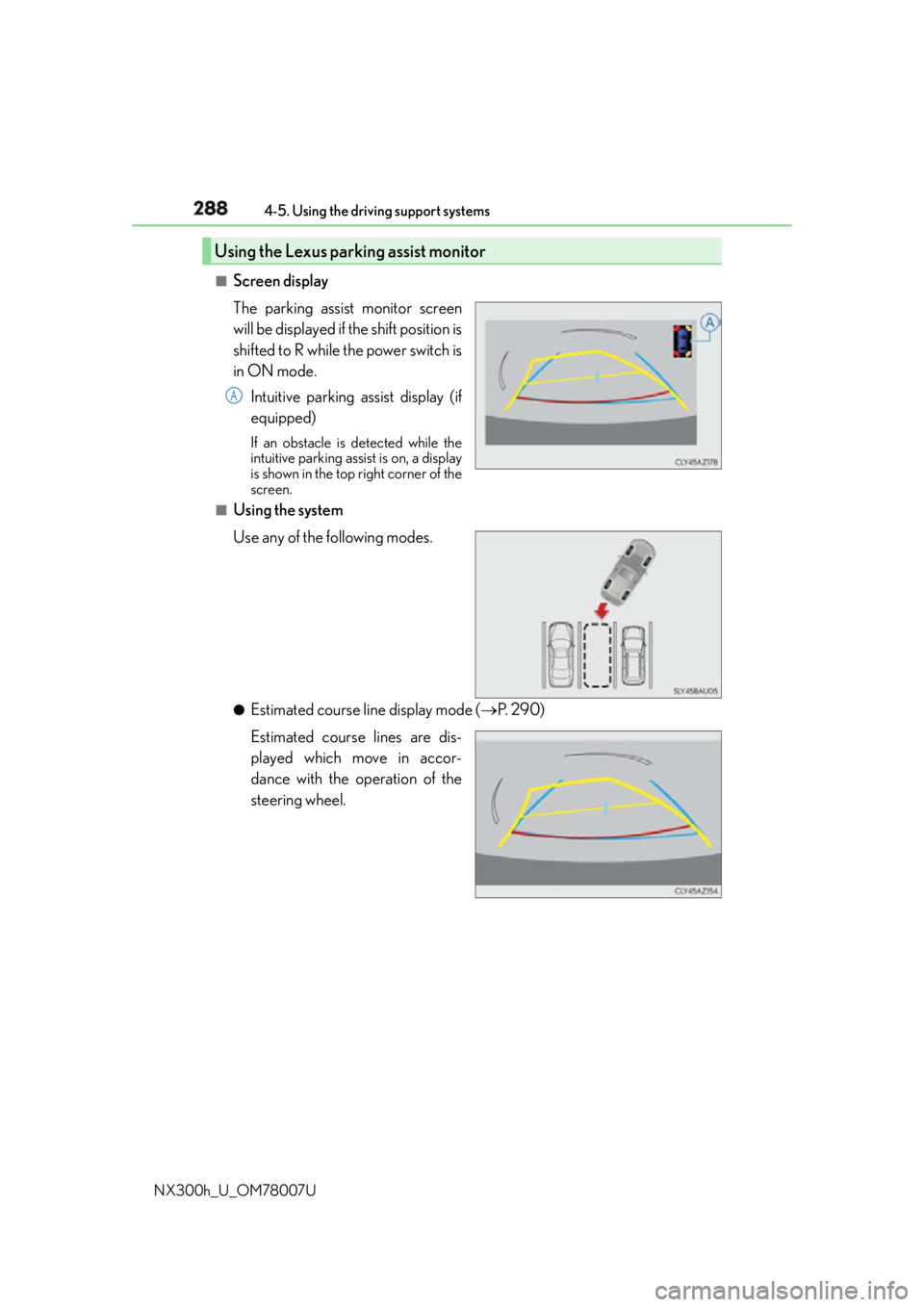
Screen display
The parking assist monitor screen
will be displayed if the shift position is
shifted to R while the power switch is
in ON mode.
Intuitive parking assist display (if
equipped) If an obstacle is detected while the
intuitive parking assist is on, a display
is shown in the top right corner of the
screen.■
Using the system
Use any of the following modes.
●
Estimated course line display mode ( P. 2 9 0 )
Estimated course lines are dis-
played which move in accor-
dance with the operation of the
steering wheel.Using the Lexus parking assist monitor A
Page 300 of 681
300 4-5. Using the driving support systems
NX300h_U_OM78007U The estimated course lines move even though the steering wheel is straight
There is a malfunction in the signals being
output by the steering sensor. Have the vehicle inspected by your Lexus
dealer.
Guide lines are not displayed
The back door is open. Close the back door.
If this does not resolve the symptom, have
the vehicle inspected by your Lexus
dealer.
The estimated course lines are not displayed
• The steering wheel has been moved
while the battery was being reinstalled.
• Battery power is low.
• The steering sensor has been rein-
stalled.
• There is a malfunction in the signals
being output by the steering sensor. Stop the vehicle, and turn the steering
wheel as far as it will go to the left and
right.
If this does not resolve the symptom, have
the vehicle inspected by your Lexus
dealer.Likely cause Solution
Page 305 of 681
3054-5. Using the driving support systems
4
Driving
NX300h_U_OM78007UDriving assist systems ◆ ECB (Electronically Controlled Brake System)
The electronically controlled system generates braking force corresponding
to the brake operation
◆ ABS (Anti-lock Brake System)
Helps to prevent wheel lock when the brakes are applied suddenly, or if the
brakes are applied while drivin g on a slippery road surface
◆ Brake assist
Generates an increased level of braking force after the brake pedal is
depressed when the system detects a panic stop situation
◆ VSC (Vehicle Stability Control)
Helps the driver to control skidding when swerving suddenly or turning on
slippery road surfaces
◆ Enhanced VSC (Enhanced Vehicle Stability Control)
Provides cooperative control of the ABS, TRAC, VSC and EPS.
Helps to maintain directional stability when swerving on slippery road sur-
faces by controlling steering performance.
◆ TRAC (Traction Control)
Helps to maintain drive power and prevent the drive wheels from spinning
when starting the vehicle or accelerating on slippery roads
◆ Hill-start assist control
Helps to prevent the vehicle from rolling backward when starting on an
incline.
◆ EPS (Electric Power Steering)
Employs an electric motor to reduce the amount of effort needed to turn the
steering wheelTo help enhance driving safety and performance, the following systems oper-
ate automatically in response to various driving situations. Be aware, however,
that these systems are supplementary and should not be relied upon too
heavily when operating the vehicle.
Page 307 of 681
3074-5. Using the driving support systems
4
Driving
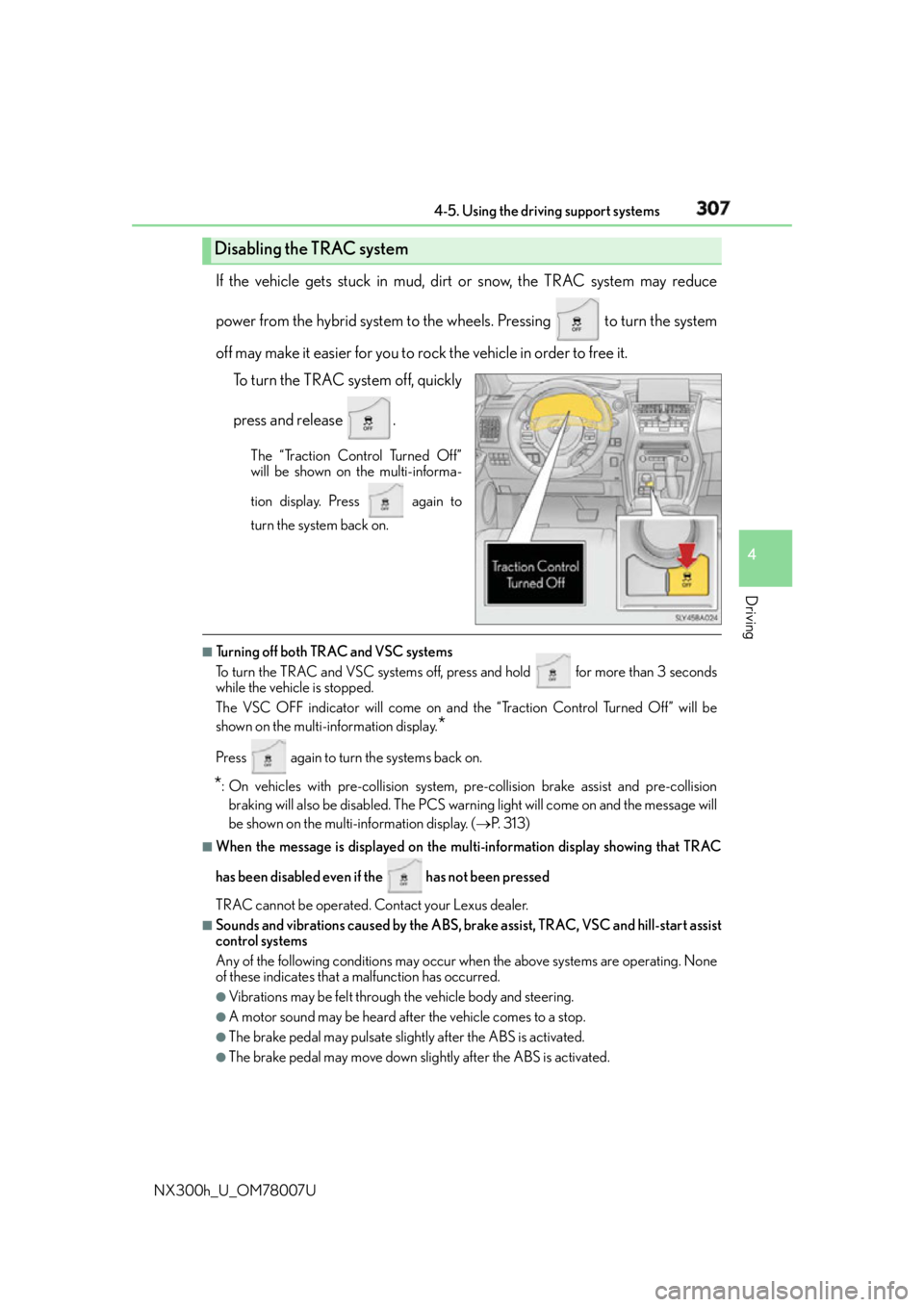
NX300h_U_OM78007U If the vehicle gets stuck in mud, dirt or snow, the TRAC system may reduce
power from the hybrid system to the wheels. Pressing to turn the system
off may make it easier for you to rock the vehicle in order to free it.
To turn the TRAC system off, quickly
press and release . The “Traction Control Turned Off”
will be shown on the multi-informa-
tion display. Press again to
turn the system back on.
■
Turning off both TRAC and VSC systems
To turn the TRAC and VSC systems off, press and hold for more than 3 seconds
while the vehicle is stopped.
The VSC OFF indicator will come on and th e “Traction Control Turned Off” will be
shown on the multi- information display.
*Press again to turn the systems back on.
* : On vehicles with pre-collision system, pre-collision brake assist and pre-collision
braking will also be disabled. The PCS warn ing light will come on and the message will
be shown on the multi-information display. ( P. 313) ■
When the message is displayed on the mu lti-information display showing that TRAC
has been disabled even if the has not been pressed
TRAC cannot be operated. Contact your Lexus dealer. ■
Sounds and vibrations caused by the ABS, brake assist, TRAC, VSC and hill-start assist
control systems
Any of the following conditions may occur when the above systems are operating. None
of these indicates that a malfunction has occurred. ●
Vibrations may be felt through the vehicle body and steering.●
A motor sound may be heard after the vehicle comes to a stop. ●
The brake pedal may pulsate slight ly after the ABS is activated.●
The brake pedal may move down slig htly after the ABS is activated.Disabling the TRAC system
Page 308 of 681

308 4-5. Using the driving support systems
NX300h_U_OM78007U ■
ECB operating sound
ECB operating sound may be hear d in the following cases, but it does not indicate that a
malfunction has occurred. ●
Operating sound heard from the engine compartment when the brake pedal is oper-
ated. ●
Motor sound of the brake system heard from the front part of the vehicle when the
driver’s door is opened. ●
Operating sound heard from the engine compartment when 1 or 2 minutes passed
after the stop of the hybrid system. ■
EPS operation sound
When the steering wheel is operated, a motor sound (whirring sound) may be heard.
This does not indicate a malfunction. ■
Reduced effectiveness of the EPS system
The effectiveness of the EPS system is reduced to prevent the system from overheating
when there is frequent steering input over an extended period of time. The steering
wheel may feel heavy as a result. Should this occur, refrain from excessive steering input
or stop the vehicle and turn the hybrid system off. The EPS system should return to nor-
mal within 10 minutes. ■
Automatic reactivation of TRAC and VSC systems
After turning the TRAC and VSC systems off, the systems will be automatically
re-enabled in the following situations: ●
When the power switch is turned off ●
If only the TRAC system is turned off, the TRAC will turn on when vehicle speed
increases
If both the TRAC and VSC systems are turn ed off, automatic re-enabling will not
occur when vehicl e speed increases.■
Operating conditions of hill-start assist control
When the following four conditions are met, the hill-start assist control will operate:●
The shift lever is in a position other than P or N (when starting off forward/backward on
an upward incline). ●
The vehicle is stopped. ●
The accelerator pedal is not depressed. ●
The parking brake is not engaged. ■
Automatic system cancelation of hill-start assist control
The hill-start assist control will turn off in any of the following situations: ●
The shift lever is moved to P or N. ●
The accelerator pedal is depressed. ●
The parking brake is engaged. ●
Approximately 2 seconds elapse after the brake pedal is released.
Page 342 of 681
342 5-1. Basic Operations
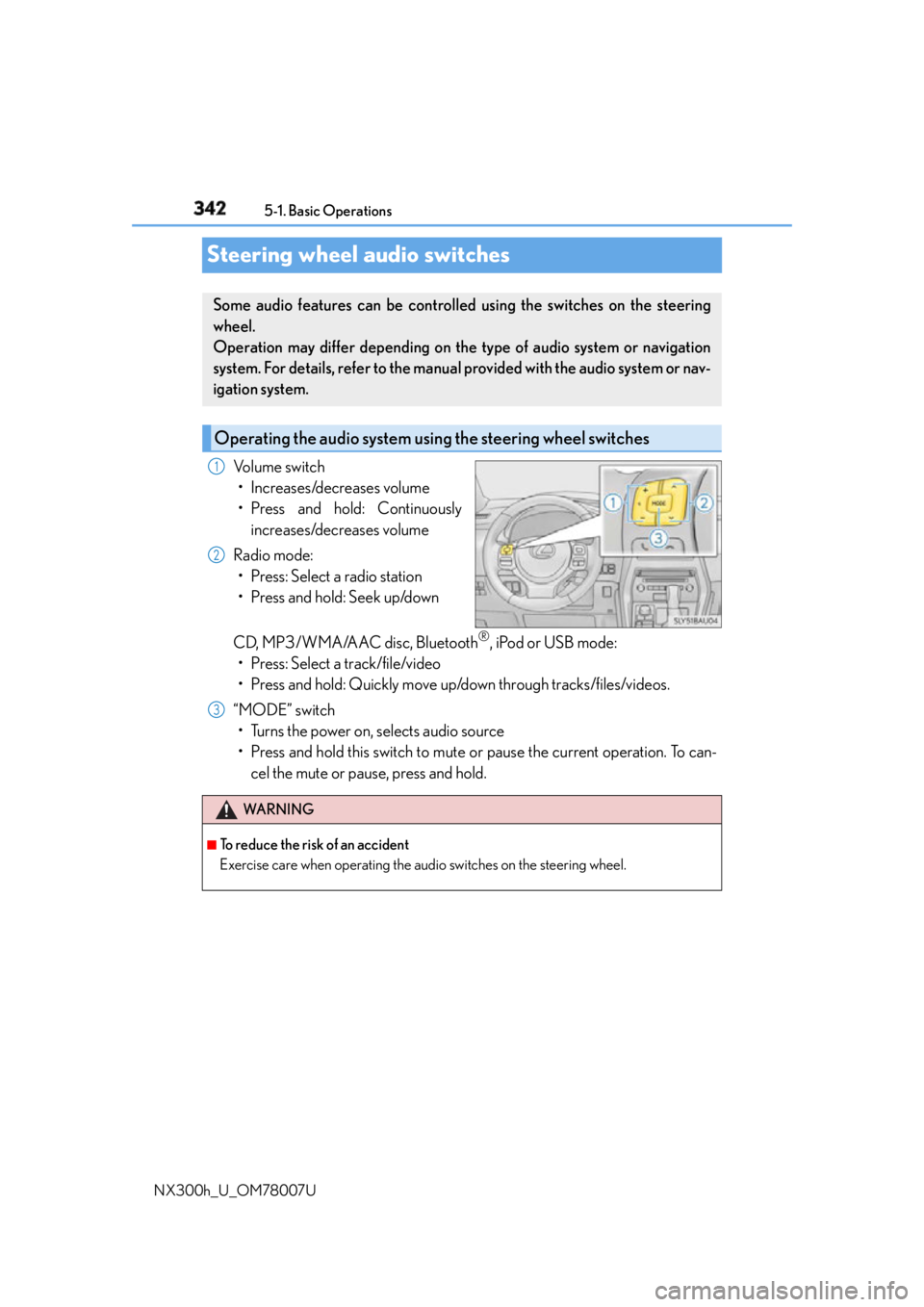
NX300h_U_OM78007USteering wheel audio switches Volume switch
• Increases/decreases volume
• Press and hold: Continuously
increases/decreases volume
Radio mode:
• Press: Select a radio station
• Press and hold: Seek up/down
CD, MP3/WMA/AAC disc, Bluetooth ®
, iPod or USB mode:
• Press: Select a track/file/video
• Press and hold: Quickly move up/down through tracks/files/videos.
“MODE” switch
• Turns the power on, selects audio source
• Press and hold this switch to mute or pause the current operation. To can-
cel the mute or pause, press and hold.Some audio features can be controlled using the switches on the steering
wheel.
Operation may differ depending on th e type of audio system or navigation
system. For details, refer to the manual provided with the audio system or nav-
igation system.
Operating the audio system us ing the steering wheel switches1
2
WA R N I N G ■
To reduce the risk of an accident
Exercise care when operating the audio switches on the steering wheel. 3
Page 429 of 681

429
6Interior features
NX300h_U_OM78007U 6-1. Using the air conditioning
system and defogger
Automatic air conditioning
system ......................................... 430
Heated steering wheel/
seat heaters/
seat ventilators......................... 440
6-2. Using the interior lights
Interior lights list..........................443
• Front interior light ................444
• Personal lights........................444
• Rear interior light ................. 445 6-3. Using the storage features
List of storage features ............ 446
• Glove box ............................... 447
• Console box........................... 447
•Cup holders/
bottle holders.........................448
• Sunglass holder .................... 449
Luggage compartment
features........................................ 450
6-4. Other interior features
Other interior features ............ 455
• Sun visors ................................ 455
• Vanity mirrors ........................ 455
• Clock ........................................ 456
• Power outlet (12 VDC)...... 456
• Power outlet (120 VAC) ... 457
• Wireless charger .................. 458
• Armrest .................................... 465
• Assist grips.............................. 465
• Coat hooks ............................. 466
Garage door opener................ 467
Compass ........................................473
Safety Connect ............................477
Page 441 of 681
4416-1. Using the air conditio ning system and defogger
6
Interior features
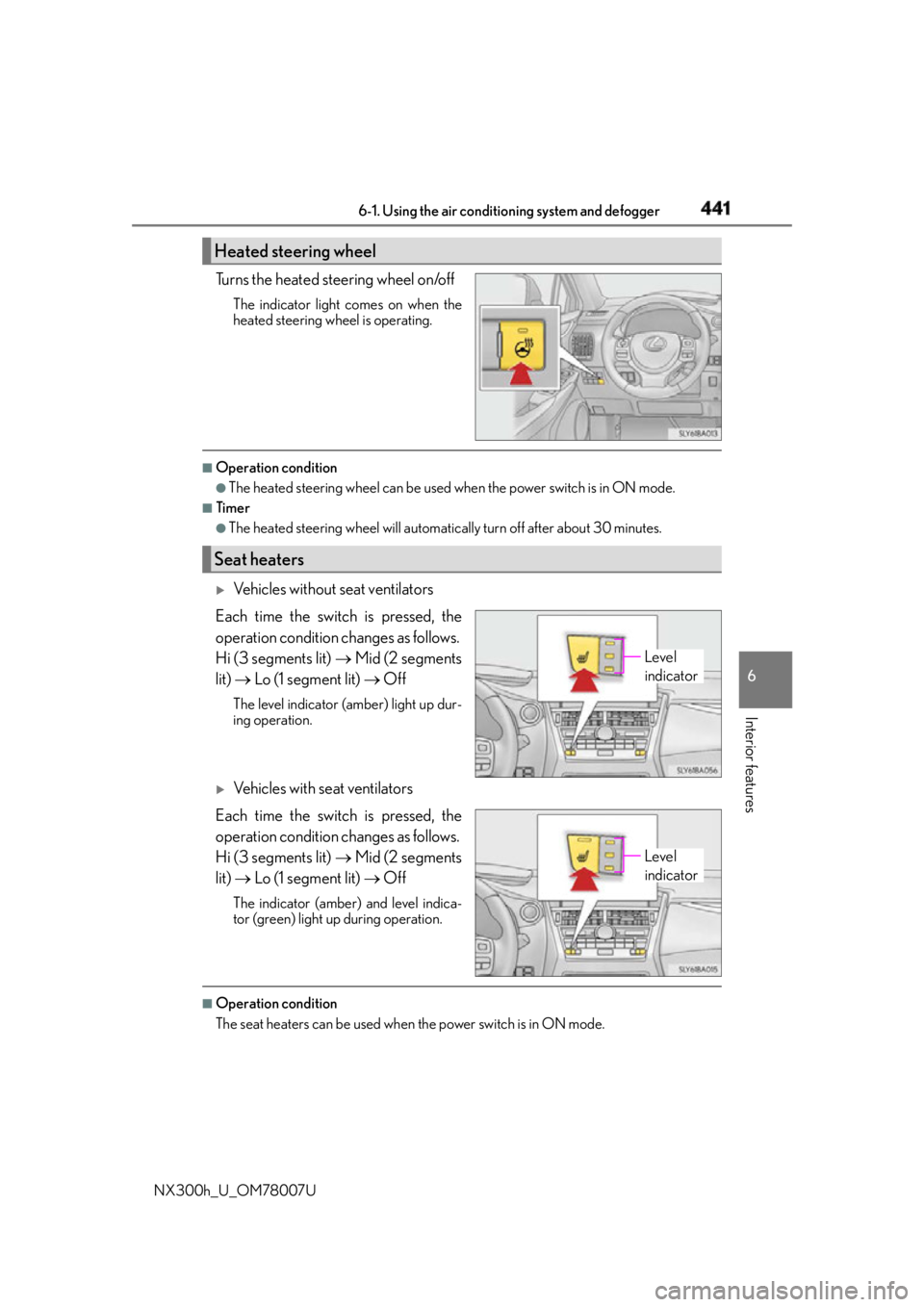
NX300h_U_OM78007U Turns the heated steering wheel on/off The indicator light comes on when the
heated steering wheel is operating. ■
Operation condition ●
The heated steering wheel can be used when the power switch is in ON mode. ■
Timer ●
The heated steering wheel will automati cally turn off after about 30 minutes.
Vehicles without seat ventilators
Each time the switch is pressed, the
operation condition changes as follows.
Hi (3 segments lit) Mid (2 segments
lit) Lo (1 segment lit) OffThe level indicator (amber) light up dur-
ing operation.
Vehicles with seat ventilators
Each time the switch is pressed, the
operation condition changes as follows.
Hi (3 segments lit) Mid (2 segments
lit) Lo (1 segment lit) OffThe indicator (amber) and level indica-
tor (green) light up during operation.
■
Operation condition
The seat heaters can be used when the power switch is in ON mode.Heated steering wheel
Seat heaters
Level
indicator
Level
indicator
Page 557 of 681
557
8
When trouble arises 8-1. Essential information
NX300h_U_OM78007UIf your vehicle has to be stopped in an emergency Steadily step on the brake pedal with both feet and firmly depress it.Do not pump the brake pedal repeatedly as this will increase the effort required to
slow the vehicle.
Shift the shift lever to N.
If the shift lever is shifted to N
After slowing down, stop the vehicle in a safe place by the road.
Stop the hybrid system.
If the shift lever cannot be shifted to N
Keep depressing the brake pedal with both feet to reduce vehicle speed as
much as possible.
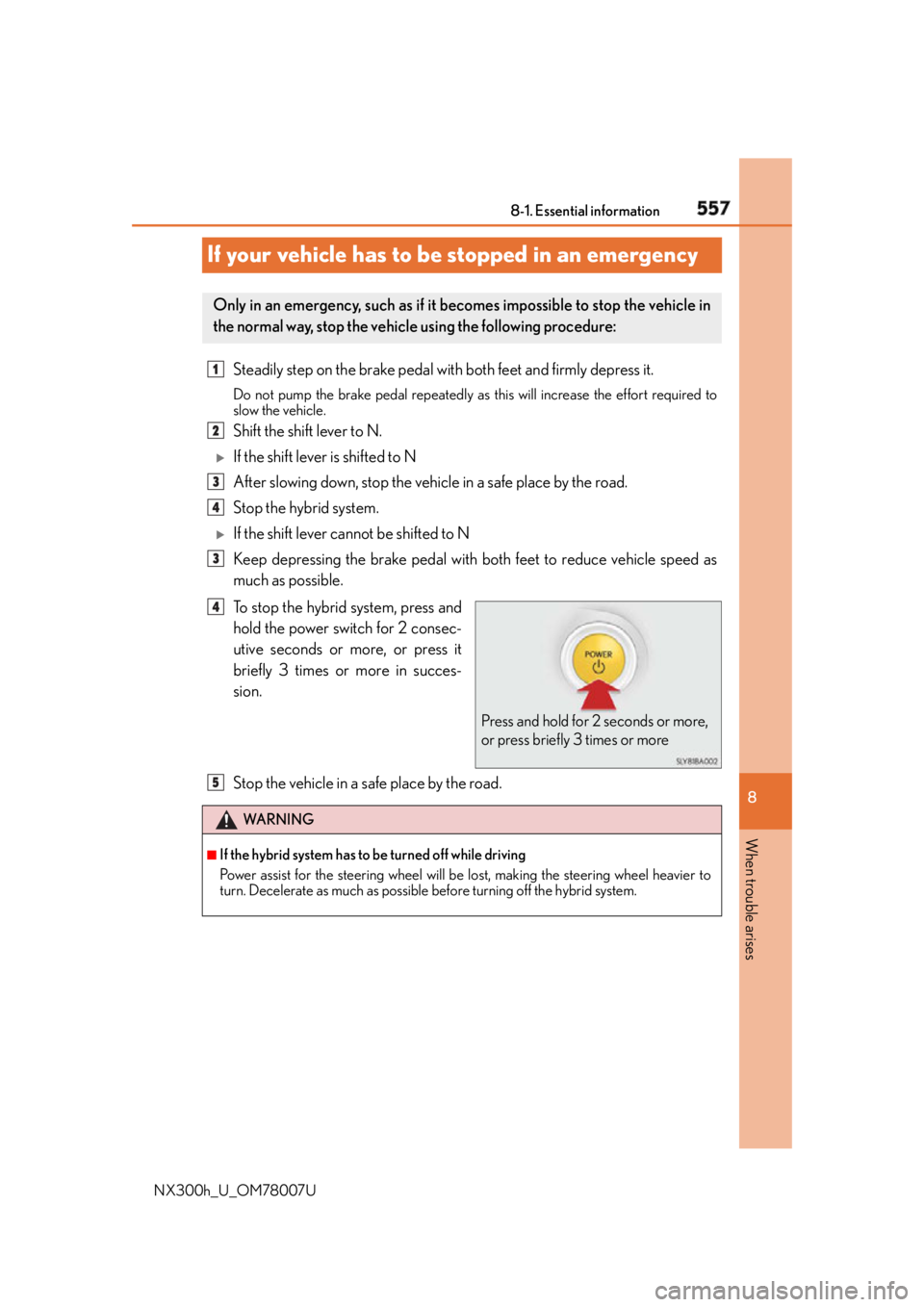
To stop the hybrid system, press and
hold the power switch for 2 consec-
utive seconds or more, or press it
briefly 3 times or more in succes-
sion.
Stop the vehicle in a safe place by the road.Only in an emergency, such as if it becomes impossible to stop the vehicle in
the normal way, stop the vehicl e using the following procedure:1
2
3
4
3
Press and hold for 2 seconds or more,
or press briefly 3 times or more4
WA R N I N G ■
If the hybrid system has to be turned off while driving
Power assist for the steering wheel will be lost, making the stee ring wheel heavier to
turn. Decelerate as much as possible before turning off the hybrid system.5