remote control LEXUS NX300h 2015 Owner's Manual
[x] Cancel search | Manufacturer: LEXUS, Model Year: 2015, Model line: NX300h, Model: LEXUS NX300h 2015Pages: 681, PDF Size: 9.14 MB
Page 157 of 681
1573-3. Adjusting the seats
3
Operation of each component
NX300h_U_OM78007U ■
Recall procedure
Carry the electronic key that has been registered to the driving position,
and then unlock and open the driver’s door using the smart access system
with push-button start or wireless remote control. The driving position will move to the reco rded position (not including the steering
wheel). However, the seat will move to a po sition slightly behind the recorded posi-
tion in order to make entering the vehicle easier.
If the driving position is in a position th at has already been recorded, the seat and
outside rear view mirrors will not move.
Turn the power switch to ACCESSORY mode or ON mode, or fasten a
seat belt. The seat and steering wheel will move to the recorded position.■
Cancelation procedure
Carry only the key you want to cancel and then close the driver’s door.
If 2 or more keys are in the vehicle, the driving position cannot be canceled
properly.
Turn the power switch to ON mode.
While pressing the “SET” button, press and hold the door lock switch
(either lock or unlock) unt il the buzzer sounds twice.If it could not be canceled, the buzzer sounds continuously for approximately 3
seconds.■
Recalling the driving position using the memory recall function ●
Different driving positions can be registered for each electronic key. Therefore, the
driving position that is recalled may be different depending on the key being carried. ●
If a door other than the driver’s door is unlocked with the smart access system with
push-button start, the driving position cannot be recalled. In this case, press the driving
position button which has been set. ■
Customization
The unlock door settings of the memory recall function can be customized.
(Customizable features: P. 6 3 3 )
WA R N I N G ■
Seat adjustment caution
Take care during seat adjustment so that th e seat does not strike the rear passenger or
squeeze your body against the steering wheel. 1
2
1
2
Page 167 of 681
1673-5. Opening, closing the windows and moon roof
3
Operation of each component
NX300h_U_OM78007U ■
The power windows can be operated when
The power switch is in ON mode. ■
Operating the power windows after turning the hybrid system off
The power windows can be operated for approximately 45 seconds even after the
power switch is turned to ACCESSORY mode or turned off. They cannot, however, be
operated once either front door is opened. ■
Up jam protection function
If an object becomes caught between the window and the window frame, window travel
is stopped and the window is opened slightly. ■
Down jam protection function
When the window is opening, if a foreign obje ct malfunction within the door causes it to
be clamped, the operation stops. ■
When opening and closing the window can not be done
When the up or down jam protection function operates unusually or the door window
can not be fully opened and closed, perfor m the following operations with the power
window switch of that door. ●
Stop the vehicle, with the power switch in ON mode, continually operate the power
window switch in the one-touch closing position within 4 seconds after the up jam or
down jam protection function was activated. Otherwise, by continually operating the
power window switch in the one-touch opening position, the door window can be
opened and closed. ●
If the door window can not be opened and closed even when performing the above
operations, implement the following pr ocedure for function initialization.
Turn the power switch to ON mode.
Pull and hold the power window switch in the one-touch closing position and com-
pletely close the door window.
Release the power window switch for a mo ment and then resume pulling and hold-
ing the switch in the one-touch closin g position for approximately 4 seconds.
Press and hold the power window switch in the one-touch opening position and
after the door window is co mpletely opened, continue ho lding the switch for a fur-
ther 1 second or more.
Pull and hold the power window switch in the one-touch closing position, once
more, and after the door window is comple tely closed, continue holding the switch
for a further 1 second or more.
If you release the switch while the window is moving, start again from the beginning.
If the window movement does not reverse an d can not be closed or completely open,
have the vehicle inspected by your Lexus dealer. ■
Door lock linked window operation ●
The power windows can be opened an d closed using the mechanical key.
* ( P. 5 9 3 )●
The power windows can be opened us ing the wireless remote control.
* (
P. 1 2 4 )
* : These settings must be cust omized at your Lexus dealer. 1
2
3
4
5
Page 170 of 681
170 3-5. Opening, closing the windows and moon roof
NX300h_U_OM78007U ■
The moon roof can be operated when
The power switch is in ON mode. ■
Jam protection function
If an object is detected between the moon roof and the frame while the moon roof is clos-
ing or tilting down, travel is stoppe d and the moon roof opens slightly.■
Sunshade
The sunshade can be opened and closed manually. However, the sunshade will open
automatically when the moon roof is opened. ■
Door lock linked moon roof operation ●
The moon roof can be opened and closed using the mechanical key.
* ( P. 5 9 3 )●
The moon roof can be opened us ing the wireless remote control.
* ( P. 1 2 4 )
* : These settings must be cust omized at your Lexus dealer.■
When the moon roof does not close normally
Perform the following procedure: ●
If the moon roof closes but then re-opens slightly
Stop the vehicle.
Press and hold the “CLOSE” switch.
* 1
The moon roof will close, reopen and pause for approximately 10 seconds.
* 2
Then it
will close again and tilt down. Finally it will stop.
Check to make sure that the moon roof completely stops and then release the
switch. ●
If the moon roof tilts down but then tilts back up
Stop the vehicle.
Press and hold the “DOWN” switch.
* 1
The moon roof will close, reopen and paus e for approximately 10 seconds in the tilt
up position.
* 2
Then it will close again. Finally it will stop.
Check to make sure that the moon roof has completely stopped and then release
the switch.
* 1
: If the switch is released at the incorrec t time, the procedure will have to be per-
formed again from the beginning.
* 2
: If the switch is released after the above mentioned 10 second pause, automatic
operation will be disabled. In that case , perform the moon roof initialization by
referring to “When tilt up/down or moon roof opening and closing can be done but
automatic full opening and closing can not be done” on P. 171.
If the moon roof does not fully close even after performing the above procedure cor-
rectly, have the vehicle inspected by your Lexus dealer. 1
2
3
1
2
3
Page 283 of 681
2834-5. Using the driving support systems
4
Driving
NX300h_U_OM78007U You can change the buzzer sounds volu me and the screen operating conditions
when the power switch is in ON mode.
Lexus Display Audio system
Press the “MENU” button on the Lexus Display Audio controller, and then
select “Setup” on the screen.
Select “Vehicle”, and th en select “LEXUS Park Assist” on the screen.
Select the desired item.
Navigation system
Press the “MENU” button on the Remote Touch, and then select “Setup” on
the screen.
Select “Vehicle”, and th en select “LEXUS Park Assist” on the screen.
Select the desired item.
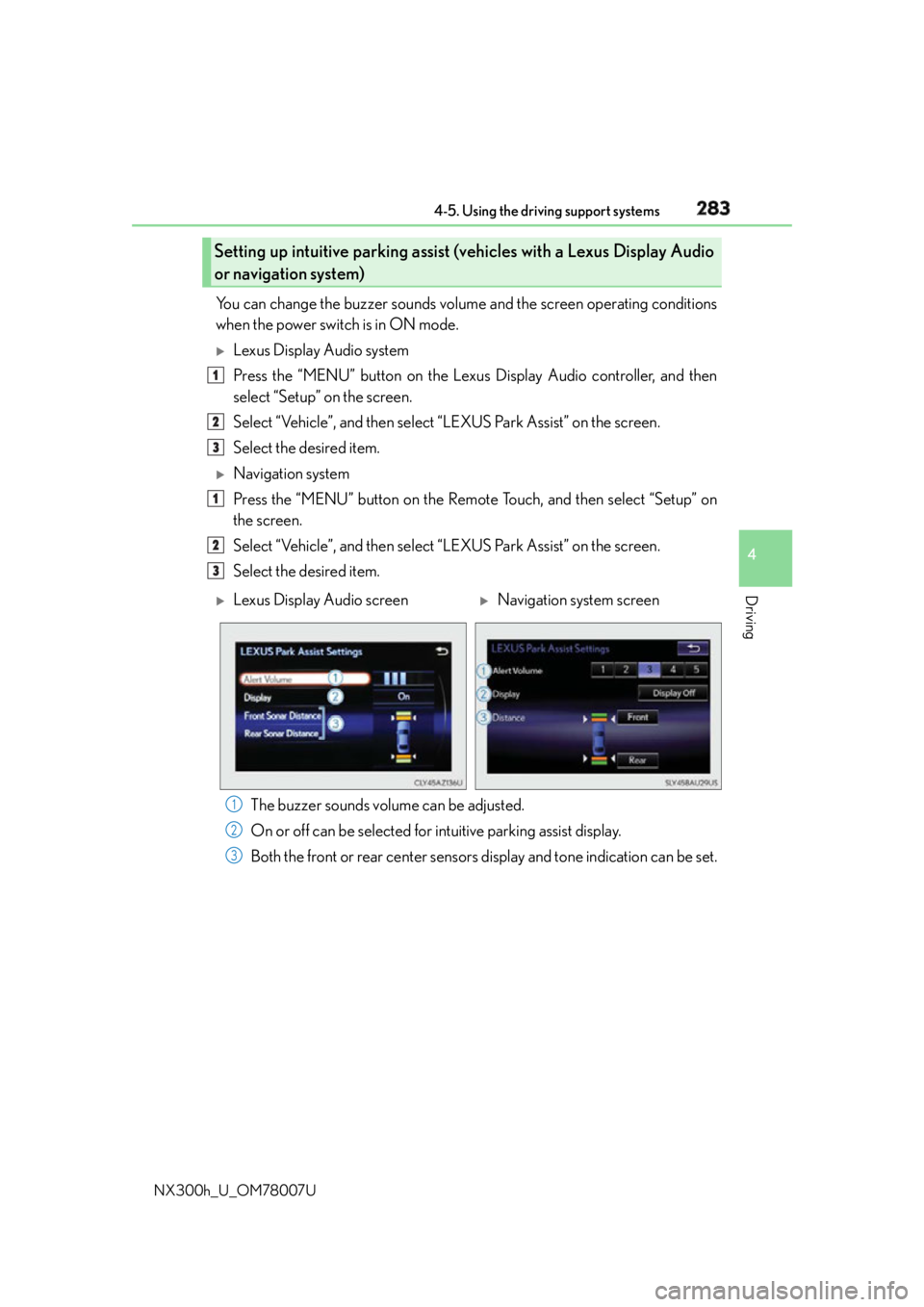
The buzzer sounds volume can be adjusted.
On or off can be selected for intuitive parking assist display.
Both the front or rear center sensors display and tone indication can be set.Setting up intuitive parking assist (v ehicles with a Lexus Display Audio
or navigation system) 1
2
3
1
2
3
Lexus Display Audio screen
Navigation system screen
1
2
3
Page 415 of 681
4155-11. Bluetooth ®
5
Lexus Display Audio system
NX300h_U_OM78007U ■
Compatible models
The Bluetooth ®
audio system supports portable audi o players with the following specifi-
cations ●
Bluetooth ®
specifications:
Ver. 2.0 or higher (Recommended: Ver. 3.0 +EDR or higher) ●
Profiles:
• A2DP (Advanced Audio Distribution Profile) Ver. 1.0, or higher
(Recommended: Ver. 1.2 or higher)
This is a profile to transmit stereo audio or high quality sound to the audio system.
• AVRCP (Audio/Video Remote Control Profile) Ver. 1.0 or higher
(Recommended: Ver. 1.4 or higher)
This is a profile to allow remote control the A/V equipment.
However, please note that some functions may be limited depending on the type of por-
table audio player connected.
The hands-free system supports cellular phones with the following specifications. ●
Bluetooth ®
specification:
Ver. 2.0 or higher (Recommended: Ver. 3.0 +EDR or higher) ●
Profiles:
• HFP (Hands Free Profile) Ver. 1.0 or higher (Recommended: Ver. 1.6 or higher)
This is a profile to allow ha nds-free phone calls using a cellular phone or head set. It
has outgoing and incoming call functions.
• OPP (Object Push Profile) Ver. 1.1 or higher (Recommended: Ver. 1.2)
This is a profile to transfer phonebook data. When a Bluetooth ®
compatible cellular
phone has both PBAP and OPP, OPP cannot be used.
• PBAP (Phone Book Access Profile) Ver. 1.0 or higher (Recommended: Ver. 1.1)
This is a profile to tr ansfer phonebook data.
• MAP (Message Access Profile) Ver.1.0 or higher
This is a profile to using phone message.
If the cellular phone does not support HFP, you cannot register it with the hands-free sys-
tem. OPP, PBAP or MAP services must be selected individually.■
Reconnecting the portable audio player
If the portable audio player is disconnected due to poor reception when the power
switch is in ACCESSORY or ON mode, the system automatically reconnects the porta-
ble audio player.
If you have switched off the portable audio player yourself, follow the instructions below
to reconnect: ●
Select the portable audio player again ●
Enter the portable audio player ■
When you sell your car
Be sure to delete your personal data. ( P. 3 5 0 )
Page 427 of 681
4275-12. Other function
5
Lexus Display Audio system
NX300h_U_OM78007ULEXUS Enform Remote
After you sign the Telematics Subscription Service Agreement, download the
Lexus Enform Remote app from your cellular phone’s app store, and register
within the app (or enroll and complete registration at the dealer), you can begin
using these services. ( P. 4 7 7 )
A variety of subscription terms are available. Contact your Lexus dealer, or call 1-
800-25-LEXUS (1-800-255-3987) fo r further subscription details.
: If equippedLexus Enform Remote is a cellular phone application that lets you view and
remotely control certain aspects of your vehicle.
For details about the functions and serv ices of this application, refer to
http://www.lexus.com/enform/
.
Function of the Lexus Enform Remote is achieved by using an embedded cel-
lular device in the vehicle (D CM: Data Communication Module).
Subscription
Page 430 of 681
430 6-1. Using the air conditioning system and defogger
NX300h_U_OM78007UAutomatic air conditioning system Air outlets and fan speed are automatica lly adjusted according to the temper-
ature setting.
Vehicles with a Lexus Display Audio sy stem: Press the “MENU” button on the
Lexus Display Audio controller, then select “Climate” to display the air condi-
tioning control screen.
For details on the Lexus Display Audio controller, refer to “Lexus Display
Audio controller” on P. 338.
Vehicles with a navigati on system: Press the “MENU” button on the Remote
Touch, then select “Climate” to display the air conditioning control screen.
For details on the Remote Touch, refer to the “NAVIGATION SYSTEM
OWNER’S MANUAL”.
Page 433 of 681
4336-1. Using the air conditio ning system and defogger
6
Interior features
NX300h_U_OM78007U
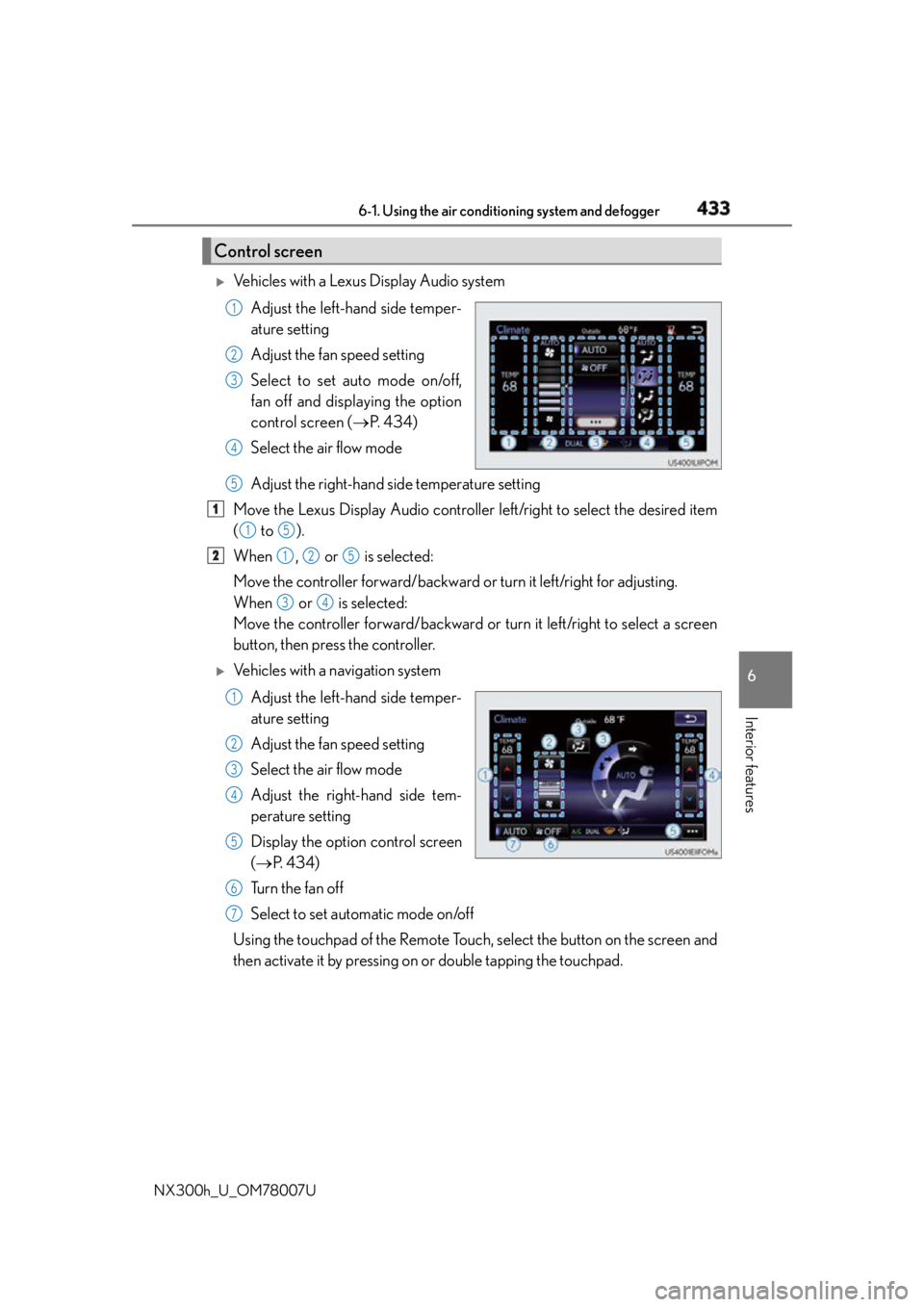
Vehicles with a Lexus Display Audio system
Adjust the left-hand side temper-
ature setting
Adjust the fan speed setting
Select to set auto mode on/off,
fan off and displaying the option
control screen ( P. 434)
Select the air flow mode
Adjust the right-hand side temperature setting
Move the Lexus Display Audio controller left/right to select the desired item
( to ).
When , or is selected:
Move the controller forward/backward or turn it left/right for adjusting.
When or is selected:
Move the controller forward/backward or turn it left/right to select a screen
button, then press the controller.
Vehicles with a navigation system
Adjust the left-hand side temper-
ature setting
Adjust the fan speed setting
Select the air flow mode
Adjust the right-hand side tem-
perature setting
Display the option control screen
( P. 4 3 4 )
Tu r n t h e f a n o f f
Select to set automatic mode on/off
Using the touchpad of the Remote Touch, select the button on the screen and
then activate it by pressing on or double tapping the touchpad.Control screen 1
2
3
4
5
1
1 5
2
1 2 5
3 4
1
2
3
4
5
6
7
Page 467 of 681
4676-4. Other interior features
6
Interior features
NX300h_U_OM78007UGarage door opener
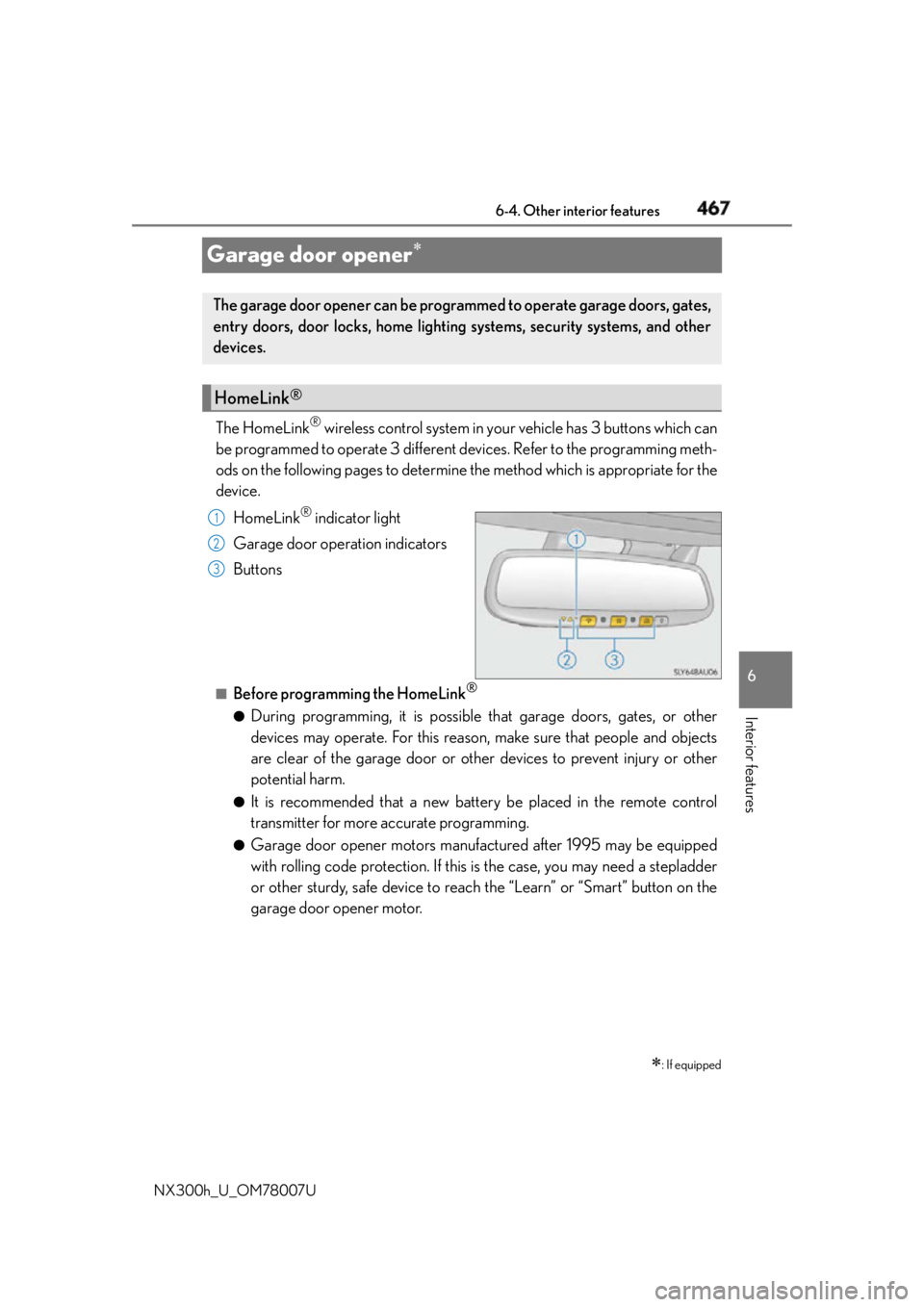
The HomeLink ®
wireless control system in your vehicle has 3 buttons which can
be programmed to operate 3 different devices. Refer to the programming meth-
ods on the following pages to determine the method which is appropriate for the
device.
HomeLink ®
indicator light
Garage door operation indicators
Buttons
■
Before programming the HomeLink ®
●
During programming, it is possible th at garage doors, gates, or other
devices may operate. For this reason, make sure that people and objects
are clear of the garage door or other devices to prevent injury or other
potential harm. ●
It is recommended that a new battery be placed in the remote control
transmitter for more accurate programming. ●
Garage door opener motors manufactured after 1995 may be equipped
with rolling code protection. If this is the case, you may need a stepladder
or other sturdy, safe device to reach the “Learn” or “Smart” button on the
garage door opener motor.
: If equippedThe garage door opener can be programmed to operate garage doors, gates,
entry doors, door locks, home lighting systems, security systems, and other
devices.
HomeLink ®
1
2
3
Page 468 of 681
468 6-4. Other interior features
NX300h_U_OM78007U ■
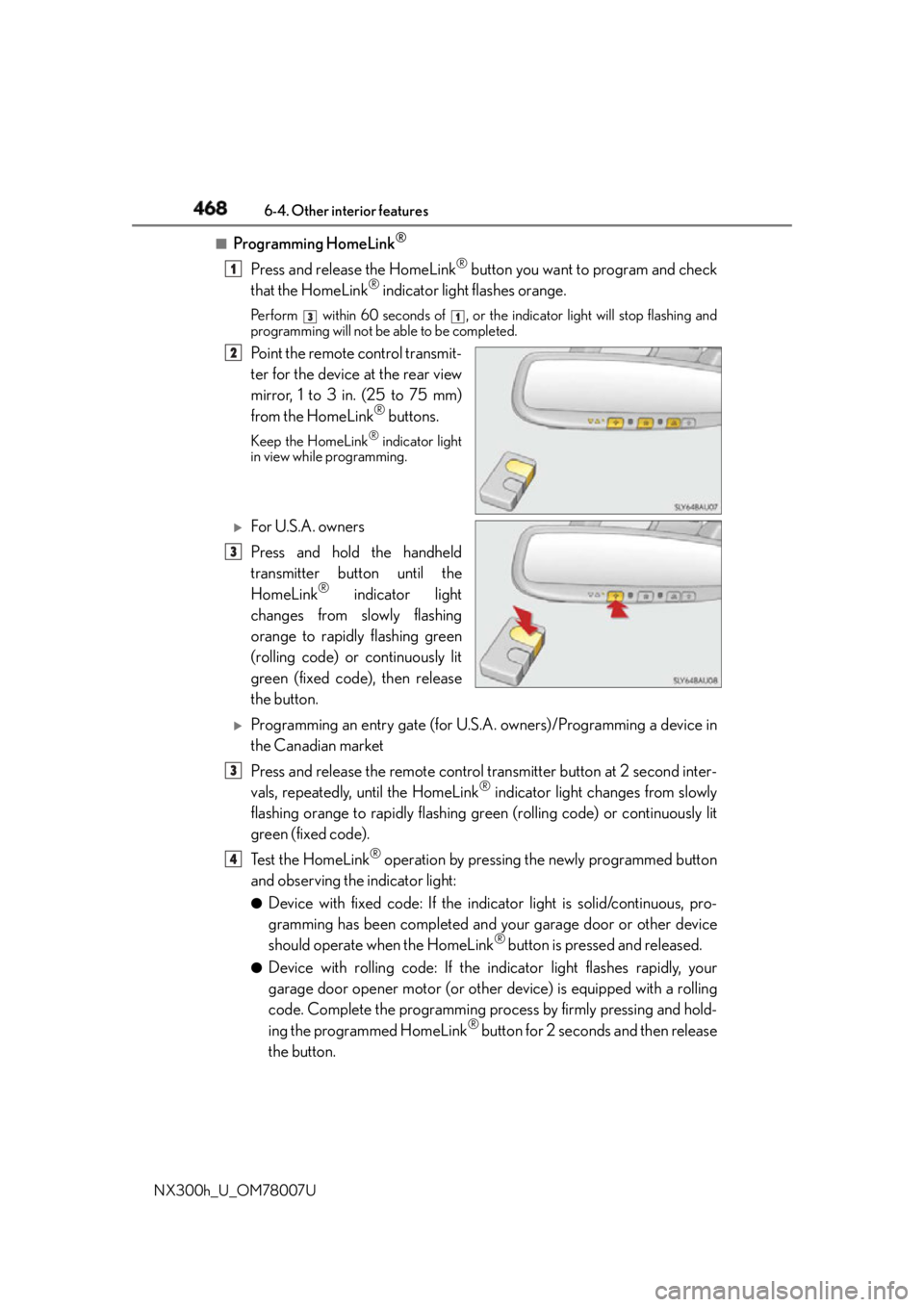
Programming HomeLink ®
Press and release the HomeLink ®
button you want to program and check
that the HomeLink ®
indicator light flashes orange.Perform within 60 seconds of , or th e indicator light will stop flashing and
programming will not be able to be completed.
Point the remote control transmit-
ter for the device at the rear view
mirror, 1 to 3 in. (25 to 75 mm)
from the HomeLink ®
buttons.Keep the HomeLink ®
indicator light
in view while programming.
For U.S.A. owners
Press and hold the handheld
transmitter button until the
HomeLink ®
indicator light
changes from slowly flashing
orange to rapidly flashing green
(rolling code) or continuously lit
green (fixed code), then release
the button.
Programming an entry gate (for U.S. A. owners)/Programming a device in
the Canadian market
Press and release the remote control transmitter button at 2 second inter-
vals, repeatedly, until the HomeLink ®
indicator light changes from slowly
flashing orange to rapidly flashing green (rolling code) or continuously lit
green (fixed code).
Te s t t h e H o m e L i n k ®
operation by pressing the newly programmed button
and observing the indicator light: ●
Device with fixed code: If the indi cator light is solid/continuous, pro-
gramming has been completed and your garage door or other device
should operate when the HomeLink ®
button is pressed and released.●
Device with rolling code: If the indicator light flashes rapidly, your
garage door opener motor (or other device) is equipped with a rolling
code. Complete the programming process by firmly pressing and hold-
ing the programmed HomeLink ®
button for 2 seconds and then release
the button. 1 3 1
2
3
3
4