remote control LEXUS NX300h 2015 Owner's Guide
[x] Cancel search | Manufacturer: LEXUS, Model Year: 2015, Model line: NX300h, Model: LEXUS NX300h 2015Pages: 681, PDF Size: 9.14 MB
Page 472 of 681
472 6-4. Other interior features
NX300h_U_OM78007U ■
Codes stored in the HomeLink ®
memory●
The registered codes are not erased even if the battery cabl e is disconnected.●
If learning failed when registerin g a different code to a HomeLink ®
button that already
has a code registered to it, the already registered code will not be erased. ■
Before programming ●
Install a new battery in the transmitter. ●
The battery side of the transmitter mu st be pointed away from the HomeLink ®
.■
Certification for the garage door opener
For vehicles sold in the U.S.A.
FCC ID: NZLAECHL5
NOTE:
This device complies with part 15 of the FC C Rules. Operation is subject to the following
two conditions: (1) This device may not caus e harmful interference, and (2) this device
must accept any interference received, incl uding interference that may cause undesired
operation.
FCC WARNING:
Changes or modifications not expressly approved by the party responsible for compli-
ance could void the user’s authority to operate the equipment.
For vehicles sold in Canada
NOTE:
This device complies with Industry Canada licence-exempt RSS standard(s).
Operation is subject to the following two co nditions: (1) this device may not cause inter-
ference, and (2) this device must accept any interference, including interference that
may cause undesired operation of the device.
REMARQUE:
Le présent appareil est conforme aux CNR d’Industrie Canada applicables aux appar-
eils radio exempts de licence. L’exploitation est autorisée aux deux conditions suivantes:
(1) l’appareil ne doit pas produire de brou illage, et (2) l’utilisateur de l’appareil doit
accepter tout brouillage radioé lectrique subi, même si le brouillage est susceptible d’en
compromettre le fonctionnement. ■
When support is necessary
Visit on the web at www.homelink.com
or call 1-800-355-3515.
WA R N I N G ■
When programming a garage door or other remote control device
The garage door or other device may operat e, so ensure people and objects are out of
danger to prevent potential harm. ■
Conforming to federal safety standards
Do not use the HomeLink ®
compatible transceiver with any garage door opener or
device that lacks safety stop and reverse fe atures as required by federal safety stan-
dards.
This includes any garage door that canno t detect an interfer ing object. A door or
device without these features increases the risk of death or serious injury. ■
When operating or programming HomeLink ®
Never allow a child to operate or play with the HomeLink ®
buttons.
Page 513 of 681

5137-3. Do-it-yourself maintenance
7
Maintenance and care
NX300h_U_OM78007U Make sure that the 12-volt battery terminals are not corroded and that there are
no loose connections, cracks, or loose clamps.
Te r m i n a l s
Hold-down clamp
Insert the left side auxiliary box.
Push up center position
Insert
Press ■
Before recharging
When recharging, the 12-volt battery produces hydrogen gas which is flammable and
explosive. Therefore, observe the following precautions before recharging: ●
If recharging with the 12-volt battery installed on the vehicle, be sure to disconnect the
ground cable. ●
Make sure the power switch on the charger is off when connecting and disconnecting
the charger cables to the 12-volt battery. ■
After recharging/reconnecting the 12-volt battery ●
The hybrid system may not start. Follow the procedure below to initialize the system.
Shift the shift lever to P.
Open and close any of the doors.
Restart the hybrid system.●
Unlocking the doors using the smart access system with push-button start may not be
possible immediately after reconnecting the 12-volt battery. If this happens, use the
wireless remote control or the mech anical key to lock/unlock the doors.●
Start the hybrid system with the power switch in ACCESSORY mode. The hybrid sys-
tem may not start with the power switch turned off. However, the hybrid system will
operate normally from the second attempt.Exterior 1
2
Installing the 12-volt battery maintenance cover 1
2
3
1
2
3
Page 533 of 681
5337-3. Do-it-yourself maintenance
7
Maintenance and care
NX300h_U_OM78007U ■
Use a CR2032 lithium battery ●
Batteries can be purchased at your Lexus dealer, local electrical appliance shops or
camera stores. ●
Replace only with the same or equivalent type recommended by the manufacturer. ●
Dispose of used batteries according to the local laws. ■
When the card key battery needs to be replaced (if equipped)
The battery for the card key is available only at Lexus dealers. Your Lexus dealer can
replace the battery for you. ■
If the electronic key battery is depleted
The following symptoms may occur: ●
The smart access system with push-button start and wireless remote control will not
function properly. ●
The operational range will be reduced.
WA R N I N G ■
Removed battery and other parts
These parts are small and if swallowed by a child, they can cause choking. Keep away
from children. Failure to do so could result in death or serious injury.
NOTICE ■
For normal operation afte r replacing the battery
Observe the following precautions to prevent accidents: ●
Always work with dry hands.
Moisture may cause the battery to rust. ●
Do not touch or move any other component inside the remote control. ●
Do not bend either of the battery terminals.
Page 592 of 681
592 8-2. Steps to take in an emergency
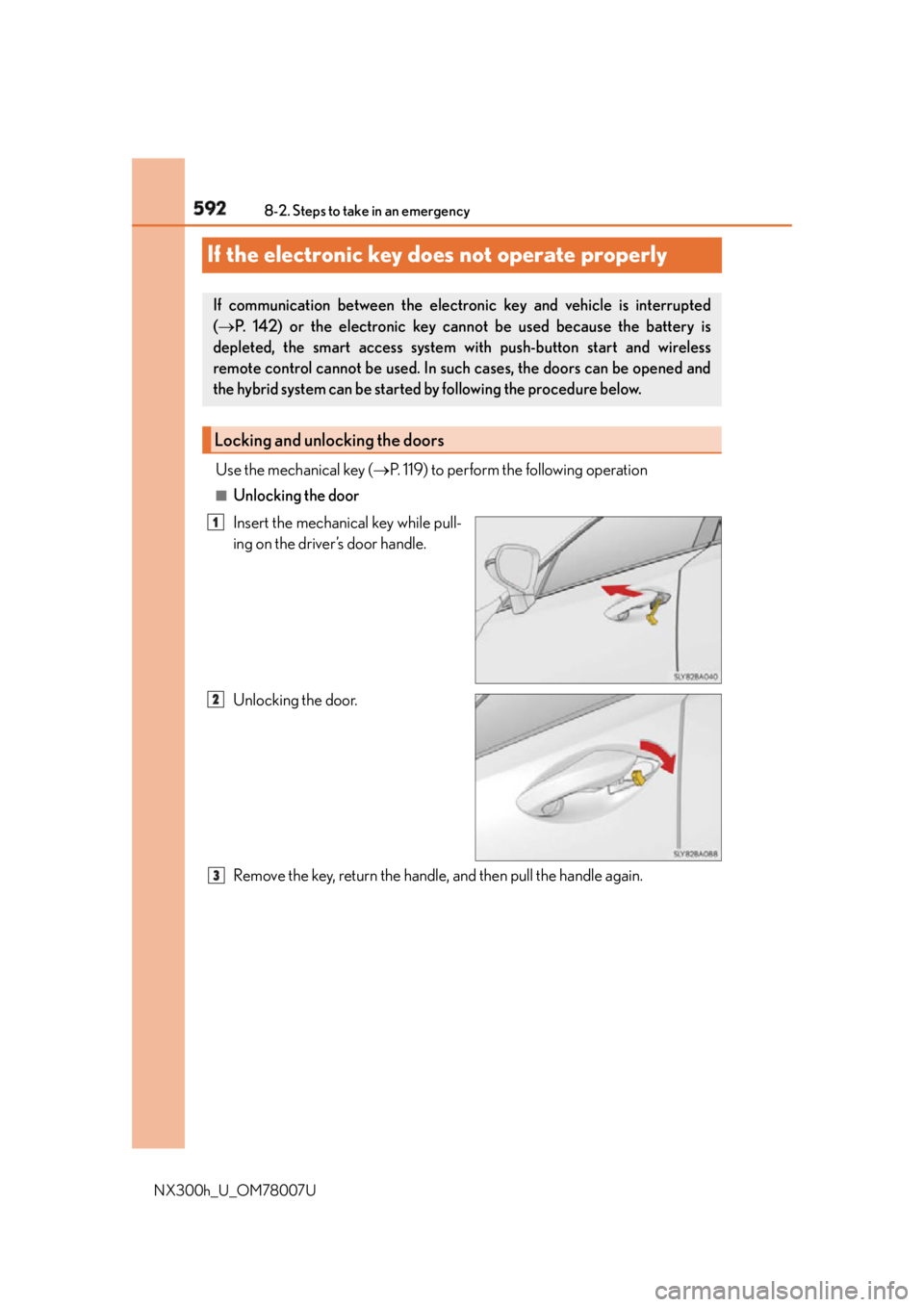
NX300h_U_OM78007UIf the electronic key do es not operate properlyUse the mechanical key ( P. 119) to perform the following operation■
Unlocking the door
Insert the mechanical key while pull-
ing on the driver’s door handle.
Unlocking the door.
Remove the key, return the handle, and then pull the handle again.If communication between the electron ic key and vehicle is interrupted
( P. 142) or the electronic key cannot be used because the battery is
depleted, the smart access system with push-button start and wireless
remote control cannot be used. In such cases, the doors can be opened and
the hybrid system can be started by following the procedure below.
Locking and unlocking the doors 1
2
3
Page 597 of 681
5978-2. Steps to take in an emergency
8
When trouble arises
NX300h_U_OM78007U Start the engine of the second vehicle. Increase the engine speed slightly and
maintain at that level for approximately 5 minutes to recharge the 12-volt bat-
tery of your vehicle.
Open and close any of the doors of your vehicle with the power switch off.
Maintain the engine speed of the second vehicle and start the hybrid system
of your vehicle by turning the power switch to ON mode.
Make sure the “READY” indicator comes on. If the indicator light does not
come on, contact your Lexus dealer.
Once the hybrid system has started, remove the jumper cables in the exact
reverse order from which they were connected.
Close the exclusive jump starting terminal cover, and reinstall the fuse box
cover to its original position.
Once the hybrid system starts, have th e vehicle inspected at your Lexus dealer
as soon as possible. ■
Starting the hybrid system when the 12-volt battery is discharged
The hybrid system cannot be started by push-starting. ■
To prevent 12-volt battery discharge ●
Turn off the headlights and the audio system while the hybrid system is off. ●
Turn off any unnecessary electrical components when the vehicle is running at a low
speed for an extended period, such as in heavy traffic. ■
Charging the 12-volt battery
The electricity stored in the 12-volt battery will discharge gradually even when the vehicle
is not in use, due to natural discharge and the draining effects of certain electrical appli-
ances. If the vehicle is left for a long time, the 12-volt battery may discharge, and the
hybrid system may be unable to start. (The 12-volt battery recharges automatically while
the hybrid system is operating.) ■
When the 12-volt battery is removed or discharged ●
In some cases, it may not be possible to unlock the doors using the smart access system
with push-button start when the 12-volt battery is discharged. Use the wireless remote
control or the mechanical key to lock or unlock the doors. ●
The hybrid system may not start on the first attempt after the 12-volt battery has
recharged but will start normally after the second attempt. This is not a malfunction.●
The power switch mode is memorized by the vehicle. When the 12-volt battery is
reconnected, the system will return to the mode it was in before the 12-volt battery was
discharged. Before disconnecting the 12-volt battery, turn the power switch off.
If you are unsure what mode the power switch was in before the 12-volt battery dis-
charged, be especially careful when reconnecting the 12-volt battery. ●
The power back door must be initialized. ( P. 1 3 4 )●
Make sure that the key is not inside the vehicle when recharging or replacing the
12-volt battery. The key may be locked in the vehicle if the alarm is activated. ( P. 88)5
6
7
8
9
10
Page 633 of 681
6339-2. Customization
9
Vehicle specifications
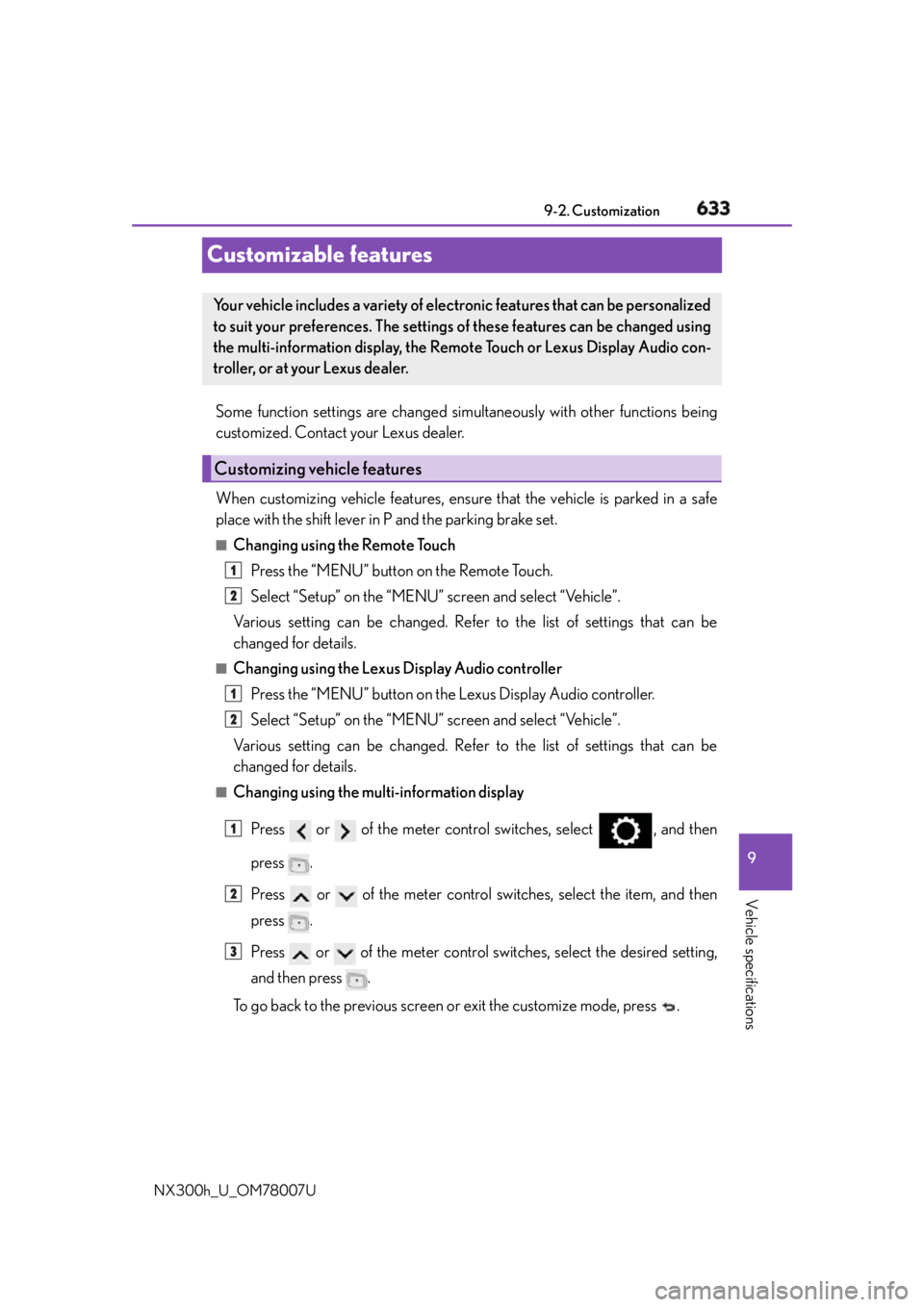
NX300h_U_OM78007UCustomizable features Some function settings are changed simultaneously with other functions being
customized. Contact your Lexus dealer.
When customizing vehicle features, ensure that the vehicle is parked in a safe
place with the shift lever in P and the parking brake set. ■
Changing using the Remote Touch
Press the “MENU” button on the Remote Touch.
Select “Setup” on the “MENU” screen and select “Vehicle”.
Various setting can be changed. Refer to the list of settings that can be
changed for details. ■
Changing using the Lexus Display Audio controller
Press the “MENU” button on the Lexus Display Audio controller.
Select “Setup” on the “MENU” screen and select “Vehicle”.
Various setting can be changed. Refer to the list of settings that can be
changed for details. ■
Changing using the multi-information display
Press or of the meter control switches, select , and then
press .
Press or of the meter control switches, select the item, and then
press .
Press or of the meter control switches, select the desired setting,
and then press .
To go back to the previous screen or exit the customize mode, press .Your vehicle includes a variety of electronic features that can be personalized
to suit your preferences. The settings of these features can be changed using
the multi-information display, the Remo te Touch or Lexus Display Audio con-
troller, or at your Lexus dealer.
Customizing vehicle features 1
2
1
2
1
2
3
Page 634 of 681
634 9-2. Customization
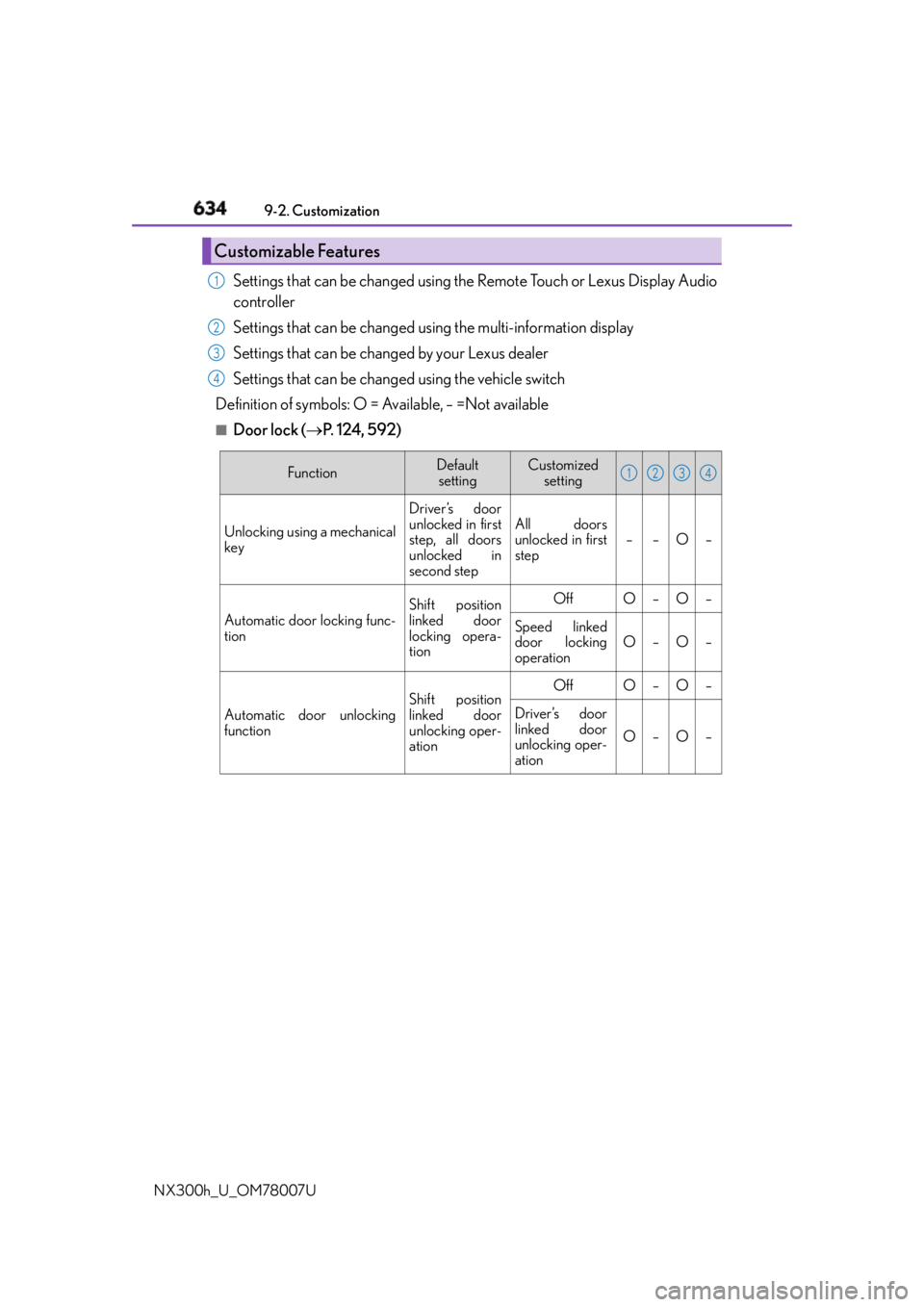
NX300h_U_OM78007U Settings that can be changed using the Remote Touch or Lexus Display Audio
controller
Settings that can be changed us ing the multi-information display
Settings that can be changed by your Lexus dealer
Settings that can be changed using the vehicle switch
Definition of symbols: O = Available, – =Not available ■
Door lock ( P. 1 2 4 , 5 9 2 )Customizable Features 1
2
3
4
Function Default
setting Customized
setting
Unlocking using a mechanical
key Driver’s door
unlocked in first
step, all doors
unlocked in
second step All doors
unlocked in first
step – – O –
Automatic door locking func-
tion Shift position
linked door
locking opera-
tion Off O – O –
Speed linked
door locking
operation O – O –
Automatic door unlocking
function Shift position
linked door
unlocking oper-
ation Off O – O –
Driver’s door
linked door
unlocking oper-
ation O – O – 1 2 3 4
Page 635 of 681
6359-2. Customization
9
Vehicle specifications
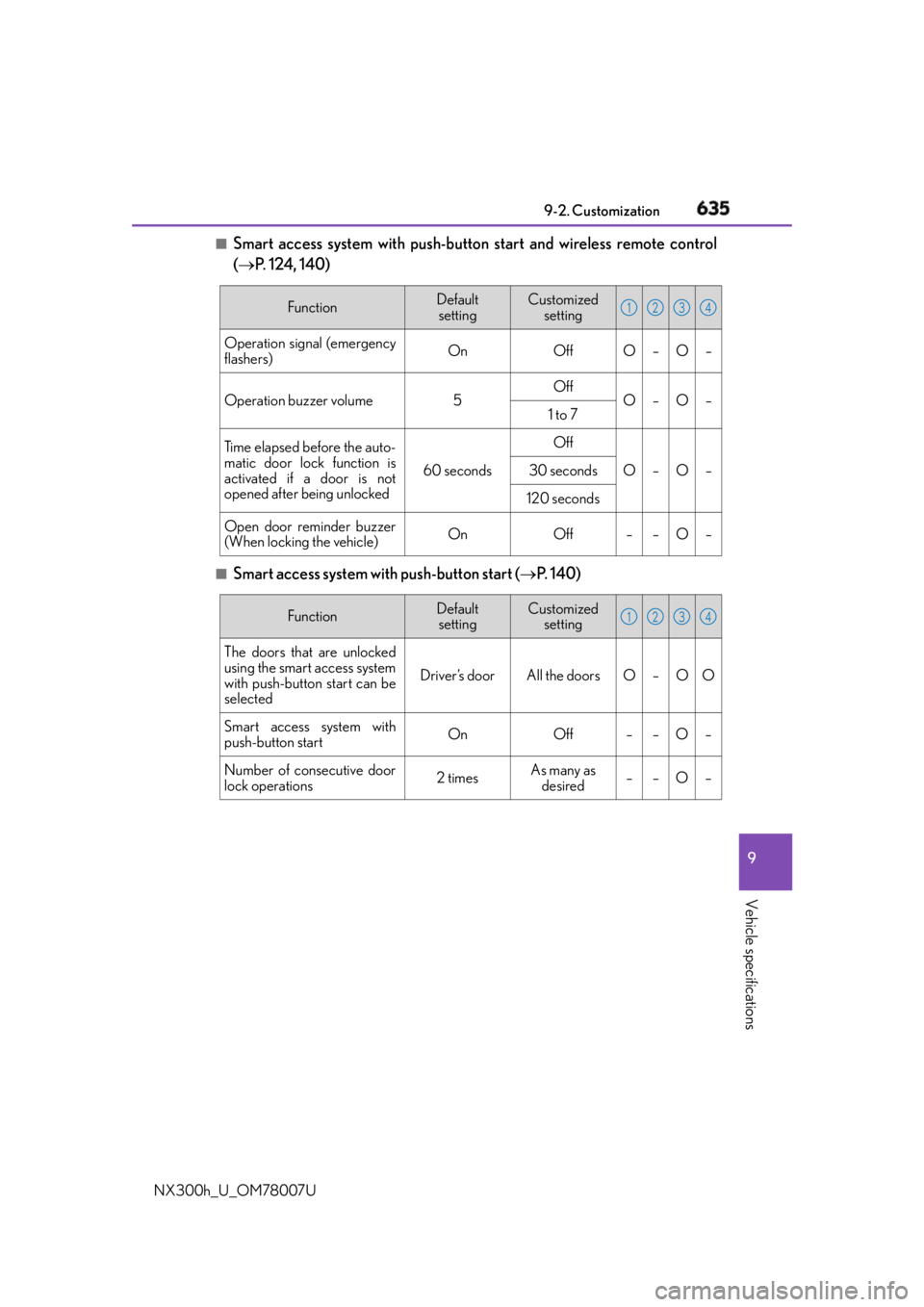
NX300h_U_OM78007U ■
Smart access system with push-button start and wireless remote control
( P. 124, 140)
■
Smart access system with push-button start ( P. 1 4 0 )Function Default
setting Customized
setting
Operation signal (emergency
flashers) On Off O – O –
Operation buzzer volume 5 Off
O – O –
1 to 7
Time elapsed before the auto-
matic door lock function is
activated if a door is not
opened after being unlocked 60 seconds Off
O – O –30 seconds
120 seconds
Open door reminder buzzer
(When locking the vehicle) On Off – – O – 1 2 3 4
Function Default
setting Customized
setting
The doors that are unlocked
using the smart access system
with push-button start can be
selected Driver’s door All the doors O – O O
Smart access system with
push-button start On Off – – O –
Number of consecutive door
lock operations 2 times As many as
desired ––O– 1 2 3 4
Page 636 of 681
636 9-2. Customization
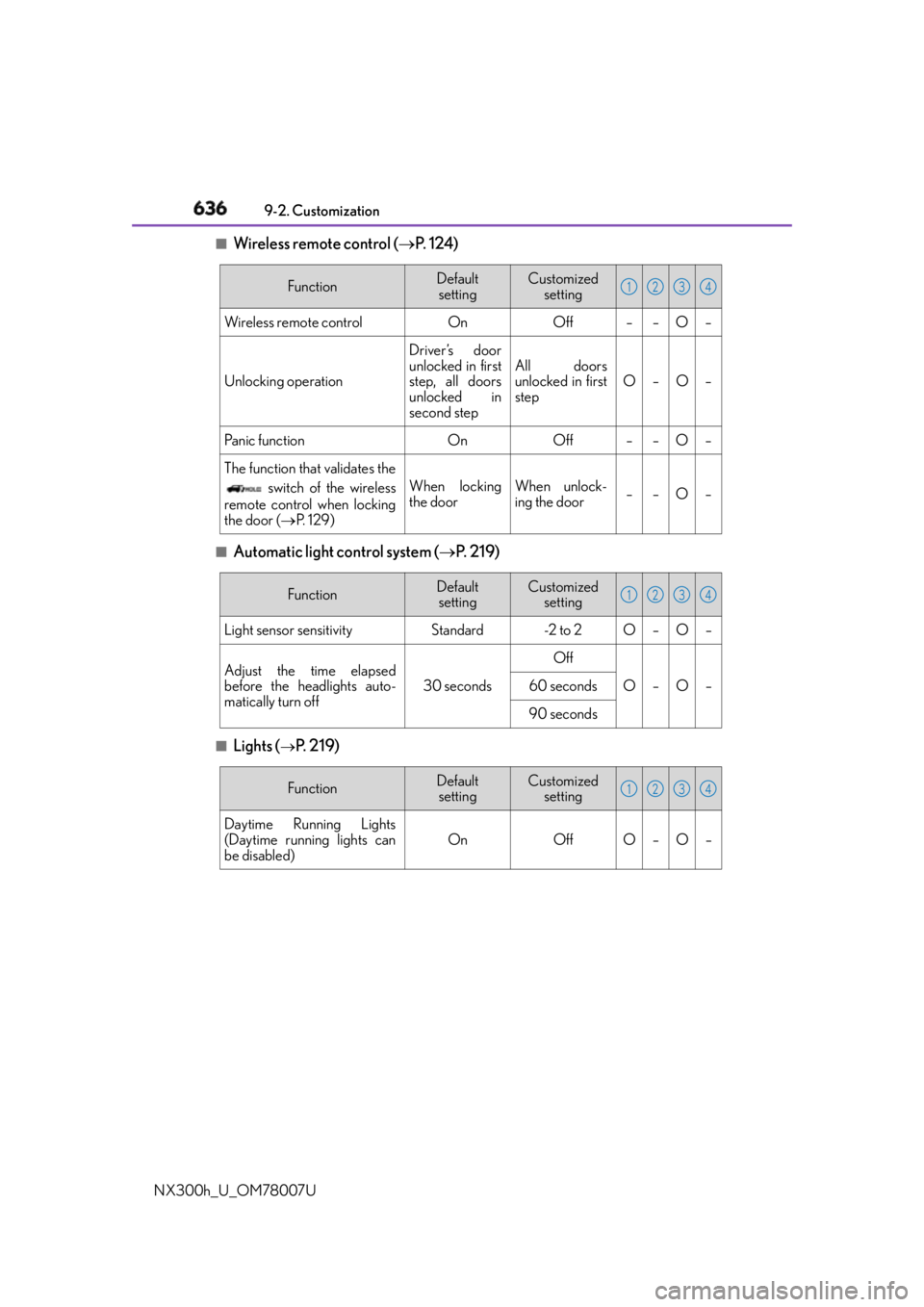
NX300h_U_OM78007U ■
Wireless remote control ( P. 1 2 4 )
■
Automatic light control system ( P. 2 1 9 )
■
Lights (
P. 2 1 9 ) Function Default
setting Customized
setting
Wireless remote control On Off – – O –
Unlocking operation Driver’s door
unlocked in first
step, all doors
unlocked in
second step All doors
unlocked in first
step O–O–
Panic function On Off – – O –
The function that validates the
switch of the wireless
remote control when locking
the door ( P. 1 2 9 ) When locking
the door When unlock-
ing the door ––O– 1 2 3 4
Function Default
setting Customized
setting
Light sensor sensitivity Standard -2 to 2 O – O –
Adjust the time elapsed
before the headlights auto-
matically turn off 30 seconds Off
O–O–
60 seconds
90 seconds 1 2 3 4
Function Default
setting Customized
setting
Daytime Running Lights
(Daytime running lights can
be disabled) On Off O – O – 1 2 3 4
Page 639 of 681
6399-2. Customization
9
Vehicle specifications
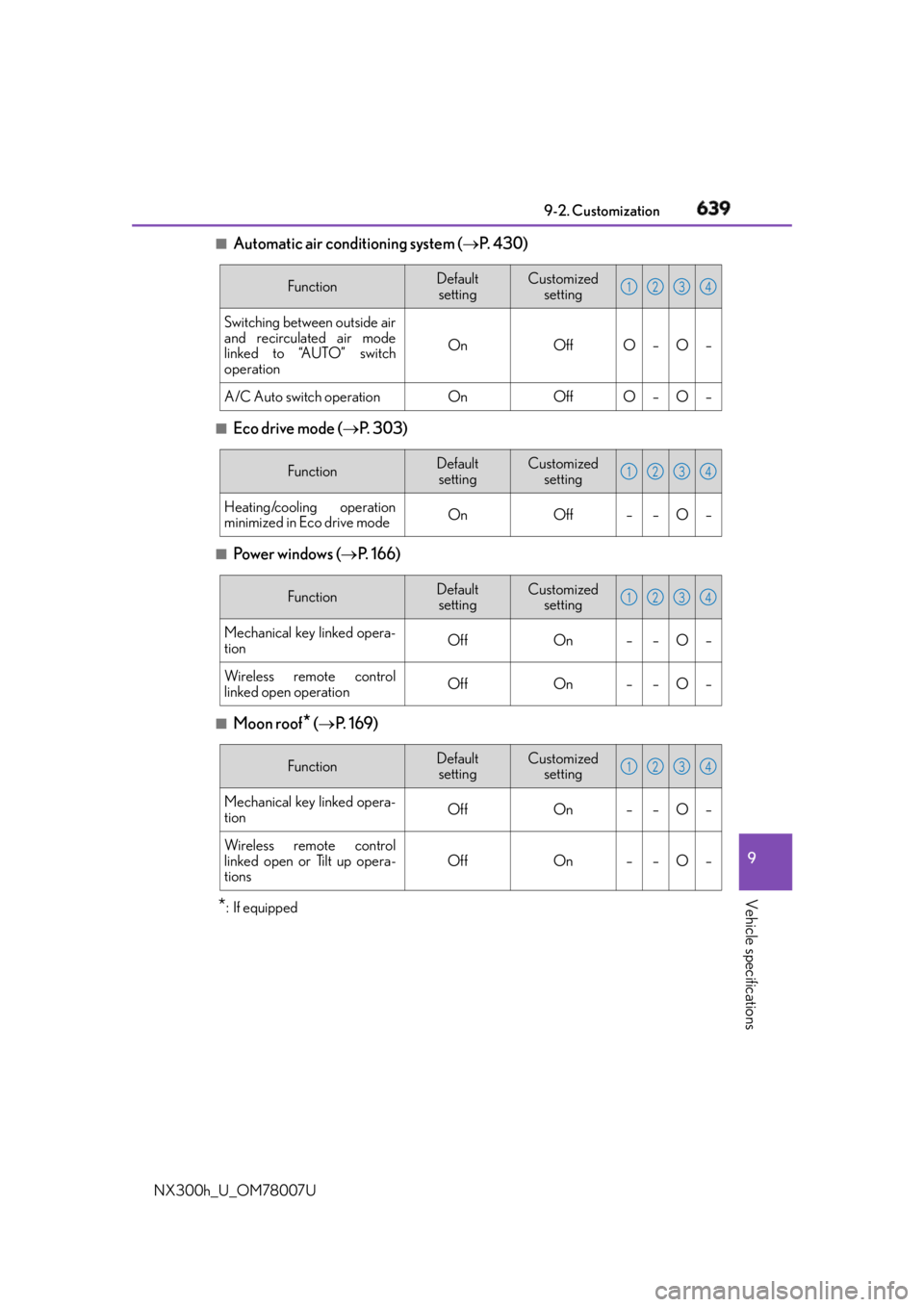
NX300h_U_OM78007U ■
Automatic air conditioning system ( P. 4 3 0 )
■
Eco drive mode ( P. 3 0 3 )
■
Powe r w i n d ow s ( P. 166)
■
Moon roof
* ( P. 1 6 9 )
* : If equipped Function Default
setting Customized
setting
Switching between outside air
and recirculated air mode
linked to “AUTO” switch
operation On Off O – O –
A/C Auto switch operation On Off O – O – 1 2 3 4
Function Default
setting Customized
setting
Heating/cooling operation
minimized in Eco drive mode On Off – – O – 1 2 3 4
Function Default
setting Customized
setting
Mechanical key linked opera-
tion Off On – – O –
Wireless remote control
linked open operation Off On – – O – 1 2 3 4
Function Default
setting Customized
setting
Mechanical key linked opera-
tion Off On – – O –
Wireless remote control
linked open or Tilt up opera-
tions Off On – – O – 1 2 3 4