steering LEXUS NX300h 2015 Owner's Manual
[x] Cancel search | Manufacturer: LEXUS, Model Year: 2015, Model line: NX300h, Model: LEXUS NX300h 2015Pages: 681, PDF Size: 9.14 MB
Page 156 of 681
156 3-3. Adjusting the seats
NX300h_U_OM78007U ■
To stop the position recall operation part-way through
Perform any of the following: ●
Press the “SET” button. ●
Press button “1”, “2” or “3”. ●
Operate any of the seat adjustment switch es (only cancels seat position recall).●
Operate the tilt and telescopic steering co ntrol switch (only ca ncels steering wheel
position recall). ■
Seat positions that can be memorized ( P. 1 4 6 )
The adjusted positions other than the position adjusted by lumbar support switch can be
recorded. ■
Operating the driving position memory after turning the power switch off
Recorded seat positions can be activated up to 180 seconds after the driver’s door is
opened and another 60 seconds after it is closed again. ■
In order to correctly use the dr iving position memory function
If a seat position is already in the furthest po ssible position and the seat is operated in the
same direction, the recorded position may be slightly different when it is recalled.
Each electronic key (including a card key) can be registered to recall your pre-
ferred driving position. ■
Registering procedure
Record your driving position to button “1”, “2” or “3” before performing the
following:
Carry only the key you want to regist er, and then close the driver’s door.
If 2 or more keys are in the vehicle, the driving position cannot be recorded
properly.
Check that the shift lever is in P.
Turn the power switch to ON mode.
Recall the driving position that you want to record.
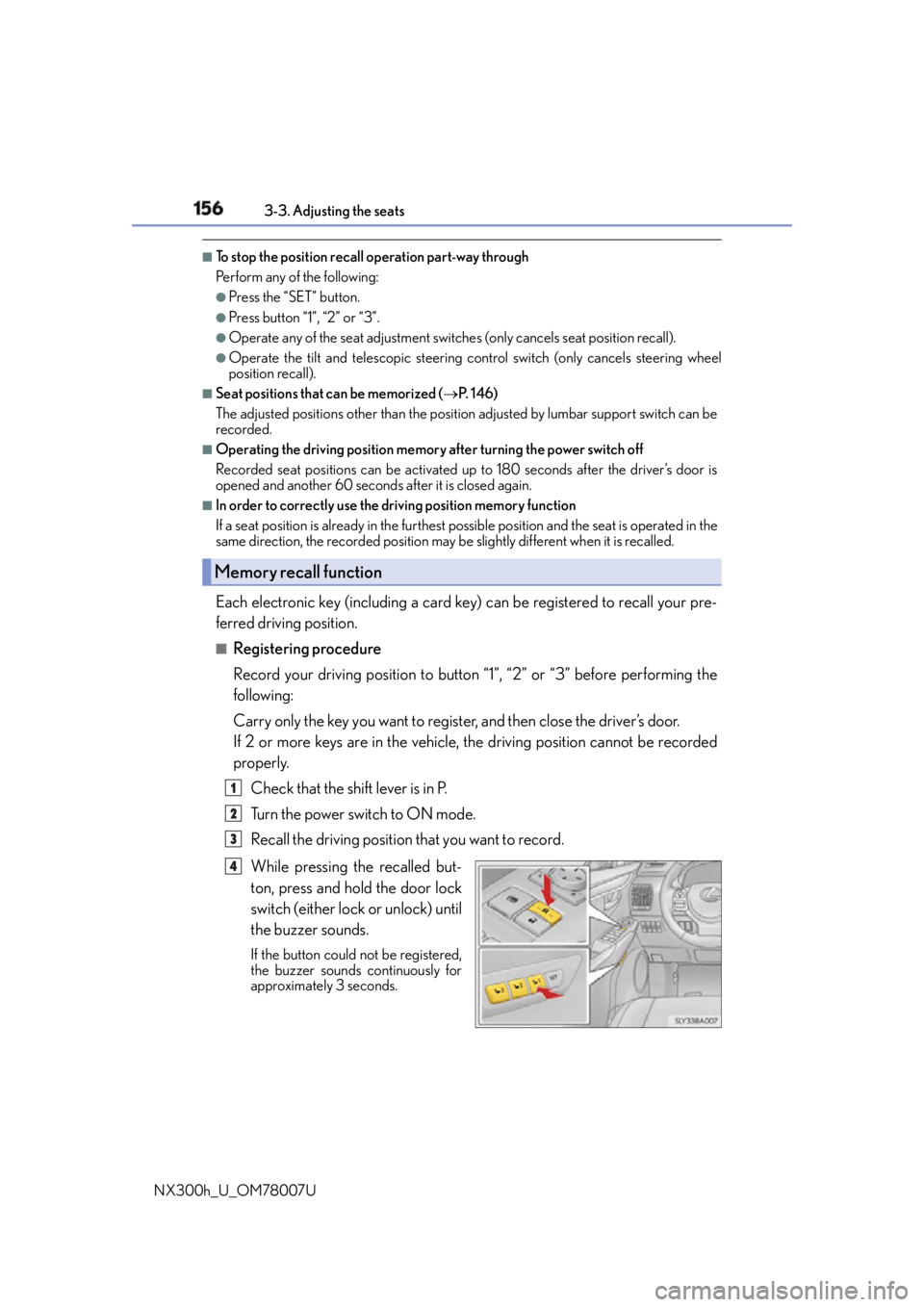
While pressing the recalled but-
ton, press and hold the door lock
switch (either lock or unlock) until
the buzzer sounds. If the button could not be registered,
the buzzer sounds continuously for
approximately 3 seconds.Memory recall function
1
2
3
4
Page 157 of 681

1573-3. Adjusting the seats
3
Operation of each component
NX300h_U_OM78007U ■
Recall procedure
Carry the electronic key that has been registered to the driving position,
and then unlock and open the driver’s door using the smart access system
with push-button start or wireless remote control. The driving position will move to the reco rded position (not including the steering
wheel). However, the seat will move to a po sition slightly behind the recorded posi-
tion in order to make entering the vehicle easier.
If the driving position is in a position th at has already been recorded, the seat and
outside rear view mirrors will not move.
Turn the power switch to ACCESSORY mode or ON mode, or fasten a
seat belt. The seat and steering wheel will move to the recorded position.■
Cancelation procedure
Carry only the key you want to cancel and then close the driver’s door.
If 2 or more keys are in the vehicle, the driving position cannot be canceled
properly.
Turn the power switch to ON mode.
While pressing the “SET” button, press and hold the door lock switch
(either lock or unlock) unt il the buzzer sounds twice.If it could not be canceled, the buzzer sounds continuously for approximately 3
seconds.■
Recalling the driving position using the memory recall function ●
Different driving positions can be registered for each electronic key. Therefore, the
driving position that is recalled may be different depending on the key being carried. ●
If a door other than the driver’s door is unlocked with the smart access system with
push-button start, the driving position cannot be recalled. In this case, press the driving
position button which has been set. ■
Customization
The unlock door settings of the memory recall function can be customized.
(Customizable features: P. 6 3 3 )
WA R N I N G ■
Seat adjustment caution
Take care during seat adjustment so that th e seat does not strike the rear passenger or
squeeze your body against the steering wheel. 1
2
1
2
Page 160 of 681
160 3-4. Adjusting the steering wheel and mirrors
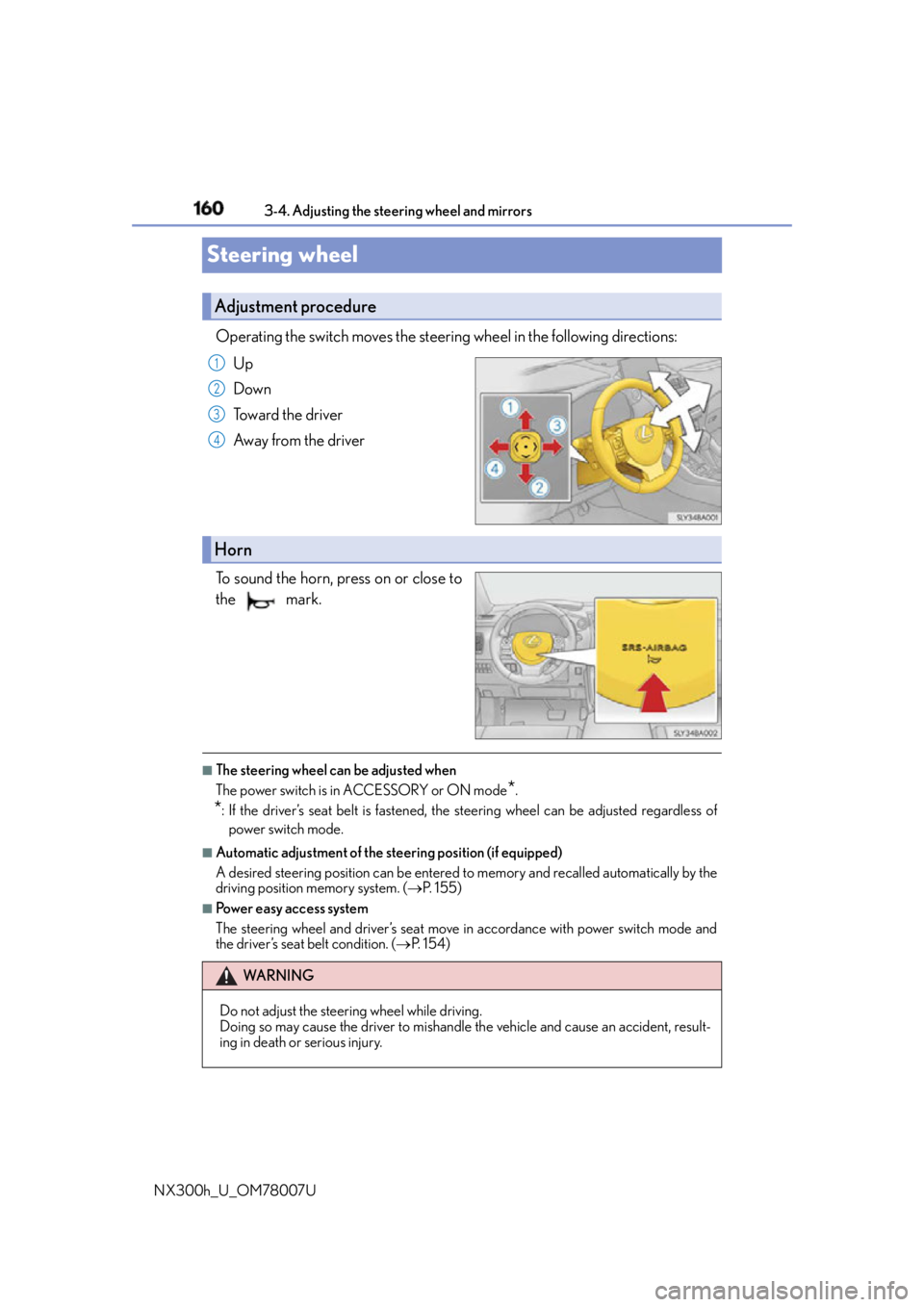
NX300h_U_OM78007USteering wheel Operating the switch moves the steering wheel in the following directions:
Up
Down
Toward the driver
Away from the driver
To sound the horn, press on or close to
the mark.
■
The steering wheel can be adjusted when
The power switch is in ACCESSORY or ON mode
* .
* : If the driver’s seat belt is fastened, the steering wheel can be adjusted regardless of
power switch mode. ■
Automatic adjustment of the steering position (if equipped)
A desired steering position can be entered to memory and recalled automatically by the
driving position memory system. ( P. 1 5 5 )■
Power easy access system
The steering wheel and driver’s seat move in accordance with power switch mode and
the driver’s seat belt condition. ( P. 1 5 4 )Adjustment procedure 1
2
3
4
Horn
WA R N I N G
Do not adjust the steering wheel while driving.
Doing so may cause the driver to mishandle the vehicle and cause an accident, result-
ing in death or serious injury.
Page 161 of 681
1613-4. Adjusting the steering wheel and mirrors
3
Operation of each component
NX300h_U_OM78007UInside rear view mirror The height of the rear view mirror can be adjusted to suit your driving posture.
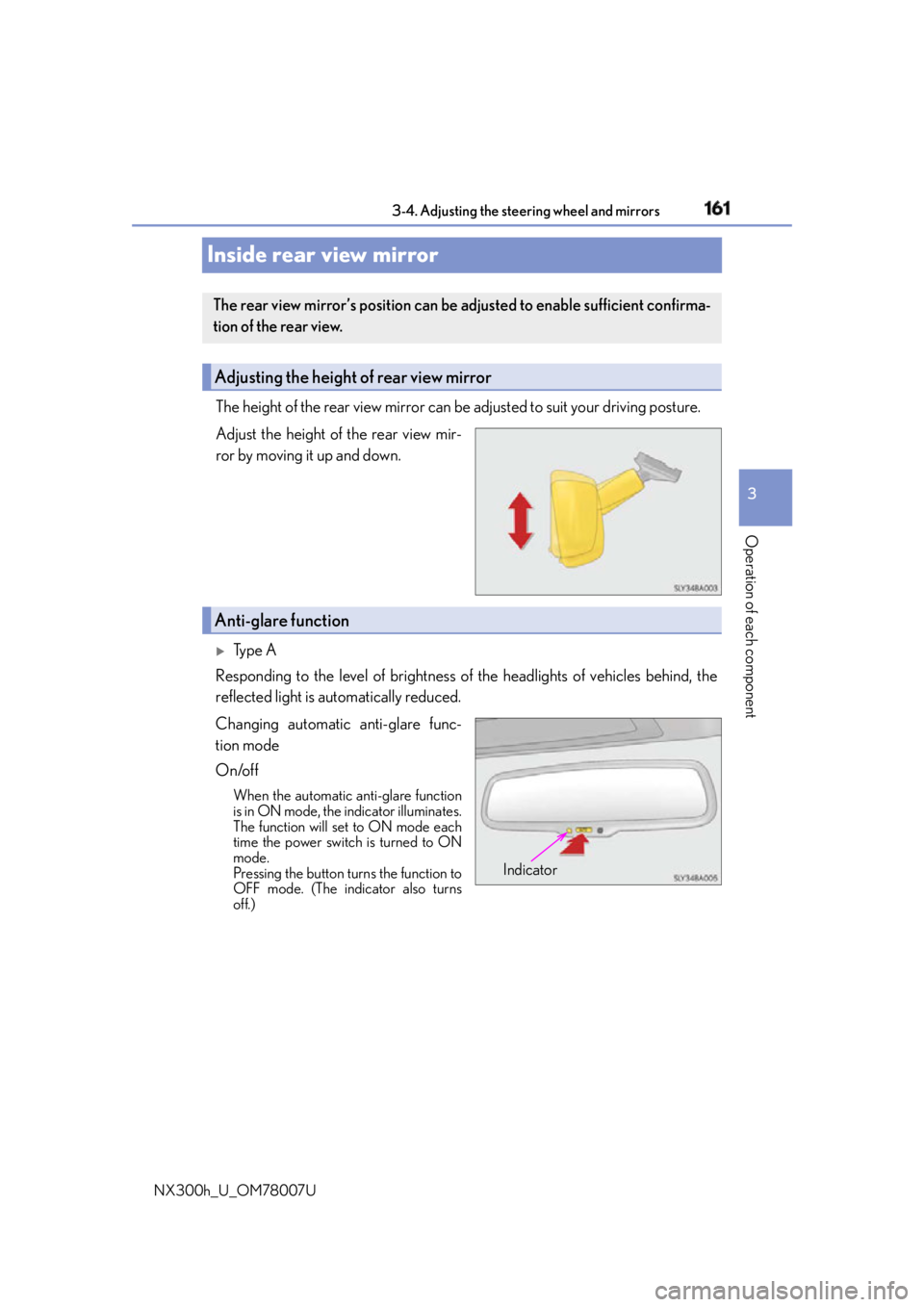
Adjust the height of the rear view mir-
ror by moving it up and down.
Ty p e A
Responding to the level of brightness of the headlights of vehicles behind, the
reflected light is automatically reduced.
Changing automatic anti-glare func-
tion mode
On/off When the automatic anti-glare function
is in ON mode, the indicator illuminates.
The function will set to ON mode each
time the power switch is turned to ON
mode.
Pressing the button turns the function to
OFF mode. (The indicator also turns
off.)The rear view mirror’s position can be adjusted to enable sufficient confirma-
tion of the rear view.
Adjusting the height of rear view mirror
Anti-glare function
Indicator
Page 162 of 681
162 3-4. Adjusting the steering wheel and mirrors
NX300h_U_OM78007U
Ty p e B
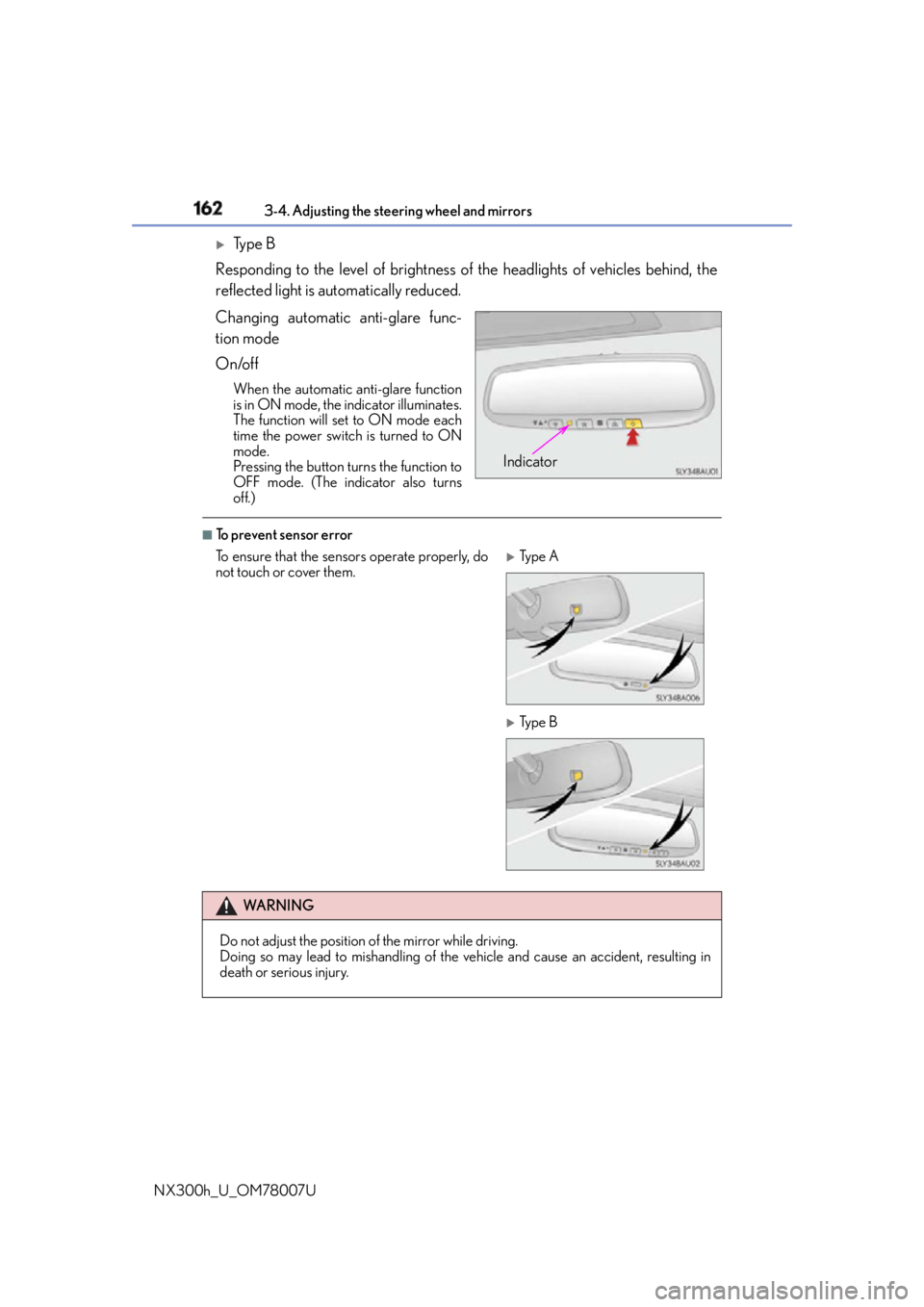
Responding to the level of brightness of the headlights of vehicles behind, the
reflected light is automatically reduced.
Changing automatic anti-glare func-
tion mode
On/off When the automatic anti-glare function
is in ON mode, the indicator illuminates.
The function will set to ON mode each
time the power switch is turned to ON
mode.
Pressing the button turns the function to
OFF mode. (The indicator also turns
off.) ■
To prevent sensor error Indicator
To ensure that the sens ors operate properly, do
not touch or cover them.
Ty p e A
Ty p e B
WA R N I N G
Do not adjust the position of the mirror while driving.
Doing so may lead to mishandling of the vehicle and cause an accident, resulting in
death or serious injury.
Page 163 of 681
1633-4. Adjusting the steering wheel and mirrors
3
Operation of each component
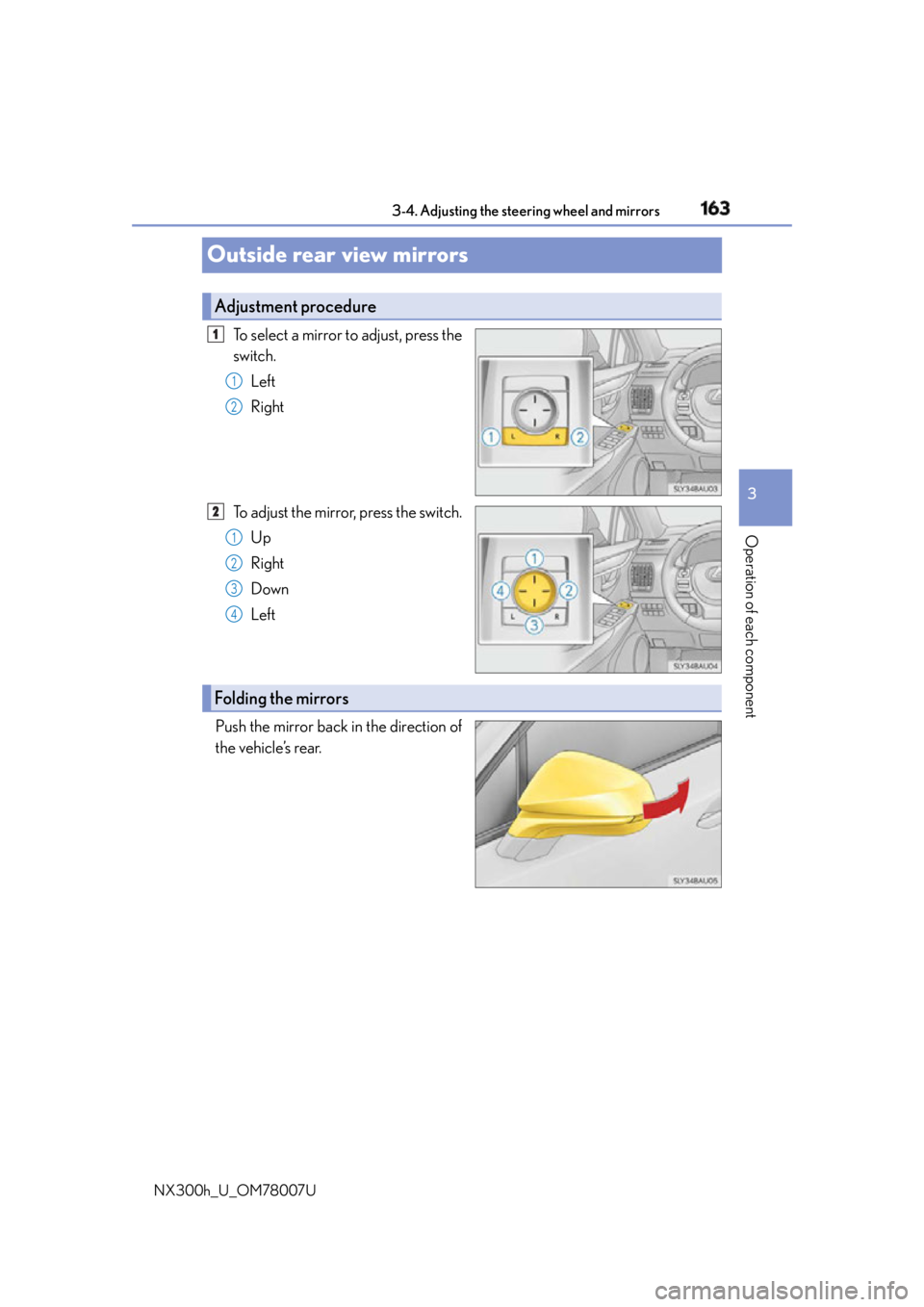
NX300h_U_OM78007UOutside rear view mirrors To select a mirror to adjust, press the
switch.
Left
Right
To adjust the mirror, press the switch.
Up
Right
Down
Left
Push the mirror back in the direction of
the vehicle’s rear. Adjustment procedure 1
1
2
2
1
2
3
4
Folding the mirrors
Page 164 of 681

164 3-4. Adjusting the steering wheel and mirrors
NX300h_U_OM78007U When the mirror select switch is in the “L” or “R” position, the outside rear view
mirrors will automatically angle downwards when the vehicle is reversing in
order to give a better view of the ground.
To disable this function, move the mirror select switch to the neutral position
(between “L” or “R”) ■
Adjusting the mirror angle when the vehicle is reversing
With the shift lever in R, adjust the mirror angle at a desired position.
The adjusted angle will be memorized and the mirror will automatically tilt to
the memorized angle whenever the shift lever is shifted to R from next time. The memorized downward tilt position of the mirror is linked to the normal position
(angle adjusted with the shif t lever in other than R). Therefore, if the normal posi-
tion is changed after adjustment, th e tilt position will also change.
When the normal position is chang ed, readjust the angle in reversing.■
Mirror angle can be adjusted when
The power switch is in ACCESSORY or ON mode. ■
When the mirrors are fogged up
The outside rear view mirrors can be cleare d using the mirror defoggers. Turn on the
rear window defogger to turn on the outside rear view mirror defoggers. ( P. 4 3 5 )■
Automatic adjustment of the mirror angle (vehicles with driving position memory)
A desired mirror face angle can be entered to memory and recalled automatically by the
driving position memory. ( P. 1 5 4 )■
Auto anti-glare function (if equipped)
When the anti-glare inside rear view mirror is set to automatic mode, the outside rear
view mirrors will activate in conjunction with the anti-glare inside rear view mirror to
reduce reflected light. ( P. 161)Linked mirror function when reversi ng (vehicles with driving position
memory)
Page 165 of 681

1653-4. Adjusting the steering wheel and mirrors
3
Operation of each component
NX300h_U_OM78007U WA R N I N G ■
When driving the vehicle
Observe the following precautions while driving.
Failing to do so may result in loss of contro l of the vehicle and cause an accident, result-
ing in death or serious injury. ●
Do not adjust the mirrors while driving. ●
Do not drive with the mirrors folded. ●
Both the driver and passenger side mirror s must be extended and properly adjusted
before driving. ■
When a mirror is moving
To avoid personal injury and mirror malfunct ion, be careful not to get your hand caught
by the moving mirror. ■
When the mirror defoggers are operating
Do not touch the rear view mirror surfaces, as they can become very hot and burn you.
Page 173 of 681

173
4 Driving
NX300h_U_OM78007U 4-1. Before driving
Driving the vehicle ....................... 174
Cargo and luggage .................... 182
Vehicle load limits ....................... 186
Trailer towing (vehicles with
towing package) ....................... 187
Trailer towing (vehicles
without towing package) ...... 199
Dinghy towing............................. 200
4-2. Driving procedures
Power (ignition) switch.............. 201
EV drive mode ........................... 206
Hybrid transmission ................. 208
Turn signal lever ........................... 212
Parking brake ................................ 213
Brake hold ...................................... 216
ASC
(Active Sound Control) ......... 218
4-3. Operating the lights
and wipers
Headlight switch .......................... 219
Automatic High Beam .............223
Fog light switch............................ 227
Windshield wipers and
washer..........................................228
Rear window wiper and
washer..........................................234 4-4. Refueling
Opening the fuel tank cap ..... 236
4-5. Using the driving support
systems
Dynamic radar cruise
control ......................................... 240
Dynamic radar cruise
control with full-speed
range ............................................ 253
Cruise control ..............................267
LDA (Lane Departure Alert
with steering control) ............ 270
Intuitive parking assist .............. 279
Lexus parking assist
monitor ........................................ 287
Driving mode select
switch ...........................................303
Driving assist systems...............305
PCS
(Pre-Collision System)........... 310
BSM (Blind Spot Monitor) ...... 316
4-6. Driving tips
Hybrid vehicle driving
tips ................................................. 324
Winter driving tips ..................... 326
Utility vehicle precautions ......330
Page 175 of 681

1754-1. Before driving
4
Driving
NX300h_U_OM78007U With the brake pedal depressed, shift the shift lever to D. ( P. 2 0 8 )
Pull the parking brake switch and parking brake is set manually. ( P. 2 1 4 )
Release the brake pedal and gently depress the accelerator pedal to acceler-
ate the vehicle.
Press the parking brake switch and parking brake is released manually.
( P. 2 1 4 ) ■
When starting off on a uphill
The hill-start assist co ntrol will activate. ( P. 3 0 5 )■
For fuel-efficient driving
Keep in mind that hybrid vehicles are similar to conventional vehicles, and it is necessary
to refrain from activities such as sudden acceleration. ( P. 3 2 4 )■
Driving in the rain ●
Drive carefully when it is raining, because visibility will be reduced, the windows may
become fogged-up, and th e road will be slippery.●
Drive carefully when it starts to rain, becau se the road surface will be especially slip-
pery. ●
Refrain from high speeds when driving on an expressway in the rain, because there may
be a layer of water between the tires and the road surface, preventing the steering and
brakes from operating properly. ■
Restraining the hybrid system output (Brake Override System) ●
When the accelerator and brake pedals are de pressed at the same time, the hybrid sys-
tem output may be restrained. ●
A warning message is displayed on the multi-information display while the system is
operating. If a warning message is shown on the multi-information display, read the
message and follow the instructions.■
Restraining sudden start (Drive-Start Control) ●
When the following unusual op eration is performed, the hybrid system output may be
restrained.
• When the shift lever is shifted from R to D, D to R, N to R, P to D, or P to R (D
includes S) with the accelerator pedal depressed, a warning message appears on
the multi-information display. If a warnin g message is shown on the multi-informa-
tion display, read the message and follow the instructions.
• When the accelerator pedal is depresse d too while the vehicle is in reverse.●
While Drive-Start Control is being activate d, your vehicle may have trouble escaping
from the mud or fresh snow. In such case, deactivate TRAC ( P. 307) to cancel Drive-
Start Control so that the vehicle may become able to escape from the mud or fresh
snow.Starting off on a uphill 1
2
3
4