belt LEXUS NX300h 2015 Service Manual
[x] Cancel search | Manufacturer: LEXUS, Model Year: 2015, Model line: NX300h, Model: LEXUS NX300h 2015Pages: 681, PDF Size: 9.14 MB
Page 93 of 681
932. Instrument cluster
2
Instrument cluster
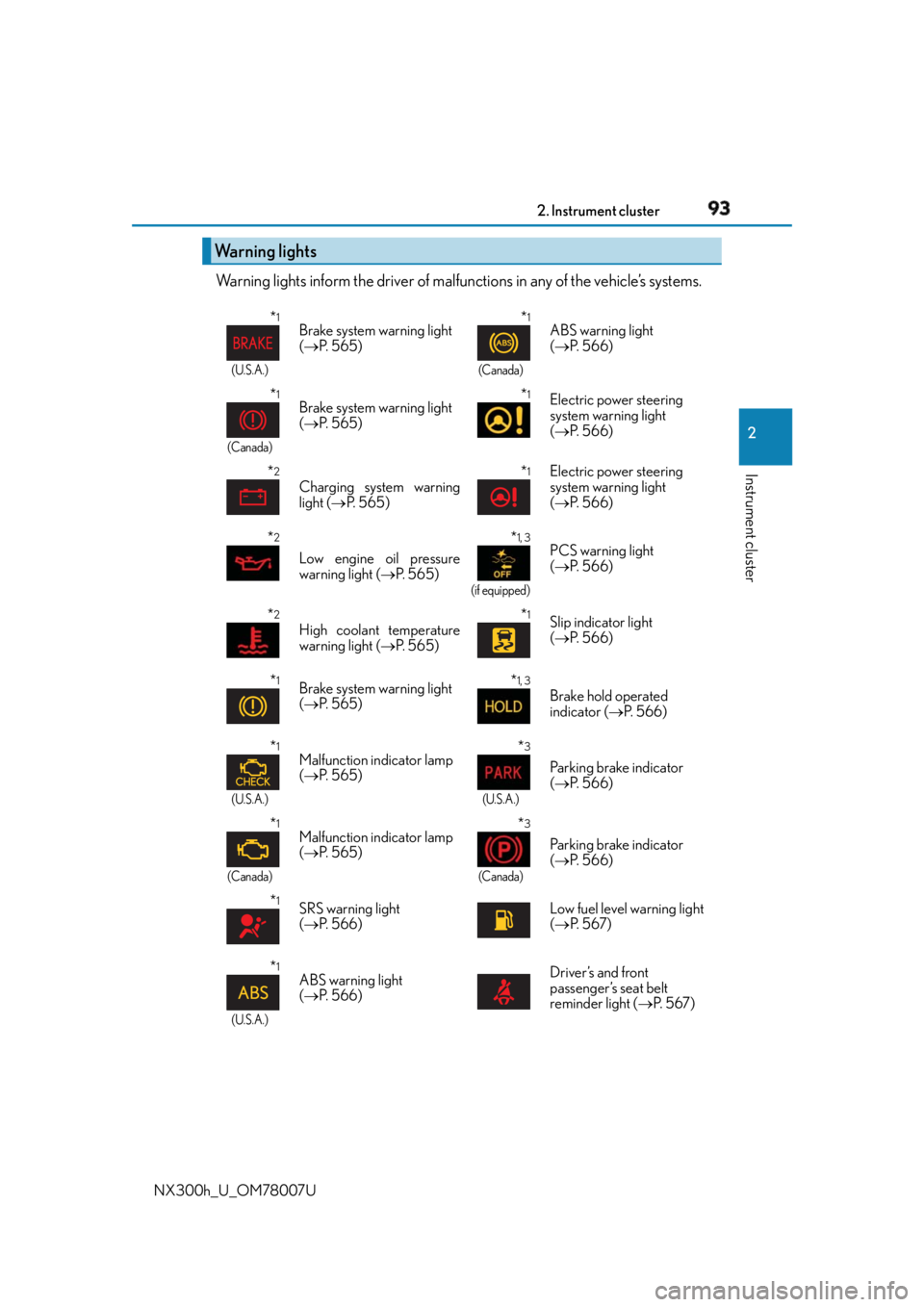
NX300h_U_OM78007U Warning lights inform the driver of malfun ctions in any of the vehicle’s systems.
Warning lights * 1
(U.S.A.)
Brake system warning light
( P. 5 6 5 )
* 1
(Canada)
ABS warning light
( P. 5 6 6 )
* 1
(Canada)
Brake system warning light
( P. 5 6 5 )
* 1
Electric power steering
system warning light
( P. 5 6 6 )
* 2
Charging system warning
light ( P. 5 6 5 )
* 1
Electric power steering
system warning light
( P. 5 6 6 )
* 2
Low engine oil pressure
warning light ( P. 565) * 1, 3
(if equipped)
PCS warning light
( P. 5 6 6 )
* 2
High coolant temperature
warning light ( P. 565) * 1
Slip indicator light
( P. 5 6 6 )
* 1
Brake system warning light
( P. 5 6 5 )
* 1, 3
Brake hold operated
indicator ( P. 5 6 6 )
* 1
(U.S.A.)
Malfunction indicator lamp
( P. 5 6 5 ) * 3
(U.S.A.)
Parking brake indicator
( P. 5 6 6 )
* 1
(Canada)
Malfunction indicator lamp
( P. 5 6 5 ) * 3
(Canada)
Parking brake indicator
( P. 5 6 6 )
* 1
SRS warning light
( P. 5 6 6 ) Low fuel level warning light
( P. 5 6 7 )
* 1
(U.S.A.) ABS warning light
( P. 5 6 6 ) Driver’s and front
passenger’s seat belt
reminder light ( P. 5 6 7 )
Page 146 of 681
146 3-3. Adjusting the seats
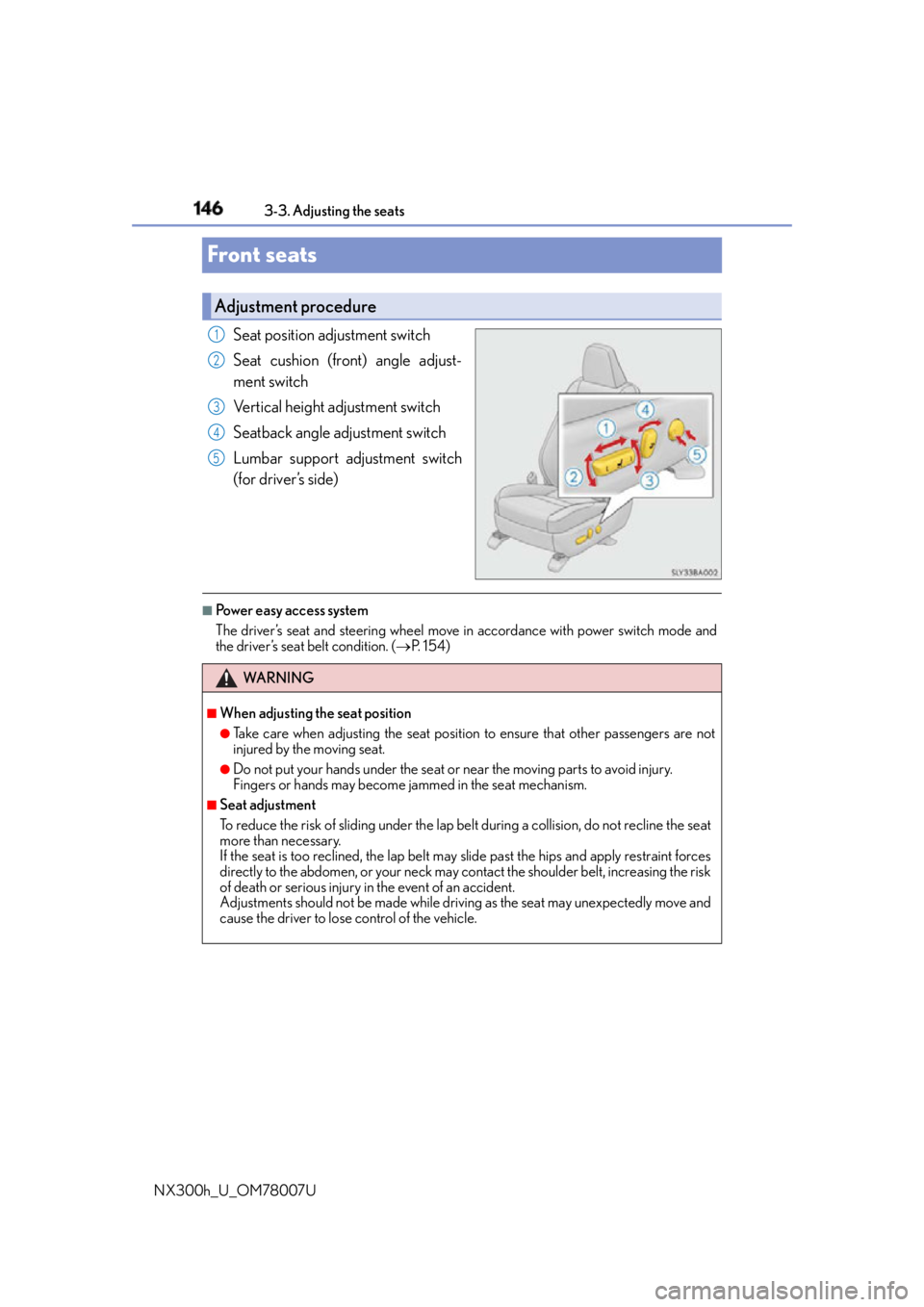
NX300h_U_OM78007UFront seats Seat position adjustment switch
Seat cushion (front) angle adjust-
ment switch
Vertical height adjustment switch
Seatback angle adjustment switch
Lumbar support adjustment switch
(for driver’s side) ■
Power easy access system
The driver’s seat and steering wheel move in accordance with power switch mode and
the driver’s seat belt condition. ( P. 1 5 4 )Adjustment procedure 1
2
3
4
5
WA R N I N G ■
When adjusting the seat position ●
Take care when adjusting the seat position to ensure that other passengers are not
injured by the moving seat. ●
Do not put your hands under the seat or near the moving parts to avoid injury.
Fingers or hands may become jammed in the se at mechanism.■
Seat adjustment
To reduce the risk of sliding under the lap belt during a co llision, do not recline the seat
more than necessary.
If the seat is too rec lined, the lap belt may slide past the hips and apply restraint forces
directly to the abdomen, or your neck may contact the shoulder belt, increasing the risk
of death or serious injury in the event of an accident.
Adjustments should not be ma de while driving as the seat may unexpectedly move and
cause the driver to lose control of the vehicle.
Page 148 of 681
148 3-3. Adjusting the seats
NX300h_U_OM78007U ■
Before folding down the rear seatbacks
Stow the rear center seat be lt and seat belt buckles. ( P. 3 4 )
Lower the head restraint of the rear seat. ( P. 1 5 8 )■
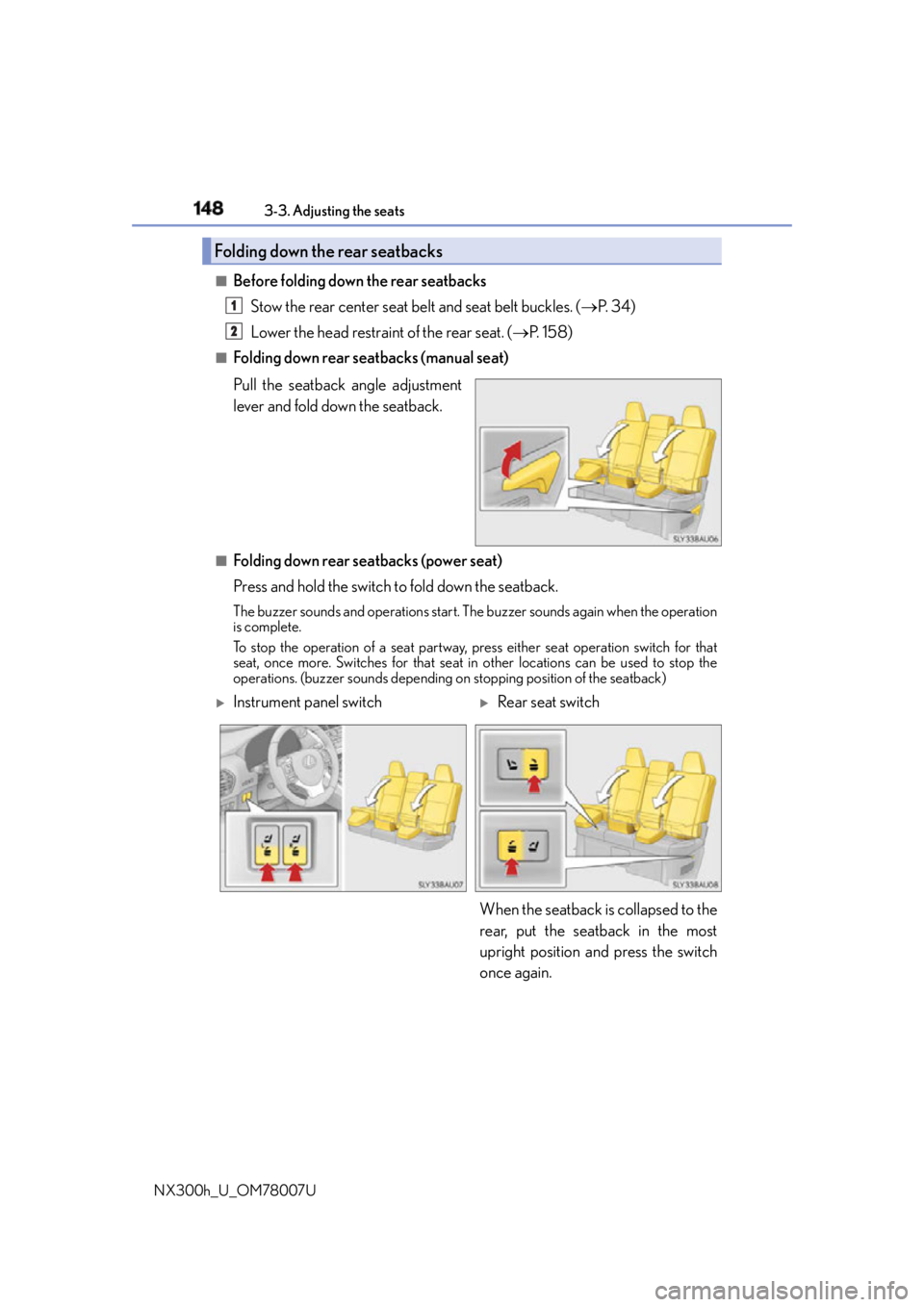
Folding down rear seatbacks (manual seat)
Pull the seatback angle adjustment
lever and fold down the seatback.
■
Folding down rear seatbacks (power seat)
Press and hold the switch to fold down the seatback.The buzzer sounds and operations start. Th e buzzer sounds again when the operation
is complete.
To stop the operation of a se at partway, press either seat operation switch for that
seat, once more. Switches for that seat in other locations can be used to stop the
operations. (buzzer sounds depending on stopping position of the seatback)Folding down the rear seatbacks 1
2
Instrument panel switch
Rear seat switch
When the seatback is collapsed to the
rear, put the seatback in the most
upright position and press the switch
once again.
Page 149 of 681
1493-3. Adjusting the seats
3
Operation of each component
NX300h_U_OM78007U ■
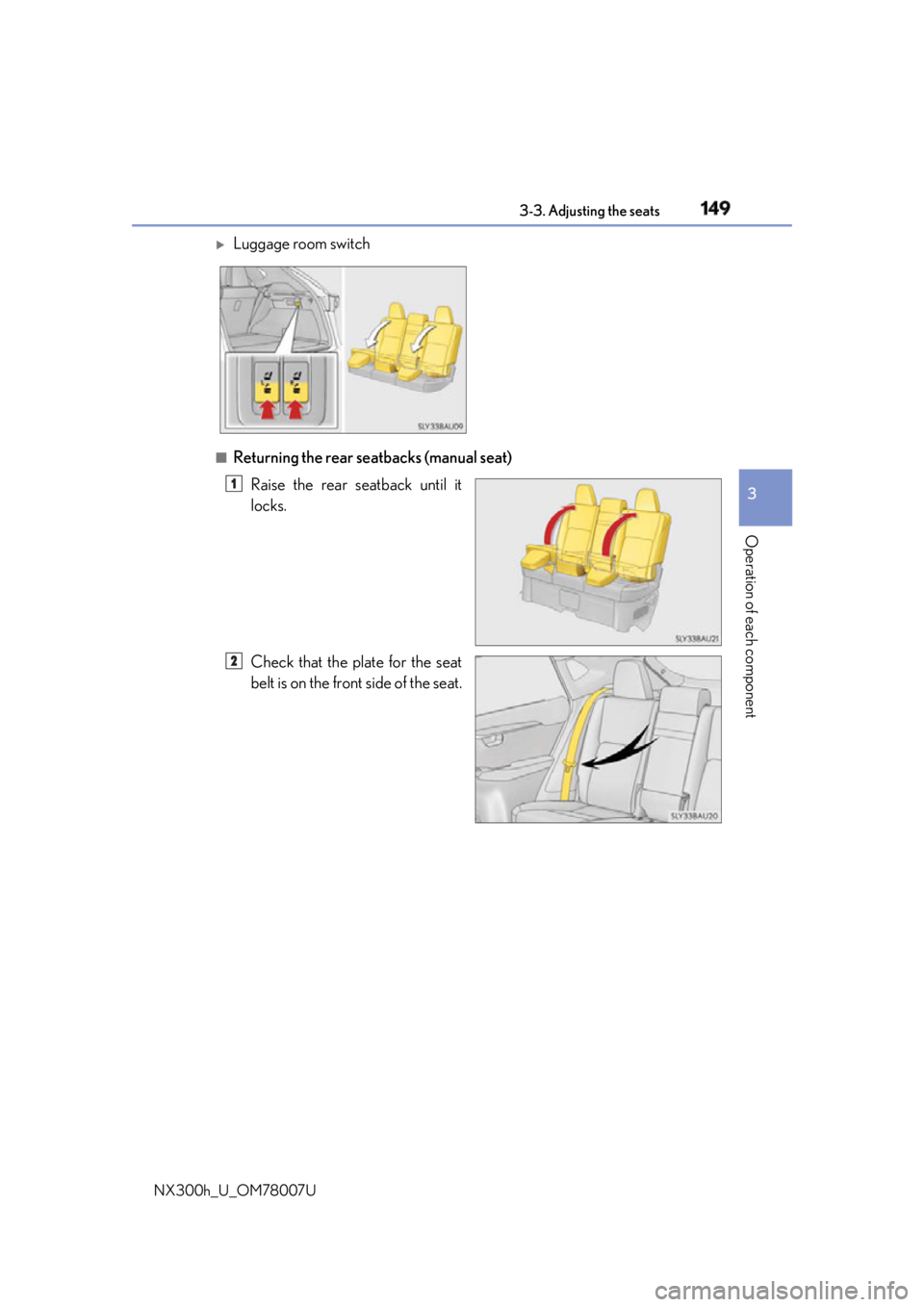
Returning the rear seatbacks (manual seat)
Raise the rear seatback until it
locks.
Check that the plate for the seat
belt is on the front side of the seat.
Luggage room switch
1
2
Page 150 of 681
150 3-3. Adjusting the seats
NX300h_U_OM78007U ■
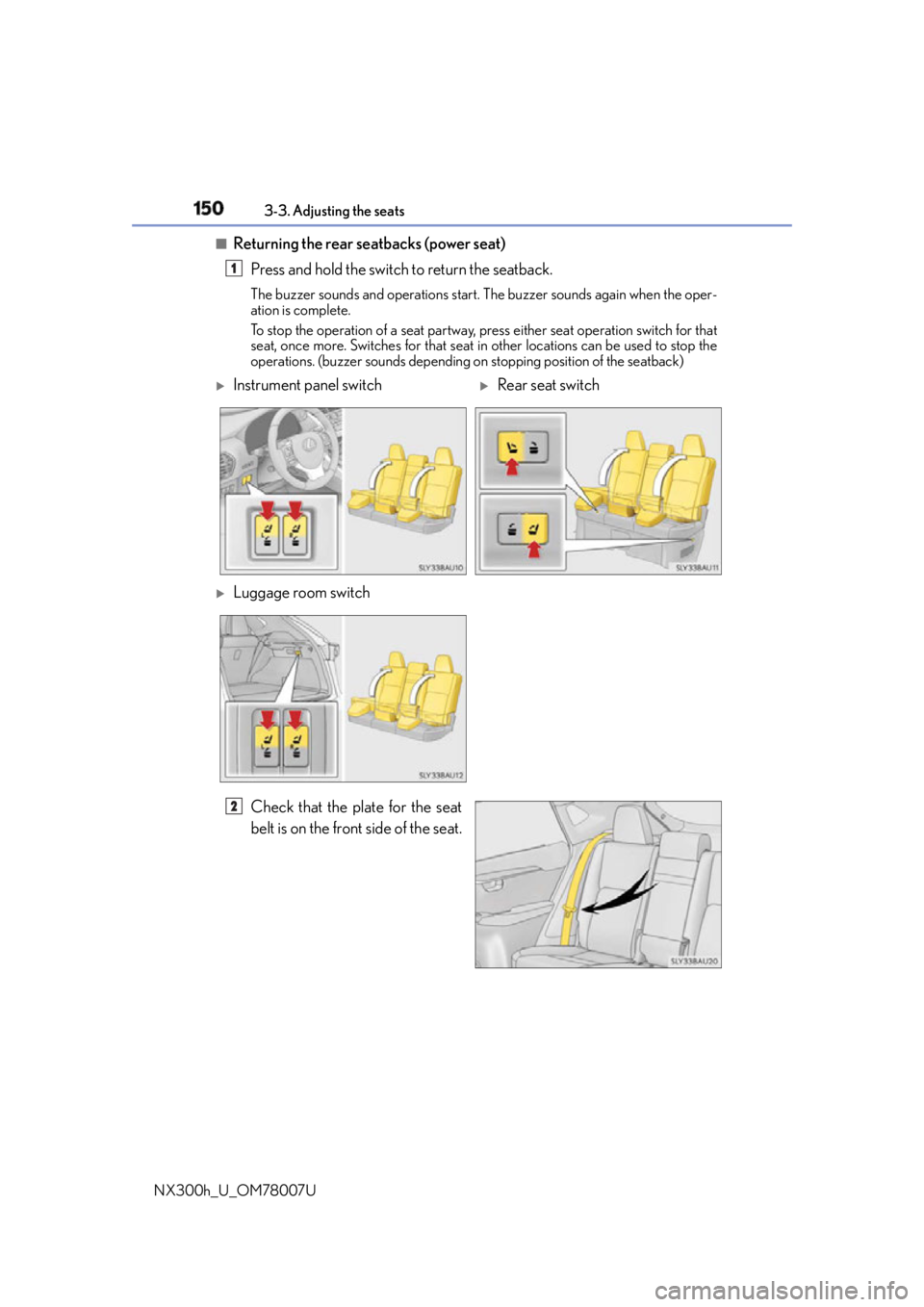
Returning the rear seatbacks (power seat)
Press and hold the switch to return the seatback. The buzzer sounds and operations start. The buzzer sounds again when the oper-
ation is complete.
To stop the operation of a seat partway, press either seat operation switch for that
seat, once more. Switches for that seat in other locations can be used to stop the
operations. (buzzer sounds depending on stopping position of the seatback)
Check that the plate for the seat
belt is on the front side of the seat. 1
Instrument panel switch
Rear seat switch
Luggage room switch
2
Page 153 of 681
1533-3. Adjusting the seats
3
Operation of each component
NX300h_U_OM78007U WA R N I N G ■
Seat adjustment
To reduce the risk of sliding under the lap belt during a co llision, do not recline the seat
more than necessary.
If the seat is too rec lined, the lap belt may slide past the hips and apply restraint forces
directly to the abdomen, or your neck may contact the shoulder belt, increasing the risk
of death or serious injury in the event of an accident.
Adjustments should not be ma de while driving as the seat may unexpectedly move and
cause the driver to lose control of the vehicle. ■
After returning the rear seatback to the upright position
Observe the following precautions.
Failure to do so may result in death or serious injury.●
Make sure that the seatback is securely locked in position by lightly pushing it back
and forth. ●
Check that the seat belts are not twisted or caught in the seatback. ■
Jam protection function (vehicles with a power seat)
Observe the following precautions.
Failure to do so may cause death or serious injury. ●
Never use any part of your body to intentio nally activate the jam protection function.●
The jam protection function may not work if something gets caught just before the
seatback is fully folded forward. Be careful not to get fingers caught or anything else.●
The jam protection function may not work depending on the shape of the object that
is caught. Be careful not to catch fingers or anything else.
NOTICE ■
Stowing the seat belts
The seat belts and the buckles for the rear ce nter seat, as well as the armrest, must be
stowed before you fold down the rear seatbacks. ( P. 3 4 , 4 6 5 )
Page 154 of 681
154 3-3. Adjusting the seats
NX300h_U_OM78007UDriving position memory
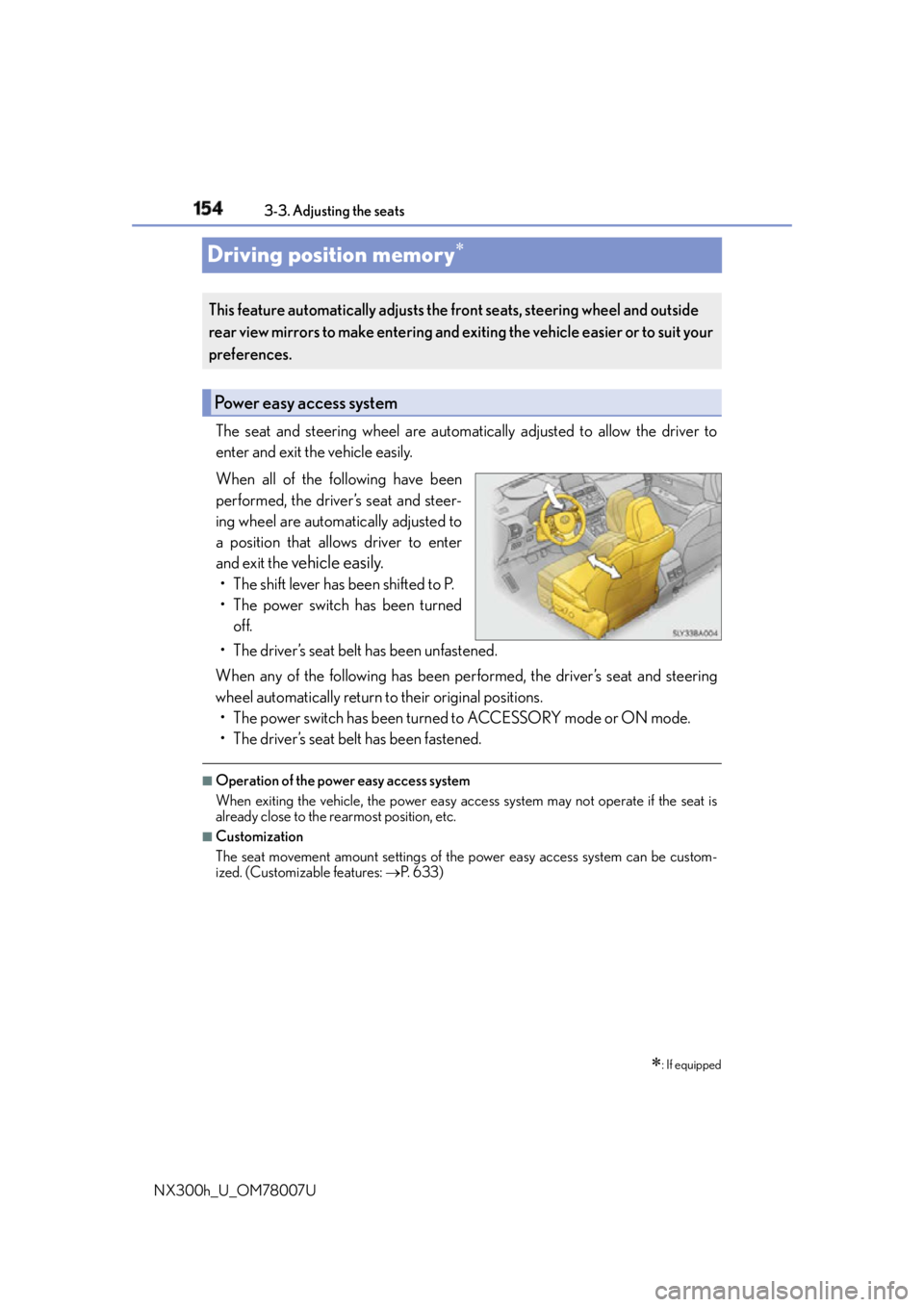
The seat and steering wheel are automati cally adjusted to allow the driver to
enter and exit the vehicle easily.
When all of the following have been
performed, the driver’s seat and steer-
ing wheel are automatically adjusted to
a position that allows driver to enter
and exit the
vehicle easily.• The shift lever has been shifted to P.
• The power switch has been turned
off.
• The driver’s seat belt has been unfastened.
When any of the following has been perf ormed, the driver’s seat and steering
wheel automatically return to their original positions.
• The power switch has been turned to ACCESSORY mode or ON mode.
• The driver’s seat belt has been fastened. ■
Operation of the power easy access system
When exiting the vehicle, the power easy acc ess system may not operate if the seat is
already close to the rearmost position, etc. ■
Customization
The seat movement amount settings of the power easy access system can be custom-
ized. (Customizable features: P. 6 3 3 )
: If equippedThis feature automatically adjusts the fr ont seats, steering wheel and outside
rear view mirrors to make entering and ex iting the vehicle easier or to suit your
preferences.
Power easy access system
Page 157 of 681
1573-3. Adjusting the seats
3
Operation of each component
NX300h_U_OM78007U ■
Recall procedure
Carry the electronic key that has been registered to the driving position,
and then unlock and open the driver’s door using the smart access system
with push-button start or wireless remote control. The driving position will move to the reco rded position (not including the steering
wheel). However, the seat will move to a po sition slightly behind the recorded posi-
tion in order to make entering the vehicle easier.
If the driving position is in a position th at has already been recorded, the seat and
outside rear view mirrors will not move.
Turn the power switch to ACCESSORY mode or ON mode, or fasten a
seat belt. The seat and steering wheel will move to the recorded position.■
Cancelation procedure
Carry only the key you want to cancel and then close the driver’s door.
If 2 or more keys are in the vehicle, the driving position cannot be canceled
properly.
Turn the power switch to ON mode.
While pressing the “SET” button, press and hold the door lock switch
(either lock or unlock) unt il the buzzer sounds twice.If it could not be canceled, the buzzer sounds continuously for approximately 3
seconds.■
Recalling the driving position using the memory recall function ●
Different driving positions can be registered for each electronic key. Therefore, the
driving position that is recalled may be different depending on the key being carried. ●
If a door other than the driver’s door is unlocked with the smart access system with
push-button start, the driving position cannot be recalled. In this case, press the driving
position button which has been set. ■
Customization
The unlock door settings of the memory recall function can be customized.
(Customizable features: P. 6 3 3 )
WA R N I N G ■
Seat adjustment caution
Take care during seat adjustment so that th e seat does not strike the rear passenger or
squeeze your body against the steering wheel. 1
2
1
2
Page 160 of 681
160 3-4. Adjusting the steering wheel and mirrors
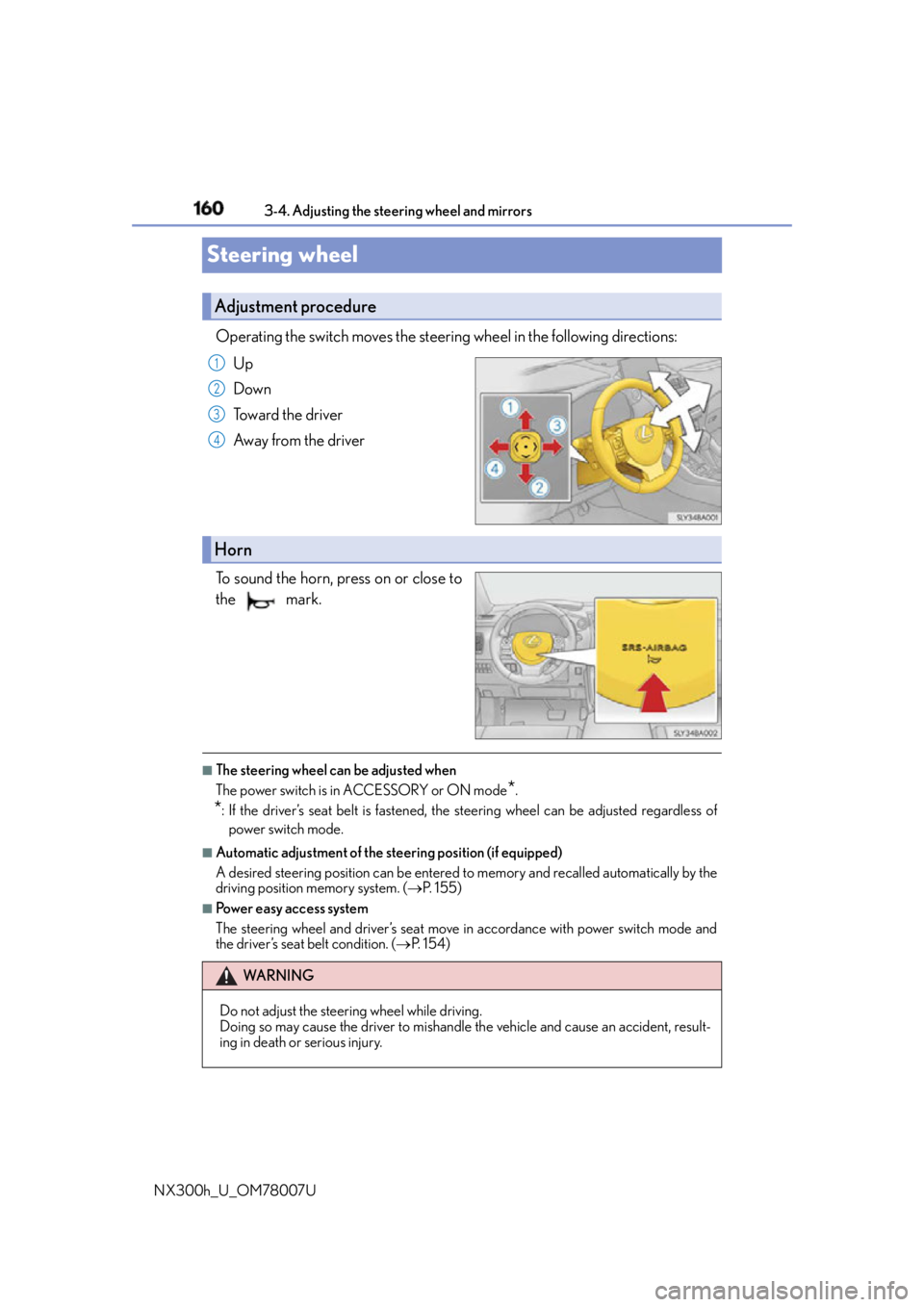
NX300h_U_OM78007USteering wheel Operating the switch moves the steering wheel in the following directions:
Up
Down
Toward the driver
Away from the driver
To sound the horn, press on or close to
the mark.
■
The steering wheel can be adjusted when
The power switch is in ACCESSORY or ON mode
* .
* : If the driver’s seat belt is fastened, the steering wheel can be adjusted regardless of
power switch mode. ■
Automatic adjustment of the steering position (if equipped)
A desired steering position can be entered to memory and recalled automatically by the
driving position memory system. ( P. 1 5 5 )■
Power easy access system
The steering wheel and driver’s seat move in accordance with power switch mode and
the driver’s seat belt condition. ( P. 1 5 4 )Adjustment procedure 1
2
3
4
Horn
WA R N I N G
Do not adjust the steering wheel while driving.
Doing so may cause the driver to mishandle the vehicle and cause an accident, result-
ing in death or serious injury.
Page 184 of 681
184 4-1. Before driving
NX300h_U_OM78007U WA R N I N G ■
Things that must not be carri ed in the luggage compartment
The following things may cause a fire if loaded in the luggage compartment:●
Receptacles containing gasoline ●
Aerosol cans ■
Storage precautions
Observe the following precautions.
Failure to do so may prevent the pedals from being depressed properly, may block the
driver’s vision, or may result in items hittin g the driver or passengers, possibly causing
an accident. ●
Stow cargo and luggage in the luggage compartment whenever possible. ●
Do not stack cargo and luggage in the luggage compartment higher than the seat-
backs. ●
When you fold down the rear seats, long items should not be placed directly behind
the front seats. ●
Never allow anyone to ride in the luggage compartment. It is not designed for pas-
sengers. They should ride in their seats with their se at belts properly fastened.●
Do not place cargo or luggage in or on the following locations.
• At the feet of the driver
• On the front passenger or rear seats (when stacking items)
•On the luggage cover
• On the instrument panel
•On the dashboard ●
Secure all items in th e occupant compartment.■
Capacity and distribution ●
Do not exceed the maximum axle weight ra ting or the total vehicle weight rating. ●
Even if the total load of occupant’s weight and the cargo load is less than the total load
capacity, do not apply the load unevenly. Improper loading may cause deterioration
of steering or braking control which may cause death or serious injury. ■
When using a roof luggage carrier (vehicles with roof rails)
Observe the following precautions: ●
Place the cargo so that its weight is distributed evenly between the front and rear
axles. ●
If loading long or wide cargo, never exce ed the vehicle overall length or width.
( P. 6 0 8 ) ●
Before driving, make sure the cargo is secu rely fastened on the roof luggage carrier.●
Loading cargo on the roof luggage carrier will make the center of gravity of the vehi-
cle higher. Avoid high speeds, sudden starts, sharp turns, sudden braking or abrupt
maneuvers, otherwise it may result in loss of control or vehicle rollover due to failure
to operate this vehicle correctly and result in death or serious injury. ●
If driving for a long distance, on rough roads, or at high speeds, stop the vehicle now
and then during the trip to make sure the cargo remains in its place. ●
Do not exceed 176.3 lb. (80 kg) cargo weight on the roof luggage carrier.