wheel LEXUS NX300h 2015 Workshop Manual
[x] Cancel search | Manufacturer: LEXUS, Model Year: 2015, Model line: NX300h, Model: LEXUS NX300h 2015Pages: 681, PDF Size: 9.14 MB
Page 301 of 681

3014-5. Using the driving support systems
4
Driving
NX300h_U_OM78007U WA R N I N G ■
When using the Lexus parking assist monitor system
The parking assist monitor is a supplemental device intended to assist the driver when
backing up. When backing up, be sure to chec k visually behind and all around the vehi-
cle before proceeding.
Observe the following precautions to avoid an accident that could result in death or
serious injuries. ●
Never depend on the parking assist monitor entirely when backing up. The image
and the position of the guide lines displaye d on the screen may differ from the actual
state.
Use caution, just as you would when backing up any vehicle. ●
Be sure to back up slowly, depressing the brake pedal to control vehicle speed. ●
If you seem likely to hit nearby vehicles, obstacles, people or mount the shoulder,
depress the brake pedal to stop the vehicle. ●
The instructions given are only guidelines.
When and how much to turn the steering wheel will vary according to traffic condi-
tions, road surface conditions, vehicle condit ion, etc. when parking. It is necessary to
be fully aware of this before using the parking assist system. ●
When parking, be sure to check that the par king space will accommodate your vehi-
cle before maneuvering into it. ●
Do not use the parking assist monitor in the following cases:
• On icy or slick road surfaces, or in snow
• When using tire chains or emergency tires
• When the back door is not closed completely
• On roads that are not flat or straight, such as curves or slopes. ●
In low temperatures, the screen may darken or the image may become faint. The
image could distort when the vehicle is moving, or you may become unable to see the
image on the screen. Be sure to check dire ct visually and with the mirrors all around
the vehicle before proceeding. ●
If the tire sizes are changed, the position of the guide lines displayed on the screen
may change. ●
The camera uses a special lens. The dist ances between objects and pedestrians that
appear in the image displayed on the screen will differ from the actual distances.
( P. 2 9 5 ) ●
Estimated course line display mode: If the st eering wheel is straight and the vehicle
width guide lines and the estimated course li nes are not in alignment, have the vehicle
inspected by your Lexus dealer.
Page 305 of 681

3054-5. Using the driving support systems
4
Driving
NX300h_U_OM78007UDriving assist systems ◆ ECB (Electronically Controlled Brake System)
The electronically controlled system generates braking force corresponding
to the brake operation
◆ ABS (Anti-lock Brake System)
Helps to prevent wheel lock when the brakes are applied suddenly, or if the
brakes are applied while drivin g on a slippery road surface
◆ Brake assist
Generates an increased level of braking force after the brake pedal is
depressed when the system detects a panic stop situation
◆ VSC (Vehicle Stability Control)
Helps the driver to control skidding when swerving suddenly or turning on
slippery road surfaces
◆ Enhanced VSC (Enhanced Vehicle Stability Control)
Provides cooperative control of the ABS, TRAC, VSC and EPS.
Helps to maintain directional stability when swerving on slippery road sur-
faces by controlling steering performance.
◆ TRAC (Traction Control)
Helps to maintain drive power and prevent the drive wheels from spinning
when starting the vehicle or accelerating on slippery roads
◆ Hill-start assist control
Helps to prevent the vehicle from rolling backward when starting on an
incline.
◆ EPS (Electric Power Steering)
Employs an electric motor to reduce the amount of effort needed to turn the
steering wheelTo help enhance driving safety and performance, the following systems oper-
ate automatically in response to various driving situations. Be aware, however,
that these systems are supplementary and should not be relied upon too
heavily when operating the vehicle.
Page 306 of 681
306 4-5. Using the driving support systems
NX300h_U_OM78007U ◆ E-Four (if equipped)
Electronic On-Demand AWD system. Automatically switches from front-
wheel drive to all-wheel drive (AWD) according to the driving conditions,
helping to ensure reliable handling and stability. Examples of conditions where
the system will switch to AWD are when cornering, going uphill, starting off or
accelerating, and when the road surface is slippery due to snow, rain, etc.
◆ PCS (Pre-Collision System) (if equipped)
P. 3 1 0
◆ BSM (Blind Spot Monitor) (if equipped)
P. 3 1 6
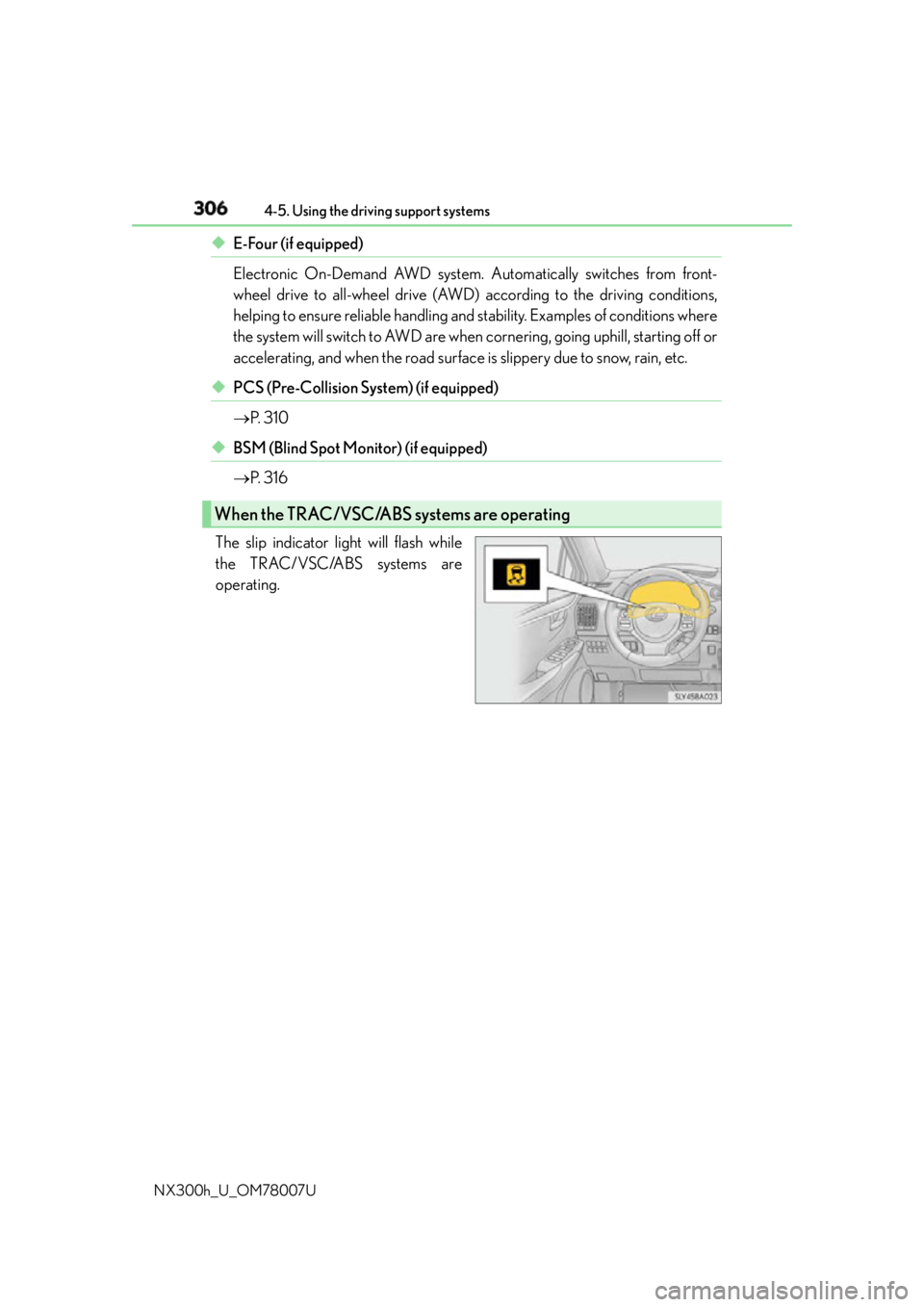
The slip indicator light will flash while
the TRAC/VSC/ABS systems are
operating.When the TRAC/VSC/ABS systems are operating
Page 307 of 681
3074-5. Using the driving support systems
4
Driving
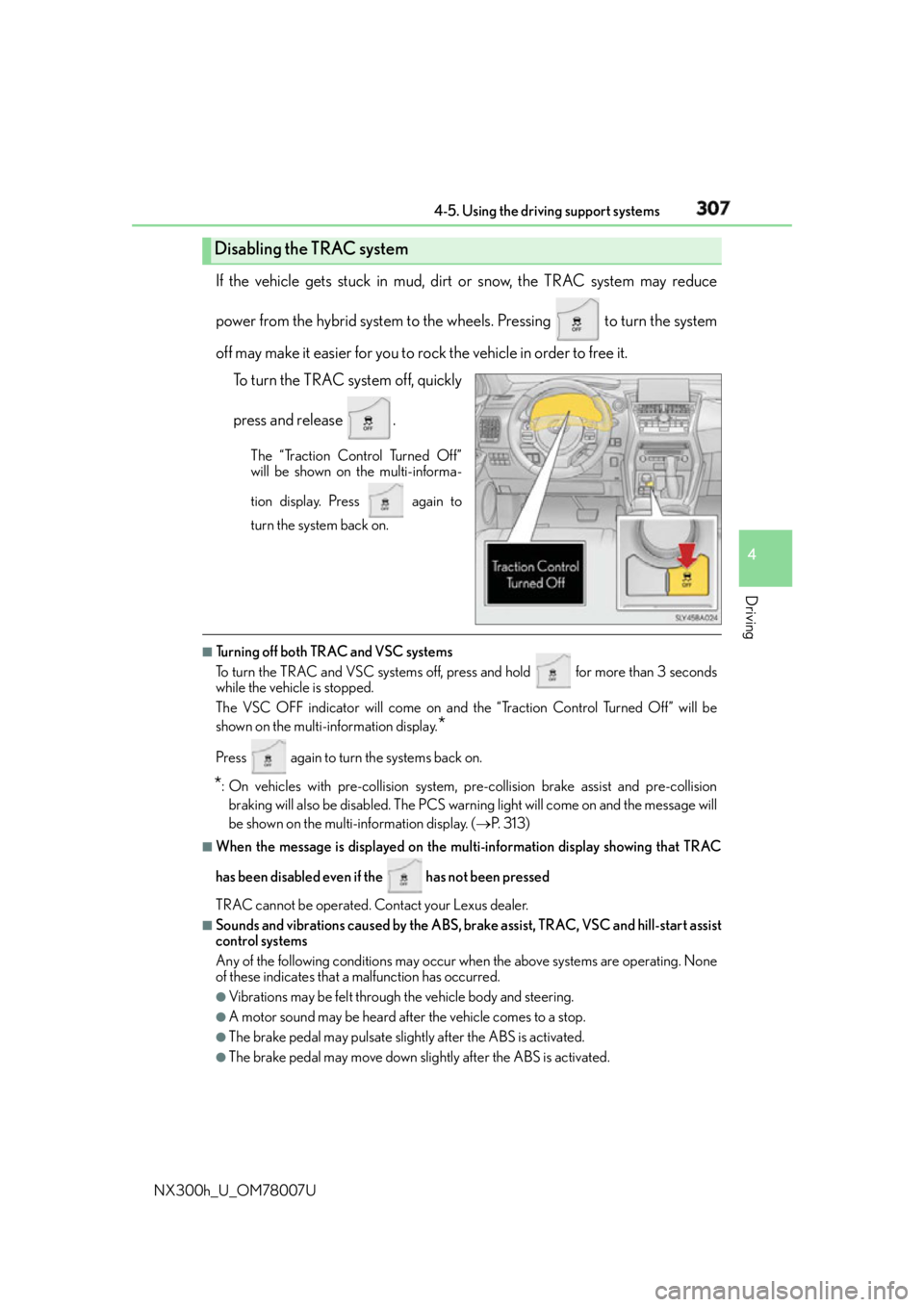
NX300h_U_OM78007U If the vehicle gets stuck in mud, dirt or snow, the TRAC system may reduce
power from the hybrid system to the wheels. Pressing to turn the system
off may make it easier for you to rock the vehicle in order to free it.
To turn the TRAC system off, quickly
press and release . The “Traction Control Turned Off”
will be shown on the multi-informa-
tion display. Press again to
turn the system back on.
■
Turning off both TRAC and VSC systems
To turn the TRAC and VSC systems off, press and hold for more than 3 seconds
while the vehicle is stopped.
The VSC OFF indicator will come on and th e “Traction Control Turned Off” will be
shown on the multi- information display.
*Press again to turn the systems back on.
* : On vehicles with pre-collision system, pre-collision brake assist and pre-collision
braking will also be disabled. The PCS warn ing light will come on and the message will
be shown on the multi-information display. ( P. 313) ■
When the message is displayed on the mu lti-information display showing that TRAC
has been disabled even if the has not been pressed
TRAC cannot be operated. Contact your Lexus dealer. ■
Sounds and vibrations caused by the ABS, brake assist, TRAC, VSC and hill-start assist
control systems
Any of the following conditions may occur when the above systems are operating. None
of these indicates that a malfunction has occurred. ●
Vibrations may be felt through the vehicle body and steering.●
A motor sound may be heard after the vehicle comes to a stop. ●
The brake pedal may pulsate slight ly after the ABS is activated.●
The brake pedal may move down slig htly after the ABS is activated.Disabling the TRAC system
Page 308 of 681

308 4-5. Using the driving support systems
NX300h_U_OM78007U ■
ECB operating sound
ECB operating sound may be hear d in the following cases, but it does not indicate that a
malfunction has occurred. ●
Operating sound heard from the engine compartment when the brake pedal is oper-
ated. ●
Motor sound of the brake system heard from the front part of the vehicle when the
driver’s door is opened. ●
Operating sound heard from the engine compartment when 1 or 2 minutes passed
after the stop of the hybrid system. ■
EPS operation sound
When the steering wheel is operated, a motor sound (whirring sound) may be heard.
This does not indicate a malfunction. ■
Reduced effectiveness of the EPS system
The effectiveness of the EPS system is reduced to prevent the system from overheating
when there is frequent steering input over an extended period of time. The steering
wheel may feel heavy as a result. Should this occur, refrain from excessive steering input
or stop the vehicle and turn the hybrid system off. The EPS system should return to nor-
mal within 10 minutes. ■
Automatic reactivation of TRAC and VSC systems
After turning the TRAC and VSC systems off, the systems will be automatically
re-enabled in the following situations: ●
When the power switch is turned off ●
If only the TRAC system is turned off, the TRAC will turn on when vehicle speed
increases
If both the TRAC and VSC systems are turn ed off, automatic re-enabling will not
occur when vehicl e speed increases.■
Operating conditions of hill-start assist control
When the following four conditions are met, the hill-start assist control will operate:●
The shift lever is in a position other than P or N (when starting off forward/backward on
an upward incline). ●
The vehicle is stopped. ●
The accelerator pedal is not depressed. ●
The parking brake is not engaged. ■
Automatic system cancelation of hill-start assist control
The hill-start assist control will turn off in any of the following situations: ●
The shift lever is moved to P or N. ●
The accelerator pedal is depressed. ●
The parking brake is engaged. ●
Approximately 2 seconds elapse after the brake pedal is released.
Page 309 of 681

3094-5. Using the driving support systems
4
Driving
NX300h_U_OM78007U WA R N I N G ■
The ABS does not operate effectively when ●
The limits of tire gripping performance have been exceeded (such as excessively
worn tires on a snow covered road). ●
The vehicle hydroplanes while driving at high speed on wet or slick road. ■
Stopping distance when the ABS is operat ing may exceed that of normal conditions
The ABS is not designed to shorten the vehicle’s stopping distance. Always maintain a
safe distance from the vehicle in front of you, especially in the following situations:●
When driving on dirt, gravel or snow-covered roads ●
When driving with tire chains ●
When driving over bumps in the road ●
When driving over roads with potholes or uneven surfaces ■
TRAC may not operate effectively when
Directional control and power may not be achievable while drivin g on slippery road
surfaces, even if the TRAC system is operating.
Drive the vehicle carefully in conditions where stability and power may be lost. ■
Hill-start assist control does not operate effectively when ●
Do not overly rely on the hill-start assist control. The hill-start assist control may not
operate effectively on steep inclines and roads covered with ice. ●
Unlike the parking brake, hill-start assist control is not intended to hold the vehicle
stationary for an extended period of time. Do not attempt to use hill-start assist con-
trol to hold the vehicle on an incline, as doing so may lead to an accident. ■
When the TRAC, VSC and/or ABS are activated
The slip indicator light flashes. Always drive carefully. Reckless driving may cause an
accident. Exercise particular care when the indicator light flashes. ■
When the TRAC/VSC system are turned off
Be especially careful and drive at a speed ap propriate to the road conditions. As these
are the systems to help ensure vehicle st ability and driving force, do not turn the
TRAC/VSC systems off unless necessary. ■
Replacing tires
Make sure that all tires are of the specified size, brand, tread pattern and total load
capacity. In addition, make sure that the tires are inflated to the recommended tire infla-
tion pressure level.
The ABS, TRAC and VSC systems will not function correctly if different tires are
installed on the vehicle.
Contact your Lexus dealer for further information when replacing tires or wheels. ■
Handling of tires and the suspension
Using tires with any kind of problem or modi fying the suspension will affect the driving
assist systems, and may caus e a system to malfunction.
Page 313 of 681

3134-5. Using the driving support systems
4
Driving
NX300h_U_OM78007U ■
Situations in which the pre-collision system does not function properly
The system may not function effectively in situations such as the following:●
On roads with sharp bends or uneven surfaces ●
If a vehicle suddenly moves in front of your vehicle, such as at an intersection ●
If a vehicle suddenly cuts in front of your vehicle, such as when overtaking ●
In inclement weather such as heav y rain, fog, snow or sand storms●
When your vehicle is skidding with the VSC system off ●
When an extreme change in vehicle height occurs ●
When the radar sensor moves off position du e to its surrounding area being subjected
to a strong impact ●
Due to greatly turning the wheel when an obstacle suddenly appears ahead ■
Automatic cancelation of the pre-collision system
When a malfunction occurs due to sensor contamination, etc., that results in the sensors
being unable to detect obstacles, the pre-collision syst em will be automatically disabled.
In this case, the system will not activate even if there is a collision possibility.■
When there is a malfunction in the system, or if the system is temporarily unavailable
The PCS warning light flashes and a warning message is shown on the multi-information
display. If a warning message is shown on th e multi-information display, read the message
and follow the instructions. ■
When the TRAC and VSC are turned off ●
When the TRAC and VSC operations are turned off ( P. 307), the pre-collision brake
assist and pre-collision braking are also turned off. However, the alert function oper-
ates. ●
The PCS warning light turns on and the “V SC Turned Off Pre-Collision Brake System
Unavailable” is shown on the multi-information display. ■
Certification
For vehicles sold in the U.S.A.
FCC ID: HYQDNMWR007
This device complies with part 15 of the FC C Rules. Operation is subject to the following
two conditions: (1) This device may not caus e harmful interference, and (2) this device
must accept any interference received, incl uding interference that may cause undesired
operation.
FCC WARNING
Changes or modifications not expressly approved by the party responsible for compli-
ance could void the user’s authority to operate the equipment.
Radio frequency radiation exposure Information:
This equipment complies with FCC radiation exposure limits set forth for an uncontrolled
environment.
This equipment should be installed and operated with minimum distance of 20 cm
between the radiator (antenna) and your body.
This transmitter must not be co-located or operating in conjunction with any other
antenna or transmitter.
For vehicles sold in Canada
This device complies with Industry Canada licence-exempt RSS standard(s).
Operation is subject to the following two co nditions: (1) this device may not cause inter-
ference, and (2) this device must accept any interference, including interference that
may cause undesired operation of the device.
Page 314 of 681

314 4-5. Using the driving support systems
NX300h_U_OM78007U WA R N I N G ■
Limitations of the pre-collision system
It is the driver’s responsibility to drive safely. The driver should be aware of the sur-
roundings and strive for safe driving.
Do not rely on the pre-collision system inst ead of normal braking operations. This sys-
tem does not avoid or reduce collisions in every situation.
Overly relying on the system and entrusting it with safety may cause an unexpected
accident which could lead to death or serious injury.
Although the system is designed for the pu rpose to support in evading collisions or
reducing the damage of a collision, the effect changes according to various conditions.
( P. 312) Therefore, it does not always provide the same performance. Also, the pre-
collision braking does not work depending on the operating conditions of the driver.
When the driver has stepped on the brake pedal and is operating the steering wheel,
the system judges that the driver is takin g evasive action and the automatic braking
may not operate. ■
Handling the radar sensor
Observe the following to ensure the pre-collision system can function effectively.
Otherwise, the system may not function correctly and could result in an accident. ●
Keep the sensor and front grille cover clean at all times.
Clean the sensor and front grille cover with a soft cloth so you do not mark or dam-
age them. ●
Do not subject the sensor or surr ounding area to a strong impact.
If the sensor moves even slightly off position, the system may not normally or malfunc-
tion. If the sensor or surrounding area is subject to a strong impact, always have the
area inspected and adjusted by your Lexus dealer. ●
Do not disassemble the sensor. ●
Do not attach accessories or stickers to the sensor, grille cover or surrounding area.●
Do not modify or paint the sensor and grille cover. ●
If the radar sensor needs to be re placed, contact your Lexus dealer.
Page 327 of 681
3274-6. Driving tips
4
Driving
NX300h_U_OM78007U Accelerate the vehicle slowly, keep a safe distance between you and the vehicle
ahead, and drive at a reduced speed suitable to road conditions.●
Park the vehicle and move the shift lever to P and block the wheel under the
vehicle without setting the parking brake. The parking brake may freeze up,
preventing it from being released. When the parking brake is in automatic mode, release the parking brake after shifting
the shift lever to P. ( P. 2 1 3 )●
If the vehicle is left parked with the br akes damp in cold temperatures, there is
a possibility of the brakes freezing.
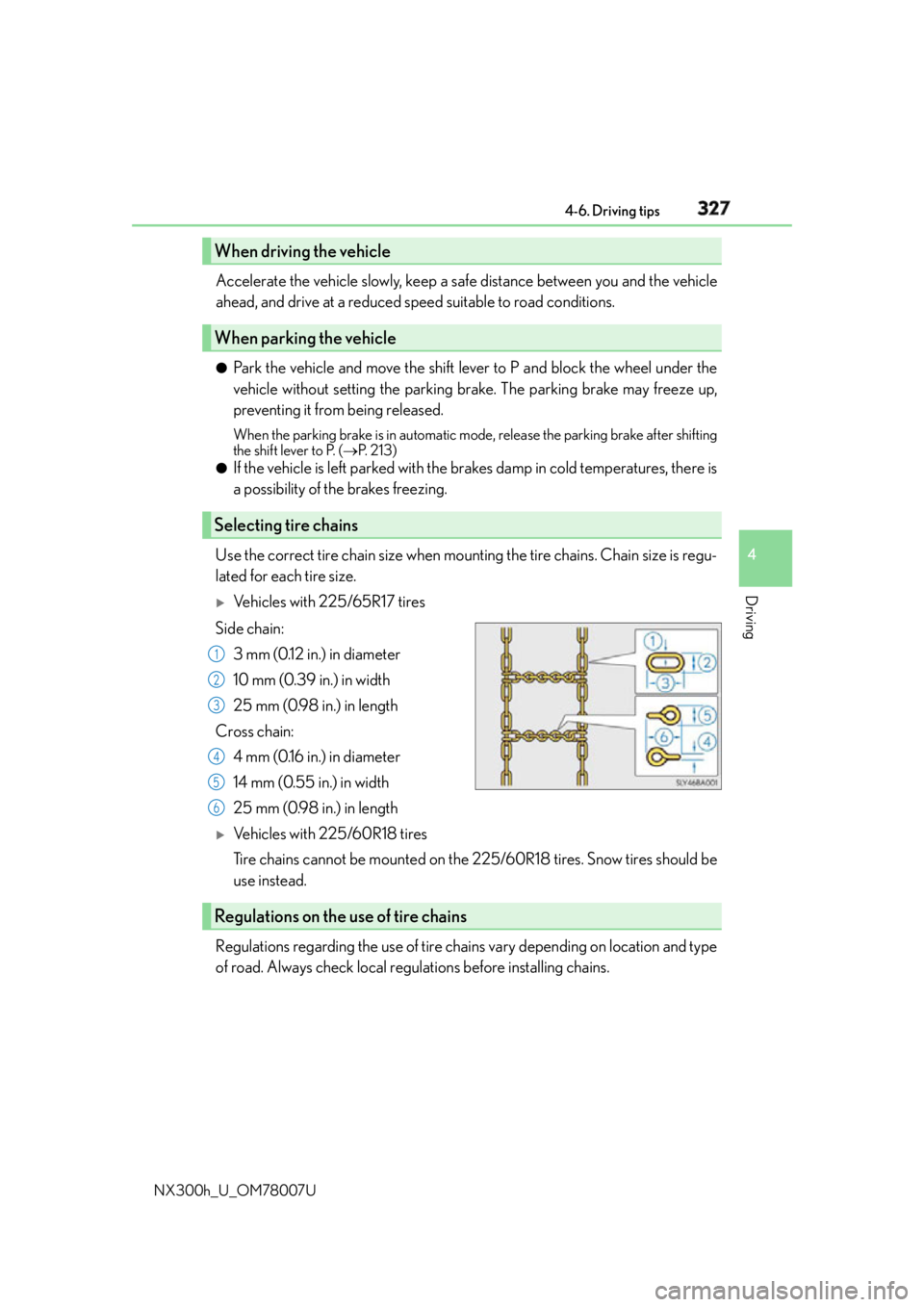
Use the correct tire chain size when mounting the tire chains. Chain size is regu-
lated for each tire size.
Vehicles with 225/65R17 tires
Side chain:
3 mm (0.12 in.) in diameter
10 mm (0.39 in.) in width
25 mm (0.98 in.) in length
Cross chain:
4 mm (0.16 in.) in diameter
14 mm (0.55 in.) in width
25 mm (0.98 in.) in length
Vehicles with 225/60R18 tires
Tire chains cannot be mounted on the 225/60R18 tires. Snow tires should be
use instead.
Regulations regarding the use of tire chains vary depending on location and type
of road. Always check local regulations before installing chains.When driving the vehicle
When parking the vehicle
Selecting tire chains 1
2
3
4
5
6
Regulations on the use of tire chains
Page 328 of 681

328 4-6. Driving tips
NX300h_U_OM78007U ■
Tire chain installation
Observe the following precautions wh en installing and removing chains:●
Install and remove tire chains in a safe location. ●
Install tire chains on the front tires only. Do not install tire chains on the rear tires. ●
Install tire chains on front tires as tightl y as possible. Retighten chains after driving
1/4 -1/2 mile (0.5 - 1.0 km). ●
Install tire chains following the instru ctions provided with the tire chains.
WA R N I N G ■
Driving with snow tires
Observe the following precautions to reduce the risk of accidents.
Failure to do so may result in a loss of ve hicle control and cause death or serious injury.●
Use tires of the specified size. ●
Maintain the recommended level of air pressure. ●
Do not drive in excess of 75 mph (120 km/h), regardless of the type of snow tires
being used. ●
Use snow tires on all, not just some wheels.■
Driving with tire chains
Observe the following precautions to reduce the risk of accidents.
Failure to do so may result in the vehicle being unable to be driven safely, and may
cause death or serious injury. ●
Do not drive in excess of the speed limit specified for the tire chains being used, or
30 mph (50 km/h), whichever is lower. ●
Avoid driving on bumpy road surfaces or over potholes. ●
Avoid sudden acceleration, ab rupt steering, sudden bra king and shifting operations
that cause sudden engine braking. ●
Slow down sufficiently before entering a cu rve to ensure that vehicle control is main-
tained. ●
Do not use LDA (Lane Departure Alert with steering control) (if equipped). ■
When parking the vehicle
When parking the vehicle without applying the parking brake, make sure to chock the
wheels. If you do not chock the wheels, the vehicle may move unexpectedly, possibly
resulting in an accident.