lane assist LEXUS NX300h 2015 Owners Manual
[x] Cancel search | Manufacturer: LEXUS, Model Year: 2015, Model line: NX300h, Model: LEXUS NX300h 2015Pages: 681, PDF Size: 9.14 MB
Page 3 of 681

3 1
9876432
105
NX300h_U_OM78007U 3-4. Adjusting the steering
wheel and mirrors
Steering wheel ............................. 160
Inside rear view mirror................ 161
Outside rear view mirrors........163
3-5. Opening, closing the windows
and moon roof
Power windows .............................166
Moon roof .......................................169
4-1. Before driving
Driving the vehicle .......................174
Cargo and luggage.................... 182
Vehicle load limits ....................... 186
Trailer towing (vehicles with
towing package) .......................187
Trailer towing (vehicles
without towing package) ...... 199
Dinghy towing .............................200
4-2. Driving procedures
Power (ignition) switch ............. 201
EV drive mode ............................ 206
Hybrid transmission ..................208
Turn signal lever ............................ 212
Parking brake ................................213
Brake Hold .....................................216
ASC (Active Sound
Control) ....................................... 218 4-3. Operating the lights
and wipers
Headlight switch ..........................219
Automatic High Beam............. 223
Fog light switch ............................227
Windshield wipers and
washer ......................................... 228
Rear window wiper and
washer ......................................... 234
4-4. Refueling
Opening the fuel tank cap ..... 236
4-5. Using the driving support
systems
Dynamic radar cruise
control ......................................... 240
Dynamic radar cruise
control with full-speed
range ............................................ 253
Cruise control .............................. 267
LDA (Lane Departure Alert
with steering co ntrol) .............270
Intuitive parking assist ...............279
Lexus parking assist
monitor.........................................287
Driving mode select
switch ........................................... 303
Driving assist systems .............. 305
PCS (Pre-Collision
System) ........................................ 310
BSM (Blind Spot Monitor).......316
4-6. Driving tips
Hybrid vehicle driving
tips ................................................. 324
Winter driving tips ..................... 326
Utility vehicle precautions...... 3304
Driving
Page 173 of 681

173
4 Driving
NX300h_U_OM78007U 4-1. Before driving
Driving the vehicle ....................... 174
Cargo and luggage .................... 182
Vehicle load limits ....................... 186
Trailer towing (vehicles with
towing package) ....................... 187
Trailer towing (vehicles
without towing package) ...... 199
Dinghy towing............................. 200
4-2. Driving procedures
Power (ignition) switch.............. 201
EV drive mode ........................... 206
Hybrid transmission ................. 208
Turn signal lever ........................... 212
Parking brake ................................ 213
Brake hold ...................................... 216
ASC
(Active Sound Control) ......... 218
4-3. Operating the lights
and wipers
Headlight switch .......................... 219
Automatic High Beam .............223
Fog light switch............................ 227
Windshield wipers and
washer..........................................228
Rear window wiper and
washer..........................................234 4-4. Refueling
Opening the fuel tank cap ..... 236
4-5. Using the driving support
systems
Dynamic radar cruise
control ......................................... 240
Dynamic radar cruise
control with full-speed
range ............................................ 253
Cruise control ..............................267
LDA (Lane Departure Alert
with steering control) ............ 270
Intuitive parking assist .............. 279
Lexus parking assist
monitor ........................................ 287
Driving mode select
switch ...........................................303
Driving assist systems...............305
PCS
(Pre-Collision System)........... 310
BSM (Blind Spot Monitor) ...... 316
4-6. Driving tips
Hybrid vehicle driving
tips ................................................. 324
Winter driving tips ..................... 326
Utility vehicle precautions ......330
Page 270 of 681
270 4-5. Using the driving support systems
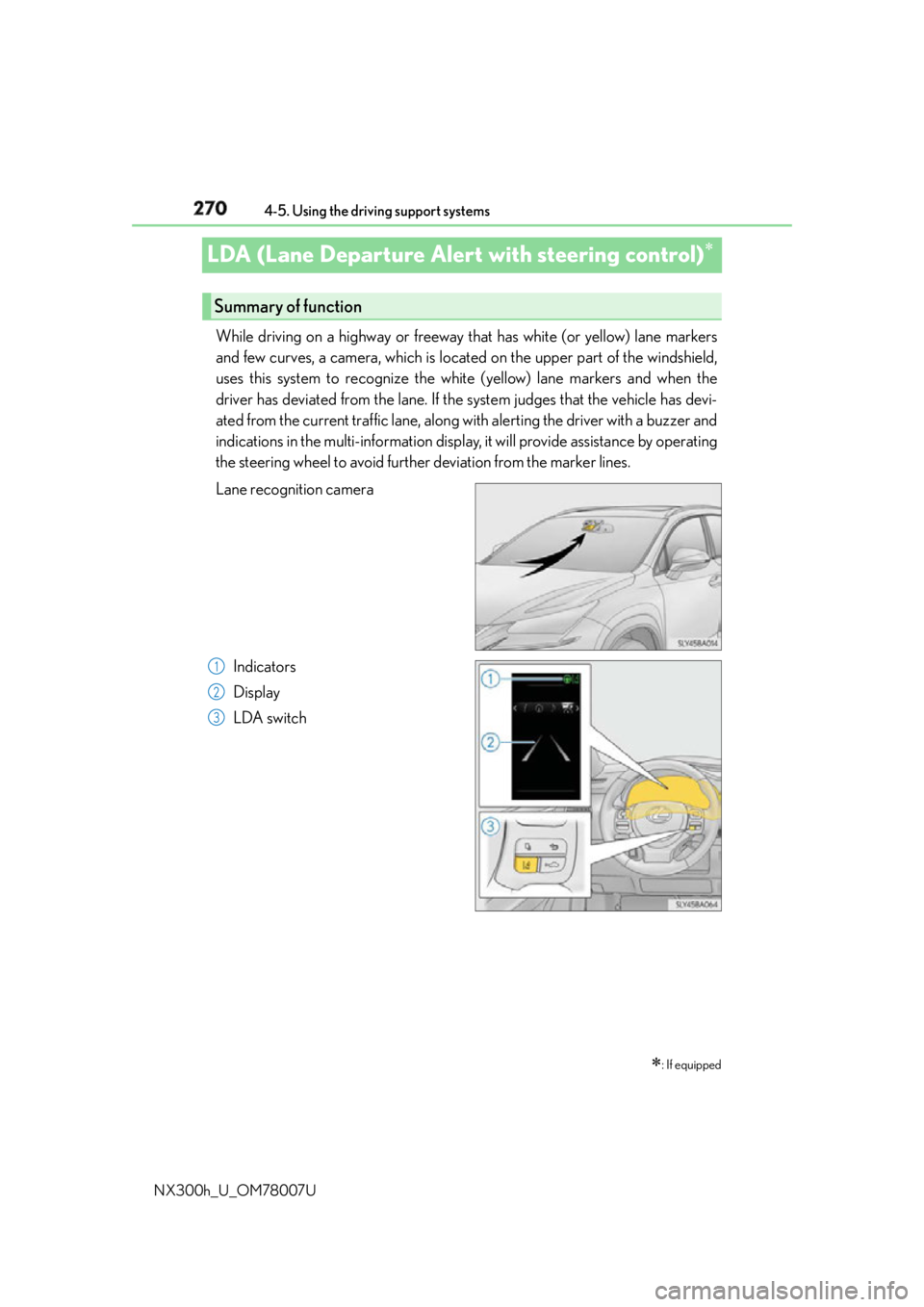
NX300h_U_OM78007ULDA (Lane Departure Alert with steering control) While driving on a highway or freeway that has white (or yellow) lane markers
and few curves, a camera, which is located on the upper part of the windshield,
uses this system to recognize the white (yellow) lane markers and when the
driver has deviated from the lane. If the system judges that the vehicle has devi-
ated from the current traffic lane, along with alerting the driver with a buzzer and
indications in the multi-information display, it will provide assistance by operating
the steering wheel to avoid further deviation from the marker lines.
Lane recognition camera
Indicators
Display
LDA switch
: If equippedSummary of function
1
2
3
Page 271 of 681
2714-5. Using the driving support systems
4
Driving
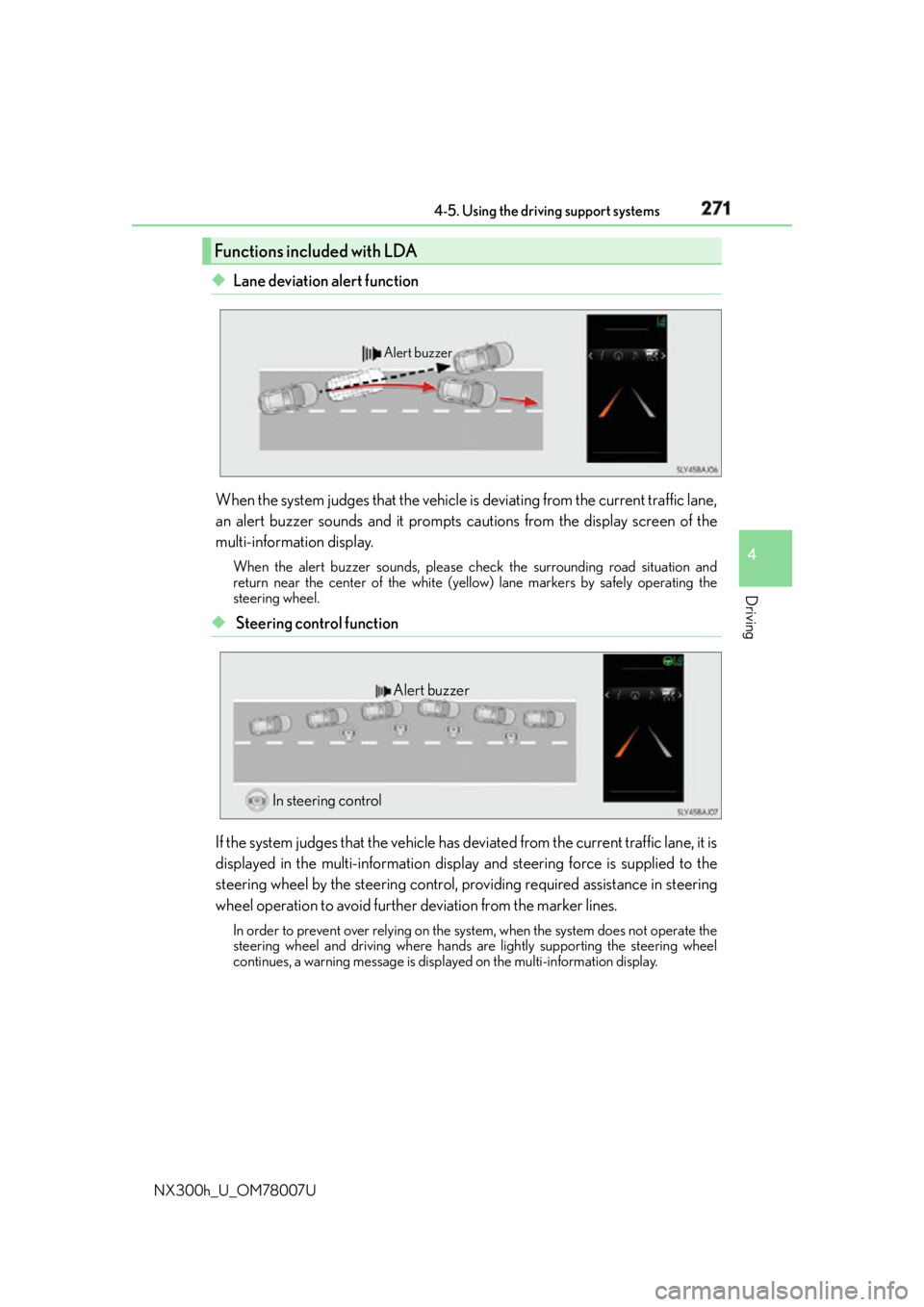
NX300h_U_OM78007U ◆ Lane deviation alert function
When the system judges that the vehicle is deviating from the current traffic lane,
an alert buzzer sounds and it prompts cautions from the display screen of the
multi-information display. When the alert buzzer sounds, please ch eck the surrounding road situation and
return near the center of the white (yello w) lane markers by safely operating the
steering wheel.
◆ Steering control function
If the system judges that the vehicle has de viated from the current traffic lane, it is
displayed in the multi-information displa y and steering force is supplied to the
steering wheel by the steering control, pr oviding required assistance in steering
wheel operation to avoid further deviation from the marker lines. In order to prevent over relying on the system, when the system does not operate the
steering wheel and driving where hands are lightly supporting the steering wheel
continues, a warning message is displa yed on the multi-information display.Functions included with LDA Alert buzzer
Alert buzzer
In steering control
Page 273 of 681

2734-5. Using the driving support systems
4
Driving
NX300h_U_OM78007U ■
Steering control function
In addition to the operation conditions for the lane deviation alert function,
when all of the following condit ions are fulfilled, it operates.●
When settings for the “Steering Assist” in the “Settings display” of the multi-
information display is set to “On” ( P. 2 76 )●
When the vehicle has not slowed down more than a defined setting. ●
When the steering wheel is operated wi th a steering force level that is not
equivalent to changing lanes. ●
When the ABS, VSC, TRAC, or PCS (if equipped) is not operating. ●
When intentional accelerator peda l operations are not performed.■
Lane deviation alert function
In any of the following cases, the lane deviation alert function will be tempo-
rarily canceled. When the conditions, in which the cancelation occurred
improves, the function will resume operations. ●
The vehicle speed deviates from the operating ranges of the function ●
The turn signal lever is operated ●
When the emergency flashers are operated ●
When the lane markers cannot be recognized while driving ●
When the system malfunctions ●
Immediately after the lane deviation alert operates
The lane deviation alert function will not operate again for a several sec-
onds after it has been activated, even if the vehicle leaves the lane again. ●
When more than half of the vehicle body straddles the lane■
Steering control function
In addition to the temporary cancelation conditions of the lane deviation alert
function, in any of the following cases the steering control function is tempo-
rarily canceled. When the conditions for which the cancelation occurred
improves, the function will restart operations. ●
When the vehicle has slowed down more than a defined setting.●
When the steering wheel is operated with a steering force level that is
equivalent to changing lanes. ●
When the ABS, VSC, TRAC, or PCS (if equipped) is operating. ●
When intentional accelerator pe dal operations are performed.●
Operations of the VSC and TRAC have been turned off ( P. 3 0 7 )Temporary cancelation of the functions
Page 274 of 681
274 4-5. Using the driving support systems
NX300h_U_OM78007U When it is judged that there is a malfun ction in the system relating to steering
control function, the steering control function is canceled and “LDA Steering
Assist Deactivated Warnings Available” is displayed on the multi-information dis-
play. However, it is possible that the lane deviation alert function operates.
When the steering control function is canc eled, it will not return unless “Steering
Assist” is turned “On” again from the “S ettings display” of the multi-information
display ( P. 276) or the LDA switch is turned on again.
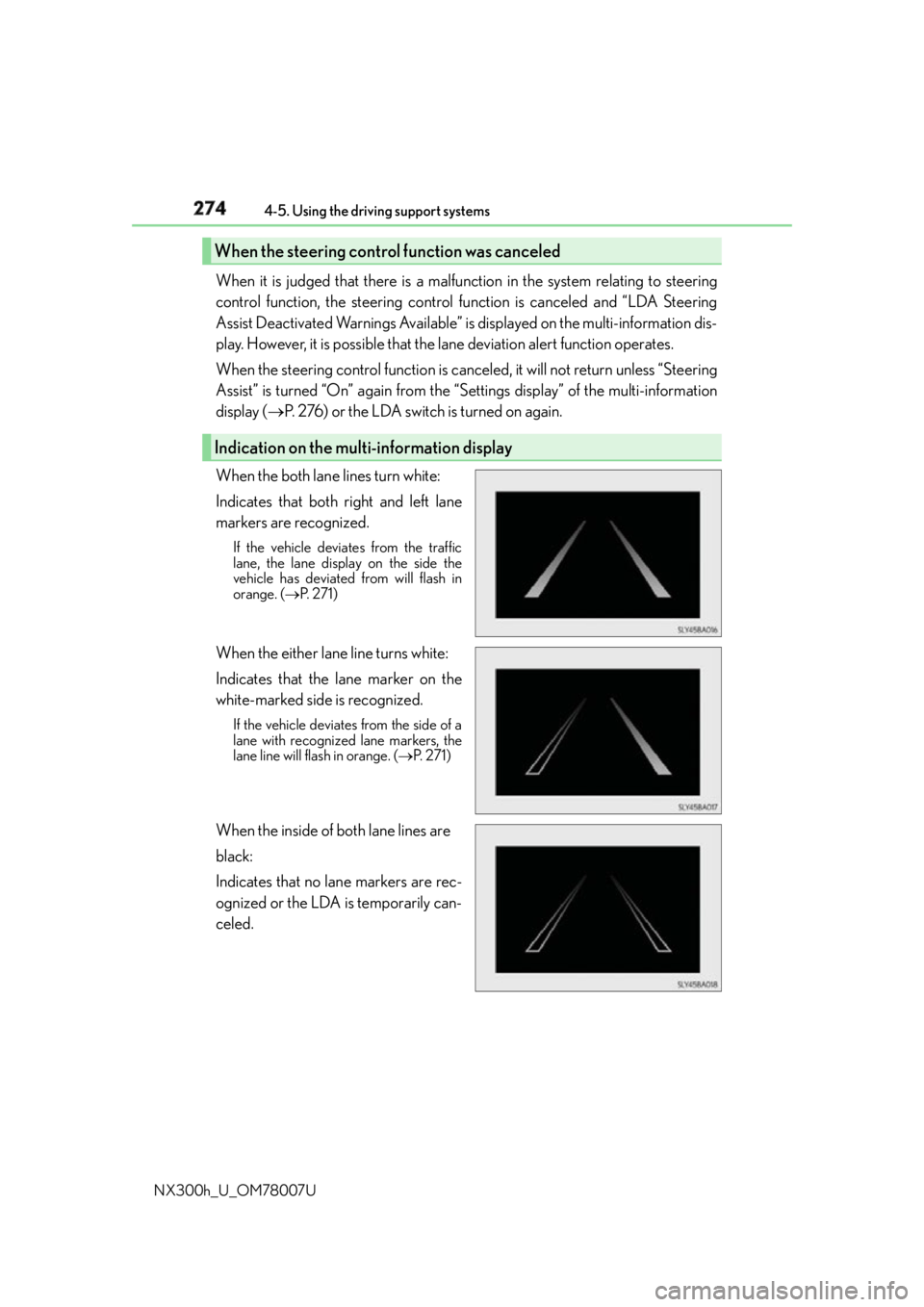
When the both lane lines turn white:
Indicates that both right and left lane
markers are recognized. If the vehicle deviates from the traffic
lane, the lane displa y on the side the
vehicle has deviated from will flash in
orange. ( P. 2 7 1 )
When the either lane line turns white:
Indicates that the lane marker on the
white-marked side is recognized. If the vehicle deviates from the side of a
lane with recognized lane markers, the
lane line will flash in orange. ( P. 2 7 1 )
When the inside of both lane lines are
black:
Indicates that no lane markers are rec-
ognized or the LDA is temporarily can-
celed.When the steering cont rol function was canceled
Indication on the multi-information display
Page 309 of 681
3094-5. Using the driving support systems
4
Driving
NX300h_U_OM78007U WA R N I N G ■
The ABS does not operate effectively when ●
The limits of tire gripping performance have been exceeded (such as excessively
worn tires on a snow covered road). ●
The vehicle hydroplanes while driving at high speed on wet or slick road. ■
Stopping distance when the ABS is operat ing may exceed that of normal conditions
The ABS is not designed to shorten the vehicle’s stopping distance. Always maintain a
safe distance from the vehicle in front of you, especially in the following situations:●
When driving on dirt, gravel or snow-covered roads ●
When driving with tire chains ●
When driving over bumps in the road ●
When driving over roads with potholes or uneven surfaces ■
TRAC may not operate effectively when
Directional control and power may not be achievable while drivin g on slippery road
surfaces, even if the TRAC system is operating.
Drive the vehicle carefully in conditions where stability and power may be lost. ■
Hill-start assist control does not operate effectively when ●
Do not overly rely on the hill-start assist control. The hill-start assist control may not
operate effectively on steep inclines and roads covered with ice. ●
Unlike the parking brake, hill-start assist control is not intended to hold the vehicle
stationary for an extended period of time. Do not attempt to use hill-start assist con-
trol to hold the vehicle on an incline, as doing so may lead to an accident. ■
When the TRAC, VSC and/or ABS are activated
The slip indicator light flashes. Always drive carefully. Reckless driving may cause an
accident. Exercise particular care when the indicator light flashes. ■
When the TRAC/VSC system are turned off
Be especially careful and drive at a speed ap propriate to the road conditions. As these
are the systems to help ensure vehicle st ability and driving force, do not turn the
TRAC/VSC systems off unless necessary. ■
Replacing tires
Make sure that all tires are of the specified size, brand, tread pattern and total load
capacity. In addition, make sure that the tires are inflated to the recommended tire infla-
tion pressure level.
The ABS, TRAC and VSC systems will not function correctly if different tires are
installed on the vehicle.
Contact your Lexus dealer for further information when replacing tires or wheels. ■
Handling of tires and the suspension
Using tires with any kind of problem or modi fying the suspension will affect the driving
assist systems, and may caus e a system to malfunction.
Page 312 of 681

312 4-5. Using the driving support systems
NX300h_U_OM78007U ■
The pre-collision system is operational when
The pre-collision system is on ( P. 311) and the following conditions are met:●
Pre-collision warning:
• Vehicle speed is greater th an about 10 mph (15 km/h).
• The speed at which your vehicle is approaching the obstacle or the vehicle running
ahead of you is greater than about 7 mph (10 km/h). ●
Pre-collision brake assist:
• The VSC is not turned off.
• Vehicle speed is greater than about 19 mph (30 km/h).
• The speed at which your vehicle is approaching the obstacle or the vehicle running
ahead of you is greater than about 19 mph (30 km/h).
• The brake pedal is depressed. ●
Pre-collision braking:
• The VSC is not turned off.
• Vehicle speed is greater th an about 10 mph (15 km/h).
• The speed at which your vehicle is approaching the obstacle or the vehicle running
ahead of you is greater than about 7 mph (10 km/h).■
Conditions that may trigger the system even if there is no possibility of a collision
If the following obstructs the front of the sens or, the system judges that a collision may be
possible and operates. ●
When passing by a vehicle while making left or right turns or passing a vehicle in an
opposite lane. ●
When the vehicle rapidly approaches an object in front of it (such as another vehicle,
toll gate, etc.) ●
When climbing a steep hill, etc., and there are structures in the upper region of the road
(billboards, low ceilings , street lamps, etc.)●
When driving through narrow passages or places with low ceilings (bridges, tunnels,
overhead passes, etc.) ●
When driving on an uneven road surface ●
When metal objects are on the road surface causing level differences or protrusions in
the road ●
When an extreme change in vehicle height occurs ●
When the radar sensor moves off position du e to its surrounding area being subjected
to a strong impact. ●
When there is an obstacle on the side of an entrance of a curb for road (guardrails, etc.) ●
When your vehicle is tilted upwards (due to towing a trailer or during emergency tow-
ing, heavy loads in the lu ggage compartment, etc.).
When the system is activated in the situations described above, ther e is also a possibility
that the brakes will be applied wi th a force greater than normal.■
Obstacles not detected
The sensor cannot detect plasti c obstacles such as traffic co nes. There may also be occa-
sions when the sensor cannot detect pedestrians, animals, bicycles, motorcycles, trees,
or snowdrifts.
Page 316 of 681
316 4-5. Using the driving support systems
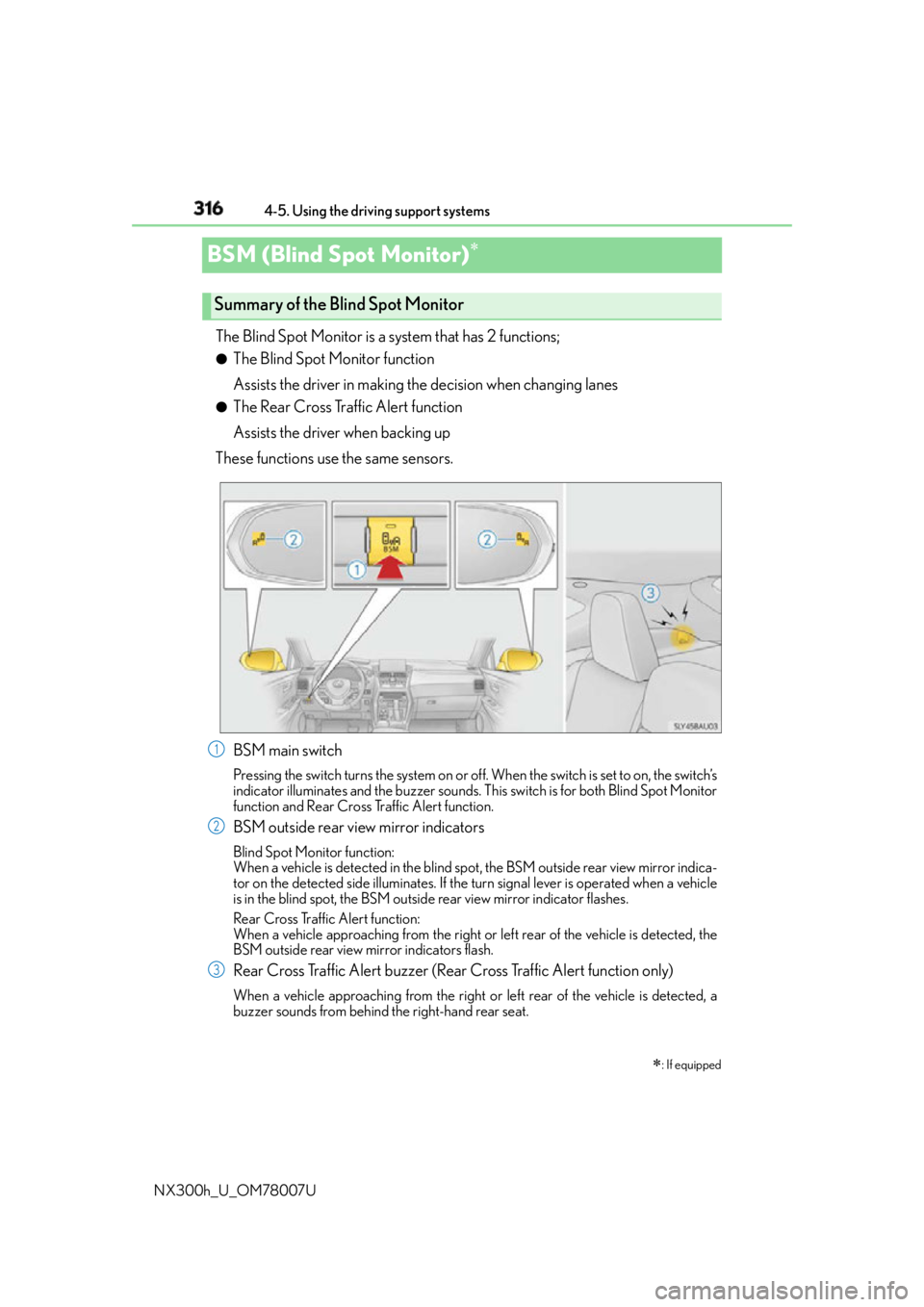
NX300h_U_OM78007UBSM (Blind Spot Monitor) The Blind Spot Monitor is a system that has 2 functions; ●
The Blind Spot Monitor function
Assists the driver in making the decision when changing lanes ●
The Rear Cross Traffic Alert function
Assists the driver when backing up
These functions use the same sensors.
BSM main switch Pressing the switch turns the system on or of f. When the switch is set to on, the switch’s
indicator illuminates and the buzzer sounds. Th is switch is for both Blind Spot Monitor
function and Rear Cross Traffic Alert function.
BSM outside rear view mirror indicators Blind Spot Monitor function:
When a vehicle is detected in the blind spot , the BSM outside rear view mirror indica-
tor on the detected side illuminates. If the turn signal lever is operated when a vehicle
is in the blind spot, the BSM outside rear view mirror indicator flashes.
Rear Cross Traffic Alert function:
When a vehicle approaching from the right or left rear of the vehicle is detected, the
BSM outside rear view mirror indicators flash.
Rear Cross Traffic Alert buzzer (Rear Cross Traffic Alert function only) When a vehicle approaching from the right or left rear of the vehicle is detected, a
buzzer sounds from behind the right-hand rear seat.
: If equippedSummary of the Blind Spot Monitor
1
2
3
Page 587 of 681
5878-2. Steps to take in an emergency
8
When trouble arises
NX300h_U_OM78007U ■
If you have a flat front tire on a road covered with snow or ice (vehicles with a compact
spare tire and excluding the 225/60R18 tires)
Install the compact spare tire on one of the rear wheels of the vehicle. Perform the follow-
ing steps and fit tire chains to the front tires:
Replace a rear tire with the compact spare tire.
Replace the flat front tire with the tire removed from the rear of the vehicle.
Fit tire chains to the front tires.
WA R N I N G ■
When using the compact spare tire (Vehicle with compact spare tire) ●
Remember that the spare tire provided is specifically designed for use with your vehi-
cle. Do not use your spare tire on another vehicle. ●
Do not use more than one spare tire simultaneously. ●
Replace the spare tire with a stan dard tire as soon as possible.●
Avoid sudden acceleration, deceleration and braking, as well as sharp cornering. ■
When the compact spare tire is attached
The vehicle speed may not be correctly detected, and the following systems may not
operate correctly:
Also, not only can the following system not be utilized fully, but it may even negatively
affect the drive-train components: ●
E-Four (if equipped) ■
Speed limit when using the compact spare tire
Do not drive at speeds in excess of 50 mph (80 km/h) when a compact spare tire is
installed on the vehicle.
The compact spare tire is not designed for driving at high speeds. Failure to observe
this precaution may lead to an accid ent causing death or serious injury.■
After using the tools and jack
Before driving, make sure all the tools and jack are securely in place in their storage
location to reduce the possibility of personal injury during a collision or sudden brak-
ing. 1
2
3
• ABS & Brake assist
•VSC
•TRAC
•Cruise control
• Dynamic radar cruise control
(if equipped)
• Pre-collision system (if equipped)
•EPS • AVS (if equipped)
• LDA (Lane Departure Alert)
(if equipped)
• Intuitive parking assist (if equipped)
• Navigation system (if equipped)
• BSM (Blind spot monitor)
(if equipped)
• Automatic high Beam (if equipped)