power steering LEXUS NX300h 2015 Owners Manual
[x] Cancel search | Manufacturer: LEXUS, Model Year: 2015, Model line: NX300h, Model: LEXUS NX300h 2015Pages: 681, PDF Size: 9.14 MB
Page 3 of 681
3 1
9876432
105
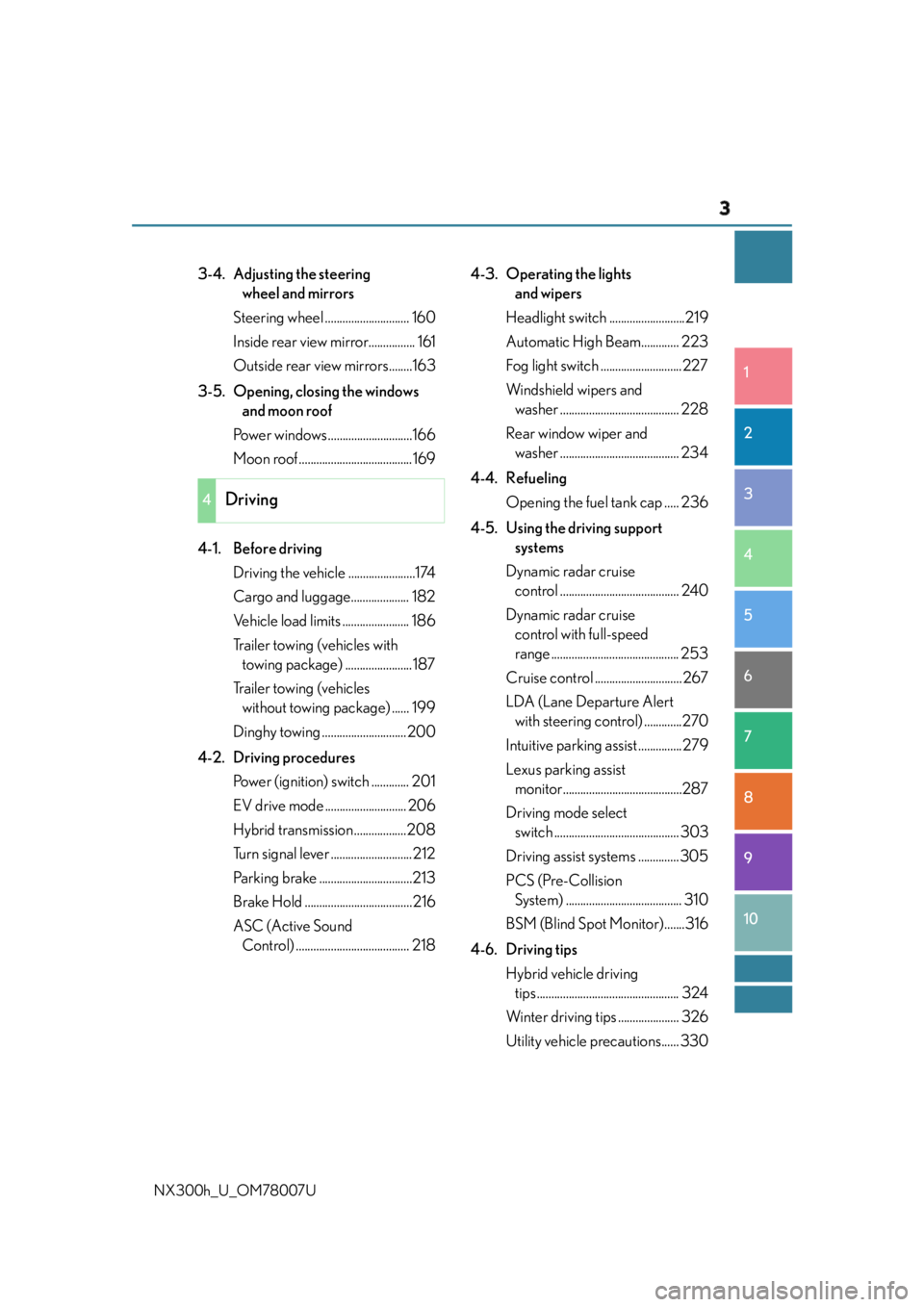
NX300h_U_OM78007U 3-4. Adjusting the steering
wheel and mirrors
Steering wheel ............................. 160
Inside rear view mirror................ 161
Outside rear view mirrors........163
3-5. Opening, closing the windows
and moon roof
Power windows .............................166
Moon roof .......................................169
4-1. Before driving
Driving the vehicle .......................174
Cargo and luggage.................... 182
Vehicle load limits ....................... 186
Trailer towing (vehicles with
towing package) .......................187
Trailer towing (vehicles
without towing package) ...... 199
Dinghy towing .............................200
4-2. Driving procedures
Power (ignition) switch ............. 201
EV drive mode ............................ 206
Hybrid transmission ..................208
Turn signal lever ............................ 212
Parking brake ................................213
Brake Hold .....................................216
ASC (Active Sound
Control) ....................................... 218 4-3. Operating the lights
and wipers
Headlight switch ..........................219
Automatic High Beam............. 223
Fog light switch ............................227
Windshield wipers and
washer ......................................... 228
Rear window wiper and
washer ......................................... 234
4-4. Refueling
Opening the fuel tank cap ..... 236
4-5. Using the driving support
systems
Dynamic radar cruise
control ......................................... 240
Dynamic radar cruise
control with full-speed
range ............................................ 253
Cruise control .............................. 267
LDA (Lane Departure Alert
with steering co ntrol) .............270
Intuitive parking assist ...............279
Lexus parking assist
monitor.........................................287
Driving mode select
switch ........................................... 303
Driving assist systems .............. 305
PCS (Pre-Collision
System) ........................................ 310
BSM (Blind Spot Monitor).......316
4-6. Driving tips
Hybrid vehicle driving
tips ................................................. 324
Winter driving tips ..................... 326
Utility vehicle precautions...... 3304
Driving
Page 20 of 681
20 Pictorial index
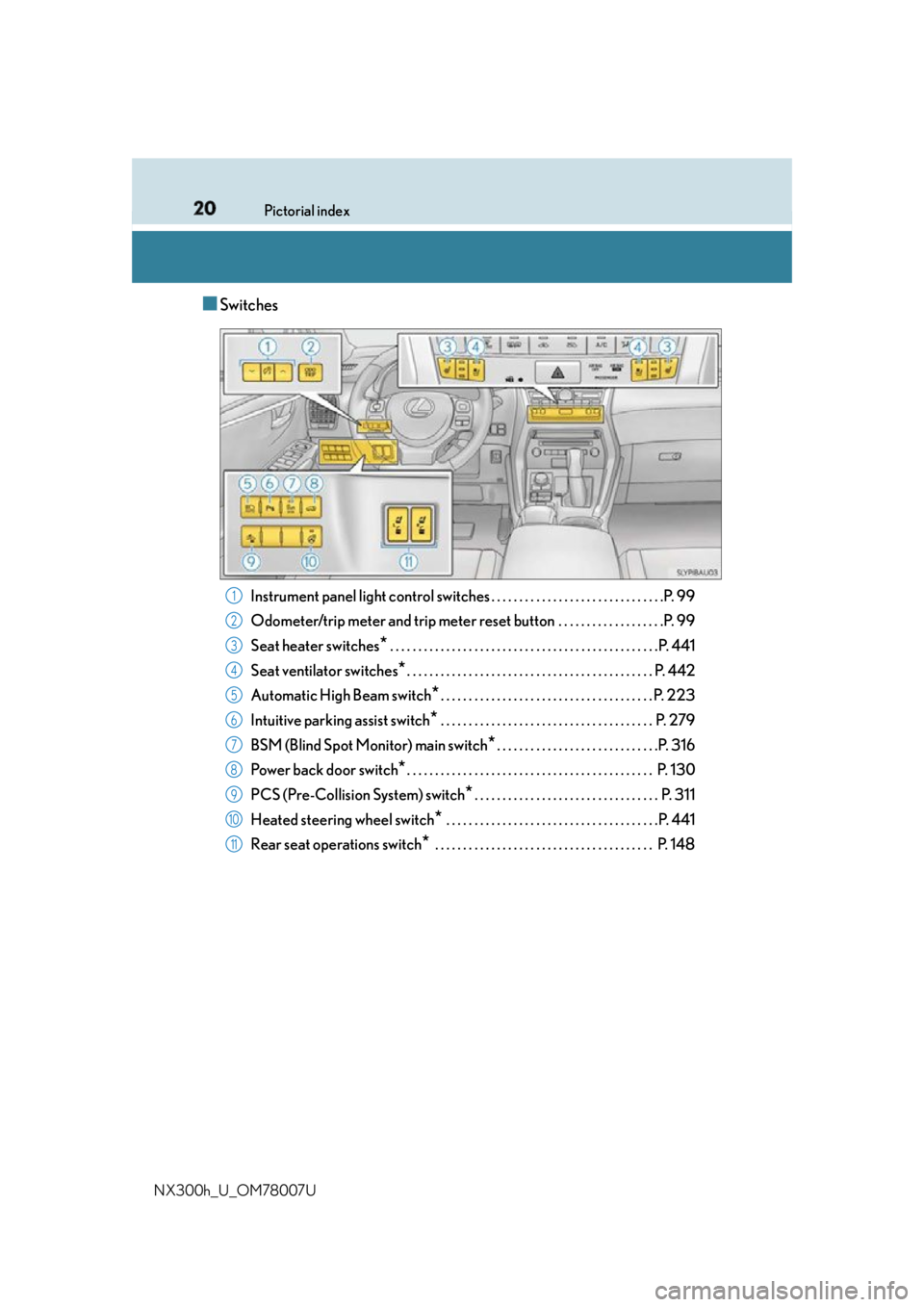
NX300h_U_OM78007U ■ Switches
Instrument panel light control swit ches . . . . . . . . . . . . . . . . . . . . . . . . . . . . . . .P. 99
Odometer/trip meter and trip meter reset button . . . . . . . . . . . . . . . . . . .P. 99
Seat heater switches
* . . . . . . . . . . . . . . . . . . . . . . . . . . . . . . . . . . . . . . . . . . . . . . . .P. 441
Seat ventilator switches
* . . . . . . . . . . . . . . . . . . . . . . . . . . . . . . . . . . . . . . . . . . . . P. 442
Automatic High Beam switch
* . . . . . . . . . . . . . . . . . . . . . . . . . . . . . . . . . . . . . . P. 223
Intuitive parking assist switch
* . . . . . . . . . . . . . . . . . . . . . . . . . . . . . . . . . . . . . . P. 279
BSM (Blind Spot Monitor) main switch
* . . . . . . . . . . . . . . . . . . . . . . . . . . . . .P. 316
Power back door switch
* . . . . . . . . . . . . . . . . . . . . . . . . . . . . . . . . . . . . . . . . . . . . P. 130
PCS (Pre-Collision System) switch
* . . . . . . . . . . . . . . . . . . . . . . . . . . . . . . . . . P. 311
Heated steering wheel switch
* . . . . . . . . . . . . . . . . . . . . . . . . . . . . . . . . . . . . . .P. 441
Rear seat operations switch
* . . . . . . . . . . . . . . . . . . . . . . . . . . . . . . . . . . . . . . . P. 1481
2
3
4
5
6
7
8
9
10
11
Page 93 of 681
932. Instrument cluster
2
Instrument cluster
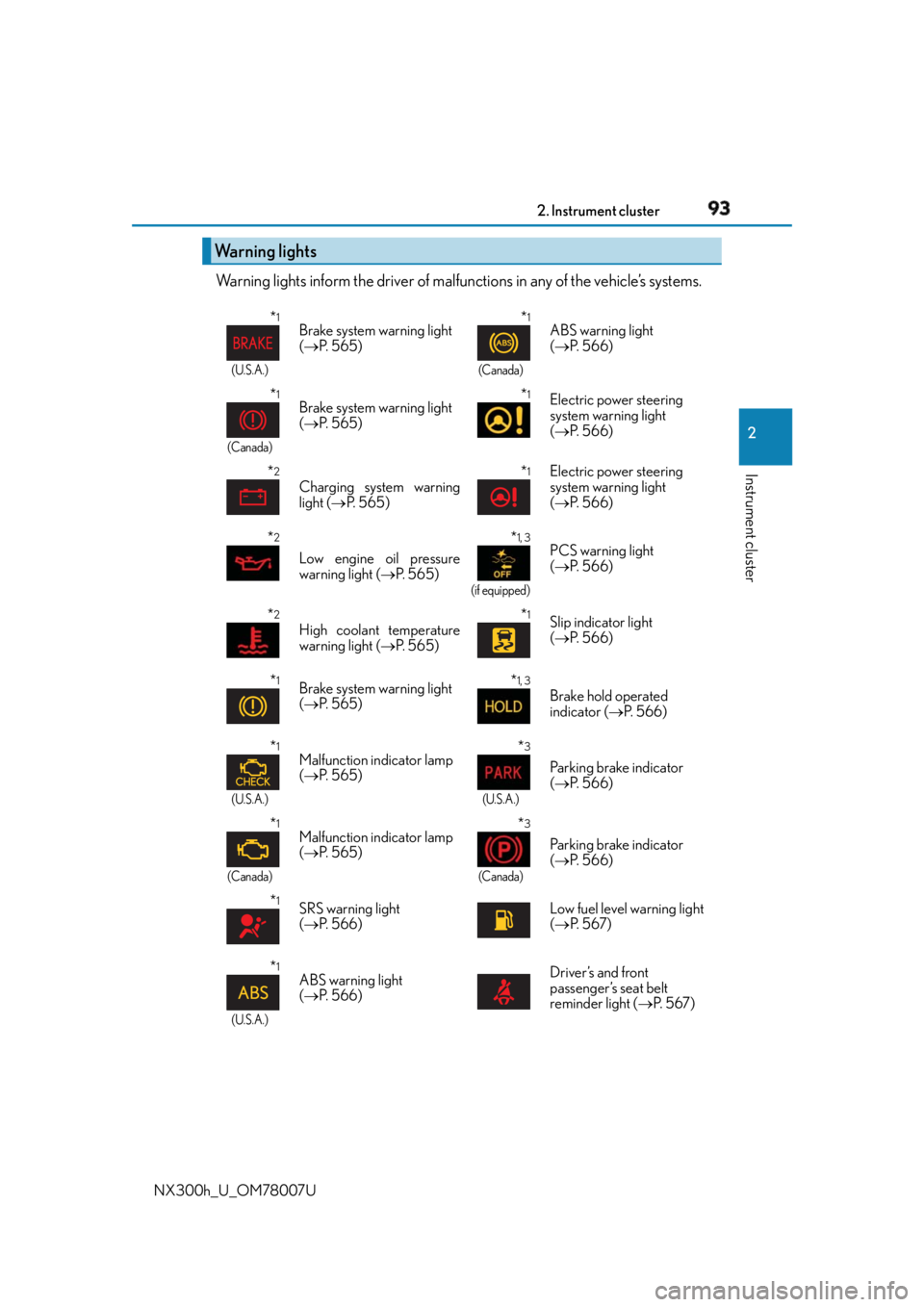
NX300h_U_OM78007U Warning lights inform the driver of malfun ctions in any of the vehicle’s systems.
Warning lights * 1
(U.S.A.)
Brake system warning light
( P. 5 6 5 )
* 1
(Canada)
ABS warning light
( P. 5 6 6 )
* 1
(Canada)
Brake system warning light
( P. 5 6 5 )
* 1
Electric power steering
system warning light
( P. 5 6 6 )
* 2
Charging system warning
light ( P. 5 6 5 )
* 1
Electric power steering
system warning light
( P. 5 6 6 )
* 2
Low engine oil pressure
warning light ( P. 565) * 1, 3
(if equipped)
PCS warning light
( P. 5 6 6 )
* 2
High coolant temperature
warning light ( P. 565) * 1
Slip indicator light
( P. 5 6 6 )
* 1
Brake system warning light
( P. 5 6 5 )
* 1, 3
Brake hold operated
indicator ( P. 5 6 6 )
* 1
(U.S.A.)
Malfunction indicator lamp
( P. 5 6 5 ) * 3
(U.S.A.)
Parking brake indicator
( P. 5 6 6 )
* 1
(Canada)
Malfunction indicator lamp
( P. 5 6 5 ) * 3
(Canada)
Parking brake indicator
( P. 5 6 6 )
* 1
SRS warning light
( P. 5 6 6 ) Low fuel level warning light
( P. 5 6 7 )
* 1
(U.S.A.) ABS warning light
( P. 5 6 6 ) Driver’s and front
passenger’s seat belt
reminder light ( P. 5 6 7 )
Page 95 of 681
952. Instrument cluster
2
Instrument cluster
NX300h_U_OM78007U * 1
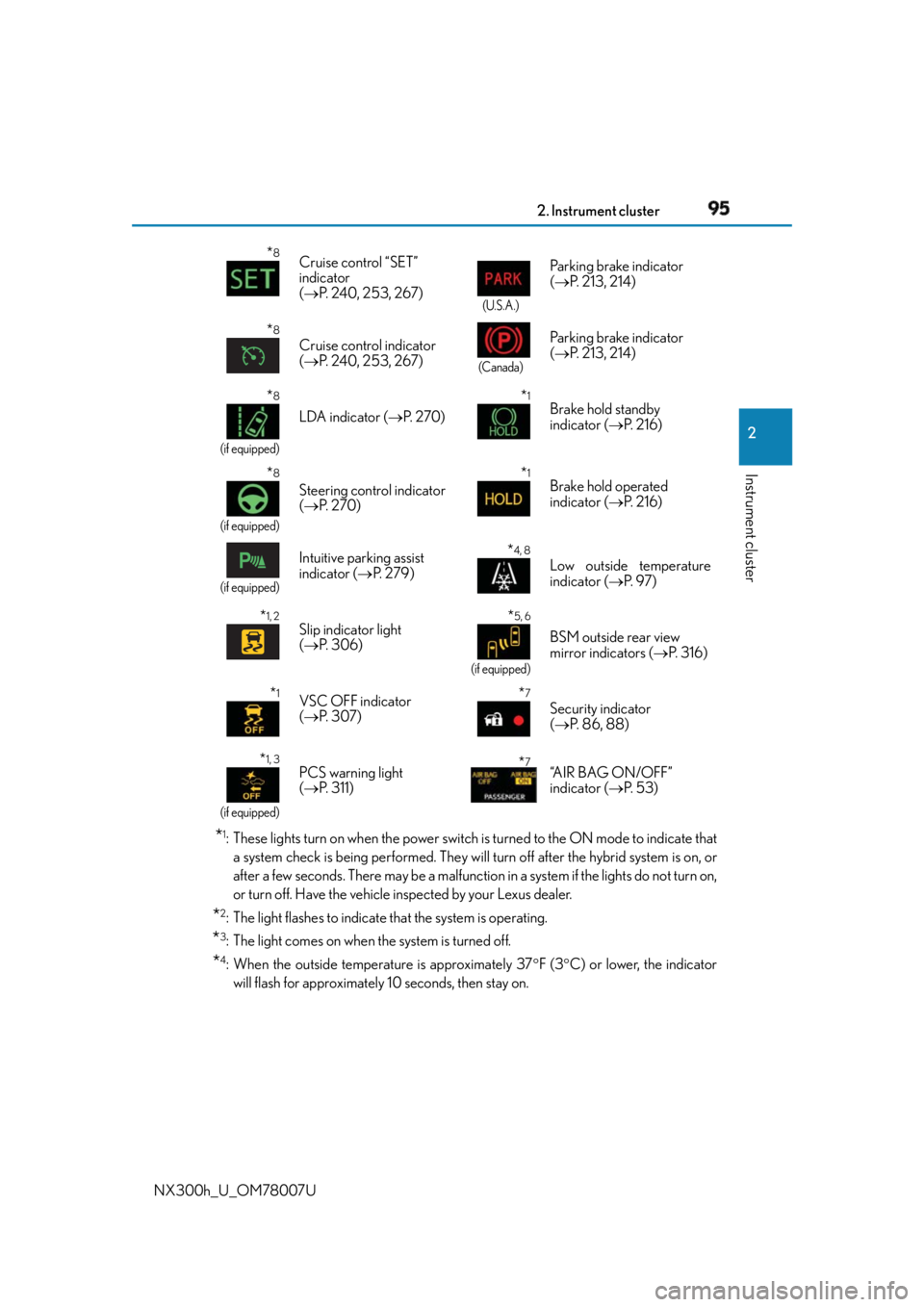
: These lights turn on when the power switch is turned to the ON mode to indicate that
a system check is being performed. They will turn off after the hybrid system is on, or
after a few seconds. There may be a malfunctio n in a system if the lights do not turn on,
or turn off. Have the vehicle inspected by your Lexus dealer.
* 2
: The light flashes to indicate that the system is operating.
* 3
: The light comes on when the system is turned off.
* 4
: When the outside temperature is approximately 37 F (3 C) or lower, the indicator
will flash for approximately 10 seconds, then stay on.* 8
Cruise control “SET”
indicator
( P. 240, 253, 267) (U.S.A.)
Parking brake indicator
( P. 213, 214)
* 8
Cruise control indicator
( P. 240, 253, 267) (Canada)
Parking brake indicator
( P. 213, 214)
* 8
(if equipped)
LDA indicator ( P. 2 7 0 )
* 1
Brake hold standby
indicator ( P. 2 1 6 )
* 8
(if equipped)
Steering control indicator
( P. 2 7 0 )
* 1
Brake hold operated
indicator ( P. 2 1 6 )
(if equipped)
Intuitive parking assist
indicator ( P. 2 7 9 )
* 4, 8
Low outside temperature
indicator ( P. 9 7 )
* 1, 2
Slip indicator light
( P. 3 0 6 ) * 5, 6
(if equipped)
BSM outside rear view
mirror indicators ( P. 3 1 6 )
* 1
VSC OFF indicator
( P. 3 0 7 )
* 7
Security indicator
( P. 86, 88)
* 1, 3
(if equipped)
PCS warning light
( P. 311) * 7
“A I R B A G O N / O F F ”
indicator ( P. 5 3 )
Page 117 of 681
117
3 Operation of
each component
NX300h_U_OM78007U 3-1. Key information
Keys ....................................................118
3-2. Opening, closing and locking
the doors
Side doors ....................................... 124
Back door........................................129
Smart access system with
push-button start...................... 140
3-3. Adjusting the seats
Front seats ...................................... 146
Rear seats ........................................ 147
Driving position memory ......... 154
Head restraints ............................ 158
3-4. Adjusting the steering
wheel and mirrors
Steering wheel ............................. 160
Inside rear view mirror................ 161
Outside rear view mirrors ....... 163
3-5. Opening, closing the windows
and moon roof
Power windows ............................ 166
Moon roof .......................................169
Page 146 of 681
146 3-3. Adjusting the seats
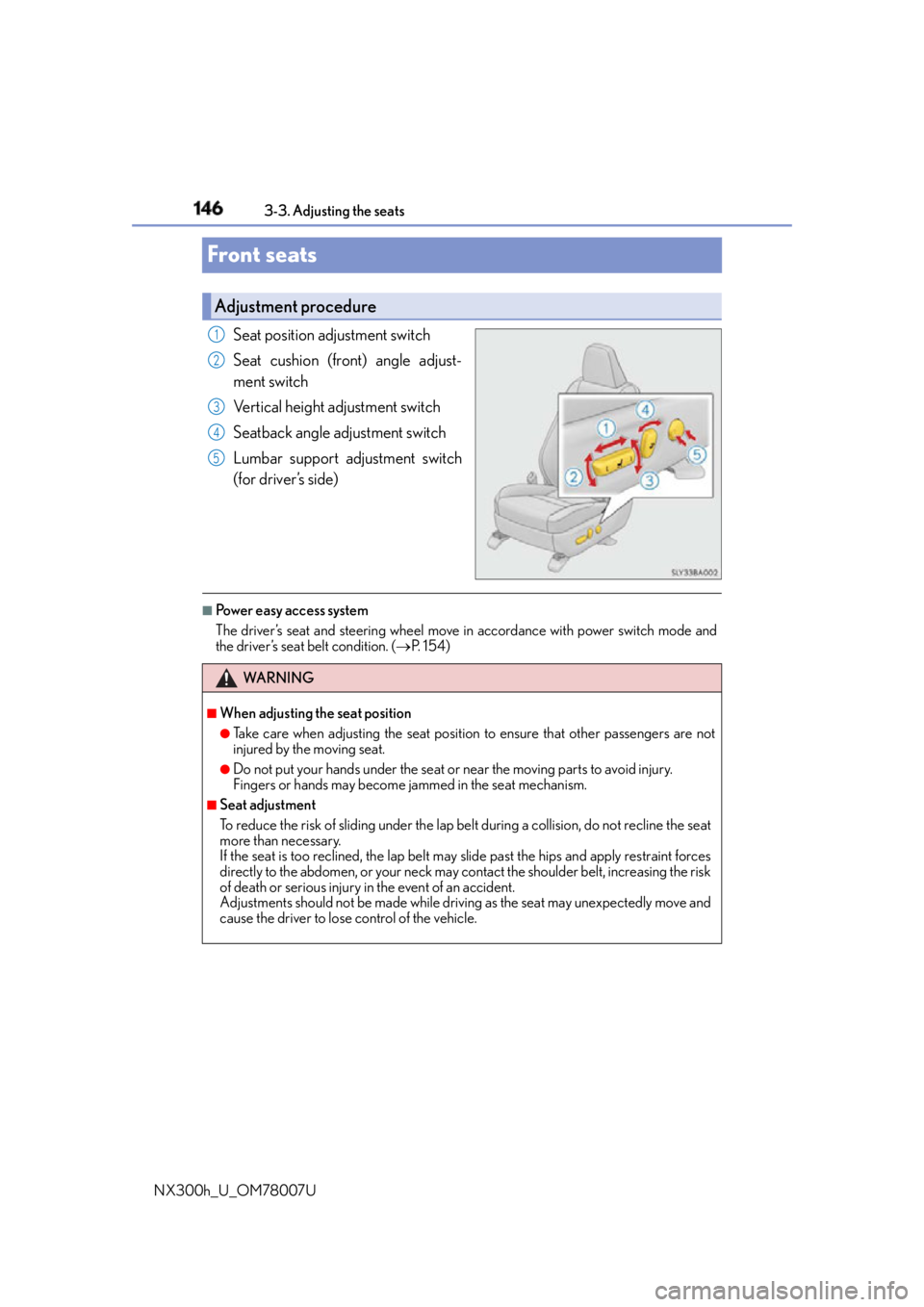
NX300h_U_OM78007UFront seats Seat position adjustment switch
Seat cushion (front) angle adjust-
ment switch
Vertical height adjustment switch
Seatback angle adjustment switch
Lumbar support adjustment switch
(for driver’s side) ■
Power easy access system
The driver’s seat and steering wheel move in accordance with power switch mode and
the driver’s seat belt condition. ( P. 1 5 4 )Adjustment procedure 1
2
3
4
5
WA R N I N G ■
When adjusting the seat position ●
Take care when adjusting the seat position to ensure that other passengers are not
injured by the moving seat. ●
Do not put your hands under the seat or near the moving parts to avoid injury.
Fingers or hands may become jammed in the se at mechanism.■
Seat adjustment
To reduce the risk of sliding under the lap belt during a co llision, do not recline the seat
more than necessary.
If the seat is too rec lined, the lap belt may slide past the hips and apply restraint forces
directly to the abdomen, or your neck may contact the shoulder belt, increasing the risk
of death or serious injury in the event of an accident.
Adjustments should not be ma de while driving as the seat may unexpectedly move and
cause the driver to lose control of the vehicle.
Page 154 of 681
154 3-3. Adjusting the seats
NX300h_U_OM78007UDriving position memory
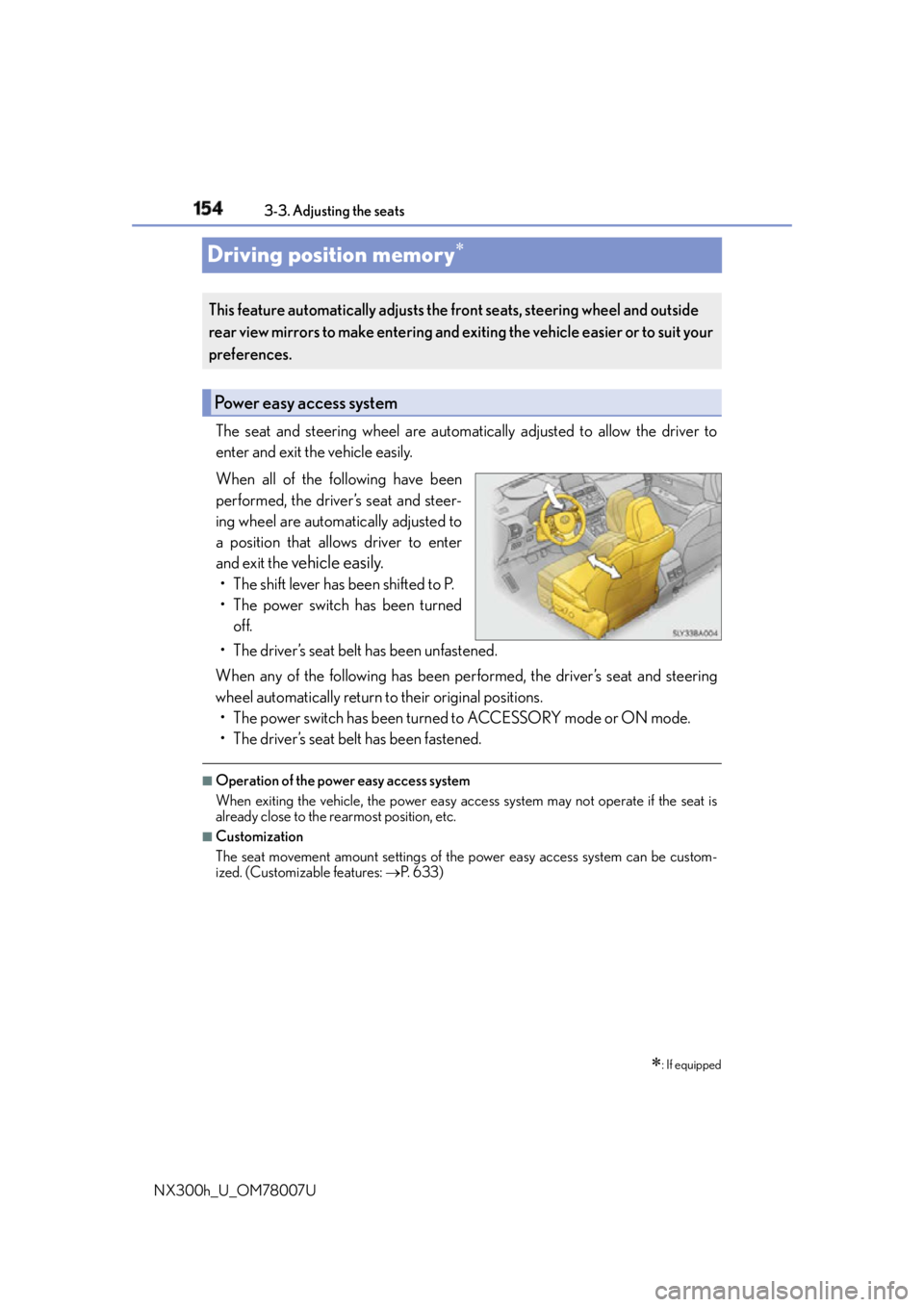
The seat and steering wheel are automati cally adjusted to allow the driver to
enter and exit the vehicle easily.
When all of the following have been
performed, the driver’s seat and steer-
ing wheel are automatically adjusted to
a position that allows driver to enter
and exit the
vehicle easily.• The shift lever has been shifted to P.
• The power switch has been turned
off.
• The driver’s seat belt has been unfastened.
When any of the following has been perf ormed, the driver’s seat and steering
wheel automatically return to their original positions.
• The power switch has been turned to ACCESSORY mode or ON mode.
• The driver’s seat belt has been fastened. ■
Operation of the power easy access system
When exiting the vehicle, the power easy acc ess system may not operate if the seat is
already close to the rearmost position, etc. ■
Customization
The seat movement amount settings of the power easy access system can be custom-
ized. (Customizable features: P. 6 3 3 )
: If equippedThis feature automatically adjusts the fr ont seats, steering wheel and outside
rear view mirrors to make entering and ex iting the vehicle easier or to suit your
preferences.
Power easy access system
Page 155 of 681
1553-3. Adjusting the seats
3
Operation of each component
NX300h_U_OM78007U Your preferred driving position (the posi tion of the driver’s seat, steering wheel
and outside rear view mirrors) can be recorded and recalled by pressing a but-
ton.
Three different driving positions can be recorded into memory. ■
Recording procedure
Check that the shift lever is in P.
Turn the power switch to ON mode.
Adjust the driver’s seat, steering wheel and outside rear view mirrors to the
desired positions.
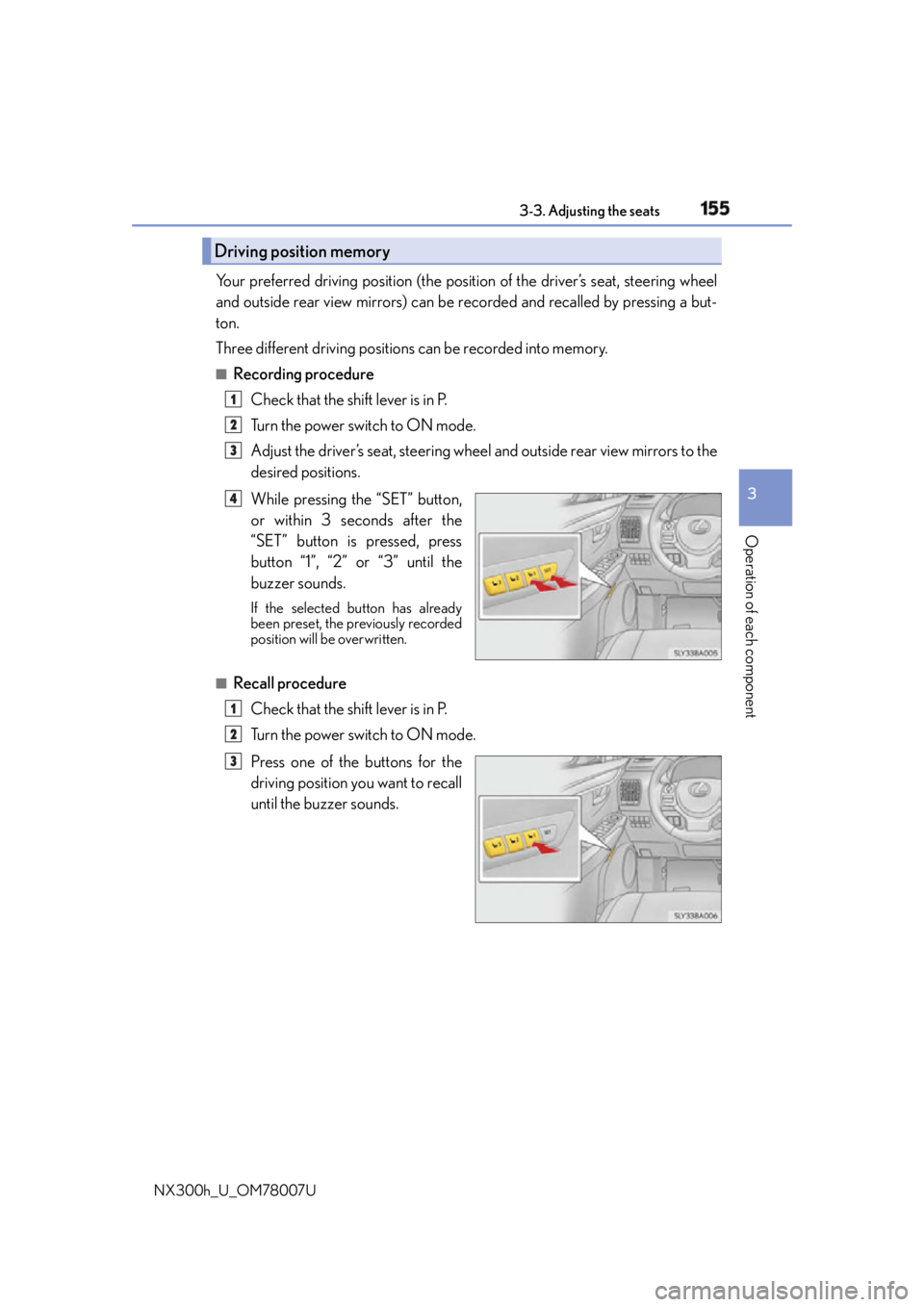
While pressing the “SET” button,
or within 3 seconds after the
“SET” button is pressed, press
button “1”, “2” or “3” until the
buzzer sounds. If the selected button has already
been preset, the previously recorded
position will be overwritten.
■
Recall procedure
Check that the shift lever is in P.
Turn the power switch to ON mode.
Press one of the buttons for the
driving position you want to recall
until the buzzer sounds. Driving position memory 1
2
3
4
1
2
3
Page 156 of 681
156 3-3. Adjusting the seats
NX300h_U_OM78007U ■
To stop the position recall operation part-way through
Perform any of the following: ●
Press the “SET” button. ●
Press button “1”, “2” or “3”. ●
Operate any of the seat adjustment switch es (only cancels seat position recall).●
Operate the tilt and telescopic steering co ntrol switch (only ca ncels steering wheel
position recall). ■
Seat positions that can be memorized ( P. 1 4 6 )
The adjusted positions other than the position adjusted by lumbar support switch can be
recorded. ■
Operating the driving position memory after turning the power switch off
Recorded seat positions can be activated up to 180 seconds after the driver’s door is
opened and another 60 seconds after it is closed again. ■
In order to correctly use the dr iving position memory function
If a seat position is already in the furthest po ssible position and the seat is operated in the
same direction, the recorded position may be slightly different when it is recalled.
Each electronic key (including a card key) can be registered to recall your pre-
ferred driving position. ■
Registering procedure
Record your driving position to button “1”, “2” or “3” before performing the
following:
Carry only the key you want to regist er, and then close the driver’s door.
If 2 or more keys are in the vehicle, the driving position cannot be recorded
properly.
Check that the shift lever is in P.
Turn the power switch to ON mode.
Recall the driving position that you want to record.
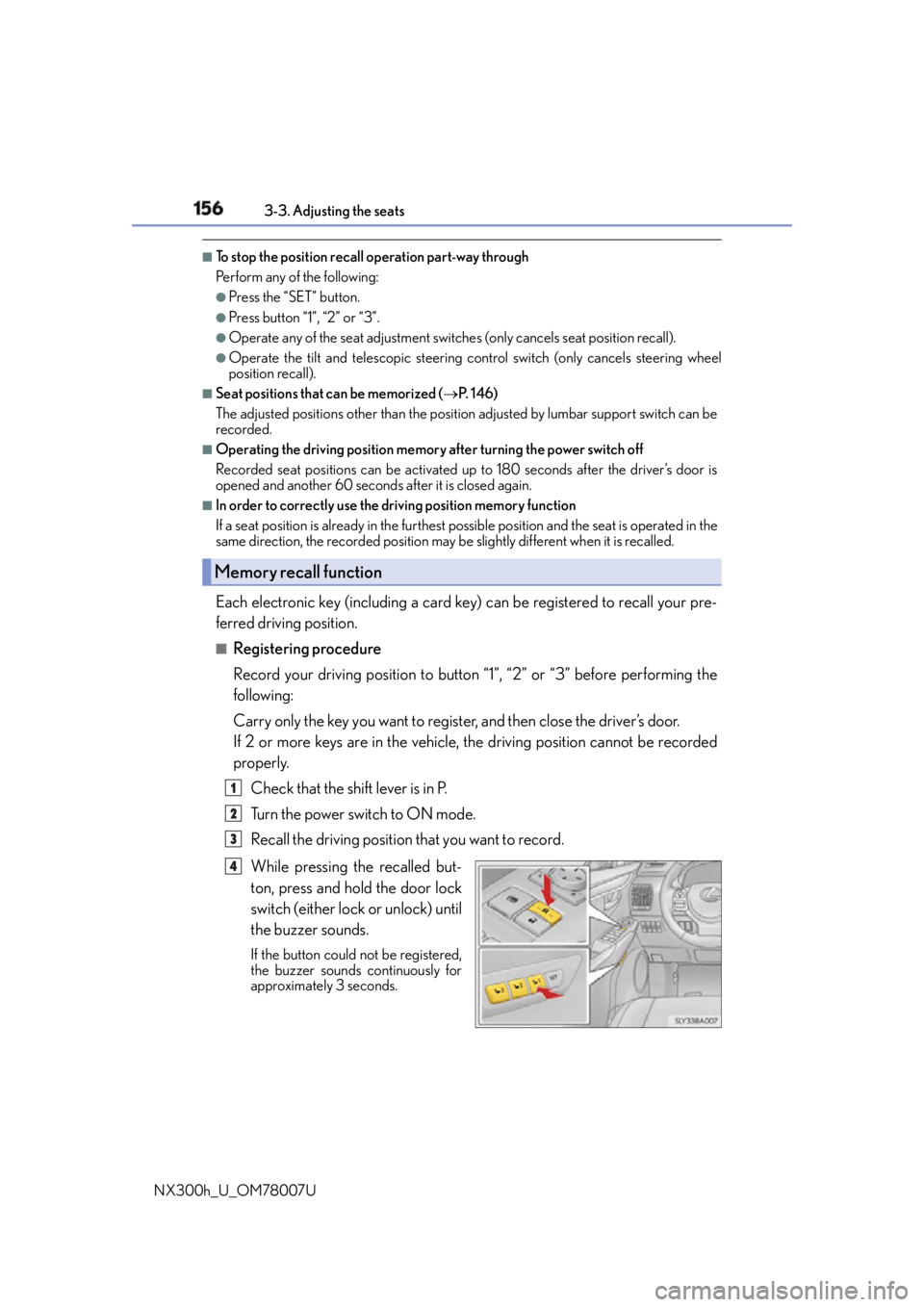
While pressing the recalled but-
ton, press and hold the door lock
switch (either lock or unlock) until
the buzzer sounds. If the button could not be registered,
the buzzer sounds continuously for
approximately 3 seconds.Memory recall function
1
2
3
4
Page 157 of 681
1573-3. Adjusting the seats
3
Operation of each component
NX300h_U_OM78007U ■
Recall procedure
Carry the electronic key that has been registered to the driving position,
and then unlock and open the driver’s door using the smart access system
with push-button start or wireless remote control. The driving position will move to the reco rded position (not including the steering
wheel). However, the seat will move to a po sition slightly behind the recorded posi-
tion in order to make entering the vehicle easier.
If the driving position is in a position th at has already been recorded, the seat and
outside rear view mirrors will not move.
Turn the power switch to ACCESSORY mode or ON mode, or fasten a
seat belt. The seat and steering wheel will move to the recorded position.■
Cancelation procedure
Carry only the key you want to cancel and then close the driver’s door.
If 2 or more keys are in the vehicle, the driving position cannot be canceled
properly.
Turn the power switch to ON mode.
While pressing the “SET” button, press and hold the door lock switch
(either lock or unlock) unt il the buzzer sounds twice.If it could not be canceled, the buzzer sounds continuously for approximately 3
seconds.■
Recalling the driving position using the memory recall function ●
Different driving positions can be registered for each electronic key. Therefore, the
driving position that is recalled may be different depending on the key being carried. ●
If a door other than the driver’s door is unlocked with the smart access system with
push-button start, the driving position cannot be recalled. In this case, press the driving
position button which has been set. ■
Customization
The unlock door settings of the memory recall function can be customized.
(Customizable features: P. 6 3 3 )
WA R N I N G ■
Seat adjustment caution
Take care during seat adjustment so that th e seat does not strike the rear passenger or
squeeze your body against the steering wheel. 1
2
1
2