light LEXUS NX300H 2016 Owners Manual
[x] Cancel search | Manufacturer: LEXUS, Model Year: 2016, Model line: NX300H, Model: LEXUS NX300H 2016Pages: 680, PDF Size: 10.23 MB
Page 317 of 680

3174-5. Using the driving support systems
4
Driving
NX300h_OM_USA_OM78082U
■The BSM outside rear view mirror indicators visibility
When under strong sunlight, the BSM outside rear view mirror indicator may be difficult
to see.
■Rear Cross Traffic Alert buzzer hearing
Rear Cross Traffic Alert function may be difficult to hear over loud noises such as high
audio volume.
■When “Blind Spot Monitor Unavailable” is shown on the multi-information display
Water, snow mud, etc., may be built up in the vicinity of the sensor area of bumper.
( P. 318) Removing the water, snow, mud, etc., from the vicinity of the sensor area
bumper should return it to normal. Also, the sensor may not function normally when used
in extremely hot or cold weather.
■When “Blind Spot Monitor System Malfunct ion” is shown on the multi-information
display
There may be a sensor malfunction or volta ge abnormality. Have the vehicle inspected at
a Lexus dealer.
■Certification for the Blind Spot Monitor system
For vehicles sold in the U.S.A.
FCC ID: OAYSRR2A
This device complies with part 15 of the FC C Rules. Operation is subject to the following
two conditions:
(1) This device may not cause harmful interference, and
(2) this device must accept any interference received, including interference that may cause undesired operation.
FCC Warning
Changes or modifications not expressly approved by the party responsible for compli-
ance could void the user’s authority to operate the equipment.
For vehicles sold in Canada
Applicable law: Canada 310
This device complies with Industry Canada licence-exempt RSS standard(s). Operation
is subject to the following two conditions: (1) this device may not cause interference, and
(2) this device must accept any interference, including interference that may cause
undesired operation of the device.
Frequency bands: 24.05-24.25 GHz
Output power: less than 20 milliwatts
Page 318 of 680
3184-5. Using the driving support systems
NX300h_OM_USA_OM78082U
WA R N I N G
■Handling the radar sensor
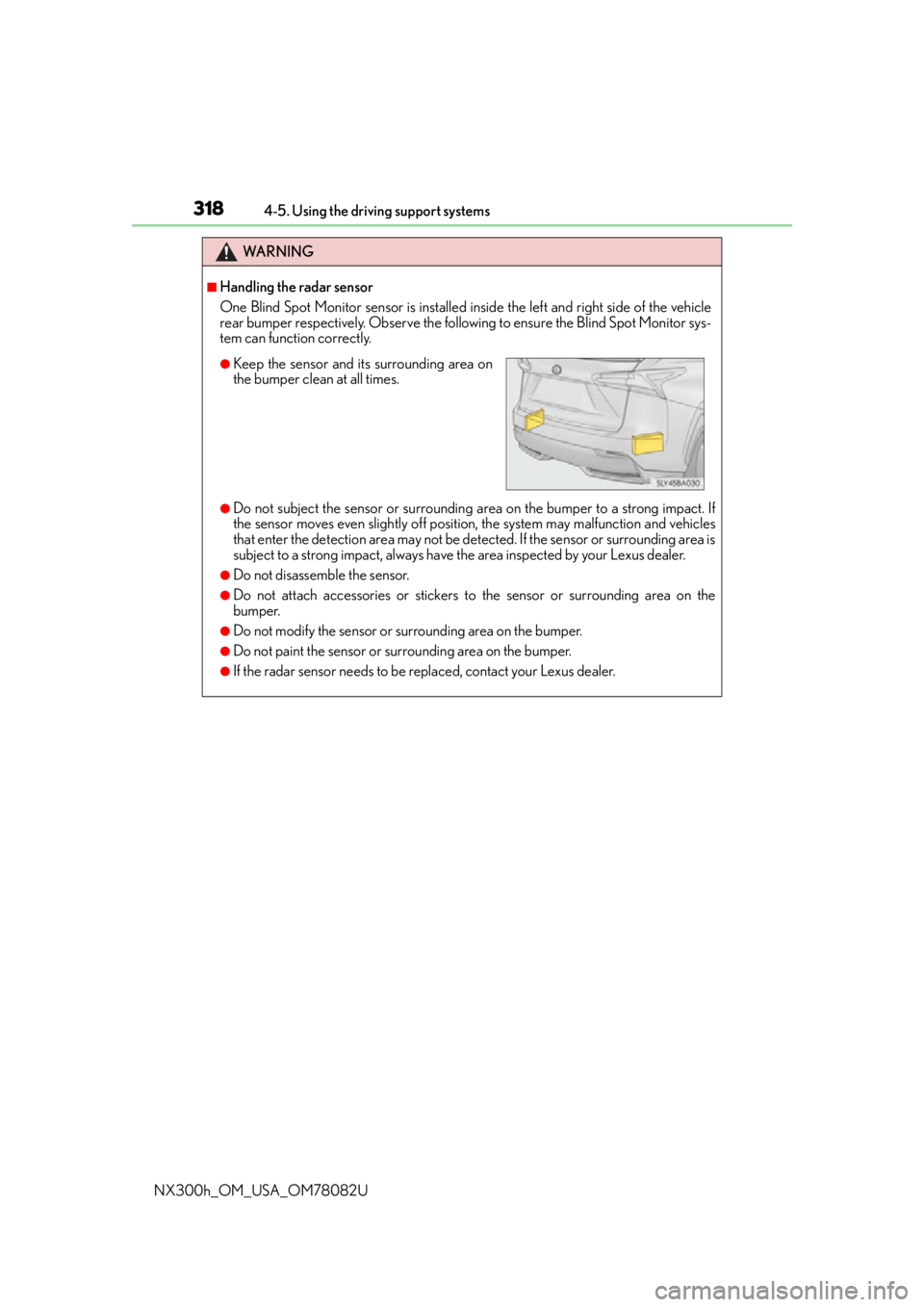
One Blind Spot Monitor sensor is installed in side the left and right side of the vehicle
rear bumper respectively. Observe the following to ensure the Blind Spot Monitor sys-
tem can function correctly.
●Do not subject the sensor or surrounding area on the bumper to a strong impact. If
the sensor moves even slightly off position, the system may malfunction and vehicles
that enter the detection area may not be detected. If the sensor or surrounding area is
subject to a strong impact, always have the area inspected by your Lexus dealer.
●Do not disassemble the sensor.
●Do not attach accessories or stickers to the sensor or surrounding area on the
bumper.
●Do not modify the sensor or su rrounding area on the bumper.
●Do not paint the sensor or surrounding area on the bumper.
●If the radar sensor needs to be re placed, contact your Lexus dealer.
●Keep the sensor and its surrounding area on
the bumper clean at all times.
Page 324 of 680

3244-6. Driving tips
NX300h_OM_USA_OM78082U
Hybrid vehicle driving tips
◆Using Eco drive mode
When using Eco drive mode, the torq ue corresponding to the accelerator
pedal depression amount can be generate d more smoothly than it is in normal
conditions. In addition, the operation of the air conditioning system (heat-
ing/cooling) will be minimized, improving the fuel economy. ( P. 3 0 3 )
◆Use of Hybrid System Indicator
The Eco-friendly driving is possible by keeping the indicator needle of Hybrid
System Indicator within Eco area. ( P. 100)
◆Shift lever operation
Shift the shift lever to D when stopped at a traffic light, or driving in heavy traf-
fic, etc. Shift the shift lever to P when parking. When using the N, there is no
positive effect on fuel consumption. In the N, the gasoline engine operates but
electricity cannot be generated. Also, wh en using the air conditioning system,
etc., the hybrid battery (traction battery) power is consumed.
◆Accelerator pedal/brake pedal operation
●Drive your vehicle smoothly. Avoid ab rupt acceleration and deceleration.
Gradual acceleration and deceleration will make more effective use of the
electric motor (traction motor) wi thout having to use gasoline engine
power.
●Avoid repeated acceleration. Repeated acceleration consumes hybrid bat-
tery (traction battery) power, resulting in poor fuel consumption. Battery
power can be restored by driving with the accelerator pedal slightly
released.
◆When braking
Make sure to operate the brakes gently and in a timely manner. A greater
amount of electrical energy can be regenerated when slowing down.
For economical and ecological driving, pay attention to the following points:
Page 325 of 680

3254-6. Driving tips
4
Driving
NX300h_OM_USA_OM78082U
◆Delays
Repeated acceleration and deceleration, as well as long waits at traffic lights,
will lead to bad fuel economy. Check traffic reports before leaving and avoid
delays as much as possible. When driving in a traffic jam, gently release the
brake pedal to allow the vehicle to move forward slightly while avoiding over-
use of the accelerator pedal. Doing so can help control excessive gasoline
consumption.
◆Highway driving
Control and maintain the vehicle at a co nstant speed. Before stopping at a toll
booth or similar, allow plenty of time to release the accelerator and gently
apply the brakes. A greater amount of electrical energy can be regenerated
when slowing down.
◆Air conditioning
Use the air conditioning only when necessary. Doing so can help reduce
excessive gasoline consumption.
In summer: When the ambient temperature is high, use the recirculated air
mode. Doing so will help to reduce th e burden on the air conditioning system
and reduce fuel consumption as well.
In winter: Because the gasoline engine will not automatically cut out until it
and the interior of the vehicle are warm, it will consume fuel. Also, fuel con-
sumption can be improved by avoiding overuse of the heater.
◆Checking tire inflation pressure
Make sure to check the tire inflation pressure frequently. Improper tire infla-
tion pressure can cause poor fuel economy.
Also, as snow tires can cause large amou nts of friction, their use on dry roads
can lead to poor fuel economy. Use ti res that are appropriate for the season.
◆Luggage
Carrying heavy luggage will lead to poor fuel economy. Avoid carrying
unnecessary luggage. Installing a large roof rack will also cause poor fuel
economy.
◆Warming up before driving
Since the gasoline engine starts up and cuts out automatically when cold,
warming up the engine is unnecessary. Moreover, frequently driving short dis-
tances will cause the engine to repeated ly warm up, which can lead to excess
fuel consumption.
Page 326 of 680
3264-6. Driving tips
NX300h_OM_USA_OM78082U
Winter driving tips
●Use fluids that are appropriate to the prevailing outside temperatures. •Engine oil
• Engine/power control unit coolant
• Washer fluid
●Have a service technician inspect the condition of the 12-volt battery.
●Have the vehicle fitted with four snow tires or purchase a set of tire chains for
the front tires
*.
Ensure that all tires are the same size and br and, and that chains match the size of the
tires.
*: Tire chains cannot be mounted on the 225/60R18 tires.
Perform the following according to the driving conditions:
●Do not try to forcibly open a window or move a wiper that is frozen. Pour
warm water over the frozen area to melt the ice. Wipe away the water imme-
diately to prevent it from freezing.
●To ensure proper operation of the climate control system fan, remove any
snow that has accumulated on the air inlet vents in front of the windshield.
●Check for and remove any excess ice or snow that may have accumulated on
the exterior lights, vehicle’s roof, chassis, around the tires or on the brakes.
●Remove any snow or mud from the bottom of your shoes before getting in the
vehicle.
Carry out the necessary preparations and inspections before driving the vehi-
cle in winter. Always drive the vehicle in a manner appropriate to the prevail-
ing weather conditions.
Preparation for winter
Before driving the vehicle
Page 341 of 680

3415-1. Basic Operations
5
Lexus Display Audio system
NX300h_OM_USA_OM78082U
■When using the screen
●Under extremely cold conditions, the Lexus Display Audio controller may react slowly.
●If the screen is cold, the display may be dark, or the system may seem to be operating
slightly slower than normal.
●The screen may seem dark and hard to see when viewed through sunglasses. Change
your angle of viewing, adjust the display on the “Display” screen (P. 352) or remove
your sunglasses.
■Using cellular phones
Interference may be heard through the audio system’s speakers if a cellular phone is
being used inside or close to the vehi cle while the audio system is operating.
WA R N I N G
■Using the Lexus Display Audio controller
Be careful when touching the Lexus Display Audio controller in extreme temperatures
as it may become very hot or cold due to the temperature inside the vehicle.
■Laser product
●CAUTION
USE OF CONTROL OR ADJUSTMENT OR PERFORMANCE OF PROCE-
DURES OTHER THAN THOSE SPECIFIED HEREIN MAY RESULT IN HAZARD-
OUS RADIATION EXPOSURE.
●CAUTION
THE USE OF OPTICAL INSTRUMENTS WITH THIS PRODUCT WILL
INCREASE EYE HAZARD.
NOTICE
■To prevent Lexus Display Audio controller malfunction
●Do not allow the Lexus Display Audio controller to come into contact with food, liq-
uid, stickers or lit cigarettes as doing so may cause it to change color, emit a strange
odor or stop functioning.
●Do not subject the Lexus Display Audio controller to excessive pressure or strong
impact as the controller may bend or break off.
■To prevent 12-volt battery discharge
Do not leave the audio system on longer than necessary when the hybrid system is off.
■To avoid damaging the audio system
Take care not to spill drinks or other fluids on the audio system.
Page 352 of 680
3525-2. Setup
NX300h_OM_USA_OM78082U
Display settings
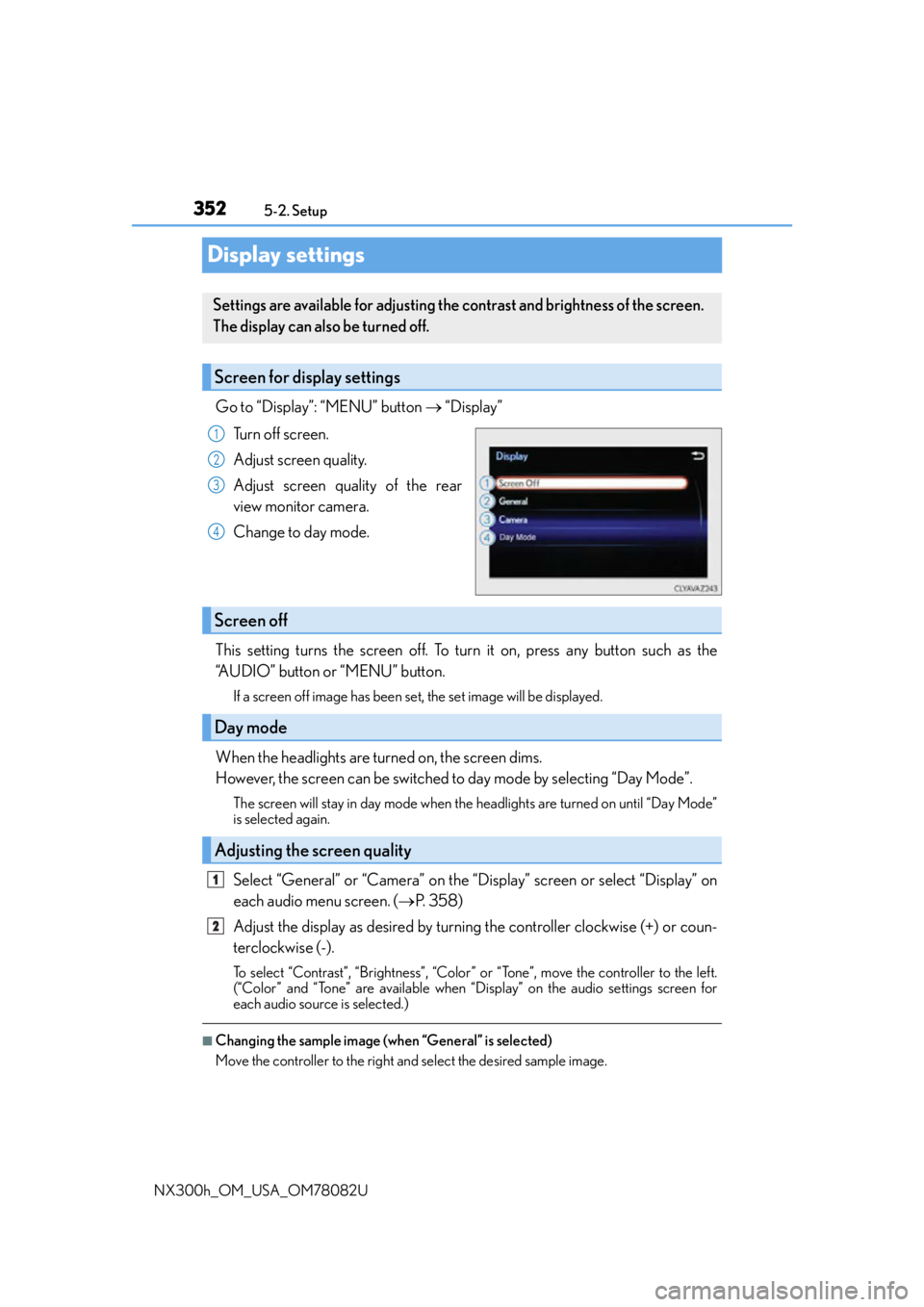
Go to “Display”: “MENU” button “Display”
Turn off screen.
Adjust screen quality.
Adjust screen quality of the rear
view monitor camera.
Change to day mode.
This setting turns the screen off. To turn it on, press any button such as the
“AUDIO” button or “MENU” button.
If a screen off image has been set, the set image will be displayed.
When the headlights are turned on, the screen dims.
However, the screen can be switched to day mode by selecting “Day Mode”.
The screen will stay in day mode when the headlights are turned on until “Day Mode”
is selected again.
Select “General” or “Camera” on the “Display” screen or select “Display” on
each audio menu screen. ( P. 3 5 8 )
Adjust the display as desired by turning the controller clockwise (+) or coun-
terclockwise (-).
To select “Contrast”, “Brightness”, “Color” or “Tone”, move the controller to the left.
(“Color” and “Tone” are available when “Display” on the audio settings screen for
each audio source is selected.)
■Changing the sample image (when “General” is selected)
Move the controller to the right and select the desired sample image.
Settings are available for adjusting the contrast and brightness of the screen.
The display can also be turned off.
Screen for display settings
1
2
3
4
Screen off
Day mode
Adjusting the screen quality
1
2
Page 373 of 680
3735-5. Playing an audio CD and MP3/WMA/AAC discs
5
Lexus Display Audio system
NX300h_OM_USA_OM78082U
NOTICE
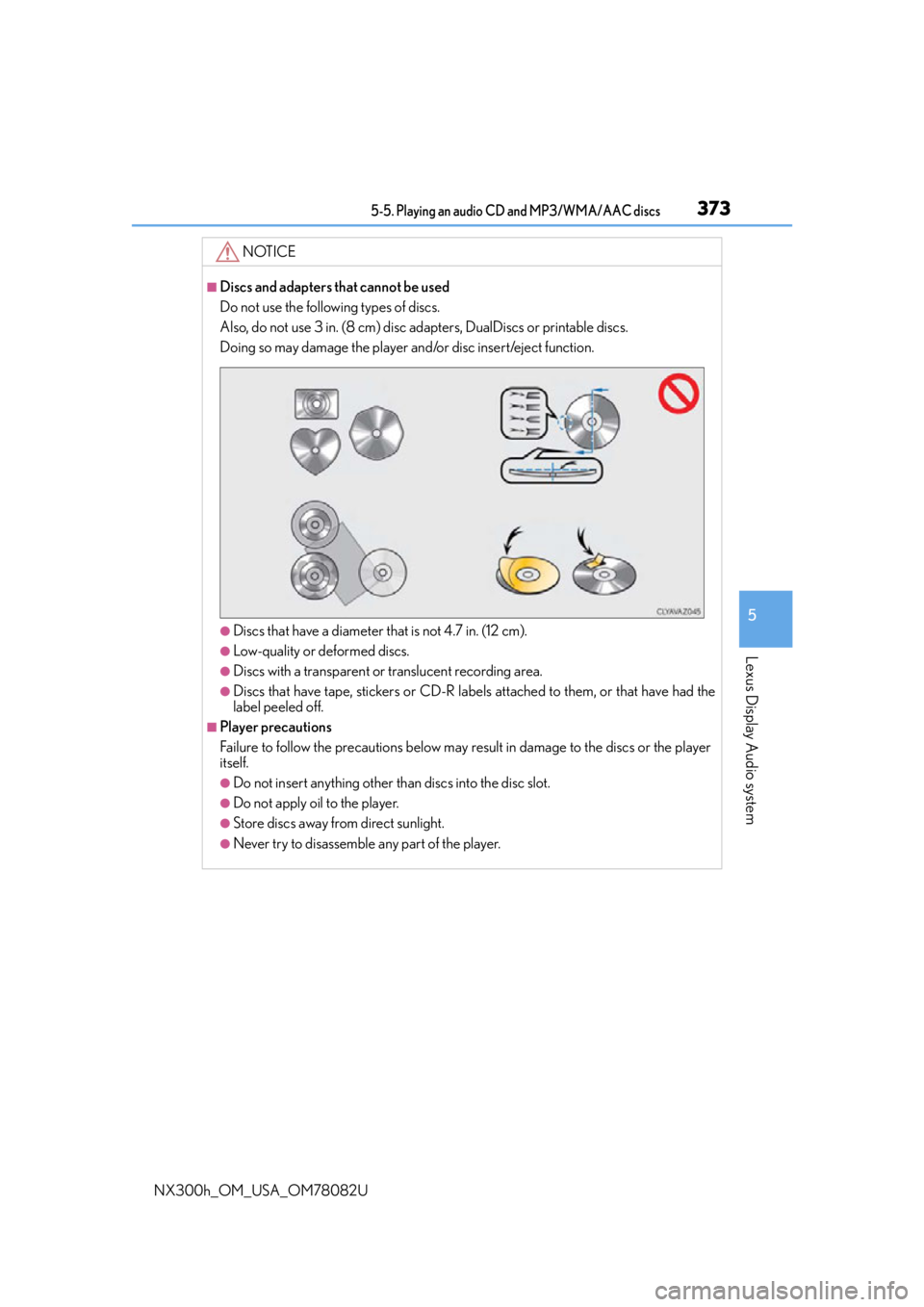
■Discs and adapters that cannot be used
Do not use the following types of discs.
Also, do not use 3 in. (8 cm) disc ad apters, DualDiscs or printable discs.
Doing so may damage the player and/or disc insert/eject function.
●Discs that have a diameter that is not 4.7 in. (12 cm).
●Low-quality or deformed discs.
●Discs with a transparent or translucent recording area.
●Discs that have tape, stickers or CD-R labels attached to them, or that have had the
label peeled off.
■Player precautions
Failure to follow the precautions below may result in damage to the discs or the player
itself.
●Do not insert anything other th an discs into the disc slot.
●Do not apply oil to the player.
●Store discs away from direct sunlight.
●Never try to disassemble any part of the player.
Page 413 of 680

4135-11. Bluetooth®
5
Lexus Display Audio system
NX300h_OM_USA_OM78082U
Bluetooth®
■When using the Bluetooth® audio system
●In the following situations, the system may not function.
• If the portable audio player is turned off
• If the portable audio player is not connected
• If the portable audio player’s battery is low
●There may be a delay if a cellular phon e connection is made during Bluetooth® audio
play.
●Depending on the type of portable audio play er that is connected to the system, opera-
tion may differ slightly and certain functions may not be available.
■When using the hands-free system
●The audio system is mu ted when making a call.
●If both parties speak at the same time, it may be difficult to hear.
●If the received call volume is overly loud, an echo may be heard.
If the Bluetooth® phone is too close to the system, quality of the sound may deteriorate
and connection status may deteriorate.
●In the following situations, it may be difficult to hear the other party:
• When driving on unpaved roads
• When driving at high speeds
•If a window is open
• If the air conditioning is blowing directly on the microphone
• If there is interference from the network of the cellular phone
●Depending on the type phone, cert ain functions may not be available.
■Conditions under which the system will not operate
●If using a cellular phone that does not support Bluetooth®
●If the cellular phone is turned off
●If you are outside of cellular phone service coverage
●If the cellular phone is not connected
●If the cellular phone’s battery is low
●When outgoing calls are controlled, due to heavy traffic on telephone lines, etc.
●When the cellular phone itself cannot be used
●When transferring phonebook data from the cellular phone
Page 429 of 680

429
6Interior features
NX300h_OM_USA_OM78082U
6-1. Using the air conditioning system and defogger
Automatic air conditioning system ......................................... 430
Heated steering wheel/ seat heaters/
seat ventilators......................... 440
6-2. Using the interior lights Interior lights list..........................443• Front interior light ................444
• Personal lights........................444
• Rear interior light .................445 6-3. Using the storage features
List of storage features ............ 446• Glove box ............................... 447
• Console box........................... 447
•Cup holders/ bottle holders......................... 448
• Sunglass holder .................... 449
Luggage compartment features........................................ 450
6-4. Other interior features Other interior features ............ 455
• Sun visors ................................ 455
• Vanity mirrors ........................ 455
• Clock ........................................ 456
• Power outlet (12 VDC)...... 456
• Power outlet (120 VAC) ... 457
• Wireless charger.................. 458
• Armrest .................................... 465
• Assist grips.............................. 465
• Coat hooks ............................. 466
Garage door opener................ 467
Compass ........................................473
Safety Connect ............................477