remote control LEXUS NX300H 2016 Owners Manual
[x] Cancel search | Manufacturer: LEXUS, Model Year: 2016, Model line: NX300H, Model: LEXUS NX300H 2016Pages: 680, PDF Size: 10.23 MB
Page 12 of 680
12
NX300h_OM_USA_OM78082UThe SRS airbag and seat belt pretensioner
devices in your Lexus contain explosive
chemicals. If the vehicle is scrapped with the airbags and seat belt pretensioners left as
they are, this may cause an accident such as fire. Be sure to have the systems of the SRS
airbag and seat belt pretensioner removed an d disposed of by a qualified service shop or
by your Lexus dealer before you scrap your vehicle.
Special handling may apply, See www.dts c.ca.gov/hazardouswaste/perchlorate.
Your vehicle has components that may contain perchlorate. These components may
include airbag, seat belt pretensioners, and wireless remote control batteries.
Scrapping of your Lexus
Perchlorate Material
WA R N I N G
■General precautions while driving
Driving under the influence: Never drive your vehicle when under the influence of
alcohol or drugs that have im paired your ability to operate your vehicle. Alcohol and
certain drugs delay reaction time, impair judgment and reduce coordination, which
could lead to an accident that could result in death or serious injury.
Defensive driving: Always drive defensively. Anticipate mistakes that other drivers or
pedestrians might make and be ready to avoid accidents.
Driver distraction: Always give your full atte ntion to driving. Anything that distracts the
driver, such as adjusting controls, talking on a cellular phone or reading can result in a
collision with resulting death or serious in jury to you, your occupants or others.
■General precaution regarding children’s safety
Never leave children unattended in the vehicle, and never allow children to have or use
the key.
Children may be able to start the vehicle or sh ift the vehicle into neutral. There is also a
danger that children may injure themselves by playing with the windows, the moon
roof, or other features of the vehicle. In addition, heat build-up or extremely cold tem-
peratures inside the vehicl e can be fatal to children.
Page 22 of 680
22Pictorial index
NX300h_OM_USA_OM78082U
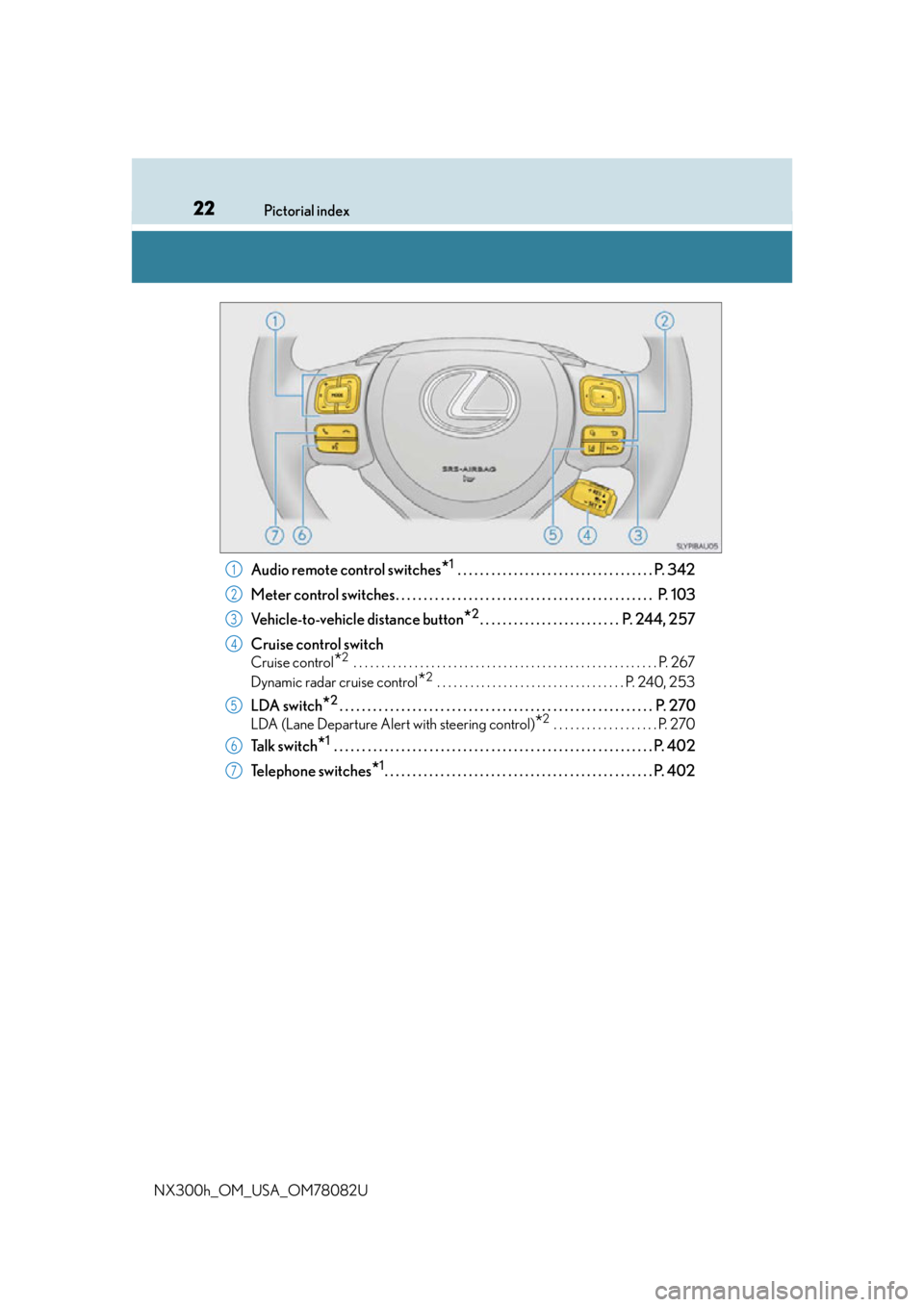
Audio remote control switches*1 . . . . . . . . . . . . . . . . . . . . . . . . . . . . . . . . . . . P. 342
Meter control switches. . . . . . . . . . . . . . . . . . . . . . . . . . . . . . . . . . . . . . . . . . . . . . P. 103
Vehicle-to-vehicle distance button
*2. . . . . . . . . . . . . . . . . . . . . . . . . P. 244, 257
Cruise control switch
Cruise control*2 . . . . . . . . . . . . . . . . . . . . . . . . . . . . . . . . . . . . . . . . . . . . . . . . . . . . . . . P. 267
Dynamic radar cruise control
*2 . . . . . . . . . . . . . . . . . . . . . . . . . . . . . . . . . . P. 240, 253
LDA switch*2. . . . . . . . . . . . . . . . . . . . . . . . . . . . . . . . . . . . . . . . . . . . . . . . . . . . . . . . P. 270
LDA (Lane Departure Alert with steering control)*2 . . . . . . . . . . . . . . . . . . . P. 270
Ta l k s w i t c h*1 . . . . . . . . . . . . . . . . . . . . . . . . . . . . . . . . . . . . . . . . . . . . . . . . . . . . . . . . . P. 402
Telephone switches
*1. . . . . . . . . . . . . . . . . . . . . . . . . . . . . . . . . . . . . . . . . . . . . . . . P. 402
1
2
3
4
5
6
7
Page 23 of 680
23Pictorial index
NX300h_OM_USA_OM78082U
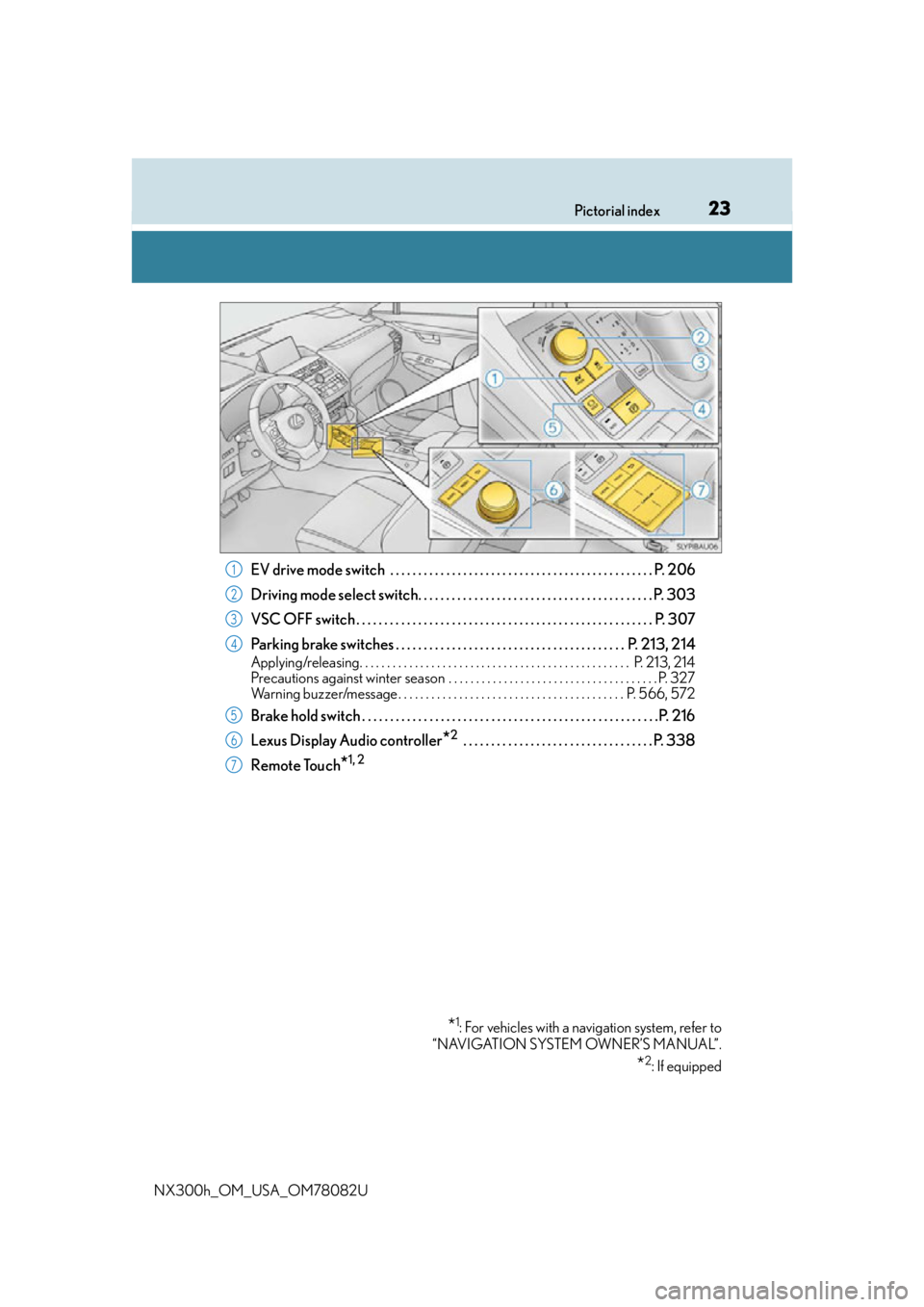
EV drive mode switch . . . . . . . . . . . . . . . . . . . . . . . . . . . . . . . . . . . . . . . . . . . . . . . P. 206
Driving mode select switch. . . . . . . . . . . . . . . . . . . . . . . . . . . . . . . . . . . . . . . . . . P. 303
VSC OFF switch . . . . . . . . . . . . . . . . . . . . . . . . . . . . . . . . . . . . . . . . . . . . . . . . . . . . . P. 307
Parking brake switches . . . . . . . . . . . . . . . . . . . . . . . . . . . . . . . . . . . . . . . . . P. 213, 214
Applying/releasing. . . . . . . . . . . . . . . . . . . . . . . . . . . . . . . . . . . . . . . . . . . . . . . . . P. 213, 214
Precautions against winter season . . . . . . . . . . . . . . . . . . . . . . . . . . . . . . . . . . . . . . P. 327
Warning buzzer/message . . . . . . . . . . . . . . . . . . . . . . . . . . . . . . . . . . . . . . . . . P. 566, 572
Brake hold switch . . . . . . . . . . . . . . . . . . . . . . . . . . . . . . . . . . . . . . . . . . . . . . . . . . . . .P. 21 6
Lexus Display Audio controller
*2 . . . . . . . . . . . . . . . . . . . . . . . . . . . . . . . . . . P. 338
Remote Touch
*1, 2
*1: For vehicles with a navigation system, refer to
“NAVIGATION SYSTEM OWNER’S MANUAL”.
*2: If equipped
1
2
3
4
5
6
7
Page 88 of 680
881-3. Theft deterrent system
NX300h_OM_USA_OM78082U
Alarm
The alarm uses light and sound to give an alert when an intrusion is detected.
The alarm is triggered in the following situations when the alarm is set:
●A locked door is unlocked or opened in any way other than using the entry
function, wireless remote control or mech anical key. (The doors will lock again
automatically.)
●The hood is opened.
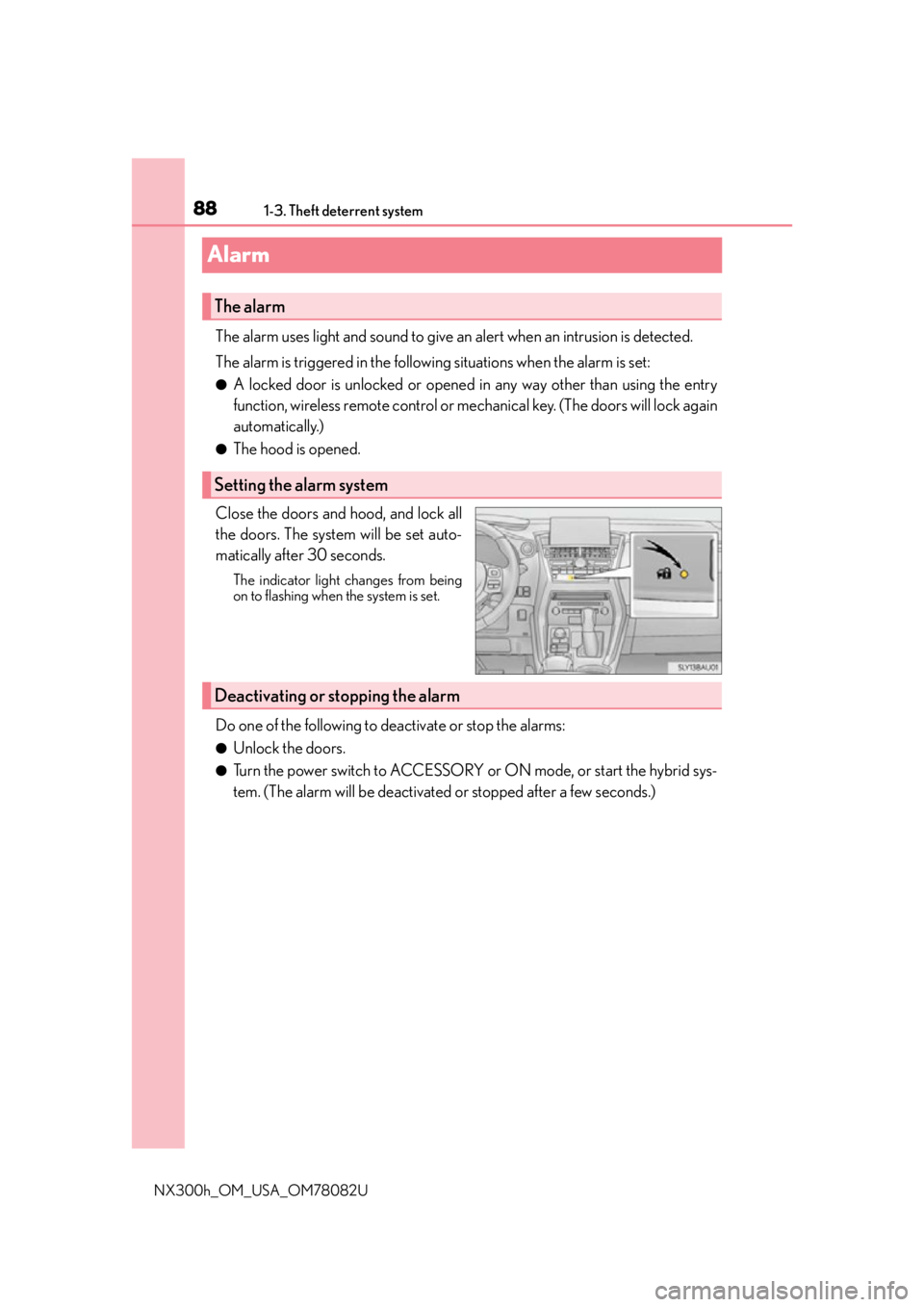
Close the doors and hood, and lock all
the doors. The system will be set auto-
matically after 30 seconds.
The indicator light changes from being
on to flashing when the system is set.
Do one of the following to de activate or stop the alarms:
●Unlock the doors.
●Turn the power switch to ACCESSORY or ON mode, or start the hybrid sys-
tem. (The alarm will be deactivated or stopped after a few seconds.)
The alarm
Setting the alarm system
Deactivating or stopping the alarm
Page 111 of 680
1112. Instrument cluster
2
Instrument cluster
NX300h_OM_USA_OM78082U
Energy monitor/consumption screen
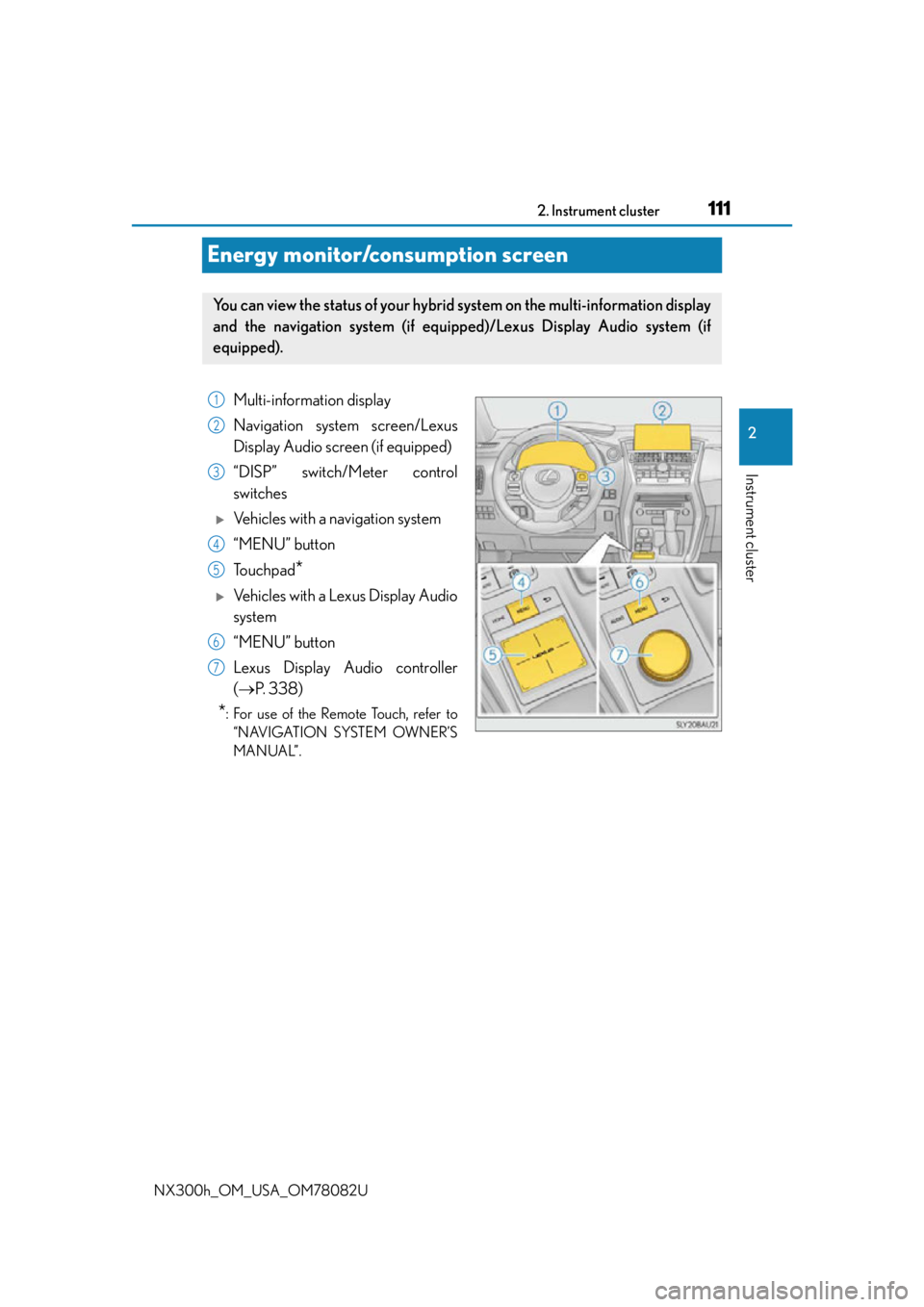
You can view the status of your hybrid system on the multi-information display
and the navigation system (if equippe d)/Lexus Display Audio system (if
equipped).
Multi-information display
Navigation system screen/Lexus
Display Audio screen (if equipped)
“DISP” switch/Meter control
switches
Vehicles with a navigation system
“MENU” button
To u c h p a d
*
Vehicles with a Lexus Display Audio
system
“MENU” button
Lexus Display Audio controller
( P. 3 3 8 )
*: For use of the Remote Touch, refer to
“NAVIGATION SYSTEM OWNER’S
MANUAL”.
1
2
3
4
5
6
7
Page 112 of 680
1122. Instrument cluster
NX300h_OM_USA_OM78082U
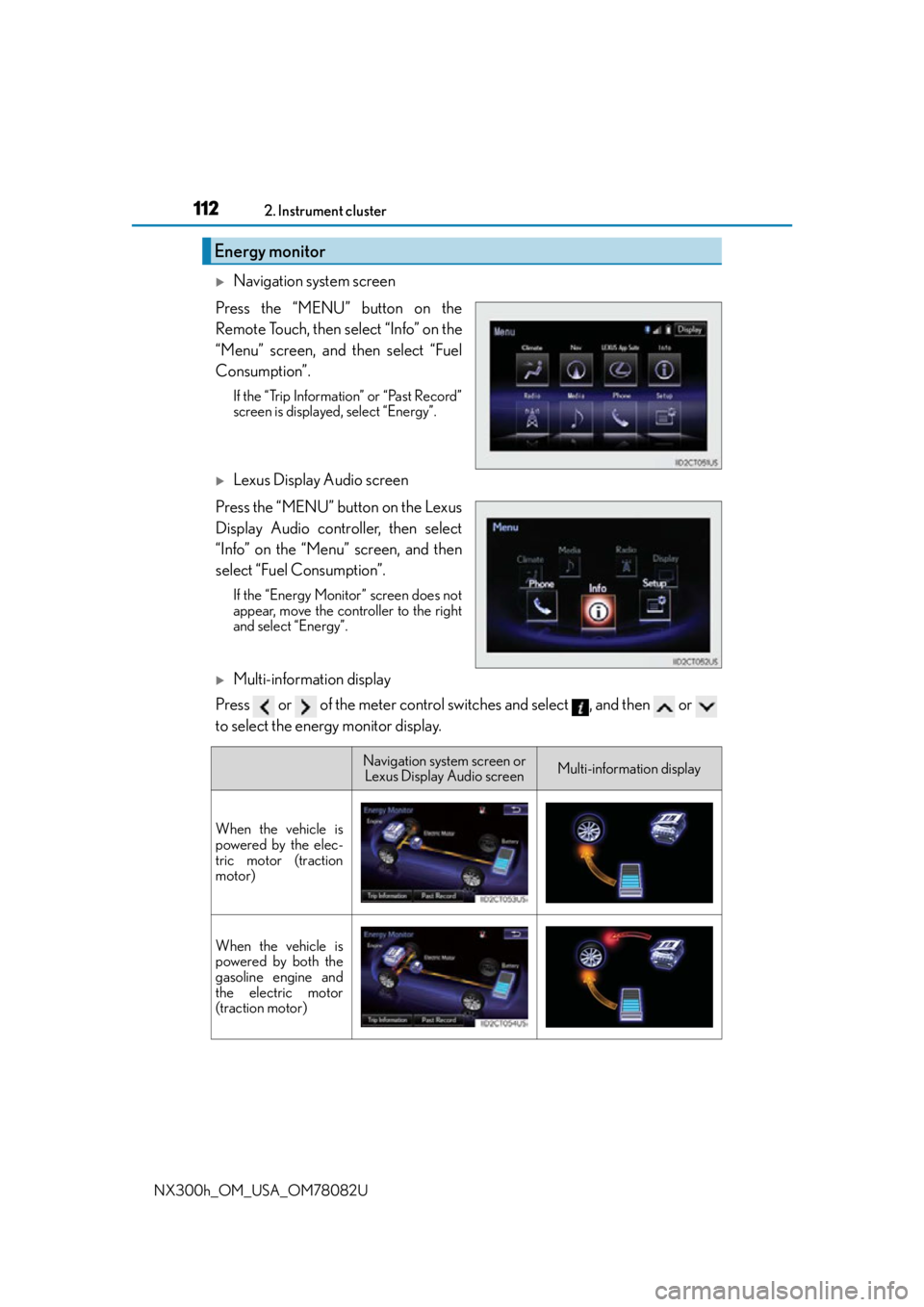
Navigation system screen
Press the “MENU” button on the
Remote Touch, then select “Info” on the
“Menu” screen, and then select “Fuel
Consumption”.
If the “Trip Information” or “Past Record”
screen is displayed, select “Energy”.
Lexus Display Audio screen
Press the “MENU” button on the Lexus
Display Audio controller, then select
“Info” on the “Menu” screen, and then
select “Fuel Consumption”.
If the “Energy Monitor” screen does not
appear, move the controller to the right
and select “Energy”.
Multi-information display
Press or of the meter control switches and select , and then or
to select the energy monitor display.
Energy monitor
Navigation system screen or Lexus Display Audio screenMulti-information display
When the vehicle is
powered by the elec-
tric motor (traction
motor)
When the vehicle is
powered by both the
gasoline engine and
the electric motor
(traction motor)
Page 115 of 680
1152. Instrument cluster
2
Instrument cluster
NX300h_OM_USA_OM78082U
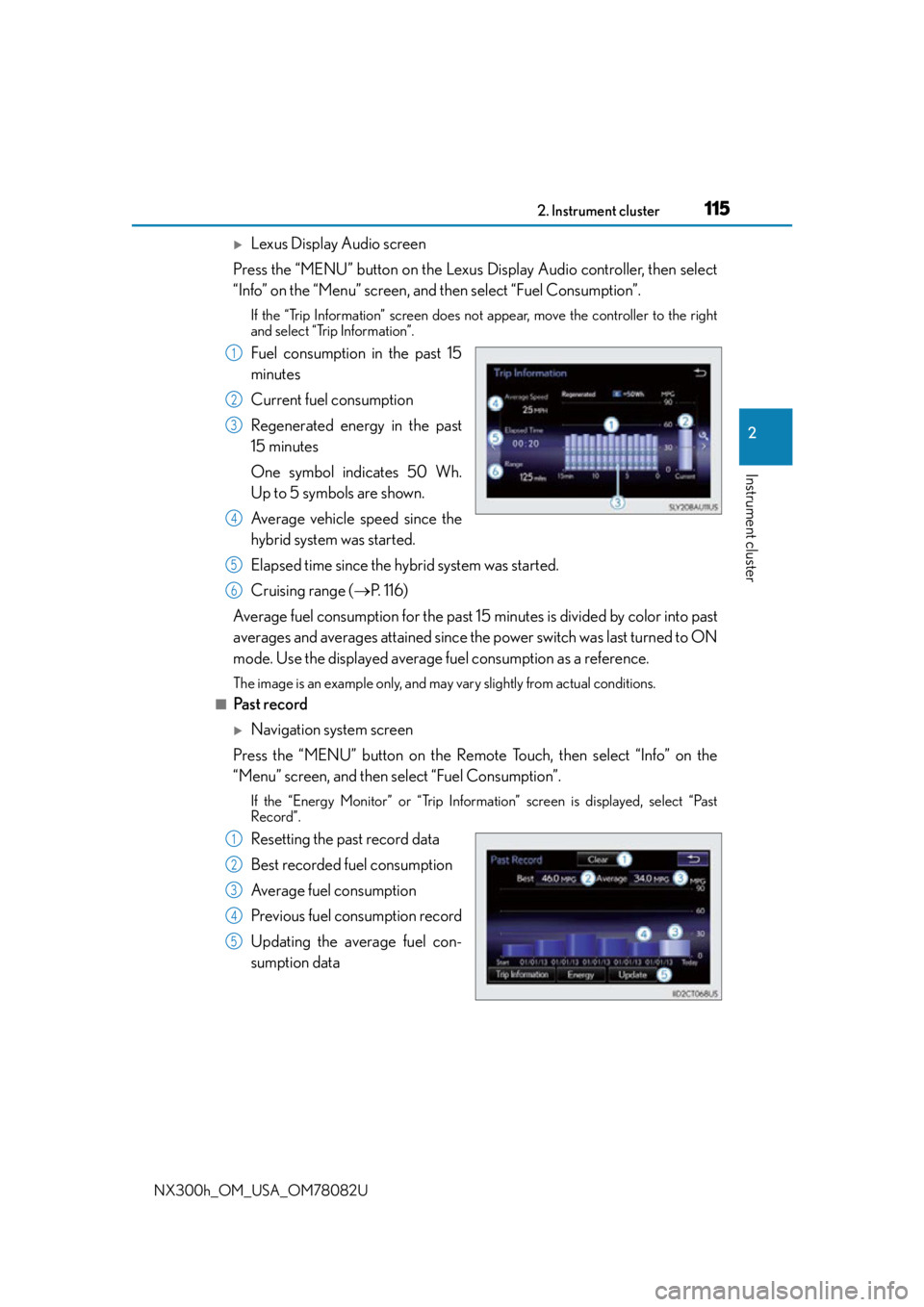
Lexus Display Audio screen
Press the “MENU” button on the Lexus Display Audio controller, then select
“Info” on the “Menu” screen, and then select “Fuel Consumption”.
If the “Trip Information” screen does not appear, move the controller to the right
and select “Trip Information”.
Fuel consumption in the past 15
minutes
Current fuel consumption
Regenerated energy in the past
15 minutes
One symbol indicates 50 Wh.
Up to 5 symbols are shown.
Average vehicle speed since the
hybrid system was started.
Elapsed time since the hybrid system was started.
Cruising range (P. 1 1 6 )
Average fuel consumption fo r the past 15 minutes is divided by color into past
averages and averages attained since th e power switch was last turned to ON
mode. Use the displayed average fuel consumption as a reference.
The image is an example only, and may vary slightly from actual conditions.
■Past record
Navigation system screen
Press the “MENU” button on the Remote Touch, then select “Info” on the
“Menu” screen, and then select “Fuel Consumption”.
If the “Energy Monitor” or “Trip Information” screen is displayed, select “Past
Record”.
Resetting the past record data
Best recorded fuel consumption
Average fuel consumption
Previous fuel consumption record
Updating the average fuel con-
sumption data
1
2
3
4
5
6
1
2
3
4
5
Page 118 of 680
1183-1. Key information
NX300h_OM_USA_OM78082U
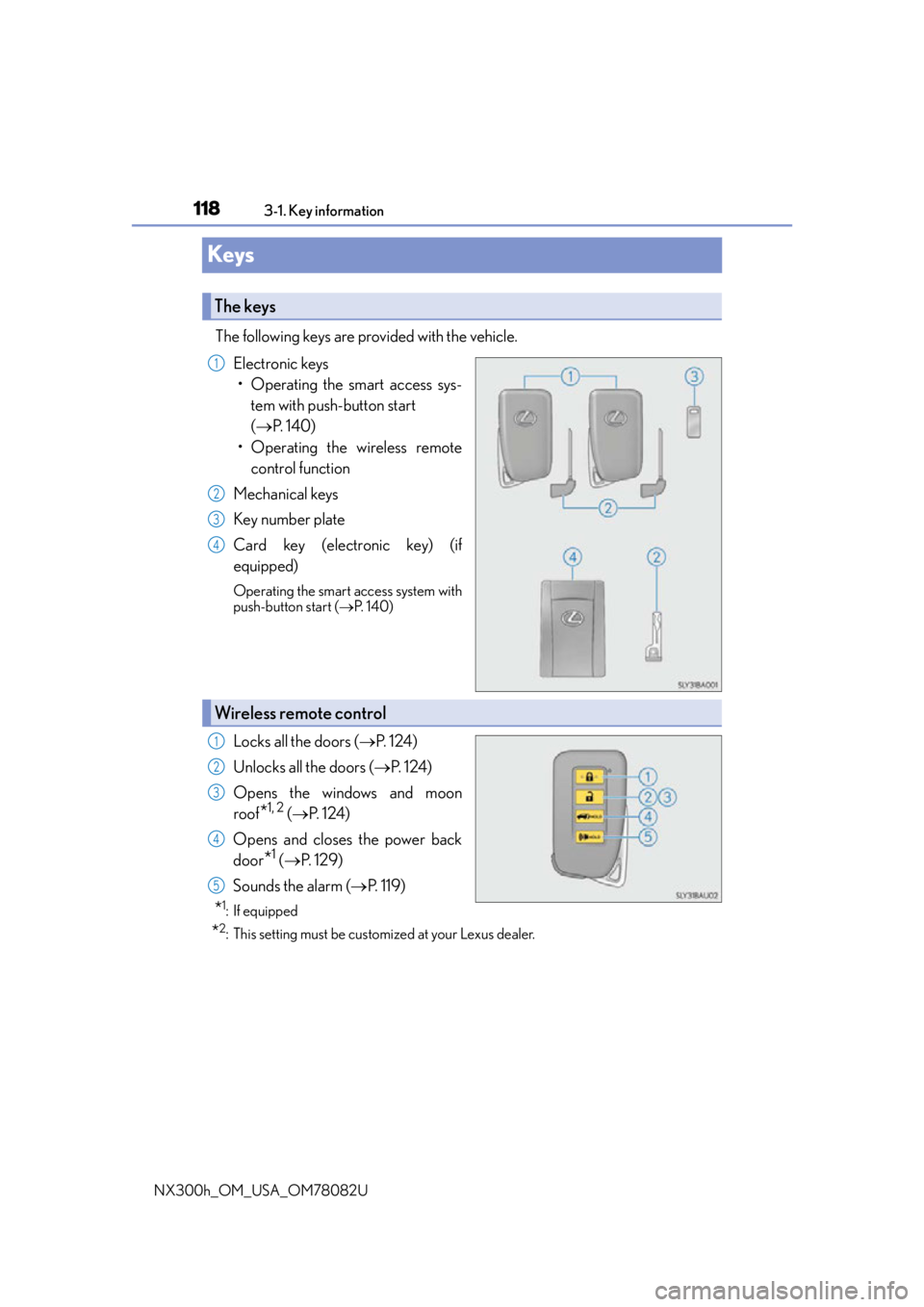
Keys
The following keys are provided with the vehicle. Electronic keys• Operating the smart access sys- tem with push-button start
( P. 1 4 0 )
• Operating the wireless remote control function
Mechanical keys
Key number plate
Card key (electronic key) (if
equipped)
Operating the smart access system with
push-button start ( P. 1 4 0 )
Locks all the doors ( P. 1 2 4 )
Unlocks all the doors ( P. 1 2 4 )
Opens the windows and moon
roof
*1, 2 ( P. 1 2 4 )
Opens and closes the power back
door
*1 ( P. 1 2 9 )
Sounds the alarm ( P. 1 1 9 )
*1:If equipped
*2: This setting must be customized at your Lexus dealer.
The keys
1
2
3
4
Wireless remote control
1
2
3
4
5
Page 121 of 680

1213-1. Key information
3
Operation of each component
NX300h_OM_USA_OM78082U
■Electronic key battery depletion
●The standard battery life is 1 to 2 years. (The card key battery life is about a year and a
half.)
●If the battery becomes low, an alarm will sound in the cabin when the hybrid system
stops.
●As the electronic key always receives ra dio waves, the battery will become depleted
even if the electronic key is not used. The following symptoms indicate that the elec-
tronic key battery may be depleted. Replace the battery when necessary. ( P. 5 3 2 )
• The smart access system with push-button start or the wireless remote control does
not operate.
• The detection area becomes smaller.
• The LED indicator on the key surface does not turn on.
●To avoid serious deterioration, do not leave the electronic key within 3 ft. (1 m) of the
following electrical appliances that produce a magnetic field:
•TVs
• Personal computers
• Cellular phones, cordless phones and battery chargers
• Recharging cellular phones or cordless phones
• Induction cookers
• Table lamps
■Replacing the battery
P. 5 3 2
■Confirmation of the registered key number
The number of keys already registered to the vehicle can be confirmed. Ask your Lexus
dealer for details.
■If a wrong key is used
The key cylinder rotates freely to isolate inside mechanism.
Page 124 of 680
1243-2. Opening, closing and locking the doors
NX300h_OM_USA_OM78082U
Side doors
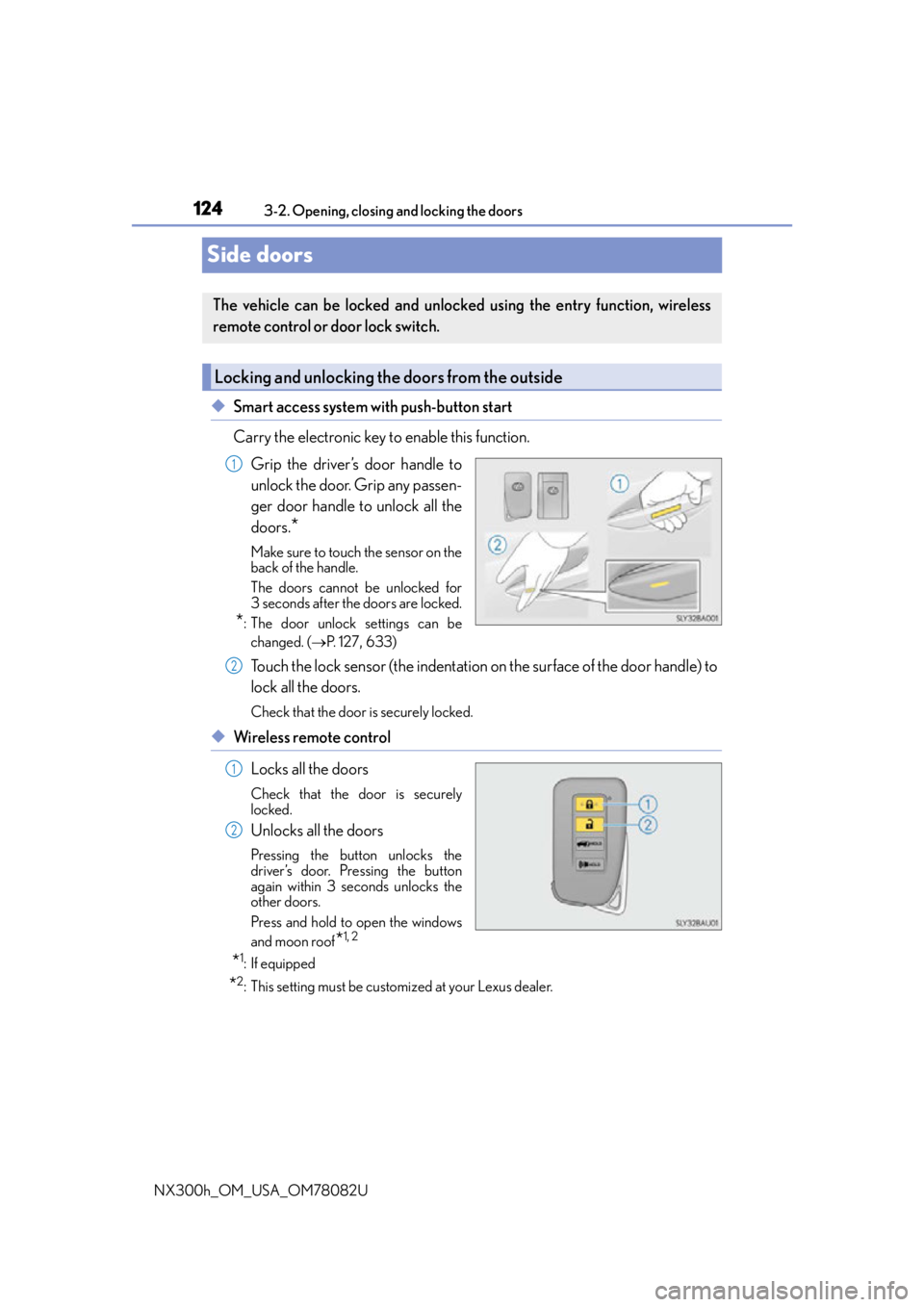
◆Smart access system with push-button start
Carry the electronic key to enable this function. Grip the driver’s door handle to
unlock the door. Grip any passen-
ger door handle to unlock all the
doors.
*
Make sure to touch the sensor on the
back of the handle.
The doors cannot be unlocked for
3 seconds after the doors are locked.
*: The door unlock settings can bechanged. ( P. 1 2 7 , 633)
Touch the lock sensor (the indentation on the surface of the door handle) to
lock all the doors.
Check that the door is securely locked.
◆Wireless remote control
Locks all the doors
Check that the door is securely
locked.
Unlocks all the doors
Pressing the button unlocks the
driver’s door. Pressing the button
again within 3 seconds unlocks the
other doors.
Press and hold to open the windows
and moon roof
*1, 2
*1:If equipped
*2: This setting must be customized at your Lexus dealer.
The vehicle can be locked and unlock ed using the entry function, wireless
remote control or door lock switch.
Locking and unlocking the doors from the outside
1
2
1
2