ESP LEXUS NX300H 2016 User Guide
[x] Cancel search | Manufacturer: LEXUS, Model Year: 2016, Model line: NX300H, Model: LEXUS NX300H 2016Pages: 680, PDF Size: 10.23 MB
Page 86 of 680

861-3. Theft deterrent system
NX300h_OM_USA_OM78082U
Immobilizer system
The indicator light flashes after the
power switch has been turned off to
indicate that the system is operating.
The indicator light stops flashing after
the power switch has been turned to
ACCESSORY or ON mode to indi-
cate that the system has been canceled.
■System maintenance
The vehicle has a maintenance-free type immobilizer system.
■Conditions that may cause the system to malfunction
●If the grip portion of the key is in contact with a metallic object
●If the key is in close proximity to or touching a key registered to the security system (key
with a built-in transponder chip) of another vehicle
■Certification for the immobilizer system
For vehicles sold in the U.S.A.
FCC ID: NI4TMIMB-3
This device complies with part 15 of the FC C Rules. Operation is subject to the following
two conditions: (1) This device may not caus e harmful interference; and (2) This device
must accept any interference received, incl uding interference that may cause undesired
operation.
Changes or modifications not expressly approved by the party responsible for compli-
ance could void the user’s authority to operate the equipment.
For vehicles sold in Canada
This device complies with Industry Canada licence-exempt RSSs. Operation is subject
to the following two conditions: (1) This de vice may not cause interference; and (2) This
device must accept any interference, includ ing interference that may cause undesired
operation of the device.
The vehicle’s keys have built-in transponder chips that prevent the hybrid sys-
tem from starting if a key has not been previously registered in the vehicle’s
on-board computer.
Never leave the keys inside the vehicle when you leave the vehicle.
This system is designed to help prevent vehicle theft but does not guarantee
absolute security against all vehicle thefts.
Page 87 of 680
871-3. Theft deterrent system
1
For safety and security
NX300h_OM_USA_OM78082U
WA R N I N G
■Certifications for the immobilizer system
Changes or modifications not expressly approved by the party responsible for compli-
ance could void the user’s authority to operate the equipment.
NOTICE
■To ensure the system operates correctly
Do not modify or remove the system. If modified or removed, the proper operation of
the system cannot be guaranteed.
Page 101 of 680

1012. Instrument cluster
2
Instrument cluster
NX300h_OM_USA_OM78082U
■Outside temperature display
●In the following situations, the correct outside temperature may not be displayed, or the
display may take longer than normal to change.
• When stopped, or driving at low speeds (less than 12 mph [20 km/h])
• When the outside temperature has changed suddenly (at the entrance/exit of agarage, tunnel, etc.)
●When “--” or “E” is displayed, the system may be malfunctioning.
Take your vehicle to your Lexus dealer.
■ Pop-up display
In some situations, a pop-up display will be temporarily displayed on the multi-informa-
tion display or the odometer/trip meter/ maintenance required information screen.
The pop-up display function can be set on/off. ( P. 636)
■ Liquid crystal display
Small spots or light spots may appear on the display. This phenomenon is characteristic
of liquid crystal displays, and there is no problem continuing to use the display.
■Customization
The meter display can be customized on the multi-information display.
(Customizable features: P. 6 3 1 )
WA R N I N G
■The information display at low temperatures
Allow the interior of the vehicle to warm up before using the liquid crystal information
display. At extremely low temperatures, th e information display monitor may respond
slowly, and display changes may be delayed.
For example, there is a lag between the driver's shifting and the new gear number
appearing on the display. This lag could cau se the driver to downshift again, causing
rapid and excessive engine braking and po ssibly an accident resulting in personal
death or injury.
NOTICE
■To prevent damage to the engine and its components
●When the tachometer is displayed, do not let the indicator needle of the tachometer
enter the red zone, which indicates the maximum engine speed.
●The engine may be overheating if the engine coolant temperature gauge is in the red
zone (H); or “Engine Coolant Temp High” or “Hybrid System Overheated” is shown
on the multi-information display. In this case, immediately stop the vehicle in a safe
place, and check the engine or hybrid system after it has cooled completely.
( P. 599)
Page 103 of 680
1032. Instrument cluster
2
Instrument cluster
NX300h_OM_USA_OM78082U
Warning message display
Select to display warning messages and measures to be taken if a malfunction is
detected. ( P. 5 7 2 )
Settings display
Select to change the meter display settings. ( P. 636)
●Energy monitor
Displays the status of the hybrid system. ( P. 111)
●Intuitive parking assist (if equipped)
Automatically displayed when the system is used. ( P. 2 7 9 )
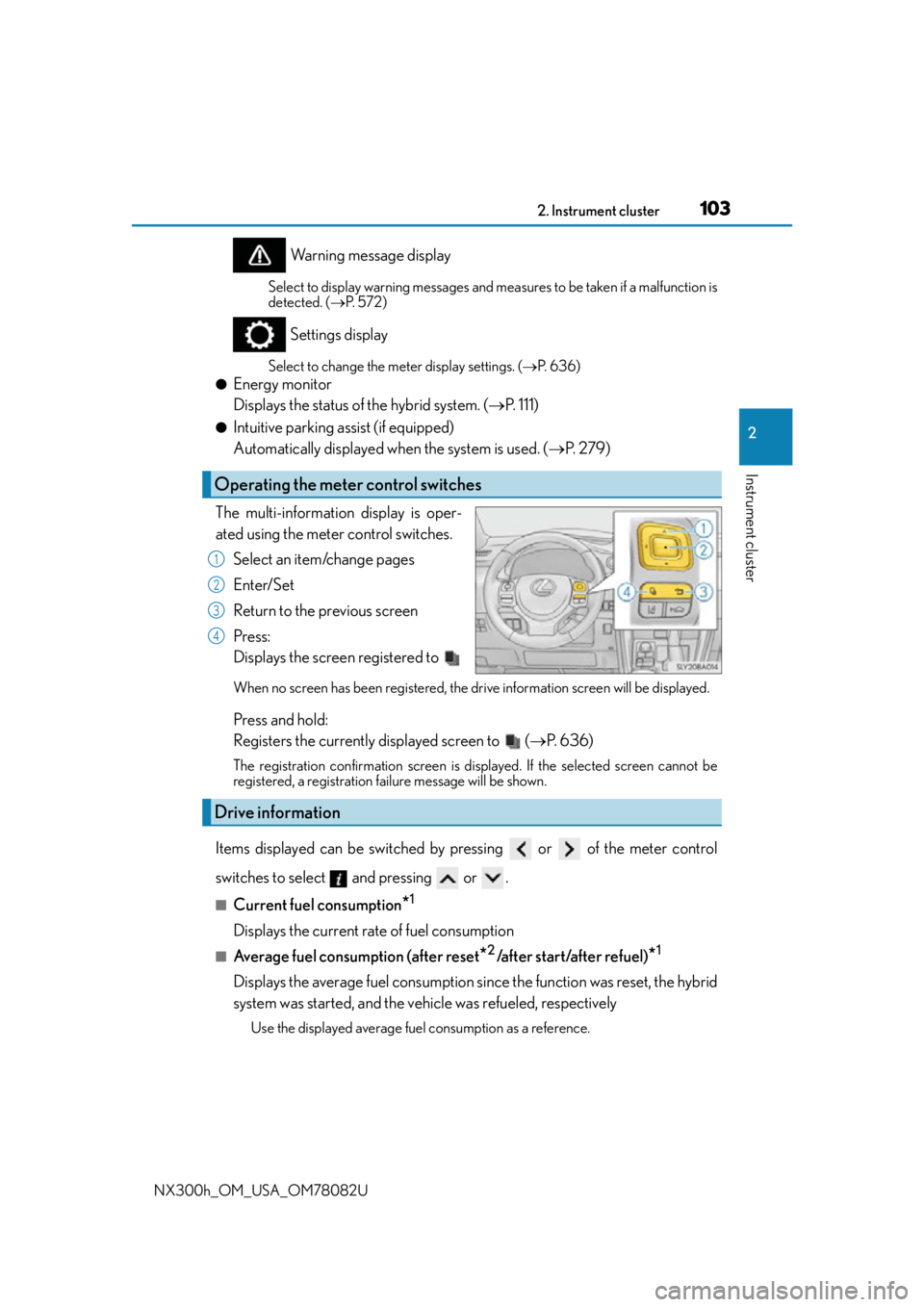
The multi-information display is oper-
ated using the meter control switches. Select an item/change pages
Enter/Set
Return to the previous screen
Press:
Displays the screen registered to
When no screen has been registered, the drive information screen will be displayed.
Press and hold:
Registers the currently displayed screen to ( P. 636)
The registration confirmation screen is di splayed. If the selected screen cannot be
registered, a registration failure message will be shown.
Items displayed can be switched by pressing or of the meter control
switches to select and pressing or .
■Current fuel consumption*1
Displays the current rate of fuel consumption
■Average fuel consumption (after reset*2/after start/after refuel)*1
Displays the average fuel consumption si nce the function was reset, the hybrid
system was started, and the vehicle was refueled, respectively
Use the displayed average fuel consumption as a reference.
Operating the meter control switches
1
2
3
4
Drive information
Page 104 of 680

1042. Instrument cluster
NX300h_OM_USA_OM78082U
■Average vehicle speed (after reset*2/a f t e r s t a r t )*1
Displays the average vehicle speed since the function was reset and the
hybrid system was started, respectively
■Elapsed time (after reset*2/after start)*1
Displays the elapsed time since the function was reset and the hybrid system
was started, respectively
■Distance (driving range/after start)*1
Displays the estimated maximum distance that can be driven with the quantity
of fuel remaining and the distance driv en after the hybrid system was started
respectively.
• This distance is computed based on your average fuel consumption. As a result,
the actual distance that can be driven may differ from that displayed.
• When only a small amount of fuel is added to the tank, the display may not be
updated.
When refueling, turn the power switch off. If the vehicle is refueled without turning
the power switch off, the display may not be updated.
■Energy monitor
P. 1 1 1
■Tire inflation pressure
Displays inflation pressure of each tire.
The inflation pressure of the spare tire will not be displayed.
■Display off
A blank screen is displayed
*1: Displayed when the item is set in “D rive Info 1” or “Drive Info 2”. (P. 636)
*2: The function can be reset by pressing th e of the meter control switches for longer
than 1 second when the item to reset is displayed.
If there is more than one item that can be reset, the item selection screen will appear.
Page 105 of 680
1052. Instrument cluster
2
Instrument cluster
NX300h_OM_USA_OM78082U
■Suspension of the settings display
In the following situations, the settings display using the meter control switches will be
suspended.
●When a warning message appears on the multi-information display
●When the vehicle begins to move
■Tire inflation pressure
●It may take a few minutes to display the tire inflation pressure after the power switch is
turned to ON mode. It may also take a few minutes to display the tire inflation pressure
after inflation pressure has been adjusted.
●“---” may be displayed if the tire information cannot be determined due to unfavorable
radio wave conditions.
●Tire inflation pressure changes with temperat ure. The displayed values may also be dif-
ferent from the values measured using a tire pressure gauge.
■When disconnecting and reconnec ting 12-volt battery terminals
The drive information will be reset.
■Liquid crystal display
P. 1 0 1
WA R N I N G
■Cautions during setting up the display
As the hybrid system needs to be operating during setting up the display, ensure that
the vehicle is parked in a place with adequate ventilation. In a closed area such as a
garage, exhaust gases includin g harmful carbon monoxide (CO) may collect and enter
the vehicle. This may lead to death or a serious health hazard.
NOTICE
■The multi-information disp lay at low temperatures
Allow the interior of the vehicle to warm up before using the liquid crystal information
display. At extremely low temperatures, th e information display monitor may respond
slowly, and display changes may be delayed.
■During setting up the display
To prevent 12-volt battery discharge, ensure that the hybrid system is operating while
setting up the display features.
Page 110 of 680
1102. Instrument cluster
NX300h_OM_USA_OM78082U
■Head-up display
●The head-up display may seem dark and hard to see when viewed through sunglasses,
especially polarized sunglasses.
Adjust the brightness of the head-up display or remove your sunglasses.
●When the head-up display is turned off, it will not display anything until it is turned on
again.
■When the 12-volt battery is disconnected
The customize settings of the head-up display will be reset.
WA R N I N G
■Before using the head-up display
Check that the position and brightness of the head-up display image does not interfere
with safe driving. Incorrect adjustment of the image’s positi on or brightnessmay
obstruct the driver’s view and lead to an a ccident, resulting in death or serious injury.
NOTICE
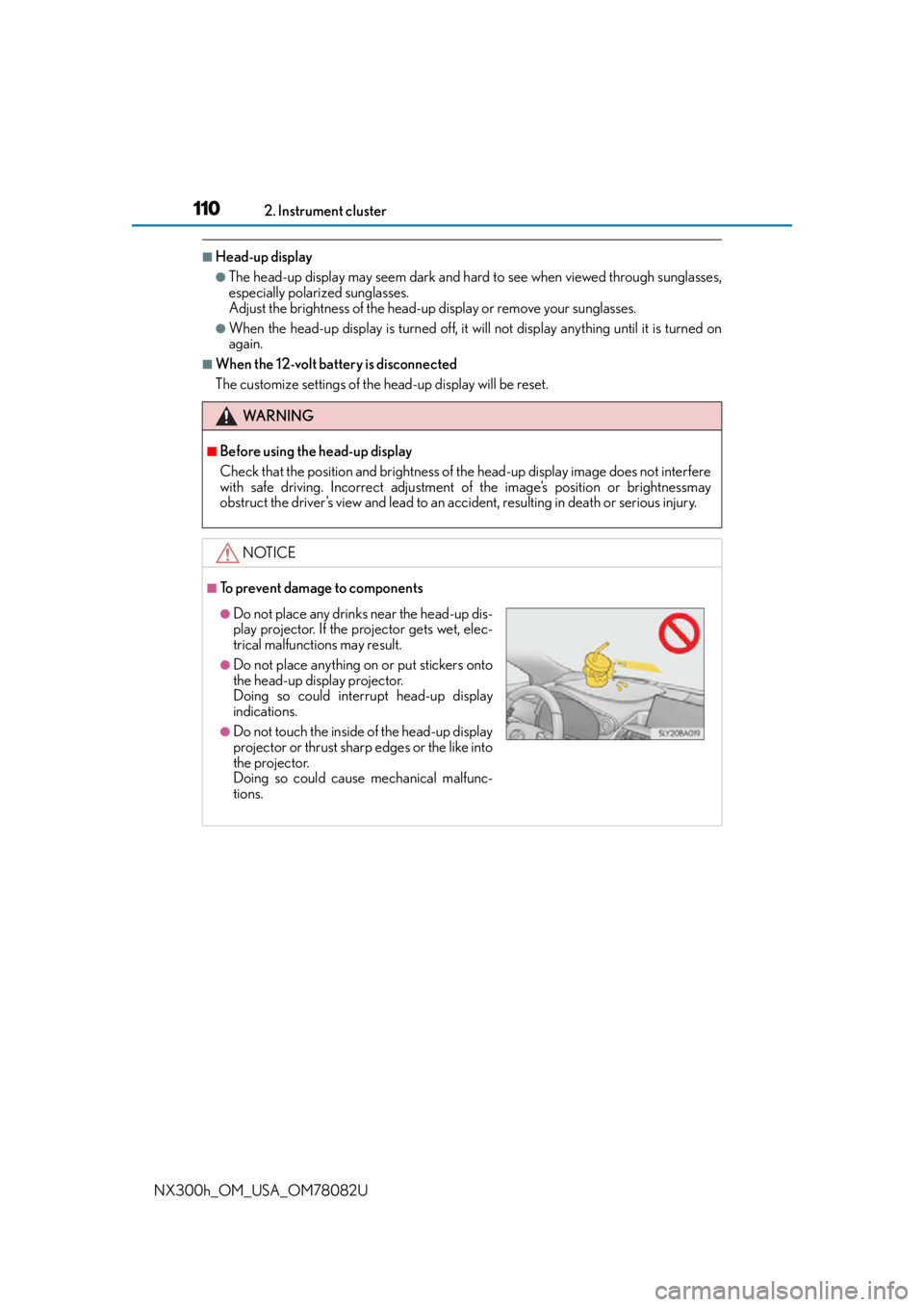
■To prevent damage to components
●Do not place any drinks near the head-up dis-
play projector. If the projector gets wet, elec-
trical malfunctions may result.
●Do not place anything on or put stickers onto
the head-up display projector.
Doing so could interrupt head-up display
indications.
●Do not touch the inside of the head-up display
projector or thrust sharp edges or the like into
the projector.
Doing so could cause mechanical malfunc-
tions.
Page 128 of 680

1283-2. Opening, closing and locking the doors
NX300h_OM_USA_OM78082U
■Impact detection door lock release system
In the event that the vehicle is subject to a strong impact, all the doors are unlocked.
Depending on the force of the impact or the type of accident, however, the system may
not operate.
■Using the mechanical key
The doors can also be locked and unlocked with the mechanical key. ( P. 5 9 1 )
■Open door warning buzzer
If the vehicle speed reaches 3 mph (5 km/h), the master warning light flashes and a
buzzer sounds to indicate that door (s) or the hood in not fully closed.
The open door(s) or hood is displa yed on the multi-information display.
■Conditions affecting the operation of the sm art access system with push-button start
or wireless remote control
P. 1 4 2
■Customization
Settings (e.g. unlocking function using a key) can be changed.
(Customizable features: P. 6 3 1 )
WA R N I N G
■To prevent an accident
Observe the following precautions while driving the vehicle.
Failure to do so may result in a door open ing and an occupant falling out, resulting in
death or serious injury.
●Ensure that all doors are properly closed and locked.
●Do not pull the inside handle of the doors while driving.
Be especially careful for the front doors, as the doors may be opened even if the
inside lock buttons ar e in locked position.
●Set the rear door child-protector locks wh en children are seated in the rear seats.
■When opening or closing a door
Check the surroundings of the vehicle such as whether the vehicle is on an incline,
whether there is enough space for a door to open and whether a strong wind is blow-
ing. When opening or closing the door, hold the door handle tightly to prepare for any
unpredictable movement.
Page 141 of 680

1413-2. Opening, closing and locking the doors
3
Operation of each component
NX300h_OM_USA_OM78082U
■Alarms and warning messages
A combination of exterior and interior alarms as well as warning messages shown on the
multi-information display are used to prevent theft of the vehicle and accidents resulting
from erroneous operation. Take appropriate measures in response to any warning mes-
sage on the multi-information display. ( P. 5 7 2 )
The following table describes circumstance s and correction procedures when only
alarms are sounded.
■When “Smart Access System Malfunction See Owner’s Manual” will be displayed on
the multi-inform ation display
The system may be malfunctioning. Have the vehicle inspected by your Lexus dealer
immediately.
■Battery-saving function
The battery-saving function will be activated in order to prevent the electronic key bat-
tery and the 12-volt battery from being discha rged while the vehicle is not in operation
for a long time.
●In the following situations, the smart access system with push-button start may take
some time to unlock the doors.
• The electronic key has been left in an area of approximately 6 ft. (2 m) of the outside
of the vehicle for 10 minutes or longer.
• The smart access system with push-butto n start has not been used for 5 days or
longer.
●If the smart access system with push-butto n start has not been used for 14 days or
longer, the doors cannot be unlocked at any doors except the driver’s door. In this case,
take hold of the driver’s door handle, or us e the wireless remote control or the mechan-
ical key, to unlock the doors.
AlarmSituationCorrection procedure
Exterior alarm
sounds once for 5
secondsAn attempt was made to lock
the vehicle while a door was
open.Close all of the doors and
lock the doors again.
Interior alarm pings
repeatedly
The power switch was turned to
ACCESSORY mode while the
driver’s door was open (The
driver’s door was opened when
the power switch was in
ACCESSORY mode).
Tu r n t h e p o w e r s w i t c h o f f
and close the driver’s door.
Page 145 of 680

1453-2. Opening, closing and locking the doors
3
Operation of each component
NX300h_OM_USA_OM78082U
■Certification for the smart access system with push-button start
For vehicles sold in the U.S.A.
FCC ID: HYQ23AAB
FCC ID: HYQ14FBA
FCC ID: HYQ14CBB
FCC ID: NI4TMLF12-3
NOTE:
This device complies with part 15 of the FC C Rules. Operation is subject to the following
two conditions: (1) This device may not caus e harmful interference, and (2) this device
must accept any interference received, incl uding interference that may cause undesired
operation.
FCC WARNING:
Changes or modifications not expressly approved by the party responsible for compli-
ance could void the user’s authority to operate the equipment.
For vehicles sold in Canada
NOTE:
This device complies with Industry Canada’s licence-exempt RSSs. Operation is subject
to the following two conditions: (1) This de vice may not cause interference; and (2) This
device must accept any interference, includ ing interference that may cause undesired
operation of the device.
WA R N I N G
■Caution regarding interference with electronic devices
●People with implantable cardiac pacemakers, cardiac resynchronization therapy-
pacemakers or implantable cardioverter de fibrillators should keep away from the
smart access system with pu sh-button start antennas. (P. 1 4 0 )
The radio waves may affect the operation of such devices. If necessary, the entry
function can be disabled. Ask your Lexus dealer for details, such as the frequency of
radio waves and timing of the emitted radio waves. Then, consult your doctor to see if
you should disable the entry function.
●Users of any electrical medical device other than implantable cardiac pacemakers,
cardiac resynchronization therapy-pacemakers or implantable cardioverter defibril-
lators should consult the ma nufacturer of the device for information about its opera-
tion under the influence of radio waves.
Radio waves could have unexpected effe cts on the operation of such medical
devices.
Ask your Lexus dealer for details on disabling the entry function.