alarm LEXUS NX300H 2016 User Guide
[x] Cancel search | Manufacturer: LEXUS, Model Year: 2016, Model line: NX300H, Model: LEXUS NX300H 2016Pages: 680, PDF Size: 10.23 MB
Page 143 of 680

1433-2. Opening, closing and locking the doors
3
Operation of each component
NX300h_OM_USA_OM78082U
■Note for the entry function
●Even when the electronic key is within the effective range (detection areas), the system
may not operate properly in the following cases:
• The electronic key is too close to the window or outside door handle, near the
ground, or in a high place when the doors are locked or unlocked.
• The electronic key is near the ground or in a high place, or too close to the rear
bumper center when the back door is opened.
• The electronic key is on the instrument panel, luggage room, floor, or in the door
pockets or glove box when the hybrid system is started or power switch modes are
changed.
●Do not leave the electronic key on top of th e instrument panel or near the door pockets
when exiting the vehicle. Depending on the radio wave reception conditions, it may be
detected by the antenna outs ide the cabin and the door will become lockable from the
outside, possibly trapping the el ectronic key inside the vehicle.
●As long as the electronic key is within the effective range, the doors may be locked or
unlocked by anyone.
●Even if the electronic key is not inside the ve hicle, it may be possible to start the hybrid
system if the electronic key is near the window.
●The doors may unlock if a large amount of wa ter splashes on the door handle, such as in
the rain or in a car wash when the electronic key is within the effective range. (The door
will automatically be locked after approximately 60 seconds if the doors are not
opened and closed.)
●If the wireless remote control is used to lo ck the doors when the electronic key is near
the vehicle, there is a possibility that the door may not be unlocked by the entry func-
tion. (Use the wireless remote control to unlock the doors.)
●Touching the door lock sensor while wearin g gloves may delay or prevent lock opera-
tion. Remove the gloves and touch the lock sensor again.
●When the lock operation is performed using the lock sensor, recognition signals will be
shown up to two consecutive times. After th is, no recognition signals will be given.
●If the door handle becomes wet while the el ectronic key is within the effective range,
the door may lock and unlock repeatedly. In that case, follow the following correction
procedures to wash the vehicle:
• Place the electronic key in a location 6 ft. (2 m) or more away from the vehicle. (Take
care to ensure that the key is not stolen.)
• Set the electronic key to battery-saving mode to disable the smart access system with push-button start. ( P. 1 4 2 )
●If the electronic key is insi de the vehicle and a door handle becomes wet during a car
wash, a message may be shown on the mult i-information display and a buzzer will
sound outside the vehicle. To turn off the alarm, lock all the doors.
●The lock sensor may not work properly if it comes into contact with ice, snow, mud, etc.
Clean the lock sensor and attempt to operate it again.
Page 144 of 680

1443-2. Opening, closing and locking the doors
NX300h_OM_USA_OM78082U
●A sudden approach to the effective range or door handle may prevent the doors from
being unlocked. In this case, return the door handle to the original position and check
that the doors unlock before pulling the door handle again.
●If there is another electronic key in the detection area, it may take slightly longer to
unlock the doors after the door handle is gripped.
■When the vehicle is not driven for extended periods
●To prevent theft of the vehicle, do not leave the electronic key within 6 ft. (2 m) of the
vehicle.
●The smart access system with push-button start can be deactivated in advance.
( P. 6 3 3 )
■To operate the system properly
Make sure to carry the electronic key when operating the system. Do not get the elec-
tronic key too close to the vehicle when op erating the system from the outside of the
vehicle.
Depending on the position and holding condition of the electronic key, the key may not
be detected correctly and the system may not operate properly. (The alarm may go off
accidentally, or the door lock prevention may not operate.)
■If the smart access system with push-button start does not operate properly
●Locking and unlocking the doors: Use the mechanical key. (P. 5 9 1 )
●Starting the hybrid system: P. 5 9 2
■Customization
Settings (e.g. smart access system with push-button start) can be changed.
(Customizable features: P. 6 3 1 )
■If the smart access system with push-butto n start has been deactivated in a customized
setting
●Locking and unlocking the doors:
Use the wireless remote control or mechanical key. ( P. 1 2 4 , 5 9 1 )
●Starting the hybrid system and changing power switch modes: P. 5 9 2
●Stopping the hybrid system: P. 2 0 2
Page 315 of 680

3154-5. Using the driving support systems
4
Driving
NX300h_OM_USA_OM78082U
WA R N I N G
■Cautions regarding the assist contents of the system
By means of alarms and brake control, the pre-collision system is intended to assist the
driver in avoiding collisions through the process of LOOK-JUDGE-ACT. There are
limits to the degree of assistance the system can provide, so please keep in mind the
following important points.
●Assisting the driver in watching the road
The pre-collision system is only able to detect obstacles directly in front of the vehicle,
and only within a limited range. It is not a mechanism that allows careless or inatten-
tive driving, and it is not a system that can assist the driver in low-visibility conditions. It
is still necessary for the driver to pay cl ose attention to the vehicle’s surroundings.
●Assisting the driver in making correct judgement
When attempting to estimate the possibility of a collision, the only data available to
the pre-collision system is that from obstacle s it has detected directly in front of the
vehicle. Therefore, it is absolutely necess ary for the driver to remain vigilant and to
determine whether or not there is a possib ility of collision in any given situation.
●Assisting the driver in taking action
The pre-collision system’s braking assist feat ure is designed to help reduce the sever-
ity of a collision, and so only acts when the system has judged that a collision is
unavoidable. This system is not capable of automatically avoiding a collision or bring-
ing the vehicle to a stop safely without appropriate operations performed by the
driver. For this reason, when encountering a dangerous situation the driver must take
direct and immediate action in order to ensure the safety of all involved.
Page 485 of 680

4857-1. Maintenance and care
7
Maintenance and care
NX300h_OM_USA_OM78082U
■Note for a smart access system with push-button start
●If the door handle becomes wet while the electronic key is within the effective range,
the door may lock and unlock repeatedly. Place the key in a position 6 ft. (2 m) or more
separate from the vehicle while the vehicle is being washed. (Take care to ensure that
the key is not stolen.)
●If the electronic key is insi de the vehicle and a door handle becomes wet during a car
wash, a buzzer will sound outside the vehicle. To turn off the alarm, lock all the doors.
●Set the electronic key to battery-saving mode to disable the smart access system with
push-button start. ( P. 1 4 1 )
■Aluminum wheels
●Remove any dirt immediately by using a neutral detergent. Do not use hard brushes or
abrasive cleaners. Do not use strong or harsh chemical cleaners.
Use the same mild detergent and wax as used on the paint.
●Do not use detergent on the wheels when they are hot, for example after driving for
long distance in the hot weather.
●Wash detergent from the wheels immediately after use.
■Bumpers
Do not scrub with abrasive cleaners.
■Front side windows water-repellent coatin g (vehicles with water-repellent coating)
●The following precautions can extend the effectiveness of the water-repellent coating.
• Remove any dirt, etc. from the front side windows regularly.
• Do not allow dirt and dust to accumulate on the windows for a long period.
Clean the windows with a soft, da mp cloth as soon as possible.
• Do not use wax or glass cleaners that co ntain abrasives when cleaning the windows.
• Do not use any metallic objects to remove condensation build up.
●When the water-repellent performance has become insufficient, the coating can be
repaired. Contact your Lexus dealer.
Page 593 of 680
5938-2. Steps to take in an emergency
8
When trouble arises
NX300h_OM_USA_OM78082U
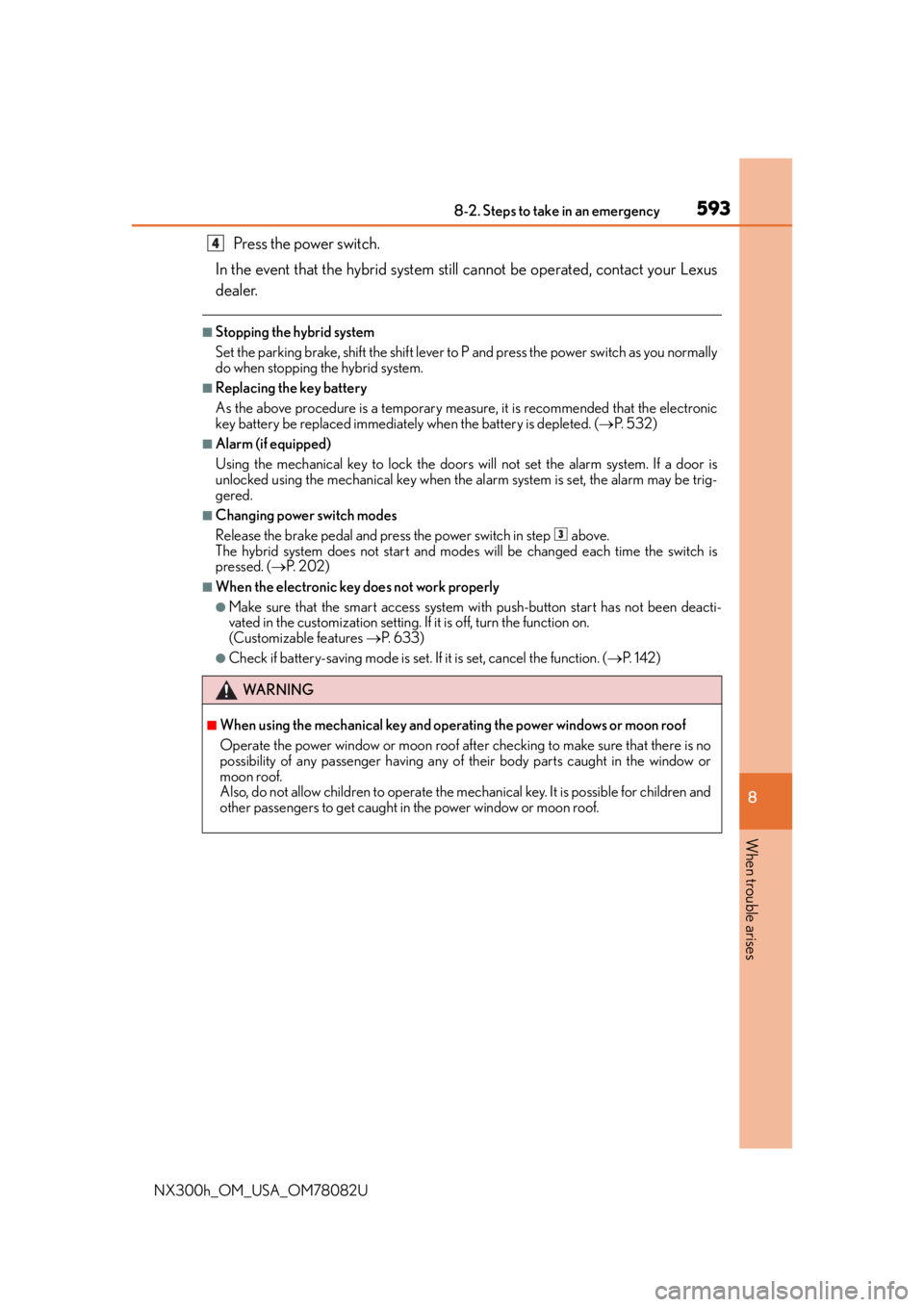
Press the power switch.
In the event that the hybrid system st ill cannot be operated, contact your Lexus
dealer.
■Stopping the hybrid system
Set the parking brake, shift the shift lever to P and press the power switch as you normally
do when stopping the hybrid system.
■Replacing the key battery
As the above procedure is a temporary measure, it is recommended that the electronic
key battery be replaced immediately when the battery is depleted. ( P. 5 3 2 )
■Alarm (if equipped)
Using the mechanical key to lock the doors will not set the alarm system. If a door is
unlocked using the mechanical key when the al arm system is set, the alarm may be trig-
gered.
■Changing power switch modes
Release the brake pedal and press the power switch in step above.
The hybrid system does not start and mode s will be changed each time the switch is
pressed. ( P. 202)
■When the electronic key does not work properly
●Make sure that the smart access system wi th push-button start has not been deacti-
vated in the custom ization setting. If it is off, turn the function on.
(Customizable features P. 6 3 3 )
●Check if battery-saving mo de is set. If it is set, cancel the function. ( P. 1 4 2 )
WA R N I N G
■When using the mechanical key and operating the power windows or moon roof
Operate the power window or moon roof afte r checking to make sure that there is no
possibility of any passenger having any of their body parts caught in the window or
moon roof.
Also, do not allow children to operate the mech anical key. It is possible for children and
other passengers to get caught in the power window or moon roof.
4
3
Page 594 of 680
5948-2. Steps to take in an emergency
NX300h_OM_USA_OM78082U
If the 12-volt battery is discharged
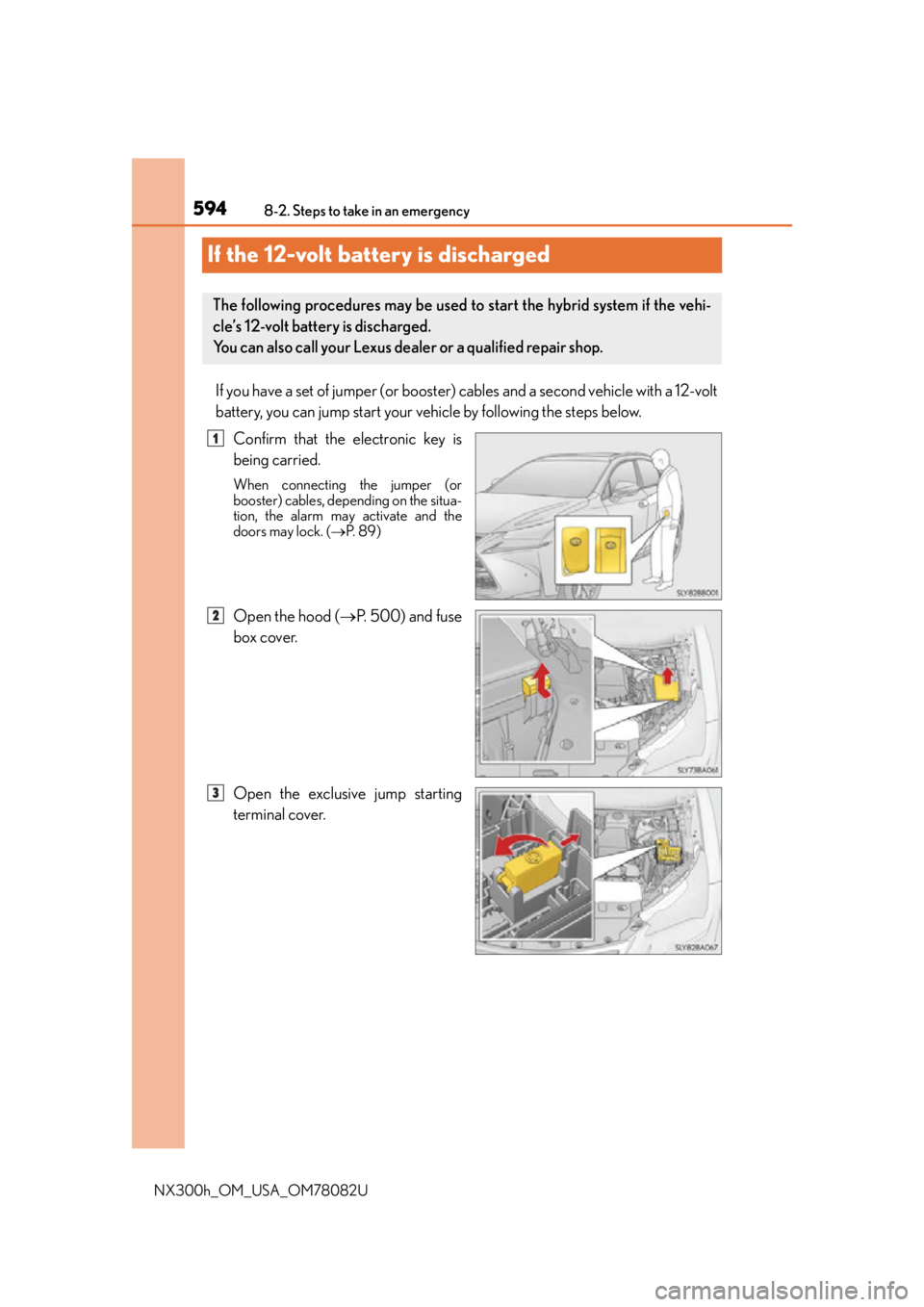
If you have a set of jumper (or booster) cables and a second vehicle with a 12-volt
battery, you can jump start your vehicle by following the steps below.
Confirm that the electronic key is
being carried.
When connecting the jumper (or
booster) cables, depending on the situa-
tion, the alarm may activate and the
doors may lock. ( P. 8 9 )
Open the hood ( P. 5 0 0 ) a n d f u s e
box cover.
Open the exclusive jump starting
terminal cover.
The following procedures may be used to start the hybrid system if the vehi-
cle’s 12-volt battery is discharged.
You can also call your Lexus dealer or a qualified repair shop.
1
2
3
Page 658 of 680
658What to do if... (Troubleshooting)
NX300h_OM_USA_OM78082U
●The seat belt reminder light is flashing
Are the driver and the front passenger wearing the seat belts? ( P. 5 6 7 )
●The parking brake indicator is on
Is the parking brake released? ( P. 2 1 3 )
Depending on the situation, other type s of warning buzzer may also sound.
( P. 5 6 5 , 5 7 2 )
●Did anyone inside the vehicle open a door during setting the alarm?
The sensor detects it and the alarm sounds. ( P. 8 8 )
To stop the alarm, turn the power switch to ON mode or start the hybrid system.
●Is the message displayed on the multi-information display?
Check the message on the multi-information display. ( P. 5 7 2 )
●When a warning light turns on or a warning message is displayed, refer to
P. 5 6 5 , 5 7 2 . A warning buzzer sounds during driving
An alarm is activated and the horn sounds
A warning buzzer sounds when leaving the vehicle
A warning light turns on or a warning message is displayed
Page 660 of 680

660Alphabetical index
NX300h_OM_USA_OM78082U
Alphabetical index
A/C ............................................................ 430Air conditioning filter....................... 530
Automatic air conditioning system ................................................. 430
Micro dust and pollen filter ...........436
ABS (Anti-lock Brake System).......305 Function ................................................. 305
Warning light ...................................... 566
Active Sound Control (ASC) .......... 218
Air conditioning filter ..........................530
Air conditioning system ..................... 430 Air conditioning filter....................... 530
Automatic air conditioning system ................................................. 430
Micro dust and pollen filter ...........436
S-FLOW mode .................................. 432
Airbags ........................................................ 40 Airbag operating conditions ...........48
Airbag precautions for your child .......................................................... 43
Airbag warning light ........................ 566
Correct driving posture ....................30
Curtain shield airbag operating conditions........................48
Curtain shield airbag precautions ........................................... 46
Front passenger occupant classification system ......................... 53
General airbag precautions............ 43 Locations of airbags............................ 40
Modification and disposal of
airbags .....................................................47
Seat cushion airbag ............................. 40
Side airbag operating conditions ............................................. 48
Side airbag precautions .................... 45
Side and curtain shield airbags operating conditions ....................... 48
Side and curtain shield airbags precautions .......................................... 46
SRS airbag instructions for Canadian owners ................... 647
SRS airbags ............................................. 40
Alarm ........................................................... 88 Alarm ..........................................................88
Warning buzzer.................................569
Anchor brackets................................ 71, 73
Antenna Radio ........................................................ 364
Smart access system with push-button start....................140
Anti-lock brake system (ABS)........ 305 Function ..................................................305
Warning light .......................................566
Approach warning ................... 245, 259
Armrest .................................................... 465
ASC (Active Sound Control) ........... 218
Assist grips .............................................. 465
A
Page 675 of 680

675Alphabetical index
NX300h_OM_USA_OM78082U
Parking brake switch..........................213
PCS switch............................................... 311
Power back door openerand closer switch.................... 130, 131
Power switch......................................... 201
Power window switch ...................... 166
Rear window and outside rear view mirror
defoggers switch ............................435
Rear window wiper and washer switch................................... 234
Seat heater switches........................ 440
“SOS” button........................................ 477
Talk switch .................................402, 423
Telephone switches ..........................402
Vehicle-to-vehicle distance button ................... 240, 253
VSC OFF switch ...............................307
Window lock switch.......................... 166
Windshield wipers and washer switch...................................228 Tachometer ................................................ 97
Tail lights
Light switch............................................. 219
Replacing light bulbs ....................... 552
Talk switch.................................... 402, 423
Telephone switch ................................. 402
Theft deterrent system Alarm ..........................................................88
Immobilizer system.............................. 86
Tire inflation pressure Maintenance data................................613
Warning light ....................................... 567
Tire information ...................................... 619 Glossary................................................. 625
Size ........................................................... 622
Tire identification number ............... 621
Uniform Tire Quality Grading.... 623
Tire pressure warning system Function .................................................... 517
Initializing ................................................. 517
Installing tire pressure warning valves and transmitters.................. 517
Registering ID codes .........................519
Warning light ....................................... 567T