brake sensor LEXUS NX300H 2016 User Guide
[x] Cancel search | Manufacturer: LEXUS, Model Year: 2016, Model line: NX300H, Model: LEXUS NX300H 2016Pages: 680, PDF Size: 10.23 MB
Page 310 of 680
3104-5. Using the driving support systems
NX300h_OM_USA_OM78082U
PCS (Pre-Collision System)
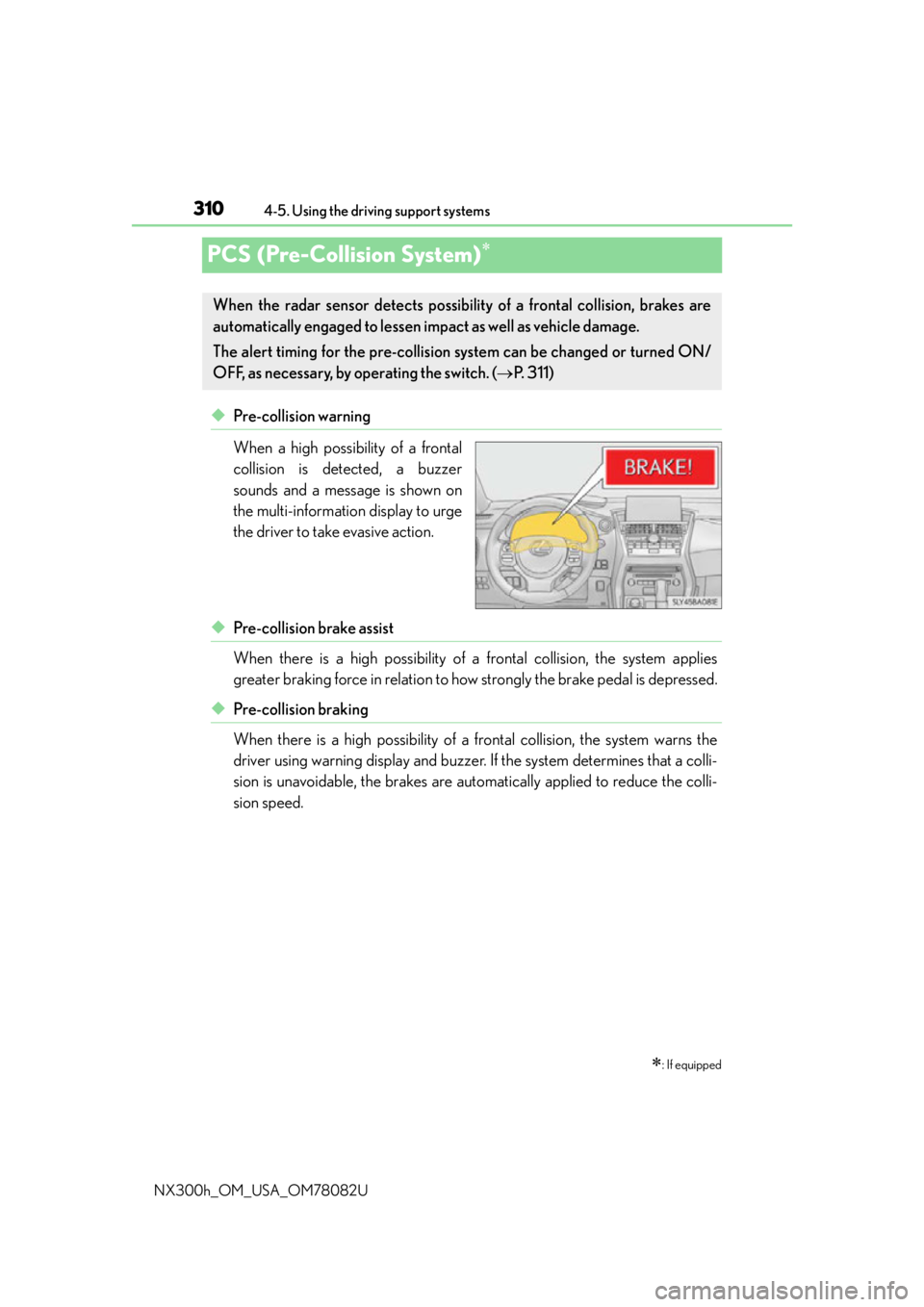
◆Pre-collision warning
When a high possibility of a frontal
collision is detected, a buzzer
sounds and a message is shown on
the multi-information display to urge
the driver to take evasive action.
◆Pre-collision brake assist
When there is a high possibility of a frontal collision, the system applies
greater braking force in relation to ho w strongly the brake pedal is depressed.
◆Pre-collision braking
When there is a high possibility of a frontal collision, the system warns the
driver using warning display and buzzer. If the system determines that a colli-
sion is unavoidable, the brakes are automatically applied to reduce the colli-
sion speed.
: If equipped
When the radar sensor detects possibilit y of a frontal collision, brakes are
automatically engaged to lessen im pact as well as vehicle damage.
The alert timing for the pre-collision system can be changed or turned ON/
OFF, as necessary, by operating the switch. ( P. 311)
Page 312 of 680

3124-5. Using the driving support systems
NX300h_OM_USA_OM78082U
■The pre-collision system is operational when
The pre-collision system is on ( P. 311) and the following conditions are met:
●Pre-collision warning:
• Vehicle speed is greater th an about 10 mph (15 km/h).
• The speed at which your vehicle is approaching the obstacle or the vehicle running ahead of you is greater than about 7 mph (10 km/h).
●Pre-collision brake assist:
• The VSC is not turned off.
• Vehicle speed is greater than about 19 mph (30 km/h).
• The speed at which your vehicle is approaching the obstacle or the vehicle running
ahead of you is greater than about 19 mph (30 km/h).
• The brake pedal is depressed.
●Pre-collision braking:
• The VSC is not turned off.
• Vehicle speed is greater th an about 10 mph (15 km/h).
• The speed at which your vehicle is approaching the obstacle or the vehicle running ahead of you is greater than about 7 mph (10 km/h).
■Conditions that may trigger the system even if there is no possibility of a collision
In any of the following situations where the fr ontal area of the radar sensor is interrupted,
the radar sensor may detect possibility of a fr ontal collision and the system may be acti-
vated.
●When passing by an oncoming vehicle in a curve or a turn to the right or the left
●When rapidly approaching an obstacle ahead (e.g. preceding vehicle, toll gate barrier,
etc.)
●When there is a structural ob ject (billboard, low ceiling, fluorescent light, etc.) above
the uphill road ahead
●When driving on a narrow road or through under a low overhead structure (bridge,
tunnel, fly-under, etc.)
●When driving on an uneven road surface
●When there is a metal object, bump, or protrusion on the road surface
●When vehicle’s front part is raised or lowered depending on loading conditions
●When the direction of radar sensor is misa ligned by strong impact applied on an area
around the radar sensor, etc.
●When there is an obstacle (guard rail, etc.) by the roadside at the entrance to a curve
●When the front of your vehicle is pointing upwards (caused by towing a trailer or put-
ting a heavy load in the luggage compartment, etc.)
When the system is activated in the situations described above, there is also a possibility
that the brakes may be applied with a force greater than normal.
■Obstacles not detected
The sensor cannot detect plasti c obstacles such as traffic cones. There may also be occa-
sions when the sensor cannot detect pedestrians, animals, bicycles, motorcycles, trees,
or snowdrifts.
Page 313 of 680

3134-5. Using the driving support systems
4
Driving
NX300h_OM_USA_OM78082U
■Situations in which the pre-collision system does not function properly
The system may not function effectively in situations such as the following:
●On roads with sharp bends or uneven surfaces
●If a vehicle suddenly moves in front of your vehicle, such as at an intersection
●If a vehicle suddenly cuts in front of your vehicle, such as when overtaking
●In inclement weather such as heavy rain, fog, snow or sand storms
●When your vehicle is skidding with the VSC system off
●When an extreme change in vehicle height occurs
●When the radar sensor moves off position due to its surrounding area being subjected
to a strong impact
●Due to greatly turning the wheel when an obstacle suddenly appears ahead
■Automatic cancelation of the pre-collision system
When a malfunction occurs due to sensor contamination, etc., that results in the sensors
being unable to detect obstacles, the pre-collision syst em will be automatically disabled.
In this case, the system will not activate even if there is a collision possibility.
■When there is a malfunction in the system, or if the system is temporarily unavailable
The PCS warning light flashes and a warning message is shown on the multi-information
display. If a warning message is shown on th e multi-information display, read the message
and follow the instructions.
■When the TRAC and VSC are turned off
●When the TRAC and VSC operations are turned off ( P. 307), the pre-collision brake
assist and pre-collision braking are also turned off. However, the alert function oper-
ates.
●The PCS warning light turns on and the “V SC Turned Off Pre-Collision Brake System
Unavailable” is shown on the multi-information display.
■Certification
For vehicles sold in the U.S.A.
FCC ID: HYQDNMWR007
This device complies with part 15 of the FC C Rules. Operation is subject to the following
two conditions: (1) This device may not caus e harmful interference, and (2) this device
must accept any interference received, incl uding interference that may cause undesired
operation.
FCC WARNING
Changes or modifications not expressly approved by the party responsible for compli-
ance could void the user’s authority to operate the equipment.
Radio frequency radiation exposure Information:
This equipment complies with FCC radiation exposure limits set forth for an uncontrolled
environment.
This equipment should be installed and operated with minimum distance of 20 cm
between the radiator (antenna) and your body.
This transmitter must not be co-located or operating in conjunction with any other
antenna or transmitter.
For vehicles sold in Canada
This device complies with Industry Canada licence-exempt RSS standard(s).
Operation is subject to the following two co nditions: (1) this device may not cause inter-
ference, and (2) this device must accept any interference, including interference that
may cause undesired operation of the device.
Page 314 of 680

3144-5. Using the driving support systems
NX300h_OM_USA_OM78082U
WA R N I N G
■Limitations of the pre-collision system
The driver is solely responsible for safe driving. Always drive safely, taking care to
observe your surroundings.
Do not use the pre-collision system instea d of normal braking operations under any
circumstances. This system will not prevent collisions or lessen damage or injuries in all
cases. Do not overly rely on this system. Failu re to do so may cause an accident, result-
ing in death or serious injury.
This system has been designed to help avoid and reduce the impact of collision.
However, the system operates differently depending on the situation ( P. 3 1 2 ) . A s a
result, the same level of performance may not be expected in all cases. Also, the pre-
collision system brakes may not operate if th e driver is depressing the brake pedal or
turning the steering wheel, as the system will determine such conditions as collision
avoidance operations.
■Handling the radar sensor
Observe the following to ensure the pre-collision system can function effectively.
Otherwise, the system may not function correctly and could result in an accident.
●Keep the sensor and front grille cover clean at all times.
Clean the sensor and front grille cover with a soft cloth so you do not mark or dam-
age them.
●Do not subject the sensor or surr ounding area to a strong impact.
If the sensor moves even slightly off posi tion, the system may not work normally or
malfunction. If the sensor or surrounding area is subject to a strong impact, always
have the area inspected and adjusted by your Lexus dealer.
●Do not disassemble the sensor.
●Do not attach accessories or stickers to the sensor, grille cover or surrounding area.
●Do not modify or paint the sensor and grille cover.
●If the radar sensor needs to be replaced, contact your Lexus dealer.
Page 658 of 680
658What to do if... (Troubleshooting)
NX300h_OM_USA_OM78082U
●The seat belt reminder light is flashing
Are the driver and the front passenger wearing the seat belts? ( P. 5 6 7 )
●The parking brake indicator is on
Is the parking brake released? ( P. 2 1 3 )
Depending on the situation, other type s of warning buzzer may also sound.
( P. 5 6 5 , 5 7 2 )
●Did anyone inside the vehicle open a door during setting the alarm?
The sensor detects it and the alarm sounds. ( P. 8 8 )
To stop the alarm, turn the power switch to ON mode or start the hybrid system.
●Is the message displayed on the multi-information display?
Check the message on the multi-information display. ( P. 5 7 2 )
●When a warning light turns on or a warning message is displayed, refer to
P. 5 6 5 , 5 7 2 . A warning buzzer sounds during driving
An alarm is activated and the horn sounds
A warning buzzer sounds when leaving the vehicle
A warning light turns on or a warning message is displayed