USB LEXUS NX300H 2016 Owners Manual
[x] Cancel search | Manufacturer: LEXUS, Model Year: 2016, Model line: NX300H, Model: LEXUS NX300H 2016Pages: 680, PDF Size: 10.23 MB
Page 4 of 680

TABLE OF CONTENTS4
NX300h_OM_USA_OM78082U
5-1. Basic OperationsLexus Display Audio System ........................................ 336
Steering wheel audio switches...................................... 342
Mobile Assistant........................ 343
USB/AUX ports ........................ 345
5-2. Setup Setup menu ................................. 347
General settings ........................348
Voice settings................................351
Display settings .......................... 352
5-3. Using the audio system Selecting the audio source ......................................... 353
Optimal use of the audio system ......................................... 354
Audio settings............................. 355
Audio menu screen operation ................................... 358
5-4. Using the radio Radio operation ........................... 361
5-5. Playing an audio CD and MP3/WMA/AAC discs
CD player operation ................367 5-6. Using an external device
Listening to an iPod ................... 374
Using USB memory device........................................... 377
Using the AUX port ................. 381
5-7. Connecting Bluetooth
®
Steps for using Bluetooth®
devices........................................ 382
Registering a Bluetooth
®
device.......................................... 384
Selecting a Bluetooth
®
device..........................................385
Connecting a Bluetooth
®
audio player.............................. 386
Connecting a Bluetooth
®
phone .......................................... 387
Displaying a Bluetooth
®
device details ...........................388
Detailed Bluetooth
®
settings ....................................... 389
5-8. Bluetooth
® Audio
Listening to Bluetooth
®
Audio .......................................... 390
5Lexus Display Audio system
Page 5 of 680

5
1
9 8
7
6 4 3
2
10
5
NX300h_OM_USA_OM78082U
5-9. Bluetooth® Phone
Using a Bluetooth
®
Phone .......................................... 392
Making a call ............................... 394
Receiving a call ...........................397
Speaking on the phone........... 398
Using a Bluetooth
®
phone message.......................400
Using the steering wheel switches...................................... 402
Bluetooth
® phone
settings ....................................... 403
5-10. Phonebook Contact settings ........................ 405
Messaging setting.....................408
5-11. Bluetooth
®
What to do if... (Troubleshooting)................... 409
Bluetooth
®....................................413
5-12. Other function “Information” screen ................. 418
USB photo ................................... 420
Weather information ............... 422
Voice command system ......... 423
LEXUS Enform Remote .........427 6-1. Using the air conditioning
system and defogger
Automatic air conditioning system .......................................... 430
Heated steering wheel/ seat heaters/
seat ventilators ......................... 440
6-2. Using the interior lights Interior lights list ......................... 443• Front interior light ................ 444
• Personal lights ....................... 444
• Rear interior light ................. 445
6-3. Using the storage features List of storage features ............ 446• Glove box ................................447
• Console box ...........................447
•Cup holders/ bottle holders ........................ 448
• Sunglass holder .................... 449
Luggage compartment features ....................................... 450
6Interior features
Page 334 of 680

334
NX300h_OM_USA_OM78082U
5-1. Basic Operations Lexus Display Audio System ......................................... 336
Steering wheel audio switches ...................................... 342
Mobile Assistant ........................ 343
USB/AUX ports ........................ 345
5-2. Setup Setup menu.................................. 347
General settings ........................348
Voice settings............................... 351
Display settings .......................... 352
5-3. Using the audio system Selecting the audio source .......................................... 353
Optimal use of the audio system ......................................... 354
Audio settings ............................. 355
Audio menu screen operation ...................................358
5-4. Using the radio Radio operation ............................361
5-5. Playing an audio CD and MP3/WMA/AAC discs
CD player operation ................ 367
Lexus Display Audio system
5
Page 335 of 680

335
Lexus DisplayAudio system
5
NX300h_OM_USA_OM78082U
5-6. Using an external device
Listening to an iPod ....................374Using USB memory device .......................................... 377
Using the AUX port .................. 381
5-7. Connecting Bluetooth
®
Steps for using Bluetooth
®
devices ........................................ 382
Registering a Bluetooth
®
device ......................................... 384
Selecting a Bluetooth
®
device ......................................... 385
Connecting a Bluetooth
®
audio player ............................. 386
Connecting a Bluetooth
®
phone...........................................387
Displaying a Bluetooth
®
device details........................... 388
Detailed Bluetooth
®
settings ....................................... 389
5-8. Bluetooth
® Audio
Listening to Bluetooth
®
Audio ........................................... 390 5-9. Bluetooth
® Phone
Using a Bluetooth
®
Phone ........................................... 392
Making a call ............................... 394
Receiving a call .......................... 397
Speaking on the phone ...........398
Using a Bluetooth
®
phone message ...................... 400
Using the steering wheel switches ...................................... 402
Bluetooth
® phone
settings........................................ 403
5-10. Phonebook Contact settings .........................405
Messaging setting .................... 408
5-11. Bluetooth
®
What to do if... (Troubleshooting)....................409
Bluetooth
®................................... 413
5-12. Other function “Information” screen .................. 418
USB photo ................................... 420
Weather information................ 422
Voice command system ......... 423
LEXUS Enform Remote..........427
Page 342 of 680
3425-1. Basic Operations
NX300h_OM_USA_OM78082U
Steering wheel audio switches
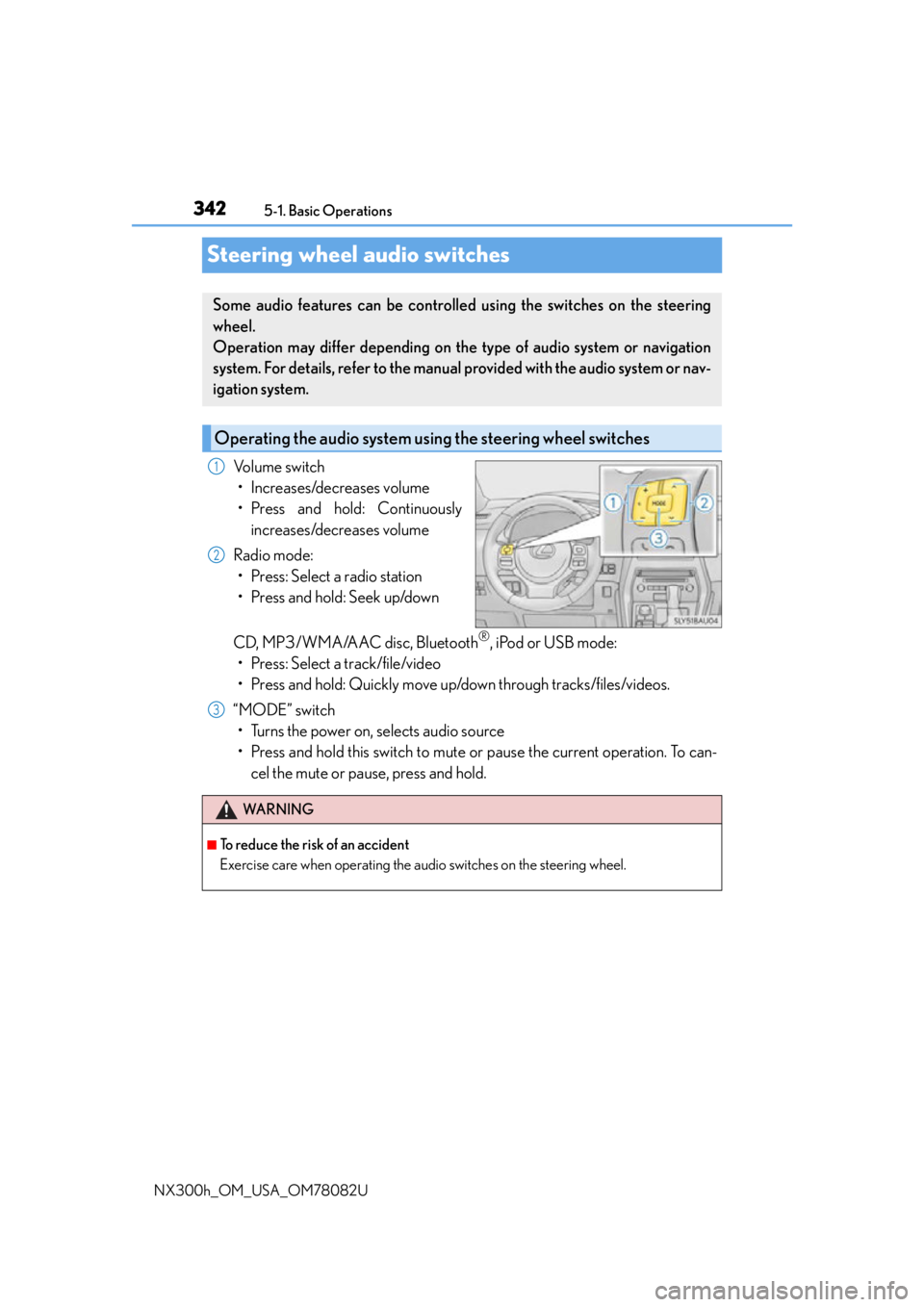
Volume switch • Increases/decreases volume
• Press and hold: Continuously increases/decreases volume
Radio mode: • Press: Select a radio station
• Press and hold: Seek up/down
CD, MP3/WMA/AAC disc, Bluetooth
®, iPod or USB mode:
• Press: Select a track/file/video
• Press and hold: Quickly move up/down through tracks/files/videos.
“MODE” switch • Turns the power on, selects audio source
• Press and hold this switch to mute or pause the current operation. To can- cel the mute or pause, press and hold.
Some audio features can be controlled using the switches on the steering
wheel.
Operation may differ depending on th e type of audio system or navigation
system. For details, refer to the manual provided with the audio system or nav-
igation system.
Operating the audio system us ing the steering wheel switches
1
2
WA R N I N G
■To reduce the risk of an accident
Exercise care when operating the audio switches on the steering wheel.
3
Page 345 of 680
3455-1. Basic Operations
5
Lexus Display Audio system
NX300h_OM_USA_OM78082U
USB/AUX ports
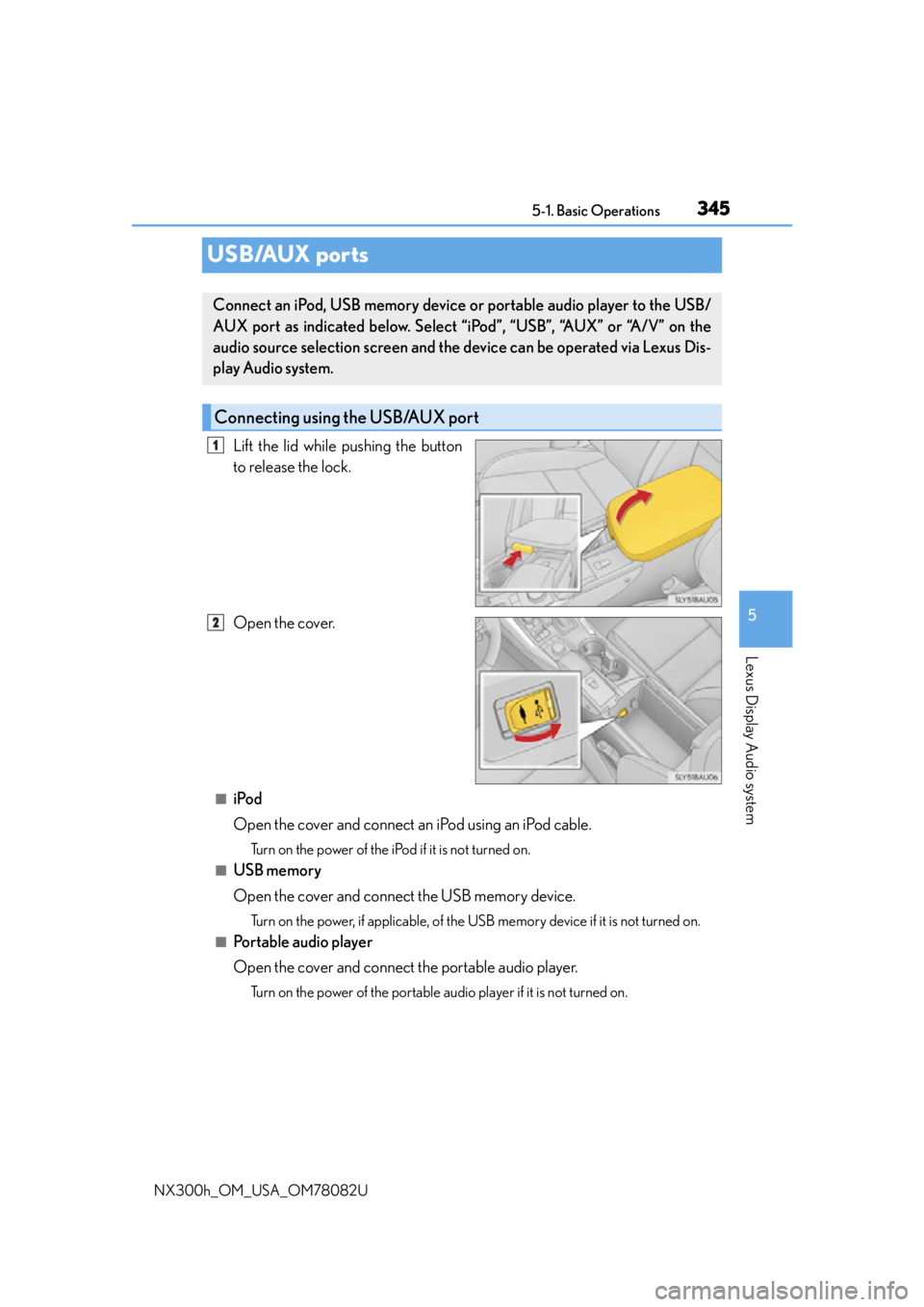
Lift the lid while pushing the button
to release the lock.
Open the cover.
■iPod
Open the cover and connect an iPod using an iPod cable.
Turn on the power of the iPod if it is not turned on.
■USB memory
Open the cover and connect the USB memory device.
Turn on the power, if applicable, of the US B memory device if it is not turned on.
■Portable audio player
Open the cover and connect the portable audio player.
Turn on the power of the portable audio player if it is not turned on.
Connect an iPod, USB memory device or portable audio player to the USB/
AUX port as indicated below. Select “iPod”, “USB”, “AUX” or “A/V” on the
audio source selection screen and the device can be operated via Lexus Dis-
play Audio system.
Connecting using the USB/AUX port
1
2
Page 346 of 680
3465-1. Basic Operations
NX300h_OM_USA_OM78082U
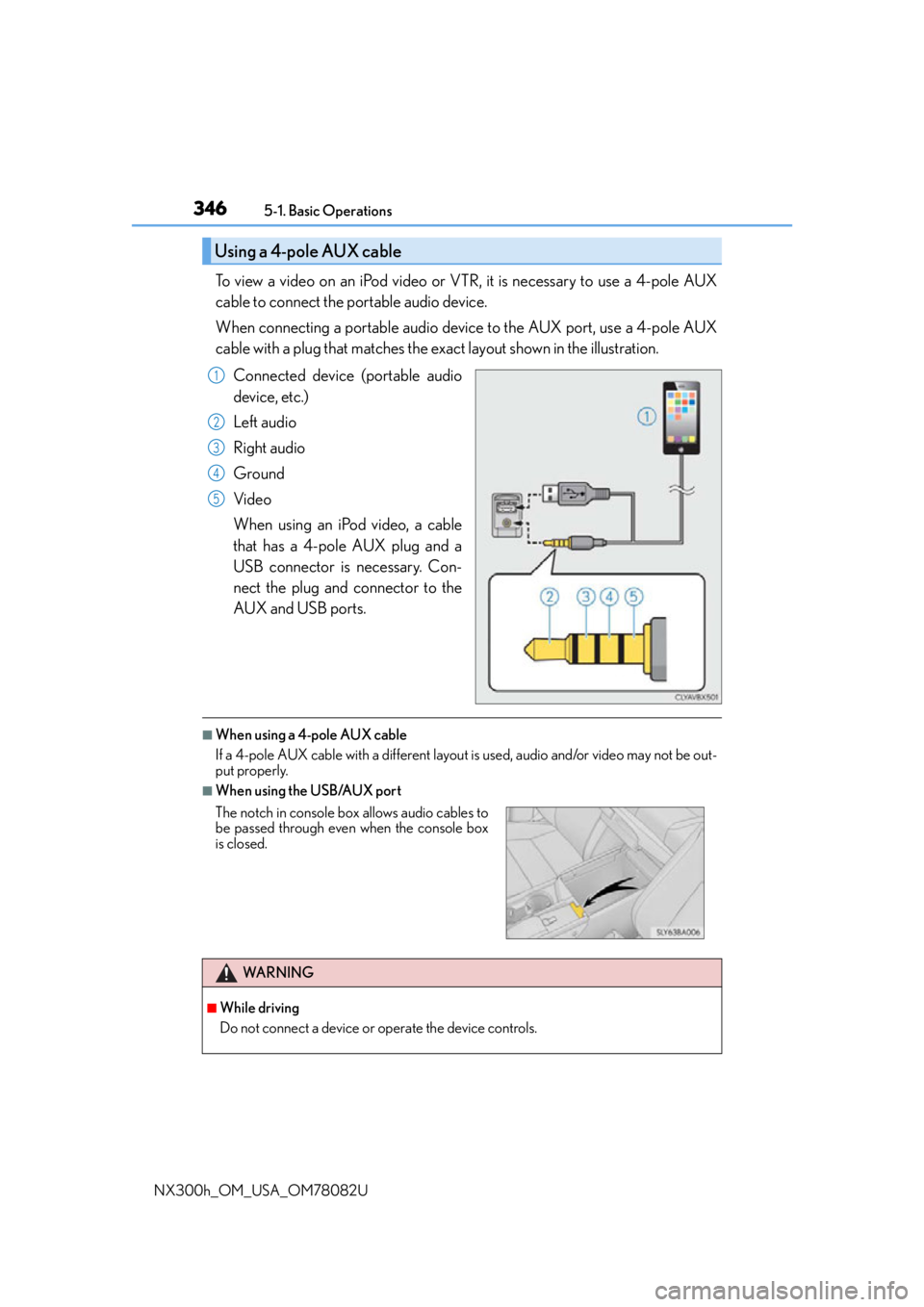
To view a video on an iPod video or VTR, it is necessary to use a 4-pole AUX
cable to connect the portable audio device.
When connecting a portable audio device to the AUX port, use a 4-pole AUX
cable with a plug that matches the exact layout shown in the illustration. Connected device (portable audio
device, etc.)
Left audio
Right audio
Ground
Video
When using an iPod video, a cable
that has a 4-pole AUX plug and a
USB connector is necessary. Con-
nect the plug and connector to the
AUX and USB ports.
■When using a 4-pole AUX cable
If a 4-pole AUX cable with a different layout is used, audio and/or video may not be out-
put properly.
■When using the USB/AUX port
Using a 4-pole AUX cable
1
2
3
4
5
The notch in console box allows audio cables to
be passed through even when the console box
is closed.
WA R N I N G
■While driving
Do not connect a device or operate the device controls.
Page 349 of 680
3495-2. Setup
5
Lexus Display Audio system
NX300h_OM_USA_OM78082U
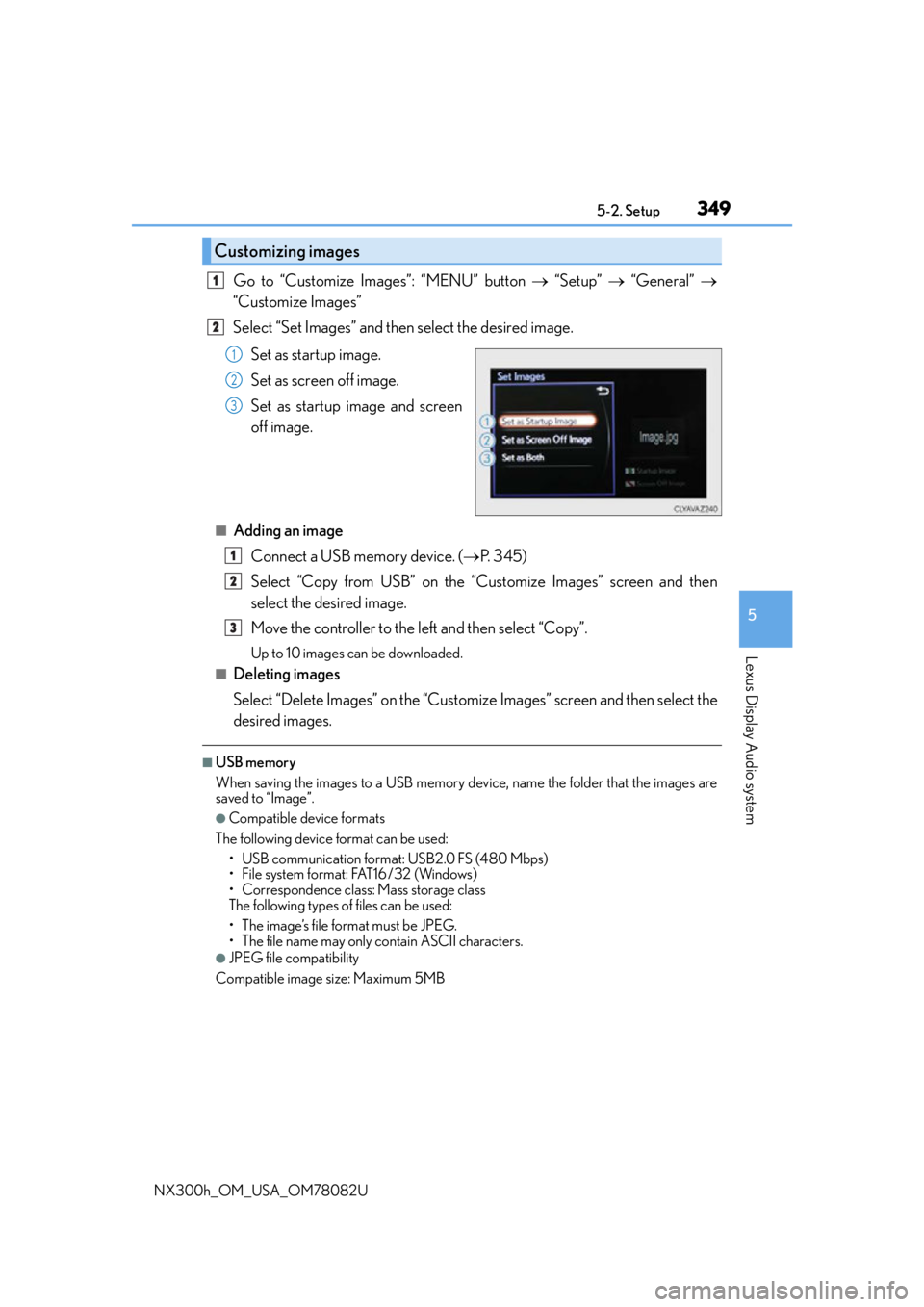
Go to “Customize Images”: “MENU” button “Setup” “General”
“Customize Images”
Select “Set Images” and then select the desired image.
Set as startup image.
Set as screen off image.
Set as startup image and screen
off image.
■Adding an imageConnect a USB memory device. ( P. 3 4 5 )
Select “Copy from USB” on the “Customize Images” screen and then
select the desired image.
Move the controller to the left and then select “Copy”.
Up to 10 images can be downloaded.
■Deleting images
Select “Delete Images” on the “Customize Images” screen and then select the
desired images.
■USB memory
When saving the images to a USB memory device, name the folder that the images are
saved to “Image”.
●Compatible device formats
The following device format can be used: • USB communication format: USB2.0 FS (480 Mbps)
• File system format: FAT16/32 (Windows)
• Correspondence class: Mass storage class
The following types of files can be used:
• The image’s file format must be JPEG.
• The file name may only contain ASCII characters.
●JPEG file compatibility
Compatible image size: Maximum 5MB
Customizing images
1
2
1
2
3
1
2
3
Page 350 of 680
3505-2. Setup
NX300h_OM_USA_OM78082U
“MENU” button “Setup” “General” “Delete Personal Data”
Select “Delete”.
Check carefully beforehand, as data cannot be retrieved once deleted.
The following personal data will be deleted or changed to its default settings.
• Phonebook data
• Call history data
•Favorite data
•Bluetooth
® devices data
• Phone sound settings
• Detailed Bluetooth
® settings
• Audio/video setting
• Preset switch data
•Last used radio station
• Customized image data
•FM info setting
• iPod tagging information
• Software update history
• Software update detail information
•Phone disp lay setting
• Contact/call history setting
• Messaging setting
• Traffic information map
• Weather information
• Phonebook data for voice recognition
• Music data for voice recognition
NOTICE
■To prevent damage to the USB memory device or its terminals
P. 3 8 0
Deleting personal data
1
2
Page 355 of 680
3555-3. Using the audio system
5
Lexus Display Audio system
NX300h_OM_USA_OM78082U
Audio settings
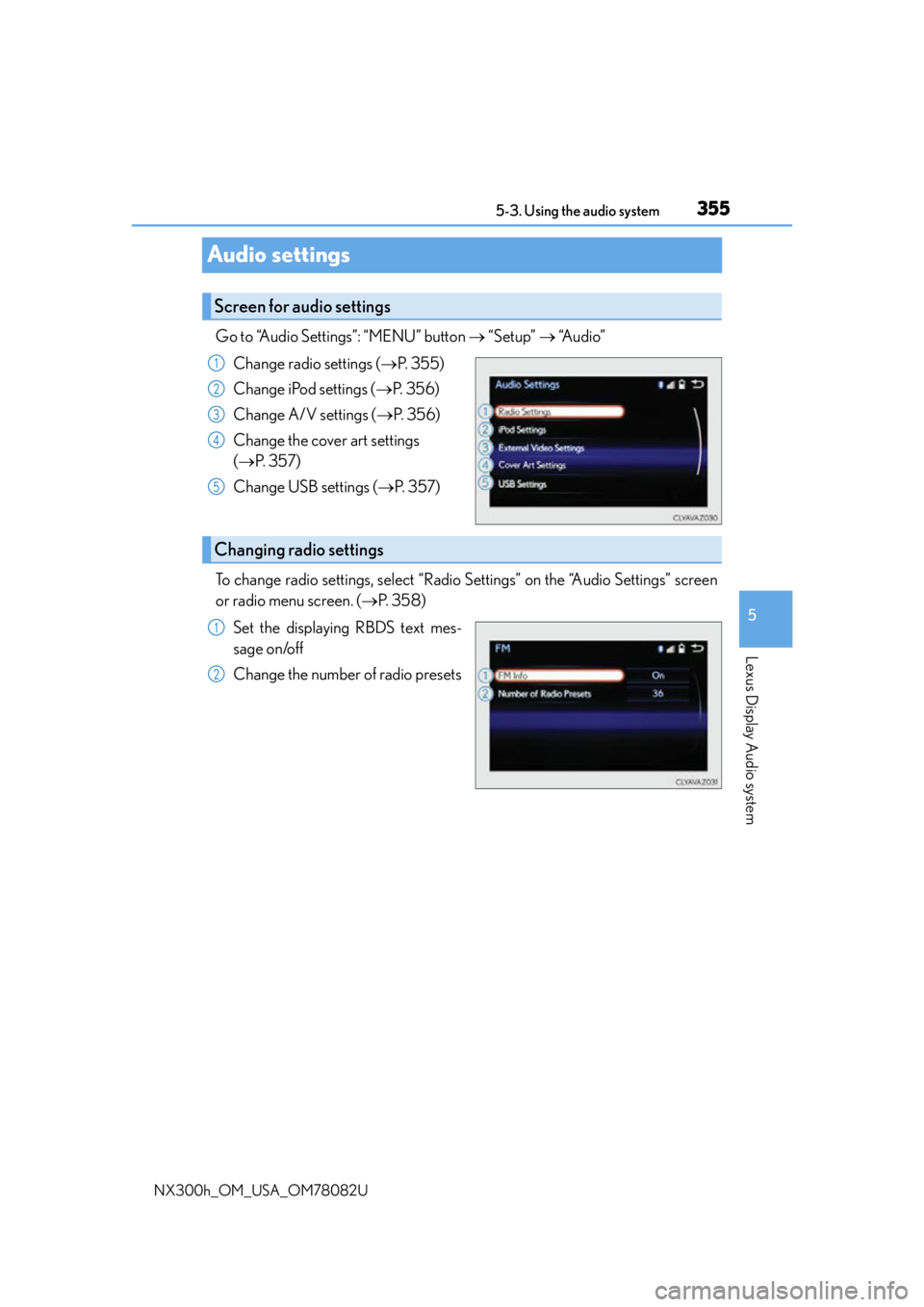
Go to “Audio Settings”: “MENU” button “Setup” “Audio”
Change radio settings ( P. 3 5 5 )
Change iPod settings ( P. 3 5 6 )
Change A/V settings ( P. 3 5 6 )
Change the cover art settings
( P. 3 5 7 )
Change USB settings ( P. 3 5 7 )
To change radio settings, select “Radio Settings” on the “Audio Settings” screen
or radio menu screen. ( P. 3 5 8 )
Set the displaying RBDS text mes-
sage on/off
Change the number of radio presets
Screen for audio settings
1
2
3
4
5
Changing radio settings
1
2