windshield LEXUS NX300H 2016 User Guide
[x] Cancel search | Manufacturer: LEXUS, Model Year: 2016, Model line: NX300H, Model: LEXUS NX300H 2016Pages: 680, PDF Size: 10.23 MB
Page 225 of 680

2254-3. Operating the lights and wipers
4
Driving
NX300h_OM_USA_OM78082U
■The Automatic High Beam can be operated when
The power switch is in ON mode.
■Camera sensor detection information
●High beam may not be automatically tu rned off in the following situations:
• When oncoming vehicles sudd enly appear from a curve
• When the vehicle is cut in front of by another
• When oncoming or preceding vehicles are hidden from sight due to repeated
curves, road dividers or roadside trees
●High beam may be turned off if an oncoming vehicle that is using fog lights without
using the headlights is detected.
●House lights, street lights, red traffic signals, and illuminated billboards or signs may
cause the high beam to turn off.
●The following factors may affect the amount of time taken to turn high beam on or off:
• The brightness of headlights, fog lights, and tail lights of oncoming and preceding
vehicles
• The movement and direction of oncoming and preceding vehicles
• When a oncoming or preceding vehicle on ly has operational lights on one side
• When a oncoming or preceding vehicle is a two-wheeled vehicle
• The condition of the road (gradient, curve, condition of the road surface, etc.)
• The number of passengers and amount of luggage
●High beam may be turned on or off when unexpected by the driver.
●In the situations below, the system may not be able to correctly detect the surrounding
brightness levels, and may flash or expose nearby pedestrians to the high beam. There-
fore, you should consider turning the high be ams on or off manually rather than relying
on the Automatic High Beam system.
• In bad weather (rain, snow , fog, sandstorms, etc.)
• The windshield is obscured by fog, mist, ice, dirt, etc.
• The windshield is cracked or damaged.
• The camera sensor is deformed or dirty.
• The camera sensor temperature is extremely high.
• Surrounding brightness levels are equal to those of headlights, tail lights or fog lights.
• Vehicles ahead have headlights or tail lights that are either switched off, dirty, are
changing color, or are not aimed properly.
• When driving through an area of intermit tently changing brightness and darkness.
• When frequently and repeatedly driving ascending/descending roads, or roads with
rough, bumpy or uneven surfaces (such as stone-paved roads, gravel tracks, etc.).
• When frequently and repeat edly taking curves or driving on a winding road.
• There is a highly reflective object ahead of the vehicle, such as a sign or a mirror.
• The back of a vehicle ahead is highly reflective, such as a container on a truck.
• The vehicle’s headlights are damaged or dirty.
• The vehicle is listing or titling, due to a flat tire, a trailer being towed, etc.
• The driver believes that the high beam may be causing problems or distress to other
drivers or pedestrians nearby.
Page 226 of 680
2264-3. Operating the lights and wipers
NX300h_OM_USA_OM78082U
WA R N I N G
■Limitations of the Automatic High Beam
Do not rely on the Automatic High Beam. Always drive safely, taking care to observe
your surroundings and turning high be am on or off manually if necessary.
NOTICE
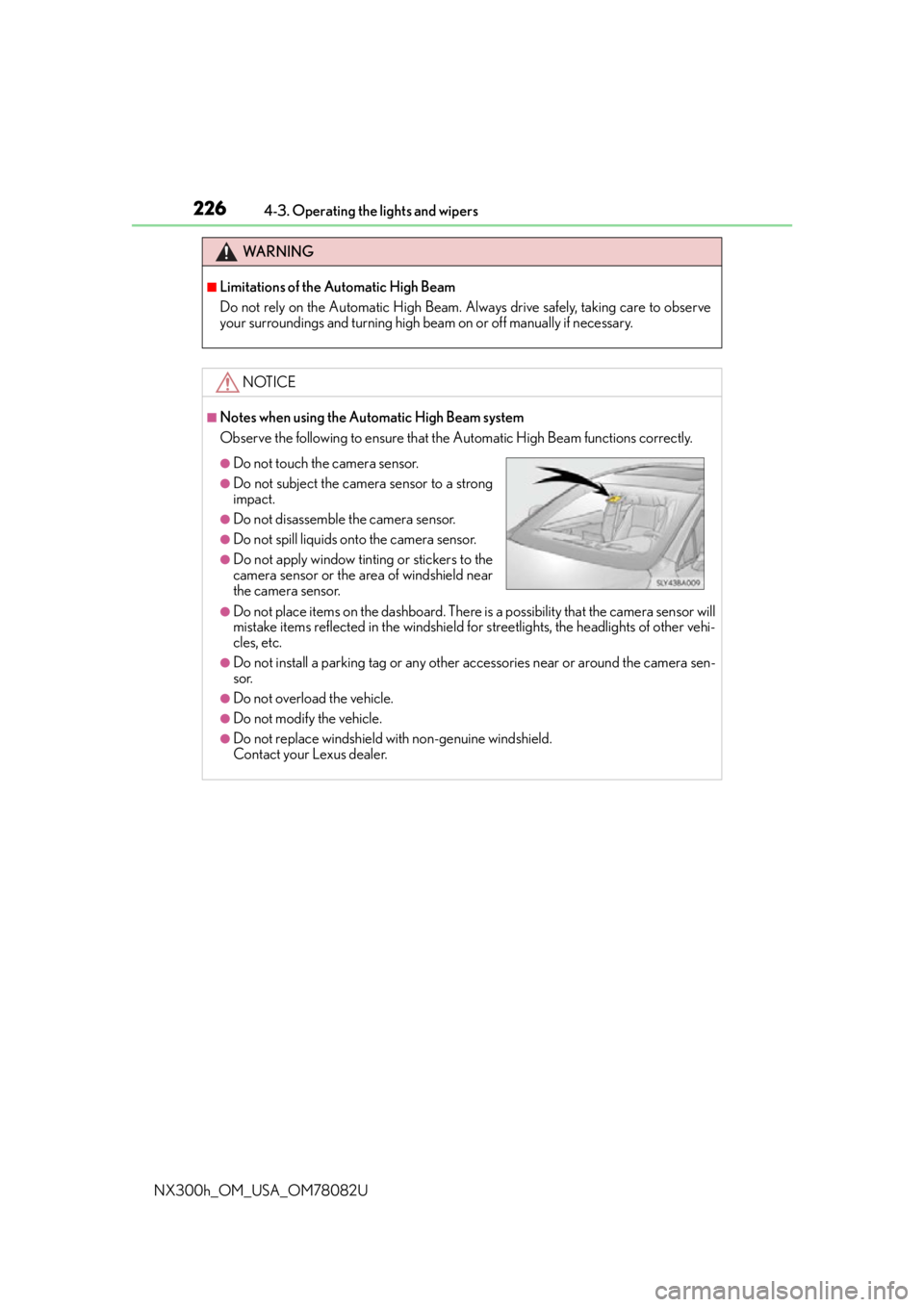
■Notes when using the Automatic High Beam system
Observe the following to ensure that the Automatic High Beam functions correctly.
●Do not place items on the dashboard. There is a possibility that the camera sensor will
mistake items reflected in the windshield for streetlights, the headlights of other vehi-
cles, etc.
●Do not install a parking tag or any other accessories near or around the camera sen-
sor.
●Do not overload the vehicle.
●Do not modify the vehicle.
●Do not replace windshield with non-genuine windshield.
Contact your Lexus dealer.
●Do not touch the camera sensor.
●Do not subject the camera sensor to a strong
impact.
●Do not disassemble the camera sensor.
●Do not spill liquids onto the camera sensor.
●Do not apply window tinting or stickers to the
camera sensor or the area of windshield near
the camera sensor.
Page 228 of 680
2284-3. Operating the lights and wipers
NX300h_OM_USA_OM78082U
Windshield wipers and washer
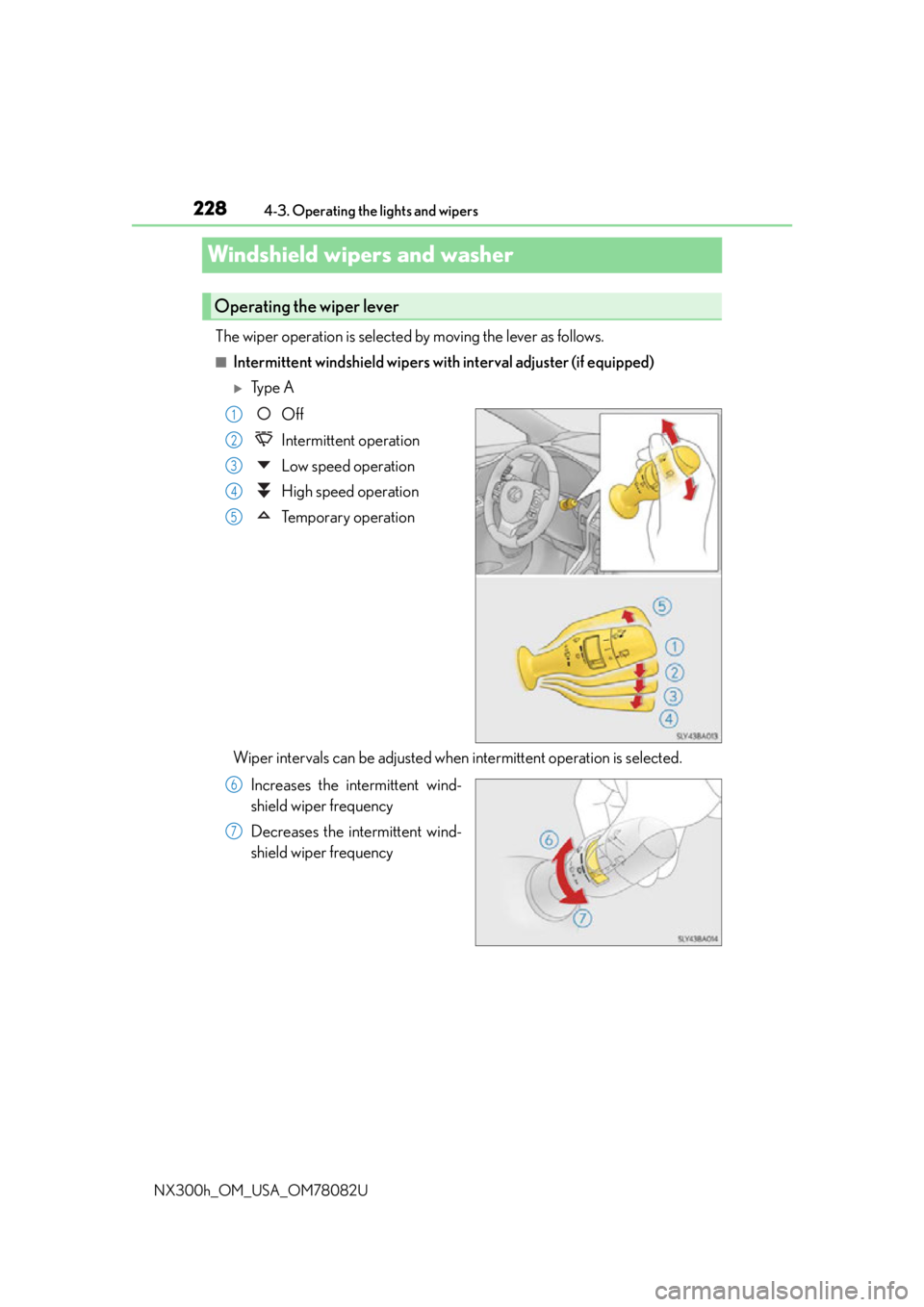
The wiper operation is selected by moving the lever as follows.
■Intermittent windshield wipers wi th interval adjuster (if equipped)
Ty p e A
Off
Intermittent operation
Low speed operation
High speed operation
Temporary operation
Wiper intervals can be adjusted when intermittent operation is selected. Increases the intermittent wind-
shield wiper frequency
Decreases the intermittent wind-
shield wiper frequency
Operating the wiper lever
1
2
3
4
5
6
7
Page 230 of 680
2304-3. Operating the lights and wipers
NX300h_OM_USA_OM78082U
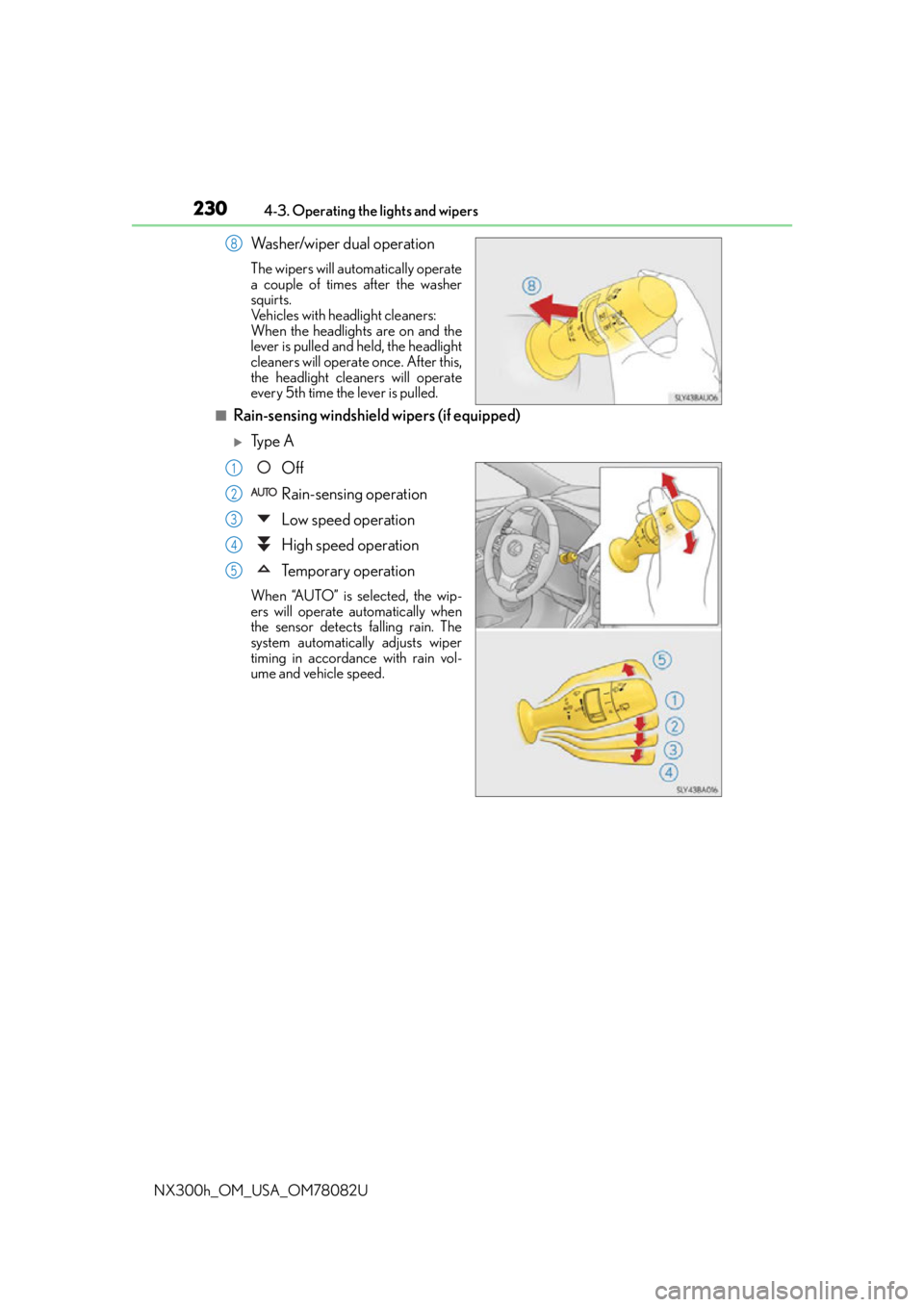
Washer/wiper dual operation
The wipers will automatically operate
a couple of times after the washer
squirts.
Vehicles with headlight cleaners:
When the headlights are on and the
lever is pulled and held, the headlight
cleaners will operate once. After this,
the headlight cleaners will operate
every 5th time the lever is pulled.
■Rain-sensing windshield wipers (if equipped)
Ty p e A Off
Rain-sensing operation
Low speed operation
High speed operation
Temporary operation
When “AUTO” is selected, the wip-
ers will operate automatically when
the sensor detects falling rain. The
system automatically adjusts wiper
timing in accordance with rain vol-
ume and vehicle speed.
8
1
2
3
4
5
Page 232 of 680
2324-3. Operating the lights and wipers
NX300h_OM_USA_OM78082U
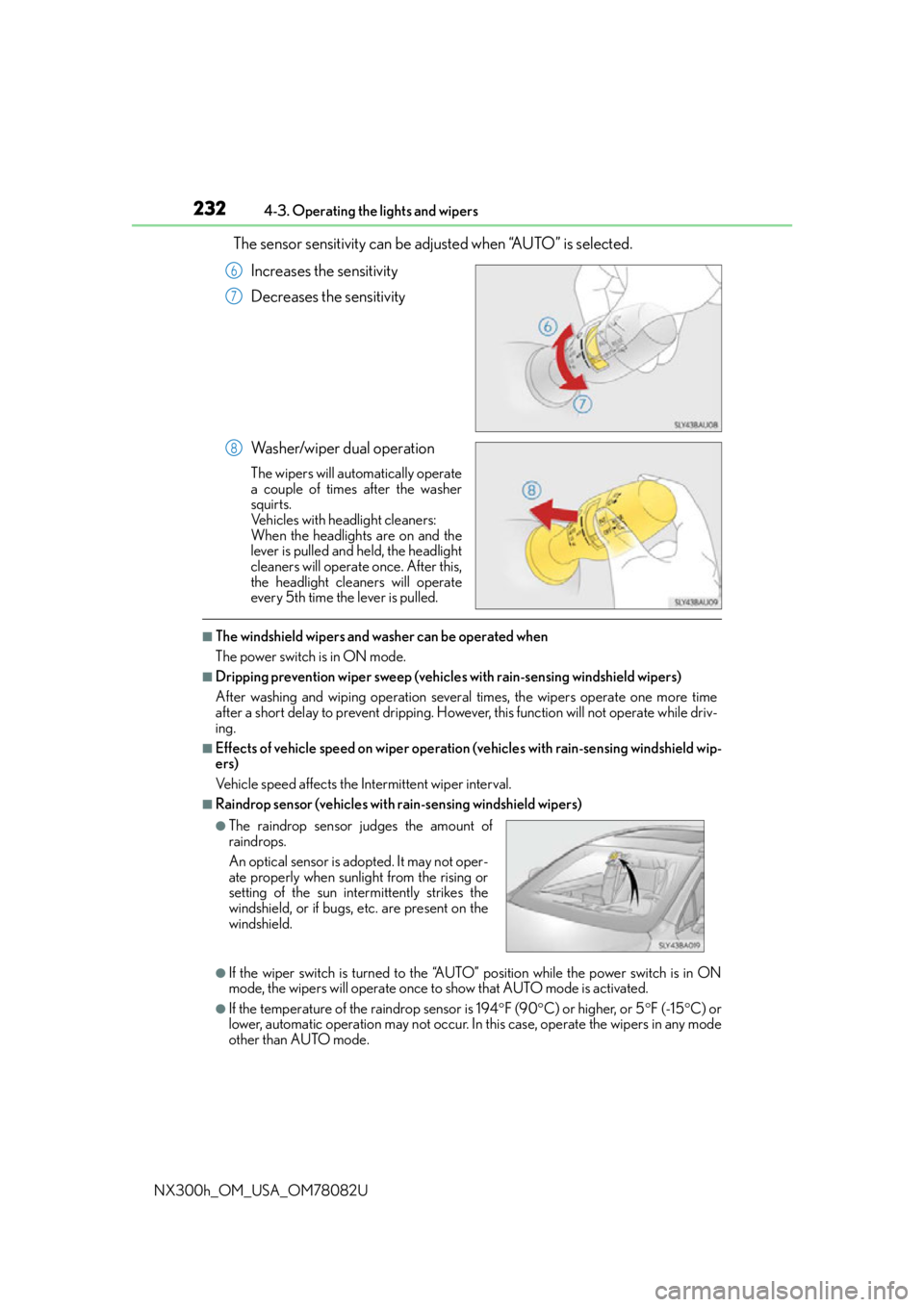
The sensor sensitivity can be adju sted when “AUTO” is selected.
Increases the sensitivity
Decreases the sensitivity
Washer/wiper dual operation
The wipers will automatically operate
a couple of times after the washer
squirts.
Vehicles with headlight cleaners:
When the headlights are on and the
lever is pulled and held, the headlight
cleaners will operate once. After this,
the headlight cleaners will operate
every 5th time the lever is pulled.
■The windshield wipers and washer can be operated when
The power switch is in ON mode.
■Dripping prevention wiper sweep (vehicle s with rain-sensing windshield wipers)
After washing and wiping operation several times, the wipers operate one more time
after a short delay to prevent dripping. Howeve r, this function will not operate while driv-
ing.
■Effects of vehicle speed on wiper operation (vehicles with rain-sensing windshield wip-
ers)
Vehicle speed affects the Intermittent wiper interval.
■Raindrop sensor (vehicles with rain-sensing windshield wipers)
●If the wiper switch is turned to the “AUTO” position while the power switch is in ON
mode, the wipers will operate once to show that AUTO mode is activated.
●If the temperature of the raindrop sensor is 194 F (90 C) or higher, or 5 F (-15 C) or
lower, automatic operation may not occur. In this case, operate the wipers in any mode
other than AUTO mode.
6
7
8
●The raindrop sensor judges the amount of
raindrops.
An optical sensor is ad opted. It may not oper-
ate properly when sunlight from the rising or
setting of the sun intermittently strikes the
windshield, or if bugs, etc. are present on the
windshield.
Page 233 of 680

2334-3. Operating the lights and wipers
4
Driving
NX300h_OM_USA_OM78082U
■If no windshield washer fluid sprays
Check that the washer nozzles are not blocked, if there is washer fluid in the washer fluid
tank.
WA R N I N G
■Caution regarding the use of windshield wi pers in AUTO mode (vehicles with rain-
sensing windshield wipers)
The windshield wipers may operate unexpectedly if the sensor is touched or the wind-
shield is subject to vibration in AUTO mode. Take care that your fingers, etc. do not
become caught in the windshield wipers.
■Caution regarding the use of washer fluid
When it is cold, do not use the washer fluid until the windshield becomes warm. The
fluid may freeze on the windshield and cause lo w visibility. This may lead to an accident,
resulting in death or serious injury.
NOTICE
■When the windshield is dry
Do not use the wipers, as they may damage the windshield.
■When the washer fluid tank is empty
Do not operate the switch continually as the washer fluid pump may overheat.
■When a nozzle becomes blocked
In this case, contact your Lexus dealer.
Do not try to clear it with a pin or other object. The nozzle will be damaged.
■To prevent 12-volt battery discharge
Do not leave the wipers on longer than necessary when the hybrid system is off.
Page 247 of 680

2474-5. Using the driving support systems
4
Driving
NX300h_OM_USA_OM78082U
■Dynamic radar cruise control can be set when
●The shift lever is in D or range 4 or higher of S has been selected.
●Vehicle speed is above approximately 30 mph (50 km/h).
■Accelerating after setting the vehicle speed
The vehicle can accelerate by operating the accelerator pedal. After accelerating, the
set speed resumes. However, during vehicle-to-vehicle distance control mode, the vehi-
cle speed may decrease below the set speed in order to maintain the distance to the pre-
ceding vehicle.
■Automatic cancelation of vehicle- to-vehicle distance control mode
Vehicle-to-vehicle distance control mode is automatically canceled in the following situ-
ations:
●VSC is activated.
●TRAC is activated for a period of time.
●When the VSC or TRAC system is turned off by pressing the VSC OFF switch.
●The sensor cannot detect properly beca use it is obstructed in some way.
●Pre-collision braking is activated.
When vehicle-to-vehicle distance control mo de is automatically canceled in the follow-
ing situations, “Radar Cruise Control Unavaila ble” will be displayed on the multi-infor-
mation display:
●Actual vehicle speed falls below approximately 25 mph (40 km/h).
●The windshield wipers are oper ating at high speed (when the wiper switch is set to the
“AUTO” mode or the high speed wiper operation position).
If vehicle-to-vehicle distance control mode is automatically canceled for any other rea-
son, there may be a malfunction in the system. Contact your Lexus dealer.
■Automatic cancelation of constant speed control mode
Constant speed control mode is automatica lly canceled in the following situations:
●Actual vehicle speed is more than approximately 10 mph (16 km/h) below the set vehi-
cle speed.
●Actual vehicle speed falls below approximately 25 mph (40 km/h).
●VSC is activated.
●TRAC is activated for a period of time.
●When the VSC or TRAC system is turned off by pressing the VSC OFF switch.
●Pre-collision braking is activated.
Page 261 of 680

2614-5. Using the driving support systems
4
Driving
NX300h_OM_USA_OM78082U
■Dynamic radar cruise control with full-speed range can be set when
●The shift lever is in D or range 4 or higher of S has been selected.
●Vehicle speed is above approximately 30 mph (50 km/h).
■Accelerating after setting the vehicle speed
The vehicle can accelerate by operating the accelerator pedal. After accelerating, the
set speed resumes. However, during vehicle-to-vehicle distance control mode, the vehi-
cle speed may decrease below the set speed in order to maintain the distance to the pre-
ceding vehicle.
■Automatic cancelation of vehicle- to-vehicle distance control mode
Vehicle-to-vehicle distance control mode is automatically canceled in the following situ-
ations:
●VSC is activated.
●TRAC is activated for a period of time.
●When the VSC or TRAC system is turned off by pressing the VSC OFF switch.
●The sensor cannot detect properly beca use it is obstructed in some way.
●The parking brake is operated.
●The vehicle is stopped by system control on a steep incline.
●Pre-collision braking is activated.
●The following are detected when the vehicle has been stopped by system control:
• The driver is not wearing a seat belt.
• The driver’s door is opened.
• The back door or hood is opened.
When vehicle-to-vehicle distance control mo de is automatically canceled in the follow-
ing situations, “Radar Cruise Control Unavaila ble” will be displayed on the multi-infor-
mation display:
●Actual vehicle speed falls below approximately 25 mph (40 km/h) when there are no
vehicles ahead.
●The preceding vehicle leaves the lane when your vehicle is following at a vehicle speed
below 25 mph (40 km/h). Otherwise, the se nsor cannot properly detect the vehicle.
●The windshield wipers are operating at high speed (when the wiper switch is set to the
“AUTO” mode or the high speed wiper operation position).
If vehicle-to-vehicle distance control mode is automatically canceled for any other rea-
son, there may be a malfunction in the system. Contact your Lexus dealer.
Page 270 of 680
2704-5. Using the driving support systems
NX300h_OM_USA_OM78082U
LDA (Lane Departure Alert with steering control)
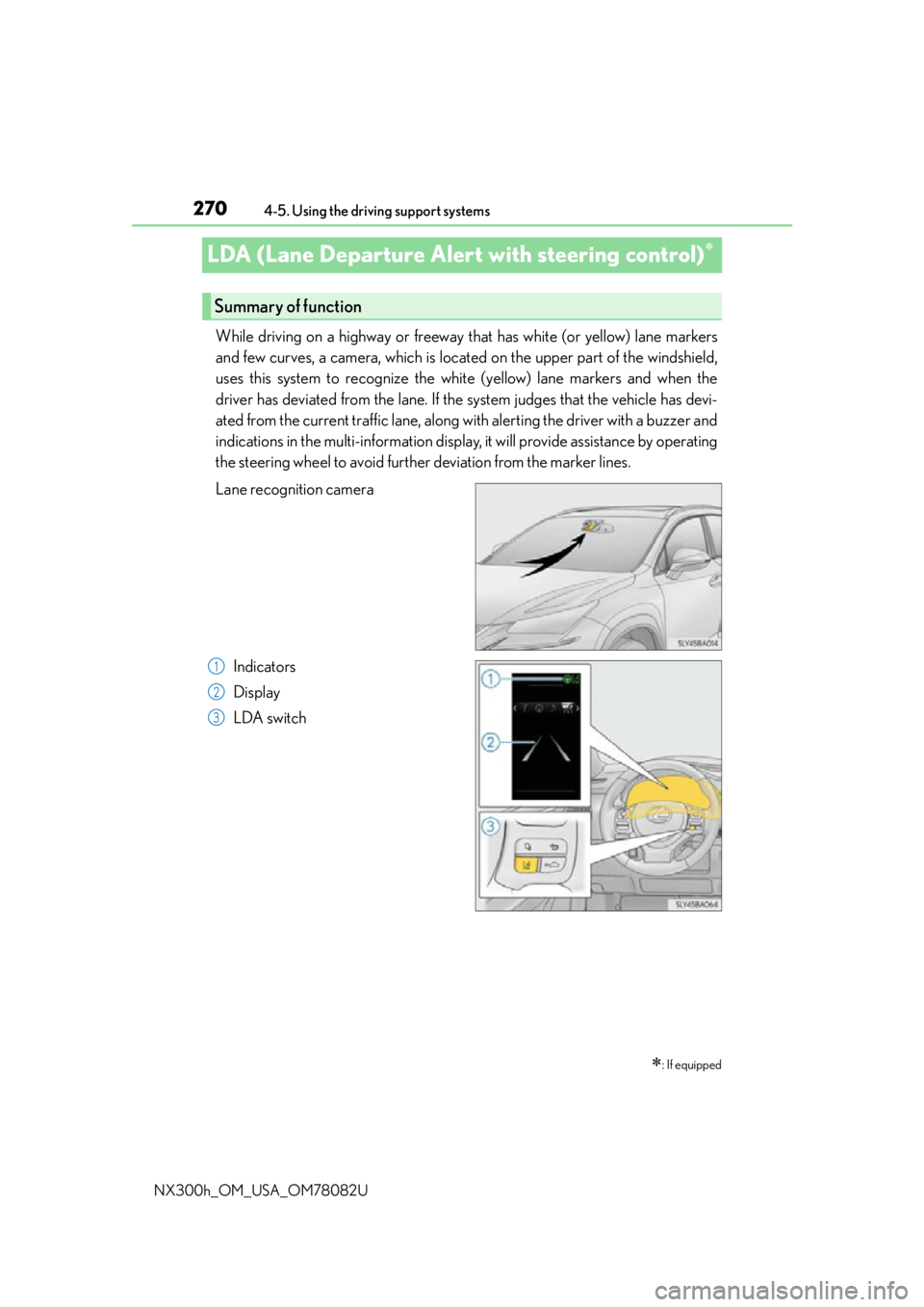
While driving on a highway or freeway that has white (or yellow) lane markers
and few curves, a camera, which is located on the upper part of the windshield,
uses this system to recognize the white (yellow) lane markers and when the
driver has deviated from the lane. If the system judges that the vehicle has devi-
ated from the current traffic lane, along with alerting the driver with a buzzer and
indications in the multi-information display, it will provide assistance by operating
the steering wheel to avoid further deviation from the marker lines.
Lane recognition camera
Indicators
Display
LDA switch
: If equipped
Summary of function
1
2
3
Page 278 of 680
2784-5. Using the driving support systems
NX300h_OM_USA_OM78082U
NOTICE
■To prevent damage to or incorrect operation of the LDA
Observe the following to ensure that the LDA system functions correctly
●Do not modify the headlights or attach stickers to the surface of the lights.
●Do not modify the suspension or replace it with non-genuine parts.
●Do not install or place anything on the hood or the grille. Also, do not install a grille
guard (bull bars, kangaroo bar, etc.).
●If your windshield needs repairs, contact your Lexus dealer.
●Do not overload with luggage
■ Lane recognition camera
Observe the following to ensure that the LDA system functions correctly
●Keep the windshield clean at all times.
Performance could be affected if the windshie ld is dirty, or if raindrops, condensation
or ice are adhering to the windshield.
●Do not spill liquids onto the lane recognition camera.
●Do not attach window tinting to the windshield.
●Do not install an antenna in fron t of the lane recognition camera.
●If the windshield area in front of the lane recognition camera is fogged up, use the
windshield defogger to remove the fog from that area. ( P. 4 3 5 )
When it is cold, using the he ater with air blowing to the feet may allow the upper part
of the windshield to fog up. This will have a negative effect on the images.
●Do not scratch the camera lens, or let it get dirty.
When cleaning the inside of the windshield , be careful not to get any glass cleaner,
etc., on the lens. Also, do not touch the lens.
For lens repair, contact your Lexus dealer.
●Do not change the installation position or direction of the lane recognition camera or
remove it.
The direction of the lane recognit ion camera is precisely adjusted.
●Do not subject the lane recognition camera to strong impact or force, and do not dis-
assemble the lane recognition camera.
●Do not replace windshield with non-genuine windshield.
Contact your Lexus dealer.
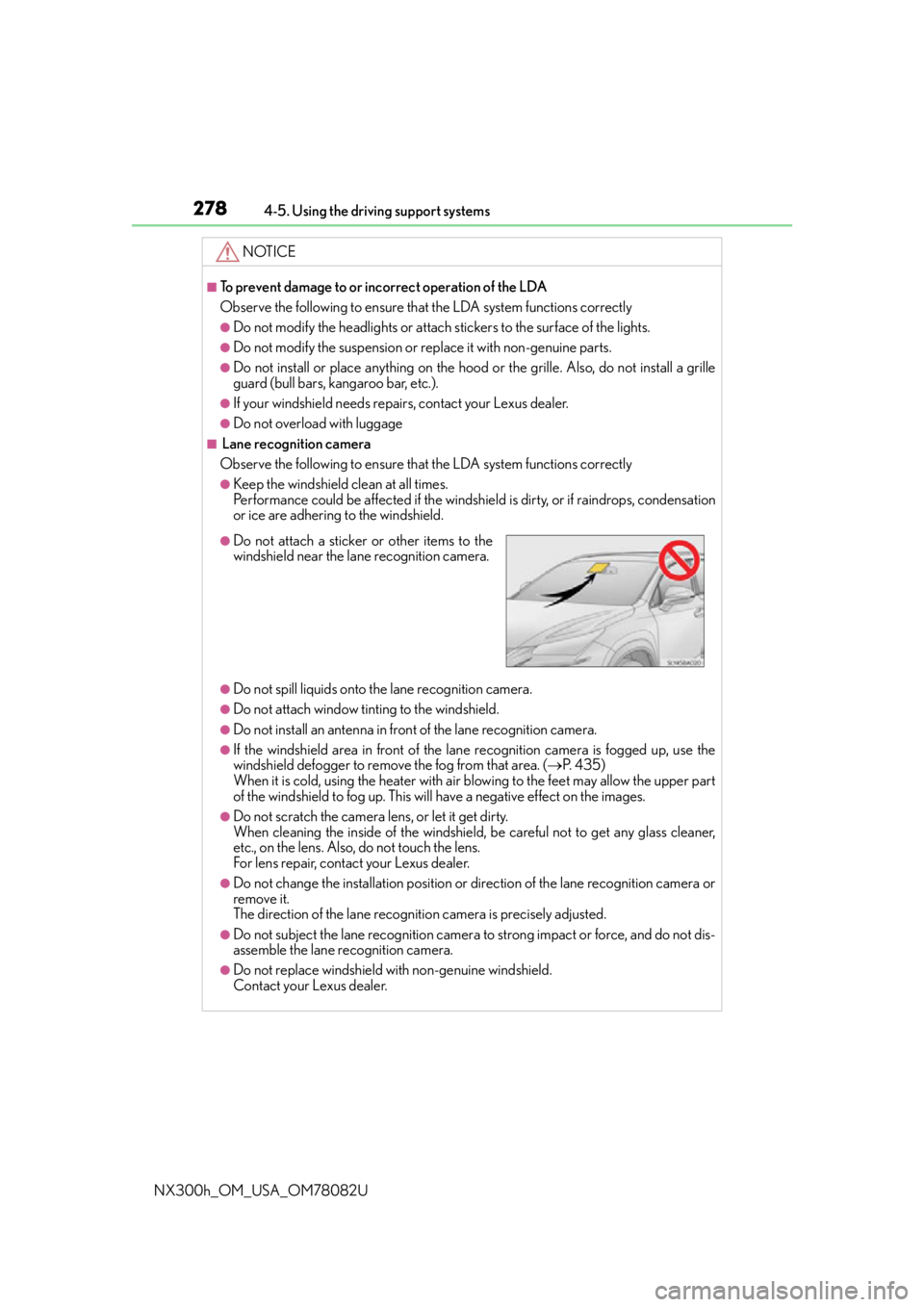
●Do not attach a sticker or other items to the
windshield near the lane recognition camera.