steering LEXUS NX300H 2016 Service Manual
[x] Cancel search | Manufacturer: LEXUS, Model Year: 2016, Model line: NX300H, Model: LEXUS NX300H 2016Pages: 680, PDF Size: 10.23 MB
Page 251 of 680
2514-5. Using the driving support systems
4
Driving
NX300h_OM_USA_OM78082U
WA R N I N G
■Conditions under which the vehicle-to-vehicle distance control mode may not func-
tion correctly
Operate the brake pedal (or accelerator pe dal operation depending on the situation)
as necessary in the following conditions as the radar sensor may not be able to cor-
rectly detect vehicles ahead, which may lead to an accident resulting in death or seri-
ous injury.
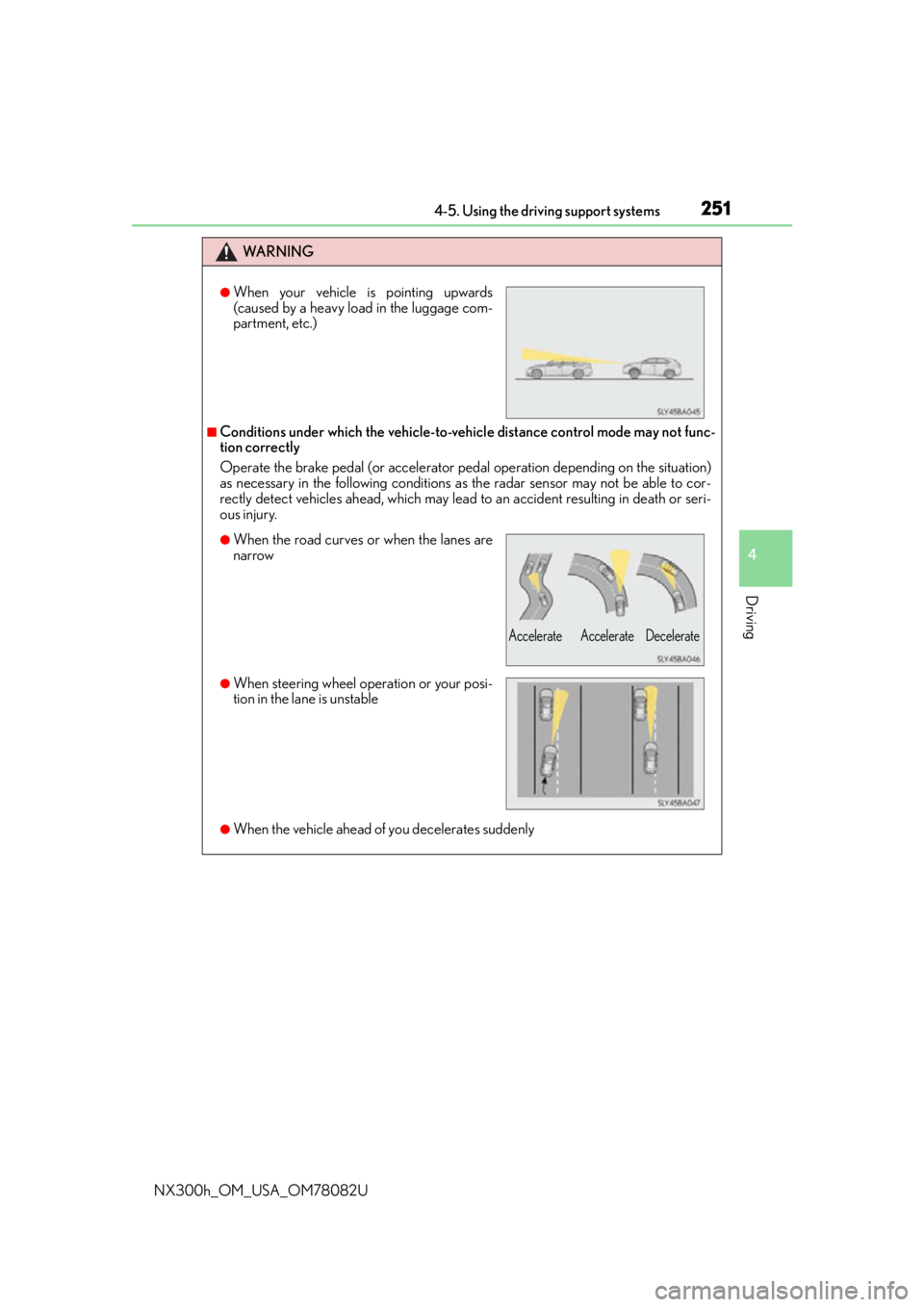
●When the vehicle ahead of you decelerates suddenly
●When your vehicle is pointing upwards
(caused by a heavy load in the luggage com-
partment, etc.)
●When the road curves or when the lanes are
narrow
●When steering wheel operation or your posi-
tion in the lane is unstable
Accelerate Accelerate Decelerate
Page 265 of 680
2654-5. Using the driving support systems
4
Driving
NX300h_OM_USA_OM78082U
WA R N I N G
■Conditions under which the vehicle-to-vehicle distance control mode may not func-
tion correctly
Operate the brake pedal (or accelerator pe dal operation depending on the situation)
as necessary in the following conditions as the radar sensor may not be able to cor-
rectly detect vehicles ahead, which may lead to an accident resulting in death or seri-
ous injury.
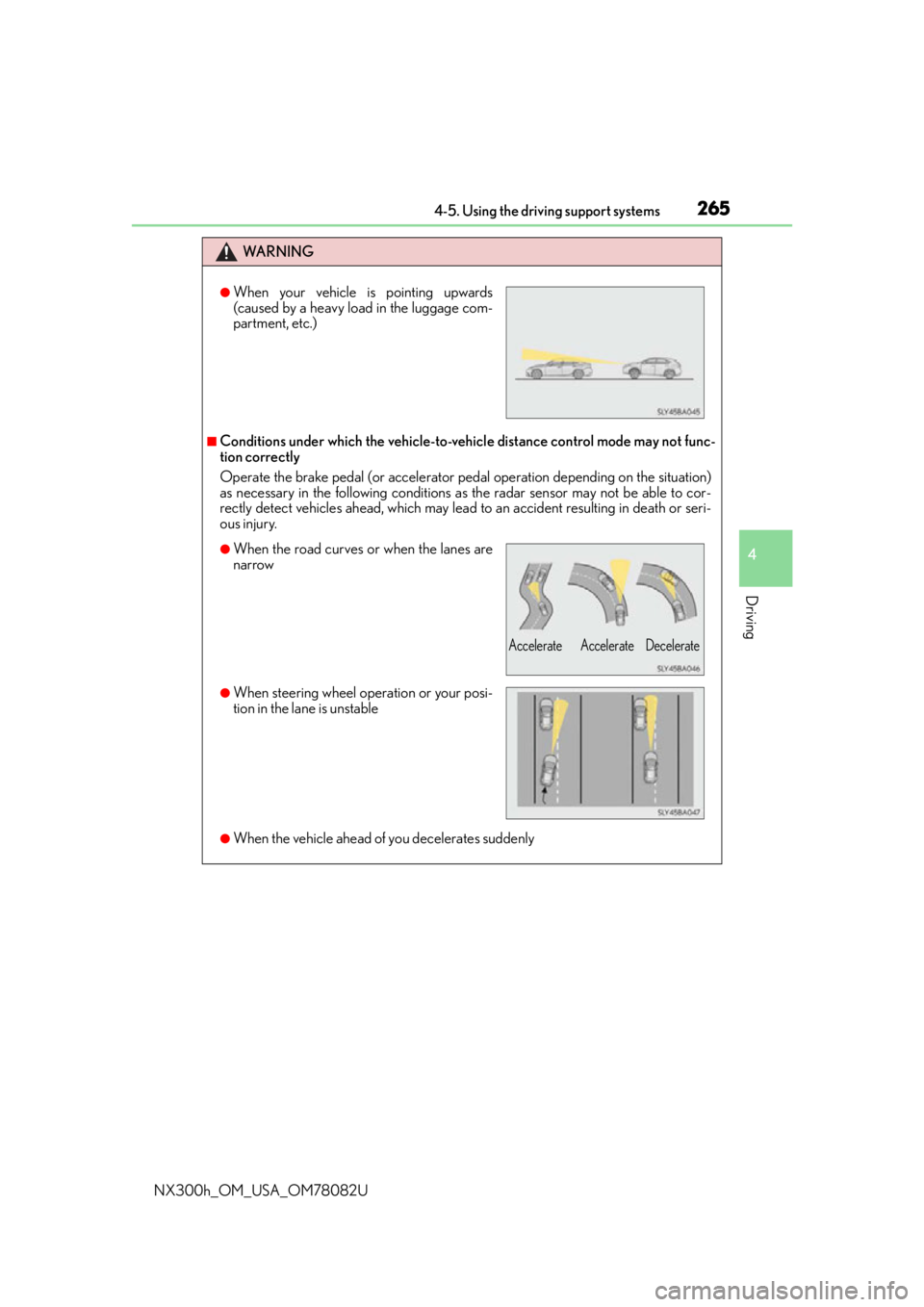
●When the vehicle ahead of you decelerates suddenly
●When your vehicle is pointing upwards
(caused by a heavy load in the luggage com-
partment, etc.)
●When the road curves or when the lanes are
narrow
●When steering wheel operation or your posi-
tion in the lane is unstable
Accelerate Accelerate Decelerate
Page 270 of 680
2704-5. Using the driving support systems
NX300h_OM_USA_OM78082U
LDA (Lane Departure Alert with steering control)
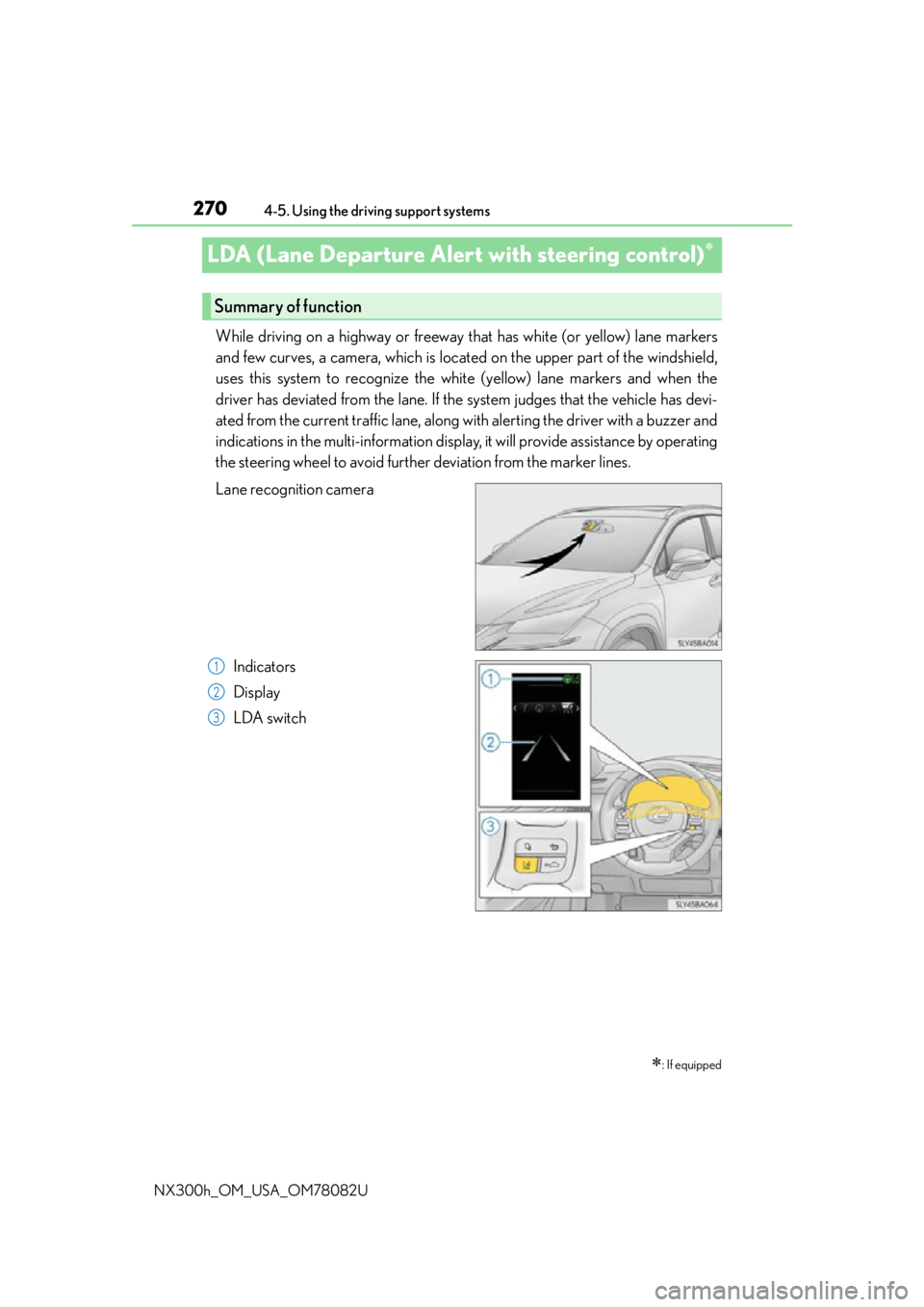
While driving on a highway or freeway that has white (or yellow) lane markers
and few curves, a camera, which is located on the upper part of the windshield,
uses this system to recognize the white (yellow) lane markers and when the
driver has deviated from the lane. If the system judges that the vehicle has devi-
ated from the current traffic lane, along with alerting the driver with a buzzer and
indications in the multi-information display, it will provide assistance by operating
the steering wheel to avoid further deviation from the marker lines.
Lane recognition camera
Indicators
Display
LDA switch
: If equipped
Summary of function
1
2
3
Page 271 of 680
2714-5. Using the driving support systems
4
Driving
NX300h_OM_USA_OM78082U
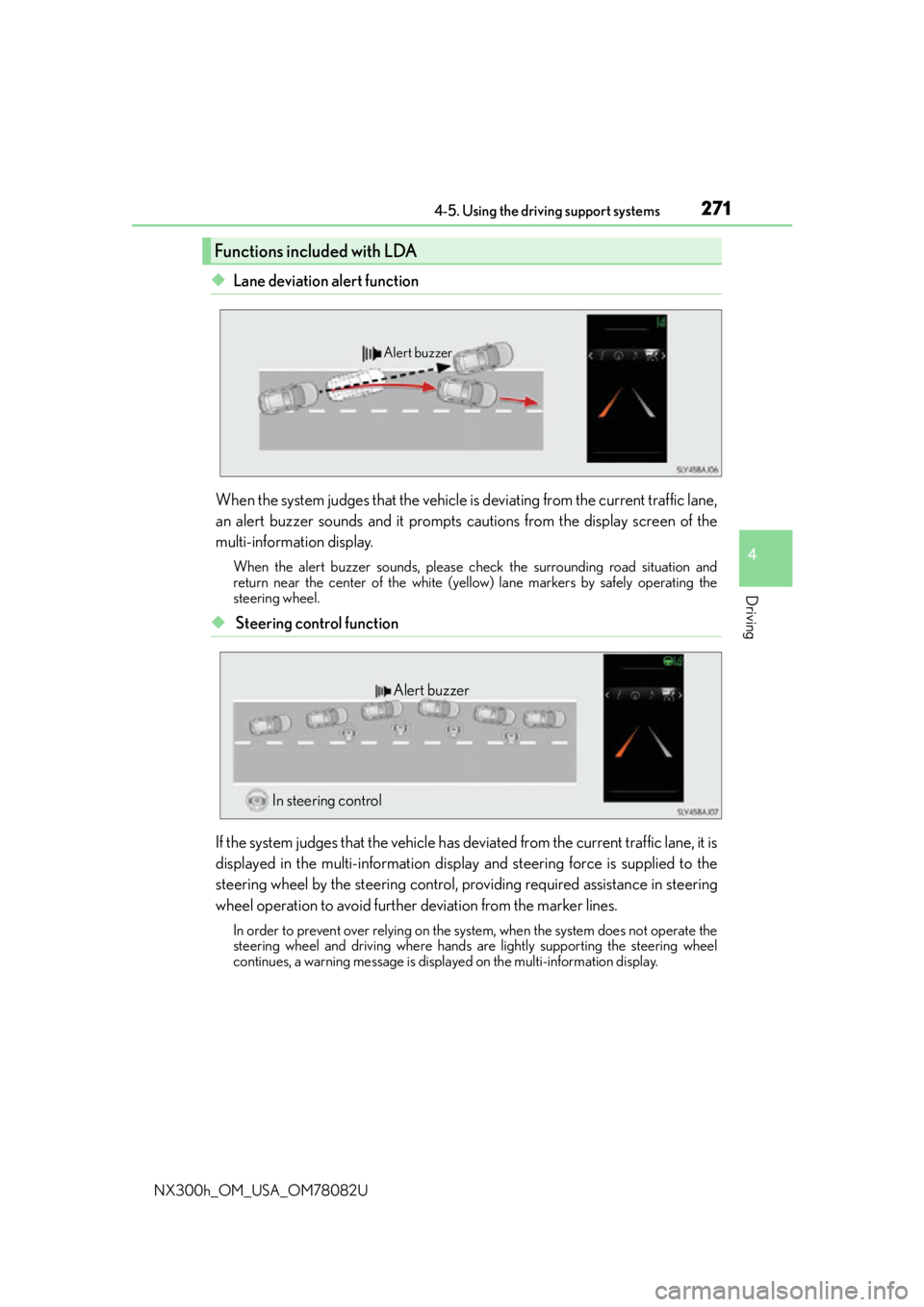
◆Lane deviation alert function
When the system judges that the vehicle is deviating from the current traffic lane,
an alert buzzer sounds and it prompts cautions from the display screen of the
multi-information display.
When the alert buzzer sounds, please ch eck the surrounding road situation and
return near the center of the white (yello w) lane markers by safely operating the
steering wheel.
◆ Steering control function
If the system judges that the vehicle has de viated from the current traffic lane, it is
displayed in the multi-information displa y and steering force is supplied to the
steering wheel by the steering control, pr oviding required assistance in steering
wheel operation to avoid further deviation from the marker lines.
In order to prevent over relying on the system, when the system does not operate the
steering wheel and driving where hands are lightly supporting the steering wheel
continues, a warning message is displa yed on the multi-information display.
Functions included with LDA
Alert buzzer
Alert buzzer
In steering control
Page 273 of 680
2734-5. Using the driving support systems
4
Driving
NX300h_OM_USA_OM78082U
■Steering control function
In addition to the operation conditions for the lane deviation alert function,
when all of the following conditions are fulfilled, it operates.
●When settings for the “Steering Assist” in the “Settings display” of the multi-
information display is set to “On” ( P. 2 76 )
●When the vehicle has not slowed down more than a defined setting.
●When the steering wheel is operated wi th a steering force level that is not
equivalent to changing lanes.
●When the ABS, VSC, TRAC, or PCS (if equipped) is not operating.
●When intentional accelerator peda l operations are not performed.
■Lane deviation alert function
In any of the following cases, the lane deviation alert function will be tempo-
rarily canceled. When the conditions, in which the cancelation occurred
improves, the function will resume operations.
●The vehicle speed deviates from the operating ranges of the function
●The turn signal lever is operated
●When the emergency flashers are operated
●When the lane markers cannot be recognized while driving
●When the system malfunctions
●Immediately after the lane deviation alert operates
The lane deviation alert function will not operate again for a several sec-
onds after it has been activated, even if the vehicle leaves the lane again.
●When more than half of the vehicle body straddles the lane
■Steering control function
In addition to the temporary cancelation conditions of the lane deviation alert
function, in any of the following cases the steering control function is tempo-
rarily canceled. When the conditions for which the cancelation occurred
improves, the function will restart operations.
●When the vehicle has slowed down more than a defined setting.
●When the steering wheel is operated with a steering force level that is
equivalent to changing lanes.
●When the ABS, VSC, TRAC, or PCS (if equipped) is operating.
●When intentional accelerator pedal operations are performed.
●Operations of the VSC and TRAC have been turned off ( P. 3 0 7 )
Temporary cancelation of the functions
Page 274 of 680
2744-5. Using the driving support systems
NX300h_OM_USA_OM78082U
When it is judged that there is a malfun ction in the system relating to steering
control function, the steering control function is canceled and “LDA Steering
Assist Deactivated Warnings Available” is displayed on the multi-information dis-
play. However, it is possible that the lane deviation alert function operates.
When the steering control function is canc eled, it will not return unless “Steering
Assist” is turned “On” again from the “S ettings display” of the multi-information
display ( P. 276) or the LDA switch is turned on again.
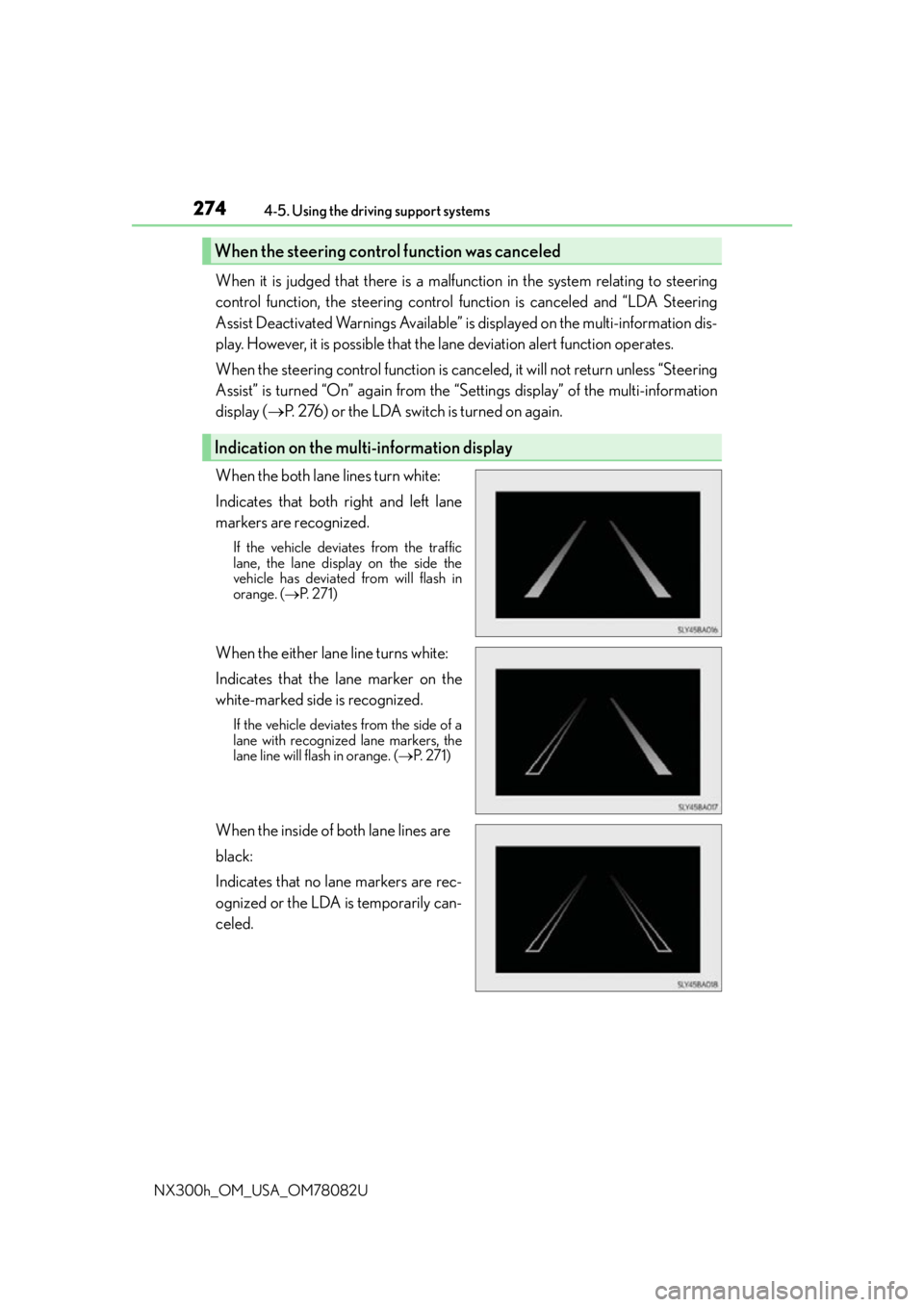
When the both lane lines turn white:
Indicates that both right and left lane
markers are recognized.
If the vehicle deviates from the traffic
lane, the lane displa y on the side the
vehicle has deviated from will flash in
orange. ( P. 2 7 1 )
When the either lane line turns white:
Indicates that the lane marker on the
white-marked side is recognized.
If the vehicle deviates from the side of a
lane with recognized lane markers, the
lane line will flash in orange. ( P. 2 7 1 )
When the inside of both lane lines are
black:
Indicates that no lane markers are rec-
ognized or the LDA is temporarily can-
celed.
When the steering cont rol function was canceled
Indication on the multi-information display
Page 275 of 680
2754-5. Using the driving support systems
4
Driving
NX300h_OM_USA_OM78082U
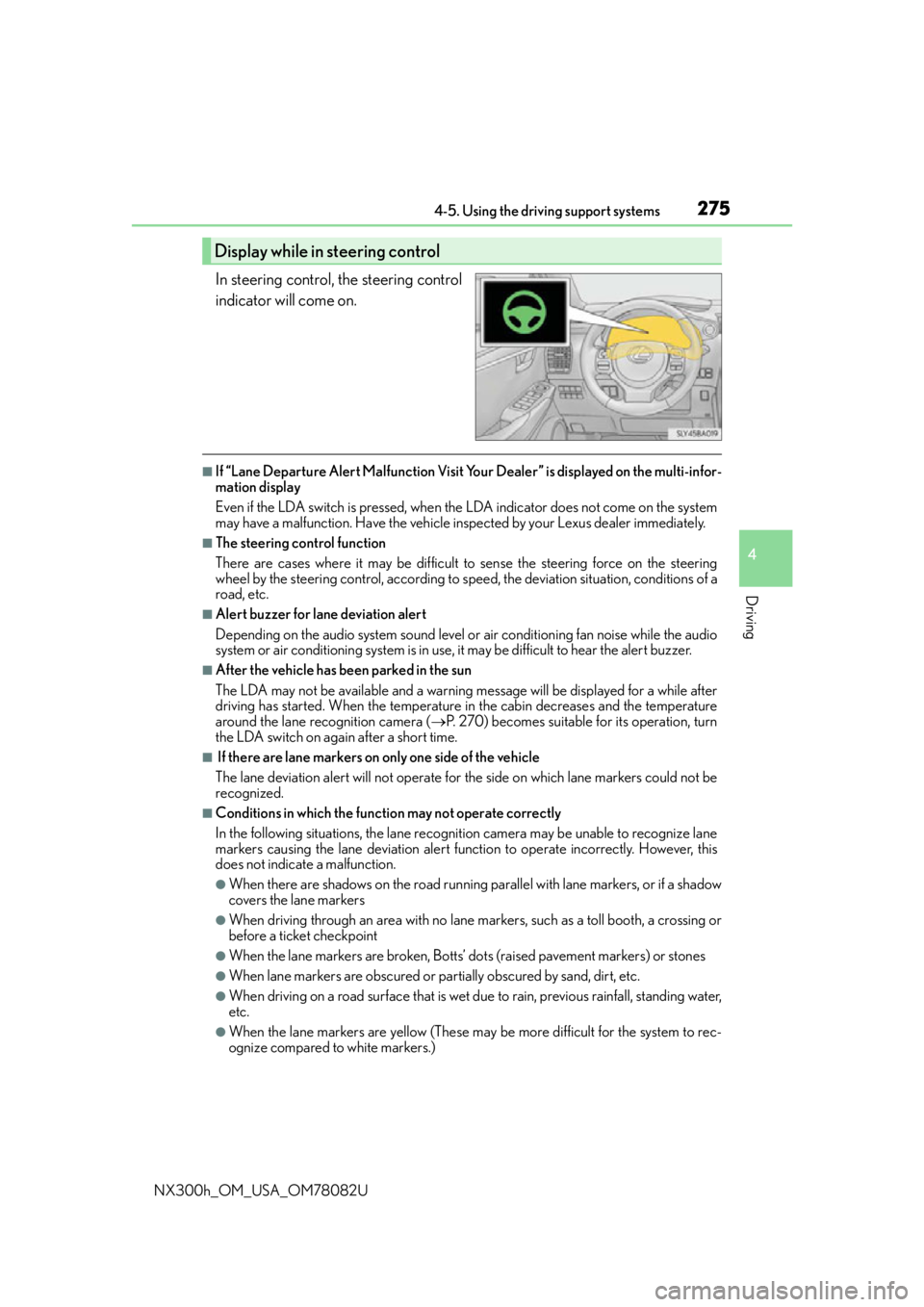
In steering control, the steering control
indicator will come on.
■If “Lane Departure Alert Malfunction Visit Your Dealer” is displayed on the multi-infor-
mation display
Even if the LDA switch is pressed, when th e LDA indicator does not come on the system
may have a malfunction. Have the vehicle in spected by your Lexus dealer immediately.
■The steering control function
There are cases where it may be difficult to sense the steering force on the steering
wheel by the steering control, according to speed, the deviatio n situation, conditions of a
road, etc.
■Alert buzzer for lane deviation alert
Depending on the audio system sound level or air conditioning fan noise while the audio
system or air conditioning system is in use, it may be difficult to hear the alert buzzer.
■After the vehicle has been parked in the sun
The LDA may not be available and a warning message will be displayed for a while after
driving has started. When the temperature in the cabin decreases and the temperature
around the lane recognition camera ( P. 270) becomes suitable for its operation, turn
the LDA switch on again after a short time.
■ If there are lane markers on only one side of the vehicle
The lane deviation alert will not operate for the side on which lane markers could not be
recognized.
■Conditions in which the functi on may not operate correctly
In the following situations, the lane recognition camera may be unable to recognize lane
markers causing the lane deviation alert function to operate incorrectly. However, this
does not indicate a malfunction.
●When there are shadows on the road running parallel with lane markers, or if a shadow
covers the lane markers
●When driving through an area with no lane markers, such as a toll booth, a crossing or
before a ticket checkpoint
●When the lane markers are broken, Botts’ dots (raised pavement markers) or stones
●When lane markers are obscured or partially obscured by sand, dirt, etc.
●When driving on a road surface that is wet du e to rain, previous rainfall, standing water,
etc.
●When the lane markers are yellow (These may be more difficult for the system to rec-
ognize compared to white markers.)
Display while in steering control
Page 276 of 680
2764-5. Using the driving support systems
NX300h_OM_USA_OM78082U
●When the lane markers are on a curb, etc.
●When driving on a particularly brig ht road surface, such as concrete
●When driving on a road surface that is bright due to reflected light
●When driving in a location where the light level changes rapi dly, such as the entrance to
or exit from a tunnel
●When sunlight or the headlights of oncoming vehicles are shining directly into the cam-
era lens
●When driving on roads that are branching or merging
●When driving on a hill
●When driving on winding roads or roads that are uneven
●When driving on rough or unpaved roads
●When driving on a sharp curve
●When lane markers are extremely narrow or extremely wide
●When the vehicle leans to one side an unus ual amount due to a heavy load or improper
tire inflation pressure
●When the following distance between your vehicle and the vehicle ahead is extremely
short
●When the vehicle experiences strong up-and -down motion such as when driving on an
extremely rough road or on a seam in the pavement
● When headlight brightness at nighttime is reduced due to dirt on the lenses, or when
the headlights are misaligned
●When receiving a side wind
■When changing the tires
Depending on the tires used such as snow ti res, etc., sufficient performance may not be
maintainable.
■Warning messages for the LDA
Warning messages are used to indicate a syst em malfunction or to inform the driver of
the need for caution while driving. If a wa rning message is shown on the multi-informa-
tion display, read the message and follow the instructions.
Also, even if a warning message is displayed, it will not impede normal driving.
■ When turning on/off the steering control function
From “Settings display” ( P. 103) of the multi-information display, the steering
control function can be turned on/off.
Pressing the or meter control switches ( P. 103), selects
With each press of meter control switch es, the control switches between “On” and
“Off”
■Sensitivity adjustment for th e lane deviation alert buzzer
From
“Settings display” ( P. 103) of the multi-inform ation display, the alert sen-
sitivity for the alert buzzer when deviating from the lane can be adjusted.
Pressing the or meter control switches ( P. 103), selects
With each press of meter control switches, the control switches between “High”
and “Standard”
1
2
1
2
Page 277 of 680
2774-5. Using the driving support systems
4
Driving
NX300h_OM_USA_OM78082U
WA R N I N G
■Before using the LDA
Do not over rely on the LDA. The LDA does not drive the vehicle automatically, nor
does it reduce the amount of care you need to take. As such, the driver must always
assume full responsibility for understanding his/her surroundings, for operating the
steering wheel to correct the driving line, and for driving safely. Also, take occasional
rests from fatigue due to driving over long periods of time, etc.
Inappropriate or negligent driving co uld lead to an unexpected accident.
■Do not drive without holding the steering wheel
While the steering control function is operating, when the system judges that the vehi-
cle is being driven without holding the steering wheel, a warning message is displayed.
( P. 2 7 1 )
Inappropriate steering wheel operations an d/or negligent driving could lead to an
unexpected accident. When driving, firmly ho ld the steering wheel and keep safe driv-
ing in mind.
■To avoid operating the LDA by mistake
Switch the LDA off using the LDA switch when not in use. ( P. 2 7 2 )
■Situations unsuitable for LDA
Do not use the LDA in any of the following situations.
Otherwise, the system may not function correctly and could result in an accident.
●When driving with tire chains, a spare tire, or similar equipment
●When a tire with a different structure, maker, brand, or tread pattern is used.
●When remain tread of the tire or the air pressure is insufficient
●When restructuring the suspension
●When there are objects or structures along the roadside that might be misinterpreted
as lane markers (such as guardrails, a curb, reflector posts, etc.)
●When driving on snowy roads
●When pavement lane markers are difficult to see due to rain, snow, fog, sand, dust,
etc.
●When there are visible lines on the pavement from road repairs, or if the remains of
old lane markers are still visible on the road
●When driving on a road with lane closures due to maintenance, or when driving in a
temporary lane
●When driving on road surfaces that are slippery from rain, snow, etc.
●When driving in traffic lanes other than highways and freeway
●When driving through construction areas
Page 288 of 680
2884-5. Using the driving support systems
NX300h_OM_USA_OM78082U
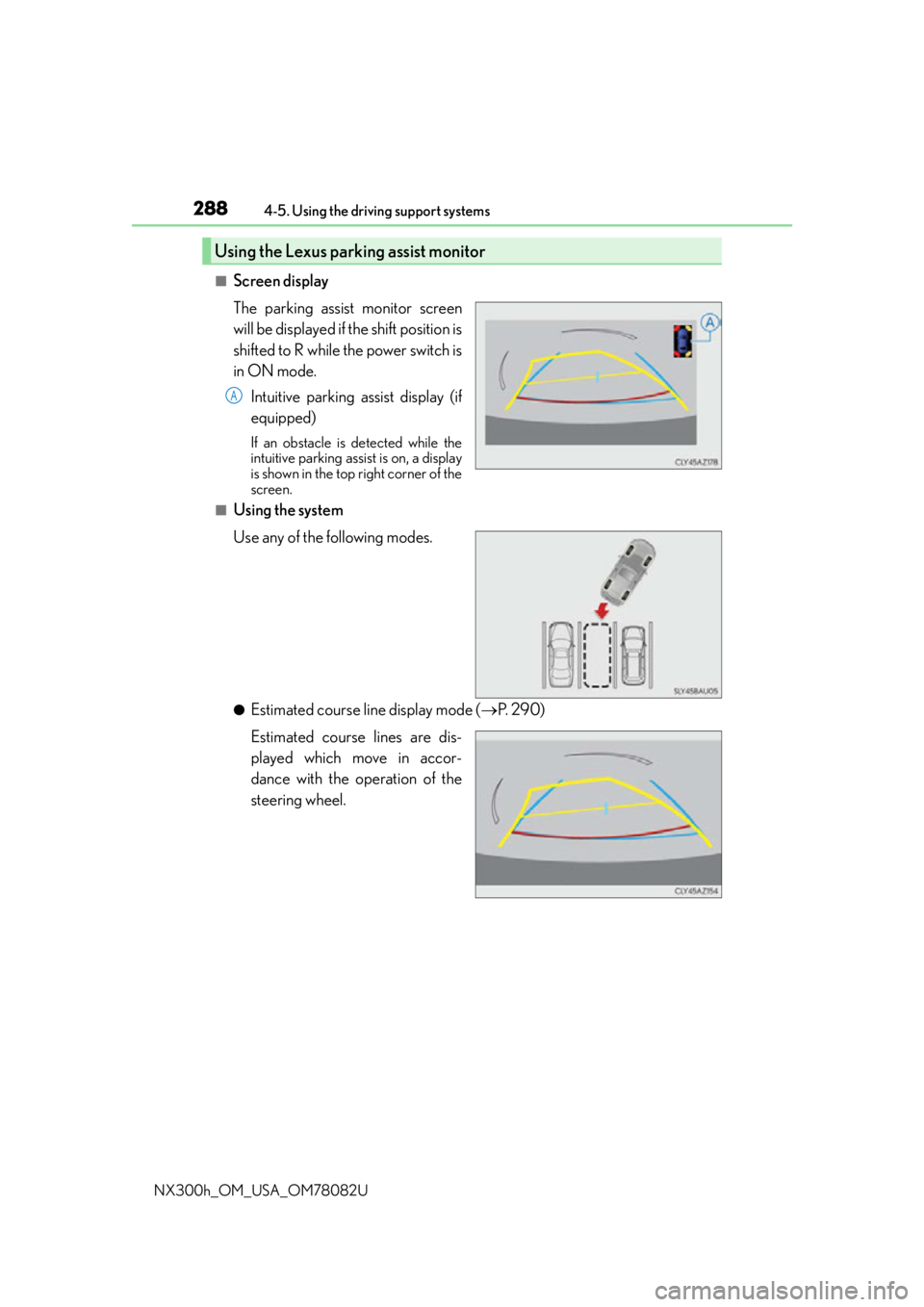
■Screen display
The parking assist monitor screen
will be displayed if the shift position is
shifted to R while the power switch is
in ON mode. Intuitive parking assist display (if
equipped)
If an obstacle is detected while the
intuitive parking assist is on, a display
is shown in the top right corner of the
screen.
■Using the system
Use any of the following modes.
●Estimated course line display mode ( P. 2 9 0 )
Estimated course lines are dis-
played which move in accor-
dance with the operation of the
steering wheel.
Using the Lexus parking assist monitor
A