display LEXUS NX300H 2016 Workshop Manual
[x] Cancel search | Manufacturer: LEXUS, Model Year: 2016, Model line: NX300H, Model: LEXUS NX300H 2016Pages: 680, PDF Size: 10.23 MB
Page 209 of 680
2094-2. Driving procedures
4
Driving
NX300h_OM_USA_OM78082U
P. 3 0 3
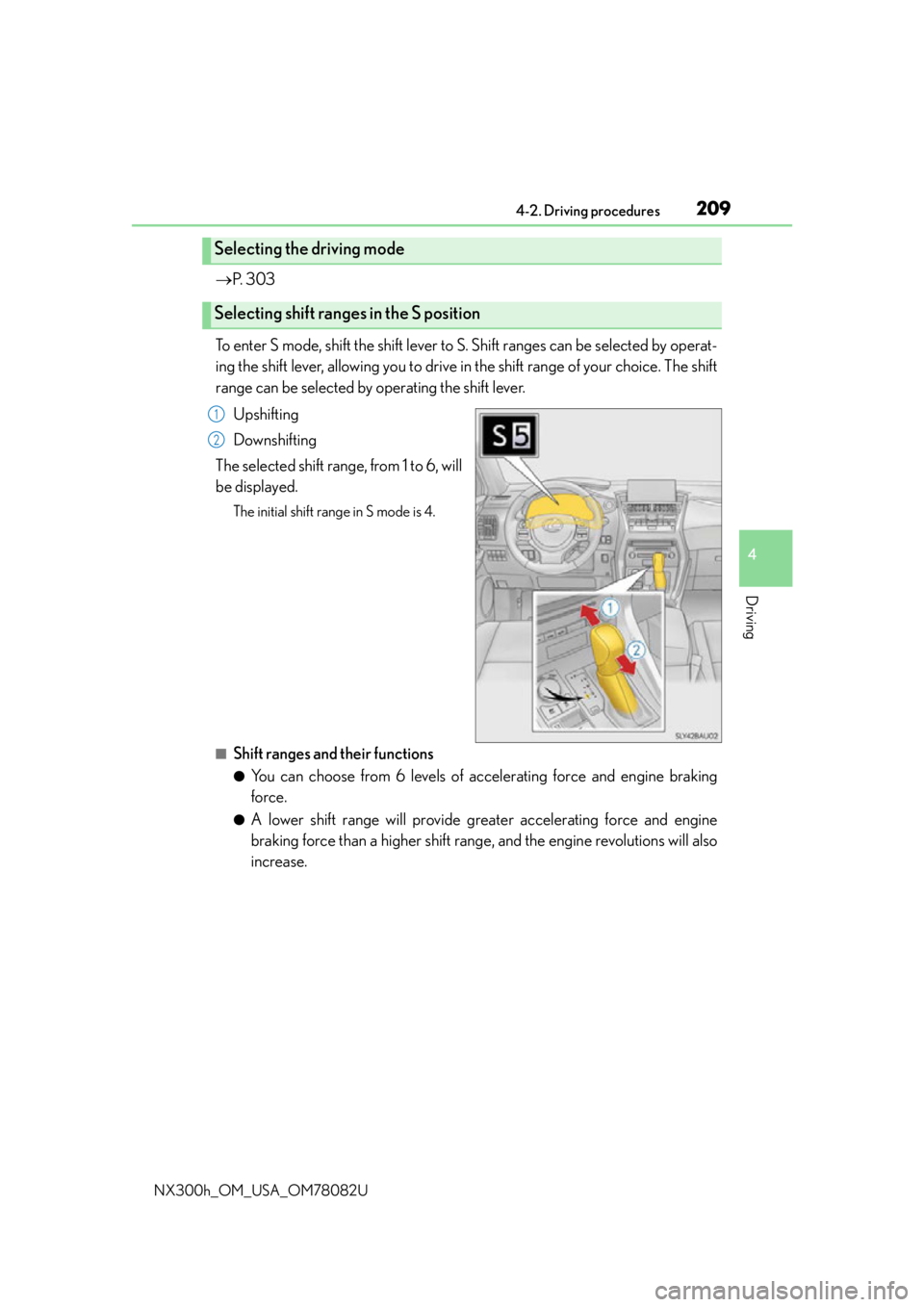
To enter S mode, shift the shift lever to S. Shift ranges can be selected by operat-
ing the shift lever, allowing you to drive in the shift range of your choice. The shift
range can be selected by operating the shift lever. Upshifting
Downshifting
The selected shift range, from 1 to 6, will
be displayed.
The initial shift range in S mode is 4.
■Shift ranges and their functions
●You can choose from 6 levels of acce lerating force and engine braking
force.
●A lower shift range will provide greater accelerating force and engine
braking force than a higher shift rang e, and the engine revolutions will also
increase.
Selecting the driving mode
Selecting shift ranges in the S position
1
2
Page 210 of 680

2104-2. Driving procedures
NX300h_OM_USA_OM78082U
■S mode
●When the shift range is 4 or lower, holding th e shift lever toward “+” sets the shift range
to 6.
●Automatically selects a higher shift range before the engine speed becomes too high.
■Downshifting restriction warning buzzer
To help ensure safety and driving performa nce, downshifting operation may sometimes
be restricted. In some circumstances, downshifting may not be possible even when the
shift lever is operated. (A buzzer will sound twice.)
■When driving with cruise control (if equipped), dynamic radar cruise control (if
equipped) or dynamic radar cruise control with full-speed range (if equipped) acti-
vated
Even when performing the following actions with the intent of enabling engine braking,
engine braking will not activate because cruise control, dynamic radar cruise control or
dynamic radar cruise control with full-speed range will not be canceled.
●While driving in S mode, downshifting to 5 or 4. ( P. 2 0 9 )
●When switching the driving mode to sp ort mode while driving in D position.
( P. 303)
■Restraining sudden start (Drive-Start Control)
When the following unusual operation is pe rformed, the hybrid system output may be
restrained.
●When the shift lever is shifted from R to D, D to R, N to R, P to D, or P to R (D includes S)
with the accelerator pedal depressed, a wa rning message appears on the multi-infor-
mation display. If a warning message is show n on the multi-information display, read the
message and follow the instructions.
●When the accelerator pedal is depresse d too while the vehicle is in reverse.
■If the shift lever cannot be shifted from P
P. 5 9 0
Page 214 of 680
2144-2. Driving procedures
NX300h_OM_USA_OM78082U
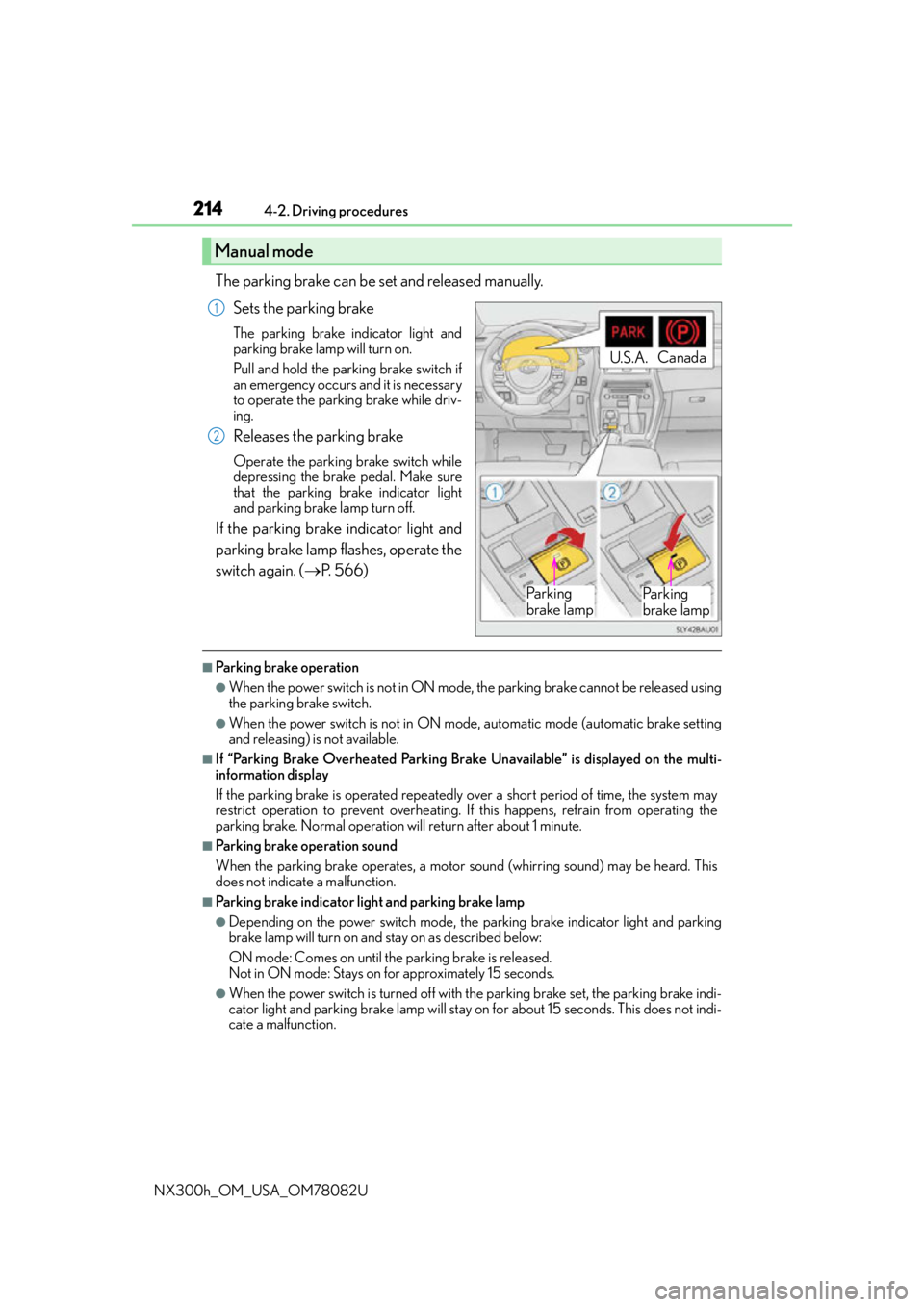
The parking brake can be set and released manually. Sets the parking brake
The parking brake indicator light and
parking brake lamp will turn on.
Pull and hold the parking brake switch if
an emergency occurs and it is necessary
to operate the parking brake while driv-
ing.
Releases the parking brake
Operate the parking brake switch while
depressing the brake pedal. Make sure
that the parking brake indicator light
and parking brake lamp turn off.
If the parking brake indicator light and
parking brake lamp flashes, operate the
switch again. ( P. 5 6 6 )
■Parking brake operation
●When the power switch is not in ON mode, the parking brake cannot be released using
the parking brake switch.
●When the power switch is not in ON mode, automatic mode (automatic brake setting
and releasing) is not available.
■If “Parking Brake Overheated Parking Brake Unavailable” is displayed on the multi-
information display
If the parking brake is operated repeatedly over a short period of time, the system may
restrict operation to prevent overheating. If this happens, refrain from operating the
parking brake. Normal operation will return after about 1 minute.
■Parking brake operation sound
When the parking brake operates, a motor sound (whirring sound) may be heard. This
does not indicate a malfunction.
■Parking brake indicator light and parking brake lamp
●Depending on the power switch mode, the parking brake indicator light and parking
brake lamp will turn on and stay on as described below:
ON mode: Comes on until the parking brake is released.
Not in ON mode: Stays on for approximately 15 seconds.
●When the power switch is turned off with th e parking brake set, the parking brake indi-
cator light and parking brake lamp will stay on for about 15 seconds. This does not indi-
cate a malfunction.
Manual mode
U.S.A. Canada
Pa r k i n g
brake lampPa r k i n g
brake lamp
1
2
Page 215 of 680
2154-2. Driving procedures
4
Driving
NX300h_OM_USA_OM78082U
■Changing the mode
When changing the automatic mode on/off, the message will be shown on the multi-
information display and the buzzer sounds.
■Parking brake engaged warning buzzer
A buzzer will sound if the vehicle is driven with the parking brake engaged. “Release
Parking Brake” is displayed on the multi-information display.
■Warning messages and buzzers
Warning messages and buzzers are used to indicate a system malfunction or to inform
the driver of the need for caution. If a warn ing message is shown on the multi-information
display, read the message and follow the instructions.
■If the brake system warning light comes on
P. 5 6 5
■Usage in winter time
P. 3 2 7
WA R N I N G
■When parking the vehicle
Do not leave a child in the vehicle alone. The parking brake may be released uninten-
tionally and there is the danger of the vehicle moving that may lead to an accident
resulting in death or serious injury.
NOTICE
■When parking the vehicle
Before you leave the vehicle, shift the shif t lever to P, set the parking brake and make
sure that the vehicle does not move.
■When the system malfunctions
Stop the vehicle in a safe place and check the warning messages.
■When the parking brake cannot be released due to a malfunction
Driving the vehicle with the parking brake set will lead to brake components overheat-
ing, which may affect braking performance and increase brake wear. Have the vehicle
inspected by contact your Lexus de aler immediately if this occurs.
Page 216 of 680
2164-2. Driving procedures
NX300h_OM_USA_OM78082U
Brake Hold
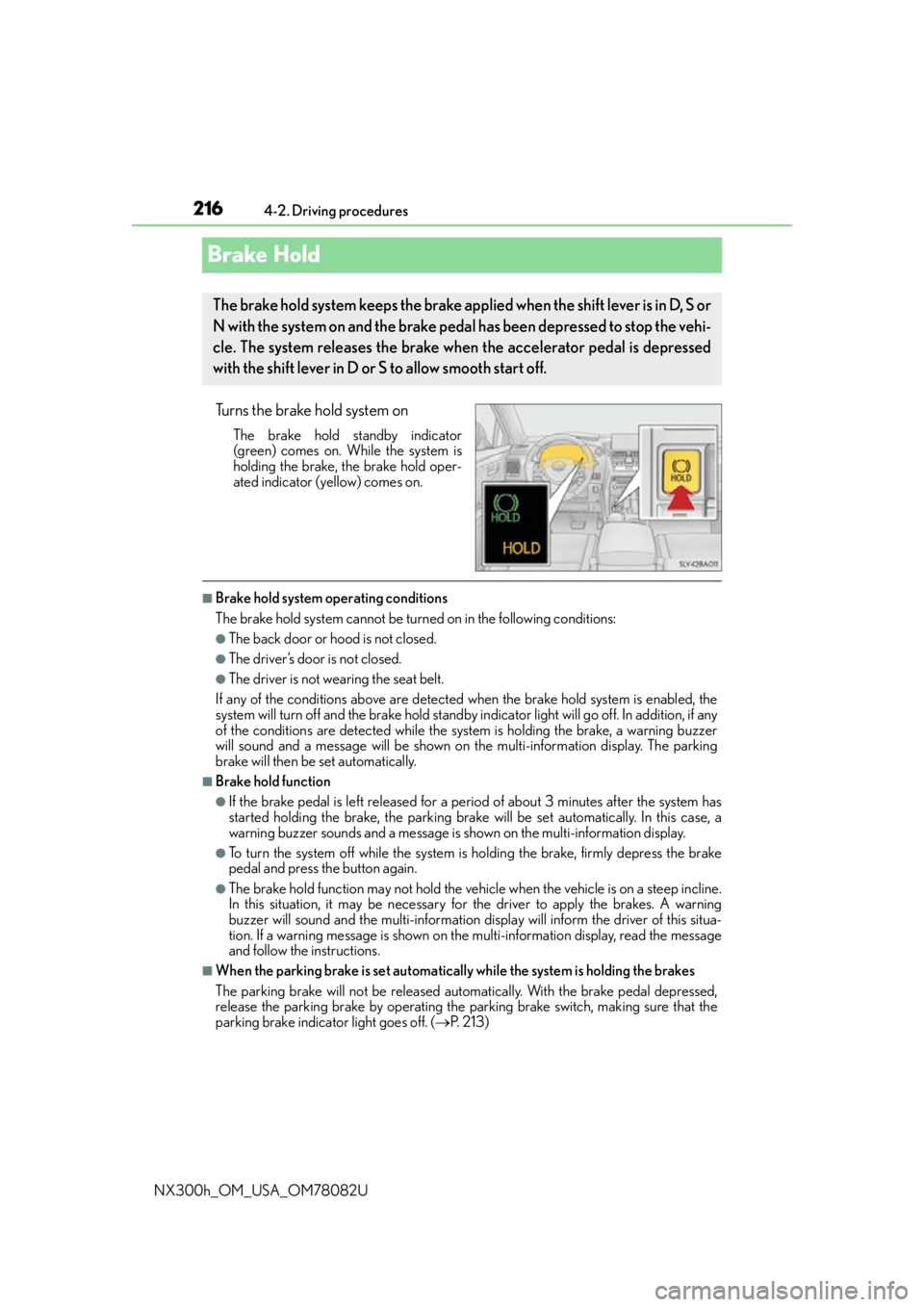
Turns the brake hold system on
The brake hold standby indicator
(green) comes on. While the system is
holding the brake, the brake hold oper-
ated indicator (yellow) comes on.
■Brake hold system operating conditions
The brake hold system cannot be turn ed on in the following conditions:
●The back door or hood is not closed.
●The driver’s door is not closed.
●The driver is not wearing the seat belt.
If any of the conditions above are detected when the brake hold system is enabled, the
system will turn off and the brake hold standby indicator light will go of f. In addition, if any
of the conditions are detected while the sy stem is holding the brake, a warning buzzer
will sound and a message will be shown on th e multi-information display. The parking
brake will then be set automatically.
■Brake hold function
●If the brake pedal is left released for a period of about 3 minutes after the system has
started holding the brake, the parking brake w ill be set automatically. In this case, a
warning buzzer sounds and a message is shown on the multi-information display.
●To turn the system off while the system is holding the brake, firmly depress the brake
pedal and press the button again.
●The brake hold function may not hold the vehicle when the vehicle is on a steep incline.
In this situation, it may be necessary for the driver to apply the brakes. A warning
buzzer will sound and the multi-information di splay will inform the driver of this situa-
tion. If a warning message is shown on the multi-information display, re a d t h e m e s s a g e
and follow the instructions.
■When the parking brake is set automatically while the system is holding the brakes
The parking brake will not be released automatically. With the brake pedal depressed,
release the parking brake by operating the parking brake switch, making sure that the
parking brake indicator light goes off. ( P. 2 1 3 )
The brake hold system keeps the brake applied when the shift lever is in D, S or
N with the system on and the brake pedal has been depressed to stop the vehi-
cle. The system releases the brake when the accelerator pedal is depressed
with the shift lever in D or S to allow smooth start off.
Page 217 of 680
2174-2. Driving procedures
4
Driving
NX300h_OM_USA_OM78082U
■If “Brake Hold Fault Depress Brake to Deactivate Visit Your Dealer” is displayed on the
multi-information display
The system may be malfunctioning. Have the vehicle inspected by your Lexus dealer.
■Warning messages and buzzers
Warning messages and buzzers are used to indicate a system malfunction or to inform
the driver of the need for caution. If a warn ing message is shown on the multi-information
display, read the message and follow the instructions.
■If the brake hold operated indicator flashes
P. 5 6 6
WA R N I N G
■When the vehicle is on a steep incline
When using the brake hold system on a stee p incline exercise caution. The brake hold
function may not hold the vehicle in such a situation.
■When stopped on a slippery road
The system cannot stop the vehicle when the gripping ability of the tires has been
exceeded. Do not use the system when stopped on a slippery road.
NOTICE
■When parking the vehicle
The brake hold system is not designed for use when parking the vehicle for a long
period of time. Turning the power switch off while the system is holding the brake may
release the brake, which would cause the vehicle to move. When operating the power
switch, depress the brake pedal, shift the shift lever to P and set the parking brake.
Page 240 of 680
2404-5. Using the driving support systems
NX300h_OM_USA_OM78082U
Dynamic radar cruise control
Without accelerator pedal operation by the driver, in vehicle-to-vehicle distance
control mode, the vehicle automatically accelerates and decelerates in accor-
dance to the changes in speed of the pr eceding vehicle. In constant speed con-
trol mode, the vehicle runs at a fixed speed.
Use the dynamic radar cruise control on freeways and highways.
●Vehicle-to-vehicle distance control mode ( P. 2 4 1 )
●Constant speed control mode ( P. 2 4 6 )
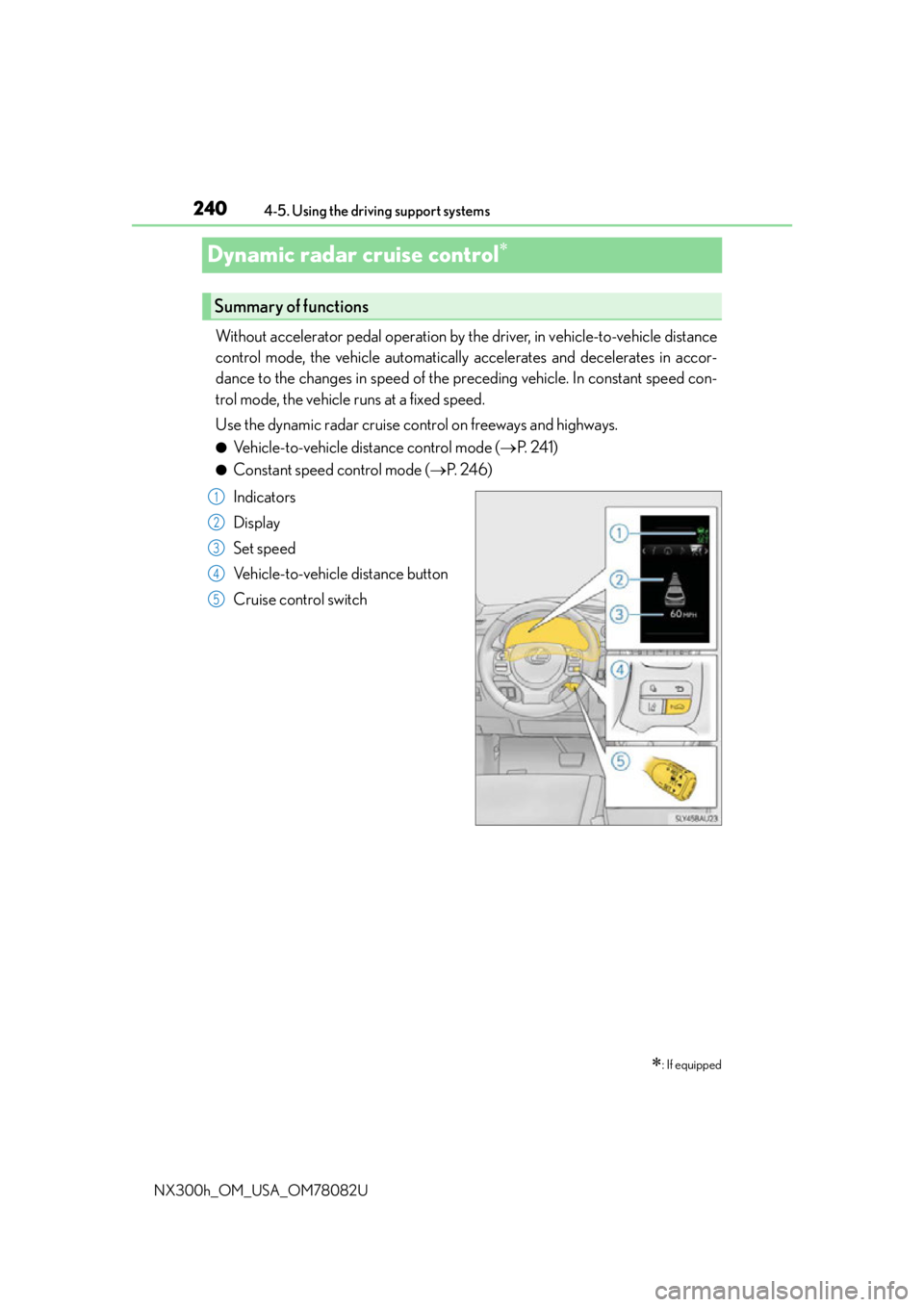
Indicators
Display
Set speed
Vehicle-to-vehicle distance button
Cruise control switch
: If equipped
Summary of functions
1
2
3
4
5
Page 242 of 680
2424-5. Using the driving support systems
NX300h_OM_USA_OM78082U
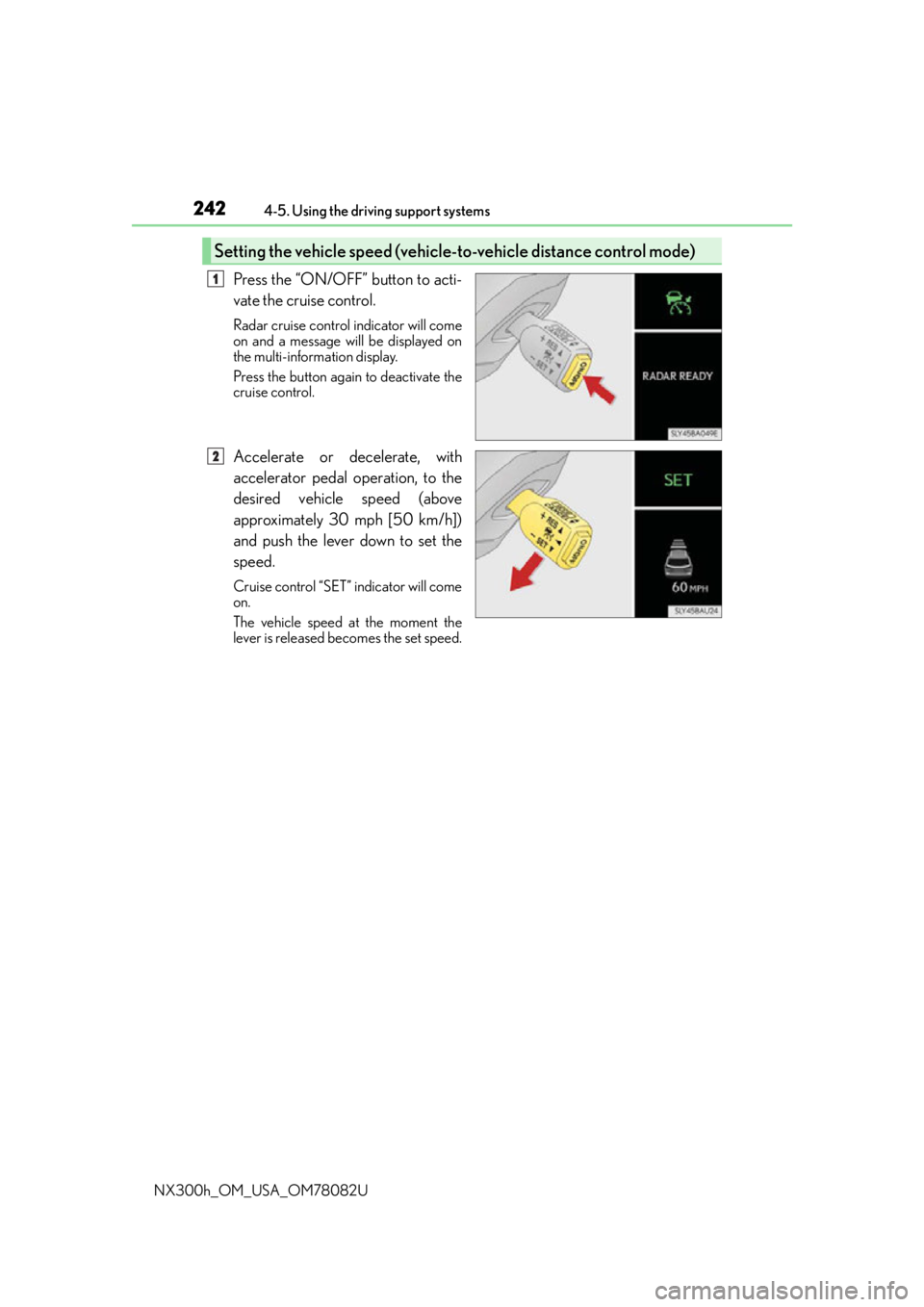
Press the “ON/OFF” button to acti-
vate the cruise control.
Radar cruise control indicator will come
on and a message will be displayed on
the multi-information display.
Press the button again to deactivate the
cruise control.
Accelerate or decelerate, with
accelerator pedal operation, to the
desired vehicle speed (above
approximately 30 mph [50 km/h])
and push the lever down to set the
speed.
Cruise control “SET” indicator will come
on.
The vehicle speed at the moment the
lever is released be comes the set speed.
Setting the vehicle speed (vehicle-to-vehicle distance control mode)
1
2
Page 244 of 680
2444-5. Using the driving support systems
NX300h_OM_USA_OM78082U
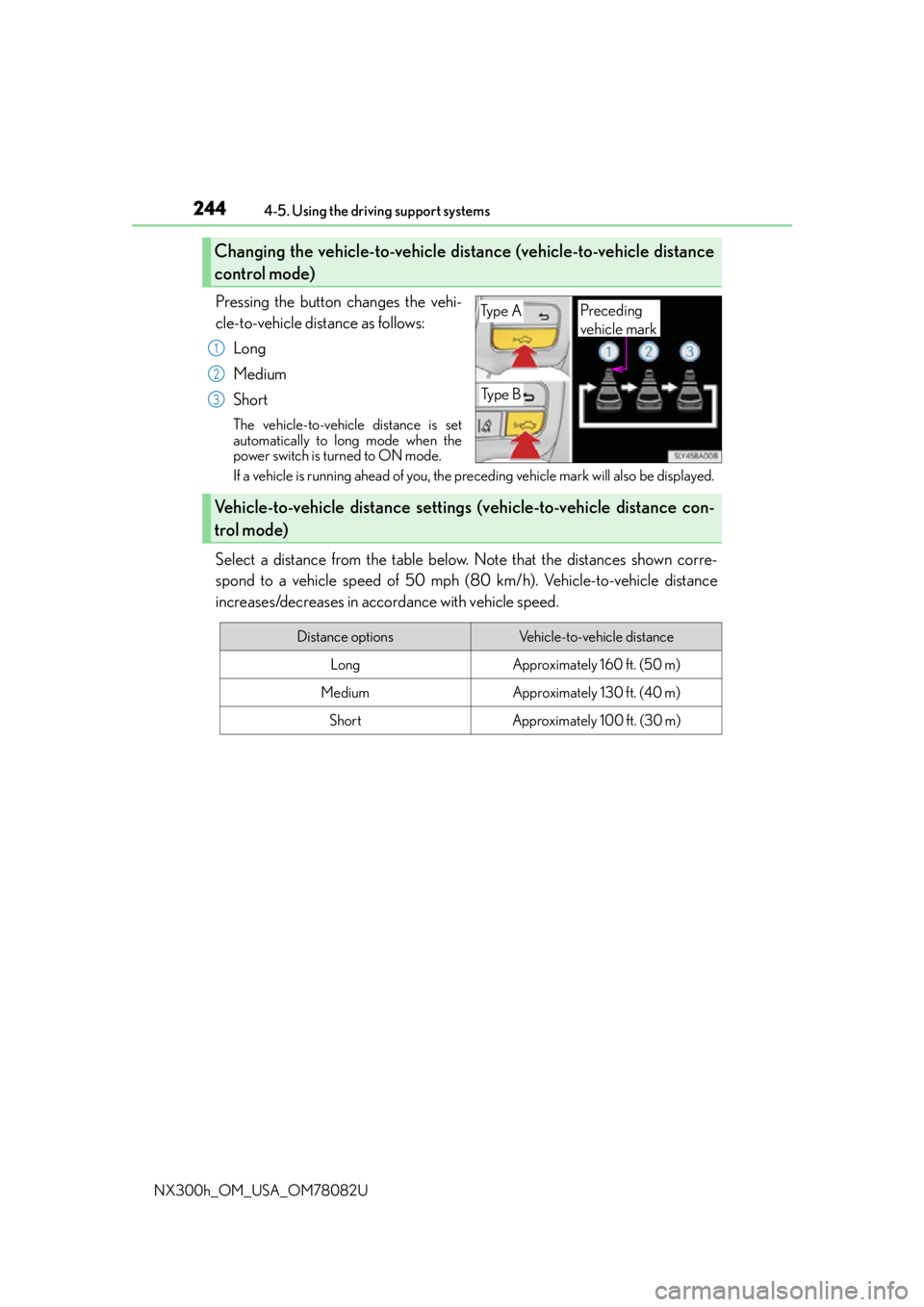
Pressing the button changes the vehi-
cle-to-vehicle distance as follows: Long
Medium
Short
The vehicle-to-vehicle distance is set
automatically to long mode when the
power switch is turned to ON mode.
If a vehicle is running ahead of you, the preceding vehicle mark will also be displayed.
Select a distance from the table below. Note that the distances shown corre-
spond to a vehicle speed of 50 mph (8 0 km/h). Vehicle-to-vehicle distance
increases/decreases in accordance with vehicle speed.
Changing the vehicle-to-vehicle distance (vehicle-to-vehicle distance
control mode)
Ty p e A
Ty p e B
Preceding
vehicle mark
1
2
3
Vehicle-to-vehicle distance settings (vehicle-to-vehicle distance con-
trol mode)
Distance optionsVehicle-to-vehicle distance
LongApproximately 160 ft. (50 m)
MediumApproximately 130 ft. (40 m)
ShortApproximately 100 ft. (30 m)
Page 245 of 680
2454-5. Using the driving support systems
4
Driving
NX300h_OM_USA_OM78082U
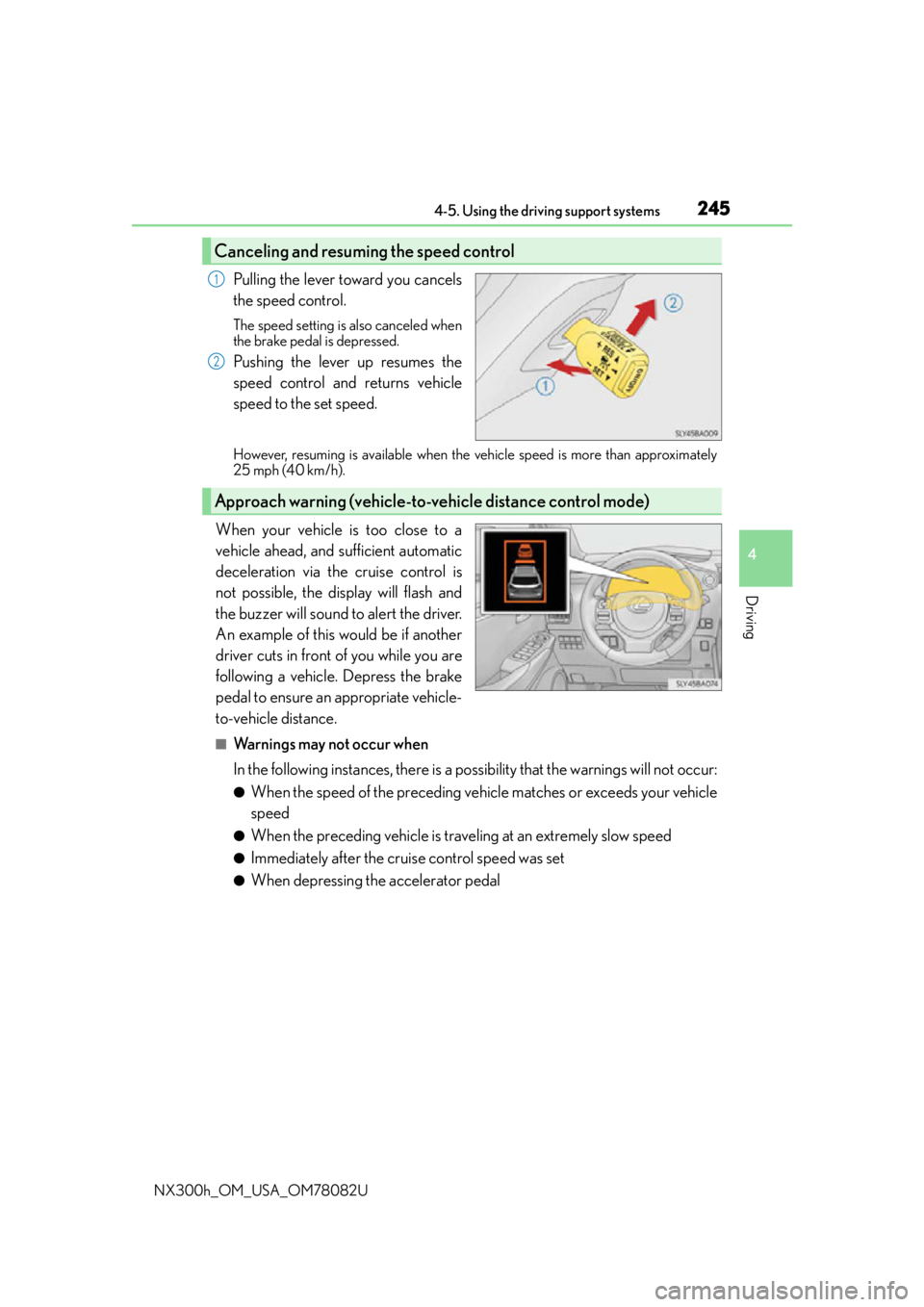
Pulling the lever toward you cancels
the speed control.
The speed setting is also canceled when
the brake pedal is depressed.
Pushing the lever up resumes the
speed control and returns vehicle
speed to the set speed.
However, resuming is available when the vehicle speed is more than approximately
25 mph (40 km/h).
When your vehicle is too close to a
vehicle ahead, and sufficient automatic
deceleration via the cruise control is
not possible, the display will flash and
the buzzer will sound to alert the driver.
An example of this would be if another
driver cuts in front of you while you are
following a vehicle. Depress the brake
pedal to ensure an appropriate vehicle-
to-vehicle distance.
■Warnings may not occur when
In the following instances, there is a possibility that the warnings will not occur:
●When the speed of the preceding vehicle matches or exceeds your vehicle
speed
●When the preceding vehicle is traveling at an extremely slow speed
●Immediately after the cruise control speed was set
●When depressing the accelerator pedal
Canceling and resuming the speed control
1
2
Approach warning (vehicle-to-vehicle distance control mode)