change time LEXUS NX300h 2018 Owner's Manual
[x] Cancel search | Manufacturer: LEXUS, Model Year: 2018, Model line: NX300h, Model: LEXUS NX300h 2018Pages: 460, PDF Size: 13.57 MB
Page 209 of 460
2094-5. Using the driving support systems
LEXUS NX300h Owners Manu-
al_USA_OM78212U 4
Driving rounding brightness changes suddenly,
such as at the entrance or exit of a tunnel
• When a very bright light, such as the sun
or the headlights of oncoming traffic,
shines directly in to the camera sensor
• When the surrounding area is dim, such
as at dawn or dusk, or while at night or in
a tunnel
• After the hybrid system has started the
vehicle has not been driven for a certain
amount of time
• While making a left/right turn and for a
few seconds after makin g a left/right turn
• While driving on a curve and for a few
seconds after driving on a curve
• If your vehicle is skidding
• If the front of the vehicle is raised or low-
ered
• If the wheels are misaligned
• If a wiper blade is blocking the camera
sensor
• The vehicle is wobbling.
• The vehicle is being driven at extremely
high speeds.
• When driving on a hill
• If the radar sensor or camera sensor is
misaligned●
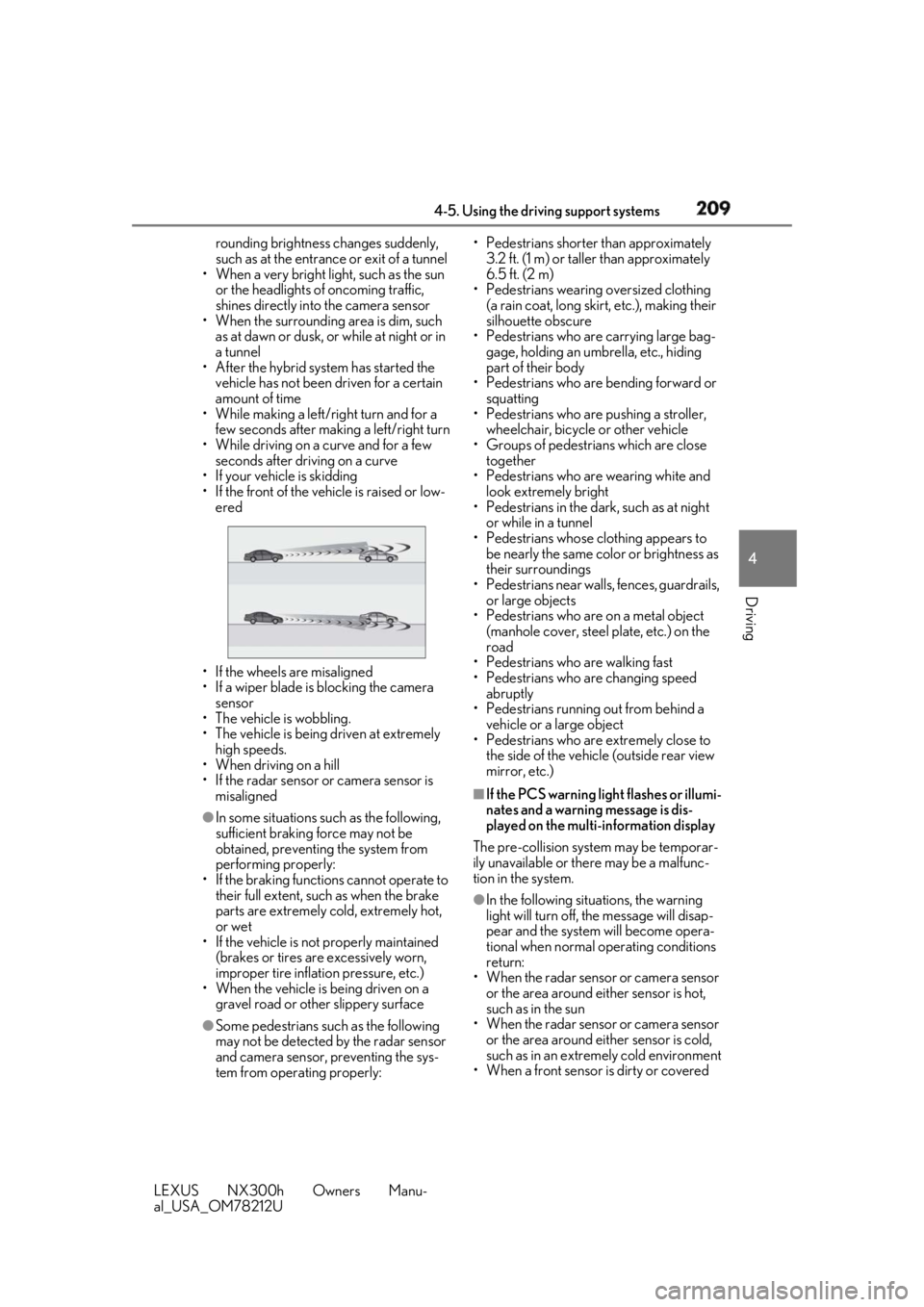
In some situations such as the following,
sufficient braking force may not be
obtained, preventing the system from
performing properly:
• If the braking functions cannot operate to
their full extent, such as when the brake
parts are extremely cold, extremely hot,
or wet
• If the vehicle is not properly maintained
(brakes or tires are excessively worn,
improper tire inflation pressure, etc.)
• When the vehicle is being driven on a
gravel road or other slippery surface
●
Some pedestrians such as the following
may not be detected by the radar sensor
and camera sensor, preventing the sys-
tem from operating properly: • Pedestrians shorter than approximately
3.2 ft. (1 m) or taller than approximately
6.5 ft. (2 m)
• Pedestrians wearing oversized clothing
(a rain coat, long skir t, etc.), making their
silhouette obscure
• Pedestrians who are carrying large bag-
gage, holding an umbrella, etc., hiding
part of their body
• Pedestrians who are bending forward or
squatting
• Pedestrians who are pushing a stroller,
wheelchair, bicycle or other vehicle
• Groups of pedestrians which are close
together
• Pedestrians who are wearing white and
look extremely bright
• Pedestrians in the dark, such as at night
or while in a tunnel
• Pedestrians whose clothing appears to
be nearly the same color or brightness as
their surroundings
• Pedestrians near walls, fences, guardrails,
or large objects
• Pedestrians who are on a metal object
(manhole cover, steel plate, etc.) on the
road
• Pedestrians who are walking fast
• Pedestrians who are changing speed
abruptly
• Pedestrians running out from behind a
vehicle or a large object
• Pedestrians who are extremely close to
the side of the vehicle (outside rear view
mirror, etc.) ■
If the PCS warning light flashes or illumi-
nates and a warning message is dis-
played on the multi-information display
The pre-collision system may be temporar-
ily unavailable or there may be a malfunc-
tion in the system.
●
In the following situations, the warning
light will turn off, the message will disap-
pear and the system will become opera-
tional when normal operating conditions
return:
• When the radar sensor or camera sensor
or the area around either sensor is hot,
such as in the sun
• When the radar sensor or camera sensor
or the area around either sensor is cold,
such as in an extremely cold environment
• When a front sensor is dirty or covered
Page 216 of 460
216 4-5. Using the driving support systems
LEXUS NX300h Owners Manu-
al_USA_OM78212U If a different warning message is displayed,
follow the instructio ns displayed on the
screen.
■
Customization
The following settings can be changed.“Front Camera
Unavailable” The operation con-
ditions of the cam-
era sensor
(temperature, etc.)
are not met.
→ When the opera-
tion conditions
of the camera
sensor (tem-
perature, etc.)
are met, the LDA
system will
become avail-
able. Turn the
LDA system off,
wait for a little
while, and then
turn the LDA
system back on.Warning message Details/Actions
“Lane Departure
Alert Unavailable” The LDA system is
temporarily can-
celed due to a mal-
function in a sensor
other than the cam-
era sensor.
→ Turn the LDA
system off and
follow the appro-
priate trouble-
shooting
procedures for
the warning
message. After-
ward, drive the
vehicle for a
short time, and
then turn the
LDA system
back on.
“Lane Departure
Alert Unavailable
Below Approx
50km/h” The LDA system
cannot be used as
the vehicle speed is
less than approxi-
mately 32 mph (50
km/h).
→ Drive the vehicle
at approxi-
mately 32 mph
(50 km/h) or
more.
Function Setting details
Lane departure alert
function Adjust alert sensitiv-
ity
Adjust alert typeWarning message Details/Actions
Page 220 of 460
220 4-5. Using the driving support systems
LEXUS NX300h Owners Manu-
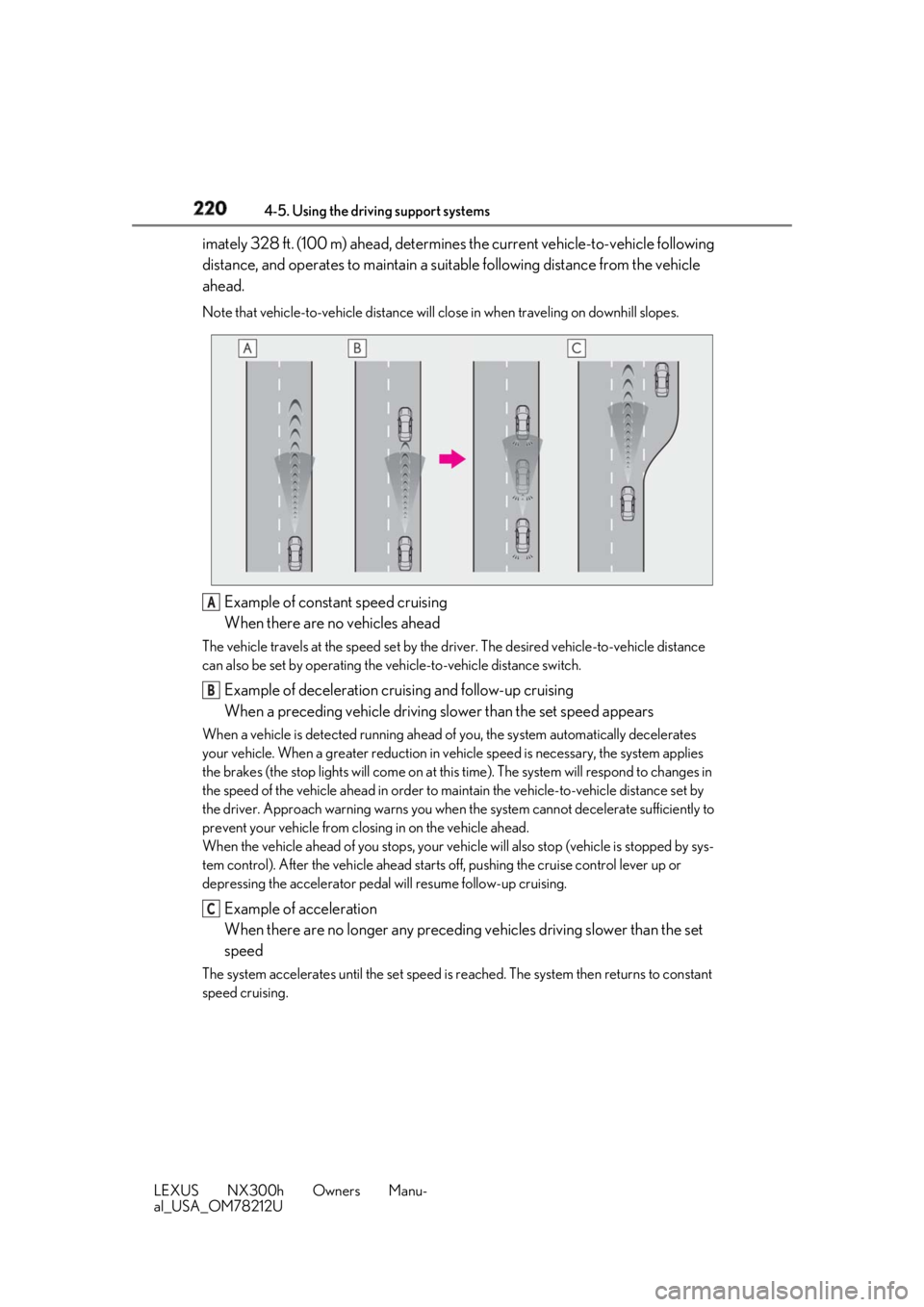
al_USA_OM78212U imately 328 ft. (100 m) ahead, determines the current vehicle-to-vehicle following
distance, and operates to maintain a suit able following distance from the vehicle
ahead. Note that vehicle-to-vehicle distance will close in when tr aveling on downhill slopes.
Example of constant speed cruising
When there are no vehicles aheadThe vehicle travels at the speed set by the driver. The desired vehicle-to-vehicle distance
can also be set by operating the ve hicle-to-vehicle distance switch.
Example of deceleration cruising and follow-up cruising
When a preceding vehicle driving slower than the set speed appearsWhen a vehicle is detected running ahead of you, the system automatically decelerates
your vehicle. When a greater reduction in vehicle speed is necessary, the system applies
the brakes (the stop lights will come on at this time). The sy stem will respond to changes in
the speed of the vehicle ahead in order to maintain the vehicle-to-vehicle distance set by
the driver. Approach warning warns you when th e system cannot decelera te sufficiently to
prevent your vehicle from closing in on the vehicle ahead.
When the vehicle ahead of you stops, your vehi cle will also stop (vehicle is stopped by sys-
tem control). After the vehicle ahead starts off, pushing the cruise control lever up or
depressing the accelerator pedal will resume follow-up cruising.
Example of acceleration
When there are no longer any preceding vehicles driving slower than the set
speedThe system accelerates until the set speed is re ached. The system then returns to constant
speed cruising. A
B
C
Page 222 of 460
222 4-5. Using the driving support systems
LEXUS NX300h Owners Manu-
al_USA_OM78212U km/h (0.6 mph) *2
each time the lever is
operated
Large adjustment: Increases or decreases
in 1 mph (1.6 km/h) *1
or 1 km/h (0.6 mph) *2
increments for as long as the lever is held
For Canada, Guam and Puerto Rico Fine adjustment: By 1 mph (1.6 km/h) *1
or 1
km/h (0.6 mph) *2
each time the lever is
operated
Large adjustment: Increases or decreases
in 5 mph (8 km/h) *2
or 5 km/h (3.1 mph) *1
increments for as long as the lever is held
In the constant speed control mode
( → P.224), the set speed will be
increased or decreased as follows:
Fine adjustment: By 1 mph (1.6 km/h) *1
or 1 km/h (0.6 mph) *2
each time the
lever is operated
Large adjustment: The speed will con-
tinue to change while the lever is held. *1
: When the set speed is shown in “MPH” *2
: When the set speed is shown in “km/h”
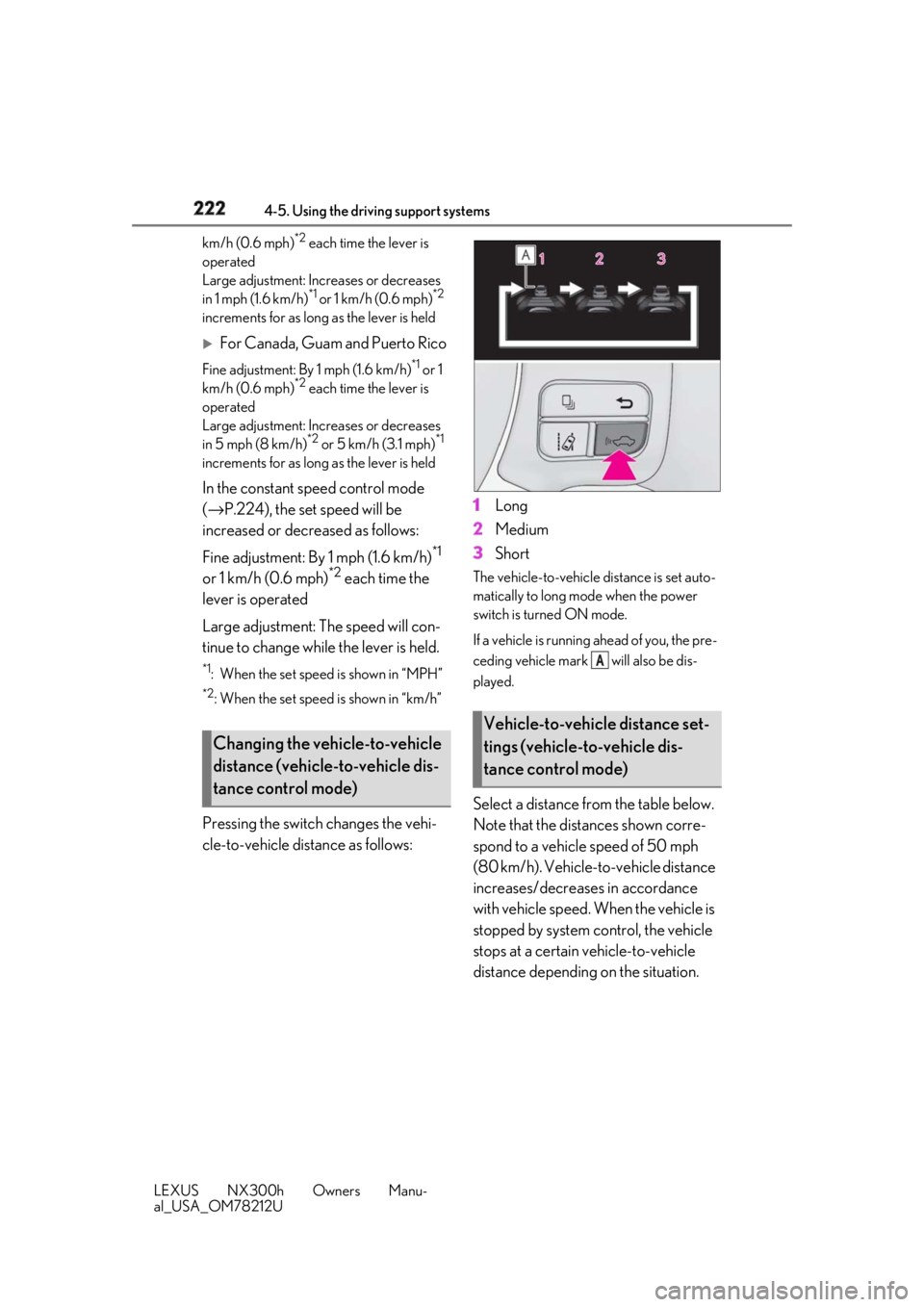
Pressing the switch changes the vehi-
cle-to-vehicle distance as follows: 1 Long
2 Medium
3 Short The vehicle-to-vehicle distance is set auto-
matically to long mode when the power
switch is turned ON mode.
If a vehicle is running ahead of you, the pre-
ceding vehicle mark will also be dis-
played.
Select a distance from the table below.
Note that the distances shown corre-
spond to a vehicle speed of 50 mph
(80 km/h). Vehicle-to-vehicle distance
increases/decreases in accordance
with vehicle speed. When the vehicle is
stopped by system control, the vehicle
stops at a certain vehicle-to-vehicle
distance depending on the situation.Changing the vehicle-to-vehicle
distance (vehicle-to-vehicle dis-
tance control mode) Vehicle-to-vehicle distance set-
tings (vehicle-to-vehicle dis-
tance control mode) A
Page 231 of 460
2314-5. Using the driving support systems
LEXUS NX300h Owners Manu-
al_USA_OM78212U 4
Driving ■
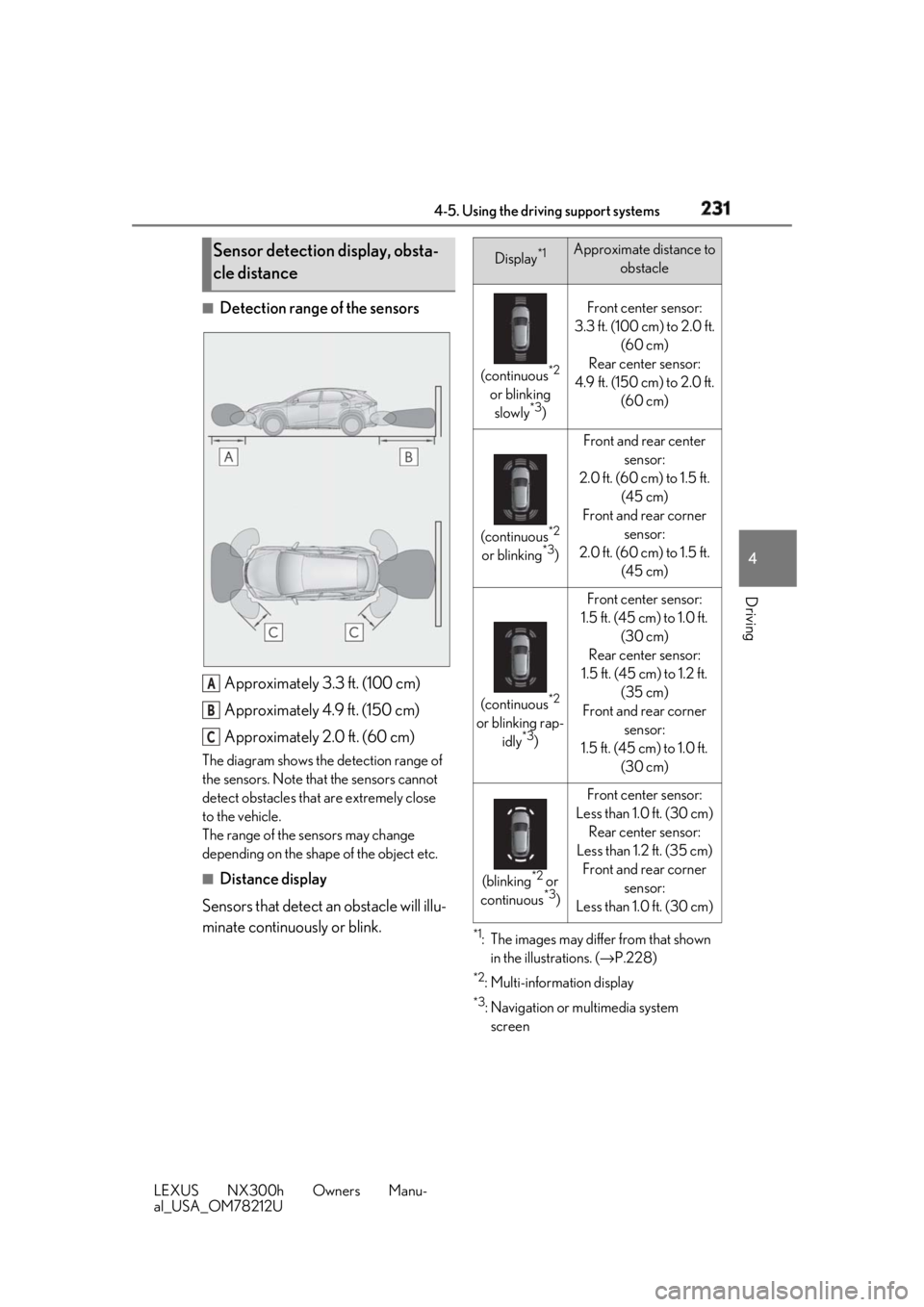
Detection range of the sensors
Approximately 3.3 ft. (100 cm)
Approximately 4.9 ft. (150 cm)
Approximately 2.0 ft. (60 cm)The diagram shows the detection range of
the sensors. Note that the sensors cannot
detect obstacles that are extremely close
to the vehicle.
The range of the sensors may change
depending on the shape of the object etc.
■
Distance display
Sensors that detect an obstacle will illu-
minate continuously or blink. *1
: The images may differ from that shown
in the illustrations. ( → P.228)*2
:Multi-information display *3
: Navigation or multimedia system
screenSensor detection display, obsta-
cle distance
A
B
C Display *1
Approximate distance to
obstacle
(continuous *2
or blinking
slowly *3
) Front center sensor:
3.3 ft. (100 cm) to 2.0 ft.
(60 cm)
Rear center sensor:
4.9 ft. (150 cm) to 2.0 ft.
(60 cm)
(continuous *2
or blinking *3
) Front and rear center
sensor:
2.0 ft. (60 cm) to 1.5 ft.
(45 cm)
Front and rear corner
sensor:
2.0 ft. (60 cm) to 1.5 ft.
(45 cm)
(continuous *2
or blinking rap-
idly *3
) Front center sensor:
1.5 ft. (45 cm) to 1.0 ft.
(30 cm)
Rear center sensor:
1.5 ft. (45 cm) to 1.2 ft.
(35 cm)
Front and rear corner
sensor:
1.5 ft. (45 cm) to 1.0 ft.
(30 cm)
(blinking *2
or
continuous *3
) Front center sensor:
Less than 1.0 ft. (30 cm)
Rear center sensor:
Less than 1.2 ft. (35 cm)
Front and rear corner
sensor:
Less than 1.0 ft. (30 cm)
Page 247 of 460
2474-5. Using the driving support systems
LEXUS NX300h Owners Manu-
al_USA_OM78212U 4
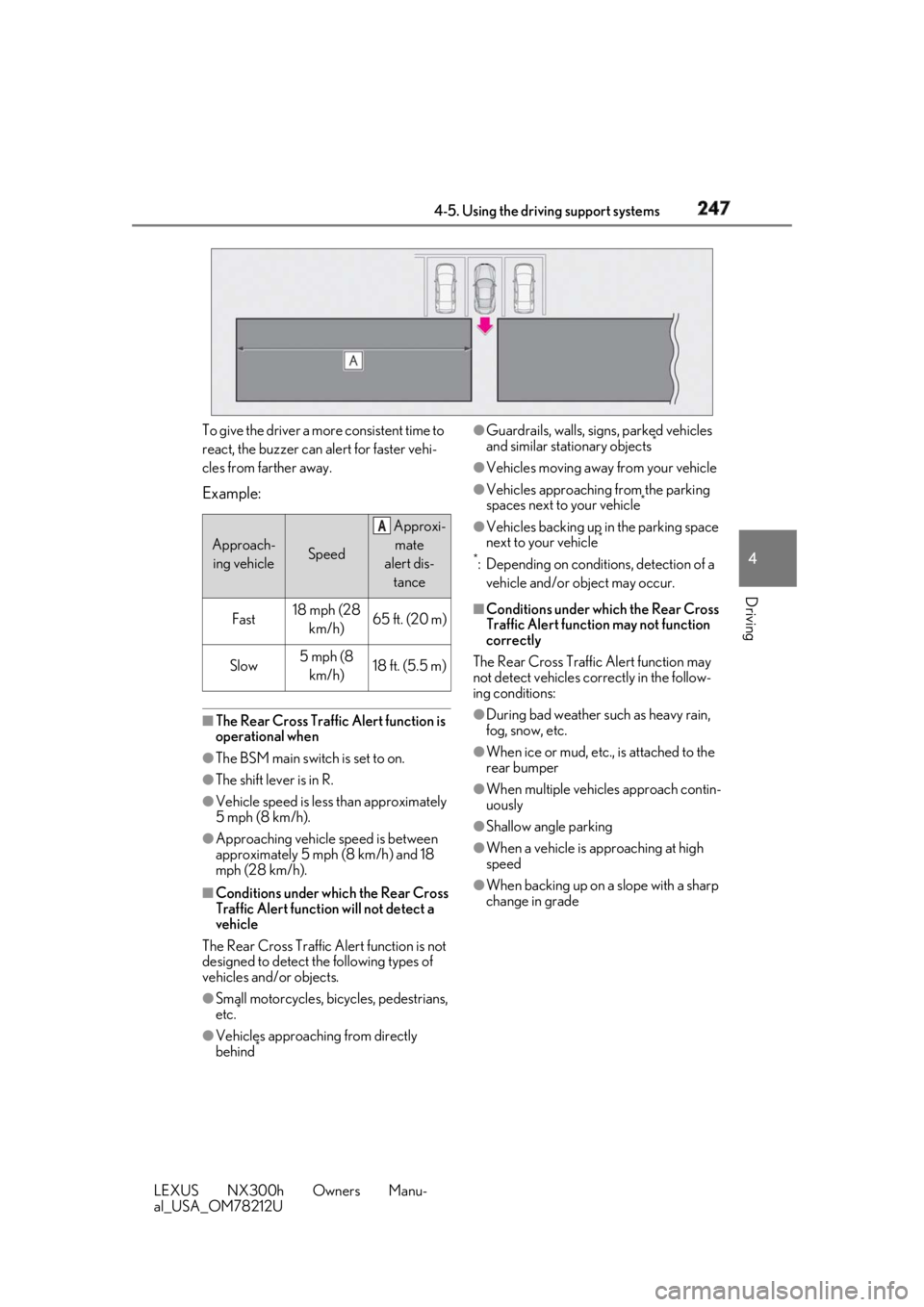
Driving To give the driver a more consistent time to
react, the buzzer can alert for faster vehi-
cles from farther away.
Example:
■
The Rear Cross Traffic Alert function is
operational when●
The BSM main switch is set to on.●
The shift lever is in R.●
Vehicle speed is less than approximately
5 mph (8 km/h).●
Approaching vehicle speed is between
approximately 5 mph (8 km/h) and 18
mph (28 km/h).
■
Conditions under which the Rear Cross
Traffic Alert function will not detect a
vehicle
The Rear Cross Traffic Alert function is not
designed to detect the following types of
vehicles and/or objects.
●
Small motorcycles, bicycles, pedestrians,
etc. *
●
Vehicles approaching from directly
behind * ●
Guardrails, walls, signs, parked vehicles
and similar stationary objects *
●
Vehicles moving away from your vehicle ●
Vehicles approaching from the parking
spaces next to your vehicle *
●
Vehicles backing up in the parking space
next to your vehicle *
*
: Depending on conditions, detection of a
vehicle and/or object may occur. ■
Conditions under which the Rear Cross
Traffic Alert function may not function
correctly
The Rear Cross Traffic Alert function may
not detect vehicles correctly in the follow-
ing conditions: ●
During bad weather su ch as heavy rain,
fog, snow, etc. ●
When ice or mud, etc., is attached to the
rear bumper ●
When multiple vehicl es approach contin-
uously ●
Shallow angle parking ●
When a vehicle is approaching at high
speed
●
When backing up on a slope with a sharp
change in gradeApproach-
ing vehicle Speed Approxi-
mate
alert dis-
tance
Fast 18 mph (28
km/h) 65 ft. (20 m)
Slow 5 mph (8
km/h) 18 ft. (5.5 m) A
Page 264 of 460
264 5-1. Remote Touch
LEXUS NX300h Owners Manu-
al_USA_OM78212U 5-1.Remote Touch
■
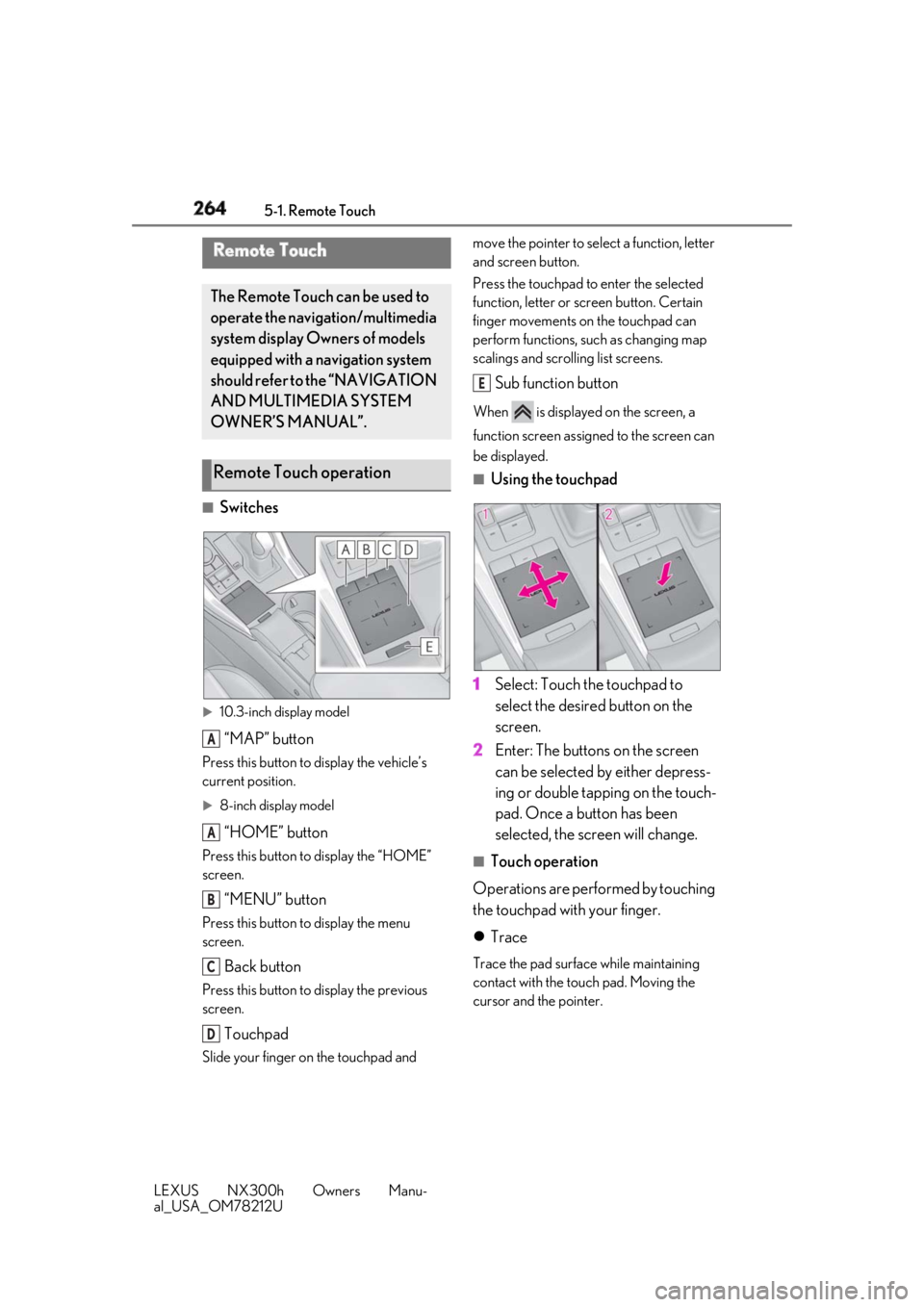
Switches
10.3-inch display model
“MAP” buttonPress this button to display the vehicle’s
current position.
8-inch display model
“HOME” buttonPress this button to display the “HOME”
screen.
“MENU” buttonPress this button to display the menu
screen.
Back buttonPress this button to display the previous
screen.
TouchpadSlide your finger on the touchpad and move the pointer to select a function, letter
and screen button.
Press the touchpad to enter the selected
function, letter or screen button. Certain
finger movements on the touchpad can
perform functions, su ch as changing map
scalings and scrolling list screens.
Sub function button When is displayed on the screen, a
function screen assigned to the screen can
be displayed. ■
Using the touchpad
1 Select: Touch the touchpad to
select the desired button on the
screen.
2 Enter: The buttons on the screen
can be selected by either depress-
ing or double tapping on the touch-
pad. Once a button has been
selected, the screen will change. ■
Touch operation
Operations are performed by touching
the touchpad with your finger.
Trace Trace the pad surface while maintaining
contact with the touch pad. Moving the
cursor and the pointer.Remote Touch The Remote Touch can be used to
operate the navigation/multimedia
system display Owners of models
equipped with a navigation system
should refer to the “NAVIGATION
AND MULTIMEDIA SYSTEM
OWNER’S MANUAL”.
Remote Touch operation
A
A
B
C
D E
Page 269 of 460
2695-2. Using the air conditio ning system and defogger
LEXUS NX300h Owners Manu-
al_USA_OM78212U 5
Interior features ■
Adjusting the temperature setting
Operate the temperature control
switch upwards to increase the tem-
perature and downwards to decrease
the temperature. ■
Adjusting the fan speed setting
Operate the fan speed control switch
upwards to increase the fan speed and
downwards to decrease the fan speed.
Press the off switch to turn the fan off. ■
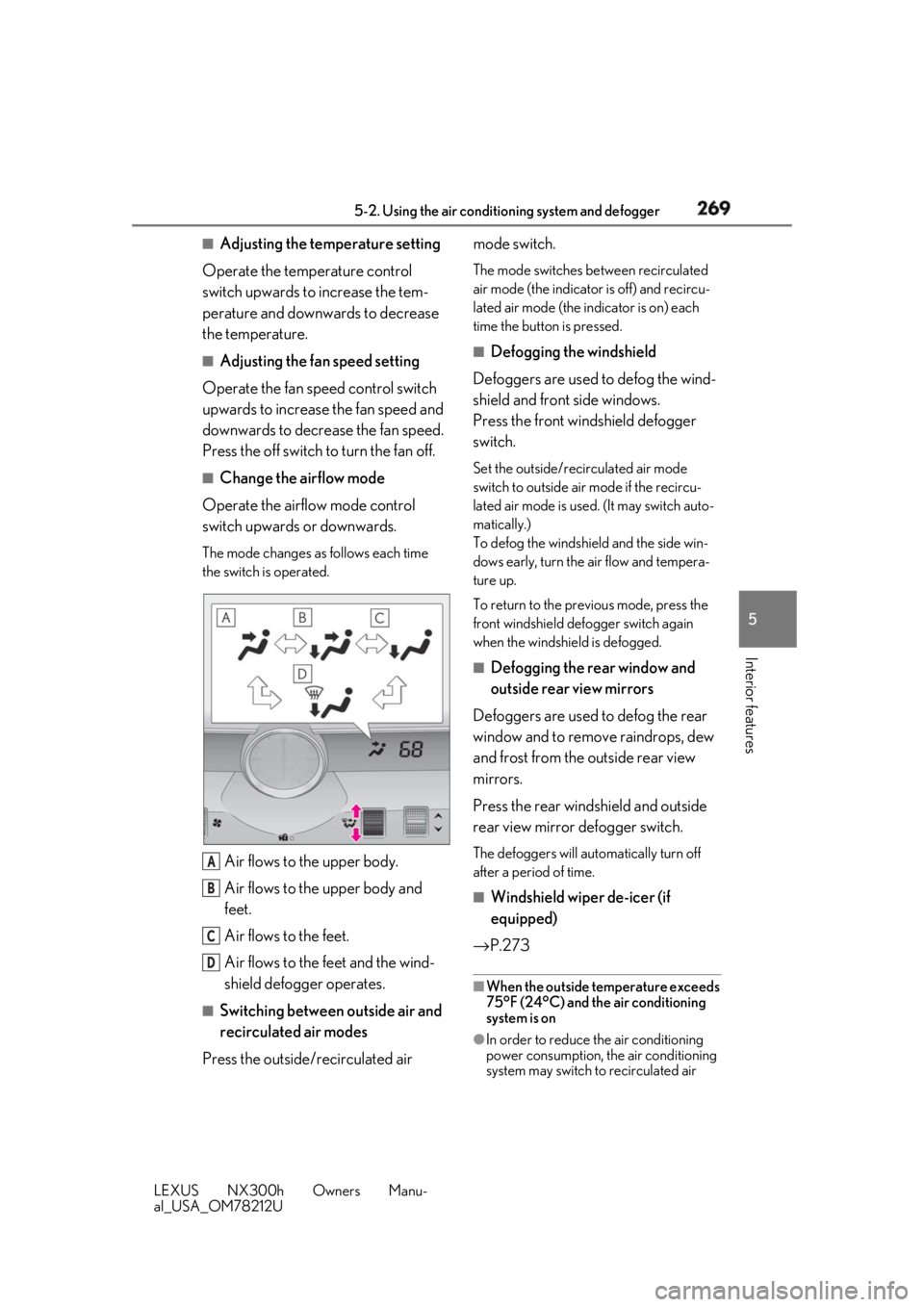
Change the airflow mode
Operate the airflow mode control
switch upwards or downwards. The mode changes as follows each time
the switch is operated.
Air flows to the upper body.
Air flows to the upper body and
feet.
Air flows to the feet.
Air flows to the feet and the wind-
shield defogger operates. ■
Switching between outside air and
recirculated air modes
Press the outside/recirculated air mode switch. The mode switches between recirculated
air mode (the indicator is off) and recircu-
lated air mode (the indicator is on) each
time the button is pressed. ■
Defogging the windshield
Defoggers are used to defog the wind-
shield and front side windows.
Press the front windshield defogger
switch. Set the outside/recirculated air mode
switch to outside air mode if the recircu-
lated air mode is used. (It may switch auto-
matically.)
To defog the windshield and the side win-
dows early, turn the air flow and tempera-
ture up.
To return to the previous mode, press the
front windshield defo gger switch again
when the windshield is defogged. ■
Defogging the rear window and
outside rear view mirrors
Defoggers are used to defog the rear
window and to remove raindrops, dew
and frost from the outside rear view
mirrors.
Press the rear windshield and outside
rear view mirror defogger switch. The defoggers will automatically turn off
after a period of time.
■
Windshield wiper de-icer (if
equipped)
→ P.273 ■
When the outside temperature exceeds
75°F (24°C) and the air conditioning
system is on
●
In order to reduce the air conditioning
power consumption, the air conditioning
system may switch to recirculated air A
B
C
D
Page 270 of 460
270 5-2. Using the air conditio ning system and defogger
LEXUS NX300h Owners Manu-
al_USA_OM78212U mode automatically.
This may also reduce fuel consumption.●
Recirculated air mode is selected as a
default mode when the power switch is
turned to ON mode.●
It is possible to switch to outside air mode
at any time by pressing the outside/recir-
culated air mode switch.■
Fogging up of the windows●
The windows will easily fog up when the
humidity in the vehicle is high. Pressing
“A/C” button or selecting “A/C” will
dehumidify the air from the outlets and
defog the windshield effectively.●
If you turn “A/C” off, the windows may
fog up more easily.●
The windows may fog up if the recircu-
lated air mode is used.■
Outside/recirculated air mode●
When driving on dusty roads such as tun-
nels or in heavy traffic, set the outside/
recirculated air mode switch to the recir-
culated air mode. This is effective in pre-
venting outside air from entering the
vehicle interior. During cooling opera-
tion, setting the recirculated air mode will
also cool the vehicle interior effectively.●
Outside/recirculated air mode may auto-
matically switch de pending on the tem-
perature setting or the inside
temperature.■
Registering air condit ioning settings to
electronic keys (vehicles with driving
position memory)●
Unlocking the vehicle using an electronic
key and turning the power switch to ON
mode will recall that key’s registered air
conditioning settings.
●
When the power switch is turned off, the
current air conditioning settings will auto-
matically be registered to the electronic
key that was used to unlock the vehicle.
●
The system may not operate correctly if
more than one electr onic key is in the
vicinity or if the smart access system with
push-button start is used to unlock a pas-
senger door.
●
The doors that can recall the air condi- tioning setting when unlocked using the
smart access system with push-button
start can be changed. *
For details, con-
tact your Lexus dealer. *
: The doors that can recall the driving posi-
tion memory are changed at the same
time. ■
Operation of the air conditioning sys-
tem in Eco mode ●
In the Eco mode, the air conditioning sys-
tem is controlled as follows to prioritize
fuel efficiency
• Engine speed and compressor operation
controlled to restrict heating/cooling
capacity
• Fan speed restricted when automatic
mode is selected ●
To improve air conditioning performance,
perform the following operations
• Adjust the fan speed
• Adjust the temperature setting
• Turn off Eco mode ●
Even when the drive mode is set to Eco
mode, the air conditioning eco mode can
be turned off by pressing the ■
When the outside temperature is low
The dehumidification function may not
operate even when “A/C” is pressed or “A/
C” is selected. ■
Ventilation and air conditioning odors ●
To let fresh air in, set the air conditioning
system to the outside air mode. ●
During use, various odors from inside and
outside the vehicle may enter into and
accumulate in the air conditioning sys-
tem. This may then cause odor to be
emitted from the vents.
●
To reduce potential odors from occur-
ring:
• It is recommended that the air condition-
ing system be set to outside air mode
prior to turning the vehicle off.
• The start timing of the blower may be
delayed for a short pe riod of time imme-
diately after the air conditioning system is
started in automatic mode.
Page 273 of 460
2735-2. Using the air conditio ning system and defogger
LEXUS NX300h Owners Manu-
al_USA_OM78212U 5
Interior features “A/C” button or selecting “A/C” will
dehumidify the air from the outlets and
defog the windshield effectively.●
If you turn “A/C” off, the windows may
fog up more easily.●
The windows may fog up if the recircu-
lated air mode is used.■
Windshield wiper de-icer (if equipped)
This feature is used to prevent ice from
building up on the wi ndshield and wiper
blades.
Select on the option control screen.
When the windshield wiper de-icer on,
is displayed on the air conditioning
control screen.
The windshield wiper de-icer will automati-
cally turn off after a period of time. ■
Eco air conditioning mode
When Eco mode is selected using the drive
mode select switch, eco air conditioning
mode turns on. When a drive mode other
than Eco mode is selected, eco air condi-
tioning mode may turn off. ■
S-FLOW mode
Priority for airflow is given to the front seats,
and the airflow and air conditioning for the
rear seats is effectively controlled.
Select on the option control screen.
The indicator comes on when S-FLOW
mode is on.
Press again to return to the previ-
ous mode. ■
Micro dust and pollen filter
Pollen is removed from the air and the air
flows to the upper part of the body.
Select on the option control screen.
When the micro dust and pollen filter is on,
is displayed on the air conditioning
control screen.
In order to prevent the windshield from fog-
ging up when the outside air is cold, the
dehumidification function may operate.
The pollens are filtered out even if the micro
dust and pollen filter is turned off. 1 Press the “AUTO” button.
2 Adjust the temperature setting.
3 To stop the operation, press the
“OFF” button.
If the fan speed setting or air flow
modes are operated, the automatic
mode indicator goes off. However,
automatic mode for functions other
than that operated is maintained. ■
Using automatic mode
Fan speed is adjusted automatically accord-
ing to the temperature setting and the
ambient conditions.
Therefore, the fan may stop for a while until
warm or cool air is ready to flow immedi-
ately after the “AUTO” button is pressed or
“AUTO” is selected. ■
Windshield fog detection function
When automatic mode is set, the humidity
sensor ( → P.274) detects fog on the wind-
shield and controls the air conditioning sys-
tem to prevent fog.
■
Air conditioning filter
→ P.346
■
Customization
Settings (e.g. A/C automatic mode switch
operation) can be changed.
(Customizable features: → P.424)WARNING■
To prevent burns (vehicles with wind-
shield wiper de-icer)
Do not touch the glass at lower part of
the windshield or to the side of the front
pillars when the windshield wiper de-icer
is on.
Using automatic mode