remote control LEXUS NX300h 2018 Owners Manual
[x] Cancel search | Manufacturer: LEXUS, Model Year: 2018, Model line: NX300h, Model: LEXUS NX300h 2018Pages: 460, PDF Size: 13.57 MB
Page 3 of 460
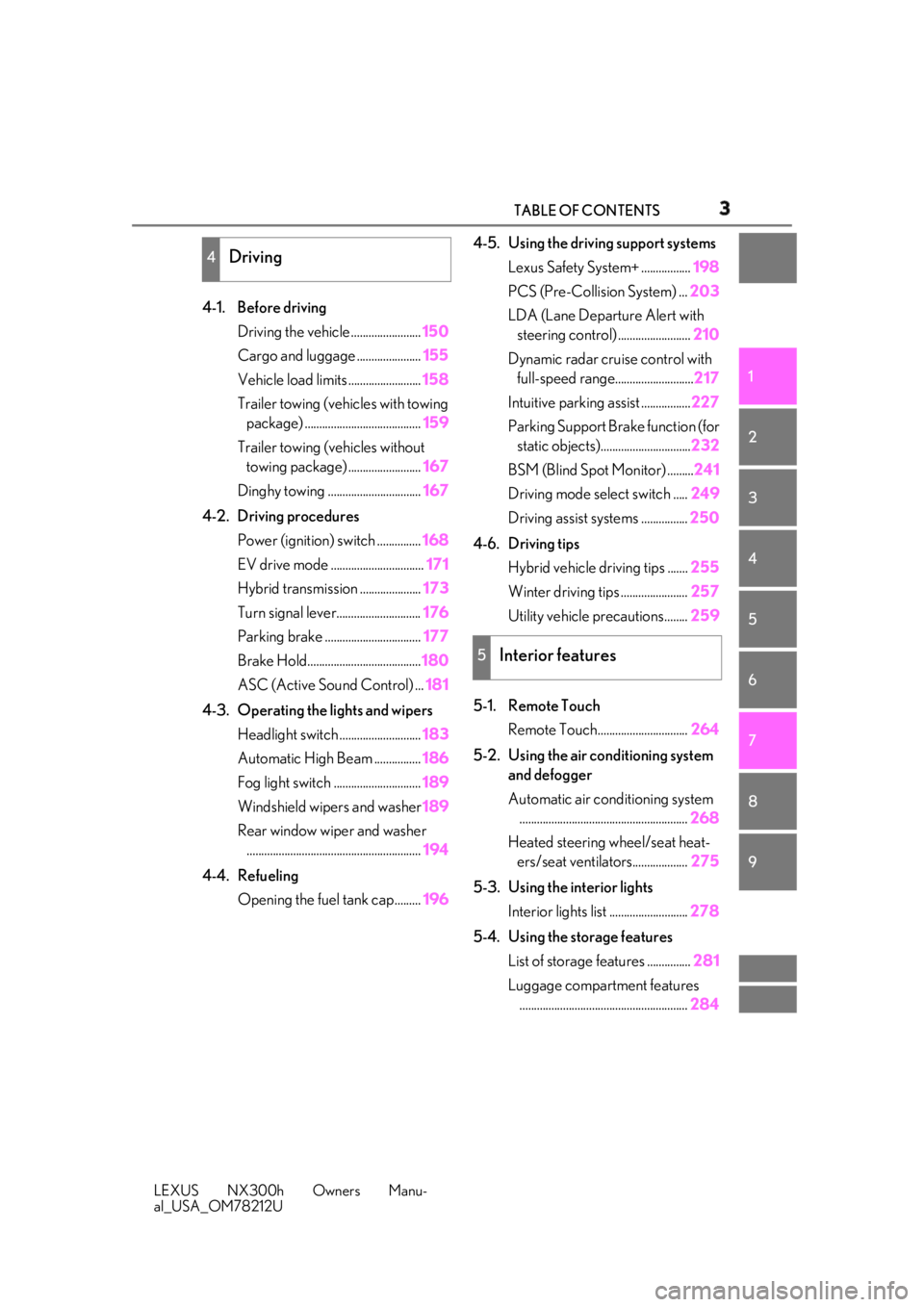
3TABLE OF CONTENTS
LEXUS NX300h Owners Manu-
al_USA_OM78212U 1
2
3
4
5
6
7
8
94-1. Before driving
Driving the vehicle ........................ 150
Cargo and luggage ...................... 155
Vehicle load limits ......................... 158
Trailer towing (vehicles with towing
package) ........................................ 159
Trailer towing (vehicles without
towing package) ......................... 167
Dinghy towing ................................ 167
4-2. Driving procedures
Power (ignition) switch ............... 168
EV drive mode ................................ 171
Hybrid transmission ..................... 173
Turn signal lever............................. 176
Parking brake ................................. 177
Brake Hold....................................... 180
ASC (Active Sound Control) ... 181
4-3. Operating the lights and wipers
Headlight switch ............................ 183
Automatic High Beam ................ 186
Fog light switch .............................. 189
Windshield wipers and washer 189
Rear window wiper and washer
............................................................ 194
4-4. Refueling
Opening the fuel tank cap......... 196 4-5. Using the driving support systems
Lexus Safety System+ ................. 198
PCS (Pre-Collision System) ... 203
LDA (Lane Departure Alert with
steering control) ......................... 210
Dynamic radar cruise control with
full-speed range........................... 217
Intuitive parking assist ................. 227
Parking Support Brake function (for
static objects)............................... 232
BSM (Blind Spot Monitor) ......... 241
Driving mode select switch ..... 249
Driving assist systems ................ 250
4-6. Driving tips
Hybrid vehicle driving tips ....... 255
Winter driving tips ....................... 257
Utility vehicle precautions........ 259
5-1. Remote Touch
Remote Touch............................... 264
5-2. Using the air conditioning system
and defogger
Automatic air conditioning system
.......................................................... 268
Heated steering wheel/seat heat-
ers/seat ventilators................... 275
5-3. Using the interior lights
Interior lights list ........................... 278
5-4. Using the storage features
List of storage features ............... 281
Luggage compartment features
.......................................................... 2844
Driving
5
Interior features
Page 8 of 460
8
LEXUS NX300h Owners Manu-
al_USA_OM78212U • How far (if at all) the driver was
depressing the accelerator and/or
brake pedal; and,
• How fast the vehicle was traveling.
These data can help provide a better
understanding of the circumstances in
which crashes and injuries occur.
NOTE: EDR data are recorded by your
vehicle only if a non-trivial crash situa-
tion occurs; no data are recorded by
the EDR under normal driving condi-
tions and no personal data (e.g., name,
gender, age, and crash location) are
recorded. However, other parties, such
as law enforcement, could combine the
EDR data with the type of personally
identifying data routinely acquired
during a crash investigation.
To read data recorded by an EDR, spe-
cial equipment is required, and access
to the vehicle or the EDR is needed. In
addition to the vehicle manufacturer,
other parties, such as law enforcement,
that have the special equipment, can
read the information if they have
access to the vehicle or the EDR.
Disclosure of the EDR data Lexus will not disclose the data recorded in
an EDR to a third party except when:
• An agreement from the vehicle’s owner
(or the lessee for a leased vehicle) is
obtained
• In response to an of ficial request by the
police, a court of law or a government
agency
• For use by Lexus in a lawsuit
However, if necessary, Lexus may:
• Use the data for research on vehicle safety performance
• Disclose the data to a third party for
research purposes without disclosing
information about the specific vehicle or
vehicle owner
The SRS airbag and seat belt preten-
sioner devices in your Lexus contain
explosive chemicals. If the vehicle is
scrapped with the airbags and seat belt
pretensioners left as they are, this may
cause an accident such as fire. Be sure
to have the systems of the SRS airbag
and seat belt pretensioner removed
and disposed of by a qualified service
shop or by your Lexus dealer before
you scrap your vehicle.
Special handling may apply, See
www.dtsc.ca.gov/hazardouswaste /
perchlorate.
Your vehicle has components that may
contain perchlorate. These compo-
nents may include airbag, seat belt pre-
tensioners, and wireless remote
control batteries. Scrapping of your Lexus
Perchlorate Material
Page 17 of 460

17Pictorial index
LEXUS NX300h Owners Manu-
al_USA_OM78212U Power window switches ........................................................................................ P.144
Window lock switch ............................................................................................... P.145
Outside rear view mirror switches .................................................................... P.142
Door lock switch..................................................................................................... P.108
Driving position memory switches *
................................................................... P.134
HUD (Head-up display) switches *
........................................................................ P.91
ASC (Active Sound Control) dial *
...................................................................... P.181*
:If equipped
Audio remote control switches *
Paddle shift switches .............................................................................................. P.175 A
B
C
D
E
F
G
A
B
Page 18 of 460

18 Pictorial index
LEXUS NX300h Owners Manu-
al_USA_OM78212U Meter control switches .......................................................................................... P.85
Vehicle-to-vehicle distance switch ..................................................................P.222
Cruise control switch
Dynamic radar cruise control with full-spee d range ........................................... P.217
LDA (Lane Departure Alert with steering control) switch ........................ P.212
Talk switch *
Telephone switches *
*
: Refer to “NAVIGATION AND MULTIMEDIA SYSTEM OWNER’S MANUAL”.
EV drive mode switch ............................................................................................. P.171
Driving mode select switch .................................................................................P.249
VSC off switch.......................................................................................................... P.251
Parking brake switches ................................................................................P.178, 179
Applying/releasing ..................................................................................................P.178, 179
Precautions against winter season ............................................................................P.258
Warning buzzer/message.................................................................................P.369, 374
Brake hold switch ................................................................................................... P.180
Remote Touch......................................................................................................... P.264
Rear seat heater switches *
.................................................................................. P.276C
D
E
F
G
H
A
B
C
D
E
F
G
Page 71 of 460

711-3. Theft deterrent system
LEXUS NX300h Owners Manu-
al_USA_OM78212U 1
For safety and security
■
Items to check before locking the
vehicle
To prevent unexpected triggering of
the alarm and vehicle theft, make sure
of the following:
Nobody is in the vehicle.
The windows and moon roof (if
equipped) are closed before the
alarm is set.
No valuables or other personal
items are left in the vehicle. ■
Setting
Close the doors and hood, and lock all
the doors. The system will be set auto-
matically after 30 seconds. The indicator light changes from being on
to flashing when the system is set. ■
Canceling or stopping
Do one of the following to deactivate
or stop the alarms:
Unlock the doors.
Turn the power switch to ACCES-
SORY or ON mode, or start the
hybrid system. (The alarm will be
deactivated or stopped after a few
seconds.) ■
System maintenance
The vehicle has a maintenance-free type
alarm system. ■
Triggering of the alarm
The alarm may be triggered in the following
situations:
(Stopping the alarm deactivates the alarm
system.) ●
A person inside the vehicle opens a door
or hood, or unlocks the vehicle using an
inside lock button.
●
The 12-volt battery is recharged or
replaced when the vehicle is locked.
( → P.392)Alarm The alarm uses light and sound to
give an alert when an intrusion is
detected.
The alarm is triggered in the follow-
ing situations when the alarm is set:
A locked door is unlocked or
opened in any way other than
using the entry function, wireless
remote control or mechanical
key. (The doors will lock again
automatically.)
The hood is opened.
Setting/canceling/stopping the
alarm system
Page 95 of 460

952-1. Instrument cluster
LEXUS NX300h Owners Manu-
al_USA_OM78212U 2
Vehicle status information and indicators
Navigation/multimedia system display
Press the “MENU” button on the Remote To uch, then select on the screen, and
then select . If the “Trip Information” or “History” screen is displayed, select “Energy”.
Multi-information display
Press or of the meter control swit ches and select , and then or
to select the energy monitor display.Energy monitor
When the vehicle is powered by the electric motor (traction motor)
Navigation/multimedia system display Multi-information display
When the vehicle is powered by both the gasoline engine and the electric motor (traction
motor)
Navigation/multimedia system display Multi-information display
When the vehicle is powered by the gasoline engine
Navigation/multimedia system display Multi-information display
Page 102 of 460

102 3-1. Key information
LEXUS NX300h Owners Manu-
al_USA_OM78212U 3-1.Key information
The following keys are provided with
the vehicle.
Electronic keys• Operating the smart access system with
push-button start ( →
P.122 )
• Operating the wireless remote control
function
Mechanical keys
Key number plate
Card key (electronic key) (if
equipped)Operating the smart access system with
push-button start ( → P.122)
■
Card key (if equipped)
●
The mechanical key that is stored inside
the card key should be used only if a
problem arises, such as when the card
key does not operate properly. ●
If the battery cover is not installed and the
battery falls out or if the battery was
removed because the key got wet, rein-
stall the battery with the positive terminal
facing the Lexus emblem.
●
The card key is not waterproof. ■
When riding in an aircraft
When bringing an electronic key onto an
aircraft, make sure you do not press any
buttons on the electronic key while inside
the aircraft cabin. If you are carrying an
electronic key in your bag, etc., ensure that
the buttons are not likely to be pressed acci-
dentally. Pressing a button may cause the
electronic key to em it radio waves that
could interfere with the operation of the air-
craft. ■
Electronic key battery depletion ●
The standard battery life is 1 to 2 years.
(The card key battery life is about a year
and a half.) ●
If the battery becomes low, an alarm will
sound in the cabin wh en the hybrid sys-
tem stops. ( → P.347)●
As the electronic key always receives
radio waves, the battery will become
depleted even if the electronic key is not
used. The following symptoms indicate
that the electronic key battery may be
depleted. Replace the battery when nec-
essary. ( → P.347)
• The smart access system with push-but-
ton start or the wireless remote control
does not operate.
• The detection area becomes smaller.
• The LED indicator on the key surface
does not turn on.
●
To avoid serious dete rioration, do not
leave the electronic key within 3 ft. (1 m)
of the following electrical appliances that
produce a magnetic field:Keys
Key types
A
B
C
D
Page 104 of 460

104 3-1. Key information
LEXUS NX300h Owners Manu-
al_USA_OM78212U The electronic keys are equipped with
the following wireless remote control:
Locks all the doors ( → P.106)
Unlocks all the doors ( → P.106)
Opens the windows and moon
roof *1, 2
( → P.106)
Opens and closes the power back
door *1
( → P.113)
Sounds the alarm ( → P.104)*1
: If equipped *2
: This setting must be customized at your
Lexus dealer.
■
Theft deterrent panic mode
When is pressed for longer than
about 1 second, an alarm will sound inter- mittently and the vehicle lights will flash to
deter any person from trying to break into
or damage your vehicle.
To stop the alarm, press any button on the
electronic key.
■
Back door reserve lock function (vehi-
cles with power back door)
This function is a function which reserves
locking of all doors, beforehand, when the
back door is open. When the follow is done,
all the doors except the back door are
locked and then back door will also be
locked at the same time it is closed.
1 Close all doors, except the back door.
2 Push the wireless lock button during the
automatic closing operation of the back
door.
To take out the mechanical key, push
the release button and take the key out. The mechanical key can only be inserted in
one direction, as the key only has grooves
on one side. If the key cannot be inserted in
a lock cylinder, turn it over and re-attempt
to insert it.
After using the mechanical key, store it in
the electronic key. Carry the mechanical
key together with the electronic key. If the
electronic key battery is depleted or the
entry function does not operate properly,
you will need the mechanical key.
( → P.387)NOTICE●
The surface of the card key may be
damaged, or its coating may peel off in
the following situations:
• The card key is carried together with
hard objects, such as coins and keys.
• The card key is scraped with a sharp
object, such as the tip of a mechanical
pencil.
• The surface of the card key is wiped
with thinner or benzene.
Wireless remote control
A
B
C
D
E Using the mechanical key
Page 106 of 460
106 3-2. Opening, closing and locking the doors
LEXUS NX300h Owners Manu-
al_USA_OM78212U 3-2.Opening, closing and locking the doors
■
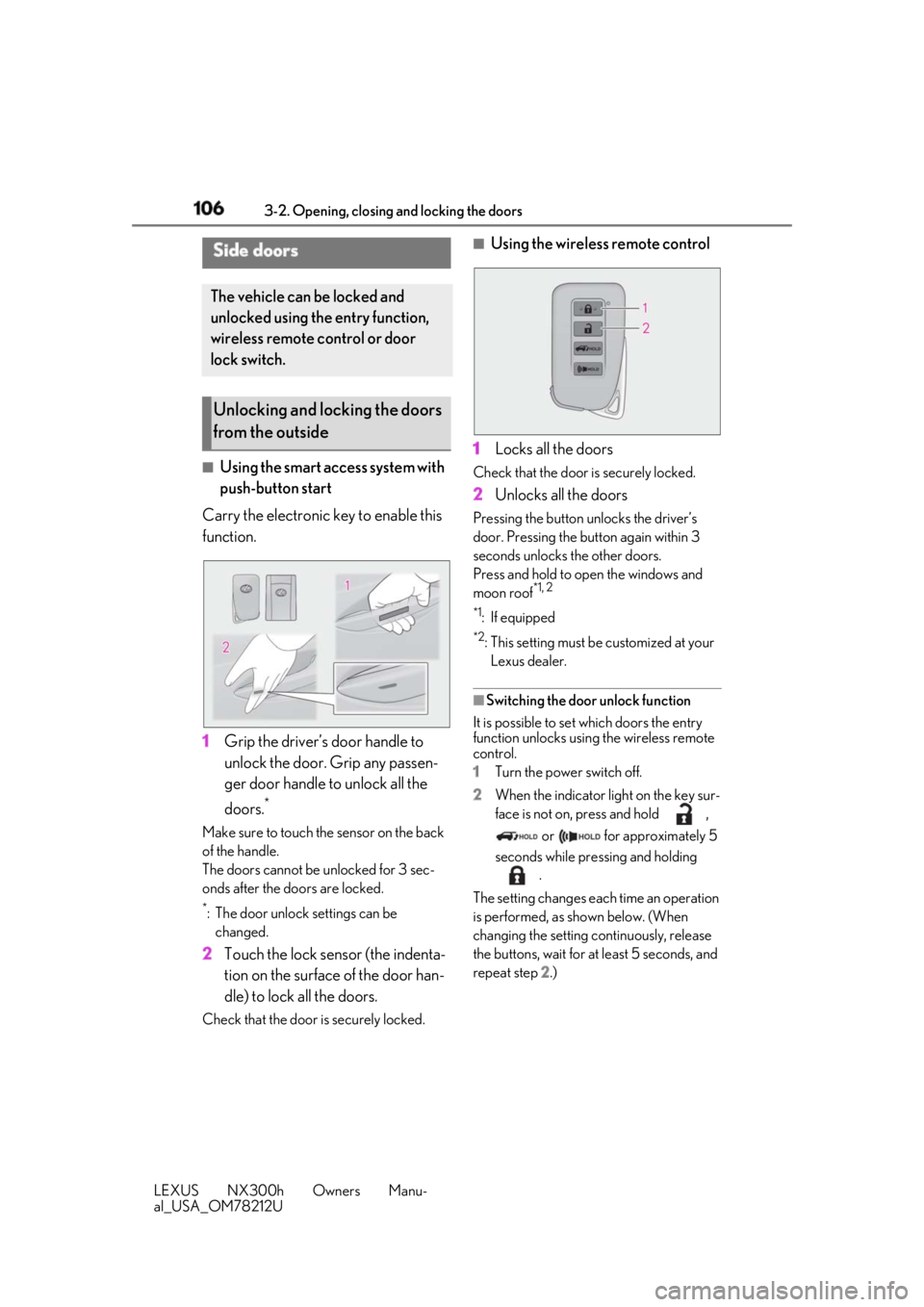
Using the smart access system with
push-button start
Carry the electronic key to enable this
function.
1 Grip the driver’s door handle to
unlock the door. Grip any passen-
ger door handle to unlock all the
doors. *
Make sure to touch the sensor on the back
of the handle.
The doors cannot be unlocked for 3 sec-
onds after the doors are locked. *
: The door unlock settings can be
changed.
2 Touch the lock sensor (the indenta-
tion on the surface of the door han-
dle) to lock all the doors.Check that the door is securely locked. ■
Using the wireless remote control
1 Locks all the doors Check that the door is securely locked.
2 Unlocks all the doors Pressing the button unlocks the driver’s
door. Pressing the button again within 3
seconds unlocks the other doors.
Press and hold to open the windows and
moon roof *1, 2
*1
: If equipped *2
: This setting must be customized at your
Lexus dealer.
■
Switching the door unlock function
It is possible to set which doors the entry
function unlocks using the wireless remote
control.
1 Turn the power switch off.
2 When the indicator light on the key sur-
face is not on, press and hold ,
or for approximately 5
seconds while pre ssing and holding
.
The setting changes each time an operation
is performed, as shown below. (When
changing the setting continuously, release
the buttons, wait for at least 5 seconds, and
repeat step 2 .)Side doors The vehicle can be locked and
unlocked using the entry function,
wireless remote control or door
lock switch.
Unlocking and locking the doors
from the outside
Page 107 of 460

1073-2. Opening, closing and locking the doors
LEXUS NX300h Owners Manu-
al_USA_OM78212U 3
Before driving
For vehicles with alarm: To prevent unin-
tended triggering of the alarm, unlock the
doors using the wirele ss remote control and
open and close a door once after the set-
tings have been changed. (If a door is not
opened within 60 seconds after is
pressed, the doors will be locked again and
the alarm will automatically be set.)
In a case that the alarm is triggered, imme-
diately stop the alarm. ( → P.71)■
Locking the doors from the outside with-
out a key
1 Move the inside lock button to the lock
position.
2 Close the door.
The door cannot be locked if the power
switch is in ACCESSORY or ON mode, or
the electronic key is le ft inside the vehicle.
The key may not be detected correctly and
the door may be locked.
■
Impact detection door lock release sys-
tem
In the event that the vehicle is subject to a
strong impact, all the doors are unlocked.
Depending on the force of the impact or the
type of accident, however, the system may not operate. ■
Operation signals
Doors:
A buzzer sounds and the emergency flash-
ers flash to indicate that the doors have
been locked/unlocked. (Locked: Once;
Unlocked: Twice)
Windows:
A buzzer sounds to indicate that all win-
dows are opening. ■
Security feature
If a door is not opened within approximately
60 seconds after the vehicle is unlocked,
the security feature automatically locks the
vehicle again. ■
Open door warning buzzer
If the vehicle speed reaches 3 mph (5 km/
h), the master warning light flashes and a
buzzer sounds to indicate that door(s) or
the hood in not fully closed.
The open door(s) or hood is displayed on
the multi-information display. ■
Welcome light illumination control
The side marker, parking, tail and license
plate lights automatically turn on at night
when the doors are unlocked using the
entry function or wireless remote control if
the light switch is in the “AUTO” position. ■
When the door cannot be locked by the
lock sensor on the surface of the door
handle
When the door cannot be locked even if the
lock sensor on the surface of the door han-
dle is touched by a finger, touch the lock
sensor with the palm.
When gloves are being worn, remove the
gloves.Multi-information
display/Beep Unlocking function
Exterior: Beeps 3
times
Interior: Pings
once Holding the driver’s
door handle unlocks
only the driver’s door.
Holding any of the
passenger door han-
dles unlocks all the
doors.
Exterior: Beeps
twice
Interior: Pings
once Holding a door han-
dle unlocks all the
doors.