ECO mode LEXUS NX300h 2018 Owners Manual
[x] Cancel search | Manufacturer: LEXUS, Model Year: 2018, Model line: NX300h, Model: LEXUS NX300h 2018Pages: 460, PDF Size: 13.57 MB
Page 24 of 460
24 1-1. For safe use
LEXUS NX300h Owners Manu-
al_USA_OM78212U 1-1.For safe use
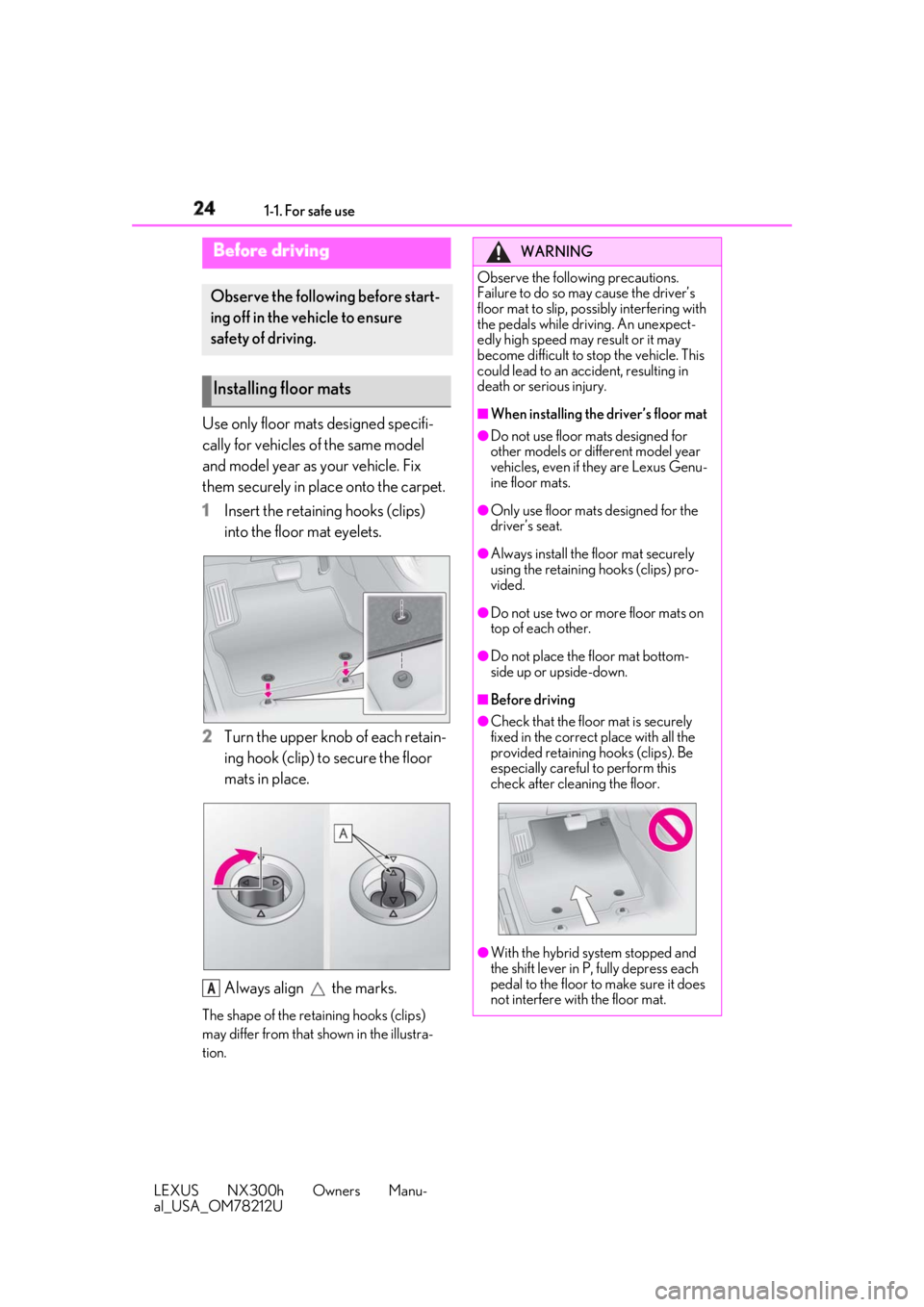
Use only floor mats designed specifi-
cally for vehicles of the same model
and model year as your vehicle. Fix
them securely in place onto the carpet.
1 Insert the retaining hooks (clips)
into the floor mat eyelets.
2 Turn the upper knob of each retain-
ing hook (clip) to secure the floor
mats in place.
Always align the marks.The shape of the reta ining hooks (clips)
may differ from that shown in the illustra-
tion.Before driving Observe the following before start-
ing off in the vehicle to ensure
safety of driving.
Installing floor mats
A WARNING
Observe the following precautions.
Failure to do so may cause the driver’s
floor mat to slip, poss ibly interfering with
the pedals while driv ing. An unexpect-
edly high speed may result or it may
become difficult to stop the vehicle. This
could lead to an accident, resulting in
death or serious injury. ■
When installing the driver’s floor mat ●
Do not use floor mats designed for
other models or different model year
vehicles, even if they are Lexus Genu-
ine floor mats. ●
Only use floor mats designed for the
driver’s seat. ●
Always install the floor mat securely
using the retaining hooks (clips) pro-
vided. ●
Do not use two or more floor mats on
top of each other. ●
Do not place the floor mat bottom-
side up or upside-down. ■
Before driving ●
Check that the floor mat is securely
fixed in the correct place with all the
provided retaining hooks (clips). Be
especially careful to perform this
check after cleaning the floor.
●
With the hybrid system stopped and
the shift lever in P, fully depress each
pedal to the floor to make sure it does
not interfere with the floor mat.
Page 55 of 460

551-1. For safe use
LEXUS NX300h Owners Manu-
al_USA_OM78212U 1
For safety and security
■
Child restraint LATCH anchors
LATCH anchors are provided for the
outboard rear seats. (Buttons display-
ing the location of the anchors are
attached to the seats.)
■
Installation with LATCH system
Install the child restraint system in
accordance to the operation manual WARNING■
When installing a child restraint sys-
tem
Observe the following precautions. Fail-
ure to do so may result in death or seri-
ous injury. ●
Do not allow children to play with the
seat belt. If the seat belt becomes
twisted around a child’s neck, it may
lead to choking or other serious inju-
ries that could result in death. If this
occurs and the buckle cannot be
unfastened, scissors should be used to
cut the belt.●
Ensure that the belt and plate are
securely locked and the seat belt is not
twisted.●
Shake the child restraint system left
and right, and forward and backward
to ensure that it has been securely
installed.●
After securing a child restraint system,
never adjust the seat.●
When a booster seat is installed,
always ensure that th e shoulder belt is
positioned across the center of the
child’s shoulder. The belt should be
kept away from the child’s neck, but
not so that it could fall off the child’s
shoulder.
●
Follow all installation instructions pro-
vided by the child restraint system
manufacturer.
●
When securing some types of child
restraint systems in rear seats, it may
not be possible to properly use the
seat belts in position s next to the child
restraint without inte rfering with it or
affecting seat belt effectiveness. Be
sure your seat belt fits snugly across
your shoulder and low on your hips. If it
does not, or if it interferes with the
child restraint, move to a different posi-
tion. Failure to do so may result in
death or serious injury. ●
When installing a child restraint system
in the rear center seat, adjust both
seatbacks at the same angle. Other-
wise, the child restraint system cannot
be securely restrained and this may
cause death or serious injuries in the
event of sudden braking, sudden
swerving or an accident. ■
When installing a booster seat
To prevent the belt from going into ALR
lock mode, do not fully extend the shoul-
der belt. ALR mode causes the belt to
tighten only. This could cause injury or
discomfort to the child. ( → P.28)■
Do not use a seat belt extender
If a seat belt extender is used when
installing a child restra int system, the seat
belt will not securely hold the child
restraint system, which could cause
death or serious injury to the child or
other passengers in the event of sudden
braking, sudden swerving or an accident.
Child restraint system fixed with
a child restraint LATCH anchor
Page 71 of 460

711-3. Theft deterrent system
LEXUS NX300h Owners Manu-
al_USA_OM78212U 1
For safety and security
■
Items to check before locking the
vehicle
To prevent unexpected triggering of
the alarm and vehicle theft, make sure
of the following:
Nobody is in the vehicle.
The windows and moon roof (if
equipped) are closed before the
alarm is set.
No valuables or other personal
items are left in the vehicle. ■
Setting
Close the doors and hood, and lock all
the doors. The system will be set auto-
matically after 30 seconds. The indicator light changes from being on
to flashing when the system is set. ■
Canceling or stopping
Do one of the following to deactivate
or stop the alarms:
Unlock the doors.
Turn the power switch to ACCES-
SORY or ON mode, or start the
hybrid system. (The alarm will be
deactivated or stopped after a few
seconds.) ■
System maintenance
The vehicle has a maintenance-free type
alarm system. ■
Triggering of the alarm
The alarm may be triggered in the following
situations:
(Stopping the alarm deactivates the alarm
system.) ●
A person inside the vehicle opens a door
or hood, or unlocks the vehicle using an
inside lock button.
●
The 12-volt battery is recharged or
replaced when the vehicle is locked.
( → P.392)Alarm The alarm uses light and sound to
give an alert when an intrusion is
detected.
The alarm is triggered in the follow-
ing situations when the alarm is set:
A locked door is unlocked or
opened in any way other than
using the entry function, wireless
remote control or mechanical
key. (The doors will lock again
automatically.)
The hood is opened.
Setting/canceling/stopping the
alarm system
Page 76 of 460

76 2-1. Instrument cluster
LEXUS NX300h Owners Manu-
al_USA_OM78212U onds. There may be a malfunction in a
system if the lights do not turn on, or
turn off. Have the vehicle inspected by
your Lexus dealer. *2
: This light illuminates on the multi-infor-
mation display. *3
: The light flashes to indicate a malfunc-
tion. *4
: This light illuminates on the center
panel. The indicators inform the driver of the
operating state of the vehicle’s various
systems.
WARNING■
If a safety system warning light does
not come on
Should a safety system light such as the
ABS and SRS airbag warning light not
come on when you start the hybrid sys-
tem, this could mean that these systems
are not available to he lp protect you in an
accident, which could result in death or
serious injury. Have the vehicle inspected
by your Lexus dealer immediately if this
occurs. Indicators Turn signal indicator ( → P.176)(U.S.A.)
Headlight indicator ( → P.183)
(Canada)
Tail light indicator ( → P.183)
Headlight high beam indicator
( → P.185)(if equipped)
Automatic High Beam indica-
tor ( → P.186)
Fog light indicator ( → P.189)
“READY” indicator ( → P.150)
EV indicator ( → P.62)
EV drive mode indicator *2
( → P.171)
“Eco” indicator *2
( → P.249)
“Sport” indicator *2
( → P.249)
Dynamic radar cruise control
indicator *2
( → P.217)
Cruise control “SET” indica-
tor *2
( → P.217)
Cruise control indicator *2
( → P.224)
Page 77 of 460

772-1. Instrument cluster
LEXUS NX300h Owners Manu-
al_USA_OM78212U 2
Vehicle status information and indicators *1
: These lights turn on when the power
switch is turned to the ON mode to
indicate that a system check is being
performed. They will turn off after the
hybrid system is on, or after a few sec-
onds. There may be a malfunction in a
system if the lights do not turn on, or
turn off. Have the vehicle inspected by
your Lexus dealer. *2
: This light illuminates on the multi-infor-
mation display. *3
: The light flashes to indicate that the sys-
tem is operating. *4
: The light comes on when the system is
turned off. *5
: When the outside temperature is
approximately 37°F (3°C) or lower, the
indicator will flash for approximately 10
seconds, then stay on. *6
: In order to confirm operation, the BSM
outside rear view mirror indicators illu-
minate in the following situations:
When the power switch is turned to
ON mode while the BSM main switch is
set to ON.
When the BSM main switch is set to
ON while the power switch is in ON
mode.
If the system is func tioning correctly, the
BSM outside rear view mirror indica-
tors will turn off after a few seconds.
If the BSM outside rear view mirror indi-
cators do not illuminate or do not turn
off, there may be a malfunction in the
system.
If this occurs, have the vehicle inspected (White)
LDA indicator *2
( → P.210)(Green)
LDA indicator *2
( → P.210)(Orange)
LDA indicator *2, 3
( → P.210)(if equipped)
Intuitive parking assist indica-
tor ( → P.227)(if equipped)
PKSB OFF indicator *1, 4
( → P.232)
Slip indicator light *1, 3
( → P.251)
VSC off indicator *1, 4
( → P.251)
PCS warning light *1, 4
( → P.205)
(U.S.A.)
Parking brake indicator
( → P.178)
(Canada)
Parking brake indicator
( → P.178)
Brake hold standby indicator *1
( → P.180)
Brake hold operated indica-
tor *1
( → P.180)
Low outside temperature
indicator *2, 5
( → P.79)
(if equipped)
BSM outside rear view mirror
indicators *6, 7
( → P.241)
Security indicator *8
( → P.69,
71) (U.S.A.)
“AIR BAG ON/OFF” indi-
cator *8
( → P.41)(Canada)
“AIR BAG ON/OFF” indi-
cator *7
( → P.41)
Page 79 of 460

792-1. Instrument cluster
LEXUS NX300h Owners Manu-
al_USA_OM78212U 2
Vehicle status information and indicators
When driving mode is in other than sport mode ( → P.249)
The units used on the meters may differ depending on the target region.
Engine coolant temperature gaugeDisplays the engine coolant temperature
Hybrid System IndicatorDisplays hybrid system outp ut or regeneration level ( → P.82)
Outside temperatureDisplays the outside temperature within the range of -40°F (-40°C) to 122°F (50°C). Low
outside temperature indicator comes on when the ambient temperature is 37°F (3°C) or
lower.
Background color of drive modeBackground color changes according to the drive mode. ( → P.249)
•Sport mode: Red
•Eco mode: Blue
When in Normal mode, the background color is Black.
ClockTime displayed is linked to the analog clock on the instrument panel. ( → P.288)
Multi-information displayPresents the driver with a variety of vehicle data ( → P.85)Gauges and meters The meters display various drive information.
Meter display
A
B
C
D
E
F
Page 80 of 460

80 2-1. Instrument cluster
LEXUS NX300h Owners Manu-
al_USA_OM78212U Displays warning messages in case of a malfunction ( → P.374)
SpeedometerDisplays the vehicle speed
Fuel gaugeDisplays the quantity of fuel remaining in the tank
Shift position and shift rangeDisplays the selected shift posi tion or selected shift range ( → P.173)
Odometer, trip meter and maintena nce required information displayOdometer:
Displays the total distance the vehicle has been driven
Trip meter:
Displays the distance the vehicle has been driven since the meter was last reset.
Trip meters “A” and “B” can be used to record and display different distances inde-
pendently.
Maintenance required information:
Displays the remaining distance unt il the engine oil sh ould be changed.
• Displays the maintenance requ ired information when the power switch is ON mode.
• It can be reset on of the multi-information display.
When driving mode is in sport mode ( → P.249)
The units used on the meters may differ depending on the target region.
Engine coolant temperature gaugeDisplays the engine coolant temperature
TachometerDisplays the engine speed in revolutions per minute
Outside temperatureDisplays the outside temperature within the range of -40°F (-40°C) to 122°F (50°C). Low G
H
I
J
A
B
C
Page 81 of 460

812-1. Instrument cluster
LEXUS NX300h Owners Manu-
al_USA_OM78212U 2
Vehicle status information and indicators outside temperature indicator comes on when the ambient temperature is 37°F (3°C) or
lower.
Background color of drive modeBackground color changes according to the drive mode. ( → P.249)
•Sport mode: Red
•Eco mode: Blue
When in Normal mode, the background color is Black.
ClockTime displayed is linked to the analog clock on the instrument panel. ( → P.288)
Multi-information displayPresents the driver with a variety of vehicle data ( → P.85)
Displays warning messages in case of a malfunction ( → P.374)
SpeedometerDisplays the vehicle speed
Fuel gaugeDisplays the quantity of fuel remaining in the tank
Shift position and shift rangeDisplays the selected shift posi tion or selected shift range ( → P.173)
Odometer, trip meter and maintena nce required information displayOdometer:
Displays the total distance the vehicle has been driven
Trip meter:
Displays the distance the vehicle has been driven since the meter was last reset.
Trip meters “A” and “B” can be used to record and display different distances inde-
pendently.
Maintenance required information:
Displays the remaining distance unt il the engine oil sh ould be changed.
• Displays the maintenance requ ired information when the power switch is ON mode.
• It can be reset on of the multi-information display. D
E
F
G
H
I
J
Page 82 of 460

82 2-1. Instrument cluster
LEXUS NX300h Owners Manu-
al_USA_OM78212U ■
Operating condition
The power switch is in ON mode. ■
Hybrid System Indicator
Power area
Shows that an Eco-friendly driving
range is being exceeded (during full
power driving etc.)
Eco area
Shows that the vehicle is being driven in
an Eco-friendly manner.
Hybrid Eco area
Shows that gasoline engine power is not
being used very often.
The gasoline engine will automatically
stop and restart under various condi-
tions.
Charge area
Shows that energy is being recovered
via the regenerative brake.
●
Hybrid System Indicator is displayed
when the driving mode is in other than
the sport mode.
●
By keeping the indicator needle within
Eco area, more Eco-friendly driving can
be achieved.
●
Charge area indicates regeneration *
sta-
tus. Regenerated energy will be used to charge the hybrid battery (traction bat-
tery). *
: When used in this manual, “regeneration”
refers to the conversion of energy cre-
ated by the movement of the vehicle into
electrical energy. ■
Tachometer
Hybrid System Indicator switches to the
tachometer when drivin g mode is in sport
mode. The settings of the tachometer dis-
play can be changed on the multi-informa-
tion display. ■
Engine speed
On hybrid vehicles, engine speed is pre-
cisely controlled in order to help improve
fuel efficiency and reduce exhaust emis-
sions, etc.
There are times when the engine speed that
is displayed may differ even when vehicle
operation and driving conditions are the
same. ■
Outside temperature display ●
In the following situations, the correct
outside temperature may not be dis-
played, or the display may take longer
than normal to change.
• When stopped, or driving at low speeds
(less than 12 mph [20 km/h])
• When the outside temperature has
changed suddenly (at the entrance/exit of
a garage, tunnel, etc.) ●
When “--” or “E” is displayed, the system
may be malfunctioning.
Take your vehicle to your Lexus dealer.
■
Pop-up display
In some situations, a pop-up display will be
temporarily displayed on the multi-informa-
tion display or the odometer/trip meter/
maintenance required information screen.
The pop-up display function can be set on/
off.
■
Liquid crystal display
Small spots or light sp ots may appear on the
display. This phenomen on is characteristic
of liquid crystal disp lays, and there is no
problem continuing to use the display.A
B
C
D
Page 87 of 460

872-1. Instrument cluster
LEXUS NX300h Owners Manu-
al_USA_OM78212U 2
Vehicle status information and indicators sway warning are met. ( → P.211)■
Display off
A blank screen is displayed ■
Tire inflation pressure●
It may take a few minutes to display the
tire inflation pressure after the power
switch is turned to ON mode. It may also
take a few minutes to display the tire infla-
tion pressure after inflation pressure has
been adjusted.●
“---” may be displayed if the tire informa-
tion cannot be determined due to unfa-
vorable radio wave conditions.●
Tire inflation pressu re changes with tem-
perature. The displayed values may also
be different from the values measured
using a tire pressure gauge.■
When disconnecting and reconnecting
12-volt battery terminals
The drive information will be reset.
Select to display the following naviga-
tion system-linked information.
Route guidance
Compass display (north-up display/
heading-up display)
Select to enable selection of an audio
source or track on the display using the
meter control switches.
Select to display the operational status
of the following systems: LDA (Lane Departure Alert with
steering control) ( → P.210)
Dynamic radar cruise control with
full-speed range ( → P.217)
The displayed icon changes depending
on the system used.
Select to display warning messages
and measures to be taken if a malfunc-
tion is detected. ( → P.374)
The settings of the following items can
be changed using the meter control
switches.
For functions that can be enabled or
disabled, the function switches
between on and off each time is
pressed. ■
LDA (Lane Departure Alert
with steering control) ( → P.210)
Select to set up the following items.
Steering Assist Select to enable/dis able steering wheel
assistance.
Alert Select to set a vibrator or buzzer as the
notification method used to warn the
driver.
Alert sensitivity Select to set the warning sensitivity.
Sway warning
Select to enable/disable the vehicle sway Navigation system-linked dis-
play (if equipped)
Audio system-linked display (if
equipped)
Driving assist system information Warning message display
Settings display