navigation system LEXUS NX300H 2019 User Guide
[x] Cancel search | Manufacturer: LEXUS, Model Year: 2019, Model line: NX300H, Model: LEXUS NX300H 2019Pages: 460, PDF Size: 6.82 MB
Page 96 of 460
962-1. Instrument cluster
LEXUS NX300h Owners Manu-
al_USA_M78287_en
tem was started.
Cruising range (P.96)
Average fuel consumption for the past
15 minutes is divided by color into past
averages and averages attained since
the power switch was last turned to
ON mode. Use the displayed average
fuel consumption as a reference.
The image is an example only, and may
vary slightly from actual conditions.
■History
Press the “MENU” button on the
Remote Touch, then select on the
screen.
If a screen other than “History” is dis-
played, select “History”.
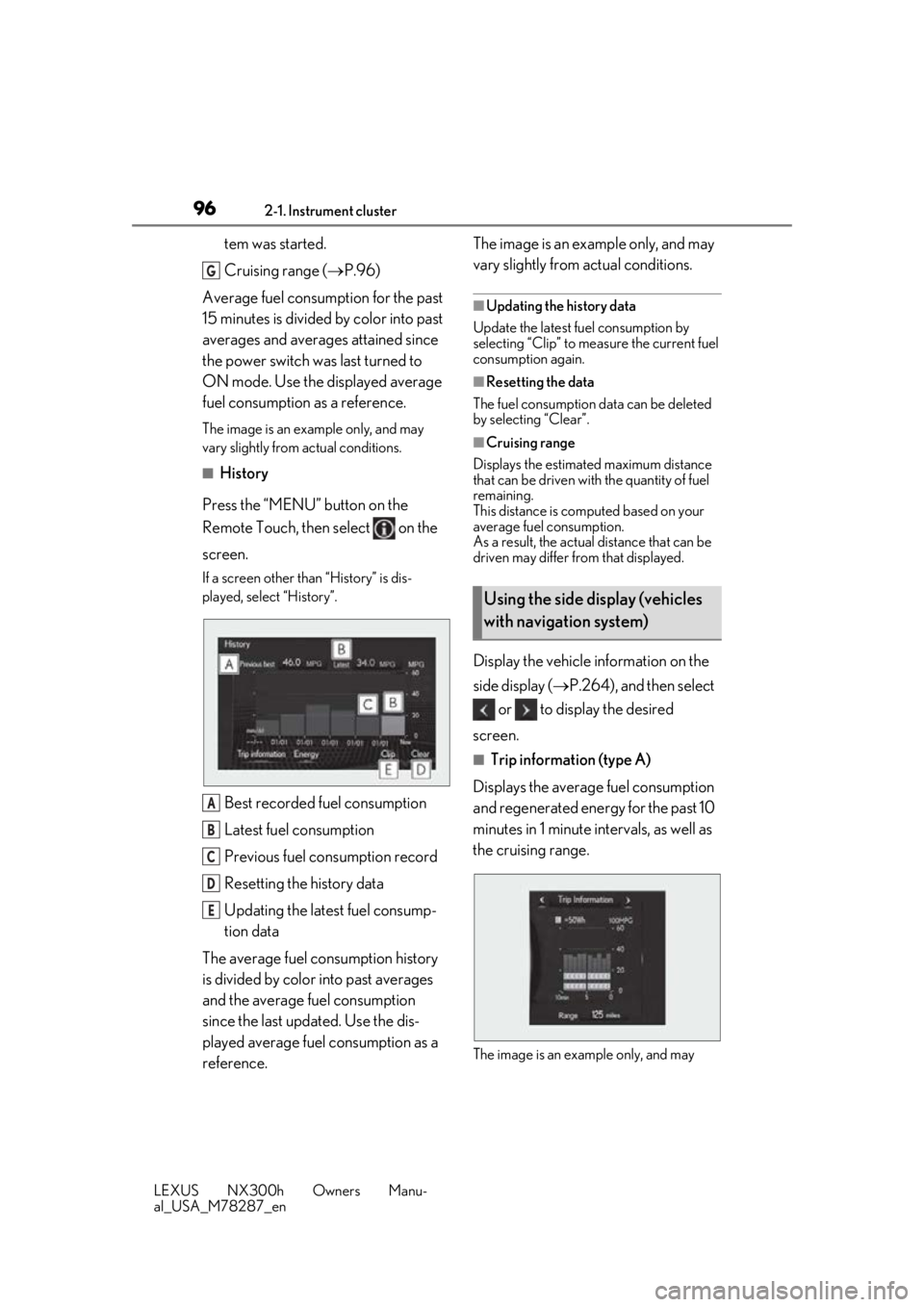
Best recorded fuel consumption
Latest fuel consumption
Previous fuel consumption record
Resetting the history data
Updating the latest fuel consump-
tion data
The average fuel consumption history
is divided by color into past averages
and the average fuel consumption
since the last updated. Use the dis-
played average fuel consumption as a
reference. The image is an example only, and may
vary slightly from actual conditions.
■Updating the history data
Update the latest fuel consumption by
selecting “Clip” to meas ure the current fuel
consumption again.
■Resetting the data
The fuel consumption data can be deleted
by selecting “Clear”.
■Cruising range
Displays the estimated maximum distance
that can be driven with the quantity of fuel
remaining.
This distance is computed based on your
average fuel consumption.
As a result, the actual distance that can be
driven may differ from that displayed.
Display the vehicle information on the
side display ( P.264), and then select
or to display the desired
screen.
■Trip information (type A)
Displays the average fuel consumption
and regenerated energy for the past 10
minutes in 1 minute intervals, as well as
the cruising range.
The image is an example only, and may
G
A
B
C
D
E
Using the side display (vehicles
with navigation system)
Page 119 of 460
1193-2. Opening, closing and locking the doors
LEXUS NX300h Owners Manu-
al_USA_M78287_en
3
Before driving
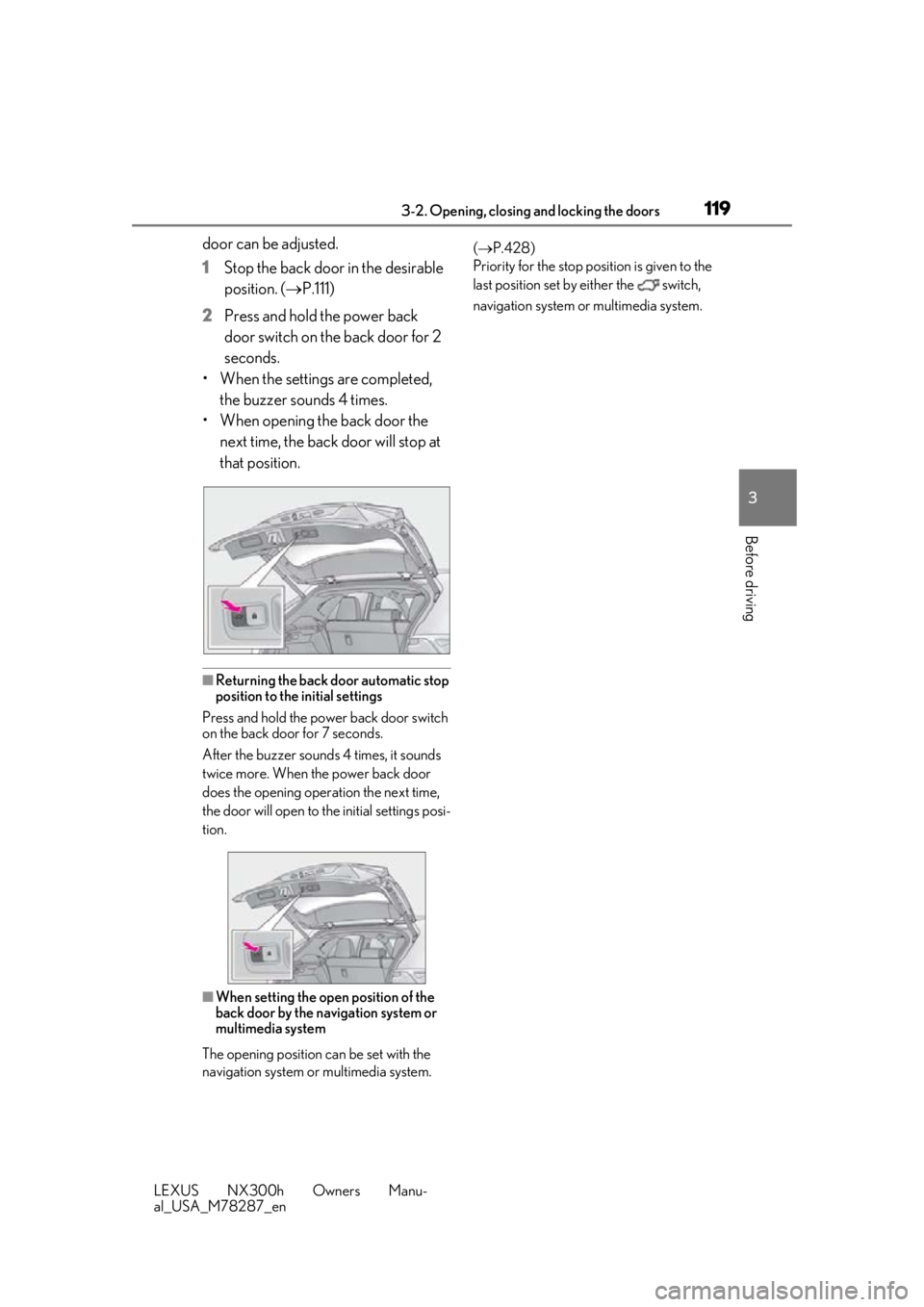
door can be adjusted.
1 Stop the back door in the desirable
position. ( P.111)
2 Press and hold the power back
door switch on the back door for 2
seconds.
• When the settings are completed, the buzzer sounds 4 times.
• When opening the back door the next time, the back door will stop at
that position.
■Returning the back door automatic stop
position to the initial settings
Press and hold the power back door switch
on the back door for 7 seconds.
After the buzzer sounds 4 times, it sounds
twice more. When the power back door
does the opening operation the next time,
the door will open to the initial settings posi-
tion.
■When setting the open position of the
back door by the navigation system or
multimedia system
The opening position can be set with the
navigation system or multimedia system. (
P.428)
Priority for the stop position is given to the
last position set by either the switch,
navigation system or multimedia system.
Page 227 of 460
2274-5. Using the driving support systems
LEXUS NX300h Owners Manu-
al_USA_M78287_en
4
Driving
*:If equipped
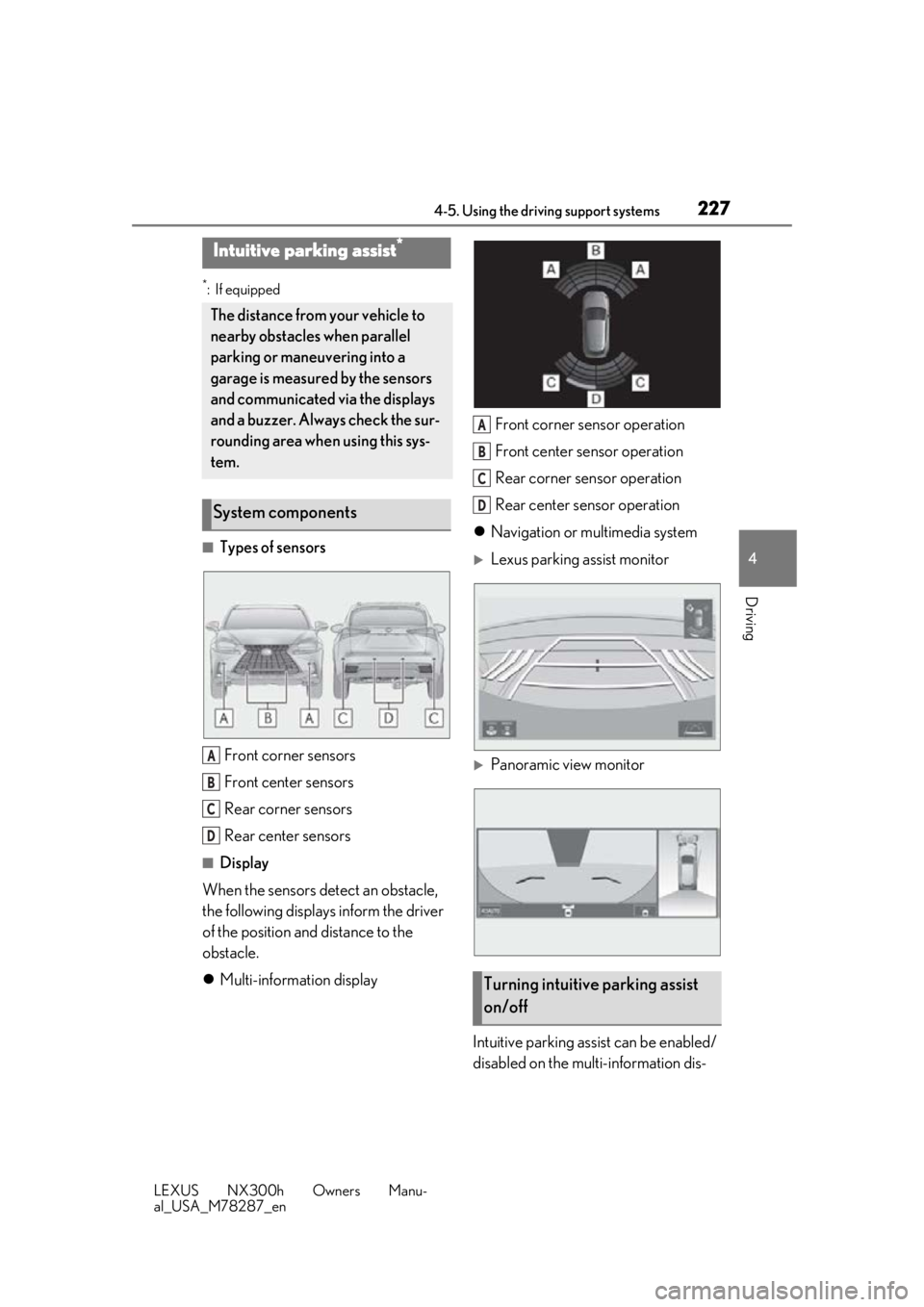
■Types of sensors Front corner sensors
Front center sensors
Rear corner sensors
Rear center sensors
■Display
When the sensors detect an obstacle,
the following displays inform the driver
of the position and distance to the
obstacle.
Multi-information display Front corner sensor operation
Front center sensor operation
Rear corner sensor operation
Rear center sensor operation
Navigation or multimedia system
Lexus parking assist monitor
Panoramic view monitor
Intuitive parking assist can be enabled/
disabled on the multi-information dis-
Intuitive parking assist*
The distance from your vehicle to
nearby obstacles when parallel
parking or maneuvering into a
garage is measured by the sensors
and communicated via the displays
and a buzzer. Always check the sur-
rounding area when using this sys-
tem.
System components
A
B
C
D
Turning intuitive parking assist
on/off
A
B
C
D
Page 239 of 460
2394-5. Using the driving support systems
LEXUS NX300h Owners Manu-
al_USA_M78287_en
4
Driving
When the hybrid system output restric-
tion control or brake control operates,
the buzzer sounds and a message is
displayed on the multi-information dis-
play, head-up display and navigation/
multimedia system screen to alert the
driver.
Depending on the situation, output restric-
tion control operates to either limit accel-
eration or restrict output as much as
possible.
■Hybrid system output restriction
control is operating (acceleration
limitation control)
■Hybrid system output restriction
control is operating (control to
restrict output as much as possible)
■Brake control is operating
NOTICE
●A towing hook is installed
●When using an automatic car wash
Display and buzzer for hybrid
system output restriction con-
trol and brake control
Situation
Acceleration at a certain speed or higher is not possible.
Multi-informa-tion display/
Head-up dis- play
“Object Detected Accel-eration Reduced”
Navigation/
multimedia sys- tem screen
PKSB OFF IndicatorNot illuminated
Buzzer
Situation
A stronger than normal
brake operation is neces- sary
Multi-informa-tion display/
Head-up dis- play
“BRAKE!”
Navigation/
multimedia sys- tem screen
PKSB OFF IndicatorNot illuminated
BuzzerShort beep
SituationEmergency braking is necessary
Multi-informa-tion display/
Head-up dis- play
“BRAKE!”
Navigation/
multimedia sys- tem screen
PKSB OFF IndicatorNot illuminated
BuzzerShort beep
Page 240 of 460
2404-5. Using the driving support systems
LEXUS NX300h Owners Manu-
al_USA_M78287_en
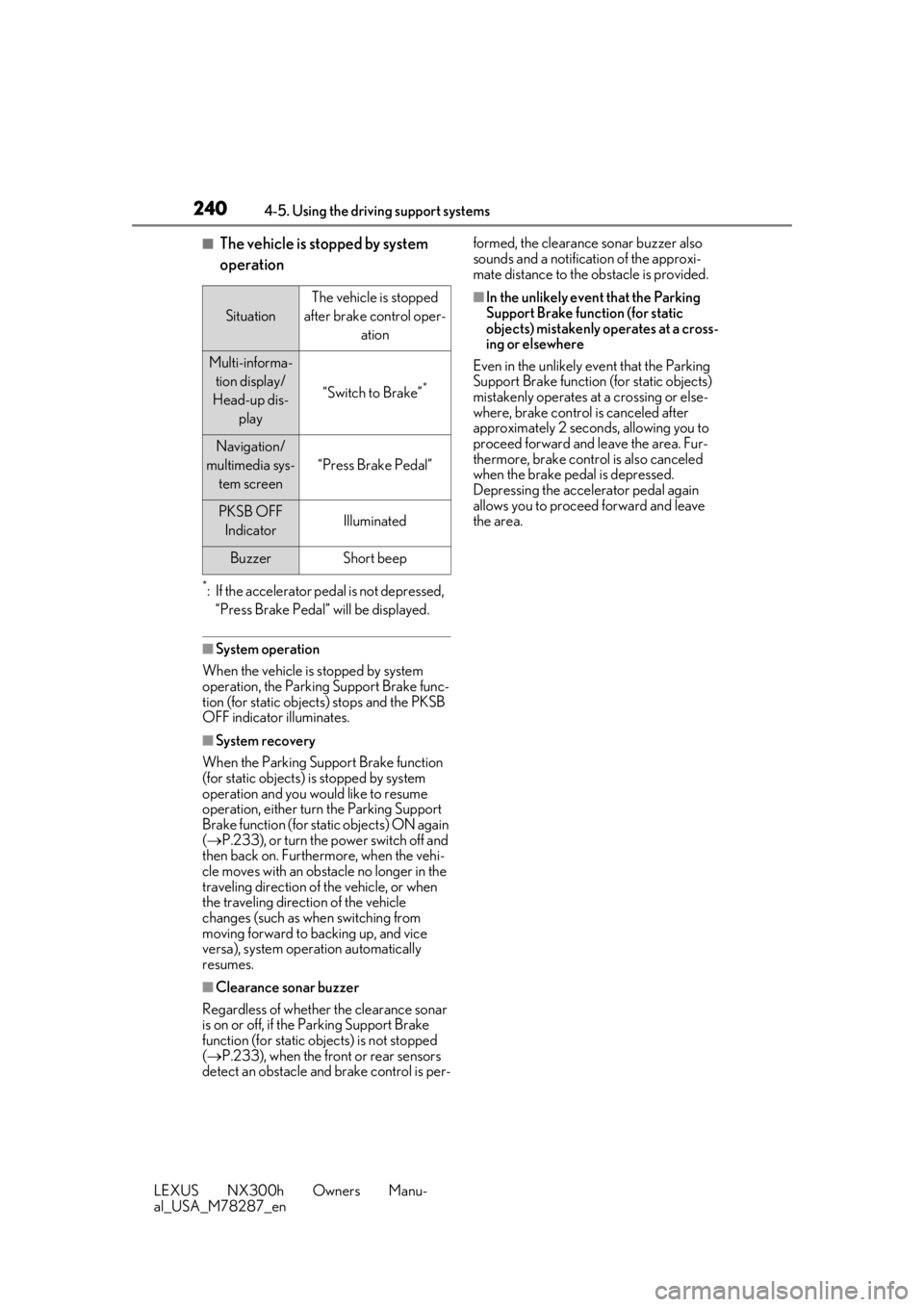
■The vehicle is stopped by system
operation
*: If the accelerator pedal is not depressed, “Press Brake Pedal” will be displayed.
■System operation
When the vehicle is stopped by system
operation, the Parking Support Brake func-
tion (for static objects) stops and the PKSB
OFF indicator illuminates.
■System recovery
When the Parking Support Brake function
(for static objects) is stopped by system
operation and you would like to resume
operation, either turn the Parking Support
Brake function (for static objects) ON again
( P.233), or turn the power switch off and
then back on. Furthermore, when the vehi-
cle moves with an obstacle no longer in the
traveling direction of the vehicle, or when
the traveling direction of the vehicle
changes (such as when switching from
moving forward to backing up, and vice
versa), system operation automatically
resumes.
■Clearance sonar buzzer
Regardless of whether the clearance sonar
is on or off, if the Parking Support Brake
function (for static ob jects) is not stopped
( P.233), when the front or rear sensors
detect an obstacle and brake control is per- formed, the clearance sonar buzzer also
sounds and a notification of the approxi-
mate distance to the obstacle is provided.
■In the unlikely event that the Parking
Support Brake function (for static
objects) mistakenly operates at a cross-
ing or elsewhere
Even in the unlikely event that the Parking
Support Brake function (for static objects)
mistakenly operates at a crossing or else-
where, brake control is canceled after
approximately 2 seconds, allowing you to
proceed forward and leave the area. Fur-
thermore, brake control is also canceled
when the brake pedal is depressed.
Depressing the accelerator pedal again
allows you to proceed forward and leave
the area.
Situation
The vehicle is stopped
after brake control oper- ation
Multi-informa-tion display/
Head-up dis- play
“Switch to Brake”*
Navigation/
multimedia sys- tem screen
“Press Brake Pedal”
PKSB OFF IndicatorIlluminated
BuzzerShort beep
Page 241 of 460
2414-5. Using the driving support systems
LEXUS NX300h Owners Manu-
al_USA_M78287_en
4
Driving
*:If equipped
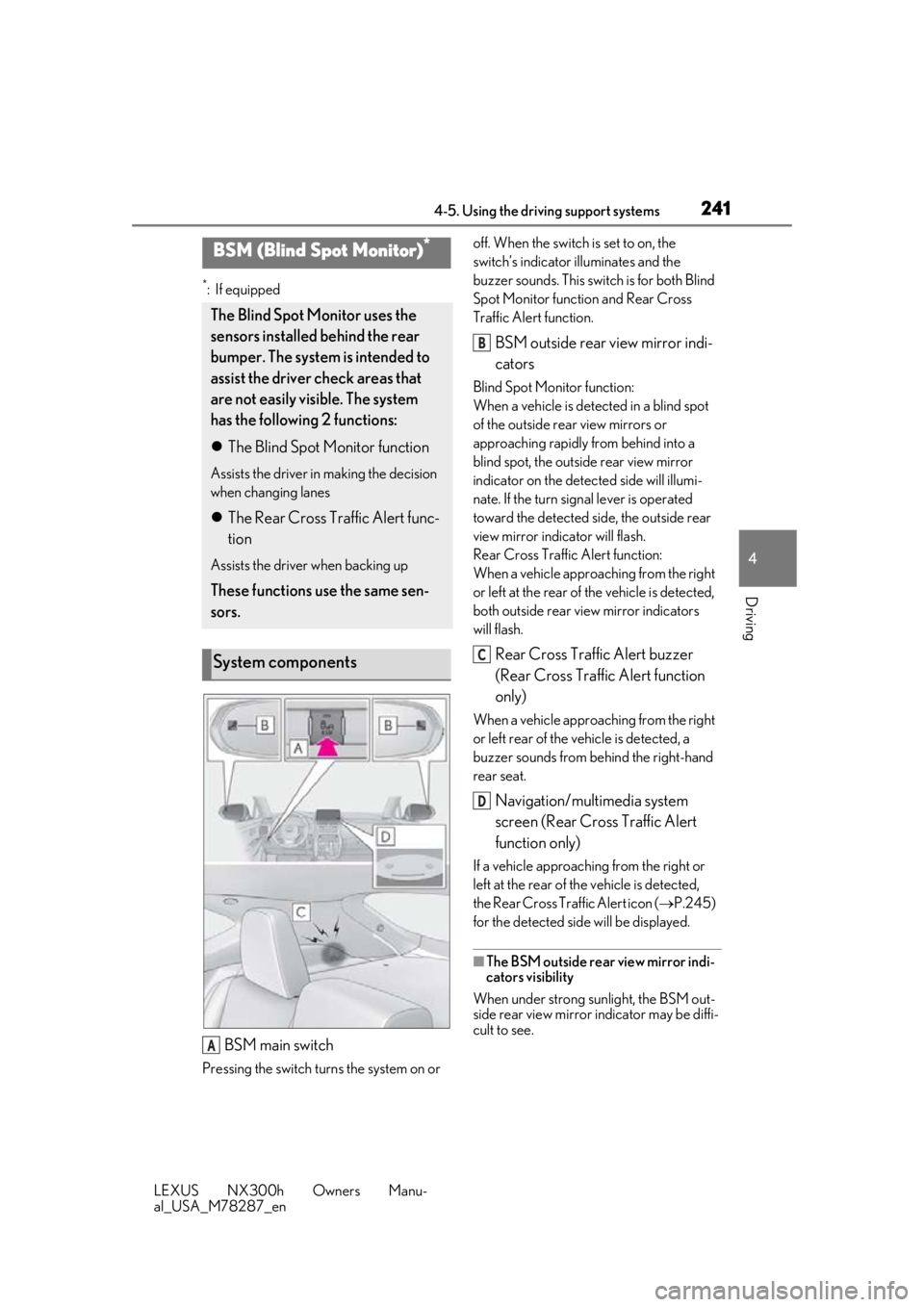
BSM main switch
Pressing the switch turns the system on or off. When the switch is set to on, the
switch’s indicator
illuminates and the
buzzer sounds. This swit ch is for both Blind
Spot Monitor function and Rear Cross
Traffic Alert function.
BSM outside rear view mirror indi-
cators
Blind Spot Monitor function:
When a vehicle is dete cted in a blind spot
of the outside rear view mirrors or
approaching rapidly from behind into a
blind spot, the outside rear view mirror
indicator on the detected side will illumi-
nate. If the turn signal lever is operated
toward the detected side, the outside rear
view mirror indicator will flash.
Rear Cross Traffic Alert function:
When a vehicle approaching from the right
or left at the rear of the vehicle is detected,
both outside rear view mirror indicators
will flash.
Rear Cross Traffic Alert buzzer
(Rear Cross Traffic Alert function
only)
When a vehicle approaching from the right
or left rear of the vehicle is detected, a
buzzer sounds from behind the right-hand
rear seat.
Navigation/multimedia system
screen (Rear Cross Traffic Alert
function only)
If a vehicle approaching from the right or
left at the rear of th e vehicle is detected,
the Rear Cross Traffic Alert icon ( P.245)
for the detected side will be displayed.
■The BSM outside rear view mirror indi-
cators visibility
When under strong sunlight, the BSM out-
side rear view mirror indicator may be diffi-
cult to see.
BSM (Blind Spot Monitor)*
The Blind Spot Monitor uses the
sensors installed behind the rear
bumper. The system is intended to
assist the driver check areas that
are not easily vi sible. The system
has the following 2 functions:
The Blind Spot Monitor function
Assists the driver in making the decision
when changing lanes
The Rear Cross Traffic Alert func-
tion
Assists the driver when backing up
These functions use the same sen-
sors.
System components
A
B
C
D
Page 245 of 460
2454-5. Using the driving support systems
LEXUS NX300h Owners Manu-
al_USA_M78287_en
4
Driving
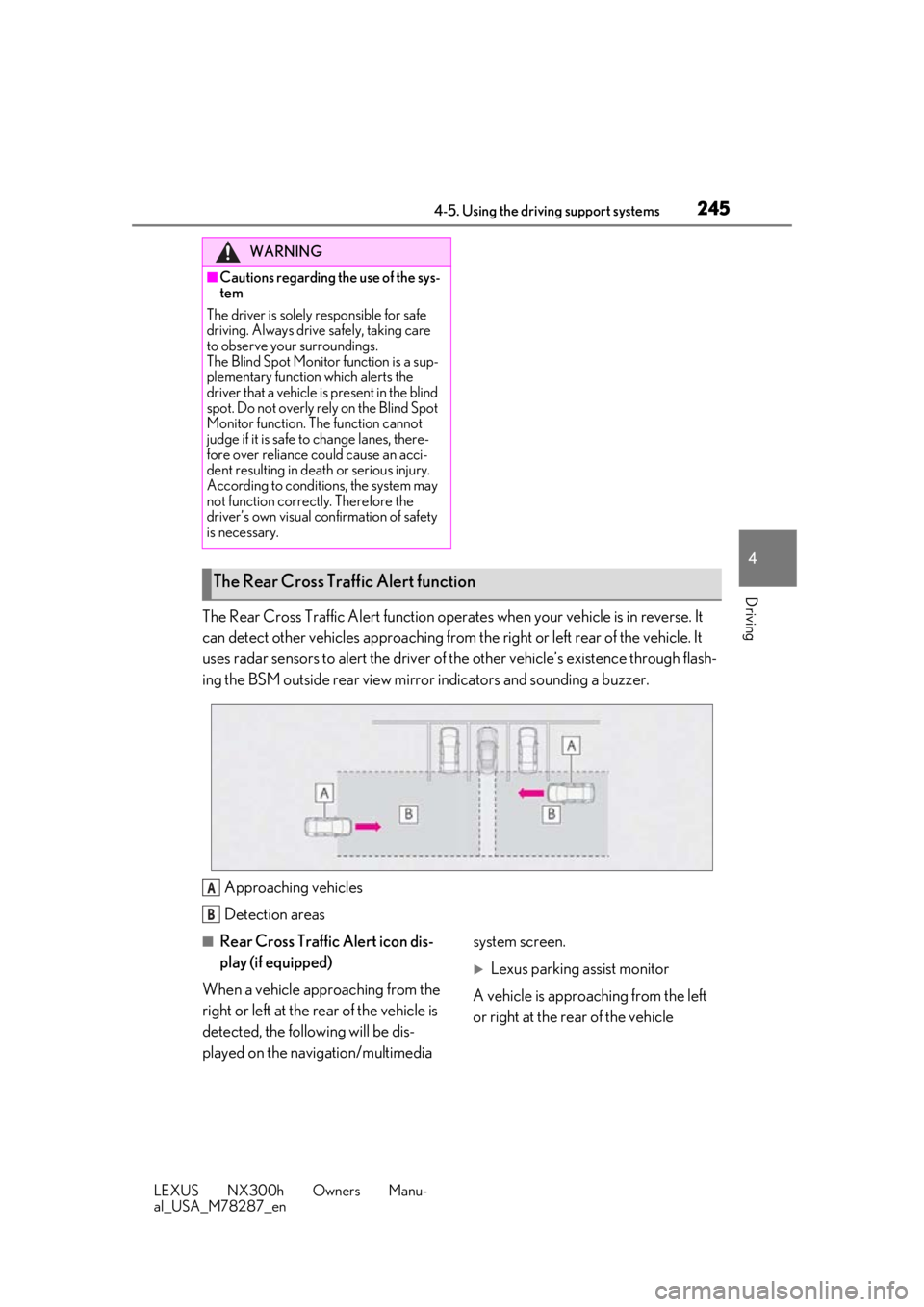
The Rear Cross Traffic Alert function operat es when your vehicle is in reverse. It
can detect other vehicles approaching from th e right or left rear of the vehicle. It
uses radar sensors to alert the driver of the other vehicle’s existence through flash-
ing the BSM outside rear view mirror indicators and sounding a buzzer.
Approaching vehicles
Detection areas
■Rear Cross Traffic Alert icon dis-
play (if equipped)
When a vehicle approaching from the
right or left at the rear of the vehicle is
detected, the following will be dis-
played on the navigation/multimedia system screen.
Lexus parking assist monitor
A vehicle is approaching from the left
or right at the rear of the vehicle
WARNING
■Cautions regarding the use of the sys-
tem
The driver is solely responsible for safe
driving. Always driv e safely, taking care
to observe your surroundings.
The Blind Spot Monitor function is a sup-
plementary function which alerts the
driver that a vehicle is present in the blind
spot. Do not overly rely on the Blind Spot
Monitor function. The function cannot
judge if it is safe to change lanes, there-
fore over reliance could cause an acci-
dent resulting in death or serious injury.
According to conditions, the system may
not function correctly. Therefore the
driver’s own visual confirmation of safety
is necessary.
The Rear Cross Traffic Alert function
A
B
Page 262 of 460
2625-1. Remote Touch
LEXUS NX300h Owners Manu-
al_USA_M78287_en
5-1.Remote Touch
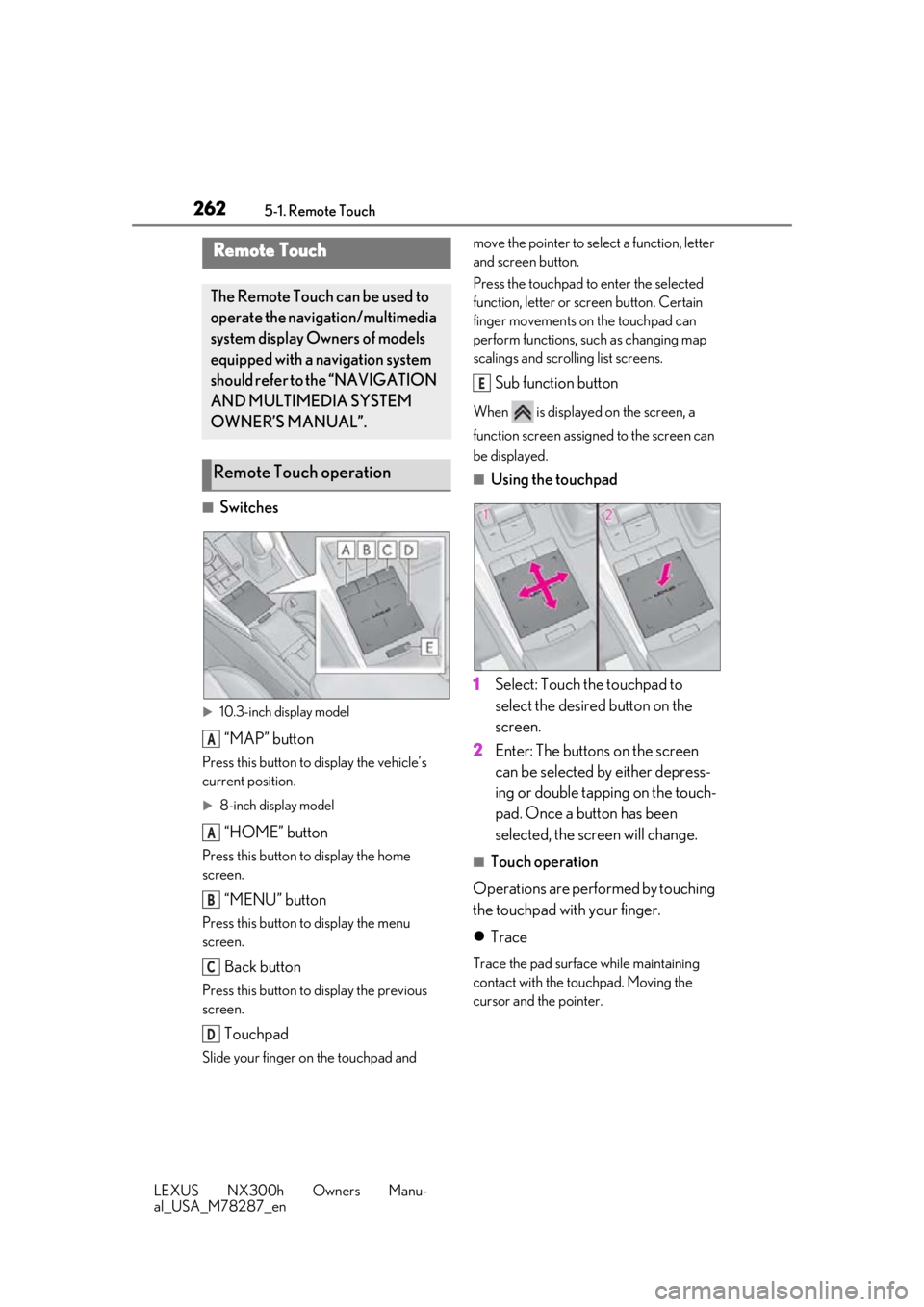
■Switches
10.3-inch display model
“MAP” button
Press this button to display the vehicle’s
current position.
8-inch display model
“HOME” button
Press this button to display the home
screen.
“MENU” button
Press this button to display the menu
screen.
Back button
Press this button to display the previous
screen.
Touchpad
Slide your finger on the touchpad and move the pointer to select a function, letter
and screen button.
Press the touchpad to enter the selected
function, letter or screen button. Certain
finger movements on the touchpad can
perform functions, su
ch as changing map
scalings and scrolling list screens.
Sub function button
When is displayed on the screen, a
function screen assigned to the screen can
be displayed.
■Using the touchpad
1 Select: Touch the touchpad to
select the desired button on the
screen.
2 Enter: The buttons on the screen
can be selected by either depress-
ing or double tapping on the touch-
pad. Once a button has been
selected, the screen will change.
■Touch operation
Operations are performed by touching
the touchpad with your finger.
Trace
Trace the pad surface while maintaining
contact with the touchpad. Moving the
cursor and the pointer.
Remote Touch
The Remote Touch can be used to
operate the navigation/multimedia
system display Owners of models
equipped with a navigation system
should refer to the “NAVIGATION
AND MULTIMEDIA SYSTEM
OWNER’S MANUAL”.
Remote Touch operation
A
A
B
C
D
E
Page 264 of 460
2645-1. Remote Touch
LEXUS NX300h Owners Manu-
al_USA_M78287_en
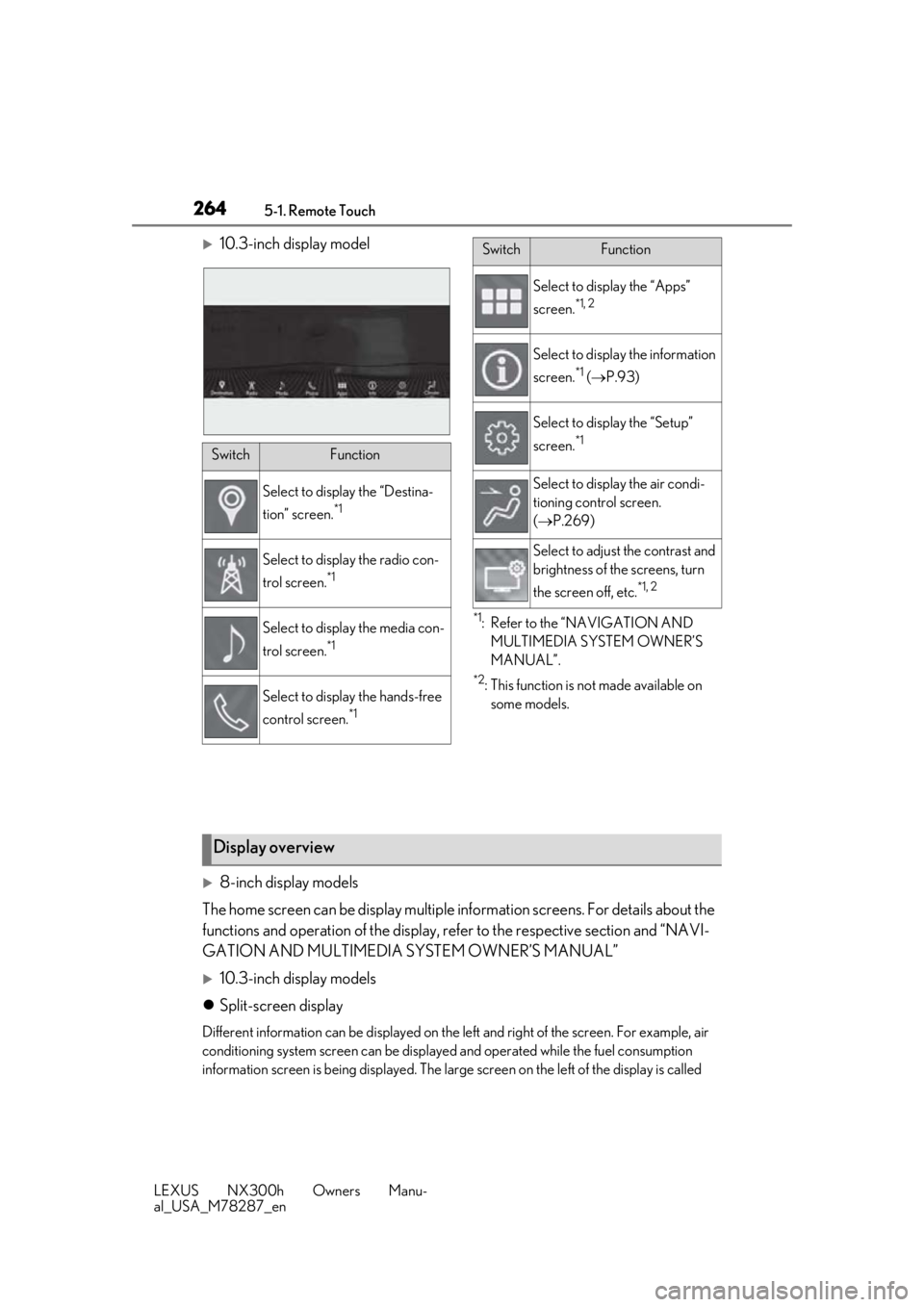
10.3-inch display model
*1: Refer to the “NAVIGATION AND MULTIMEDIA SYSTEM OWNER’S
MANUAL”.
*2: This function is not made available on some models.
8-inch display models
The home screen can be display multiple information screens. For details about the
functions and operation of the display, re fer to the respective section and “NAVI-
GATION AND MULTIMEDIA SYSTEM OWNER’S MANUAL”
10.3-inch display models
Split-screen display
Different information can be disp layed on the left and right of the screen. For example, air
conditioning system screen can be displayed and operated while the fuel consumption
information screen is being disp layed. The large screen on the left of the display is called
SwitchFunction
Select to display the “Destina-
tion” screen.
*1
Select to display the radio con-
trol screen.
*1
Select to display the media con-
trol screen.
*1
Select to display the hands-free
control screen.
*1
Select to display the “Apps”
screen.
*1, 2
Select to display the information
screen.
*1 ( P.93)
Select to display the “Setup”
screen.
*1
Select to display the air condi-
tioning control screen.
( P.269)
Select to adjust the contrast and
brightness of the screens, turn
the screen off, etc.
*1, 2
SwitchFunction
Display overview
Page 265 of 460
2655-1. Remote Touch
LEXUS NX300h Owners Manu-
al_USA_M78287_en
5
Interior features
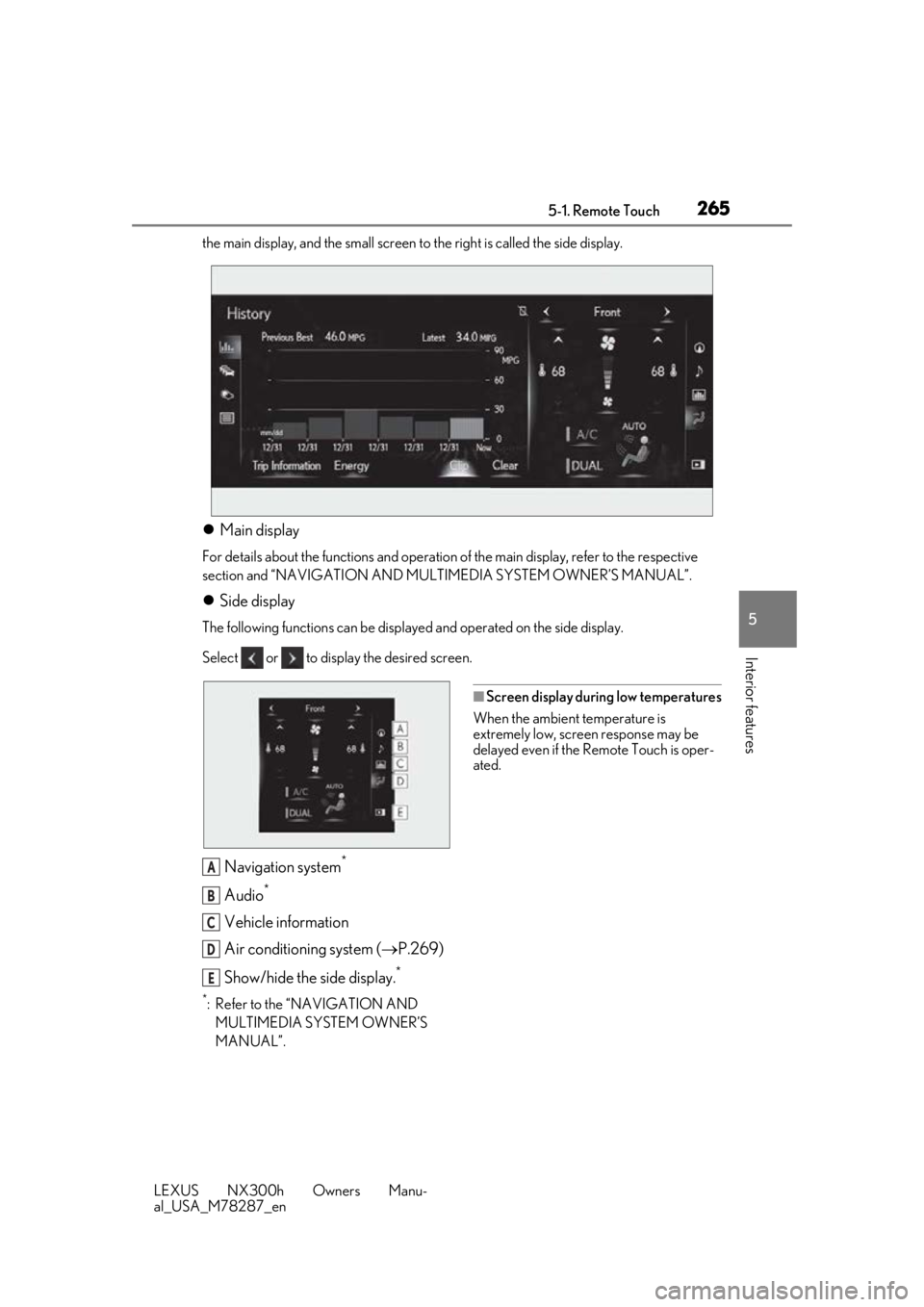
the main display, and the small screen to the right is called the side display.
Main display
For details about the functions and operation of the main display, refer to the respective
section and “NAVIGATION AND MULT IMEDIA SYSTEM OWNER’S MANUAL”.
Side display
The following functions can be displaye d and operated on the side display.
Select or to display the desired screen.
Navigation system*
Audio*
Vehicle information
Air conditioning system ( P.269)
Show/hide the side display.
*
*: Refer to the “NAVIGATION AND MULTIMEDIA SYSTEM OWNER’S
MANUAL”.
■Screen display during low temperatures
When the ambient temperature is
extremely low, screen response may be
delayed even if the Remote Touch is oper-
ated.
A
B
C
D
E