brake LEXUS NX300h 2020 User Guide
[x] Cancel search | Manufacturer: LEXUS, Model Year: 2020, Model line: NX300h, Model: LEXUS NX300h 2020Pages: 484, PDF Size: 15.45 MB
Page 81 of 484

812-1. Instrument cluster
LEXUS NX300h Owners Manual_USA_M78530_en
2
Vehicle status information and indicators
*1: These lights turn on when the power switch is turned to ON mode to indi-
cate that a system check is being per-
formed. They will turn off after the
hybrid system is on, or after a few sec-
onds. There may be a malfunction in a
system if the lights do not turn on, or
turn off. Have the vehicle inspected by
your Lexus dealer.
*2: This light illuminates on the multi-infor-mation display.
*3: The light flashes to indicate a malfunc-tion.
*4: This light illuminates on the center panel.
(Canada)
Malfunction indicator lamp*1
( P.387)
SRS warning light
*1 ( P.388)
(U.S.A.)
ABS warning light*1 ( P.388)
(Canada)
ABS warning light*1 ( P.388)
(Yellow)
Electric power steering sys-
tem warning light
*1 ( P.388)
(Red)
Electric power steering sys-
tem warning light
*1 ( P.388)
PCS warning light
*1 ( P.389)
(Orange)
LTA indicator*2 (if equipped)
( P.389)
LDA indicator
*2 (if equipped)
( P.389)
PKSB OFF indicator
*1, 3 (if
equipped) ( P.390)
Slip indicator light
*1 ( P.390)
Brake hold operated indica-
tor
*1, 3 ( P.390)
(U.S.A.)
Parking brake indicator*3
( P.390)
(Canada)
Parking brake indicator*3
( P.390)
Low fuel level warning light
( P.391)
Driver’s and front passenger’s
seat belt reminder light
( P.391)
Rear passengers’ seat belt
reminder light
*4 ( P.391)
Master warning light
*1
( P.392)
Tire pressure warning light
*1
( P.392)
Brake Override Sys-
tem/Drive-Start Control warn-
ing light
*2 ( P.393)
WARNING
■If a safety system warning light does
not come on
Should a safety system light such as the
ABS and SRS airbag warning light not
come on when you start the hybrid sys-
tem, this could mean that these systems
are not available to help protect you in an
accident, which could result in death or
serious injury. Have the vehicle inspected
by your Lexus dealer immediately if this
occurs.
Page 82 of 484

822-1. Instrument cluster
LEXUS NX300h Owners Manual_USA_M78530_en
The indicators inform the driver of the
operating state of the vehicle’s various
systems.
Indicators
Turn signal indicator (P.182)
(U.S.A.)
Headlight indicator ( P.189)
(Canada)
Tail light indicator ( P.189)
Headlight high beam indicator
( P.191)
Automatic High Beam indica-
tor ( P.192)
Fog light indicator ( P.195)
“READY” indicator ( P.174)
EV indicator ( P.68)
EV drive mode indicator
*2
( P.177)
“Eco” indicator
*2 ( P.269)
“Sport” indicator
*2 ( P.269)
Dynamic radar cruise control
indicator
*2 ( P.236)
Cruise control “SET” indica-
tor
*2 ( P.236)
Cruise control indicator
*2
( P.236)
(White)
LTA indicator*2 (if equipped)
( P.222)
LDA indicator
*2 (if equipped)
( P.231)
(Green)
LTA indicator*2 (if equipped)
( P.222)
LDA indicator
*2 (if equipped)
( P.231)
(Orange)
LTA indicator*2, 3 (if equipped)
( P.222)
LDA indicator
*2, 3 (if
equipped) ( P.231)
Intuitive parking assist indica-
tor (if equipped) ( P.247)
PKSB OFF indicator
*1, 4 (if
equipped) ( P.253)
Slip indicator light
*1, 3
( P.271)
VSC off indicator
*1, 4
( P.271)
PCS warning light
*1, 4
( P.212)
(U.S.A.)
Parking brake indicator
( P.183)
(Canada)
Parking brake indicator
( P.183)
Brake hold standby indicator
*1
( P.186)
Brake hold operated indica-
tor
*1 ( P.186)
Low outside temperature indi-
cator
*2, 5 ( P.84)
BSM outside rear view mirror
indicators
*6, 7 (if equipped)
( P.261)
Page 87 of 484

872-1. Instrument cluster
LEXUS NX300h Owners Manual_USA_M78530_en
2
Vehicle status information and indicators
■Hybrid System Indicator Power area
Shows that an Eco-friendly driving
range is being exceeded (during full
power driving etc.)
Eco area
Shows that the vehicle is being driven in
an Eco-friendly manner.
Hybrid Eco area
Shows that gasoline engine power is not
being used very often.
The gasoline engine will automatically
stop and restart under various condi-
tions.
Charge area
Shows that energy is being recovered
via the regenerative brake.
●Hybrid System Indicator is displayed
when the driving mode is in other than
the Sport mode.
●By keeping the indicator needle within
Eco area, more Eco-friendly driving can
be achieved.
●Charge area indicates regeneration* sta-
tus. Regenerated energy will be used to
charge the hybrid battery (traction bat-
tery).
*: When used in this manual, “regeneration”
refers to the conversion of energy cre-
ated by the movement of the vehicle into
electrical energy.
■Tachometer
Hybrid System Indicator switches to the
tachometer when drivin g mode is in Sport
mode. The settings of the tachometer dis-
play can be changed on the multi-informa-
tion display.
■Engine speed
On hybrid vehicles, engine speed is pre-
cisely controlled in order to help improve
fuel efficiency and reduce exhaust emis-
sions, etc.
There are times when the engine speed that
is displayed may differ even when vehicle
operation and driving conditions are the
same.
■Outside temperature display
●In the following situations, the correct
outside temperature may not be dis-
played, or the display may take longer
than normal to change.
• When stopped, or driving at low speeds
(less than 12 mph [20 km/h])
• When the outside temperature has changed suddenly (at the entrance/exit of
a garage, tunnel, etc.)
●When “--” or “E” is displayed, the system
may be malfunctioning.
Take your vehicle to your Lexus dealer.
■Pop-up display
In some situations, a pop-up display will be
temporarily displayed on the multi-informa-
tion display or the odometer/trip
meter/maintenance required information
screen.
The pop-up display function can be set
on/off. ( P.93)
■Liquid crystal display
Small spots or light sp ots may appear on the
display. This phenomenon is characteristic
of liquid crystal disp lays, and there is no
problem continuing to use the display.
■Customization
The meter display can be customized on
A
B
C
D
Page 92 of 484

922-1. Instrument cluster
LEXUS NX300h Owners Manual_USA_M78530_en
■ LTA (Lane Tracing Assist) (if
equipped) ( P.217)
Select to set up the following items.
Lane centering
Select to enable/disab le the lane centering
function.
Steering Assist
Select to enable/disable steering wheel
assistance.
Alert
Select to change the alert types.
Alert sensitivity
Select to set the warning sensitivity.
Sway warning
Select to enable/disab le the vehicle sway
warning.
Sway sensitivity
Select to set the vehicle sway warning sen-
sitivity.
■LDA (Lane Departure Alert
with steering control) (if equipped)
( P.226)
Select to set up the following items.
Steering Assist
Select to enable/disable steering wheel
assistance.
Alert
Select to change the alert types.
Alert sensitivity
Select to set the warning sensitivity.
Sway warning
Select to enable/disab le the vehicle sway
warning.
Sway sensitivity
Select to set the vehicle sway warning sen-
sitivity.
■ PCS (Pre-Collision System)
( P.210)
Select to set up the following items.
PCS on/off
Select to enable/disable the pre-collision
system.
PCS sensitivity
Select to change the warning timing.
■PKSA (Parking Support Alert) (if
equipped) ( P.246)
Select to set up the following items.
Intuitive parking assist sensor
Select to enable/disab le the intuitive park-
ing assist sensor.
Volume
Select to set the volume of the buzzer
which sounds when the parking support
alert is operated.
■ PKSB (Parking Support
Brake function) (if equipped)
( P.252)
PKSB on/off
Select to enable/disable the parking sup-
port brake function (f or static objects).
■ RSA (Road Sign Assist) (if
equipped) ( P. 234)
Select to set up the following items.
Road Sign Assist
Select to enable/disab le road sign assist.
Over Speed
Page 95 of 484

952-1. Instrument cluster
LEXUS NX300h Owners Manual_USA_M78530_en
2
Vehicle status information and indicators
Vehicle speed
Hybrid System Indicator ( P.97)
Tachometer
Shift position and shift range
Displays the selected shift position or
selected shift range ( P.179)
Audio display
Displays audio info rmation for approxi-
mately 3 seconds when the audio system is
operated
Route guidance display (vehicles
with navigation system) ( P.97)
When approaching an intersection while
the navigation system is giving route guid-
ance, an arrow will automatically be dis-
played to indicate the direction of travel.
Lane departure warning display
(LTA [Lane Tracing Assist]) (if
equipped) ( P.217)
Lane departure warning display
(LDA [Lane Departure Alert with
steering control]) ( P.226)
Approach warning display
(Dynamic radar cruise control with
full speed range) ( P.242)
Road signs (RSA [Road Sign
Assist]) (if equipped) ( P. 234)
Pre-collision warnin g message (Pre-
Collision System) ( P.210)
Speed limit display (vehicles with
navigation system) ( P.97)
Parking Support Brake function (for
static objects) ( P.252)
Brake Override System ( P.157)
Drive-Start Control ( P.157)
■“HUD” button
Pressing the button turns the head-up
display on/off and changes the vehicle
speed display units as follows:
U.S.A.
OFF ON (MPH) ON
(km/h) OFF
Canada
OFF ON (km/h) ON
(MPH) OFF
■“DISP” button
Pressing the button changes the dis-
play items (except vehicle speed) as
follows:
•Off
• Hybrid System Indicator
•Tachometer
Head-up display contents
Switching the head-up display
A
Page 98 of 484
982-1. Instrument cluster
LEXUS NX300h Owners Manual_USA_M78530_en
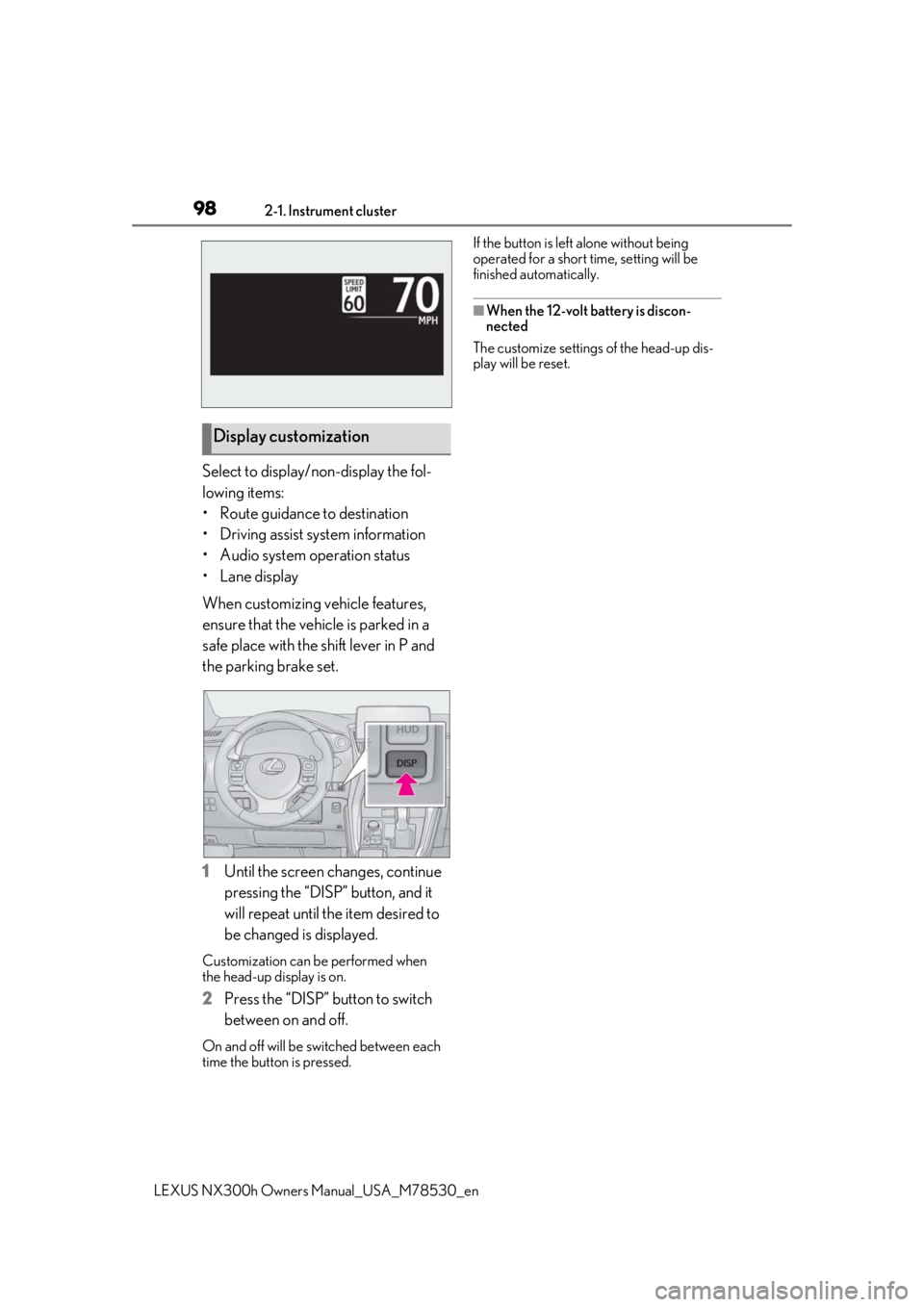
Select to display/non-display the fol-
lowing items:
• Route guidance to destination
• Driving assist system information
• Audio system operation status
•Lane display
When customizing vehicle features,
ensure that the vehicle is parked in a
safe place with the shift lever in P and
the parking brake set.
1Until the screen changes, continue
pressing the “DISP” button, and it
will repeat until the item desired to
be changed is displayed.
Customization can be performed when
the head-up display is on.
2 Press the “DISP” button to switch
between on and off.
On and off will be switched between each
time the button is pressed. If the button is left alone without being
operated for a short time, setting will be
finished automatically.
■When the 12-volt battery is discon-
nected
The customize settings of the head-up dis-
play will be reset.
Display customization
Page 119 of 484

1193-2. Opening, closing and locking the doors
LEXUS NX300h Owners Manual_USA_M78530_en
3
Before driving
When all of the doors are locked: If the
movement is de tected by the kick sensor,
all of the doors will be unlocked.
Kick sensor
Kick sensor detection area
3 When the sensor detects that your
foot is pulled back, a buzzer will
sound and the back door will auto-
matically fully open/close.
If kick operation is performed again in the
middle of back door operating, the opera-
tion will stop.
■Luggage compartment light
●The luggage compartment light turns on
when the back door is opened.
●If the luggage compartm ent light is left on
when the power switch is turned off, the
light will go off automatically after 20
minutes.
■Power back door operating conditions
With the power back door operations set to
ON, it can automatically open and close for
the following conditions:
●When the electronic key is being carried
and the power back door switch is
pushed
*
●When the wireless re mote control is
used*
●When the power switch is in ON mode,
in addition to the above for the opening
operations, the back door operates for
any of the following conditions:
• Parking brake is engaged • The brake pedal is depressed
• The shift lever is in P
*: When configured with the customization
function so that it can be operated after
being unlocked, operate the back door
after it has been unlocked.
■Kick sensor operatin g conditions (vehi-
cles with Hands Free Power Back Door)
●When the kick sensor operation setting is
turned on
●The electronic key is within the opera-
tional range. ( P.127)
■Back door closer
In the event that the back door is left slightly
open, the back door closer will automati-
cally close it to the fully closed position.
Whatever the state of the power switch, the
back door closer operates.
■Operation of the power back door
●A buzzer sounds and the emergency
flashers flash twice to indicate that the
back door is opening/closing.
●When the power back door operations
are OFF, the power back door does not
operate but it can be opened and closed
by hand.
●When the power back door automati-
cally opens, if an abnormality due to peo-
ple or objects is de tected, operation will
stop.
■Close & lock function
When the power back door is open, this
function closes the power back door and
then locks all of the doors simultaneously.
When the following procedures are per-
formed and there are no electronic keys for
the vehicle within the vehicle, all of the
doors will lock when th e power back door is
completely closed.
1 Close all of the doors except the power
back door.
2 While carrying an electronic key, press
the switch on the lower part of
the power back door.
A different buzzer than the normal one will
sound and then the power back door will
A
B
Page 136 of 484
1363-3. Adjusting the seats
LEXUS NX300h Owners Manual_USA_M78530_en
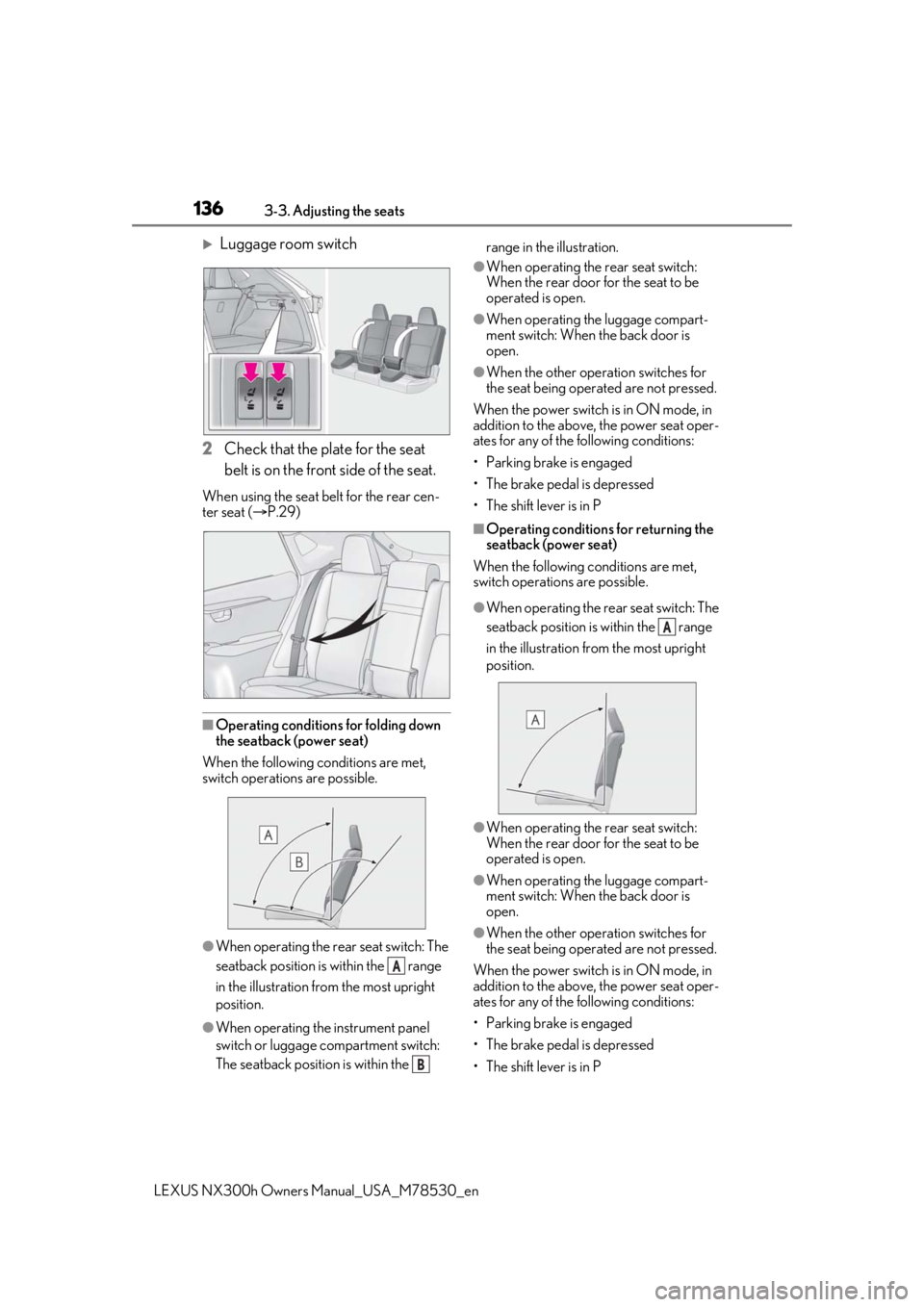
Luggage room switch
2 Check that the plate for the seat
belt is on the front side of the seat.
When using the seat be lt for the rear cen-
ter seat ( P.29)
■Operating conditions for folding down
the seatback (power seat)
When the following conditions are met,
switch operations are possible.
●When operating the rear seat switch: The
seatback position is within the range
in the illustration from the most upright
position.
●When operating the instrument panel
switch or luggage compartment switch:
The seatback position is within the range in the illustration.
●When operating the rear seat switch:
When the rear door for the seat to be
operated is open.
●When operating the luggage compart-
ment switch: When the back door is
open.
●When the other operation switches for
the seat being operated are not pressed.
When the power switch is in ON mode, in
addition to the above, the power seat oper-
ates for any of the following conditions:
• Parking brake is engaged
• The brake pedal is depressed
• The shift lever is in P
■Operating conditions for returning the
seatback (power seat)
When the following conditions are met,
switch operations are possible.
●When operating the rear seat switch: The
seatback position is within the range
in the illustration fr om the most upright
position.
●When operating the rear seat switch:
When the rear door for the seat to be
operated is open.
●When operating the luggage compart-
ment switch: When the back door is
open.
●When the other operation switches for
the seat being operated are not pressed.
When the power switch is in ON mode, in
addition to the above, the power seat oper-
ates for any of the following conditions:
• Parking brake is engaged
• The brake pedal is depressed
• The shift lever is in P
A
B
A
Page 137 of 484
1373-3. Adjusting the seats
LEXUS NX300h Owners Manual_USA_M78530_en
3
Before driving
■Seatback jam protection function
(power seat)
When folding down the seatback, if a for-
eign object is perceived between the seat-
back and seat cushion, the seatback will
reverse operations and then stops opera-
tions.
The buzzer sounds intermittently during
reverse operations and sounds continu-
ously when operations are stopped.
WARNING
■When folding the rear seatbacks
down and after folded
Observe the following precautions.
Failure to do so may result in death or
serious injury.
●Do not fold the seatbacks down while
driving.
●Stop the vehicle on level ground, set
the parking brake and shift the shift
lever to P.
●Do not allow anyone to sit on a folded
seatback or in the luggage compart-
ment while driving.
●Do not allow children to enter the lug-
gage compartment.
■After returning the rear seatback to
the upright position
Observe the following precautions.
Failure to do so may result in death or
serious injury.
●Make sure that the seatback is
securely locked in position by lightly
pushing it back and forth.
●Check that the seat belts are not
twisted or caught in the seatback.
■Jam protection function (vehicles
with power seat)
Observe the following precautions.
Failure to do so may cause death or seri-
ous injury.
●Never use any part of your body to
intentionally activate the jam protec-
tion function.
●The jam protection function may not
work if something gets caught just
before the seatback is fully folded for-
ward. Be careful no t to get fingers
caught or anything else.
●The jam protection function may not
work depending on the shape of the
object that is caught. Be careful not to
catch fingers or anything else.
NOTICE
■Stowing the seat belts
The seat belts and the buckles for the
rear center seat, as well as the armrest,
must be stowed before you fold down the
rear seatbacks. ( P.30)
Page 155 of 484

155
LEXUS NX300h Owners Manual_USA_M78530_en
4
4
Driving
Driving
4-1. Before drivingDriving the vehicle ..................... 156
Cargo and luggage .................... 161
Vehicle load limits ...................... 164
Trailer towing (vehicles with tow- ing package).............................. 165
Trailer towing (vehicles without towing package) ...................... 173
Dinghy towing ............................. 173
4-2. Driving procedures Power (ignition) switch ............ 174
EV drive mode ............................ 177
Hybrid transmission .................. 179
Turn signal lever.......................... 182
Parking brake .............................. 183
Brake Hold.................................... 186
ASC (Active Sound Control)187
4-3. Operating the lights and wipers Headlight switch ......................... 189
Automatic High Beam ............. 192
Fog light switch ........................... 195
Windshield wipers and washer ......................................................... 195
Rear window wiper and washer ........................................................ 200
4-4. Refueling Opening the fuel tank cap..... 2024-5. Using the driving support sys-
tems
Lexus Safety System+ 2.0..... 204
PCS (Pre-Collision System) . 210
LTA (Lane Tracing Assist) ...... 217
LDA (Lane Departure Alert with steering control) ..................... 226
RSA (Road Sign Assist).......... 234
Dynamic radar cruise control with full-speed range...................... 236
PKSA (Parking Support Alert) ....................................................... 246
Intuitive parking assist ............. 247
Parking Support Brake function (for static objects) .................. 252
BSM (Blind Spot Monitor) ..... 261
Driving mode select switch .. 269
Driving assist systems.............. 270
4-6. Driving tips Hybrid vehicle driving tips .... 275
Winter driving tips .................... 277
Utility vehicle precautions..... 280