change time LEXUS NX300h 2020 Service Manual
[x] Cancel search | Manufacturer: LEXUS, Model Year: 2020, Model line: NX300h, Model: LEXUS NX300h 2020Pages: 484, PDF Size: 15.45 MB
Page 314 of 484

3145-5. Using the other interior features
LEXUS NX300h Owners Manual_USA_M78530_en
■While charging, noise enters the AM
radio
Turn off the wireless charger and confirm
that the noise has decreased. If the noise
decreases, continuously pushing the power
supply switch of the wireless charger for 2
seconds, the frequency of the charger can
be changed and the noise can be reduced.
Also, on that occasion, the operation indi-
cator light will flash orange 2 times.
■Important points of the wireless charger
●If the electronic key cannot be detected
within the vehicle interior, charging can-
not be done. When the door is opened
and closed, charging may be temporarily
suspended.
●When charging, the wireless charging
device and portable device will get
warmer, however this is not a malfunction.
When a portable device gets warm while
charging, charging may stop due to the protection function on the portable
device side. In this case, when the tem-
perature of the port
able device drops
significantly, charge again.
■Operation sounds
When the power supply is turned on, while
searching for the portable device a sound
will be produced, however this is not a mal-
function.
■Certification for the wireless charger
FCC Note: This equipment has been tested
and found to comply with Part 18 of the
FCC Rules. These limits are designed to
provide reasonable protection against
harmful interference in a residential installa-
tion.
FCC Caution: Any changes or modifica-
tions not expressly approved by the party
responsible for compliance could void the
user’s authority to operate this equipment.
Page 362 of 484

3626-3. Do-it-yourself maintenance
LEXUS NX300h Owners Manual_USA_M78530_en
4Press or of the meter con-
trol switches and select .
5 Press or of the meter con-
trol switches, select the “Vehicle
Settings” and then press .
6 Press or of the meter con-
trol switches, select the “TPMS”
and then press and hold the .
The “Tire Pressure Re calibrating. Please
Wait Until Complete” will be displayed on
the multi-information display and the tire
pressure warning light will blink slowly 3
times.
When the message disappears, initializa-
tion is complete.
■Initializing the tire pressure warning sys-
tem
Initialize the system with the tire inflation
pressure adjusted to the specified level
■The initialization operation
●Make sure to carry ou t initialization after
adjusting the tire inflation pressure. Also,
make sure the tires are cold before carry-
ing out initialization or tire inflation pres-
sure adjustment.
●If you have accidenta lly turned the power
switch off during initialization, it is not
necessary to press the reset switch again
as initialization will restart automatically
when the power switch has been turned
to ON mode for the next time.
●If you accidentally press the reset switch
when initialization is not necessary, adjust
the tire inflation pressure to the specified
level when the tires are cold, and conduct
initialization again.
■Warning performance of the tire pres-
sure warning system
The warning of the tire pressure warning
system will change in accordance with the
conditions under which it was initialized. For
this reason, the system may give a warning
even if the tire pressure does not reach a
low enough level, or if the pressure is higher
than the pressure that was adjusted to when
the system was initialized.
■When initialization of the tire pressure
warning system has failed
Initialization ca n be completed in a few min-
utes. However, in the following cases, the
settings have not been recorded and the
system will not operate properly. If repeated
attempts to record tire inflation pressure
settings are unsuccessf ul, have the vehicle
inspected by your Lexus dealer.
●When initializing the tire pressure warn-
ing system, the tire pr essure warning light
does not blink 3 times.
●After carrying out the initialization proce-
dure, the tire pressure warning light
blinks for 1 minute then stays on after
driving for 20 minutes.
The tire pressure warning valve and
transmitter is equipped with a unique
ID code. When replacing a tire pres-
WARNING
■When initializing the tire pressure
warning system
Do not initializing tire inflation pressure
without first adjusting the tire inflation
pressure to the spec ified level. Other-
wise, the tire pressu re warning light may
not come on even if the tire inflation pres-
sure is low, or it may come on when the
tire inflation pressure is actually normal.
Registering ID codes
Page 405 of 484

4057-2. Steps to take in an emergency
LEXUS NX300h Owners Manual_USA_M78530_en
7
When trouble arises
come off.
2 Install the spare tire and loosely
tighten each wheel nut by hand by
approximately the same amount.
Tighten the wheel nuts until the tapered
portion comes into loose contact with
the disc wheel seat .
3Install the wheel nut wrench in jack
handle. 4
Lower the vehicle.
5 Firmly tighten each wheel nut two
or three times in the order shown in
the illustration.
Tightening torque:
76 ft•lbf (103 N•m, 10.5 kgf•m)
6Stow the flat tire, tire jack and all
tools.
■The compact spare tire
●The compact spare tire is identified by the
label “TEMPORARY USE ONLY” on
the tire sidewall.
Use the compact spar e tire temporarily,
and only in an emergency.
●Make sure to check the tire inflation pres-
sure of the compact spare tire. ( P.428)
■After completing the tire change
The tire pressure warn ing system must be
reset. ( P.361)
■When using the compact spare tire
As the compact spare tire is not equipped
with a tire pressure warning valve and trans-
mitter, low inflation pressure of the spare
tire will not be indicated by the tire pressure
A
B
Page 412 of 484

4127-2. Steps to take in an emergency
LEXUS NX300h Owners Manual_USA_M78530_en
■Changing power switch modes
Release the brake pedal and press the
power switch in step 3 above.
The hybrid system does not start and modes
will be changed each time the switch is
pressed. ( P.176)
If you have a set of jumper (or booster)
cables and a second vehicle with a 12-
volt battery, you can jump start your
vehicle by following the steps below.
1 Confirm that the electronic key is
being carried.
When connecting the jumper (or booster)
cables, depending on the situation, the
alarm may activate and the doors may lock.
( P.78)
If the 12-volt battery is dis-
charged
The following procedures may be
used to start the hybrid system if the
vehicle’s 12-volt battery is dis-
charged.
You can also call your Lexus dealer
or a qualified repair shop.
Restarting the hybrid system
Page 415 of 484
4157-2. Steps to take in an emergency
LEXUS NX300h Owners Manual_USA_M78530_en
7
When trouble arises
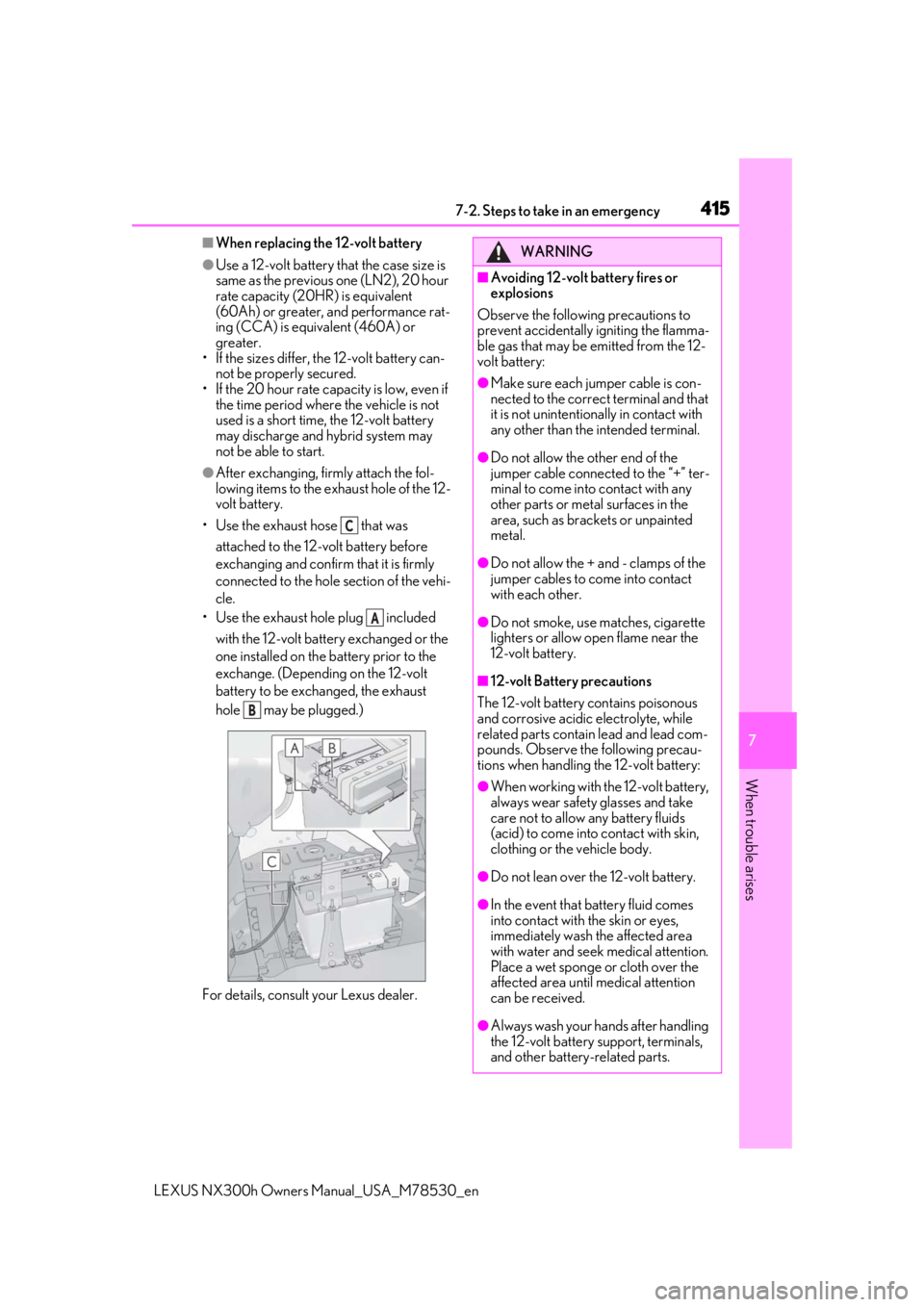
■When replacing the 12-volt battery
●Use a 12-volt battery that the case size is
same as the previous one (LN2), 20 hour
rate capacity (20HR) is equivalent
(60Ah) or greater, and performance rat-
ing (CCA) is equivalent (460A) or
greater.
• If the sizes differ, the 12-volt battery can-
not be properly secured.
• If the 20 hour rate capacity is low, even if the time period where the vehicle is not
used is a short time, the 12-volt battery
may discharge and hybrid system may
not be able to start.
●After exchanging, firmly attach the fol-
lowing items to the exhaust hole of the 12-
volt battery.
• Use the exhaust hose that was attached to the 12-volt battery before
exchanging and confirm that it is firmly
connected to the hole section of the vehi-
cle.
• Use the exhaust hole plug included
with the 12-volt battery exchanged or the
one installed on the battery prior to the
exchange. (Depending on the 12-volt
battery to be exchanged, the exhaust
hole may be plugged.)
For details, consult your Lexus dealer.
C
A
B
WARNING
■Avoiding 12-volt battery fires or
explosions
Observe the following precautions to
prevent accidentally igniting the flamma-
ble gas that may be emitted from the 12-
volt battery:
●Make sure each jumper cable is con-
nected to the correct terminal and that
it is not unintentionally in contact with
any other than the intended terminal.
●Do not allow the other end of the
jumper cable connected to the “+” ter-
minal to come into contact with any
other parts or meta l surfaces in the
area, such as brackets or unpainted
metal.
●Do not allow the + and - clamps of the
jumper cables to come into contact
with each other.
●Do not smoke, use matches, cigarette
lighters or allow open flame near the
12-volt battery.
■12-volt Battery precautions
The 12-volt battery contains poisonous
and corrosive acidic electrolyte, while
related parts contain lead and lead com-
pounds. Observe the following precau-
tions when handling the 12-volt battery:
●When working with the 12-volt battery,
always wear safety glasses and take
care not to allow any battery fluids
(acid) to come into contact with skin,
clothing or the vehicle body.
●Do not lean over the 12-volt battery.
●In the event that battery fluid comes
into contact with the skin or eyes,
immediately wash the affected area
with water and seek medical attention.
Place a wet sponge or cloth over the
affected area until medical attention
can be received.
●Always wash your ha nds after handling
the 12-volt battery support, terminals,
and other battery-related parts.
Page 442 of 484

4428-2. Customization
LEXUS NX300h Owners Manual_USA_M78530_en
Settings that can be changed by your Lexus dealer
Settings that can be changed using the vehicle switch
Definition of symbols: O = Available, – =Not available
■Door lock ( P.110, 410)
■Smart access system with push-button start and wireless remote control
( P.110, 126)
FunctionDefault settingCustomized set-
ting
Unlocking using a mechani-
cal key
Driver’s door
unlocked in first
step, all doors
unlocked in sec-
ond step
All doors
unlocked in first
step
——O—
Automatic door locking func-
tionShift position
linked door lock-
ing operationOffO—O—
Speed linked
door locking
operation
O—O—
Automatic door unlocking
function
Shift position
linked door
unlocking opera-
tionOffO—O—
Driver’s door
linked door
unlocking opera-
tion
O—O—
FunctionDefault settingCustomized set-ting
Operation signal (emergency
flashers)OnOffO—O—
Operation buzzer volume5OffO—O—1 to 7
Time elapsed before the auto-
matic door lock function is
activated if a door is not
opened after being unlocked
60 seconds
Off
O—O—30 seconds
120 seconds
Open door reminder buzzer
(When locking the vehicle)OnOff——O—
C
D
ABCD
ABCD
Page 444 of 484

4448-2. Customization
LEXUS NX300h Owners Manual_USA_M78530_en
■Lights (P.189)
■Illumination ( P.300)
■Multi-information display ( P.84, 89)
FunctionDefault settingCustomized set-
ting
Daytime Running Lights
(Daytime running lights can
be disabled)
OnOffO—O—
FunctionDefault settingCustomized set-ting
Time elapsed before the inte-
rior lights turn off15 seconds
Off
O—O—7.5 seconds
30 seconds
Time elapsed before the exte-
rior lights turn off15 seconds
Off
O—O—7.5 seconds
30 seconds
Operation after the power
switch is turned offOnOff——O—
Operation when the doors
are unlockedOnOff——O—
Operation when you
approach the vehicle with the
electronic key on your person
OnOff——O—
Footwell lightingOnOff——O—
Fading out of the outer foot
lights when they turn offLongShort——O—
FunctionDefault settingCustomized set-ting
Changeover to tachometer
when Sport mode is selectedAuto
Hybrid system
indicator (always)
—O——Tachometer (always)
EV indicatorOnOff—O——
ABCD
ABCD
ABCD
Page 447 of 484

4478-2. Customization
LEXUS NX300h Owners Manual_USA_M78530_en
8
Vehicle specifications
■Moon roof*1 ( P.150)
*1: If equipped
*2: This function cannot be cust omized unless power window op erations, using the wireless
remote control or mechanical key, is enabled.
■Turn signal lever ( P.182)
■PKSA (Parking Support Alert)* ( P.246)
*:If equipped
■Intuitive parking assist* ( P.247)
*:If equipped
FunctionDefault settingCustomized set-
ting
Mechanical key linked opera-
tion
*2OffOn——O—
Wireless remote control
linked open or Tilt up opera-
tions
*2OffOn——O—
FunctionDefault settingCustomized set-ting
The number of times the turn
signal lights flash automati-
cally when the turn signal
lever is moved to the first
position during a lane change
3
4
——O—
5
6
7
Off
FunctionDefault settingCustomized set-ting
Buzzer volume21—OO—3
FunctionDefault settingCustomized set-ting
Display setting (When intui-
tive parking assist is operat-
ing)
OnOff—OO—
ABCD
ABCD
ABCD
ABCD