change time LEXUS NX300h 2020 Owner's Guide
[x] Cancel search | Manufacturer: LEXUS, Model Year: 2020, Model line: NX300h, Model: LEXUS NX300h 2020Pages: 484, PDF Size: 15.45 MB
Page 250 of 484
2504-5. Using the driving support systems
LEXUS NX300h Owners Manual_USA_M78530_en
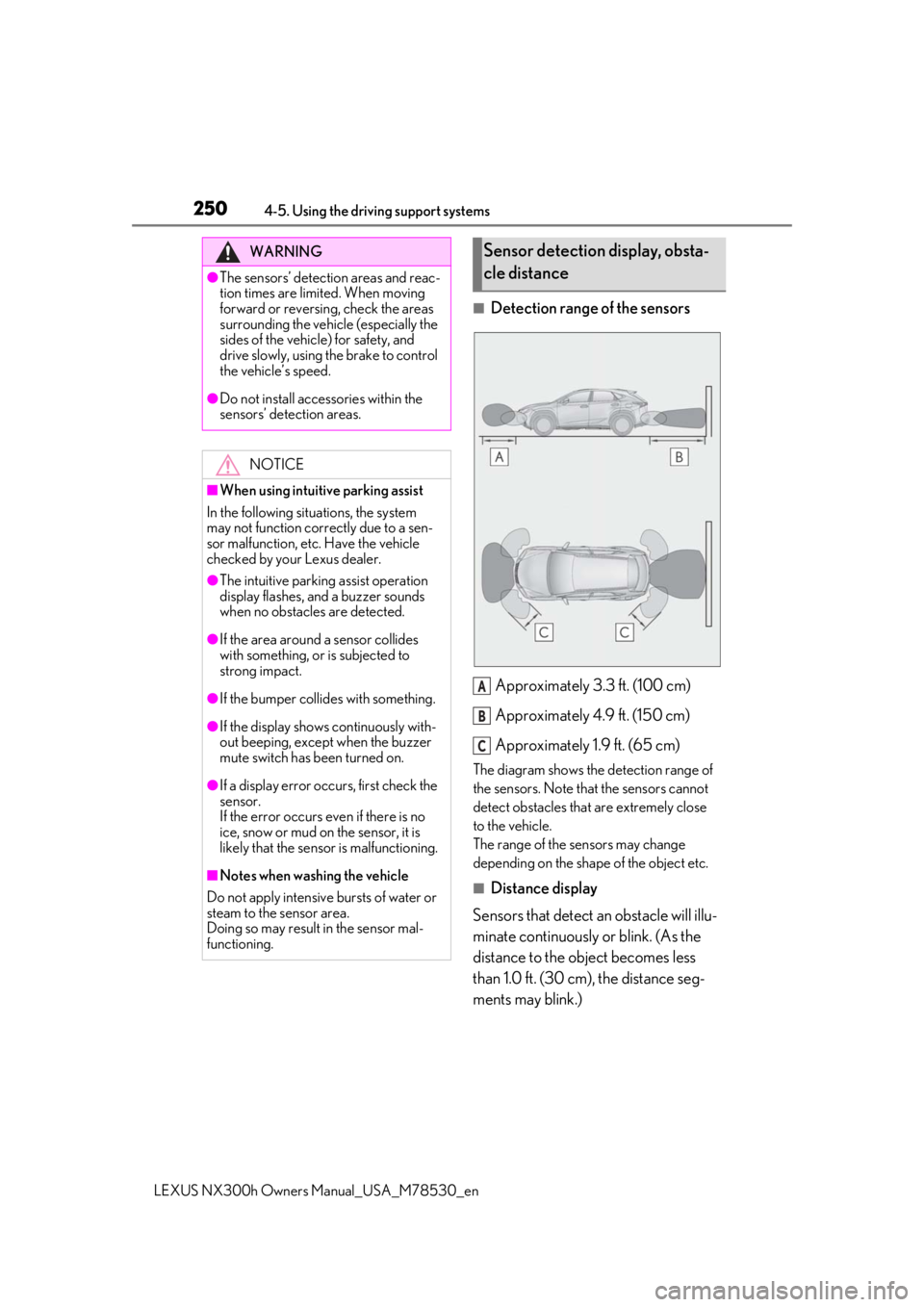
■Detection range of the sensorsApproximately 3.3 ft. (100 cm)
Approximately 4.9 ft. (150 cm)
Approximately 1.9 ft. (65 cm)
The diagram shows the detection range of
the sensors. Note that the sensors cannot
detect obstacles that are extremely close
to the vehicle.
The range of the sensors may change
depending on the shape of the object etc.
■Distance display
Sensors that detect an obstacle will illu-
minate continuously or blink. (As the
distance to the object becomes less
than 1.0 ft. (30 cm), the distance seg-
ments may blink.)
WARNING
●The sensors’ detection areas and reac-
tion times are limited. When moving
forward or reversing, check the areas
surrounding the vehicle (especially the
sides of the vehicle) for safety, and
drive slowly, using the brake to control
the vehicle’s speed.
●Do not install accessories within the
sensors’ detection areas.
NOTICE
■When using intuitive parking assist
In the following situations, the system
may not function correctly due to a sen-
sor malfunction, etc. Have the vehicle
checked by your Lexus dealer.
●The intuitive parking assist operation
display flashes, and a buzzer sounds
when no obstacles are detected.
●If the area around a sensor collides
with something, or is subjected to
strong impact.
●If the bumper collides with something.
●If the display shows continuously with-
out beeping, except when the buzzer
mute switch has been turned on.
●If a display error occurs, first check the
sensor.
If the error occurs even if there is no
ice, snow or mud on the sensor, it is
likely that the sensor is malfunctioning.
■Notes when washing the vehicle
Do not apply intensive bursts of water or
steam to the sensor area.
Doing so may result in the sensor mal-
functioning.
Sensor detection display, obsta-
cle distance
A
B
C
Page 259 of 484

2594-5. Using the driving support systems
LEXUS NX300h Owners Manual_USA_M78530_en
4
Driving
When the hybrid system output restric-
tion control or brake control operates,
the buzzer sounds and a message is
displayed on the multi-information dis- play, head-up display and naviga-
tion/multimedia system screen to alert
the driver.
Depending on the situat
ion, output restric-
tion control operates to either limit accel-
eration or restrict output as much as
possible.
■Hybrid system output restriction
control is operating (acceleration
limitation control)
■Hybrid system output restriction
control is operating (control to
restrict output as much as possible)
WARNING
●Do not damage the sensors, and
always keep them clean
■Handling the suspension
Do not modify the suspension, as
changes to the height or incline of the
vehicle may prevent the sensors from
correctly detecting static objects, may
cause the system not operate, or may
cause the system to operate unnecessar-
ily.
NOTICE
■Preventing unnecessary operation
In the following situations, turn the Park-
ing Support Brake func tion (for static
objects) OFF. The system may operate
even though there is no possibility of a
collision.
●A chassis roller, chassis dynamo, free
roller or similar equipment is being
used for an inspection, etc.
●The vehicle is being loaded onto a ship,
truck or other transport vessel
●The suspension has been lowered or
tires that have a different size than the
genuine tires are equipped
●The height of the vehicle has drastically
changed due to the carried load (the
nose tilts up or down).
●A towing hook is installed
●When using an automatic car wash
Display and buzzer for hybrid
system output restriction con-
trol and brake control
Situation
Acceleration at a certain
speed or higher is not possible.
Multi-informa-tion dis-
play/Head-up display
“Object Detected Accel- eration Reduced”
Naviga-
tion/multime- dia system screen
PKSB OFF IndicatorNot illuminated
Buzzer
Situation
A stronger than normal
brake operation is neces- sary
Multi-informa-tion dis-
play/Head-up display
“BRAKE!”Naviga-
tion/multime- dia system screen
Page 260 of 484

2604-5. Using the driving support systems
LEXUS NX300h Owners Manual_USA_M78530_en
■Brake control is operating
■The vehicle is stopped by system
operation
*: If the accelerator pedal is not depressed, “Press Brake Pedal” will be displayed.
■System operation
When the vehicle is stopped by system
operation, the Parking Support Brake func-
tion (for static objects) stops and the PKSB
OFF indicator illuminates.
■System recovery
When the Parking Support Brake function
(for static objects) is stopped by system
operation and you would like to resume
operation, either turn the Parking Support
Brake function (for static objects) ON again
( P.253), or turn the power switch off and
then back on. Furthermore, when the vehi-
cle moves with a static object no longer in
the traveling direction of the vehicle, or
when the traveling direction of the vehicle
changes (such as when switching from
moving forward to backing up, and vice
versa), system operation automatically
resumes.
■Clearance sonar buzzer
Regardless of whether the clearance sonar
is on or off, if the Parking Support Brake
function (for static ob jects) is not stopped
( P.253), when the front or rear sensors
detect a static object and brake control is
performed, the clearance sonar buzzer also
sounds and a notification of the approxi-
mate distance to the static object is pro-
vided.
■In the unlikely event that the Parking
Support Brake function (for static
objects) mistakenly operates at a cross-
ing or elsewhere
Even in the unlikely event that the Parking
Support Brake function (for static objects)
mistakenly operates at a crossing or else-
where, brake control is canceled after
approximately 2 seconds, allowing you to
proceed forward and leave the area. Fur-
thermore, brake control is also canceled
when the brake pedal is depressed.
Depressing the accelerator pedal again
allows you to proceed forward and leave
the area.
PKSB OFF
IndicatorNot illuminated
BuzzerShort beep
SituationEmergency braking is necessary
Multi-informa-tion dis-
play/Head-up display
“BRAKE!”Naviga-
tion/multime- dia system screen
PKSB OFF IndicatorNot illuminated
BuzzerShort beep
Situation
The vehicle is stopped
after brake control oper- ation
Multi-informa-tion dis-
play/Head-up display
“Switch to Brake”*
Naviga-
tion/multime- dia system screen
“Press Brake Pedal”
PKSB OFF IndicatorIlluminated
BuzzerShort beep
Page 284 of 484

2845-1. Remote Touch
LEXUS NX300h Owners Manual_USA_M78530_en
5-1.Remote Touch
■Switches
10.3-inch display model“MAP” button
Press this button to display the vehicle’s
current position.
8-inch display model“HOME” button
Press this button to display the home
screen.
“MENU” button
Press this button to display the menu
screen.
Back button
Press this button to display the previous
screen.
Touchpad
Slide your finger on the touchpad and
move the pointer to select a function, letter
and screen button.
Press the touchpad to enter the selected
function, letter or screen button. Certain
finger movements on the touchpad can
perform functions, su ch as changing map
scalings and scrolling list screens.
Sub function button
When is displayed on the screen, a
function screen assigned to the screen can
be displayed.
■Using the touchpad
1 Select: Touch the touchpad to
select the desired button on the
screen.
2 Enter: The buttons on the screen
can be selected by either depress-
ing or double tapping on the touch-
pad. Once a button has been
selected, the screen will change.
■Touch operation
Operations are performed by touching
the touchpad with your finger.
Trace
Trace the pad surface while maintaining
contact with the touchpad. Moving the
cursor and the pointer.
Remote Touch
The Remote Touch can be used to
operate the navigation/multimedia
system display Owners of models
equipped with a navigation system
should refer to the “NAVIGATION
AND MULTIMEDIA SYSTEM
OWNER’S MANUAL”.
Remote Touch operation
A
A
B
C
D
E
Page 289 of 484

2895-2. Using the air conditioning system and defogger
LEXUS NX300h Owners Manual_USA_M78530_en
5
Interior features
Outside/recirculated air mode switch
A/C switch
DUAL switch
■Adjusting the temperature setting
Operate the temperature control
switch upwards to increase the tem-
perature and downwards to decrease
the temperature.
If “A/C” switch is not pressed, the sys-
tem will blow ambient temperature air
or heated air.
■Adjusting the fan speed setting
Operate the fan speed control switch
upwards to increase the fan speed and
downwards to decrease the fan speed.
Press the off switch to turn the fan off.
■Change the airflow mode
Operate the airflow mode control
switch upwards or downwards.
The mode changes as follows each time
the switch is operated.
Air flows to the upper body.
Air flows to the upper body and feet.
Air flows to the feet.
Air flows to the feet and the wind-
shield defogger operates.
■Switching between outside air and
recirculated air modes
Press the outside/recirculated air
mode switch.
The mode switches between outside air
mode (the indicator is off) and recirculated
air mode (the indicator is on) each time the
button is pressed.
■Defogging the windshield
Defoggers are used to defog the wind-
shield and front side windows.
Press the front windshield defogger
switch.
Set the outside/recirculated air mode
switch to outside air mode if the recircu-
lated air mode is used. (It may switch auto-
matically.)
To defog the windshield and the side win-
dows early, turn the air flow and tempera-
ture up.
To return to the previous mode, press the
front windshield defo gger switch again
when the windshield is defogged.
■Defogging the rear window and
outside rear view mirrors
Defoggers are used to defog the rear
window and to remove raindrops, dew
and frost from the outside rear view
mirrors.
I
J
K
A
B
C
D
Page 290 of 484
2905-2. Using the air conditioning system and defogger
LEXUS NX300h Owners Manual_USA_M78530_en
Press the rear windshield and outside
rear view mirror defogger switch.
The defoggers will automatically turn off
after a period of time.
■Windshield wiper de-icer (if
equipped)
P.294
■When the outside temperature exceeds
75°F (24°C) and the air conditioning
system is on
●In order to reduce the air conditioning
power consumption, the air conditioning
system may switch to recirculated air
mode automatically.
This may also reduce fuel consumption.
●Recirculated air mode is selected as a
default mode when the power switch is
turned to ON mode.
●It is possible to switch to outside air mode
at any time by pressing the outside/recir-
culated air mode switch.
■Fogging up of the windows
●The windows will easily fog up when the
humidity in the vehicle is high. Pressing
“A/C” button or selecting “A/C” will
dehumidify the air from the outlets and
defog the windshield effectively.
●If you turn “A/C” off, the windows may
fog up more easily.
●The windows may fog up if the recircu-
lated air mode is used.
■When driving on dusty roads
Close all windows. If dust thrown up by the
vehicle is still drawn into the vehicle after
closing the windows, it is recommended
that the air intake mode be set to outside air
mode and the fan speed to any setting
except off.
■Outside/recirculated air mode
●Setting to the recirculated air mode tem-
porarily is recommended in preventing
dirty air from entering the vehicle interior
and helping to cool the vehicle when the
outside air temperature is high.
●Outside/recirculated air mode may auto-
matically switch depending on the tem-
perature setting or the inside
temperature.
■Registering air conditioning settings to
electronic keys (vehicles with driving
position memory)
●Unlocking the vehicle using an electronic
key and turning the power switch to ON
mode will recall that key’s registered air
conditioning settings.
●When the power switch is turned off, the
current air conditioning settings will auto-
matically be registered to the electronic
key that was used to unlock the vehicle.
●The system may not operate correctly if
more than one electr onic key is in the
vicinity or if the smart access system with
push-button start is used to unlock a pas-
senger door.
●The doors that can recall the air condi-
tioning setting when unlocked using the
smart access system with push-button
start can be changed.
* For details, con-
tact your Lexus dealer.
*: The doors that can recall the driving posi-
tion memory are changed at the same
time.
■Operation of the air conditioning sys-
tem in Eco mode
●In the Eco mode, the air conditioning sys-
tem is controlled as follows to prioritize
fuel efficiency
• Engine speed and compressor operation
controlled to restrict heating/cooling
capacity
• Fan speed restricted when automatic
mode is selected
●To improve air conditioning performance,
perform the following operations
• Adjust the fan speed
• Adjust the temperature setting
• Turn off Eco mode
●Even when the driving mode is set to Eco
mode, the air conditioning eco mode can
be turned off by selecting the
Page 291 of 484

2915-2. Using the air conditioning system and defogger
LEXUS NX300h Owners Manual_USA_M78530_en
5
Interior features
■When the outside temperature is low
The dehumidification function may not
operate even when “A/C” is pressed or
“A/C” is selected.
■Ventilation and air conditioning odors
●To let fresh air in, set the air conditioning
system to the outside air mode.
●During use, various odors from inside and
outside the vehicle may enter into and
accumulate in the air conditioning sys-
tem. This may then cause odor to be
emitted from the vents.
●To reduce potential odors from occur-
ring:
• It is recommended that the air condition-
ing system be set to outside air mode
prior to turning the vehicle off.
• The start timing of the blower may be
delayed for a short period of time imme-
diately after the air conditioning system is
started in automatic mode.
■Air conditioning filter
P.367
■Customization
Settings (e.g. A/C automatic mode switch
operation) can be changed.
(Customizable features: P. 441)
■Main control screen
Using the touchpad of the Remote
Touch ( P.284), select the button on
the screen.
to can be adjusted by perform-
ing the following operations.
Flick operation: Move the pointer to
the desired item and flick the touchpad
up or down.
The item can be adjusted by one level.
Trace operation: After selecting the
desired item, slide your finger up or
down.
The item can be adjusted by the amount
that you trace.
Trace operation cannot be used while driv-
ing.
WARNING
■To prevent the windshield from fog-
ging up
Do not use the front windshield defogger
switch during cool air operation in
extremely humid weather. The difference
between the temperature of the outside
air and that of the windshield can cause
the outer surface of the windshield to fog
up, blocking your vision.
■To prevent burns
●Do not touch the rear view mirror sur-
faces when the outside rear view mir-
ror defoggers are on.
●Vehicles with windshield wiper de-
icer: Do not touch the glass at lower
part of the windshield or to the side of
the front pillars when the windshield
wiper de-icer is on.
NOTICE
■To prevent 12-volt battery discharge
Do not leave the air conditioning system
on longer than necessary when the
hybrid system is off.
Air conditioning control screen
BE
Page 296 of 484

2965-2. Using the air conditioning system and defogger
LEXUS NX300h Owners Manual_USA_M78530_en
*:If equipped
Turns the heated steering wheel on/off
The indicator light comes on when the
heated steering wheel is operating.
■Operation condition
The power switch is in ON mode.
■Timer function
The heated steering wheel will automati-
cally turn off after about 30 minutes.
■Front
Vehicles without seat ventilators
Each time the switch is pressed, the
operation condition changes as fol-
lows.
Hi (3 segments lit) Mid (2 segments
lit) Lo (1 segment lit) Off
The level indicator (amber) light up
during operation.
Heated steering wheel*/seat
heaters*/seat ventilators*
Heated steering wheel
Warm up the grip of the steering wheel
Seat heaters
Warm up the seat upholstery
Seat ventilators
Maintain good airflo w on the seat uphol-
stery by blowing air from the seats
WARNING
■To prevent minor burn injuries
Care should be taken if anyone in the fol-
lowing categories comes in contact with
the steering wheel or seats when the
heater is on:
●Babies, small children, the elderly, the
sick and the phys ically challenged
●Persons with sensitive skin
●Persons who are fatigued
●Persons who have taken alcohol or
drugs that induce sleep (sleeping
drugs, cold remedies, etc.)
NOTICE
■To prevent damage to the seat heat-
ers and seat ventilators
Do not put heavy objects that have an
uneven surface on the seat and do not
stick sharp objects (needles, nails, etc.)
into the seat.
■To prevent battery discharge
Do not use the functions when the hybrid
system is off.
Heated steering wheel
Seat heaters
A
Page 297 of 484

2975-2. Using the air conditioning system and defogger
LEXUS NX300h Owners Manual_USA_M78530_en
5
Interior features
Vehicles with seat ventilators
Each time the switch is pressed, the
operation condition changes as fol-
lows.
Hi (3 segments lit) Mid (2 segments
lit) Lo (1 segment lit) Off
The indicator (amber) and level indicator
(green) light up during operation.
■Rear
Each time the switch is pressed, the
operation condition changes as fol-
lows.
Hi (3 segments lit) Mid (2 segments
lit) Lo (1 segment lit) Off
The level indicator (amber) lights up
during operation.
■Operation condition
The seat heaters can be used when the
power switch is in ON mode.
Each time the switch is pressed, the
operation condition changes as fol-
lows.
Hi (3 segments lit) Mid (2 segments
lit) Lo (1 segment lit) Off
The indicator (green) and level indicator
(green) light up during operation.
A
A
WARNING
■To prevent causes of overheating and
minor burn injuries
Observe the following precautions when
using a seat heater
●Do not cover the seat with a blanket or
cushion when using the seat heater.
●Do not use seat heater more than nec-
essary.
Seat ventilators (front)
A
Page 300 of 484

3005-3. Using the interior lights
LEXUS NX300h Owners Manual_USA_M78530_en
■Customization
Setting (e.g. the time elapsed before lights
turn off) can be changed. (Customizable
features: P.441)
■Front interior light
Turns the light on/off (touch the light)
The rear interior light also turns on/off.
However, when the rear interior light has
already been turned on , it will not be con-
trolled by front interior light operations.
Turns the door position on/off 1
On
The front and rear interior lights turn on/
off when a door is opened/closed.
2Off
■Rear interior light
Turns the light on/off
The rear interior light is also turned on/off
by the front interior light operations.
If the light is turned on by front interior light
operation, the rear interior light cannot
turn off by pressing the switch.
Turns the lights on/off (touch the lights)
NOTICE
■Removing light lenses
Never remove the lens for the front inte-
rior light and personal lights. Otherwise,
the lights will be damaged. If the lens
need to remove, contact your Lexus
dealer.
■To prevent 12-volt battery discharge
Do not leave the lights on longer than
necessary when the hy brid system is off.
Operating interior lights
Operating personal lights