fuel consumption LEXUS NX300h 2020 Owners Manual
[x] Cancel search | Manufacturer: LEXUS, Model Year: 2020, Model line: NX300h, Model: LEXUS NX300h 2020Pages: 484, PDF Size: 15.45 MB
Page 2 of 484
2
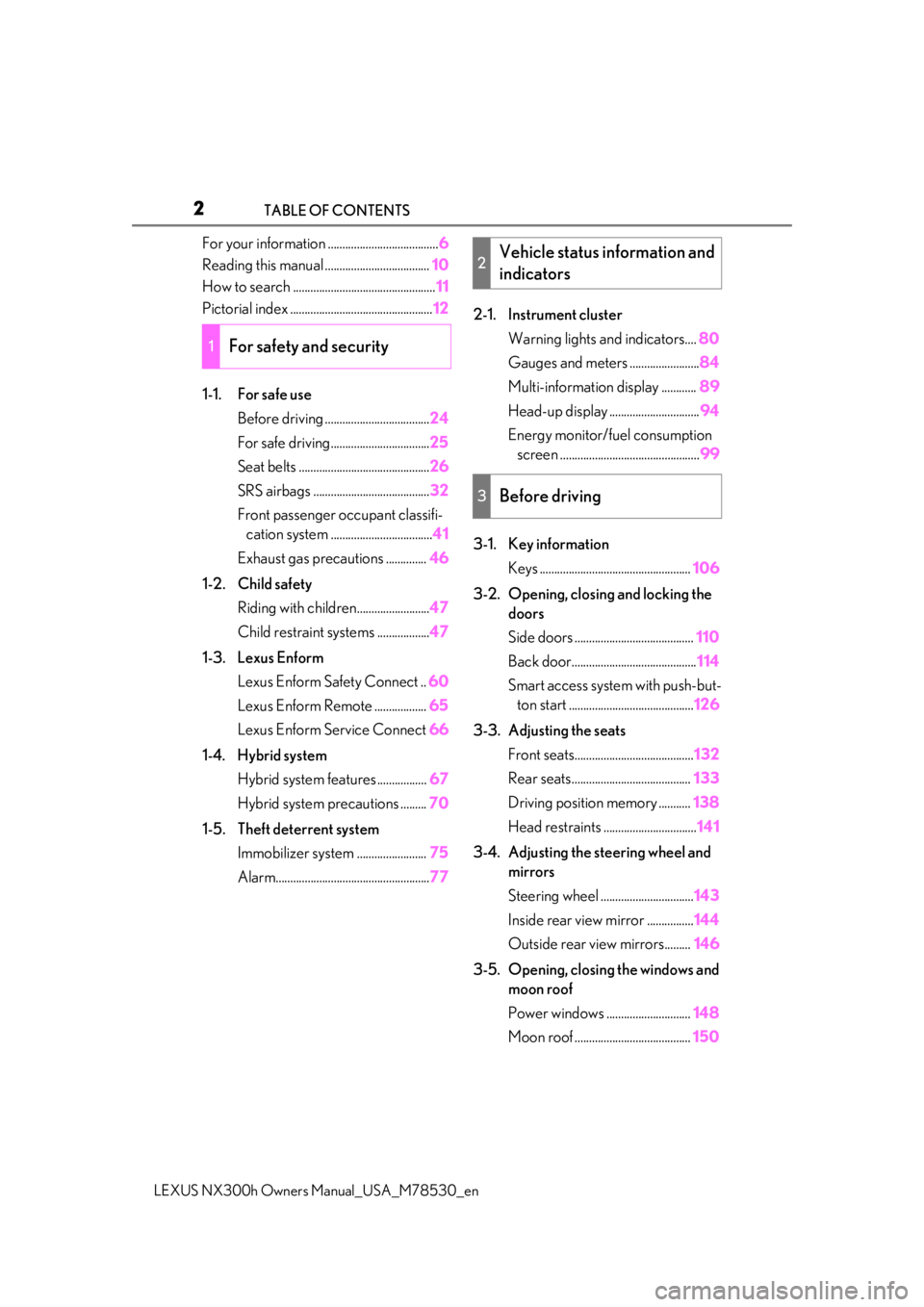
LEXUS NX300h Owners Manual_USA_M78530_enTABLE OF CONTENTS
For your information ......................................
6
Reading this manual .................................... 10
How to search ................................................. 11
Pictorial index ................................................. 12
1-1. For safe use Before driving .................................... 24
For safe driving.................................. 25
Seat belts ............................................. 26
SRS airbags ........................................ 32
Front passenger occupant classifi- cation system ................................... 41
Exhaust gas precautions .............. 46
1-2. Child safety Riding with children......................... 47
Child restraint systems .................. 47
1-3. Lexus Enform Lexus Enform Safety Connect .. 60
Lexus Enform Remote .................. 65
Lexus Enform Service Connect 66
1-4. Hybrid system Hybrid system features ................. 67
Hybrid system precautions ......... 70
1-5. Theft deterrent system Immobilizer sy stem ........................ 75
Alarm..................................................... 772-1. Instrument cluster
Warning lights and indicators.... 80
Gauges and meters ........................ 84
Multi-information display ............ 89
Head-up display ............................... 94
Energy monitor/fuel consumption screen ................................................ 99
3-1. Key information Keys .................................................... 106
3-2. Opening, closing and locking the doors
Side doors ......................................... 110
Back door........................................... 114
Smart access system with push-but- ton start ........................................... 126
3-3. Adjusting the seats Front seats......................................... 132
Rear seats......................................... 133
Driving position memory ........... 138
Head restraints ................................ 141
3-4. Adjusting the steering wheel and mirrors
Steering wheel ................................ 143
Inside rear view mirror ................ 144
Outside rear view mirrors......... 146
3-5. Opening, closing the windows and moon roof
Power windows ............................. 148
Moon roof ........................................ 150
1For safety and security
2Vehicle status information and
indicators
3Before driving
Page 79 of 484

79
LEXUS NX300h Owners Manual_USA_M78530_en
2
2
Vehicle status information and indicators
Vehicle status informationand indicators
2-1. Instrument cluster
Warning lights and indicators . 80
Gauges and meters .................... 84
Multi-information display.......... 89
Head-up display ........................... 94
Energy monitor/fuel consumption screen ............................................ 99
Page 90 of 484

902-1. Instrument cluster
LEXUS NX300h Owners Manual_USA_M78530_enwill be shown.
Call sending/receiving and history
display
Linked with the hands-free system, sending
or receiving call is displayed. For details
regarding the hands-fr
ee system, refer to
the “NAVIGATION AND MULTIMEDIA
SYSTEM OWNER’S MANUAL”.
■Content displayed as drive infor-
mation
Select to display various drive data.
Items displayed can be switched by
pressing or of the meter con-
trol switches to select and pressing
or .
Current fuel consumption
*1
Displays the current rate of fuel consump-
tion
Average fuel consumption (after
reset
*2/after start/after refuel)*1
Displays the average fuel consumption
since the function was reset, the hybrid sys-
tem was started, and the vehicle was refu-
eled, respectively
Use the displayed average fuel consump-
tion as a reference.
Average vehicle speed (after
reset
*2/after start)*1
Displays the average vehicle speed since
the function was reset and the hybrid sys-
tem was started, respectively
Elapsed time (after reset*2/after
start)
*1
Displays the elapsed time since the func-
tion was reset and the hybrid system was
started, respectively
Distance (driving range/after start)*1
Displays the estimated maximum distance
that can be driven with the quantity of fuel
remaining and the distan ce driven after the
hybrid system was started respectively.
• This distance is computed based on your average fuel consumption. As a result,
the actual distance that can be driven
may differ from that displayed.
• When only a small amount of fuel is added to the tank, the display may not be
updated.
When refueling, turn the power switch
off. If the vehicle is refueled without turn-
ing the power switch off, the display may
not be updated.
*1: Displayed when the it em is set in “Drive
Info 1”, “Drive Info 2” and “Drive Info 3”.
*2: The function can be reset by pressing
the of the meter control switches
for longer than 1 second when the item
to reset is displayed.
If there is more than one item that can
be reset, the item selection screen will
appear.
■Energy monitor
P.99
■Speedometer
Displays the vehicle speed.
■Tire inflation pressure
Displays inflation pressure of each tire.
The inflation pressure of the spare tire will
not be displayed.
Drive information
E
Page 93 of 484

932-1. Instrument cluster
LEXUS NX300h Owners Manual_USA_M78530_en
2
Vehicle status information and indicators
Select to set the over speed alert on/off.
Level of Over Speed
Select to set the over speed alert level.
Others
Select to set the other road sign assist.
■Clock
Select to switch between 12-hour dis-
play and 24-hour display.
■Vehicle Settings
PBD (Power Back Door)
*1
( P.114)
Select to set up the following items.
•System settings
Select to enable/dis able the power back
door system.
•Volume
Select to set the volume of the buzzer
which sounds when the power back door
system.
• Kick Sensor
*2
Select to enable/dis able the kick sensor.
*1: Vehicles with power back door
*2: Vehicles with Hands Free Power Back
Door
TPMS (Tire Pressure Warning Sys-
tem) ( P.357)
Select to initialize the tire pressure warning
system.
Scheduled Maintenance ( P.337)
Select to initialize the scheduled mainte-
nance.
Oil maintenance ( P.348)
Select to reset the en gine oil maintenance
information (message indicating mainte-
nance is required and distance until the
next oil change) after engine oil mainte- nance is performed.
■Meter settings
Language
Select to change the language on the dis-
play.
Units
Select to change the unit of measure for
fuel consumption.
EV Indicator ( P.68)
Select to set the EV indicator on/off.
Switch settings ( P.89)
Displays a procedure to register a desired
screen to
.
You can register 1 screen as a shortcut,
which can be displayed by pressing
.
Drive information screen ( P.90)
Select to choose between 2 items that will
be displayed on each drive information
screen (“
Drive info 1”, “Drive info 2” and
“Drive info 3
”) respectively.
Pop-up display ( P.87)
Select to set the following pop-up displays,
which may appear in some situations,
on/off.
• Intersection guidance display of the nav-
igation system-linked system
• Incoming call display of the hands-free phone system
• Instrument panel brightness adjustment display
Accent color
Select to change the accent colors on the
screen, such as the cursor color.
Tachometer settings
Page 101 of 484

1012-1. Instrument cluster
LEXUS NX300h Owners Manual_USA_M78530_en
2
Vehicle status information and indicators
These images are examples only, and may vary slightly from actual conditions.
■Hybrid battery (traction battery)
status
Navigation/multimedia system dis-
play
Low
High
Multi-information displayLow
High
These images are examples only, and may
vary slightly from actual conditions.
■Trip information
Press the “MENU” button on the
Remote Touch, then select on the
screen.
If a screen other than “Trip Information” is
displayed, select “Trip Information”.
Resetting the consumption data
Fuel consumption in the past 15
minutes
Current fuel consumption
Regenerated energy in the past 15
minutes
One symbol indicates 50 Wh. Up
to 5 symbols are shown.
Average vehicle speed since the
hybrid system was started.
When there is no energy flow
Navigation/multimedia system displayMulti-information display
A
B
A
B
Fuel consumption
A
B
C
D
E
Page 102 of 484

1022-1. Instrument cluster
LEXUS NX300h Owners Manual_USA_M78530_en
Elapsed time since the hybrid sys-
tem was started.
Cruising range (P.102)
Average fuel consumption for the past
15 minutes is divided by color into past
averages and averages attained since
the power switch was last turned to
ON mode. Use the displayed average
fuel consumption as a reference.
The image is an example only, and may
vary slightly from actual conditions.
■History
Press the “MENU” button on the
Remote Touch, then select on the
screen.
If a screen other than “History” is dis-
played, select “History”.
Best recorded fuel consumption
Latest fuel consumption
Previous fuel consumption record
Resetting the history data
Updating the latest fuel consump-
tion data
The average fuel consumption history
is divided by color into past averages
and the average fuel consumption
since the last updated. Use the dis- played average fuel consumption as a
reference.
The image is an example only, and may
vary slightly from actual conditions.
■Updating the history data
Update the latest fuel consumption by
selecting “Clip” to meas ure the current fuel
consumption again.
■Resetting the data
The fuel consumption data can be deleted
by selecting “Clear”.
■Cruising range
Displays the estimated maximum distance
that can be driven with the quantity of fuel
remaining.
This distance is computed based on your
average fuel consumption.
As a result, the actual distance that can be
driven may differ from that displayed.
Display the vehicle information on the
side display ( P.287), and then select
or to display the desired
screen.
■Trip information (type A)
Displays the average fuel consumption
and regenerated energy for the past 10
minutes in 1 minute intervals, as well as
the cruising range.
F
G
A
B
C
D
E
Using the side display (vehicles
with navigation system)
Page 103 of 484

1032-1. Instrument cluster
LEXUS NX300h Owners Manual_USA_M78530_en
2
Vehicle status information and indicators
The image is an example only, and may
vary slightly from actual conditions.
Use the displayed average fuel consump-
tion as a reference.
■Trip information (type B)
Displays the cruising range, latest fuel
consumption and the amount of time
elapsed since the hybrid system was
started.
The image is an example only, and may
vary slightly from actual conditions.
Use the displayed average fuel consump-
tion as a reference.
■History
Displays the average fuel consumption
and highest fuel consumption.
The image is an example only, and may
vary slightly from actual conditions.
Use the displayed average fuel consump-
tion as a reference.
■Energy monitor
Displays the hybrid system operation
and energy recovery states.
Displayed content is th e same as that dis-
played on the multi-information display.
( P.99)
The image is an example only, and may
vary slightly from actual conditions.
Page 165 of 484

1654-1. Before driving
LEXUS NX300h Owners Manual_USA_M78530_en
4
Driving
Contact your Lexus dealer for further
information about additional require-
ments such as a towing kit, etc.
■Matching trailer ball height to trailer
coupler height
No matter which class of tow hitch applies,
for a more safe trailer hookup, the trailer
ball setup must be the proper height for the
coupler on the trailer. Coupler
Trailer ball
■Before towing
Check that the following conditions are
met:
●Ensure that your vehicle’s tires are prop-
erly inflated. ( P.428)
●Trailer tires are inflated according to the
trailer manufacturer’s recommendation.
●All trailer lights work as required by law.
●All lights work each time you connect
them.
●The trailer ball is set at the proper height
for the coupler on the trailer.
●The trailer is level when it is hitched.
Do not drive if the trailer is not level, and
check for improper tongue weight, over-
loading, worn suspension, or other possi-
ble causes.
●The trailer cargo is securely loaded.
●The rear view mirrors conform to all
applicable federal, state/provincial or
local regulations. If they do not, install
rear view mirrors appropriate for towing
purposes.
■Break-in schedule
If your vehicle is new or equipped with any
new power train components (such as an
engine, transmission, differential or wheel
bearing), Lexus recommends that you do
Trailer towing (vehicles with
towing package)
Your vehicle is de signed primarily
as a passenger-and-load-carrying
vehicle. Towing a trailer can have an
adverse impact on handling, per-
formance, braking, durability, and
fuel consumption. For your safety
and the safety of others, you must
not overload your vehicle or trailer.
You must also ensure that you are
using appropriate towing equip-
ment, that the towing equipment
has been installed correctly and
used properly, and that you employ
the requisite driving habits.
Vehicle-trailer stability and braking
performance are affected by trailer
stability, brake performance and
setting, trailer brakes, the hitch and
hitch systems (if equipped).
To tow a trailer safely, use extreme
care and drive the vehicle in accor-
dance with your trailer’s character-
istics and operating conditions.
Lexus warranties do not apply to
damage or malfunction caused by
towing a trailer for commercial pur-
poses.
A
B
Page 269 of 484

2694-5. Using the driving support systems
LEXUS NX300h Owners Manual_USA_M78530_en
4
Driving
1 Normal mode
For normal driving.
Press the switch to change the driving
mode to Normal mode when selected to
Eco mode or Sport mode.
2Eco mode
In contrast to Normal mode when stepping
on the accelerator pedal, torque genera-
tion becomes slower, air conditioning
operations (heating/cooling) are
restrained, and driving is suited for
improved fuel consumption.
When not in Eco mode and the driving
mode select switch is turned to the left,
“Eco” indicator will be shown on the multi-
information display.
3Sport mode
Assists acceleration response by con-
trolling the hybrid system and steering.
Suitable for when precise handling is desir-
able, for example when driving on moun-
tain roads.
When not in Sport mode and the driving
mode select switch is turned to the right,
“Sport” indicator will be shown on the
multi-information display and the hybrid
system indicator changes to the tachome-
ter. ( P.84)
■Operation of the air conditioning sys-
tem in Eco mode
Eco mode controls the heating/cooling
operations and fan speed of the air condi-
tioning system to enhance fuel efficiency. To
improve air conditio ning performance,
adjust the fan speed or turn off Eco mode.
■When canceling Eco mode/Sport mode
●Select another driving mode. Also, Sport
mode will be canceled automatically
when the power switch is turned off.
●Normal mode and Eco mode will not be
canceled automatically until another driv-
ing mode is selected , even if the power
switch is turned off.
Driving mode select switch
The driving modes can be selected
to suit driving conditions.
Selecting a driving mode
Page 275 of 484

2754-6. Driving tips
LEXUS NX300h Owners Manual_USA_M78530_en
4
Driving
4-6.Driving tips
When using Eco mode, the torque cor-
responding to the accelerator pedal
depression amount can be generated
more smoothly than it is in normal con-
ditions. In addition, the operation of the
air conditioning system (heating/cool-
ing) will be minimized, improving the
fuel economy. ( P.269)
The Eco-friendly driving is possible by
keeping the indicator needle of Hybrid
System Indicator within Eco area.
( P.87)
Shift the shift lever to D when stopped
at a traffic light, or driving in heavy traf-
fic, etc. Shift the shift lever to P when
parking. When using the N, there is no
positive effect on fuel consumption. In
the N, the gasoline engine operates
but electricity cannot be generated.
Also, when using the air conditioning
system, etc., the hybrid battery (trac-
tion battery) power is consumed.
Drive your vehicle smoothly. Avoid
abrupt acceleration and decelera-
tion. Gradual acceleration and
deceleration will make more effec-
tive use of the electric motor (trac-
tion motor) without having to use
gasoline engine power.
Avoid repeated acceleration.
Repeated acceleration consumes
hybrid battery (traction battery)
power, resulting in poor fuel con-
sumption. Battery power can be
restored by driving with the acceler-
ator pedal slightly released.
Make sure to operate the brakes gently
and in a timely manner. A greater
amount of electrical energy can be
regenerated when slowing down.
Repeated acceleration and decelera-
tion, as well as long waits at traffic
lights, will lead to bad fuel economy.
Check traffic reports before leaving
and avoid delays as much as possible.
When driving in a traffic jam, gently
release the brake pedal to allow the
vehicle to move forward slightly while
avoiding overuse of the accelerator
pedal. Doing so can help control
excessive gasoline consumption.
Hybrid vehicle driving tips
For economical and ecological
driving, pay attention to the follow-
ing points:
Using Eco mode
Use of Hybrid System Indicator
Shift lever operation
Accelerator pedal/brake pedal
operation
When braking
Delays