oil LEXUS NX300h 2020 Owners Manual
[x] Cancel search | Manufacturer: LEXUS, Model Year: 2020, Model line: NX300h, Model: LEXUS NX300h 2020Pages: 484, PDF Size: 15.45 MB
Page 1 of 484

1
2
3
4
5
6
7
8
9
LEXUS NX300h Owners Manual_USA_M78530_en
Pictorial indexSearch by illustration
For safety
and securityMake sure to read through them
(Main topics: Child seat, theft deterrent system)
Vehicle status
information and
indicatorsReading driving-related information
(Main topics: Meters, multi-information display)
Before drivingOpening and closing the doors and windows,
adjustment before driving
(Main topics: Keys, doors, seats)
DrivingOperations and advice which are necessary for driving
(Main topics: Starting hybrid system, refueling)
Interior featuresUsage of the interior features
(Main topics: Air conditioner, storage features)
Maintenance
and careCaring for your vehicle and maintenance procedures
(Main topics: Interior and exterior, light bulbs)
When trouble
arisesWhat to do in case of malfunction and emergency
(Main topics: Battery discharge, flat tire)
Vehicle
specificationsVehicle specifications, customizable features
(Main topics: Fuel, oil, tire inflation pressure)
For ownersReporting safety defects for U.S. owners, and seat belt,
SRS airbag and headlight aim instructions for Canadian
owners
IndexSearch by symptom
Search alphabetically
Page 4 of 484
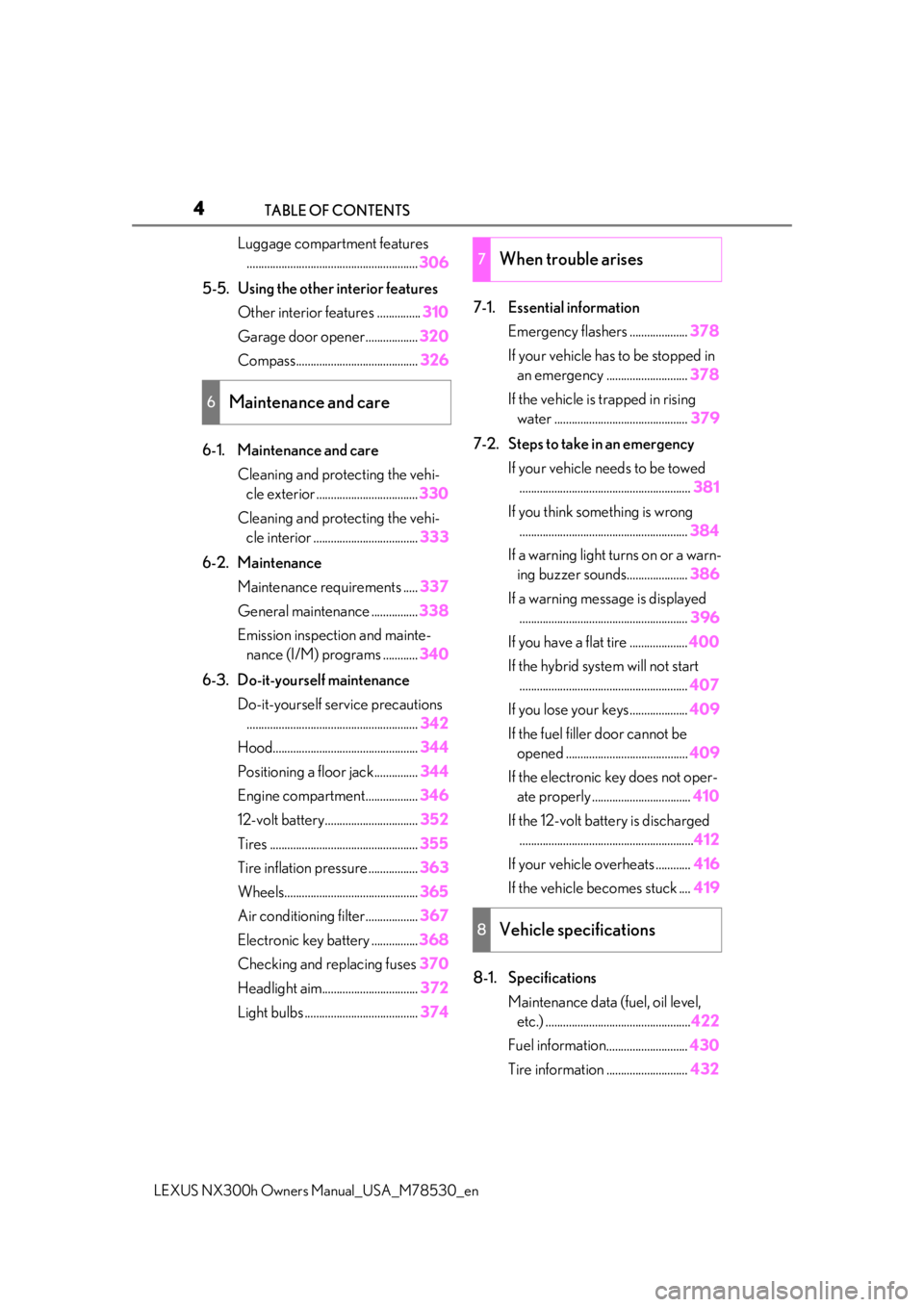
4TABLE OF CONTENTS
LEXUS NX300h Owners Manual_USA_M78530_en
Luggage compartment features........................................................... 306
5-5. Using the other interior features Other interior features ............... 310
Garage door opener.................. 320
Compass.......................................... 326
6-1. Maintenance and care Cleaning and protecting the vehi-cle exterior ................................... 330
Cleaning and protecting the vehi- cle interior .................................... 333
6-2. Maintenance Maintenance requirements ..... 337
General maintenance ................ 338
Emission inspection and mainte- nance (I/M) programs ............ 340
6-3. Do-it-yourself maintenance Do-it-yourself service precautions........................................................... 342
Hood.................................................. 344
Positioning a floor jack............... 344
Engine compartment.................. 346
12-volt battery................................ 352
Tires ................................................... 355
Tire inflation pressure ................. 363
Wheels.............................................. 365
Air conditioning filter..................367
Electronic key battery ................ 368
Checking and replacing fuses 370
Headlight aim................................. 372
Light bulbs ....................................... 3747-1. Essential information
Emergency flashers .................... 378
If your vehicle has to be stopped in an emergency ............................ 378
If the vehicle is trapped in rising water .............................................. 379
7-2. Steps to take in an emergency If your vehicle needs to be towed........................................................... 381
If you think something is wrong .......................................................... 384
If a warning light turns on or a warn- ing buzzer sounds..................... 386
If a warning messa ge is displayed
.......................................................... 396
If you have a flat tire .................... 400
If the hybrid syst em will not start
.......................................................... 407
If you lose your keys.................... 409
If the fuel filler door cannot be opened .......................................... 409
If the electronic key does not oper- ate properly .................................. 410
If the 12-volt battery is discharged ............................................................ 412
If your vehicle overheats ............ 416
If the vehicle becomes stuck .... 419
8-1. Specifications Maintenance data (fuel, oil level, etc.) .................................................. 422
Fuel information .
........................... 430
Tire information ............................ 432
6Maintenance and care
7When trouble arises
8Vehicle specifications
Page 13 of 484

13Pictorial index
LEXUS NX300h Owners Manual_USA_M78530_en
Windshield wipers ....................................................................................... P.195, 200
Precautions against winter season ................... ..........................................................P.277
To prevent freezing (windshield wiper de-icer) .................................................. P.294
Precautions against car wash ....................................................................................... P.331
Fuel filler door ........................................................................................................ P.202
Refueling method ............................................................................................................. P. 202
Fuel type/fuel tank capacity ...... ................................................................................... P.423
Tires.......................................................................................................................... .P.355
Tire size/inflation pressure ............................ ............................................................... P.428
Winter tires/tire chain .....................................................................................................P.2 77
Checking/rotation/tire pressure warning system..............................................P.355
Coping with flat tires........................................................................................................P .400
Hood ..........................................................................................................................P.344
Opening ........................................................................................................................ ....... P.344
Engine compartment cover ......................................................................................... P.347
Engine oil ..................................................................................................................... ......... P.424
Coping with overheat .......................................................................................................P.416
Warning messages .......................................................................................................... P.396
Headlights .................................................................................................................P.18 9
Parking lights/daytime running lights...............................................................P.189
Fog lights.................................................................................................................... P .195
Cornering lights
*.................................................................................................................. P.191
Turn signal lights ......................................................................................................P.182
Tail lights .................................................................................................................... P.189
License plate lights .................................................................................................P.189
Back-up light
Shifting the shift lever to R ...............................................................................................P.1 79
Light bulbs of the exterior lights for driving
(Replacing method: P.374, Watts: P.429)
D
E
F
G
H
I
J
K
L
M
N
Page 80 of 484

802-1. Instrument cluster
LEXUS NX300h Owners Manual_USA_M78530_en
2-1.Instrument cluster
For the purpose of explanation, the following illustration displays all warning lights
and indicators illuminated.
The units used on the meter and some in dicators may differ depending on the tar-
get region.
Warning lights inform the driver of mal-
functions in any of the vehicle’s sys-
tems.
Warning lights and indicators
The warning lights and indicators inform th e driver of the status of the vehicle’s
various systems.
Instrument cluster
Warning lights
(U.S.A.)
Brake system warning light*1
( P.386)
(Red)
(Canada)
Brake system warning light*1
( P.386)
Charging system warning
light
*2 ( P.386)
Output control warning light*2
( P.386, 397)
Low engine oil pressure warn-
ing light
*2 ( P.387)
High coolant temperature
warning light
*2 ( P.387)
(Yellow)
Brake system warning light*1
( P.387)
(U.S.A.)
Malfunction indicator lamp*1
( P.387)
Page 85 of 484

852-1. Instrument cluster
LEXUS NX300h Owners Manual_USA_M78530_en
2
Vehicle status information and indicators
Presents the driver with a variety of vehicle data ( P.89)
Displays warning messages in case of a malfunction (P.396)
Speedometer
Displays the vehicle speed
Fuel gauge
Displays the quantity of fuel remaining in the tank
Shift position and shift range
Displays the selected shift posi tion or selected shift range (P.179)
Odometer, trip meter and maintena nce required information display
Odometer:
Displays the total distance the vehicle has been driven
Trip meter:
Displays the distance the vehicle has been driven since the meter was last reset.
Trip meters “A” and “B” can be used to record and display different distances inde-
pendently.
Maintenance required information:
Displays the remaining distance until the engine oil should be changed.
• Displays the maintenance requ ired information when the power switch is ON mode.
• It can be reset on of the multi-information display. ( P.91)
When driving mode is in Sport mode ( P.269)
The units used on the meters may differ depending on the target region.
Engine coolant temperature gauge
Displays the engine coolant temperature
Tachometer
Displays the engine speed in revolutions per minute
G
H
I
J
A
B
Page 86 of 484

862-1. Instrument cluster
LEXUS NX300h Owners Manual_USA_M78530_en
Outside temperature
Displays the outside temperature within the range of -40°F (-40°C) to 122°F (50°C). Low
outside temperature indicator comes on when the ambient temperature is 37°F (3°C) or
lower.
Background color of driving mode
Background color changes according to the driving mode. (P.269)
•Sport mode: Red
•Eco mode: Blue
When in Normal mode, the background color is black.
Clock
Time displayed is linked to the analog clock on the instrument panel. (P.310)
Multi-information display
Presents the driver with a variety of vehicle data ( P.89)
Displays warning messages in case of a malfunction (P.396)
Speedometer
Displays the vehicle speed
Fuel gauge
Displays the quantity of fuel remaining in the tank
Shift position and shift range
Displays the selected shift posi tion or selected shift range (P.179)
Odometer, trip meter and maintena nce required information display
Odometer:
Displays the total distance the vehicle has been driven
Trip meter:
Displays the distance the vehicle has been driven since the meter was last reset.
Trip meters “A” and “B” can be used to record and display different distances inde-
pendently.
Maintenance required information:
Displays the remaining distance until the engine oil should be changed.
• Displays the maintenance requ ired information when the power switch is ON mode.
• It can be reset on of the multi-information display. ( P.91)
■Operating condition
The power switch is in ON mode.
C
D
E
F
G
H
I
J
Page 93 of 484

932-1. Instrument cluster
LEXUS NX300h Owners Manual_USA_M78530_en
2
Vehicle status information and indicators
Select to set the over speed alert on/off.
Level of Over Speed
Select to set the over speed alert level.
Others
Select to set the other road sign assist.
■Clock
Select to switch between 12-hour dis-
play and 24-hour display.
■Vehicle Settings
PBD (Power Back Door)
*1
( P.114)
Select to set up the following items.
•System settings
Select to enable/dis able the power back
door system.
•Volume
Select to set the volume of the buzzer
which sounds when the power back door
system.
• Kick Sensor
*2
Select to enable/dis able the kick sensor.
*1: Vehicles with power back door
*2: Vehicles with Hands Free Power Back
Door
TPMS (Tire Pressure Warning Sys-
tem) ( P.357)
Select to initialize the tire pressure warning
system.
Scheduled Maintenance ( P.337)
Select to initialize the scheduled mainte-
nance.
Oil maintenance ( P.348)
Select to reset the en gine oil maintenance
information (message indicating mainte-
nance is required and distance until the
next oil change) after engine oil mainte- nance is performed.
■Meter settings
Language
Select to change the language on the dis-
play.
Units
Select to change the unit of measure for
fuel consumption.
EV Indicator ( P.68)
Select to set the EV indicator on/off.
Switch settings ( P.89)
Displays a procedure to register a desired
screen to
.
You can register 1 screen as a shortcut,
which can be displayed by pressing
.
Drive information screen ( P.90)
Select to choose between 2 items that will
be displayed on each drive information
screen (“
Drive info 1”, “Drive info 2” and
“Drive info 3
”) respectively.
Pop-up display ( P.87)
Select to set the following pop-up displays,
which may appear in some situations,
on/off.
• Intersection guidance display of the nav-
igation system-linked system
• Incoming call display of the hands-free phone system
• Instrument panel brightness adjustment display
Accent color
Select to change the accent colors on the
screen, such as the cursor color.
Tachometer settings
Page 128 of 484

1283-2. Opening, closing and locking the doors
LEXUS NX300h Owners Manual_USA_M78530_entronic key from re
ceiving radio waves.
Press twice while pressing and
holding .
Confirm that the elec tronic key indicator
flashes 4 times. While the battery-saving
mode is set, the smar t access system with
push-button start cannot be used. To cancel
the function, press any of the electronic key
buttons.
■Conditions affe cting operation
The smart access system with push-button
start, wireless remote control and immobi-
lizer system use weak radio waves. In the
following situations, the communication
between the electronic key and the vehicle
may be affected, preventing the smart
access system with push -button start, wire-
less remote control and immobilizer system
from operating properly. (Ways of coping:
P.410)
●When the electronic key battery is
depleted
●Near a TV tower, electric power plant,
gas station, radio stat ion, large display,
airport or other faci lity that generates
strong radio waves or electrical noise
●When the electronic key is in contact
with, or is covered by the following metal-
lic objects
• Cards to which aluminum foil is attached
• Cigarette boxes that have aluminum foil
inside
• Metallic wallets or bags
•Coins
• Hand warmers made of metal
• Media such as CDs and DVDs
●When other wireless ke ys (that emit radio
waves) are being used nearby
●When carrying the electronic key together with the following devices that
emit radio waves
• Portable radio, cellular phone, cordless
phone or other wireless communication
devices
• Another vehicle’s electronic key or a
wireless key that emits radio waves
• Personal computers or personal digital assistants (PDAs)
• Digital audio players
• Portable game systems
●If window tint with a metallic content or
metallic objects are attached to the rear
window
●When the electronic key is placed near a
battery charger or electronic devices
■Note for the entry function
●Even when the electronic key is within the
effective range (detection areas), the sys-
tem may not operate properly in the fol-
lowing cases:
• The electronic key is too close to the win-
dow or outside door handle, near the
ground, or in a high place when the doors
are locked or unlocked.
• The electronic key is near the ground or in a high place, or too close to the rear
bumper center when the back door is
opened.
• The electronic key is on the instrument panel, luggage room, floor, or in the door
pockets or glove box when the hybrid
system is started or power switch modes
are changed.
●Do not leave the electronic key on top of
the instrument panel or near the door
pockets when exiting the vehicle.
Depending on the radio wave reception
conditions, it may be detected by the
antenna outside the cabin and the door
will become lockable from the outside,
possibly trapping the electronic key
inside the vehicle.
●As long as the electronic key is within the
effective range, the doors may be locked
or unlocked by anyone.
●Even if the electronic key is not inside the
vehicle, it may be po ssible to start the
hybrid system if the el ectronic key is near
the window.
●The doors may unlock if a large amount
Page 161 of 484

1614-1. Before driving
LEXUS NX300h Owners Manual_USA_M78530_en
4
Driving
NOTICE
●The vehicle will make abnormal
sounds or vibrations.
●The vehicle will lean abnormally.
Information on what to do in case of a flat
tire ( P.400)
■When encountering flooded roads
Do not drive on a road that has flooded
after heavy rain, etc. Doing so may cause
the following serious damage to the vehi-
cle:
●Engine stalling
●Short in electrical components
●Engine damage caused by water
immersion
In the event that you drive on a flooded
road and the vehicle is flooded, be sure
to have your Lexus dealer check the fol-
lowing:
●Brake function
●Changes in quantity and quality of oil
and fluid used for the engine, hybrid
transmission, etc.
●Lubricant condition for the bearings
and suspension joints (where possi-
ble), and the function of all joints, bear-
ings, etc.
■When parking the vehicle
Always set the parking brake, and shift
the shift lever to P. Failure to do so may
cause the vehicle to move or the vehicle
may accelerate sudden ly if the accelera-
tor pedal is accidentally depressed.
Cargo and luggage
Take notice of the following infor-
mation about storage precautions,
cargo capacity and load.
WARNING
■Things that must not be carried in the
luggage compartment
The following things may cause a fire if
loaded in the luggage compartment:
●Receptacles containing gasoline
●Aerosol cans
■Storage precautions
Observe the following precautions.
Failure to do so may prevent the pedals
from being depressed properly, may
block the driver’s vision, or may result in
items hitting the driver or passengers,
possibly causing an accident.
●Stow cargo and luggage in the lug-
gage compartment whenever possi-
ble.
●Do not stack cargo and luggage in the
luggage compartment higher than the
seatbacks.
●When you fold down the rear seats,
long items should not be placed
directly behind the front seats.
●Never allow anyone to ride in the lug-
gage compartment. It is not designed
for passengers. They should ride in
their seats with thei r seat belts prop-
erly fastened.
●Do not place cargo or luggage in or on
the following locations.
• At the feet of the driver
• On the front passenger or rear seats (when stacking items)
•On the luggage cover
• On the instrument panel
•On the dashboard
Page 205 of 484

2054-5. Using the driving support systems
LEXUS NX300h Owners Manual_USA_M78530_en
4
Driving
WARNING
●Keep the radar sensor and the grille
cover clean at all times. Radar sensor
Grille cover
If the front of the rada r sensor or the front
or back of the grille cover is dirty or cov-
ered with water droplets, snow, etc.,
clean it.
Clean the radar sensor and grille cover
with a soft cloth to avoid damaging them.
●Do not attach accessories, stickers
(including transpar ent stickers) or
other items to the radar sensor, grille
cover or surrounding area.
●Do not subject the radar sensor or its
surrounding area to a strong impact.
If the radar sensor, front grille, or front
bumper has been subjected to a
strong impact, have the vehicle
inspected by your Lexus dealer.
●Do not disassemble the radar sensor.
●Do not modify or paint the radar sen-
sor or grille cover.
●If the radar sensor, front grille, or front
bumper needs to be removed and
installed, or replaced, contact your
Lexus dealer.
A
B
■To avoid malfunction of the front cam-
era
Observe the following precautions.
Otherwise, the front camera may not
operate properly, possibly leading to an
accident resulting in death or serious
injury.
●Keep the windshield clean at all times.
• If the windshield is dirty or covered with an oily film, water droplets, snow,
etc., clean the windshield.
• If a glass coating agent is applied to the windshield, it will still be necessary to
use the windshield wipers to remove
water droplets, etc. from the area of
the windshield in front of the front
camera.
• If the inner side of the windshield where the front camera is installed is
dirty, contact your Lexus dealer.
●Do not attach objects, such as stickers,
transparent stickers, etc., to the outer
side of the windshield in front of the
front camera (shaded area in the illus-
tration).
From the top of the windshield to
approximately 0.4 in. (1 cm) below
the bottom of the front camera
Approximately 7.9 in. (20 cm)
(Approximately 4.0 in. [10 cm] to the
right and left from the center of the
front camera)
A
B