warning LEXUS RC200T 2017 Owners Manual
[x] Cancel search | Manufacturer: LEXUS, Model Year: 2017, Model line: RC200T, Model: LEXUS RC200T 2017Pages: 724, PDF Size: 42.04 MB
Page 357 of 724
3574-5. Using the driving support systems
4
Driving
RC200t_RC F_EE(OM24728E)
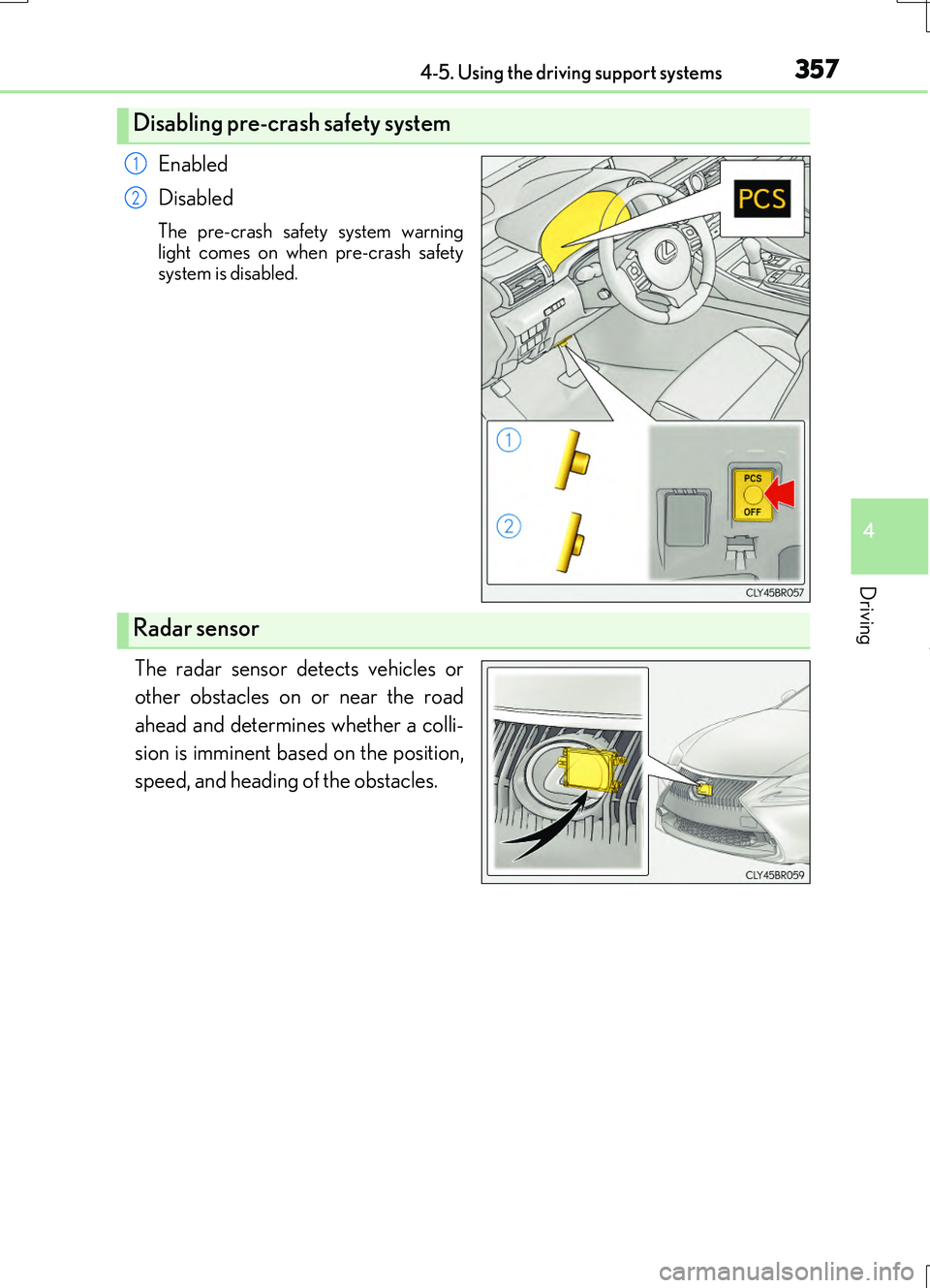
Enabled
Disabled
The pre-crash safety system warning
light comes on when pre-crash safety system is disabled.
The radar sensor detects vehicles or
other obstacles on or near the road
ahead and determines whether a colli-
sion is imminent based on the position,
speed, and heading of the obstacles.
Disabling pre-crash safety system
1
2
Radar sensor
Page 358 of 724
3584-5. Using the driving support systems
RC200t_RC F_EE(OM24728E)
■The pre-crash safety system is operational when
The pre-crash safety system is enable d and the following conditions are met:
●Pre-crash warning:
• Vehicle speed is greater than about 15 km/h (10 mph).
• The speed at which your vehicle is approaching the obstacle or the vehicle running ahead of you is greater than about 15 km/h (10 mph).
●Pre-crash brake assist:
• The VSC system is not disabled. • Vehicle speed is greater than about 30 km/h (19 mph).
• The speed at which your vehicle is approaching the obstacle or the vehicle running ahead of you is greater than about 30 km/h (19 mph).• The brake pedal is depressed.
●Pre-crash braking:
• The VSC system is not disabled.
• Vehicle speed is greater than about 15 km/h (10 mph). • The speed at which your vehicle is approaching the obstacle or the vehicle runningahead of you is greater than about 15 km/h (10 mph).
●Suspension control:
• Vehicle speed is greater than about 5 km/h (4 mph).
• The speed at which your vehicle is approaching the obstacle or the vehicle running ahead of you is greater than about 30 km/h (19 mph).
■Conditions that may trigger the system even if there is no danger of a collision
In any of the following situations where the frontal area of the radar sensor is interrupted, the radar sensor may detect possibility of a frontal collision and the system may be acti- vated.
●When passing by an oncoming vehicle in a curve or a turn to the right or the left
●When rapidly approaching an obstacle ahead (e.g. preceding vehicle, toll gate barrier, etc.)
●When there is a structural object (billboard, low ceiling, fluorescent light, etc.) above the uphill road ahead
●When driving on a narrow road or throug h under a low overhead structure (bridge,
tunnel, fly-under, etc.)
●When driving on an uneven road surface
●When there is a metal object, bump, or protrusion on the road surface
●When vehicle’s front part is raised or lowered depending on loading conditions
●When the direction of radar sensor is misaligned by strong impact applied on an area
around the radar sensor, etc.
●When there is an obstacle (guard rail, etc.) by the roadside at the entrance to a curve
●When the front of your vehicle is pointing upwards (caused by putting a heavy load in
the trunk etc.)
When the system is activated in the situations described above, there is also a possibility that the brakes may be applied with a force greater than normal.
Page 359 of 724
3594-5. Using the driving support systems
4
Driving
RC200t_RC F_EE(OM24728E)
■Obstacles not detected
The sensor cannot detect plastic obstacles such as traffic cones. There may also be occa- sions when the sensor cannot detect pedestrians, animals, bicycles, motorcycles, trees,
or snowdrifts.
■Situations in which the pre-crash safe ty system does not function properly
The system may not function effectively in situations such as the following:
●On roads with sharp bends or uneven surfaces
●If a vehicle suddenly moves in front of your vehicle, such as at an intersection
●If a vehicle suddenly cuts in front of your vehicle, such as when overtaking
●In inclement weather such as heavy rain, fog, snow or sand storms
●If the vehicle is skidding when VSC is not operating
●When your vehicle is steeply inclined
●When only part of your vehicle’s front end collides with, or contacts, a vehicle or object in a frontal collision
●When the radar sensor moves off position due to its surrounding area being subjected
to a strong impact
●When an obstacle suddenly appears in front of the vehicle due to the steering wheel being turned sharply or another cause
■Automatic cancelation of the pre-crash safety system
When a malfunction occurs due to sensor contamination, etc. that results in the sensors being unable to detect obstacles, the pre-crash safety system will be automatically dis-
abled. In this case, the system will not activ ate even if there is a collision possibility.
■When there is a malfunction in the system or if the system is temporarily unusable
The pre-crash safety system warning light will flash and warning messages will be dis- played. ( P. 592, 604)
Page 362 of 724
3624-5. Using the driving support systems
RC200t_RC F_EE(OM24728E)
WARNING
■Limitations of the pre-crash safety system
●The driver is solely responsible for safe driving. Always drive safely, taking care to observe your surroundings.
Do not use the pre-crash safety system in stead of normal braking operations under any circumstances. This system will not pr event collisions or lessen damage or inju- ries in all cases. Do not overly rely on this system. Failure to do so may cause an acci-
dent, resulting in death or serious injury.
●This system has been designed to help avoid and reduce the impact of collisions. However, the system operates differently depending on the situation ( P. 358,
358). As a result, the same level of perf ormance may not be expected in all cases. Also, the pre-crash safety brakes may not oper ate if the driver is depressing the brake pedal or turning the steering wheel, as th e system will determine such conditions as
collision avoidance operations.
●As the pre-crash safety system is designed to assist the driver in safe driving, it may operate under sporty driving conditions, which may cause an accident. For this rea-
son under sporty driving conditions, it is recommended that this system be disabled by using the PCS OFF switch.
■Handling the radar sensor
Observe the following to ensure the pre-crash safety system can function effectively. Otherwise, the system may not function correctly and could result in an accident.
●Keep the sensor and grille cover clean at all times.
Clean the sensor and grille cover with a soft cloth so you do not mark or damage them.
●Do not subject the sensor or surrounding area to a strong impact.
If the sensor moves even slightly off po sition, the system may become inaccurate or malfunction. If the sensor or surrounding area is subject to a strong impact, alwayshave the area inspected and adjusted by an y authorized Lexus dealer or repairer, or
another duly qualified an d equipped professional.
●Do not disassemble the sensor.
●Do not attach accessories or stickers to the sensor, grille cover or surrounding area.
●Do not modify or paint the sensor and grille cover.
●If the radar sensor needs to be replaced, contact any authorized Lexus dealer or repairer, or another duly qualified and equipped professional.
Page 363 of 724
3634-5. Using the driving support systems
4
Driving
RC200t_RC F_EE(OM24728E)
WARNING
■Cautions regarding the assist contents of the system
By means of alarms and brake control, the pr e-crash safety system is intended to assist the driver in avoiding collisions throug h the process of LOOK-JUDGE-ACT. There are
limits to the degree of assistance the system can provide, so please keep in mind the following important points.
●Assisting the driver in watching the road
The pre-crash safety system is only able to detect obstacles directly in front of the vehicle, and only within a limited range. It is not a mechanism that allows careless or inattentive driving, and it is not a system that can assist the driver in low-visibility con-
ditions. It is still necessary for the driver to pay close attention to the vehicle’s surroundings.
●Assisting the driver in making correct judgment
When attempting to estimate the possibility of a collision, the only data available to the pre-crash safety system is that from obstacles it has detected directly in front ofthe vehicle. Therefore, it is absolutely necessary for the driver to remain vigilant and
to determine whether or not there is a po ssibility of collision in any given situation.
●Assisting the driver in taking action The pre-crash brake assist function of the pre-crash safety system is designed to help
reduce the severity of a collision, and will only operate when the system determines that a collision is unavoidable. This system is not capable of automatically avoiding a collision or bringing the vehicle to a stop safely without appropriate operations per-
formed by the driver. For this reason, wh en encountering a dangerous situation the driver must take direct and immediate acti on in order to ensure the safety of all involved.
Page 366 of 724
3664-5. Using the driving support systems
RC200t_RC F_EE(OM24728E)
■Outside rear view mirror indicator visibility
In strong sunlight, the outside rear view mirror indicator may be difficult to see.
■Hearing the RCTA buzzer
The RCTA buzzer may be difficult to hear ov er loud noises, such as if the audio system
volume is high.
■When there is a malfunction in the Blind Spot Monitor
If a system malfunction is de tected due to any of the following, a warning message will be
displayed: ( P. 603, 604)
●A sensor is malfunctioning
●A sensor is dirty or covered with snow or a sticker
●The outside temperature is extremely high or low
●Sensor voltage is abnormal
●A sensor is misaligned
■Certification for the Blind Spot Monitor
For vehicles sold in Ukraine
type approval number : 1O094.000966-13
Page 369 of 724
3694-5. Using the driving support systems
4
Driving
RC200t_RC F_EE(OM24728E)
WARNING
■Handling the radar sensor
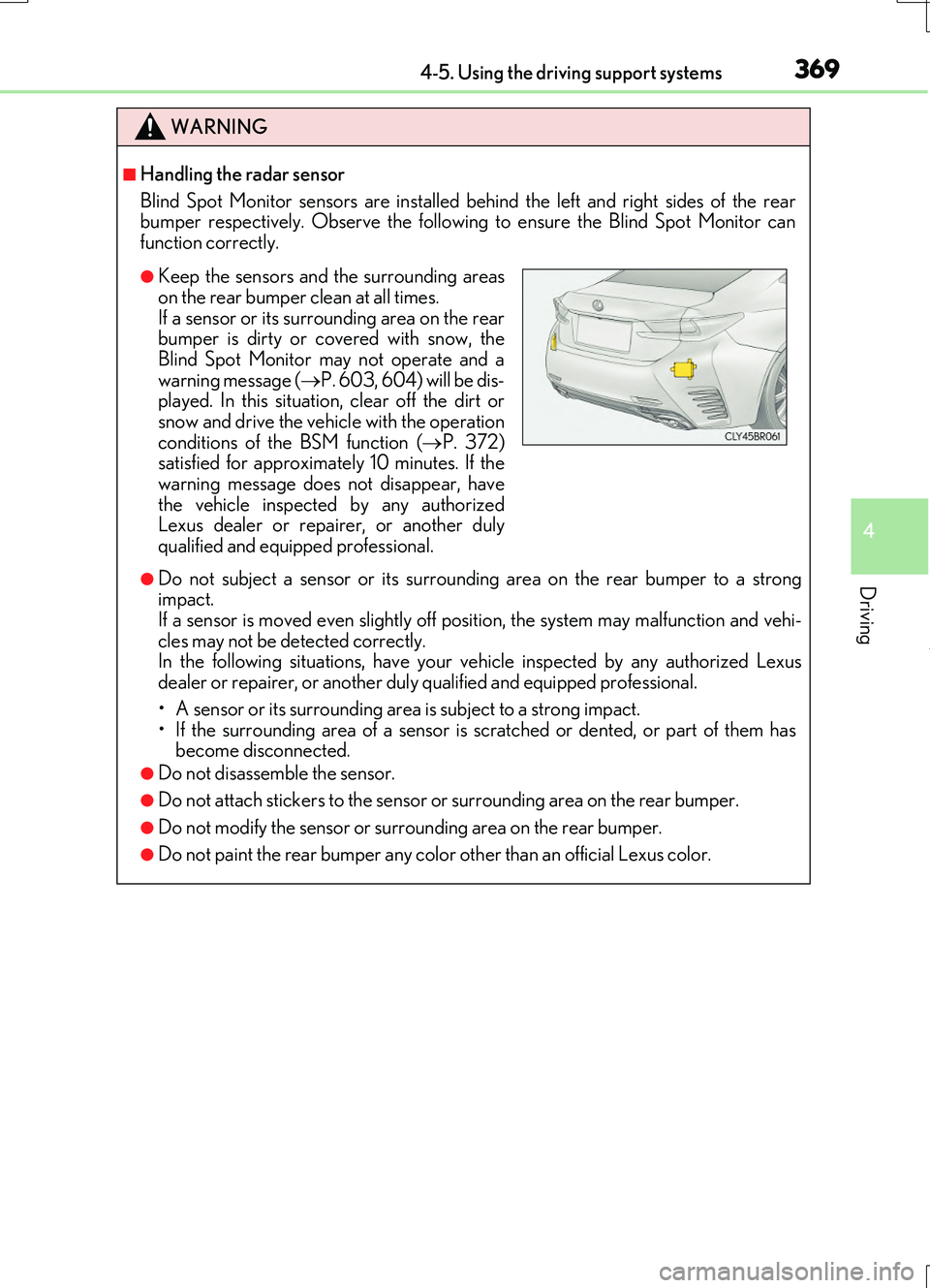
Blind Spot Monitor sensors are installed be hind the left and right sides of the rear bumper respectively. Observe the following to ensure the Blind Spot Monitor can
function correctly.
●Do not subject a sensor or its surrounding area on the rear bumper to a strong impact. If a sensor is moved even slightly off po sition, the system may malfunction and vehi-
cles may not be detected correctly. In the following situations, have your ve hicle inspected by any authorized Lexus dealer or repairer, or another duly qualified and equipped professional.
• A sensor or its surrounding area is subject to a strong impact. • If the surrounding area of a sensor is scratched or dented, or part of them hasbecome disconnected.
●Do not disassemble the sensor.
●Do not attach stickers to the sensor or surrounding area on the rear bumper.
●Do not modify the sensor or surrounding area on the rear bumper.
●Do not paint the rear bumper any color other than an official Lexus color.
●Keep the sensors and the surrounding areas
on the rear bumper clean at all times. If a sensor or its surrounding area on the rearbumper is dirty or covered with snow, the
Blind Spot Monitor may not operate and a warning message ( P. 603, 604) will be dis- played. In this situation, clear off the dirt or
snow and drive the vehicle with the operation conditions of the BSM function ( P. 372) satisfied for approximately 10 minutes. If the
warning message does not disappear, have the vehicle inspected by any authorizedLexus dealer or repairer, or another duly
qualified and equipped professional.
Page 371 of 724
3714-5. Using the driving support systems
4
Driving
RC200t_RC F_EE(OM24728E)
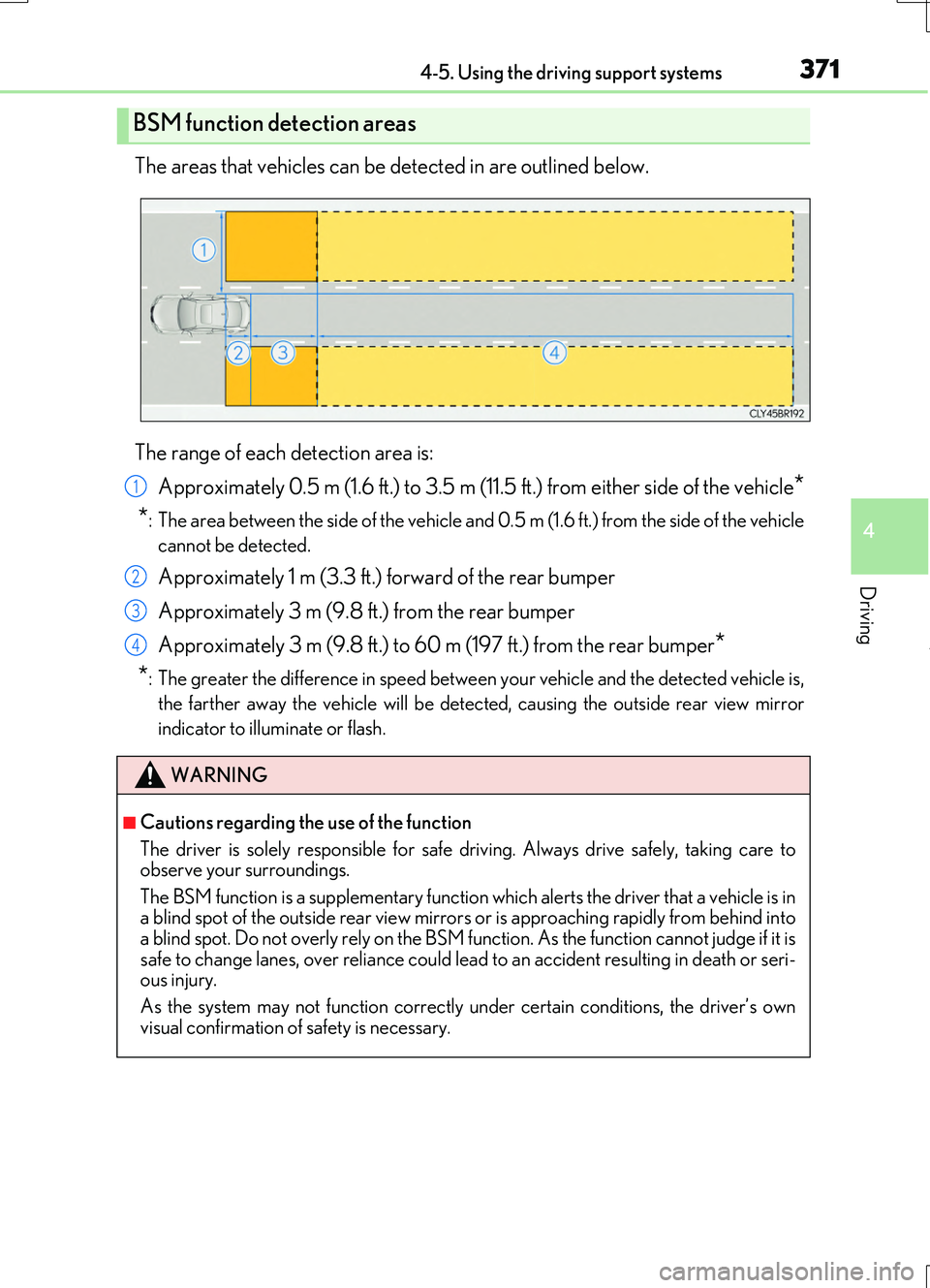
The areas that vehicles can be detected in are outlined below.
The range of each detection area is:
Approximately 0.5 m (1.6 ft.) to 3.5 m (11.5 ft.) from either side of the vehicle*
*: The area between the side of the vehicle and 0.5 m (1.6 ft.) from the side of the vehicle
cannot be detected.
Approximately 1 m (3.3 ft.) forward of the rear bumper
Approximately 3 m (9.8 ft.) from the rear bumper
Approximately 3 m (9.8 ft.) to 60 m (197 ft.) from the rear bumper*
*: The greater the difference in speed between your vehicle and the detected vehicle is,
the farther away the vehicle will be detect ed, causing the outside rear view mirror
indicator to illuminate or flash.
BSM function detection areas
WARNING
■Cautions regarding the use of the function
The driver is solely responsible for safe driving. Always drive safely, taking care to observe your surroundings.
The BSM function is a supplementary function which alerts the driver that a vehicle is in a blind spot of the outside rear view mirrors or is approaching rapidly from behind intoa blind spot. Do not overly rely on the BSM function. As the function cannot judge if it is
safe to change lanes, over reliance could lead to an accident resulting in death or seri- ous injury.
As the system may not function correctly under certain conditions, the driver’s own
visual confirmation of safety is necessary.
1
2
3
4
Page 374 of 724
3744-5. Using the driving support systems
RC200t_RC F_EE(OM24728E)
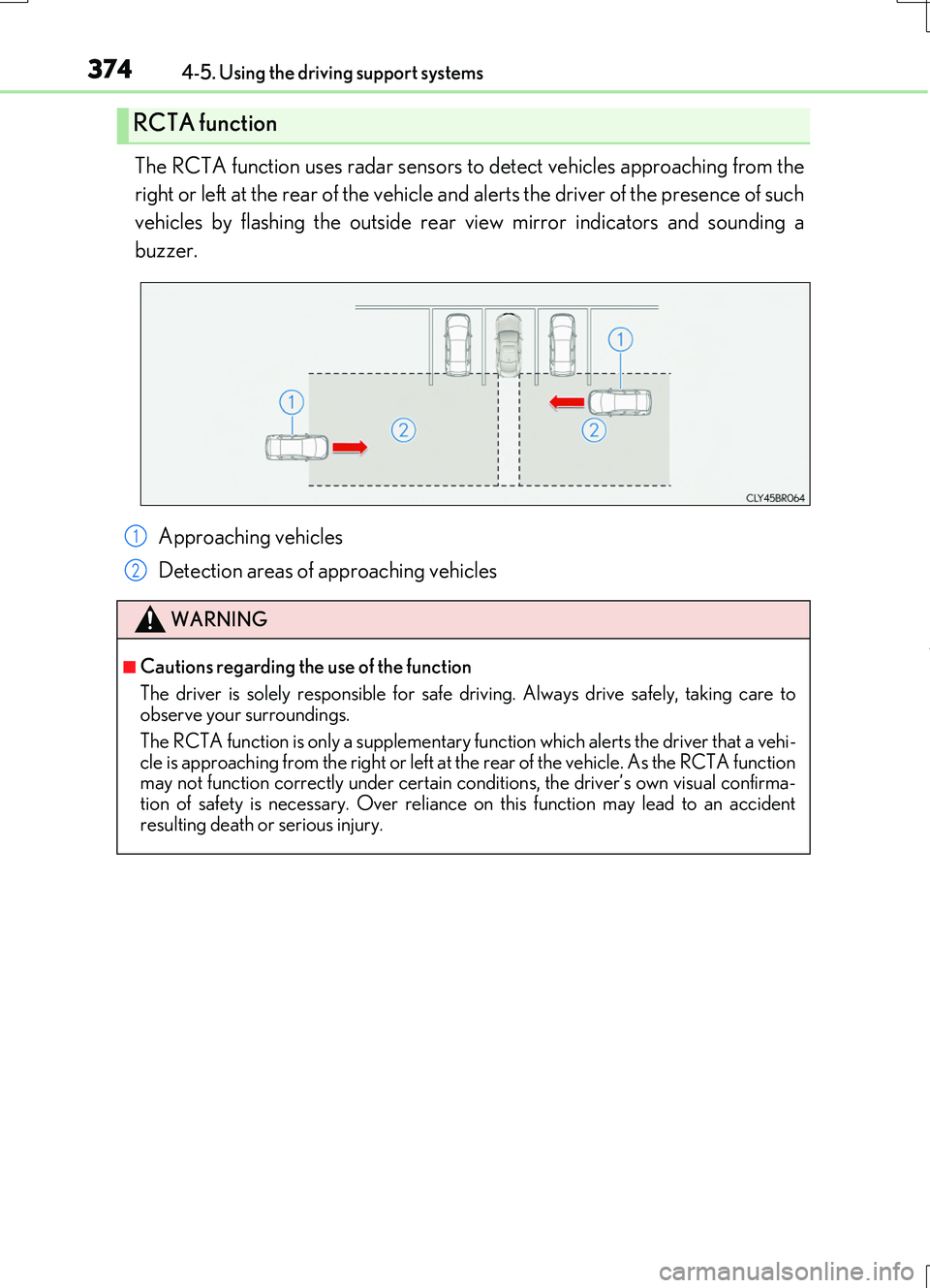
The RCTA function uses radar sensors to detect vehicles approaching from the
right or left at the rear of the vehicle and alerts the driver of the presence of such
vehicles by flashing the outside rear view mirror indicators and sounding a
buzzer.
Approaching vehicles
Detection areas of approaching vehicles
RCTA function
WARNING
■Cautions regarding the use of the function
The driver is solely responsible for safe driving. Always drive safely, taking care to observe your surroundings.
The RCTA function is only a supplementary fu nction which alerts the driver that a vehi- cle is approaching from the right or left at th e rear of the vehicle. As the RCTA function may not function correctly under certain conditions, the driver’s own visual confirma-
tion of safety is necessary. Over reliance on this function may lead to an accident resulting death or serious injury.
1
2
Page 380 of 724
3804-5. Using the driving support systems
RC200t_RC F_EE(OM24728E)
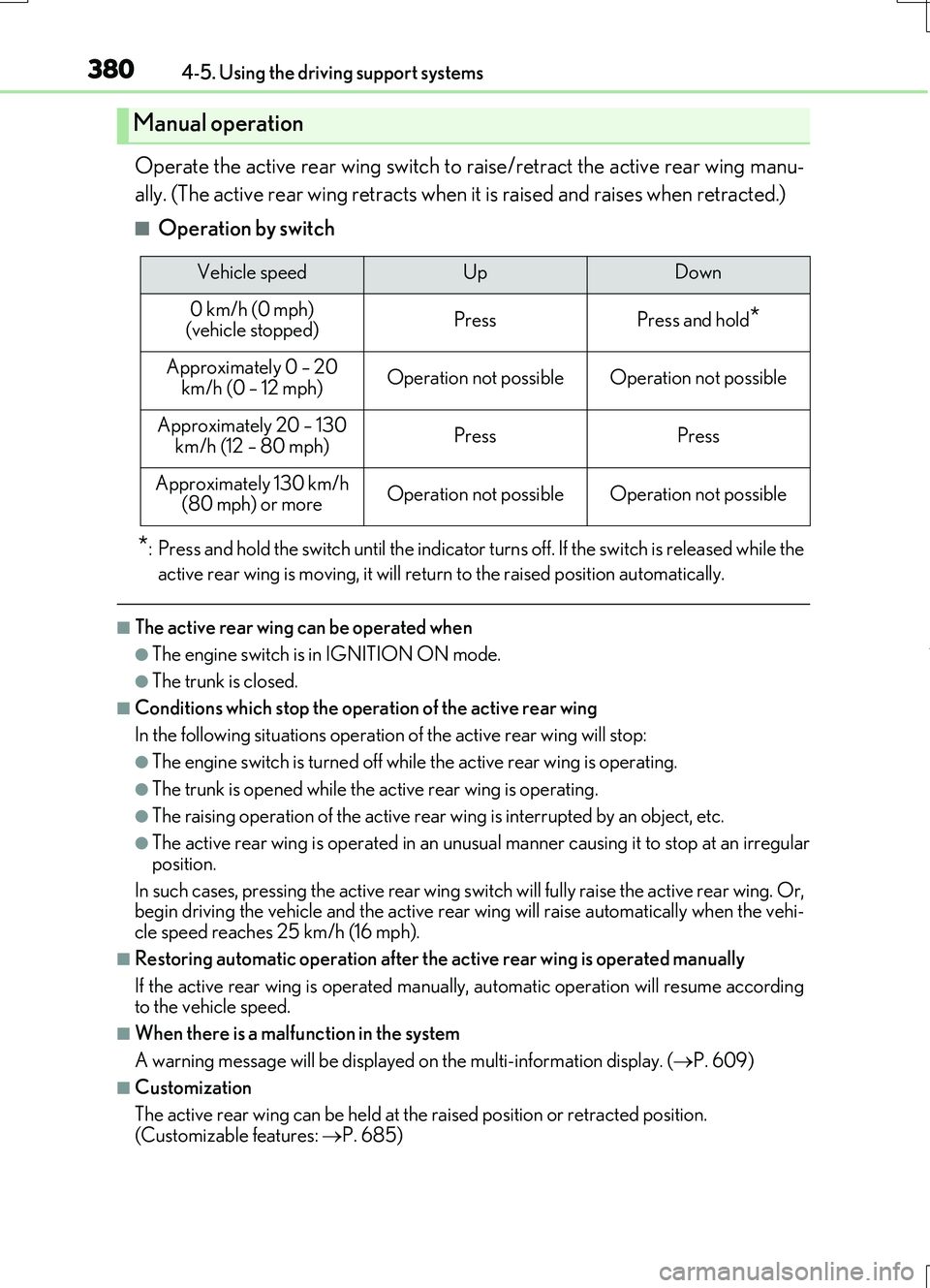
Operate the active rear wing switch to raise/retract the active rear wing manu-
ally. (The active rear wing retracts when it is raised and raises when retracted.)
■Operation by switch
*: Press and hold the switch unti l the indicator turns off. If the switch is released while the
active rear wing is moving, it will return to the raised position automatically.
■The active rear wing can be operated when
●The engine switch is in IGNITION ON mode.
●The trunk is closed.
■Conditions which stop the operation of the active rear wing
In the following situations operation of the active rear wing will stop:
●The engine switch is turned off while the active rear wing is operating.
●The trunk is opened while the active rear wing is operating.
●The raising operation of the active rear wing is interrupted by an object, etc.
●The active rear wing is operated in an unusual manner causing it to stop at an irregular
position.
In such cases, pressing the active rear wing switch will fully raise the active rear wing. Or, begin driving the vehicle and th e active rear wing will raise automatically when the vehi-
cle speed reaches 25 km/h (16 mph).
■Restoring automatic operation after the active rear wing is operated manually
If the active rear wing is operated manual ly, automatic operation will resume according to the vehicle speed.
■When there is a malfunction in the system
A warning message will be displayed on the multi-information display. (P. 609)
■Customization
The active rear wing can be held at the raised position or retracted position.
(Customizable features: P. 685)
Manual operation
Vehicle speedUpDown
0 km/h (0 mph) (vehicle stopped)PressPress and hold*
Approximately 0 – 20
km/h (0 – 12 mph)Operation not possibleOperation not possible
Approximately 20 – 130 km/h (12 – 80 mph)PressPress
Approximately 130 km/h (80 mph) or moreOperation not possibleOperation not possible