warning LEXUS RC200T 2017 Owners Manual
[x] Cancel search | Manufacturer: LEXUS, Model Year: 2017, Model line: RC200T, Model: LEXUS RC200T 2017Pages: 724, PDF Size: 42.04 MB
Page 381 of 724
3814-5. Using the driving support systems
4
Driving
RC200t_RC F_EE(OM24728E)
WARNING
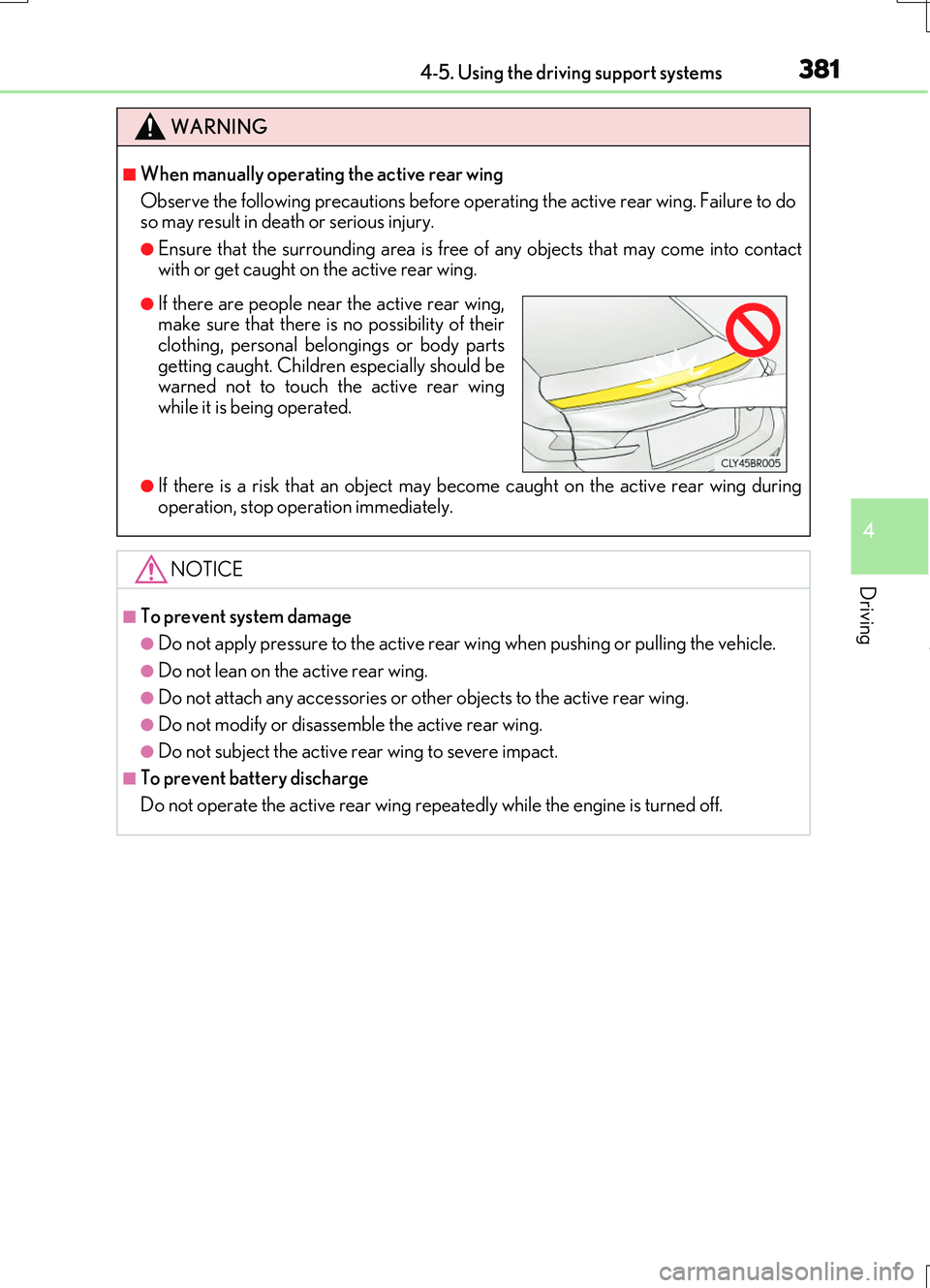
■When manually operating the active rear wing
Observe the following precautions before op erating the active rear wing. Failure to do so may result in death or serious injury.
●Ensure that the surrounding area is free of any objects that may come into contactwith or get caught on the active rear wing.
●If there is a risk that an object may become caught on the active rear wing during
operation, stop operation immediately.
NOTICE
■To prevent system damage
●Do not apply pressure to the active rear wing when pushing or pulling the vehicle.
●Do not lean on the active rear wing.
●Do not attach any accessories or other objects to the active rear wing.
●Do not modify or disassemble the active rear wing.
●Do not subject the active rear wing to severe impact.
■To prevent battery discharge
Do not operate the active rear wing repeatedly while the engine is turned off.
●If there are people near the active rear wing, make sure that there is no possibility of theirclothing, personal belongings or body parts
getting caught. Children especially should be warned not to touch the active rear wingwhile it is being operated.
Page 383 of 724
3834-5. Using the driving support systems
4
Driving
RC200t_RC F_EE(OM24728E)
■Automatic cancelation of the selected TVD control mode
SLALOM and TRACK mode are canceled when the engine switch is turned off. When the engine switch is turned to IGNITION ON mode, the TVD system will be in STAN- DARD mode.
■Automatic disabling of the TVD system
If a malfunction is detected in the TVD sy stem, a warning message will be displayed on the multi-information display ( P. 607) and the TVD system will be disabled automati-
cally. If the system is disabled, driving force will not be distributed by the TVD but through normal differential operation.
■To protect the system
The TVD fluid temperature may become excessively high when driving for a long time under extremely high load conditions. In th is case, a warning message will be displayed on the multi-information display. ( P. 607)
WARNING
■Cautions regarding the use of the system
The driver is solely responsible for safe driv ing. Do not overly rely on the TVD system. Always drive safely, taking care to observe your surroundings.
Page 387 of 724
3874-6. Driving tips
4
Driving
RC200t_RC F_EE(OM24728E)
■Tire chain installation
Observe the following precautions wh en installing and removing chains:
●Install and remove tire chains in a safe location.
●Install tire chains on the rear tires. Do not install tire chains on the front tires.
●Install tire chains on rear tires as tightly as possible. Retighten chains after driving 0.5 1.0 km (1/4 1/2 mile).
●Install tire chains following the instructions provided with the tire chains.
WARNING
■Driving with snow tires
Observe the following precautions to reduce the risk of accidents. Failure to do so may result in a loss of vehicle control and cause death or serious injury.
●Use tires of the specified size.
●Maintain the recommended level of air pressure.
●Do not drive at speeds in excess of the speed limit or the speed limit specified for the snow tires being used.
●Use snow tires on all, not just some wheels.
■Driving with tire chains
Observe the following precautions to reduce the risk of accidents.
Failure to do so may result in the vehicle being unable to be driven safely, and may cause death or serious injury.
●Do not drive in excess of the speed limit spec ified for the tire chains being used, or 50
km/h (30 mph), whichever is lower.
●Avoid driving on bumpy road surfaces or over potholes.
●Avoid sudden acceleration, abrupt steering, sudden braking and shifting operations
that cause sudden engine braking.
●Slow down sufficiently before entering a curve to ensure that vehicle control is main- tained.
●Vehicles with LDA (Lane Departure Alert): Do not use the LDA system.
NOTICE
■Repairing or replacing snow tires
Request repairs or replacement of snow ti res from Lexus dealers or legitimate tire retailers.
This is because the removal and attachment of snow tires affects the operation of the tire pressure warning valves and transmitters.
■Fitting tire chains
The tire pressure warning valves and transmitters may not function correctly when tire chains are fitted.
Page 395 of 724
3955-1. Basic Operations
5
Lexus Display Audio system
RC200t_RC F_EE(OM24728E)
■When using the screen
●Under extremely cold conditions, the Lexus Display Audio controller may react slowly.
●If the screen is cold, the display may be dark, or the system may seem to be operating slightly slower than normal.
●The screen may seem dark and hard to se e when viewed through sunglasses. Change your angle of viewing, adjust the display on the “Display” screen (P. 404) or remove your sunglasses.
■Using cellular phones
Interference may be heard through the audio system's speakers if a cellular phone is being used inside or close to the vehicle while the audio system is operating.
WARNING
■Using the Lexus Display Audio controller
Be careful when touching the Lexus Display Audio controller in extreme temperatures as it may become very hot or cold due to the temperature inside the vehicle.
■Laser product
This product is a class 1 laser product.
Do not open the cover of the player or attempt to repair the unit yourself. Refer servic- ing to qualified personnel.
NOTICE
■To prevent Lexus Display Audio controller malfunction
●Do not allow the Lexus Display Audio controller to come into contact with food, liq-uid, stickers or lit cigarettes as doing so may cause it to change color, emit a strangeodor or stop functioning.
●Do not subject the Lexus Display Audio controller to excessive pressure or strongimpact as the controller may bend or break off.
■To prevent battery discharge
Do not leave the audio system on longer than necessary when the engine is off.
■To avoid damaging the audio system
Take care not to spill drinks or other fluids on the audio system.
Page 396 of 724
3965-1. Basic Operations
RC200t_RC F_EE(OM24728E)
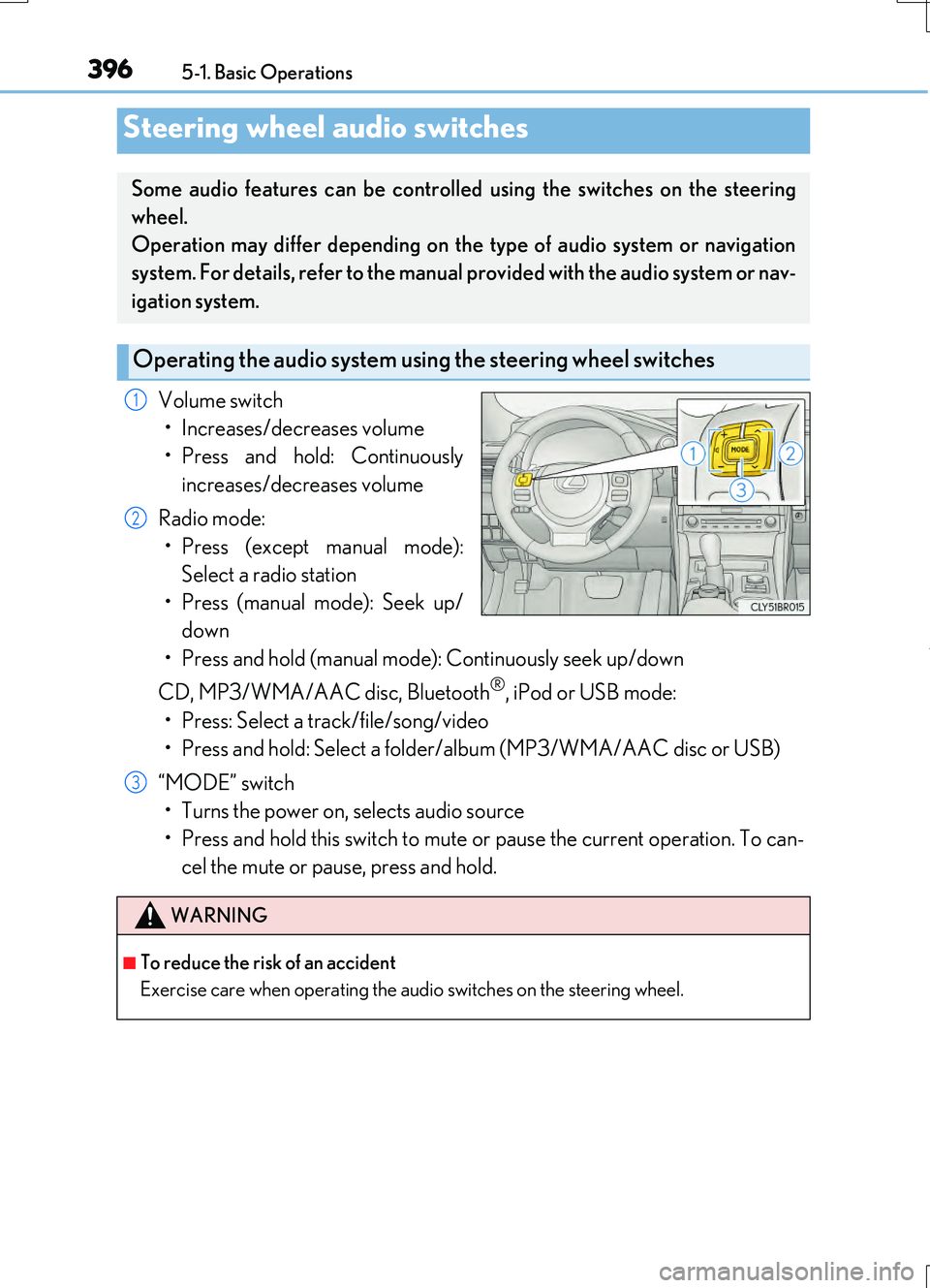
Volume switch
• Increases/decreases volume
• Press and hold: Continuously
increases/decreases volume
Radio mode:
• Press (except manual mode):
Select a radio station
• Press (manual mode): Seek up/
down
• Press and hold (manual mode): Continuously seek up/down
CD, MP3/WMA/AAC disc, Bluetooth®, iPod or USB mode:
• Press: Select a track/file/song/video
• Press and hold: Select a folder/album (MP3/WMA/AAC disc or USB)
“MODE” switch
• Turns the power on, selects audio source
• Press and hold this switch to mute or pause the current operation. To can-
cel the mute or pause, press and hold.
Steering wheel audio switches
Some audio features can be controlled using the switches on the steering
wheel.
Operation may differ depending on the type of audio system or navigation
system. For details, refer to the manual provided with the audio system or nav-
igation system.
Operating the audio system us ing the steering wheel switches
1
2
WARNING
■To reduce the risk of an accident
Exercise care when operating the audio switches on the steering wheel.
3
Page 398 of 724
3985-1. Basic Operations
RC200t_RC F_EE(OM24728E)
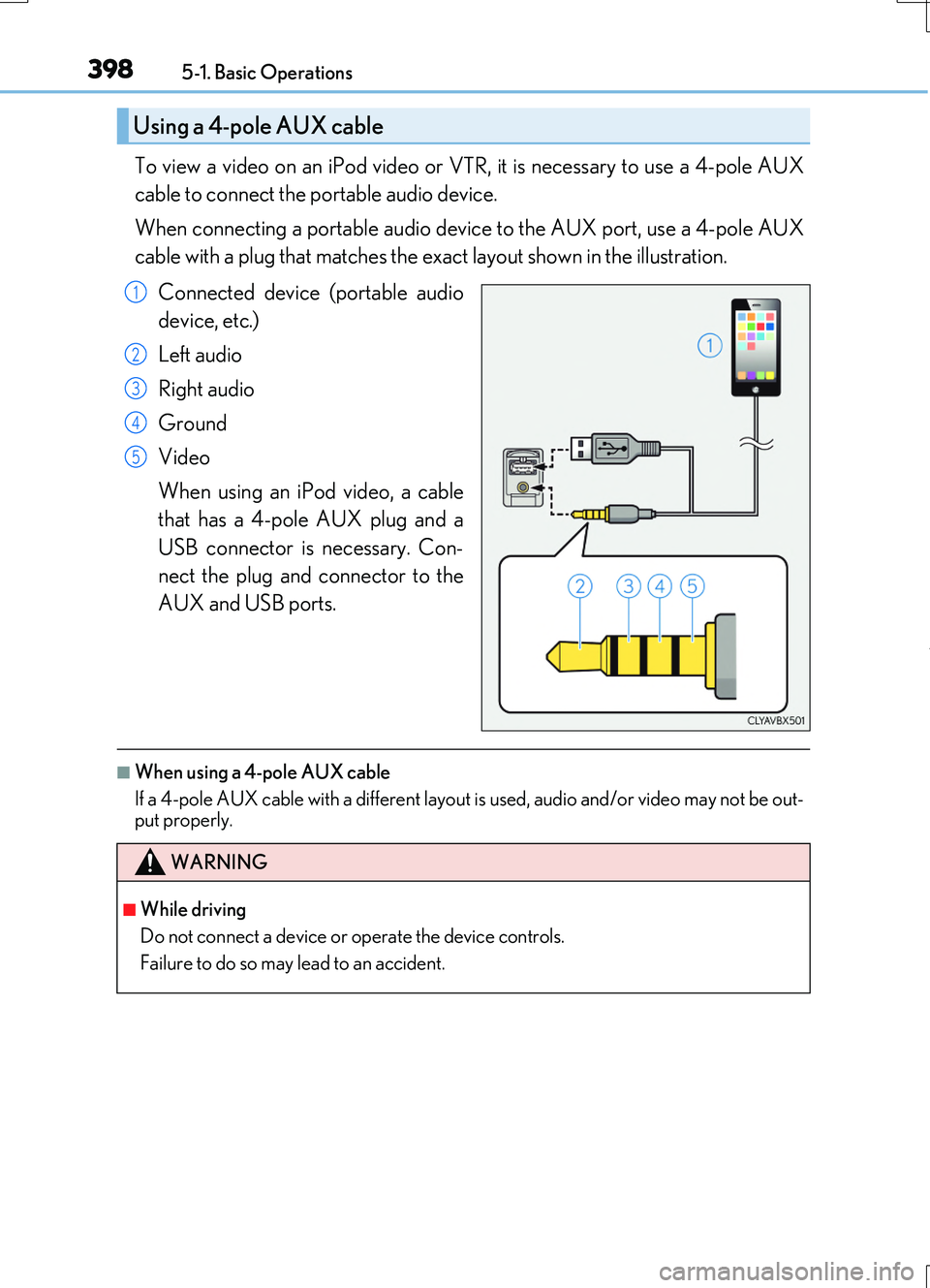
To view a video on an iPod video or VTR, it is necessary to use a 4-pole AUX
cable to connect the portable audio device.
When connecting a portable audio device to the AUX port, use a 4-pole AUX
cable with a plug that matches the exact layout shown in the illustration.
Connected device (portable audio
device, etc.)
Left audio
Right audio
Ground
Video
When using an iPod video, a cable
that has a 4-pole AUX plug and a
USB connector is necessary. Con-
nect the plug and connector to the
AUX and USB ports.
■When using a 4-pole AUX cable
If a 4-pole AUX cable with a different layout is used, audio and/or video may not be out- put properly.
Using a 4-pole AUX cable
1
2
3
4
5
WARNING
■While driving
Do not connect a device or operate the device controls.
Failure to do so may lead to an accident.
Page 468 of 724
4685-11. Bluetooth®
RC200t_RC F_EE(OM24728E)
WARNING
■While driving
Do not operate the portable audio player, cellular phone or connect a device to the Bluetooth® system.
■Caution regarding interference with electronic devices
●Your audio unit is fitted with Bluetooth® antennas. People with implantable cardiacpacemakers, cardiac resynchronization therapy-pacemakers or implantable cardioverter defibrillators should maintain a reasonable distance between them-
selves and the Bluetooth® antennas. The radio waves may affect the operation of such devices.
●Before using Bluetooth® devices, users of any electrical medical device other than
implantable cardiac pacemakers, cardiac resynchronization therapy-pacemakers or implantable cardioverter defibrillators should consult the manufacturer of the device for information about its operation under th e influence of radio waves. Radio waves
could have unexpected effects on the operation of such medical devices.
NOTICE
■When leaving the vehicle
Do not leave your portable audio player or cellular phone in the vehicle. The inside of the vehicle may become hot, causing damage to the portable audio player or cellular
phone.
Page 472 of 724
4725-12. Other function
RC200t_RC F_EE(OM24728E)
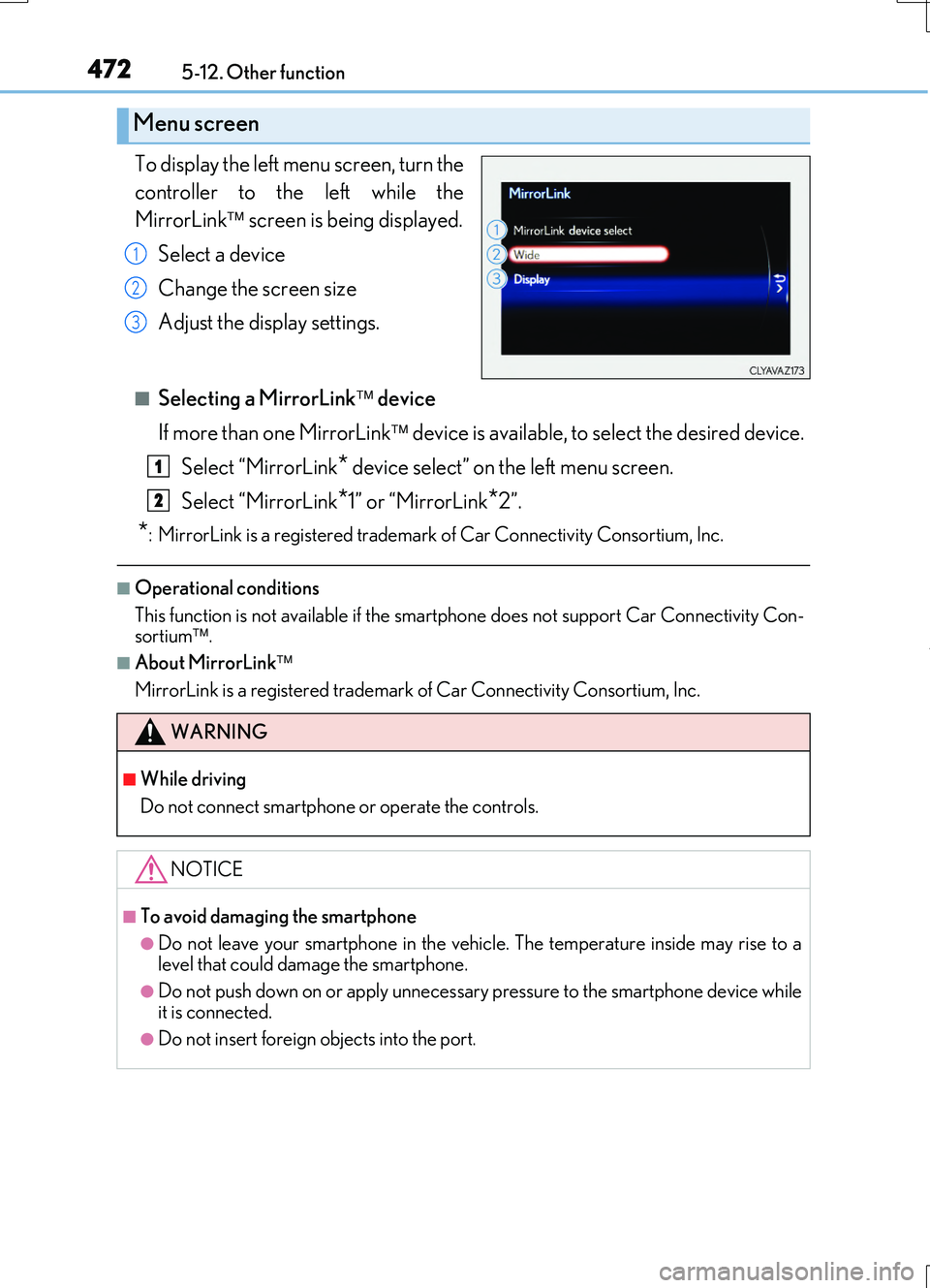
To display the left menu screen, turn the
controller to the left while the
MirrorLink screen is being displayed.
Select a device
Change the screen size
Adjust the display settings.
■Selecting a MirrorLink device
If more than one MirrorLink device is available, to select the desired device.
Select “MirrorLink* device select” on the left menu screen.
Select “MirrorLink*1” or “MirrorLink*2”.
*: MirrorLink is a registered trademark of Car Connectivity Consortium, Inc.
■Operational conditions
This function is not available if the smartp hone does not support Car Connectivity Con- sortium .
■About MirrorLink
MirrorLink is a registered trademark of Car Connectivity Consortium, Inc.
Menu screen
1
2
3
WARNING
■While driving
Do not connect smartphone or operate the controls.
NOTICE
■To avoid damaging the smartphone
●Do not leave your smartphone in the vehicle. The temperature inside may rise to a
level that could damage the smartphone.
●Do not push down on or apply unnecessary pressure to the smartphone device while it is connected.
●Do not insert foreign objects into the port.
1
2
Page 488 of 724
4886-1. Using the air conditioning system
RC200t_RC F_EE(OM24728E)
■When the outside temperature falls to nearly 0C (32 F)
The dehumidification function may not operate even when is pressed or “A/C” is
selected.
■Ventilation and air conditioning odors
●To let fresh air in, set the air conditioning system to the outside air mode.
●During use, various odors from inside and outside the vehicle may enter into and accu-
mulate in the air conditioning system. This may then cause odor to be emitted from the
vents.
●To reduce potential odors from occurring:
• It is recommended that the air conditioning system be set to outside air mode prior
to turning the vehicle off.
• The start timing of the blower may be dela yed for a short period of time immediately
after the air conditioning system is started in automatic mode.
■Air conditioning filter
P. 561
■Customization
Settings (e.g. A/C auto switch operation) can be changed.
(Customizable features P. 694)
WARNING
■To prevent the windshield from fogging up
●Do not use during cool air operation in extremely humid weather. The differ-
ence between the temperature of the outside air and that of the windshield can cause
the outer surface of the windshield to fog up, blocking your vision.
■To prevent burns
●Do not touch the rear view mirror surfaces when the outside rear view mirror defog-
gers are on.
●Do not touch the glass at lower part of the windshield or to the side of the front pillars
when the windshield wiper de-icer is on.
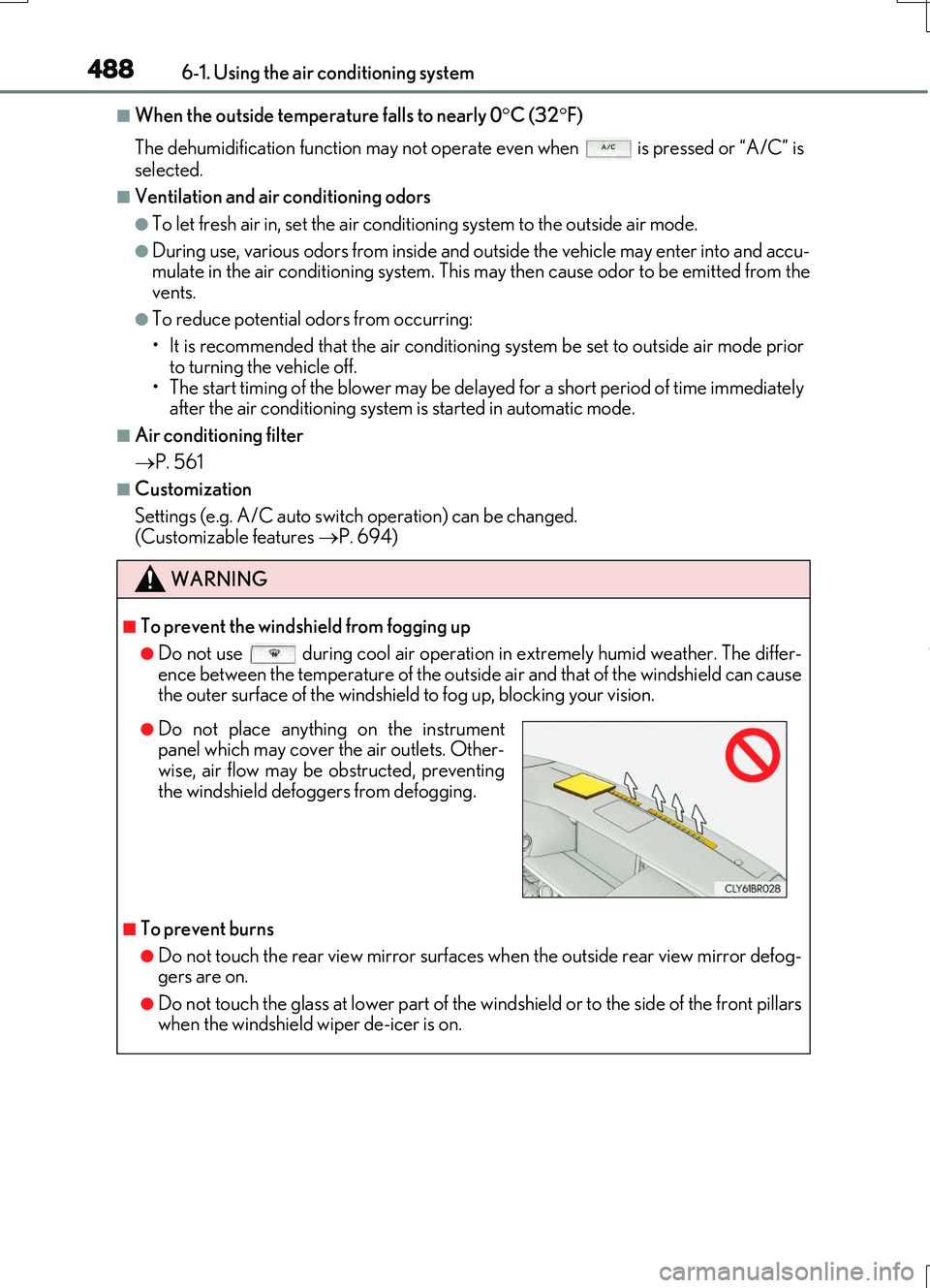
●Do not place anything on the instrument
panel which may cover the air outlets. Other-
wise, air flow may be obstructed, preventing
the windshield defoggers from defogging.
Page 490 of 724
4906-1. Using the air conditioning system
RC200t_RC F_EE(OM24728E)
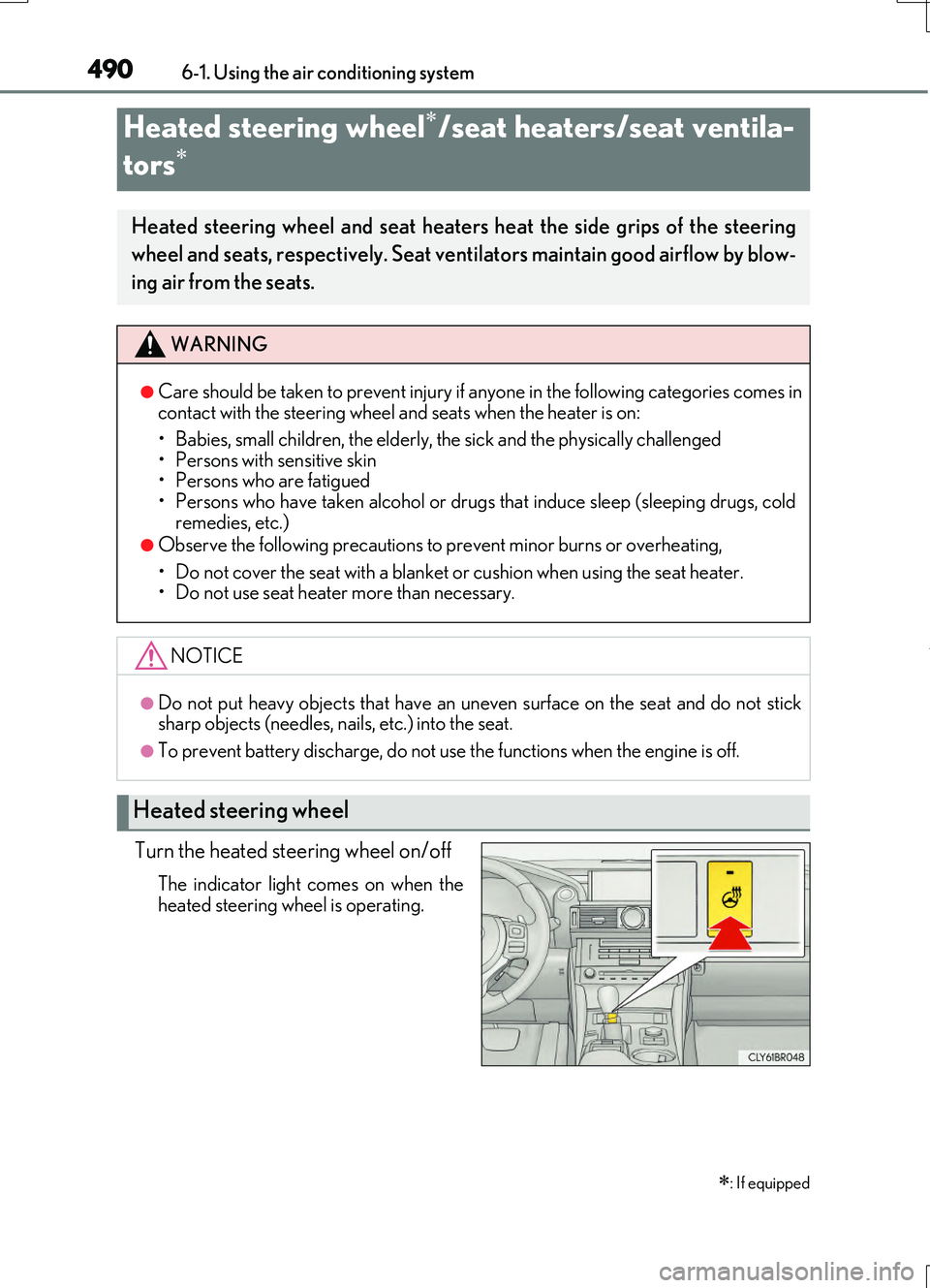
Turn the heated steering wheel on/off
The indicator light comes on when the
heated steering wheel is operating.
Heated steering wheel/seat heaters/seat ventila-
tors
: If equipped
Heated steering wheel and seat heaters heat the side grips of the steering
wheel and seats, respectively. Seat ventilators maintain good airflow by blow-
ing air from the seats.
WARNING
●Care should be taken to prevent injury if anyone in the following categories comes in contact with the steering wheel and seats when the heater is on:
• Babies, small children, the elderly, the sick and the physically challenged
• Persons with sensitive skin • Persons who are fatigued• Persons who have taken alcohol or drugs that induce sleep (sleeping drugs, cold
remedies, etc.)
●Observe the following precautions to prevent minor burns or overheating,
• Do not cover the seat with a blanket or cushion when using the seat heater. • Do not use seat heater more than necessary.
NOTICE
●Do not put heavy objects that have an uneven surface on the seat and do not sticksharp objects (needles, na ils, etc.) into the seat.
●To prevent battery discharge, do not use the functions when the engine is off.
Heated steering wheel