air conditioning LEXUS RC200T 2017 User Guide
[x] Cancel search | Manufacturer: LEXUS, Model Year: 2017, Model line: RC200T, Model: LEXUS RC200T 2017Pages: 724, PDF Size: 42.04 MB
Page 328 of 724
3284-5. Using the driving support systems
RC200t_RC F_EE(OM24728E)
WARNING
• When an object is directly under a bumper • When objects become too close to the sensors• When a non-genuine Lexus suspension (l owered suspension, etc.) is installed
In addition to the situations above, there are instances in which, because of their shape, signs and other objects may be judged by th e sensor to be closer than they are.
●The shape of an object may prevent the sensor from detecting it. Pay particular atten-
tion to the following:
• Wires, fences, ropes, etc. • Cotton, snow and other materials that absorb sound waves
• Sharply-angled objects •Low objects• Tall objects with upper sections projecting outwards in the direction of your vehi-
cle • People, animals and other moving objects• People wearing certain types of clothing
●The following situations may occur when using the Lexus parking assist-sensor.
• Depending on the shape of the object and other factors, the detection distance
may be shortened, or detection may not be possible. • Objects may not be detected if they are too close to a sensor.• There will be a short delay between the de tection of an object and display of the
detection. Even at slow speeds, there is a possibility that the object will come within a sensor’s detection area before the display is shown and a warning beep sounds.
• Thin posts or objects lower than a sensor may not be detected when approached, even if they have been detected once.• It might be difficult to hear beeps due to the volume of the audio system or air flow
noise of the air conditioning system.
Page 345 of 724
3454-5. Using the driving support systems
4
Driving
RC200t_RC F_EE(OM24728E)
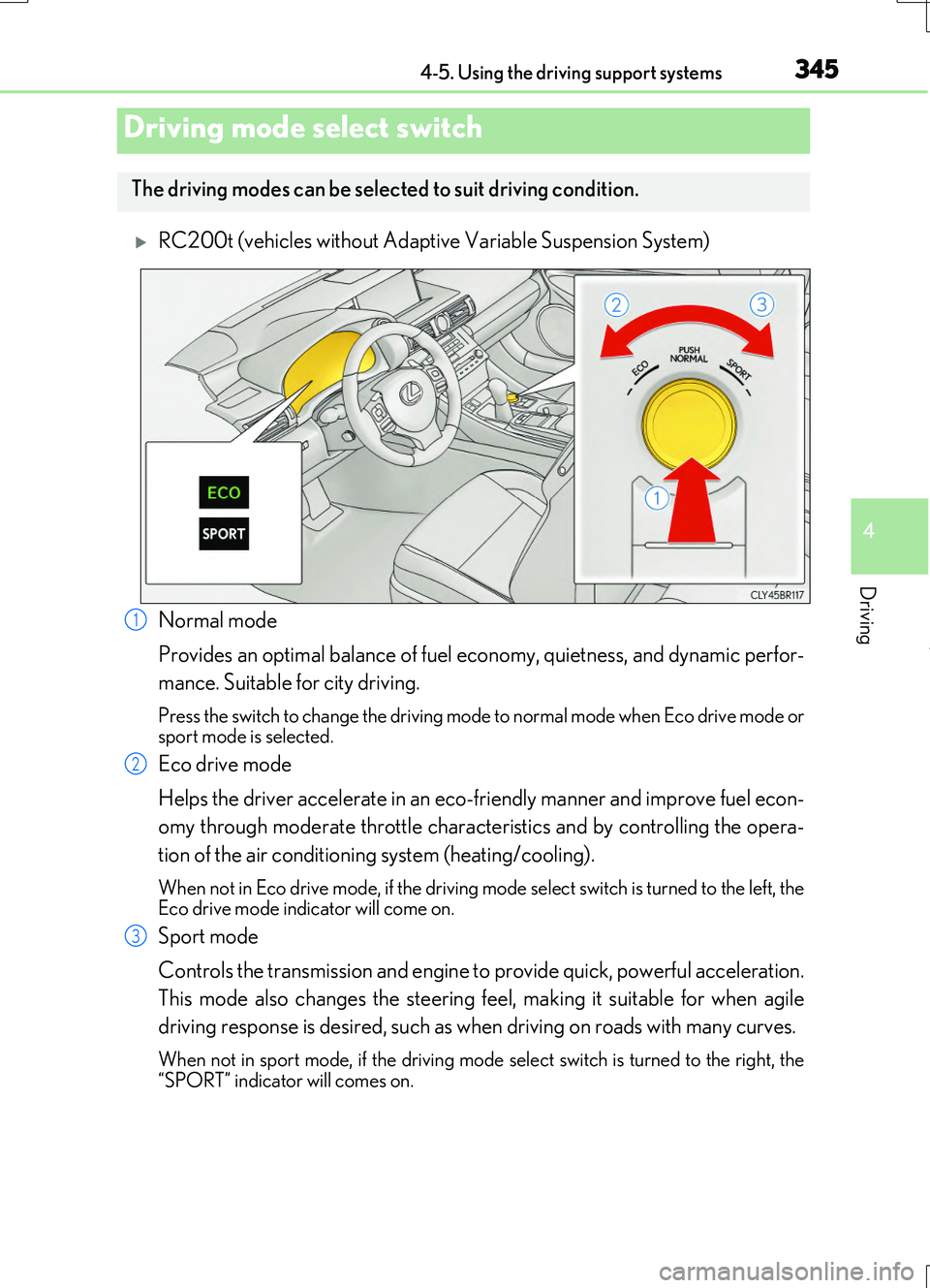
RC200t (vehicles without Adaptive Variable Suspension System)
Normal mode
Provides an optimal balance of fuel ec onomy, quietness, and dynamic perfor-
mance. Suitable for city driving.
Press the switch to change the driving mode to normal mode when Eco drive mode or sport mode is selected.
Eco drive mode
Helps the driver accelerate in an eco-friendly manner and improve fuel econ-
omy through moderate throttle characteristics and by controlling the opera-
tion of the air conditioning system (heating/cooling).
When not in Eco drive mode, if the driving mode select switch is turned to the left, the Eco drive mode indicator will come on.
Sport mode
Controls the transmission and engine to provide quick, powerful acceleration.
This mode also changes the steering feel, making it suitable for when agile
driving response is desired, such as when driving on roads with many curves.
When not in sport mode, if the driving mode se lect switch is turned to the right, the
“SPORT” indicator will comes on.
Driving mode select switch
The driving modes can be select ed to suit driving condition.
1
2
3
Page 346 of 724
3464-5. Using the driving support systems
RC200t_RC F_EE(OM24728E)
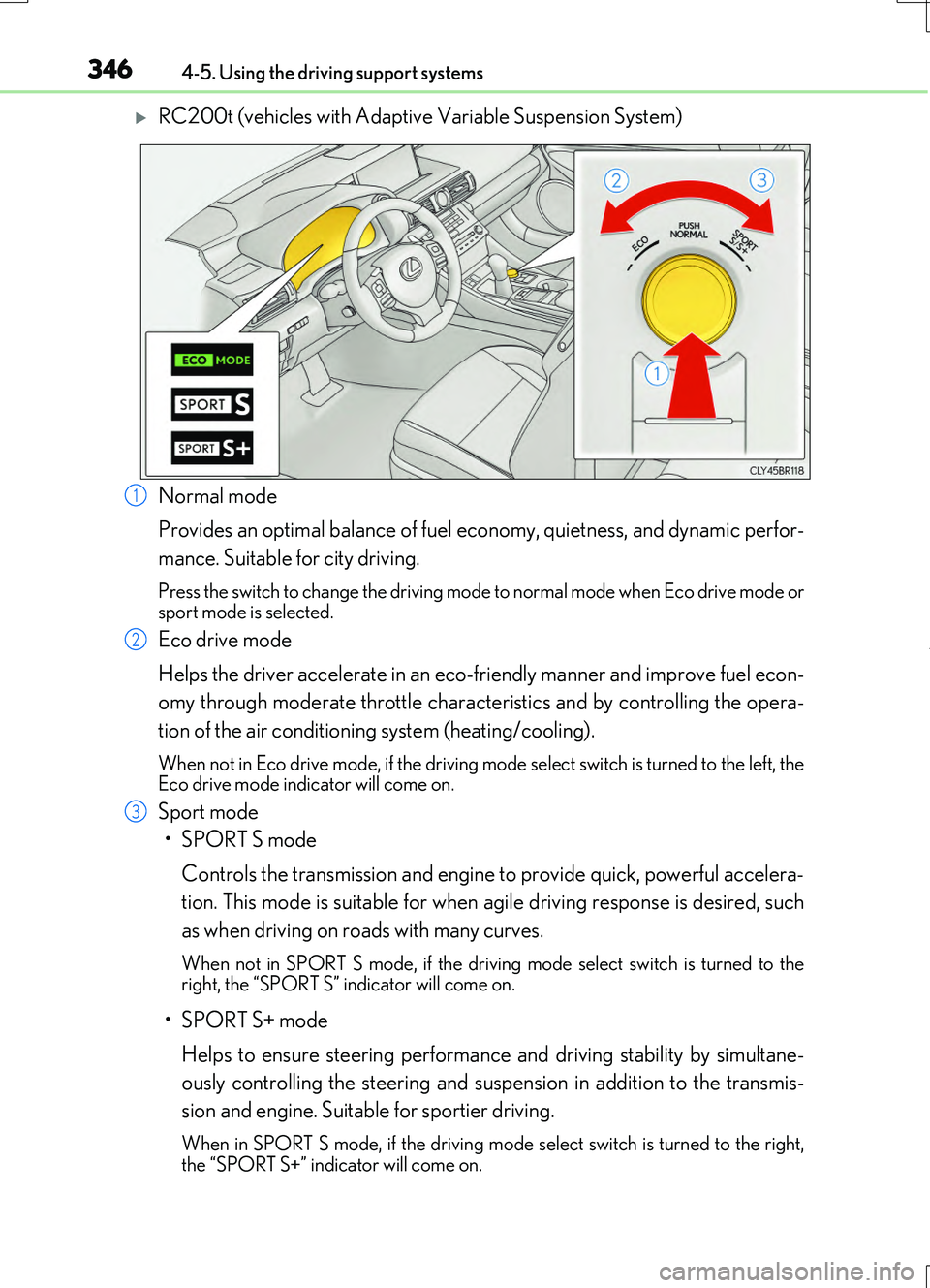
RC200t (vehicles with Adaptive Variable Suspension System)
Normal mode
Provides an optimal balance of fuel ec onomy, quietness, and dynamic perfor-
mance. Suitable for city driving.
Press the switch to change the driving mode to normal mode when Eco drive mode or sport mode is selected.
Eco drive mode
Helps the driver accelerate in an eco-friendly manner and improve fuel econ-
omy through moderate throttle characteristics and by controlling the opera-
tion of the air conditioning system (heating/cooling).
When not in Eco drive mode, if the driving mode select switch is turned to the left, the Eco drive mode indicator will come on.
Sport mode
•SPORT S mode
Controls the transmission and engine to provide quick, powerful accelera-
tion. This mode is suitable for when agile driving response is desired, such
as when driving on roads with many curves.
When not in SPORT S mode, if the drivin g mode select switch is turned to the right, the “SPORT S” indicator will come on.
•SPORT S+ mode
Helps to ensure steering performanc e and driving stability by simultane-
ously controlling the steering and susp ension in addition to the transmis-
sion and engine. Suitable for sportier driving.
When in SPORT S mode, if th e driving mode select switch is turned to the right, the “SPORT S+” indicator will come on.
1
2
3
Page 347 of 724
3474-5. Using the driving support systems
4
Driving
RC200t_RC F_EE(OM24728E)
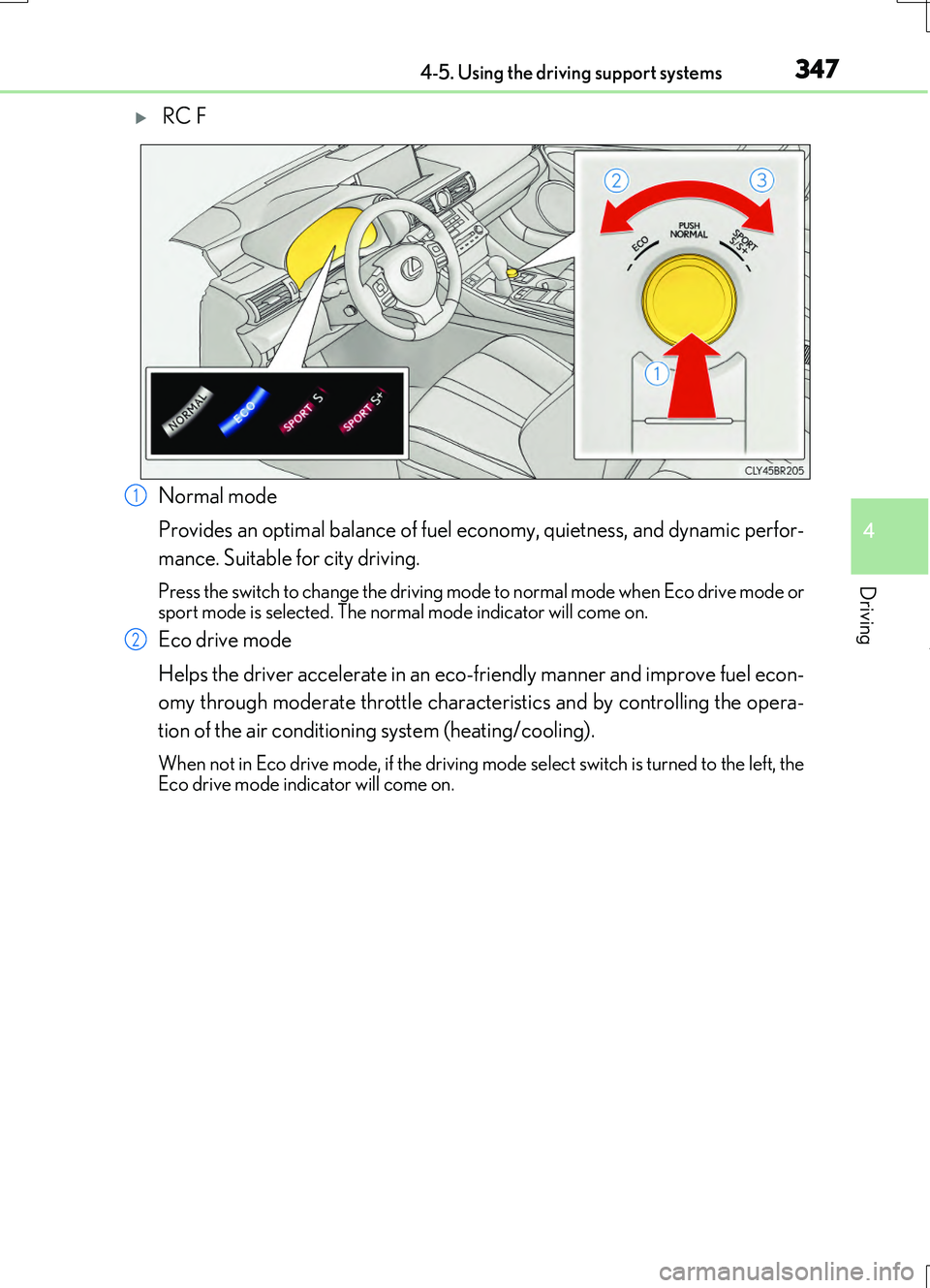
RC F
Normal mode
Provides an optimal balance of fuel ec onomy, quietness, and dynamic perfor-
mance. Suitable for city driving.
Press the switch to change the driving mode to normal mode when Eco drive mode or sport mode is selected. The norm al mode indicator will come on.
Eco drive mode
Helps the driver accelerate in an eco-friendly manner and improve fuel econ-
omy through moderate throttle characteristics and by controlling the opera-
tion of the air conditioning system (heating/cooling).
When not in Eco drive mode, if the driving mode select switch is turned to the left, the Eco drive mode indicator will come on.
1
2
Page 348 of 724
3484-5. Using the driving support systems
RC200t_RC F_EE(OM24728E)
Sport mode
•SPORT S mode
Controls the transmission and engine to provide quick, powerful accelera-
tion. Also, gear shift timing is controlled to suit sporty driving, making this
mode is suitable for when agile driving response is desired, such as when
driving on roads with many curves.
When not in SPORT S mode, if the drivin g mode select switch is turned to the right, the “SPORT S” indicator will come on.
•SPORT S+ mode
Provides earlier downshift timing than SPORT S mode in order to maintain
a high engine speed and provides faster gear changes. This mode also
changes the steering feel, suspension control and VDIM control, making it
suitable for powerful sporty driving.
When in SPORT S mode, if th e driving mode select switch is turned to the right,
the “SPORT S+” indicator will come on.
■Operation of the air conditioning system in Eco drive mode
Eco drive mode controls the heating/cooling operations and fan speed of the air condi- tioning system to enhance fuel efficiency ( P. 478). To improve air conditioning perfor- mance, adjust the fan speed or turn off Eco drive mode.
■Sport mode automatic deactivation
Sport mode is automatically deactivated if the engine switch is turned off after driving in sport mode.
3
Page 391 of 724
3915-1. Basic Operations
5
Lexus Display Audio system
RC200t_RC F_EE(OM24728E)
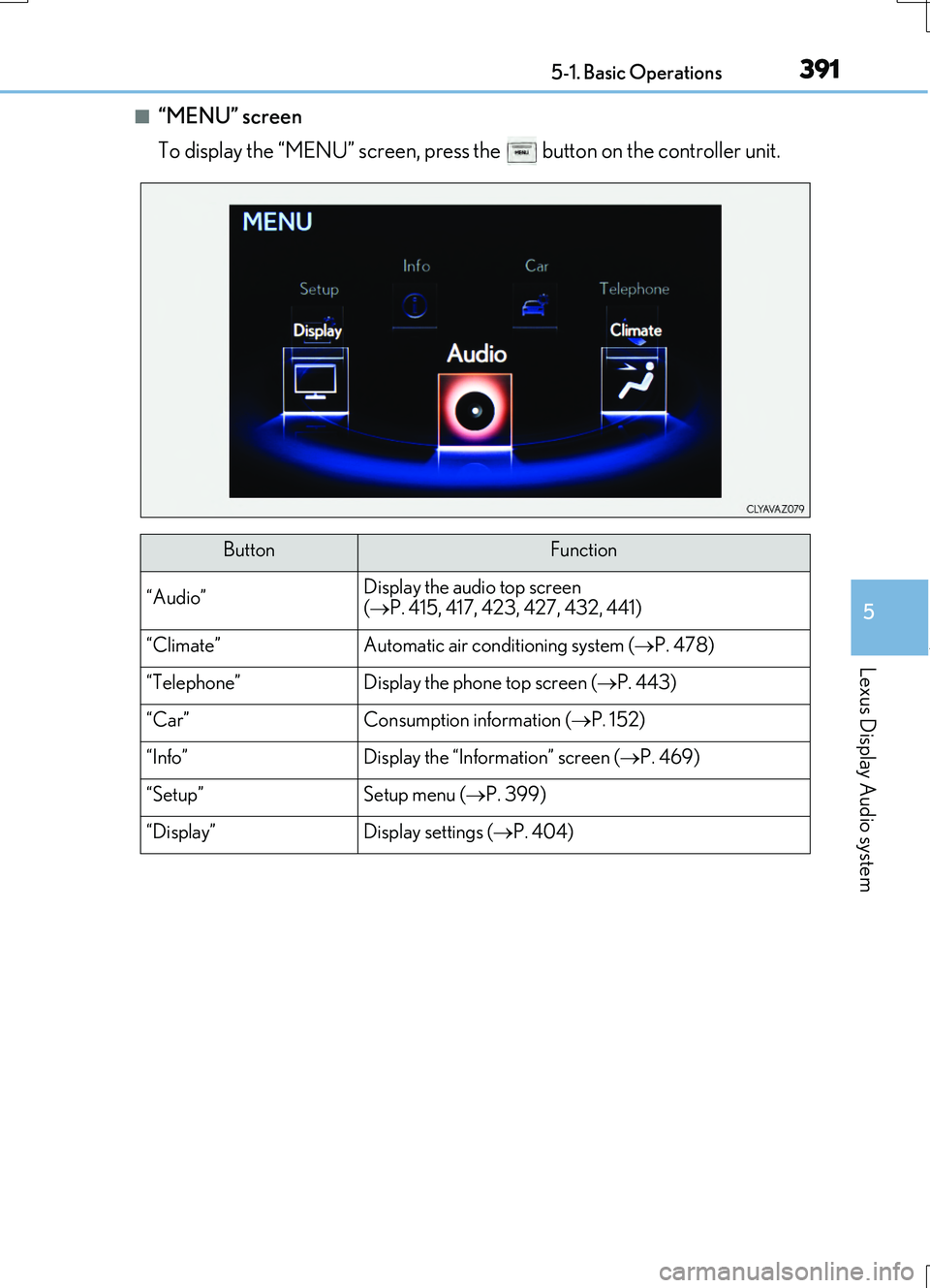
■“MENU” screen
To display the “MENU” screen, press the button on the controller unit.
ButtonFunction
“Audio”Display the audio top screen
( P. 415, 417, 423, 427, 432, 441)
“Climate”Automatic air conditioning system (P. 478)
“Telephone”Display the phone top screen (P. 443)
“Car” Consumption information (P. 152)
“Info”Display the “Information” screen (P. 469)
“Setup”Setup menu (P. 399)
“Display”Display settings (P. 404)
Page 464 of 724
4645-11. Bluetooth®
RC200t_RC F_EE(OM24728E)
■When using the Bluetooth® audio system
●In the following situations, the system may not function.
• If the portable audio player is turned off • If the portable audio player is not connected
• If the portable audio player’s battery is low
●There may be a delay if a cellular phone connection is made during Bluetooth® audio
play.
●Depending on the type of portable audio player that is connected to the system, opera- tion may differ slightly and certain functions may not be available.
■When using the hands-free system
●The audio system is muted when making a call.
●If both parties speak at the same time, it may be difficult to hear.
●If the received call volume is over ly loud, an echo may be heard. If the Bluetooth® phone is too close to the system, quality of the sound may deteriorate and connection status may deteriorate.
●In the following situations, it may be difficult to hear the other party:
• When driving on unpaved roads • When driving at high speeds
•If a window is open • If the air conditioning is blowing directly on the microphone• If there is interference from the network of the cellular phone
●Depending on the type of phone, ce rtain functions may not be available.
■Conditions under which the system will not operate
●If using a cellular phone that does not support Bluetooth®
●If the cellular phone is turned off
●If you are outside of cellular phone service coverage
●If the cellular phone is not connected
●If the cellular phone’s battery is low
●When outgoing calls are controlled, due to heavy traffic on telephone lines, etc.
●When the cellular phone itself cannot be used
●When transferring phonebook data from the cellular phone
Bluetooth®
Page 477 of 724
477
6Interior features
RC200t_RC F_EE(OM24728E)
6-1. Using the air conditioning
system
Automatic air conditioning
system .......................................... 478
Heated steering wheel/
seat heaters/
seat ventilators ........................ 490
6-2. Using the interior lights
Interior lights list ......................... 492
• Interior lights .......................... 493
• Personal lights ....................... 494
6-3. Using the storage features
List of storage features ............ 495
• Glove box ............................... 496
• Console box .......................... 496
• Cup holders ........................... 497
Trunk features .............................498
6-4. Using the other interior
features
Other interior features ........... 500
• Sun visors ............................... 500
• Vanity mirrors ...................... 500
• Clock ......................................... 501
• Power outlet............................ 501
• Armrest....................................502
• Trunk storage
extension .................................503
• Assist grips .............................504
• Coat hooks .............................504
Page 478 of 724
478
RC200t_RC F_EE(OM24728E)
6-1. Using the air conditioning system
Automatic air conditioning system
Air outlets and fan speed are automatically adjusted according to the tem-
perature setting.
Vehicles with a Lexus Display Audio system: Press the “MENU” button on the
Lexus Display Audio controller, then sele ct “Climate” to display the air condi-
tioning operation screen.
For details on the Lexus Display Audio controller, refer to “Lexus Display
Audio controller” on P. 392.
Vehicles with a navigation or multimedia system: Press the “MENU” button on
the Remote Touch, then select “Climate” to display the air conditioning con-
trol screen.
For details on the Remote Touch, refer to the “NAVIGATION AND MULTI-
MEDIA SYSTEM OWNER’S MANUAL”.
The illustrations below are for left-hand drive vehicles.
The button positions and shapes will di ffer for right-hand drive vehicles.
Also, the display and button positions will differ depending on the type of the
system.
Page 479 of 724
4796-1. Using the air conditioning system
6
Interior features
RC200t_RC F_EE(OM24728E)
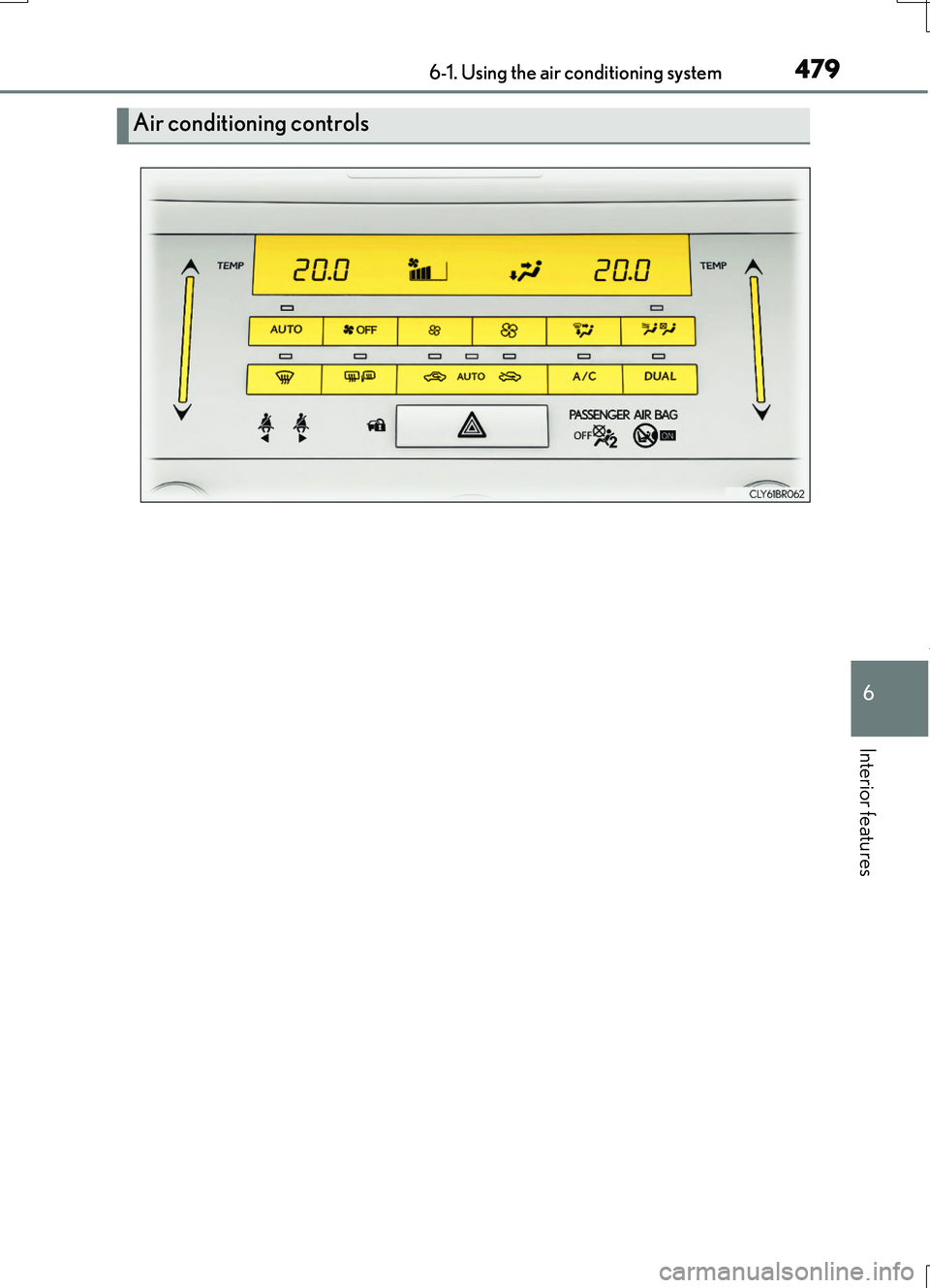
Air conditioning controls