fuel LEXUS RC200T 2017 User Guide
[x] Cancel search | Manufacturer: LEXUS, Model Year: 2017, Model line: RC200T, Model: LEXUS RC200T 2017Pages: 724, PDF Size: 42.04 MB
Page 129 of 724
1292. Instrument cluster
2
Instrument cluster
RC200t_RC F_EE(OM24728E)
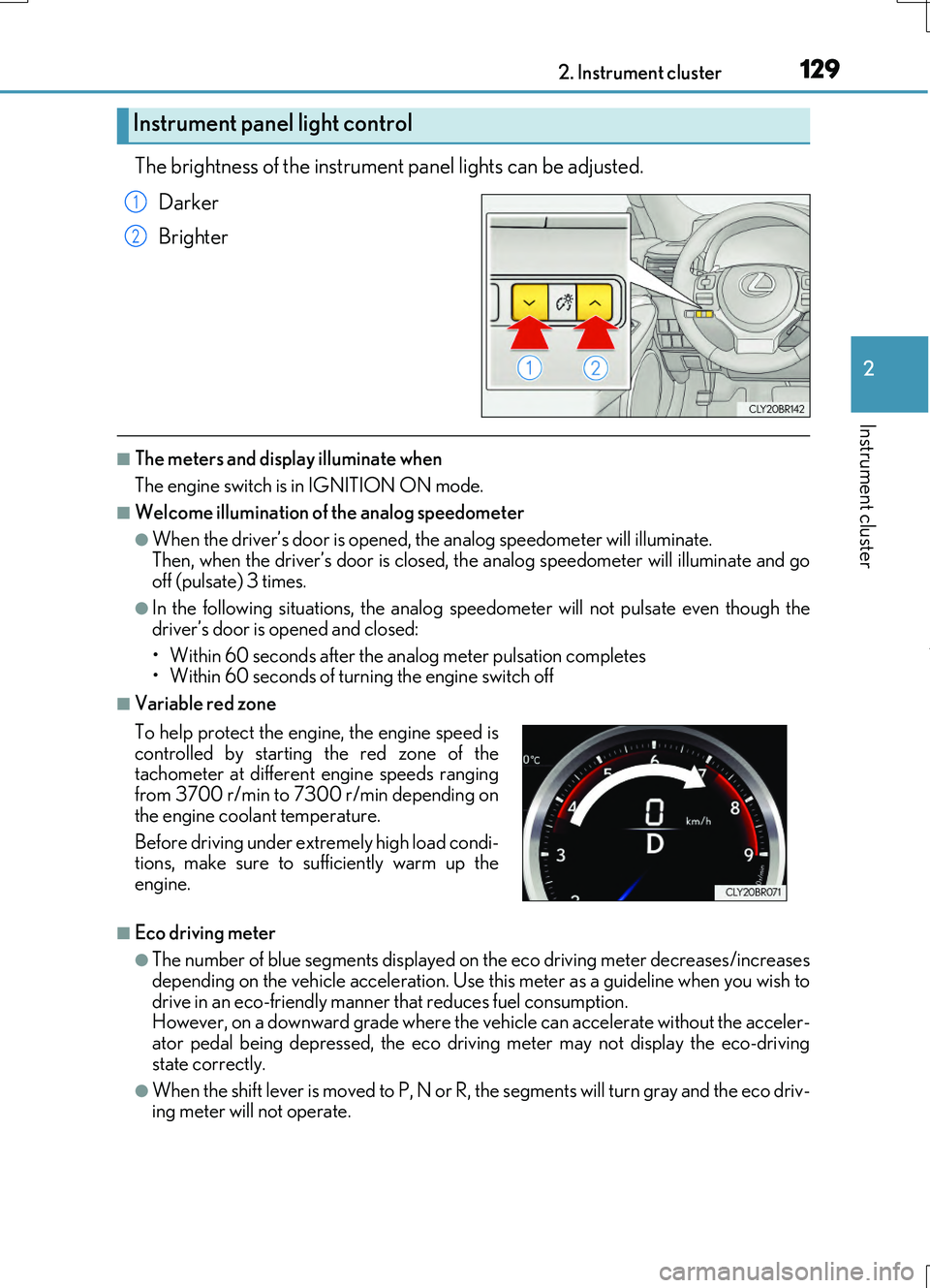
The brightness of the instrument panel lights can be adjusted.
Darker
Brighter
■The meters and display illuminate when
The engine switch is in IGNITION ON mode.
■Welcome illumination of the analog speedometer
●When the driver’s door is opened, the analog speedometer will illuminate.
Then, when the driver’s door is closed, the analog speedometer will illuminate and go off (pulsate) 3 times.
●In the following situations, the analog speedometer will not pulsate even though the
driver’s door is opened and closed:
• Within 60 seconds after the analog meter pulsation completes • Within 60 seconds of turning the engine switch off
■Variable red zone
■Eco driving meter
●The number of blue segments displayed on the eco driving meter decreases/increases depending on the vehicle acceleration. Use this meter as a guideline when you wish to
drive in an eco-friendly manner that reduces fuel consumption. However, on a downward grade where the vehicle can accelerate without the acceler-ator pedal being depressed, the eco driving meter may not display the eco-driving
state correctly.
●When the shift lever is moved to P, N or R, the segments will turn gray and the eco driv- ing meter will not operate.
Instrument panel light control
1
2
To help protect the engine, the engine speed is
controlled by starting the red zone of the tachometer at different engine speeds rangingfrom 3700 r/min to 7300 r/min depending on
the engine coolant temperature.
Before driving under extremely high load condi- tions, make sure to sufficiently warm up the
engine.
Page 134 of 724
1342. Instrument cluster
RC200t_RC F_EE(OM24728E)
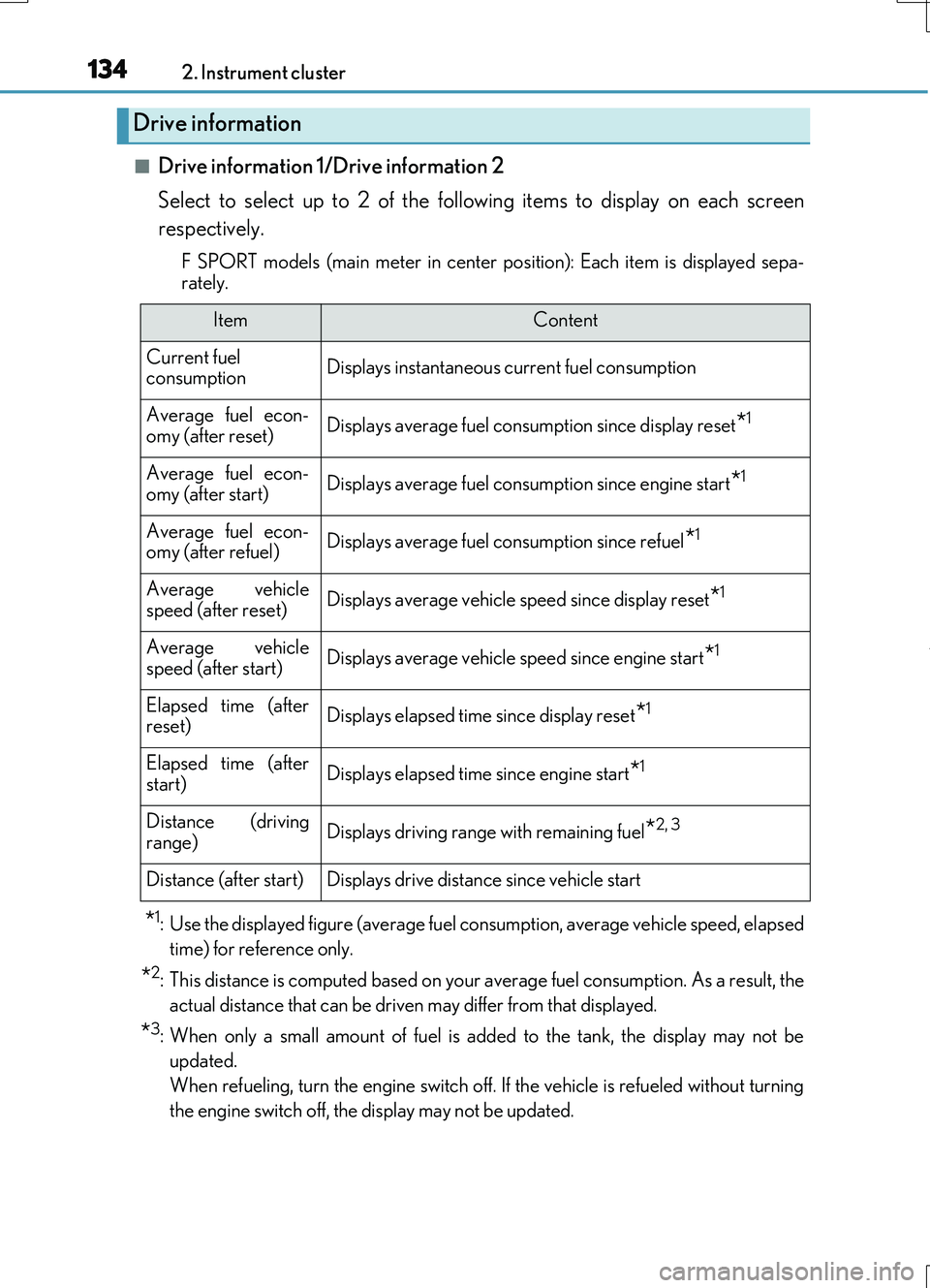
■Drive information 1/Drive information 2
Select to select up to 2 of the following items to display on each screen
respectively.
F SPORT models (main meter in center po sition): Each item is displayed sepa-
rately.
*1: Use the displayed figure (average fuel consumption, average vehicle speed, elapsed
time) for reference only.
*2: This distance is computed based on your average fuel consumption. As a result, the
actual distance that can be driven may differ from that displayed.
*3: When only a small amount of fuel is added to the tank, the display may not be
updated.
When refueling, turn the engine switch off. If the vehicle is refueled without turning
the engine switch off, the display may not be updated.
Drive information
ItemContent
Current fuel consumptionDisplays instantaneous current fuel consumption
Average fuel econ-omy (after reset)Displays average fuel consumption since display reset*1
Average fuel econ-
omy (after start)Displays average fuel cons umption since engine start*1
Average fuel econ- omy (after refuel)Displays average fuel consumption since refuel*1
Average vehiclespeed (after reset)Displays average vehicle speed since display reset*1
Average vehicle
speed (after start)Displays average vehicle speed since engine start*1
Elapsed time (after reset)Displays elapsed time since display reset*1
Elapsed time (afterstart)Displays elapsed time since engine start*1
Distance (driving
range)Displays driving range with remaining fuel*2, 3
Distance (after start)Displays drive distance since vehicle start
Page 135 of 724
1352. Instrument cluster
2
Instrument cluster
RC200t_RC F_EE(OM24728E)
●Resetting
The following displays can be reset: average fuel consumption after reset,
average vehicle speed after reset, and elapsed time after reset.
• To reset, display the desired item and press and hold .
• If both displayed items are resettable, a reset selection screen will
appear.
■Eco Driving Indicator
P. 116
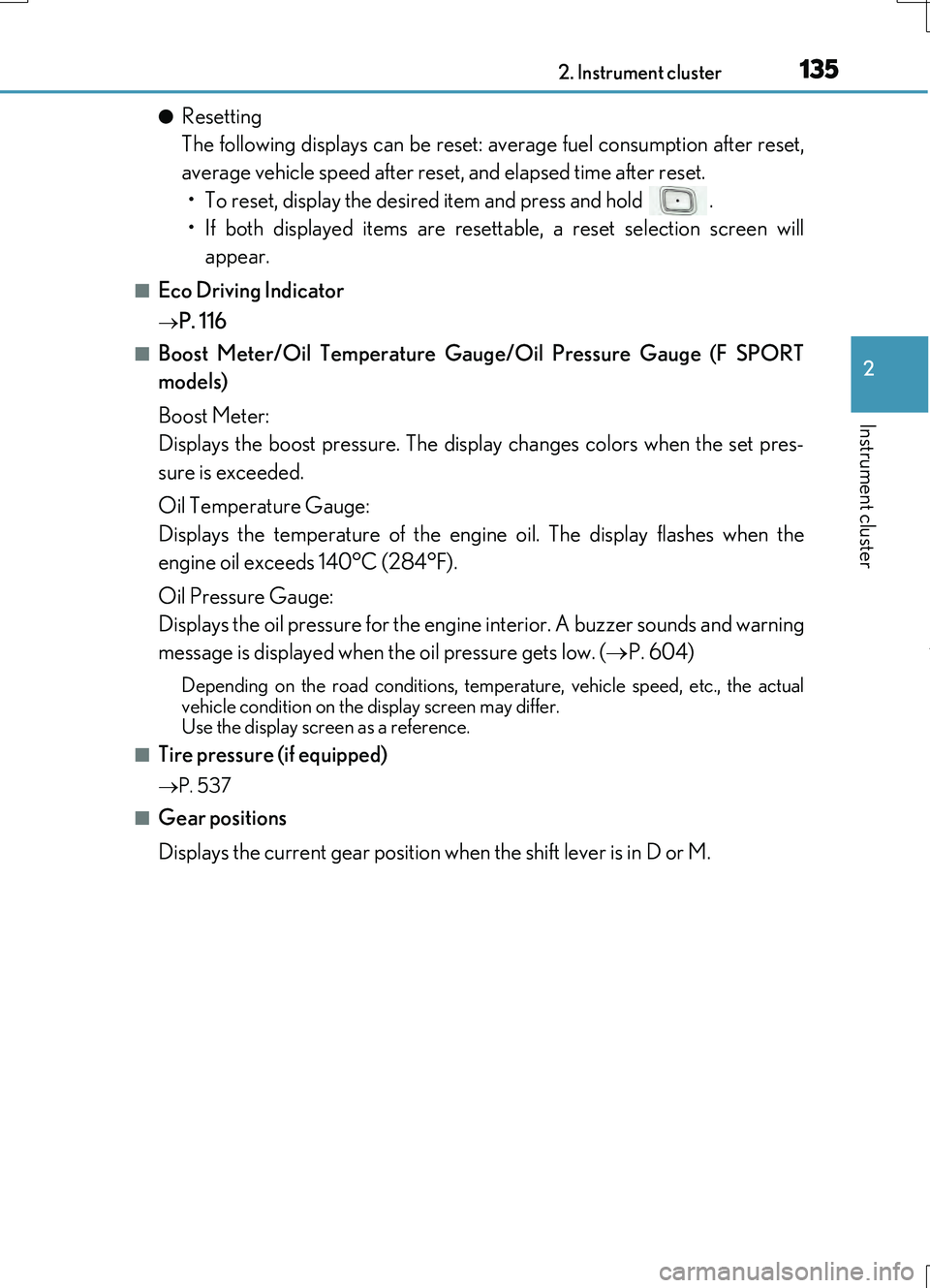
■Boost Meter/Oil Temperature Gauge/Oil Pressure Gauge (F SPORT
models)
Boost Meter:
Displays the boost pressure. The display changes colors when the set pres-
sure is exceeded.
Oil Temperature Gauge:
Displays the temperature of the engine oil. The display flashes when the
engine oil exceeds 140°C (284°F).
Oil Pressure Gauge:
Displays the oil pressure for the engine interior. A buzzer sounds and warning
message is displayed when the oil pressure gets low. ( P. 604)
Depending on the road conditions, temperature, vehicle speed, etc., the actual
vehicle condition on the display screen may differ. Use the display screen as a reference.
■Tire pressure (if equipped)
P. 537
■Gear positions
Displays the current gear position when the shift lever is in D or M.
Page 136 of 724
1362. Instrument cluster
RC200t_RC F_EE(OM24728E)
■Language
Select to change the language on the display.
■Units
Select to change the unit of measure for fuel consumption.
■Maintenance system (RC200t)
Select to reset the maintenance data after the required maintenance is per-
formed. (
P. 526)
■Eco Driving Indicator Light
Select to activate/deactivate the Eco Driving Indicator Light.
■ switch settings (except F SPORT models)
Displays a procedure to register a desired screen to .
You can register 1 screen as a shortcut, which can be displayed by pressing . ( P. 133)
■Drive information 1/Drive information 2
Select to select up to 2 items that will be displayed on the “Drive Info 1” screen
and “Drive Info 2” screen respectively.
( P. 134)
■Pop-up display
Select to set the following pop-up displays, which may appear in some situa-
tions, on/off.
• Route guidance display of the navigation system-linked system (if equipped)
• Incoming call display of the hands-free phone system
• Dynamic radar cruise control operation display (if equipped)
• Instrument panel brightness adjustment display
• Main meter switch operation display (F SPORT models)
• Stop & Start system duration
• Stop & Start system status
■Accent color (except F SPORT models)
Select to change the accent colors on the screen, such as the cursor color.
■Needle (F SPORT models)
Select to change the needle color for the tachometer.
Settings display
Page 137 of 724
1372. Instrument cluster
2
Instrument cluster
RC200t_RC F_EE(OM24728E)
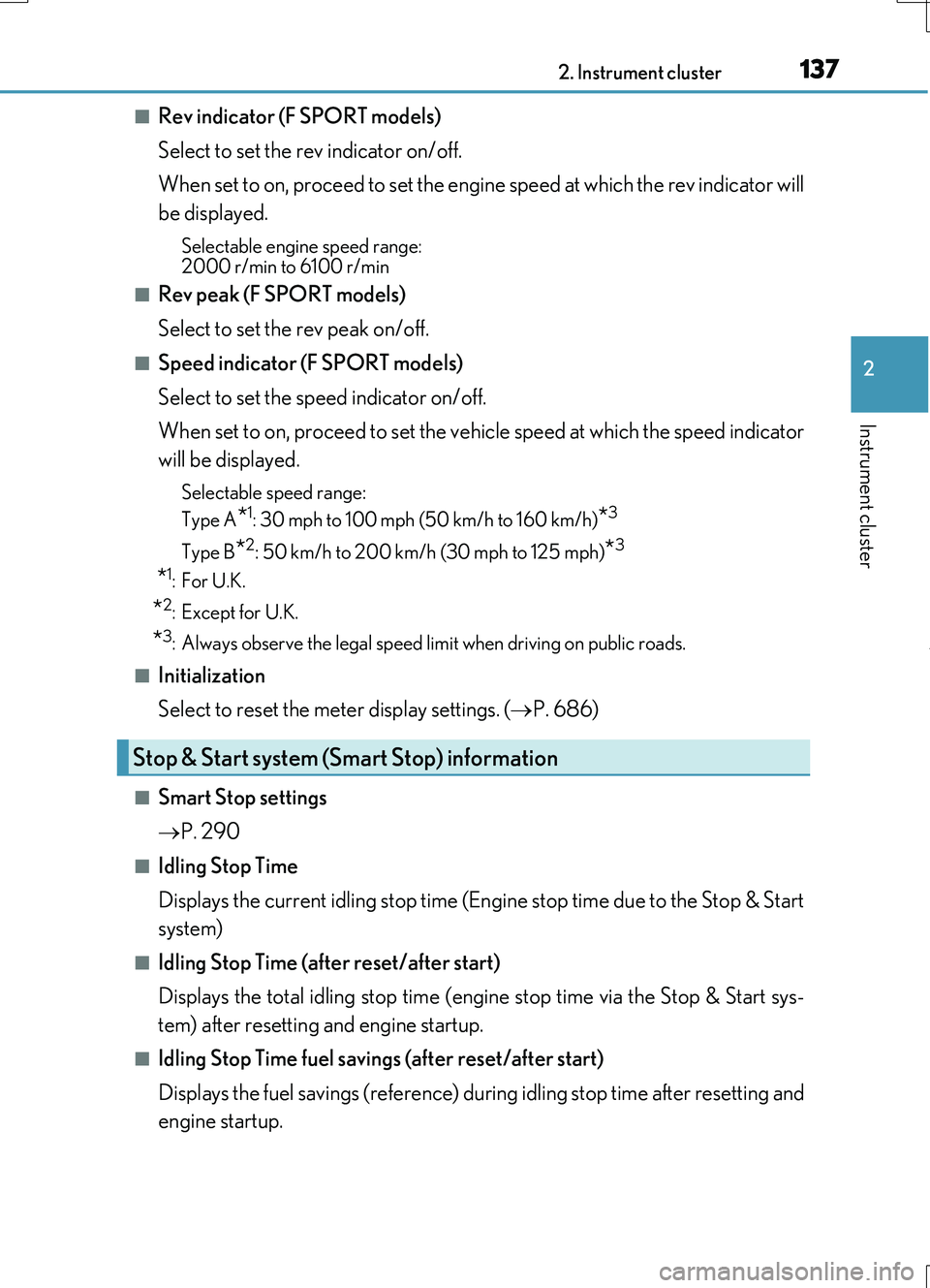
■Rev indicator (F SPORT models)
Select to set the rev indicator on/off.
When set to on, proceed to set the engine speed at which the rev indicator will
be displayed.
Selectable engine speed range: 2000 r/min to 6100 r/min
■Rev peak (F SPORT models)
Select to set the rev peak on/off.
■Speed indicator (F SPORT models)
Select to set the speed indicator on/off.
When set to on, proceed to set the vehicle speed at which the speed indicator
will be displayed.
Selectable speed range:
Type A*1: 30 mph to 100 mph (50 km/h to 160 km/h)*3
Type B*2: 50 km/h to 200 km/h (30 mph to 125 mph)*3
*1:For U.K.
*2:Except for U.K.
*3: Always observe the legal speed limit when driving on public roads.
■Initialization
Select to reset the meter display settings. ( P. 686)
■Smart Stop settings
P. 290
■Idling Stop Time
Displays the current idling stop time (Engine stop time due to the Stop & Start
system)
■Idling Stop Time (after reset/after start)
Displays the total idling stop time (eng ine stop time via the Stop & Start sys-
tem) after resetting and engine startup.
■Idling Stop Time fuel savings (after reset/after start)
Displays the fuel savings (reference) during idling stop time after resetting and
engine startup.
Stop & Start system (Smart Stop) information
Page 141 of 724
1412. Instrument cluster
2
Instrument cluster
RC200t_RC F_EE(OM24728E)
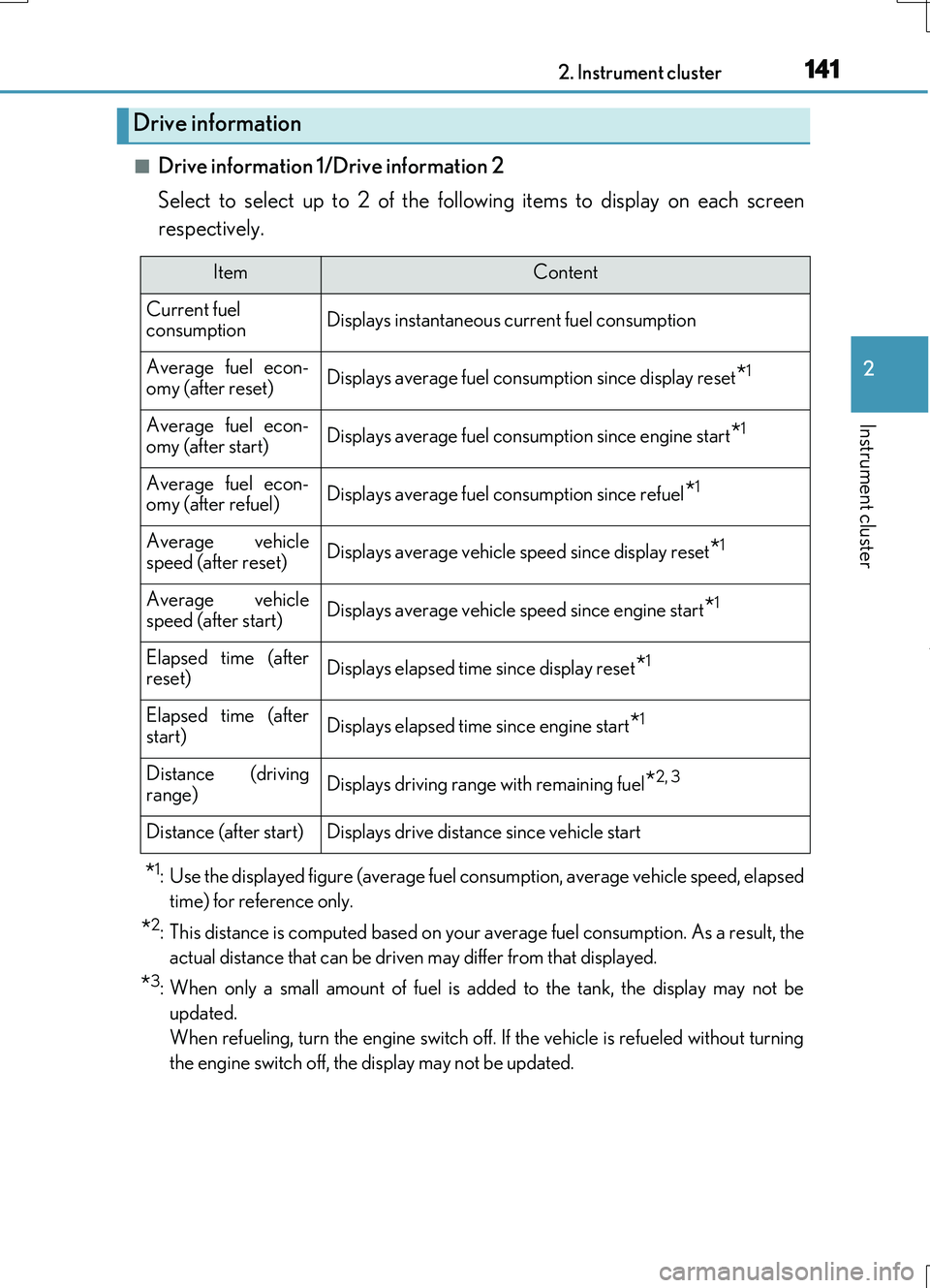
■Drive information 1/Drive information 2
Select to select up to 2 of the following items to display on each screen
respectively.
*1: Use the displayed figure (average fuel consumption, average vehicle speed, elapsed
time) for reference only.
*2: This distance is computed based on your average fuel consumption. As a result, the
actual distance that can be driven may differ from that displayed.
*3: When only a small amount of fuel is added to the tank, the display may not be
updated.
When refueling, turn the engine switch off. If the vehicle is refueled without turning
the engine switch off, the display may not be updated.
Drive information
ItemContent
Current fuel consumptionDisplays instantaneous current fuel consumption
Average fuel econ-
omy (after reset)Displays average fuel consumption since display reset*1
Average fuel econ- omy (after start)Displays average fuel cons umption since engine start*1
Average fuel econ- omy (after refuel)Displays average fuel consumption since refuel*1
Average vehicle
speed (after reset)Displays average vehicle speed since display reset*1
Average vehicle speed (after start)Displays average vehicle speed since engine start*1
Elapsed time (afterreset)Displays elapsed time since display reset*1
Elapsed time (after
start)Displays elapsed time since engine start*1
Distance (driving range)Displays driving range with remaining fuel*2, 3
Distance (after start)Displays drive distance since vehicle start
Page 142 of 724
1422. Instrument cluster
RC200t_RC F_EE(OM24728E)
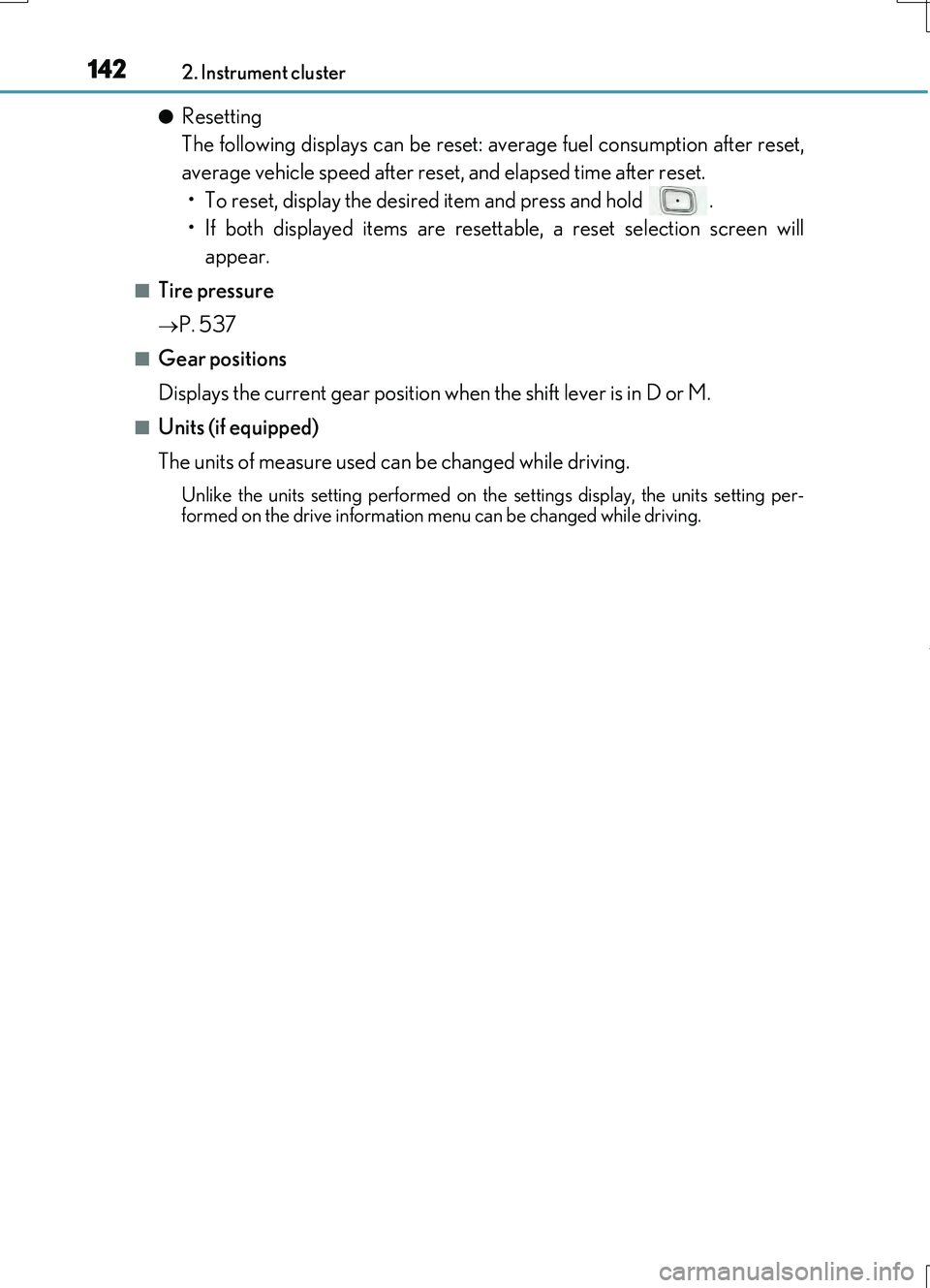
●Resetting
The following displays can be reset: average fuel consumption after reset,
average vehicle speed after reset, and elapsed time after reset.
• To reset, display the desired item and press and hold .
• If both displayed items are resettable, a reset selection screen will
appear.
■Tire pressure
P. 537
■Gear positions
Displays the current gear position when the shift lever is in D or M.
■Units (if equipped)
The units of measure used can be changed while driving.
Unlike the units setting performed on the settings display, the units setting per-
formed on the drive information me nu can be changed while driving.
Page 148 of 724
1482. Instrument cluster
RC200t_RC F_EE(OM24728E)
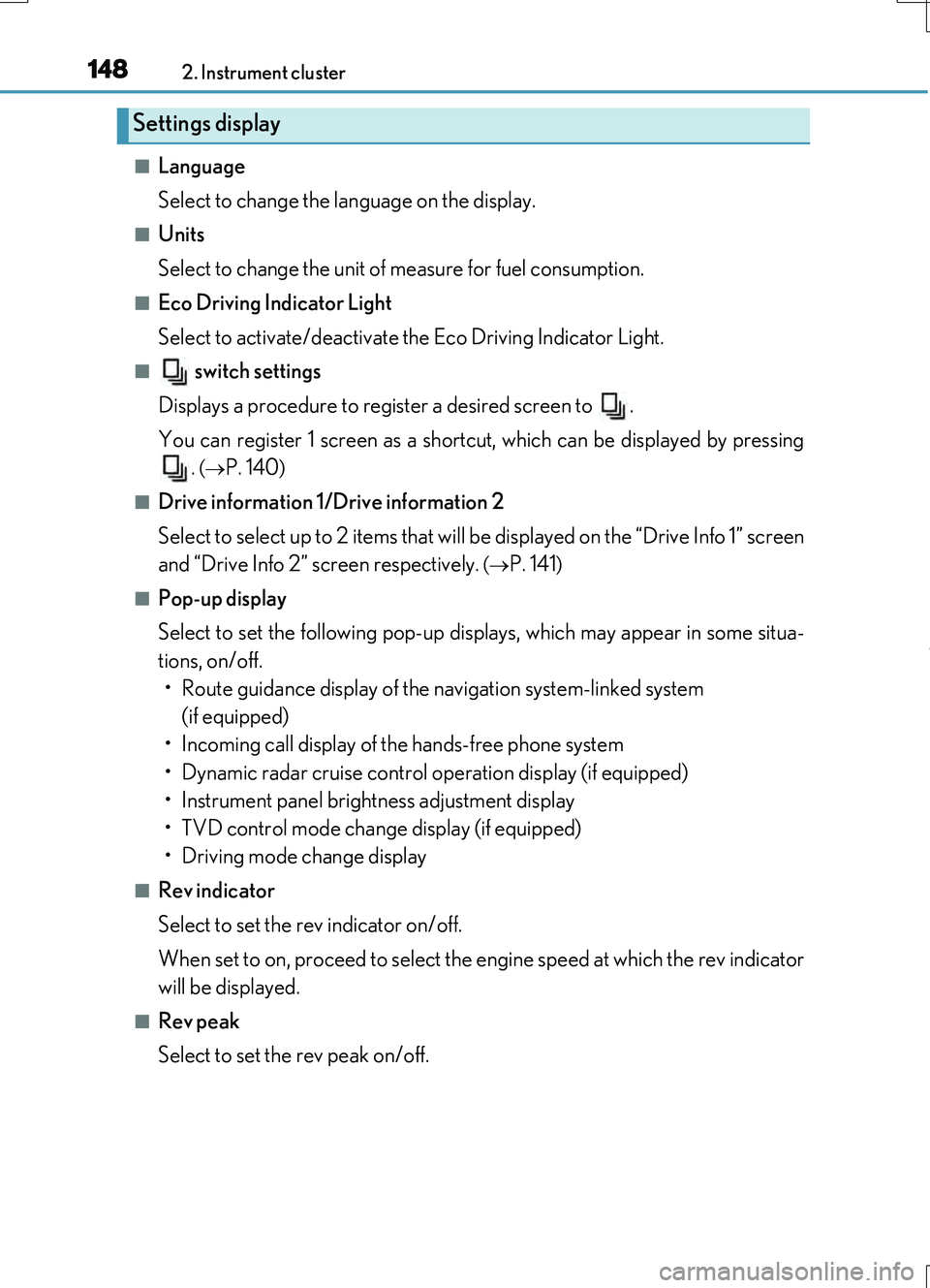
■Language
Select to change the language on the display.
■Units
Select to change the unit of measure for fuel consumption.
■Eco Driving Indicator Light
Select to activate/deactivate the Eco Driving Indicator Light.
■ switch settings
Displays a procedure to register a desired screen to .
You can register 1 screen as a shortcut, which can be displayed by pressing .
( P. 140)
■Drive information 1/Drive information 2
Select to select up to 2 items that will be displayed on the “Drive Info 1” screen
and “Drive Info 2” screen respectively.
( P. 141)
■Pop-up display
Select to set the following pop-up displays, which may appear in some situa-
tions, on/off. • Route guidance display of the navigation system-linked system
(if equipped)
• Incoming call display of the hands-free phone system
• Dynamic radar cruise control operation display (if equipped)
• Instrument panel brightness adjustment display
• TVD control mode change display (if equipped)
• Driving mode change display
■Rev indicator
Select to set the rev indicator on/off.
When set to on, proceed to select the engine speed at which the rev indicator
will be displayed.
■Rev peak
Select to set the rev peak on/off.
Settings display
Page 152 of 724
1522. Instrument cluster
RC200t_RC F_EE(OM24728E)
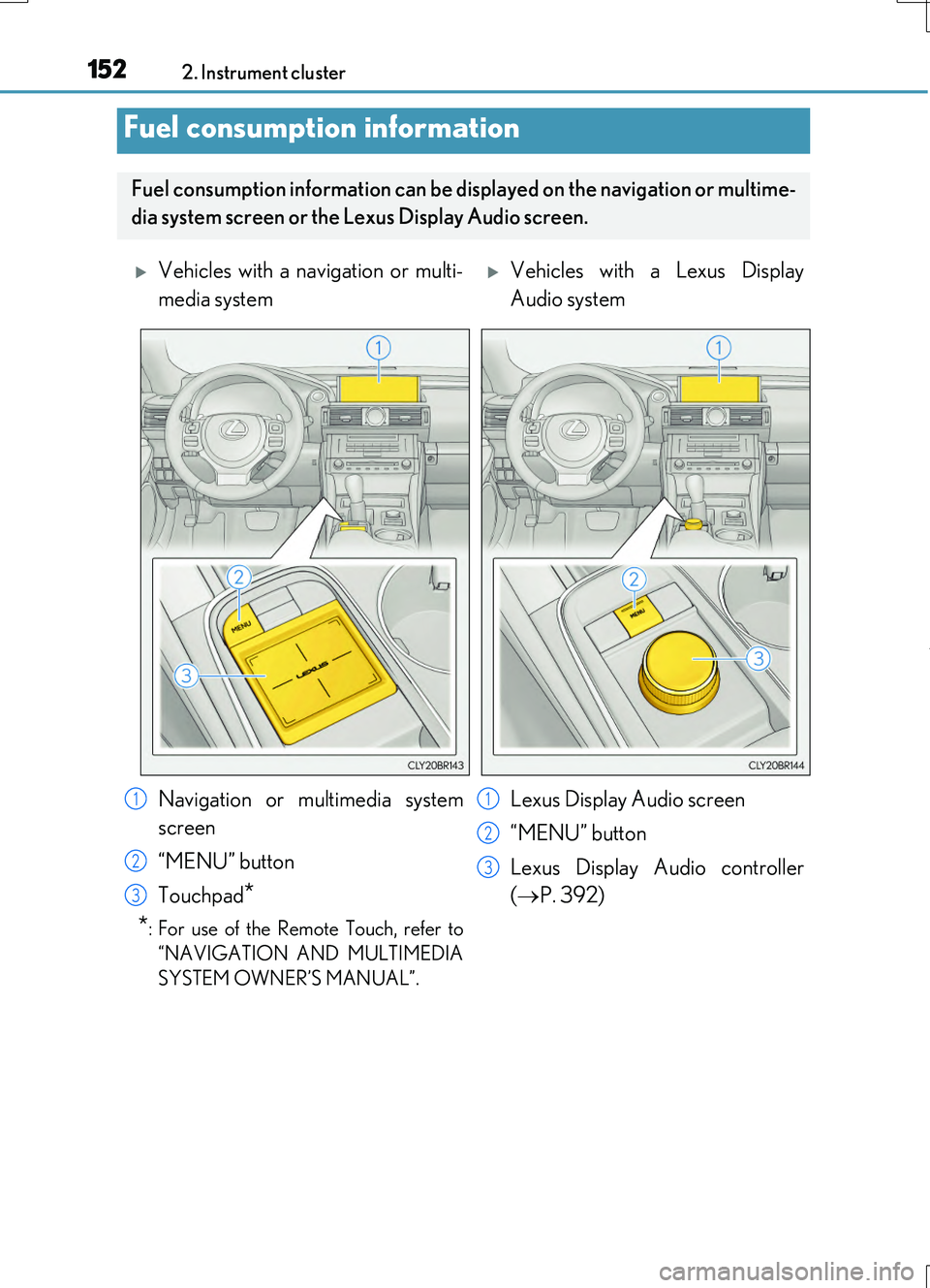
Fuel consumption information
Fuel consumption information can be displayed on the navigation or multime-
dia system screen or the Lexus Display Audio screen.
Vehicles with a navigation or multi-
media system
Vehicles with a Lexus Display
Audio system
Navigation or multimedia system
screen
“MENU” button
Touchpad*
*: For use of the Remote Touch, refer to
“NAVIGATION AND MULTIMEDIA
SYSTEM OWNER’S MANUAL”.
Lexus Display Audio screen
“MENU” button
Lexus Display Audio controller
( P. 392)
1
2
3
1
2
3
Page 153 of 724
1532. Instrument cluster
2
Instrument cluster
RC200t_RC F_EE(OM24728E)
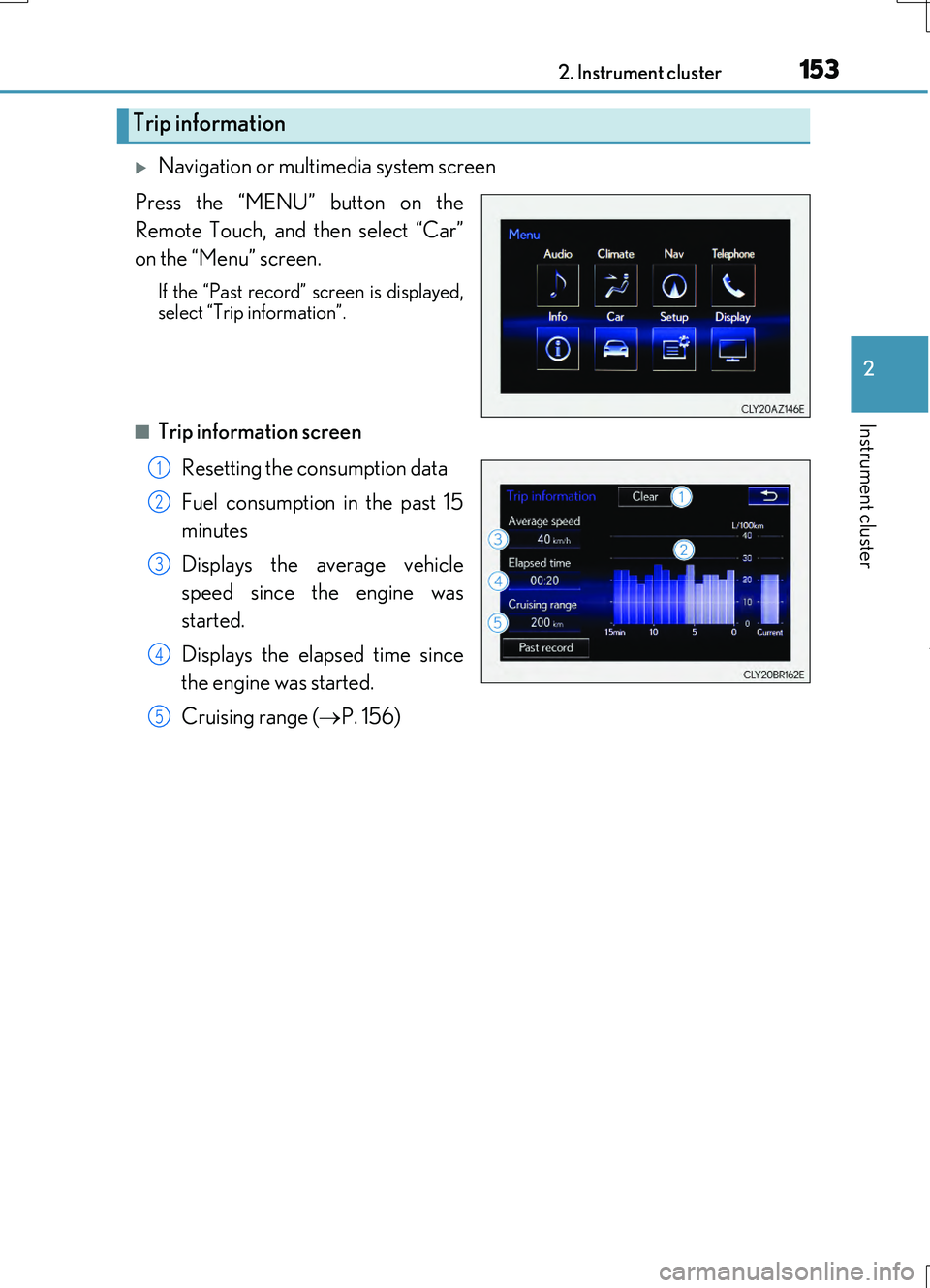
Navigation or multimedia system screen
Press the “MENU” button on the
Remote Touch, and then select “Car”
on the “Menu” screen.
If the “Past record” screen is displayed, select “Trip information”.
■Trip information screen
Resetting the consumption data
Fuel consumption in the past 15
minutes
Displays the average vehicle
speed since the engine was
started.
Displays the elapsed time since
the engine was started.
Cruising range ( P. 156)
Trip information
1
2
3
4
5