remote control LEXUS RC200T 2017 User Guide
[x] Cancel search | Manufacturer: LEXUS, Model Year: 2017, Model line: RC200T, Model: LEXUS RC200T 2017Pages: 724, PDF Size: 42.04 MB
Page 158 of 724

158
RC200t_RC F_EE(OM24728E)
3-1. Key information
The following keys are provided with the vehicle.
Electronic keys
• Operating the smart entry & start system ( P. 175)
• Operating the wireless remote con- trol function
Mechanical keys
Key number plate
Card key (electronic key) (if
equipped)
Operating the smart entry & start sys-
tem ( P. 175)
Locks the doors (P. 164)
Closes the windows and moon roof*
( P. 164)
Unlocks the doors ( P. 164)
Opens the windows and moon roof*
( P. 164)
Opens the trunk ( P. 170)
*: These settings must be customized at any authorized Lexus dealer or repairer, or
another duly qualified an d equipped professional.
Keys
The keys
1
2
3
4
Wireless remote control
1
2
3
4
5
Page 161 of 724
1613-1. Key information
3
Operation of each component
RC200t_RC F_EE(OM24728E)
■When riding in an aircraft
When bringing an electronic key onto an aircraft, make sure you do not press any but- tons on the electronic key while inside the ai rcraft cabin. If you are carrying an electronic
key in your bag etc., ensure that the buttons are not likely to be pressed accidentally. Pressing a button may cause the electronic key to emit radio waves that could interferewith the operation of the aircraft.
■Electronic key battery depletion
●The standard battery life is 1 to 2 years. (The card key battery life is about a year and a half.)
●If the battery becomes low, an alarm will sound in the cabin when the engine is stopped.( P. 615)
●As the electronic key always receives radio waves, the battery will become depleted
even if the electronic key is not used. The following symptoms indicate that the elec- tronic key battery may be depleted. Replace the battery when necessary. ( P. 563)
• The smart entry & start system or the wireless remote control does not operate.
• The detection area becomes smaller. • The LED indicator on the key surface does not turn on.
●To avoid serious deterioration, do not leave the electronic key within 1 m (3 ft.) of thefollowing electrical appliances that produce a magnetic field:
•TVs
• Personal computers • Cellular phones, cordless phones and battery chargers• Recharging cellular phones or cordless phones
• Table lamps • Induction cookers
■Replacing the battery
P. 563
■Confirmation of the registered key number
The number of keys already registered to the vehicle can be confirmed. Ask any autho- rized Lexus dealer or repairer, or another du ly qualified and equipped professional for details.
■If a wrong key is used
The key cylinder rotates freely, isolated from the internal mechanism.
Page 164 of 724

164
RC200t_RC F_EE(OM24728E)
3-2. Opening, closing and locking the doors and trunk
◆Smart entry & start system
Carry the electronic key to enable this function.
Grip the door handle to unlock
the doors.
Make sure to touch the sensor on the back of the handle.
The doors cannot be unlocked for
3 seconds after the doors are locked.
Touch the lock sensor (indenta-
tion on the side of the door han-
dle) to lock the doors.
Check that the door is securely locked.
◆Wireless remote control
Locks both side doors
Check that the door is securely locked.
Press and hold to close the windows and moon roof.*
Unlocks both side doors
Press and hold to open the windowsand moon roof.*
*: These settings must be customized at
any authorized Lexus dealer or
repairer, or another duly qualified
and equipped professional.
Doors
Unlocking and locking the doors from the outside
1
2
1
2
Page 165 of 724

1653-2. Opening, closing and locking the doors and trunk
3
Operation of each component
RC200t_RC F_EE(OM24728E)
■Operation signals
The emergency flashers flash to indicate th at the doors have been locked/unlocked. (Locked: once; Unlocked: twice)
A buzzer sounds to indicate that th e windows and moon roof are operating.
■Security feature
If a door is not opened within approximately 30 seconds after the vehicle is unlocked, the security feature automatically locks the vehicle again.
■Welcome light illumination control
The front position, tail and license plate lights automatically turn on at night when the doors are unlocked using the entry function or wireless remote control if the light switch
is in the “AUTO” position.
■When the door cannot be locked by the lock sensor on the surface of the door handle
■Door lock buzzer
If an attempt to lock the doors is made when a door is not fully closed, a buzzer sounds
continuously for 5 seconds. Fully close the door to stop the buzzer, and lock the vehicle once more.
■Setting the alarm (if equipped)
Locking the doors will set the alarm system. ( P. 103)
■If the smart entry & start system or the wireless remote control does not operate prop- erly
Use the mechanical key and/or inside lock buttons to lock and unlock the doors. ( P. 650) Replace the key battery with a new one if it is depleted. ( P. 563)
Use your palm to touch the lock sensor.
Page 168 of 724

1683-2. Opening, closing and locking the doors and trunk
RC200t_RC F_EE(OM24728E)
■Side window open/close function linked to door operation
When a door is opened, its window opens slightly. When a door is closed, its window closes completely.
■Switching the door unlock function
It is possible to set which doors the entry function unlocks using the wireless remote con- trol.
Turn the engine switch off.
For vehicles with an intrusion sensor: Cancel the intrusion sensor and tilt sensor of the alarm system to prevent unintended trigge ring of the alarm while changing the set- tings. ( P. 106)
When the indicator light on the key su rface is not on, press and hold or
for approximately 5 seconds wh ile pressing and holding .
The setting changes each time an operatio n is performed, as shown below. (When changing the setting continuously, release the buttons, wait for at least 5 seconds, and
repeat step .)
For vehicles with an alarm: To prevent unin tended triggering of the alarm, unlock the doors using the wireless remote control and op en and close a door once after the set-
tings have been changed. (If a door is not opened within 30 seconds after is
pressed, the doors will be locked again and the alarm will automatically be set.)
In a case that the alarm is triggered, immediately stop the alarm. ( P. 104)
1
2
3
3
Multi-information displayUnlocking functionBeep
(Left-hand drive vehi-cles)
(Right-hand drive vehicles)
Holding the driver’s door handleunlocks only the driver’s door.
Exterior: Beeps 3 timesInterior: Pings onceHolding the passenger’s doorhandle unlocks both side doors.
Holding either door handle
unlocks both side doors.
Exterior: Beeps twice
Interior: Pings once
Page 169 of 724

1693-2. Opening, closing and locking the doors and trunk
3
Operation of each component
RC200t_RC F_EE(OM24728E)
■Impact detection door lock release system
In the event that the vehicle is subject to a strong impact, both side doors are unlocked. Depending on the force of the impact or the type of accident, however, the system may
not operate.
■Using the mechanical key
The doors can also be unlocked with the mechanical key. ( P. 650)
■Conditions affecting the operation of the smart entry & start system or wireless remote control
P. 177
■Customization
Settings (e.g. unlocking function using a key) can be changed. (Customizable features: P. 685)
WARNING
■To prevent an accident
Observe the following precautions while driving the vehicle. Failure to do so may result in a door opening and an occupant being thrown out of thevehicle, resulting in death or serious injury.
●Ensure that both side doors are properly closed.
●Do not pull the inside handle of the doors while driving. The doors may be opened even if the inside lock buttons are in locked position.
■Side window open/close function linked to door operation
Do not hold the upper edge of the side window when you close the door. Otherwise, your fingers or hand may be caught in the window.
■When using the wireless remote control and operating the power windows or moonroof
Operate the power window or moon roof after checking to make sure that there is no
possibility of any passenger having any of their body parts caught in the window or moon roof. Also, do not allow children to oper ate the wireless remote control. It is pos- sible for children and other passengers to get caught in the power window or moon
roof.
Page 170 of 724

1703-2. Opening, closing and locking the doors and trunk
RC200t_RC F_EE(OM24728E)
Press the opener switch.
◆Smart entry & start system
While carrying the electronic key,
press the button on the trunk lid.
When both side doors are unlocked using one of the following methods,the trunk can be opened without the
electronic key: •Entry function• Wireless remote control
• Door lock switches • Automatic door unlocking system• Mechanical key
◆Wireless remote control
Press and hold the switch.
Trunk
The trunk can be opened using the trunk opener, entry function or wireless
remote control.
Opening the trunk from inside the vehicle
Opening the trunk from outside the vehicle
Page 171 of 724
1713-2. Opening, closing and locking the doors and trunk
3
Operation of each component
RC200t_RC F_EE(OM24728E)
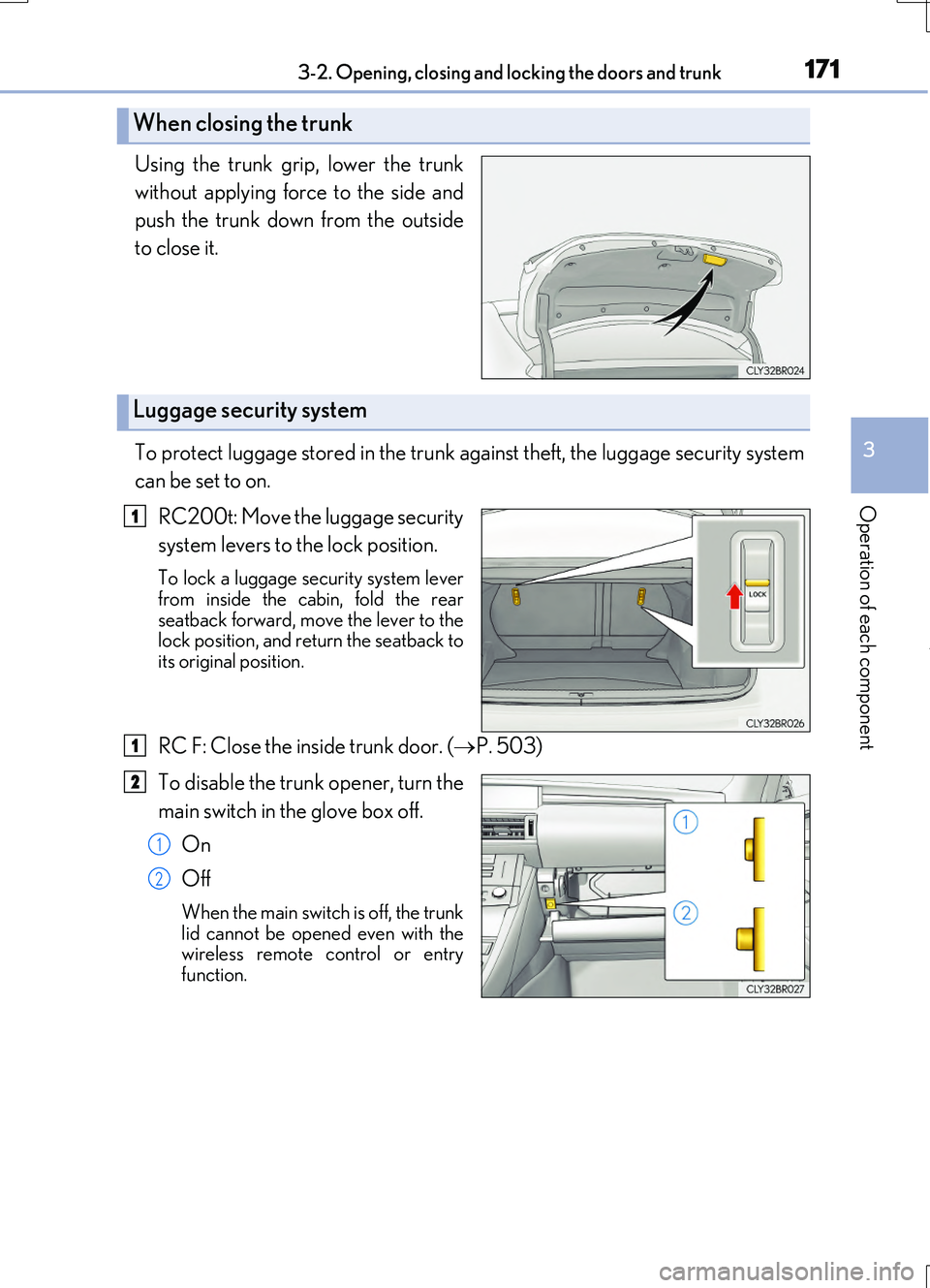
Using the trunk grip, lower the trunk
without applying force to the side and
push the trunk down from the outside
to close it.
To protect luggage stored in the trunk against theft, the luggage security system
can be set to on.
RC200t: Move the luggage security
system levers to the lock position.
To lock a luggage security system lever from inside the cabin, fold the rear
seatback forward, move the lever to the lock position, and return the seatback toits original position.
RC F: Close the inside trunk door. ( P. 503)
To disable the trunk opener, turn the
main switch in the glove box off.
On
Off
When the main switch is off, the trunk
lid cannot be opened even with the wireless remote control or entryfunction.
When closing the trunk
Luggage security system
1
1
2
1
2
Page 172 of 724

1723-2. Opening, closing and locking the doors and trunk
RC200t_RC F_EE(OM24728E)
■Trunk light
●The trunk light turns on when the trunk is opened.
●If the trunk light is left on when the engine switch is turned off, the light will go off auto- matically after 20 minutes.
■Function to prevent the trunk being locked with the electronic key inside
●When both side doors are locked, closing the trunk lid with the electronic key left insidethe trunk will sound an alarm.
In this case, the trunk lid can be opened by pressing the trunk release button on the trunk lid.
●If the spare electronic key is put in the trunk with both side doors locked, the key con-
finement prevention function is activated so the trunk can be opened. In order to pre- vent theft, take all electronic keys with you when leaving the vehicle.
●If the electronic key is put in the trunk with both side doors locked, the key may not be
detected depending on the location of the key and the surrounding radio wave condi- tions. In this case, the key confinement prevention function cannot be activated, causingthe doors to lock when the trunk is closed. Make sure to check where the key is before
closing the trunk.
●The key confinement prevention function cannot be activated if either door is unlocked. In this case, open the trunk using the trunk opener.
■Using the mechanical key
The trunk can be also opened using the mechanical key. ( P. 651)
■If the smart entry & start system or the wireless remote control does not operate prop-
erly
Use the mechanical key to unlock the trunk. ( P. 651) Replace the key battery with a new one if it is depleted. ( P. 563)
■When leaving a key to the vehicle with a parking attendant
P. 160
■Customization
The trunk unlocking operation can be changed. (Customizable features: P. 685)
Page 176 of 724

1763-2. Opening, closing and locking the doors and trunk
RC200t_RC F_EE(OM24728E)
■Alarms and warning indicators
An alarm sounds and warning messages are di splayed on the multi-information display to protect against unexpected accidents or theft of the vehicle resulting from erroneous
operation. When a warning message is displayed, take appropriate measures based on the displayed message. ( P. 597)
When only an alarm sounds, circumstances and correction procedures are as follows.
■Battery-saving function
The battery-saving function will be activated in order to prevent the electronic key bat- tery and the vehicle battery from being discharged while the vehicle is not in operationfor a long time.
●In the following situations, the smart entry & start system may take some time to unlockthe doors.
• The electronic key has been left within approximately 2 m (6 ft.) of the outside of the
vehicle for 10 minutes or longer. • The smart entry & start system has no t been used for 5 days or longer.
●If the smart entry & start system has not been used for 14 days or longer, the doors can- not be unlocked at the passenger door. In this case, hold the driver’s door handle, or use the wireless remote control or mechanical key, to unlock the doors.
AlarmSituationCorrection procedure
Exterior alarm soundsonce for 5 seconds
The trunk was closed while
the electronic key was still inside the trunk and bothside doors were locked.
Retrieve the electronic keyfrom the trunk and close
the trunk lid.
An attempt was made to
lock the vehicle while a door was open.
Close both side doors andlock the doors again.
Interior alarm sounds con-
tinuously
The engine switch was turned to ACCESSORY
mode while the driver’s door was open (or thedriver’s door was opened
while the engine switch was in ACCESSORYmode).
Turn the engine switch offand close the driver’s door.
The engine switch was
turned off while the driver’s door was open.Close the driver’s door.