remote control LEXUS RC200T 2017 Owner's Manual
[x] Cancel search | Manufacturer: LEXUS, Model Year: 2017, Model line: RC200T, Model: LEXUS RC200T 2017Pages: 724, PDF Size: 42.04 MB
Page 177 of 724
1773-2. Opening, closing and locking the doors and trunk
3
Operation of each component
RC200t_RC F_EE(OM24728E)
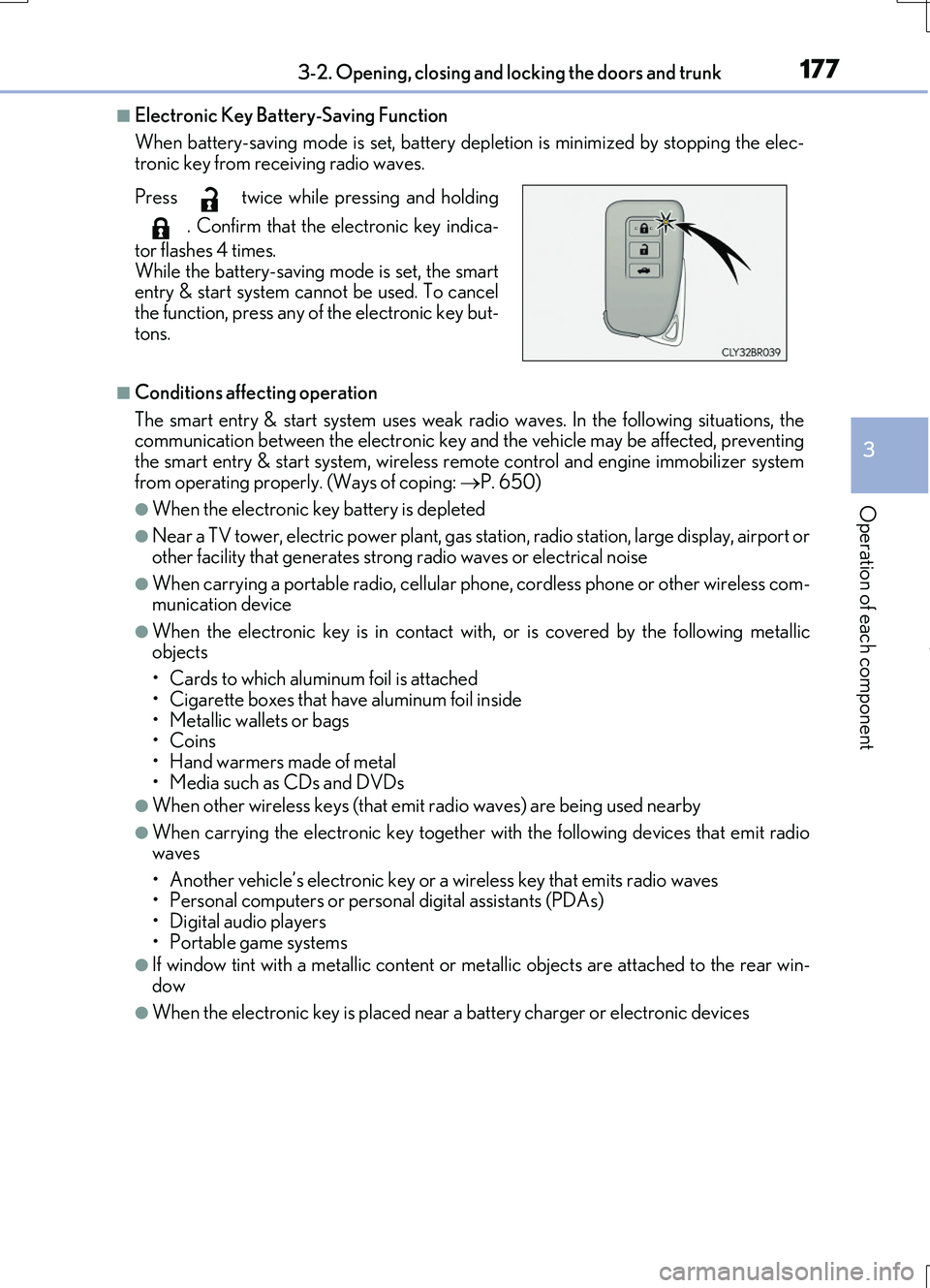
■Electronic Key Battery-Saving Function
When battery-saving mode is set, battery depl etion is minimized by stopping the elec- tronic key from receiving radio waves.
■Conditions affecting operation
The smart entry & start system uses weak ra dio waves. In the following situations, the communication between the electronic key an d the vehicle may be affected, preventing the smart entry & start system, wireless remote control and engine immobilizer system
from operating properly. (Ways of coping: P. 650)
●When the electronic key battery is depleted
●Near a TV tower, electric power plant, gas station, radio station, large display, airport or
other facility that gene rates strong radio waves or electrical noise
●When carrying a portable radio, cellular phone, cordless phone or other wireless com- munication device
●When the electronic key is in contact wi th, or is covered by the following metallic objects
• Cards to which aluminum foil is attached
• Cigarette boxes that have aluminum foil inside • Metallic wallets or bags•Coins
• Hand warmers made of metal • Media such as CDs and DVDs
●When other wireless keys (that emit radio waves) are being used nearby
●When carrying the electronic key together with the following devices that emit radiowaves
• Another vehicle’s electronic key or a wireless key that emits radio waves • Personal computers or personal digital assistants (PDAs)• Digital audio players
• Portable game systems
●If window tint with a metallic content or me tallic objects are attached to the rear win-
dow
●When the electronic key is placed near a battery charger or electronic devices
Press twice while pressing and holding
. Confirm that the electronic key indica-
tor flashes 4 times.
While the battery-saving mode is set, the smart entry & start system cannot be used. To cancelthe function, press any of the electronic key but-
tons.
Page 178 of 724

1783-2. Opening, closing and locking the doors and trunk
RC200t_RC F_EE(OM24728E)
■Note for the entry function
●Even when the electronic key is within the effective range (detection areas), the system may not operate properly in the following cases:
• The electronic key is too close to the window or outside door handle, near the ground, or in a high place when the doors are locked or unlocked.• The electronic key is near the ground or in a high place, or too close to the rear
bumper center when the trunk is opened. • The electronic key is on the instrument pa nel, rear package tray or floor, or in the door pockets or glove box when the engine is started or engine switch modes are
changed.
●Do not leave the electronic key on top of th e instrument panel or near the door pockets
when exiting the vehicle. Depending on the radio wave reception conditions, it may be detected by the antenna outside the cabin and the doors will become lockable from the outside, possibly trapping the electronic key inside the vehicle.
●As long as the electronic key is within the effective range, the doors may be locked orunlocked by anyone. However, only the doors detecting the electronic key can be usedto unlock the vehicle.
●Even if the electronic key is not inside the vehicle, it may be possible to start the engine if the electronic key is near the window.
●The doors may unlock or lock if a large amou nt of water splashes on the door handle,
such as in the rain or in a car wash, when th e electronic key is within the effective range. (The doors will automatically be locked after approximately 30 seconds if the doorsare not opened and closed.)
●If the wireless remote control is used to lock the doors when the electronic key is nearthe vehicle, there is a possibility that the d oor may not be unlocked by the entry func- tion. (Use the wireless remote control to unlock the doors.)
●Touching the door lock or unlock sensor while wearing gloves may prevent lock or unlock operation.
●If the door handle becomes wet while the electronic key is within the effective range,the door may lock and unlock repeatedly. In this case, follow the following correction procedures to wash the vehicle:
• Place the electronic key in a location 2 m (6 ft.) or more away from the vehicle. (Take care to ensure that the key is not stolen.)• Set the electronic key to battery-saving mode to disable the smart entry & start sys-
tem. ( P. 177)
●If the electronic key is inside the vehicle and a door handle becomes wet during a car
wash, a message may be shown on the mult i-information display and a buzzer will sound outside the vehicle. To turn off the alarm, lock both side doors.
●The lock sensor may not work properly if it comes into contact with ice, snow, mud, etc.
Clean the lock sensor and attempt to operate it again.
●A sudden handle operation or a handle oper ation immediately after entering the effec- tive range may prevent the doors from bein g unlocked. Touch the door unlock sensor
and check that the doors are unlocked before pulling the door handle again.
●Unlocking the vehicle may take more time if another electronic key is within the effec- tive range.
Page 179 of 724

1793-2. Opening, closing and locking the doors and trunk
3
Operation of each component
RC200t_RC F_EE(OM24728E)
■When the vehicle is not driven for extended periods
●To prevent theft of the vehicle, do not leave the electronic key within 2 m (6 ft.) of the vehicle.
●The smart entry & start system can be deactivated in advance. ( P. 685)
■To operate the system properly
●Make sure to carry the electronic key when operating the system. Do not get the elec-
tronic key too close to the vehicle when operating the system from the outside of the vehicle.
Depending on the position and holding condit ion of the electronic key, the key may not
be detected correctly and the system may not operate properly. (The alarm may go off accidentally, or the door lock prev ention function may not operate.)
●Do not leave the electronic key inside the trunk.
The key confinement prevention function ma y not operate, depending on the location of the key (close to a spare tire [if equipped], the inside edge of the Trunk), conditions(inside a metal bag, close to metallic obje cts) and the radio waves in the surrounding
area. ( P. 172)
■If the smart entry & start system does not operate properly
●Locking and unlocking the doors and opening the trunk: P. 650
●Starting the engine: P. 652
■Customization
Settings (e. g. smart entry & start system) can be changed.
(Customizable features: P. 685)
■If the smart entry & start system has been deactivated in a customized setting
●Locking and unlocking the doors and opening the trunk:
Use the wireless remote control or mechanical key. ( P. 164, 170, 650)
●Starting the engine and changing engine switch modes:P. 652
●Stopping the engine: P. 247
Page 216 of 724
2163-3. Adjusting the seats
RC200t_RC F_EE(OM24728E)
■Recall procedure
Carry the electronic key that has been registered to the driving position,
and then unlock and open the driver’s door using the smart entry & start
system or wireless remote control.
The driving position will move to the recorded position (not including the steering wheel).
If the driving position is in a position that has already been recorded, the seat and
outside rear view mirrors will not move.
Turn the engine switch to ACCESSORY mode or IGNITION ON mode.
The steering wheel will move to the recorded position.
■Cancelation procedure
Carry only the key you want to cancel and then close the driver’s door.
If 2 or more keys are in the vehicle, the driving position cannot be canceled
properly.
Turn the engine switch to IGNITION ON mode.
While pressing the “SET” button, press and hold the door lock switch
(either lock or unlock) until the buzzer sounds twice.
If the button could not be canceled, the buzzer sounds continuously for approxi-
mately 3 seconds.
■Recalling the driving position us ing the memory recall function
●Different driving positions can be registered for each electronic key. Therefore, the driving position that is recalled may be different depending on the key being carried.
●If a door other than the driver’s door is unlocked with the smart entry & start system, the
driving position cannot be reca lled. In this case, press the driving position button which has been set.
■Customization
The unlock door settings of the memory recall function can be changed. (Customizable features: P. 685)
WARNING
■Seat adjustment caution
Take care during seat adjustment so that the seat does not strike the rear passenger or
squeeze your body against the steering wheel.
1
2
1
2
Page 229 of 724
2293-5. Opening, closing the windows and moon roof
3
Operation of each component
RC200t_RC F_EE(OM24728E)
■Door lock linked window operation
●The power windows can be opened and closed using the mechanical key.* ( P. 651)
●The power windows can be opened and closed using the wireless remote control.*(P. 164)
*: These settings must be customized at any authorized Lexus dealer or repairer, or
another duly qualified and equipped professional.
■When the battery is disconnected
The window lock switch is disabled. If nece ssary, press the window lock switch after reconnecting the battery.
■Power windows open warning buzzer
The buzzer sounds and a message is shown on the multi-information display in the instru- ment cluster when the engine switch is turned off and the driver’s door is opened with the power windows open.
■Customization
Settings (e.g. linked door lock operation) can be changed. (Customizable features: P. 685)
Page 230 of 724
2303-5. Opening, closing the windows and moon roof
RC200t_RC F_EE(OM24728E)
WARNING
Observe the following precautions. Failure to do so may result in death or serious injury.
■Closing the windows
●The driver is responsible for all the power window operations, including the operation for the passengers. In order to prevent acci dental operation, especially by a child, do not let a child operate the power windows. It is possible for children and other passen-
gers to have body parts caught in the power window. Also, when riding with a child, it is recommended to use the window lock switch. ( P. 227)
●Check to make sure that all passengers do not have any part of their body in a posi-
tion where it could be caught wh en a window is being operated.
●When using the wireless remote control or mechanical key and operating the power windows, operate the power window after checking to make sure that there is no pos-
sibility of any passenger having any of thei r body parts caught in the window. Also do not let a child operate window by the wireless remote control or mechanical key. It ispossible for children and other passengers to get caught in the power window.
●When exiting the vehicle, turn the engine switch off, carry the key and exit the vehiclealong with the child. There may be accidental operation, due to mischief, etc., thatmay possibly lead to an accident.
■Jam protection function
●Never use any part of your body to intent ionally activate the jam protection function.
●The jam protection function may not work if something gets jammed just before the
window is fully closed. Be careful not to ge t any part of your body jammed in the win- dow.
■Catch protection function
●Never use any part of your body or clothing to intentionally activate the catch protec-tion function.
●The catch protection function may not work if something gets caught just before the
window is fully opened. Be careful not to get any part of your body or clothing caught in the window.
Page 232 of 724
2323-5. Opening, closing the windows and moon roof
RC200t_RC F_EE(OM24728E)
■The moon roof can be operated when
The engine switch is in IGNITION ON mode.
■Operating the moon roof after turning the engine off
The moon roof can be operated for approximately 45 seconds after the engine switch is
turned to ACCESSORY mode or turned off. It cannot, however, be operated once either door is opened.
■Jam protection function
If an object is detected between the moon roof and the frame while the moon roof is clos- ing or tilting down, travel is sto pped and the moon roof opens slightly.
■Sunshade
The sunshade can be opened and closed manually. However, the sunshade will open automatically when the moon roof is opened.
■Door lock linked moon roof operation
●The moon roof can be opened and closed using the mechanical key.* ( P. 651)
●The moon roof can be opened and closed using the wireless remote control.* ( P. 164)
*: These settings must be customized at any authorized Lexus dealer or repairer, or
another duly qualified and equipped professional.
■If the moon roof does not close normally
Perform the following procedure:
Stop the vehicle.
Press and hold th e “CLOSE” switch.*The moon roof will close, reopen and pause for approximately 10 seconds. Then it will close again and stop at the completely closed position.
Check to make sure that the moon roof is completely closed and then release the switch.
*: If the switch is released at the incorrect time, the procedure will have to be performed
again from the beginning.
If the moon roof does not fully close even after performing the above procedure cor-
rectly, have the vehicle inspected by any authorized Lexus dealer or repairer, or another duly qualified and equipped professional.
1
2
3
Page 234 of 724
2343-5. Opening, closing the windows and moon roof
RC200t_RC F_EE(OM24728E)
WARNING
Observe the following precautions. Failure to do so may cause death or serious injury.
■Opening the moon roof
●Do not allow any passengers to put their hands or heads outside the vehicle while it ismoving.
●Do not sit on top of the moon roof.
■Closing the moon roof
●The driver is responsible for moon ro of opening and closing operations. In order to prevent accidental operation, espe cially by a child, do not let a child oper-
ate the moon roof. It is possible for children and other passengers to have body parts caught in the moon roof.
●Check to make sure that all passengers do not have any part of their body in a posi-
tion where it could be caught when the moon roof is being operated.
●When using the wireless remote control or mechanical key and operating the moon roof, operate the moon roof after checking to make sure that there is no possibility of
any passenger having any of their body part s caught in the moon roof. Also, do not let a child operate moon roof by the wireless remo te control or mechanical key. It is pos- sible for children and other passengers to get caught in the moon roof.
●When exiting the vehicle, turn the engine switch off, carry the key and exit the vehiclealong with the child. There may be accidental operation, due to mischief, etc., thatmay possibly lead to an accident.
■Jam protection function
●Never use any part of your body to intent ionally activate the jam protection function.
●The jam protection function may not work if something gets caught just before the
moon roof is fully closed. Also, the jam protection function is not designed to operate while the moon roof switch is be ing pressed. Take care so that your fingers, etc. do not get caught.
NOTICE
■To prevent damage to the moon roof
●Before opening, make sure that there are no foreign objects such as stones or ice around the opening.
●Do not hit the face or edge of the moon roof with hard objects.
■Operating the moon roof
There is the possibility that water or rain will get into the vehicle if you operate the moon roof after a rainfall, snowfall or car wash. Wipe the moon roof dry with a cloth
before operating it.
Page 466 of 724
4665-11. Bluetooth®
RC200t_RC F_EE(OM24728E)
■Compatible models
The Bluetooth® audio system supports portable audio players with the following specifi- cations
●Bluetooth® specifications: Ver. 2.0, or higher (Recommend ed: Ver. 3.0+EDR or higher)
●Profiles:
• A2DP (Advanced Audio Distribution Profile) Ver. 1.0, or higher (Recommended: Ver. 1.2 or higher) This is a profile to transmit stereo audio or high quality sound to the audio system.
• AVRCP (Audio/Video Remote Control Profile) Ver. 1.0 or higher (Recommended: Ver. 1.4 or higher) This is a profile to allow remote control of the A/V equipment.
However, please note that some functions may be limited depending on the type of por- table audio player connected.
The hands-free system supports cellular ph ones with the following specifications.
●Bluetooth® specification: Ver. 2.0 or higher (Recommended: Ver. 3.0+EDR or higher)
●Profiles:
• HFP (Hands Free Profile) Ver. 1.0 or higher (Recommended: Ver. 1.6 or higher) This is a profile to allow hands-free phone calls using a cellular phone or head set. It has outgoing and incoming call functions.
• OPP (Object Push Profile) Ver. 1.1 or higher (Recommended: Ver. 1.1) This is a profile to transfer phonebook data. When a Bluetooth® compatible cellular phone has both PBAP and OPP, OPP cannot be used.
• PBAP (Phone Book Access Profile) Ver. 1.0 or higher (Recommended: Ver. 1.1) This is a profile to tr ansfer phonebook data.
• MAP (Message Access Profile) Ver.1.0 or higher This is a profile to using phone message.If the cellular phone does not support HFP, you cannot register it with the hands-free sys-
tem. OPP, PBAP or MAP services must be selected individually.
■Reconnecting the portable audio player
If the portable audio player is disconnect ed due to poor reception when the engine
switch is in ACCESSORY or IGNITION ON mode, the system automatically recon- nects the portable audio player.
If you have switched off the portable audio player yourself, follow the instructions below
to reconnect:
●Select the portable audio player again
●Enter the portable audio player
■When you sell your car
Be sure to delete your personal data. ( P. 402)
Page 478 of 724
478
RC200t_RC F_EE(OM24728E)
6-1. Using the air conditioning system
Automatic air conditioning system
Air outlets and fan speed are automatically adjusted according to the tem-
perature setting.
Vehicles with a Lexus Display Audio system: Press the “MENU” button on the
Lexus Display Audio controller, then sele ct “Climate” to display the air condi-
tioning operation screen.
For details on the Lexus Display Audio controller, refer to “Lexus Display
Audio controller” on P. 392.
Vehicles with a navigation or multimedia system: Press the “MENU” button on
the Remote Touch, then select “Climate” to display the air conditioning con-
trol screen.
For details on the Remote Touch, refer to the “NAVIGATION AND MULTI-
MEDIA SYSTEM OWNER’S MANUAL”.
The illustrations below are for left-hand drive vehicles.
The button positions and shapes will di ffer for right-hand drive vehicles.
Also, the display and button positions will differ depending on the type of the
system.