steering LEXUS RC200T 2017 User Guide
[x] Cancel search | Manufacturer: LEXUS, Model Year: 2017, Model line: RC200T, Model: LEXUS RC200T 2017Pages: 724, PDF Size: 42.04 MB
Page 54 of 724
541-1. For safe use
RC200t_RC F_EE(OM24728E)
WARNING
■SRS airbag precautions
●Do not strike or apply significant levels of force to the area of the SRS airbag compo- nents.
Doing so can cause the SRS airbags to malfunction.
●Do not touch any of the component parts immediately after the SRS airbags have deployed (inflated) as they may be hot.
●If breathing becomes difficult after the SRS airbags have deployed, open a door orwindow to allow fresh air in, or leave the vehicle if it is safe to do so. Wash off any resi-due as soon as possible to prevent skin irritation.
●If the areas where the SRS airbags are stored, such as the steering wheel pad andfront and rear pillar garnishes are damaged or cracked, have them replaced by anyauthorized Lexus dealer or repairer, or an other duly qualified and equipped profes-
sional.
■Modification and disposal of SRS airbag system components
Do not dispose of your vehicle or perform any of the following modifications without
consulting any authorized Lexus dealer or repairer, or another duly qualified and equipped professional. The SRS airbags may malfunction or deploy (inflate) acciden-tally, causing death or serious injury.
●Installation, removal, disassembly and repair of the SRS airbags
●Repairs, modifications, removal or repl acement of the steering wheel, instrument panel, dashboard, seats or seat upholstery, fr ont, side and rear pillars or roof side rails
●Repairs or modifications of the front fender, front bumper, or side of the occupant compartment
●Installation of a grille guard (bull bars, kangaroo bar, etc.), snow plows, winches
●Modifications to the vehicle’s suspension system
●Installation of electronic devices such as mobile two-way radios (RF-transmitter) and CD players
●Modifications to your vehicle for a person with a physical disability
Page 55 of 724
551-1. For safe use
1
For safety and security
RC200t_RC F_EE(OM24728E)
■If the SRS airbags deploy (inflate)
●Slight abrasions, burns, bruising etc., may be sustained from SRS airbags, due to the extremely high speed deployment (inflation) by hot gases.
●A loud noise and white powder will be emitted.
●Parts of the airbag module (steering wheel hub, airbag cover and inflator) as well as thefront seats, parts of the front and rear pillars , and roof side rails, may be hot for several minutes. The airbag itself may also be hot.
●The windshield may crack.
■SRS airbag deployment conditions (SRS front airbags)
●The SRS front airbags will deploy in the event of an impact that exceeds the set thresh-
old level (the level of force corresponding to an approximately 20 - 30 km/h [12 - 18 mph] frontal collision with a fixed wall that does not move or deform).
However, this threshold velocity will be cons iderably higher in the following situations:
• If the vehicle strikes an object, such as a parked vehicle or sign pole, which can move or deform on impact• If the vehicle is involved in an underride collision, such as a collision in which the
front of the vehicle “underrides”, or goes under, the bed of a truck
●Depending on the type of collision, it is possib le that only the seat belt pretensioners will
activate.
■SRS airbag deployment conditions (SRS side and curtain shield airbags)
●The SRS side and curtain shield airbags w ill deploy in the event of an impact that
exceeds the set threshold level (the level of force corresponding to the impact force produced by an approximately 1500 kg [3300 lb.] vehicle colliding with the vehiclecabin from a direction perpendicular to the vehicle orientation at an approximate
sp ee d o f 20 - 30 km/h [12 - 18 mph]).
●The SRS side and curtain shield airbags will de ploy in the event of a severe frontal colli- sion.
Page 58 of 724
581-1. For safe use
RC200t_RC F_EE(OM24728E)
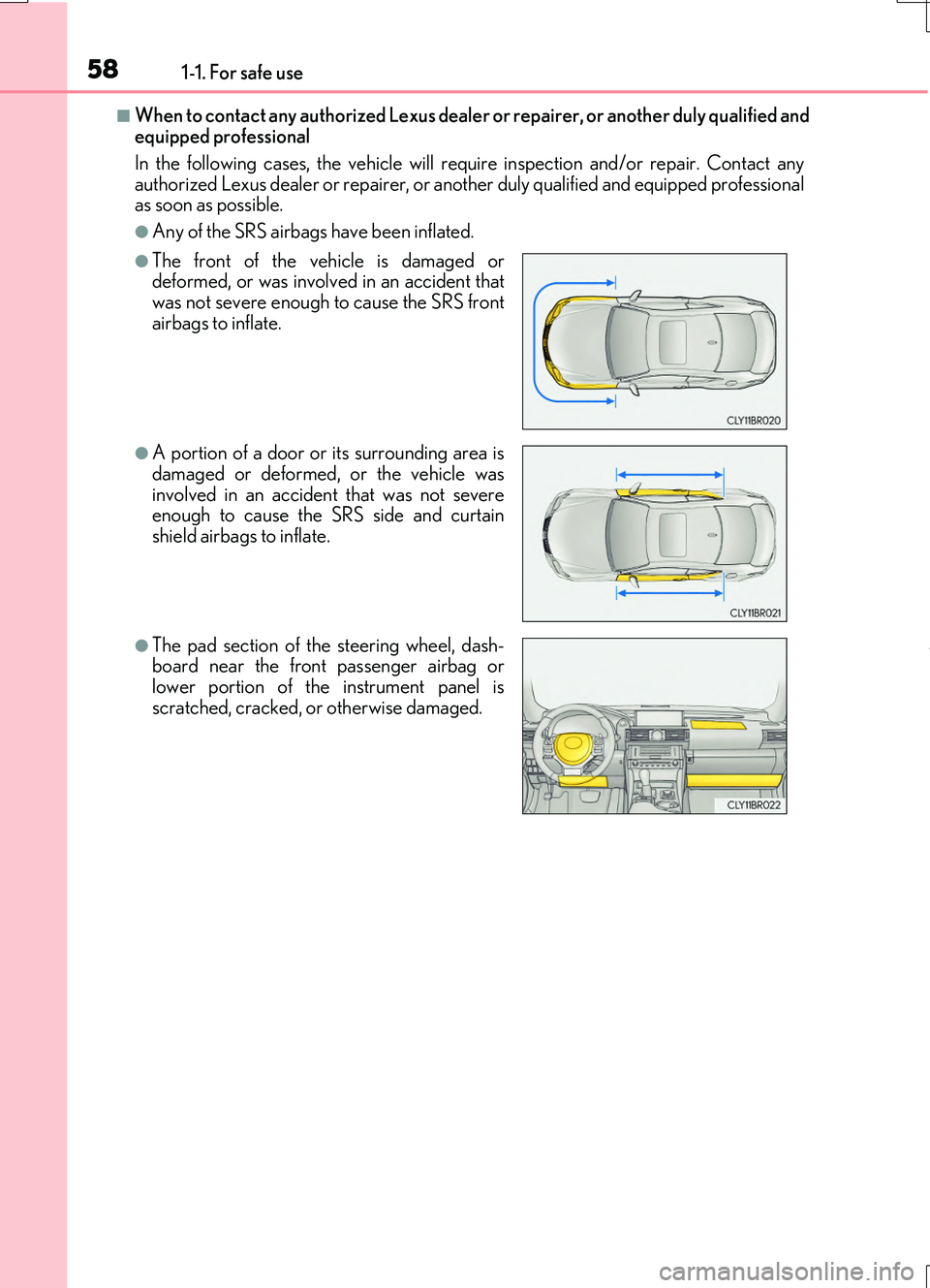
■When to contact any authorized Lexus dealer or repairer, or another duly qualified and equipped professional
In the following cases, the vehicle will requ ire inspection and/or repair. Contact any
authorized Lexus dealer or repairer, or anot her duly qualified and equipped professional as soon as possible.
●Any of the SRS airbags have been inflated.
●The front of the vehicle is damaged ordeformed, or was involved in an accident that
was not severe enough to cause the SRS front airbags to inflate.
●A portion of a door or its surrounding area isdamaged or deformed, or the vehicle was
involved in an accident that was not severe enough to cause the SRS side and curtainshield airbags to inflate.
●The pad section of the steering wheel, dash-board near the front passenger airbag orlower portion of the instrument panel is
scratched, cracked, or otherwise damaged.
Page 112 of 724
1122. Instrument cluster
RC200t_RC F_EE(OM24728E)
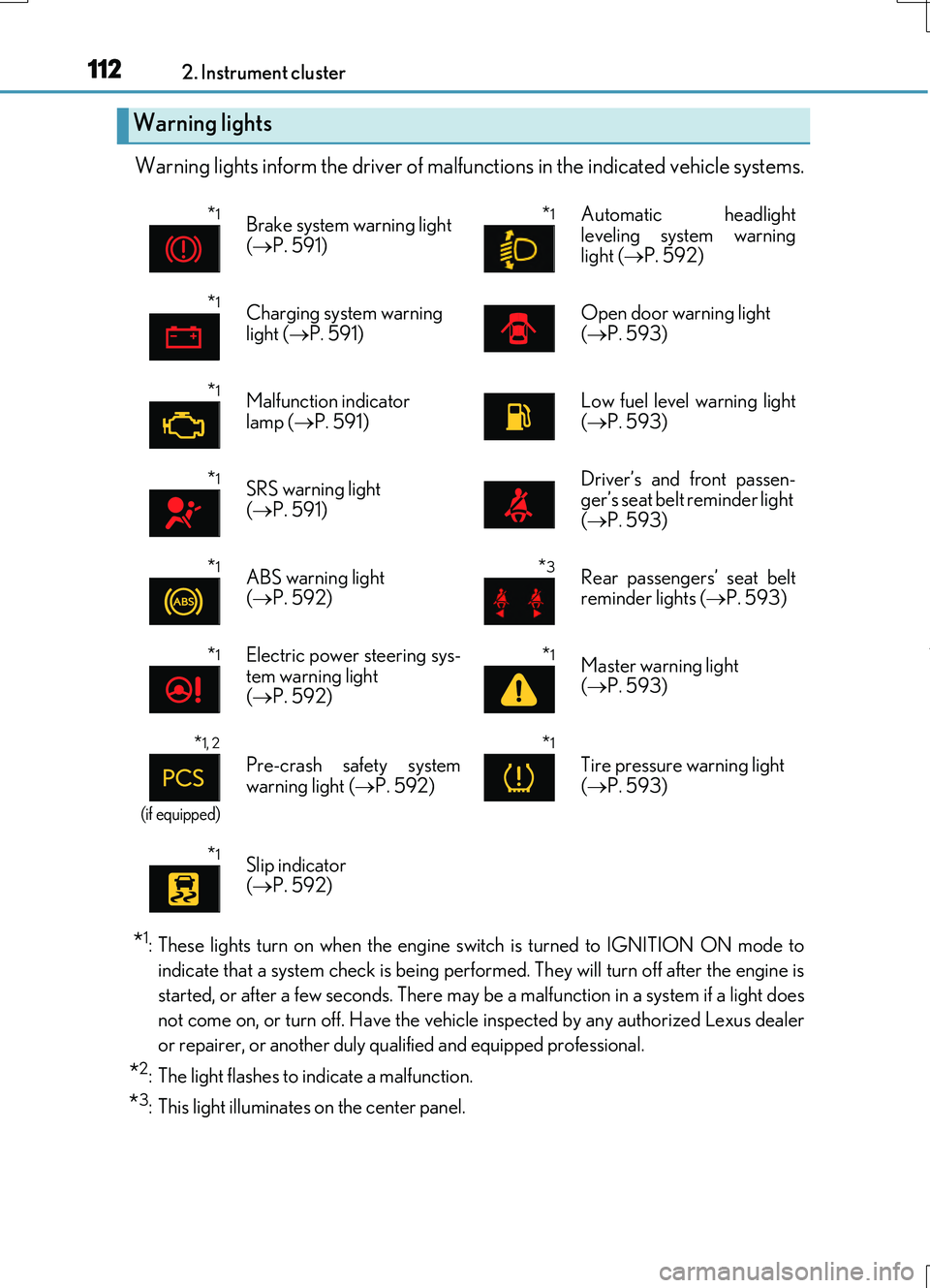
Warning lights inform the driver of malfunctions in the indicated vehicle systems.
*1: These lights turn on when the engine switch is turned to IGNITION ON mode to
indicate that a system check is being performed. They will turn off after the engine is
started, or after a few seconds. There may be a malfunction in a system if a light does
not come on, or turn off. Have the vehicle inspected by any authorized Lexus dealer
or repairer, or another duly qualified and equipped professional.
*2: The light flashes to indicate a malfunction.
*3: This light illuminates on the center panel.
Warning lights
*1Brake system warning light
( P. 591)
*1 Automatic headlight leveling system warninglight ( P. 592)
*1Charging system warning light ( P. 591)Open door warning light ( P. 593)
*1Malfunction indicator lamp ( P. 591)Low fuel level warning light ( P. 593)
*1SRS warning light
( P. 591)
Driver’s and front passen- ger’s seat belt reminder light ( P. 593)
*1ABS warning light ( P. 592)
*3Rear passengers’ seat belt reminder lights ( P. 593)
*1Electric power steering sys-
tem warning light ( P. 592)
*1Master warning light ( P. 593)
*1, 2
(if equipped)
Pre-crash safety system warning light ( P. 592)
*1
Tire pressure warning light ( P. 593)
*1Slip indicator ( P. 592)
Page 146 of 724
1462. Instrument cluster
RC200t_RC F_EE(OM24728E)
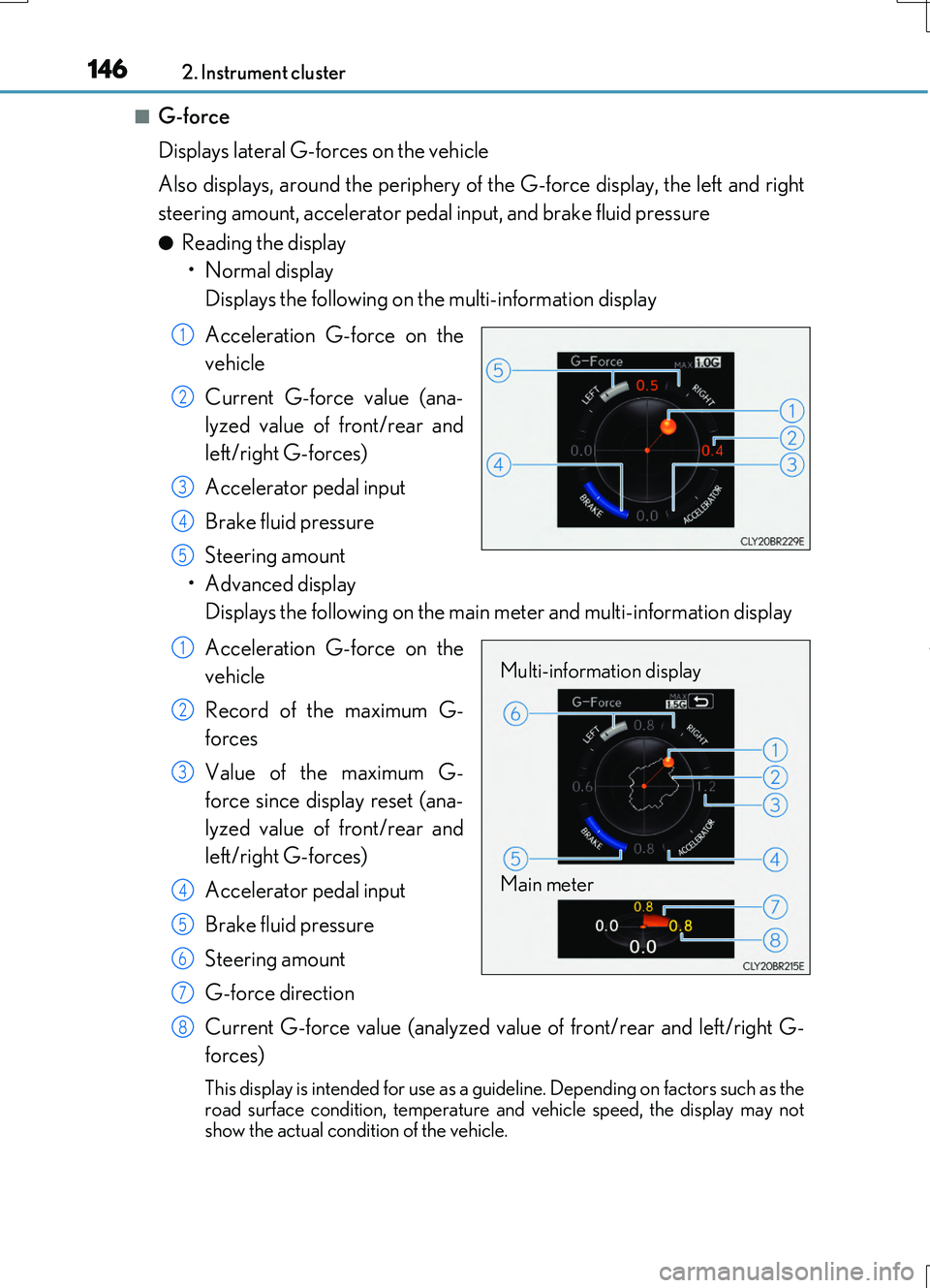
■G-force
Displays lateral G-forces on the vehicle
Also displays, around the periphery of the G-force display, the left and right
steering amount, accelerator pedal input, and brake fluid pressure
●Reading the display
• Normal display
Displays the following on the multi-information display
Acceleration G-force on the
vehicle
Current G-force value (ana-
lyzed value of front/rear and
left/right G-forces)
Accelerator pedal input
Brake fluid pressure
Steering amount
• Advanced display
Displays the following on the main meter and multi-information display
Acceleration G-force on the
vehicle
Record of the maximum G-
forces
Value of the maximum G-
force since display reset (ana-
lyzed value of front/rear and
left/right G-forces)
Accelerator pedal input
Brake fluid pressure
Steering amount
G-force direction
Current G-force value (analyzed value of front/rear and left/right G-
forces)
This display is intended for use as a guid eline. Depending on factors such as the
road surface condition, temperature and vehicle speed, the display may not show the actual condition of the vehicle.
1
2
3
4
5
Multi-information display
Main meter
1
2
3
4
5
6
7
8
Page 149 of 724
1492. Instrument cluster
2
Instrument cluster
RC200t_RC F_EE(OM24728E)
■Speed indicator
Select to set the speed indicator on/off.
When set to on, proceed to set the vehicle speed at which the speed indicator
will be displayed.
Selectable speed range:
Except for United Kingdom: 50 km/h to 200 km/h (30 mph to 125 mph)*
For United Kingdom: 50 km/h to 160 km/h (30 mph to 100 mph)*
*: Always observe the legal speed limit when driving on public roads.
■Rear wing
Select to enable/disable the active rear wing.
■SPORT gauges
The SPORT S or SPORT S+ mode meter display can be selected and set as
the customized display for either SPORT S or SPORT S+ mode.
■Initialization
Select to reset the meter display settings. ( P. 686)
■Start-up display
When the engine is started, the name of the vehicle is displayed on the multi-information display.
While the start-up display is being displayed, the meter display cannot be changed even if the drive mode is changed. When the start-up display is finished, the meter display forthe currently selected mode will be displayed.
■Torque distribution display (if equipped)
Torque distribution may not be displayed corre ctly in some cases, such as when the vehi- cle passes over road expansion joints.
■G-force display
●The G-force values may not be zero even when the vehicle is parked, such as when it isparked on an incline.
●The steering amount, accelerator pedal input, and brake fluid pressure displays are dis-abled until the engine has warmed up (the variable red zone of the tachometer hasretracted to 7300 r/min).
After the engine has warmed up, these displays will be enabled.
●Depending on the vehicle usage conditions, the brake fluid pressure display may not reach its maximum reading even though the brake pedal is fully depressed.
●If a battery terminal is disconnected and reconnected, the steering amount display may be disabled temporarily. After driving the ve hicle for a while, the display will be enabled.
Page 157 of 724

157
3
Operation of
each component
RC200t_RC F_EE(OM24728E)
3-1. Key information
Keys .................................................. 158
3-2. Opening, closing and
locking the doors and
trunk
Doors ................................................164
Trunk .................................................170
Smart entry & start system .......175
3-3. Adjusting the seats
Front seats.....................................209
Rear seats........................................212
Driving position memory ..........214
Head restraints .............................217
3-4. Adjusting the steering
wheel and mirrors
Steering wheel ............................ 220
Inside rear view mirror ............ 222
Outside rear view
mirrors ......................................... 224
3-5. Opening, closing the
windows and moon roof
Power windows .......................... 227
Moon roof .......................................231
Page 214 of 724
2143-3. Adjusting the seats
RC200t_RC F_EE(OM24728E)
Your preferred driving position (the position of the driver's seat, steering wheel
and outside rear view mirrors) can be recorded and recalled by pressing a but-
ton.
Three different driving positions can be recorded into memory.
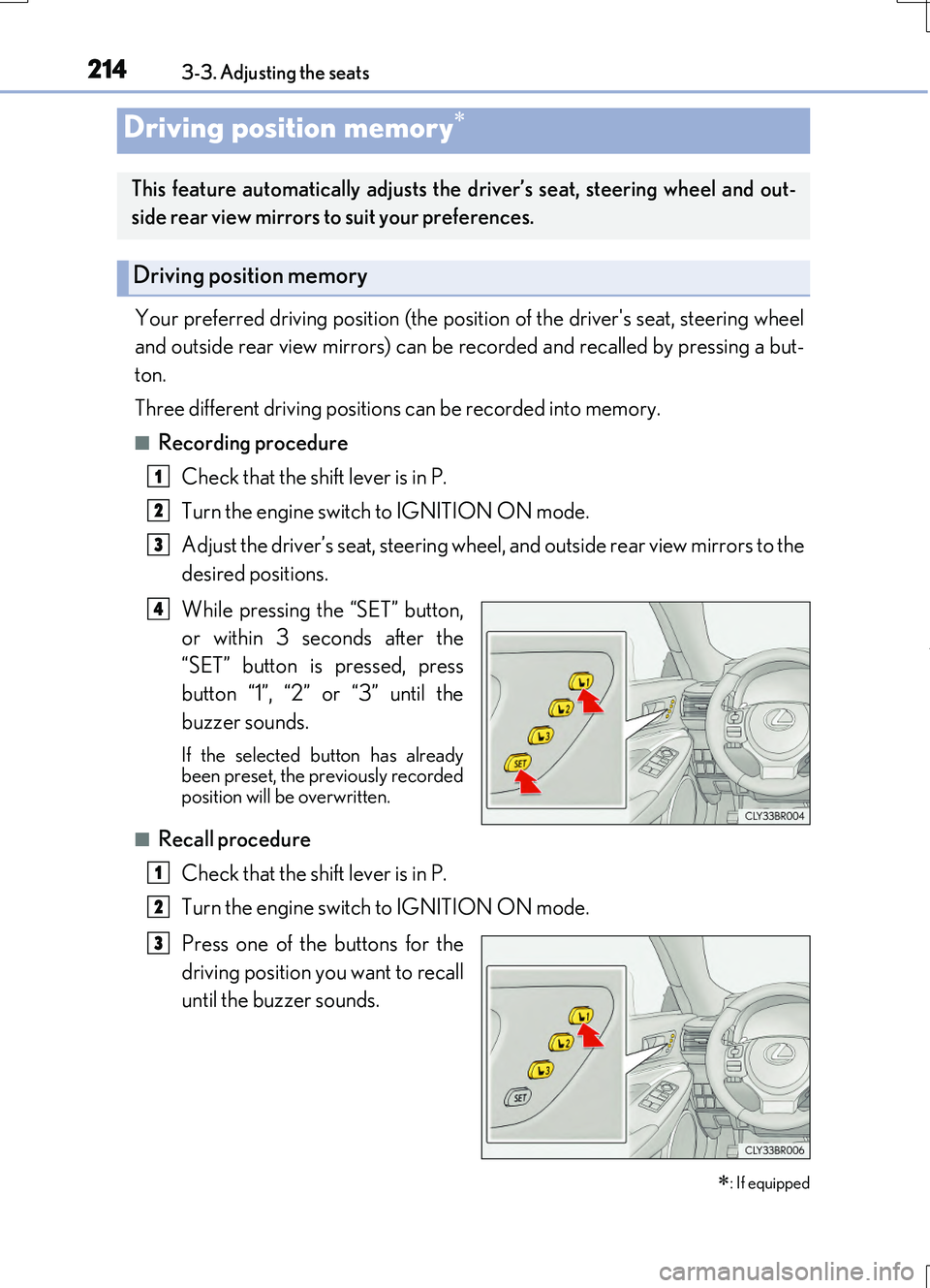
■Recording procedure
Check that the shift lever is in P.
Turn the engine switch to IGNITION ON mode.
Adjust the driver’s seat, steering wheel, and outside rear view mirrors to the
desired positions.
While pressing the “SET” button,
or within 3 seconds after the
“SET” button is pressed, press
button “1”, “2” or “3” until the
buzzer sounds.
If the selected button has already been preset, the previously recordedposition will be overwritten.
■Recall procedure
Check that the shift lever is in P.
Turn the engine switch to IGNITION ON mode.
Press one of the buttons for the
driving position you want to recall
until the buzzer sounds.
Driving position memory
: If equipped
This feature automatically adjusts the driver’s seat, steering wheel and out-
side rear view mirrors to suit your preferences.
Driving position memory
1
2
3
4
1
2
3
Page 215 of 724
2153-3. Adjusting the seats
3
Operation of each component
RC200t_RC F_EE(OM24728E)
■To stop the position recall operation part-way through
Perform any of the following:
●Press the “SET” button.
●Press button “1”, “2” or “3”.
●Operate any of the seat adjustment switches (only cancels seat position recall).
●Operate the tilt and telescopic steering control switch (only cancels steering wheel position recall).
■Seat positions that can be memorized ( P. 209)
The adjusted positions other than the position adjusted by lumbar support switch can be recorded.
■Operating the driving position memory after turning the engine switch off
Recorded seat positions can be activated up to 180 seconds after the driver's door is opened and another 60 seconds after it is closed again.
■In order to correctly use the driving position memory function
If a seat position is already in the furthest possible position and the seat is operated in the same direction, the recorded position may be slightly different when it is recalled.
Each electronic key (including a card key) can be registered to recall your pre-
ferred driving position.
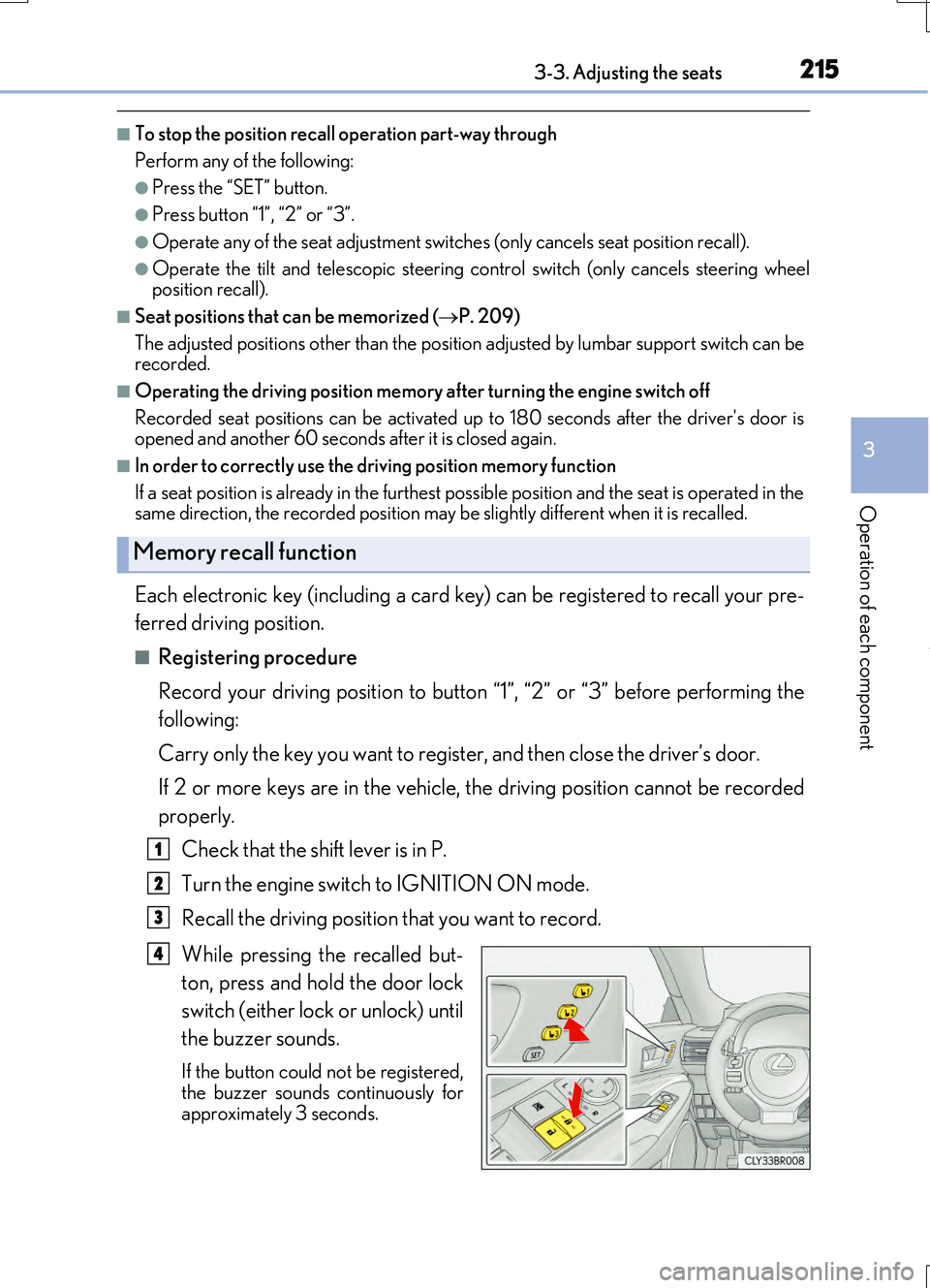
■Registering procedure
Record your driving position to button “1”, “2” or “3” before performing the
following:
Carry only the key you want to register, and then close the driver’s door.
If 2 or more keys are in the vehicle, the driving position cannot be recorded
properly.
Check that the shift lever is in P.
Turn the engine switch to IGNITION ON mode.
Recall the driving position that you want to record.
While pressing the recalled but-
ton, press and hold the door lock
switch (either lock or unlock) until
the buzzer sounds.
If the button could not be registered,
the buzzer sounds continuously for approximately 3 seconds.
Memory recall function
1
2
3
4
Page 216 of 724
2163-3. Adjusting the seats
RC200t_RC F_EE(OM24728E)
■Recall procedure
Carry the electronic key that has been registered to the driving position,
and then unlock and open the driver’s door using the smart entry & start
system or wireless remote control.
The driving position will move to the recorded position (not including the steering wheel).
If the driving position is in a position that has already been recorded, the seat and
outside rear view mirrors will not move.
Turn the engine switch to ACCESSORY mode or IGNITION ON mode.
The steering wheel will move to the recorded position.
■Cancelation procedure
Carry only the key you want to cancel and then close the driver’s door.
If 2 or more keys are in the vehicle, the driving position cannot be canceled
properly.
Turn the engine switch to IGNITION ON mode.
While pressing the “SET” button, press and hold the door lock switch
(either lock or unlock) until the buzzer sounds twice.
If the button could not be canceled, the buzzer sounds continuously for approxi-
mately 3 seconds.
■Recalling the driving position us ing the memory recall function
●Different driving positions can be registered for each electronic key. Therefore, the driving position that is recalled may be different depending on the key being carried.
●If a door other than the driver’s door is unlocked with the smart entry & start system, the
driving position cannot be reca lled. In this case, press the driving position button which has been set.
■Customization
The unlock door settings of the memory recall function can be changed. (Customizable features: P. 685)
WARNING
■Seat adjustment caution
Take care during seat adjustment so that the seat does not strike the rear passenger or
squeeze your body against the steering wheel.
1
2
1
2