wheel LEXUS RC200T 2017 Owner's Guide
[x] Cancel search | Manufacturer: LEXUS, Model Year: 2017, Model line: RC200T, Model: LEXUS RC200T 2017Pages: 724, PDF Size: 42.04 MB
Page 250 of 724
2504-2. Driving procedures
RC200t_RC F_EE(OM24728E)
■Auto power off function
If the vehicle is left in ACCESSORY mode for more than 20 minutes or IGNITION ON mode (the engine is not running) for more than an hour with the shift lever in P, the engineswitch will automatically turn off. However, this function cannot entirely prevent battery
discharge. Do not leave the vehicle with the engine switch in ACCESSORY or IGNI- TION ON mode for long periods of time when the engine is not running.
■Electronic key battery depletion
P. 161
■Conditions affecting operation
P. 177
■Notes for the entry function
P. 178
■If the engine does not start
●Check that the shift lever is securely set in P. The engine may not start if the shift lever is displaced out of P.
●The engine immobilizer system may not have been deactivated. ( P. 92)
Contact any authorized Lexus dealer or repairer, or another duly qualified and equipped professional.
■Steering lock
After turning the engine switch off and opening and closing the doors, the steering wheel will be locked due to the steering lock functi on. Operating the engine switch again auto- matically cancels the steering lock.
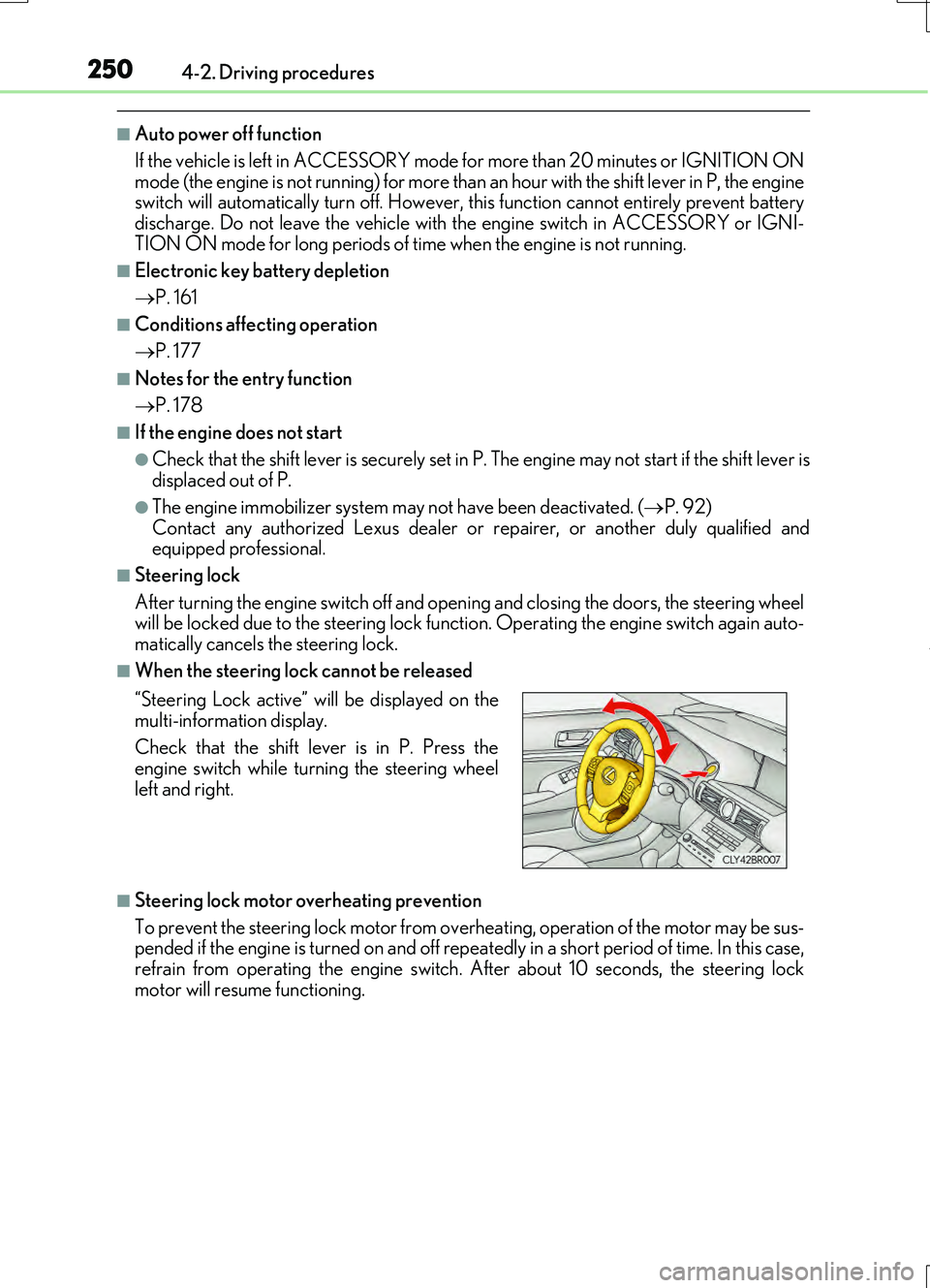
■When the steering lock cannot be released
■Steering lock motor overheating prevention
To prevent the steering lock motor from over heating, operation of the motor may be sus- pended if the engine is turned on and off repeat edly in a short period of time. In this case,
refrain from operating the engine switch. After about 10 seconds, the steering lock motor will resume functioning.
“Steering Lock active” will be displayed on the
multi-information display.
Check that the shift lever is in P. Press the engine switch while turning the steering wheel
left and right.
Page 269 of 724
2694-3. Operating the lights and wipers
4
Driving
RC200t_RC F_EE(OM24728E)
■The Automatic High Beam can be operated when
The engine switch is in IGNITION ON mode.
■Camera sensor detection information
●High beam may not be automatically turned off in the following situations:
• When oncoming vehicles suddenly appear from a curve • When the vehicle is cut in front of by another vehicle• When oncoming or preceding vehicles are hidden from sight due to repeated
curves, road dividers or roadside trees
●High beam may be turned off if an oncoming vehicle that is using fog lights without
using the headlights is detected.
●House lights, street lights, red traffic sign als, and illuminated billboards or signs may cause the high beam to turn off.
●The following factors may affect the amount of time taken to turn high beam on or off:
• The brightness of headlights, fog lights, and tail lights of oncoming and preceding vehicles
• The movement and direction of oncoming and preceding vehicles • When an oncoming or preceding vehicle only has operational lights on one side • When an oncoming or preceding vehicle is a two-wheeled vehicle
• The condition of the road (gradient, curve, condition of the road surface etc.) • The number of passengers and amount of luggage
●High beam may be turned on or off when unexpected by the driver.
●Small vehicles, such as bicycles, may not be detected.
●In the situations below, the system may not be able to correctly detect the surrounding
brightness levels, and may flash or expose nearby pedestrians to the high beam. There- fore, you should consider turning the high be ams on or off manually rather than relying on the Automatic High Beam system.
• In bad weather (rain, snow, fog, sandstorms etc.) • The windshield is obscured by fog, mist, ice, dirt etc.• The windshield is cracked or damaged.
• The camera sensor is deformed or dirty. • Surrounding brightness levels are equal to those of headlights, tail lights or fog lights. • Vehicles ahead have headlights or tail lights that are either switched off, dirty, chang-
ing color, or have improperly adjusted aim. • When driving through an area of interm ittently changing brightness and darkness. • When frequently and repeatedly driving ascending/descending roads, or roads with
rough, bumpy or uneven surfaces (such as stone-paved roads, gravel tracks etc.). • When frequently and repeatedly taking curves or driving on a winding road.• There is a highly reflective object ahead of the vehicle, such as a sign or a mirror.
• The vehicle’s headlights are damaged or dirty. • The vehicle is listing or titling, due to a flat tire, a trailer being towed etc.
• The driver believes that the high beam may be causing problems or distress to other drivers or pedestrians nearby.• The vehicle is used in a territory in which vehicles travel on the opposite side of the
road of the country for which the vehicle is approved, for example using a vehicle designed for right-hand traffic in a left-hand traffic territory, or vice versa.
Page 288 of 724
2884-5. Using the driving support systems
RC200t_RC F_EE(OM24728E)
■Operating conditions
●The Stop & Start system is operational when all of the following conditions are met:
• The brake pedal is being depressed firmly.
• The shift lever is in D or P.
• Normal mode or Eco drive mode is selected as the driving mode.
• is off.
• The driver’s seat belt is fastened.
• The engine is adequately warmed up.
• The driver’s door is closed.
• The accelerator pedal is not being depressed.
• The outside temperature is -5°C (23°F) or higher.
• The hood is closed.
●In the following situations the engine may not be stopped by the Stop & Start system.
This is not a malfunction of the Stop & Start system.
• The air conditioning system is being used when the ambient temperature is high or
low.
• The battery is not sufficiently charged, such as if the vehicle has been parked for a long time and the battery charge has decreased, the electric load is large, the bat-
tery temperature is excessively low or the battery has deteriorated, or is undergoing
a periodic recharge.
• The brake booster vacuum is low.
• The vehicle is stoppe d on a steep incline.
• The steering wheel is being operated.
• Due to traffic or other circumstances the vehicle is stopped repeatedly.
• The vehicle is being driven in a high altitude area.
• Engine coolant temperature or transmissi on fluid temperature is extremely low or
high.
• The battery fluid temperature is extremely low or high.
• For a while after the battery terminals have been disconnected and reconnected.
• For a while after the battery replacement.
●In the following situations, the engine will re start automatically if the engine is stopped
by the Stop & Start system. (To enable stoppi ng of the engine by the Stop & Start sys-
tem, drive the vehicle.)
• The air conditioning system is turned on.
• Pollen removal mode is turned on.
• is turned on.
• is turned on.
• The steering wheel is operated.
• The shift lever is shifted to M, N or R from D.
• The shift lever is shifted from P.
• Sport mode or snow mode is selected as the driving mode.
• The driver’s seat belt is unfastened.
• The driver’s door is opened.
• The accelerator pedal is depressed.
• The Stop & Start cancel switch is pressed.
• The vehicle starts to roll on an incline.
Page 289 of 724
2894-5. Using the driving support systems
4
Driving
RC200t_RC F_EE(OM24728E)
●In the following situations, the engine may restart automatically if the engine is stopped by the Stop & Start system. (To enable stoppi ng of the engine by the Stop & Start sys- tem, drive the vehicle.)
• The brake pedal is pumped or strongly depressed. • The air conditioning system is being used.• The battery is not sufficiently charged.
■If the steering wheel is turned shortly after the engine has started
If the steering wheel is turned shortly after the engine has been started by the Stop & Start system, the steering wheel may feel heavy.
■Hood
●If the hood is opened while the engine is stopped by the Stop & Start system with theshift lever in D, the engine w ill stall and will not be able to be restarted by the automatic
engine start function. In this case, restart the engine using the normal engine starting procedure. ( P. 247)
●If the hood is opened while the engine is stopped by the Stop & Start system with the
shift lever in P, the engine will be restarted automatically.
●Even if the hood is closed after the engine is started with the hood open, the Stop & Start system will not operate. Close the hood, turn the engine switch off, wait 30 sec-
onds or more, and then start the engine.
■When to use the Stop & Start system
●Use the Stop & Start system when stopping the vehicle temporarily at red lights, inter-
sections, etc. When stopping the vehicle fo r a longer period of time, stop the engine completely.
●When the system does not operate, is canceled, or is malfunctioning, warning mes-
sages and a warning buzzer are used to inform the driver. ( P. 291)
●If the engine switch is pressed when the engine is stopped by the Stop & Start system,
the engine will stall and will not be able to be restarted by the automatic engine start function. In this case, restart the engine using the normal engine starting procedure. ( P. 247)
●When the engine is restarted by the Stop & Start system, the power outlet may be tem- porarily unusable, but this is not a malfunction.
●Installation and remova l of electrical components and wireless devices may affect the
Stop & Start system. Contact any authoriz ed Lexus retailers or Lexus authorized repairers, or any reliable repairers for details.
Page 292 of 724
2924-5. Using the driving support systems
RC200t_RC F_EE(OM24728E)
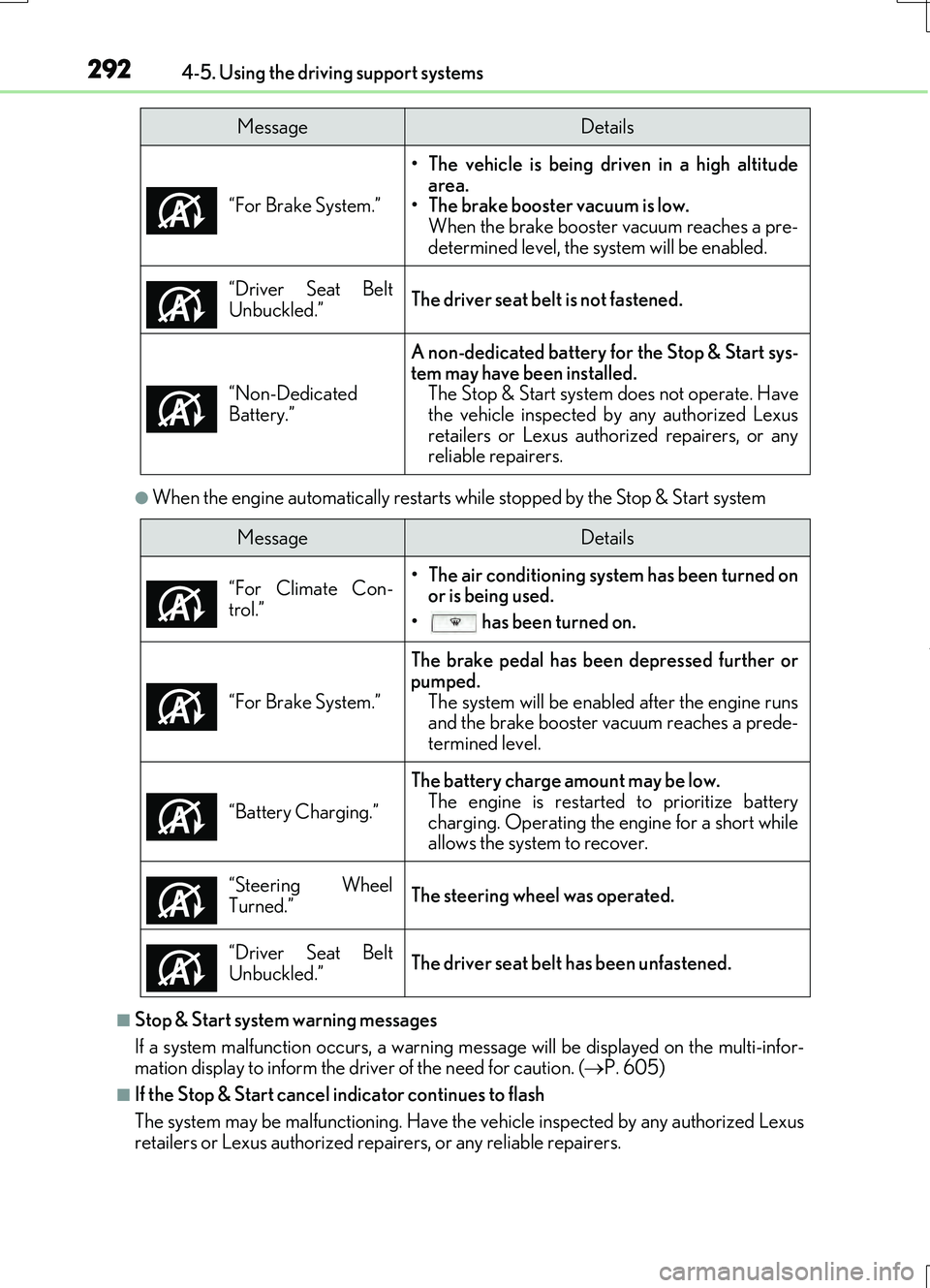
●When the engine automatically restarts while stopped by the Stop & Start system
■Stop & Start system warning messages
If a system malfunction occu rs, a warning message will be displayed on the multi-infor-
mation display to inform the driver of the need for caution. ( P. 605)
■If the Stop & Start cancel indicator continues to flash
The system may be malfunctioning. Have the vehicle inspected by any authorized Lexus
retailers or Lexus authorized repairers, or any reliable repairers. “For Brake System.”
• The vehicle is being driven in a high altitude
area.
• The brake booster vacuum is low.
When the brake booster vacuum reaches a pre-
determined level, the system will be enabled.
“Driver Seat Belt
Unbuckled.”
The driver seat belt is not fastened.
“Non-Dedicated
Battery.”
A non-dedicated battery for the Stop & Start sys-
tem may have been installed. The Stop & Start system does not operate. Have
the vehicle inspected by any authorized Lexus
retailers or Lexus authorized repairers, or any
reliable repairers.
MessageDetails
MessageDetails
“For Climate Con-
trol.”
• The air conditioning system has been turned on or is being used.
• has been turned on.
“For Brake System.”
The brake pedal has been depressed further or
pumped. The system will be enable d after the engine runs
and the brake booster vacuum reaches a prede-
termined level.
“Battery Charging.”
The battery charge amount may be low. The engine is restarted to prioritize battery
charging. Operating the engine for a short while
allows the system to recover.
“Steering Wheel
Turned.”
The steering wheel was operated.
“Driver Seat Belt
Unbuckled.”
The driver seat belt has been unfastened.
Page 312 of 724
3124-5. Using the driving support systems
RC200t_RC F_EE(OM24728E)
WARNING
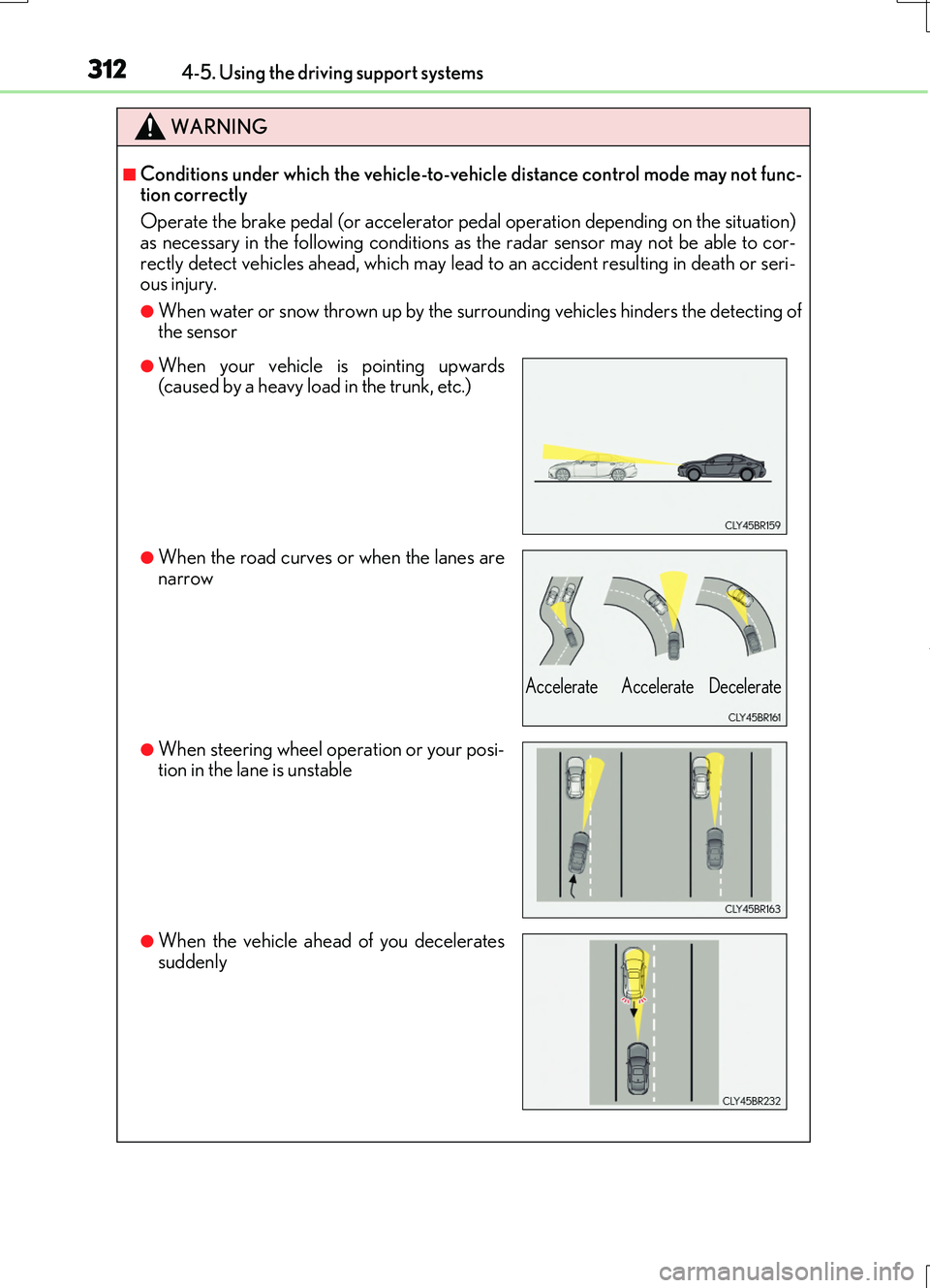
■Conditions under which the vehicle-to-vehicle distance control mode may not func- tion correctly
Operate the brake pedal (or accelerator pedal operation depending on the situation)
as necessary in the following conditions as the radar sensor may not be able to cor- rectly detect vehicles ahead, which may lead to an accident resulting in death or seri-ous injury.
●When water or snow thrown up by the surrounding vehicles hinders the detecting ofthe sensor
●When your vehicle is pointing upwards(caused by a heavy load in the trunk, etc.)
●When the road curves or when the lanes arenarrow
●When steering wheel operation or your posi-tion in the lane is unstable
●When the vehicle ahead of you decelerates
suddenly
Accelerate Accelerate Decelerate
Page 318 of 724
3184-5. Using the driving support systems
RC200t_RC F_EE(OM24728E)
●When sunlight or the headlights of oncoming vehicles are shining directly into the cam- era lens
●When driving on roads that are branching or merging
●When driving on a road surface that is wet du e to rain, previous rainfall, standing water, etc.
●When the vehicle experiences strong up-and-down motion such as when driving on an
extremely rough road or on a seam in the pavement
●When headlight brightness at nighttime is reduced due to dirt on the lenses, or when the headlights are misaligned
●When driving on winding roads or roads that are uneven
●When driving on rough or unpaved roads
■When changing the tires
Depending on the tires used, sufficient performance may not be maintainable.
■Warning messages for the LDA system
Warning messages are used to indicate a syst em malfunction or to inform the driver of
the need for caution while driving. ( P. 604)
WARNING
■Before using the LDA system
Do not rely solely on the LDA system. The LDA system does not drive the vehicle auto- matically, nor does it reduce the amount of care you need to take. As such, the driver
must always assume full responsibility fo r understanding his/her surroundings, for operating the steering wheel to correct the driving line, and for driving safely.
Inappropriate or negligent driving could lead to an accident.
■To avoid operating the LDA by mistake
Switch the LDA system off using the LDA switch when not in use.
■Situations unsuitable for LDA system
Do not use the LDA system in any of the following situations.
Otherwise, the system may not function correctly and could result in an accident.
●When driving with tire chains, a spare tire, or similar equipment
●When there are objects or structures along the roadside that might be misinterpreted as lane markers (such as guardrails, a curb, reflector posts, etc.)
●When driving on snowy roads
●When pavement lane markers are difficult to see due to rain, snow, fog, sand, dirt, etc.
●When there are visible lines on the pavement from road repairs, or if the remains of old lane markers are still visible on the road
●When driving on a road with lane closures due to maintenance, or when driving in a temporary lane
Page 331 of 724
3314-5. Using the driving support systems
4
Driving
RC200t_RC F_EE(OM24728E)
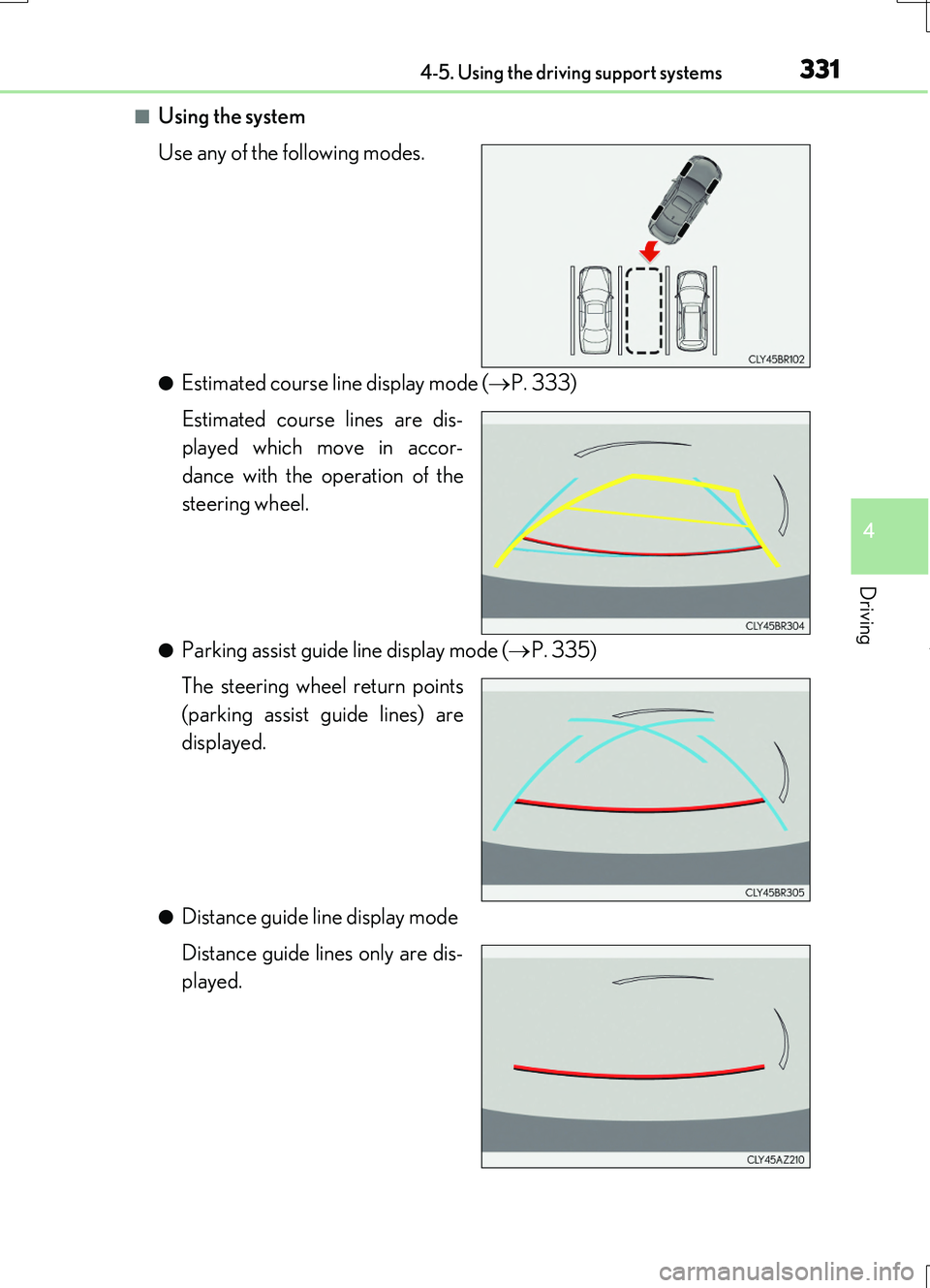
■Using the system
Use any of the following modes.
●Estimated course line display mode ( P. 333)
Estimated course lines are dis-
played which move in accor-
dance with the operation of the
steering wheel.
●Parking assist guide line display mode ( P. 335)
The steering wheel return points
(parking assist guide lines) are
displayed.
●Distance guide line display mode
Distance guide lines only are dis-
played.
Page 333 of 724
3334-5. Using the driving support systems
4
Driving
RC200t_RC F_EE(OM24728E)
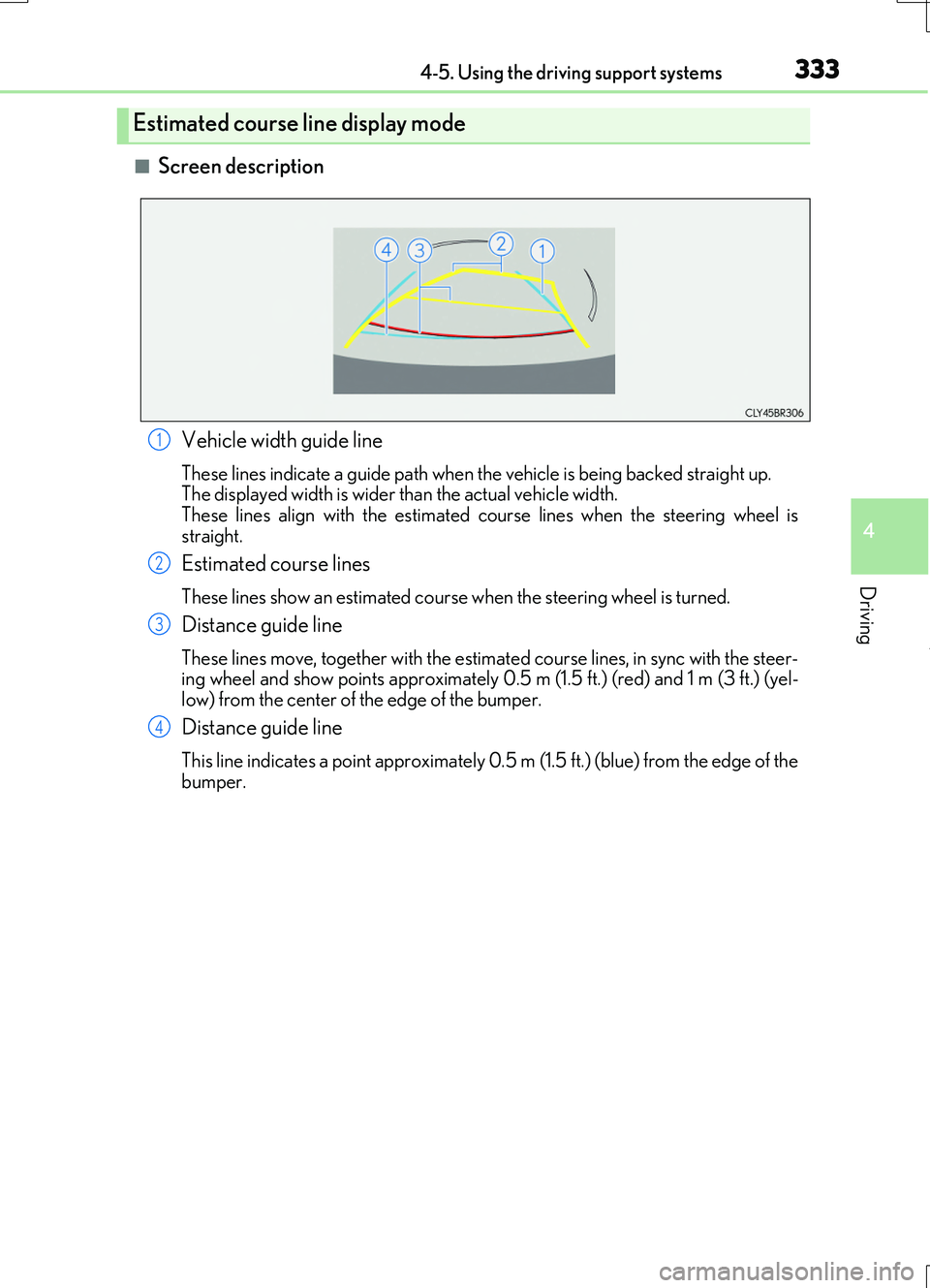
■Screen description
Estimated course line display mode
Vehicle width guide line
These lines indicate a guide path when the vehicle is being backed straight up. The displayed width is wider than the actual vehicle width.
These lines align with the estimated course lines when the steering wheel is straight.
Estimated course lines
These lines show an estimated course when the steering wheel is turned.
Distance guide line
These lines move, together with the estima ted course lines, in sync with the steer- ing wheel and show points approximately 0.5 m (1.5 ft.) (red) and 1 m (3 ft.) (yel-low) from the center of the edge of the bumper.
Distance guide line
This line indicates a point approximately 0.5 m (1.5 ft.) (blue) from the edge of the
bumper.
1
2
3
4
Page 334 of 724
3344-5. Using the driving support systems
RC200t_RC F_EE(OM24728E)
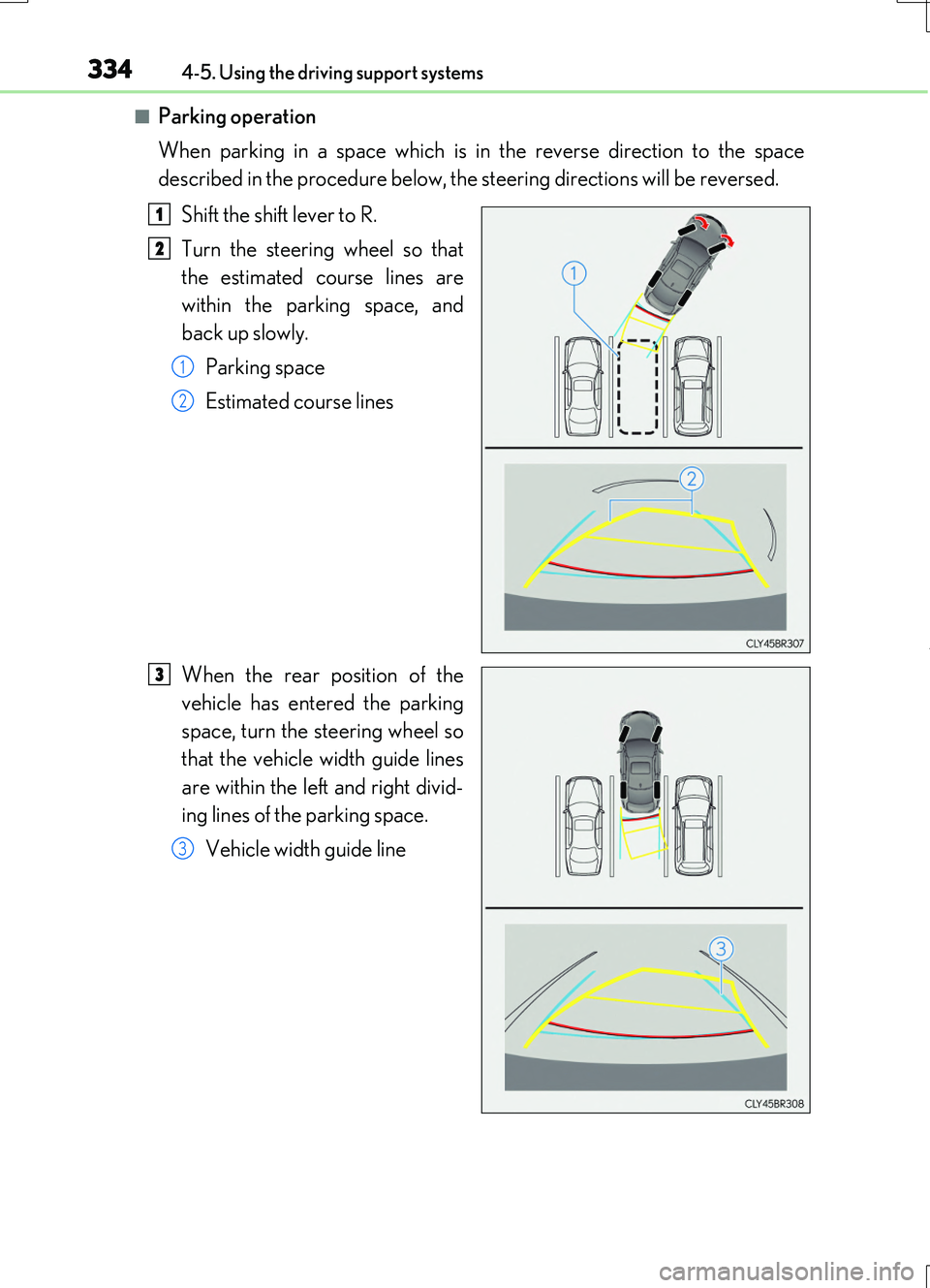
■Parking operation
When parking in a space which is in the reverse direction to the space
described in the procedure below, the steering directions will be reversed.
Shift the shift lever to R.
Turn the steering wheel so that
the estimated course lines are
within the parking space, and
back up slowly.
Parking space
Estimated course lines
When the rear position of the
vehicle has entered the parking
space, turn the steering wheel so
that the vehicle width guide lines
are within the left and right divid-
ing lines of the parking space.
Vehicle width guide line
1
2
1
2
3
3