ignition LEXUS RC200T 2017 Service Manual
[x] Cancel search | Manufacturer: LEXUS, Model Year: 2017, Model line: RC200T, Model: LEXUS RC200T 2017Pages: 724, PDF Size: 42.04 MB
Page 330 of 724
3304-5. Using the driving support systems
RC200t_RC F_EE(OM24728E)
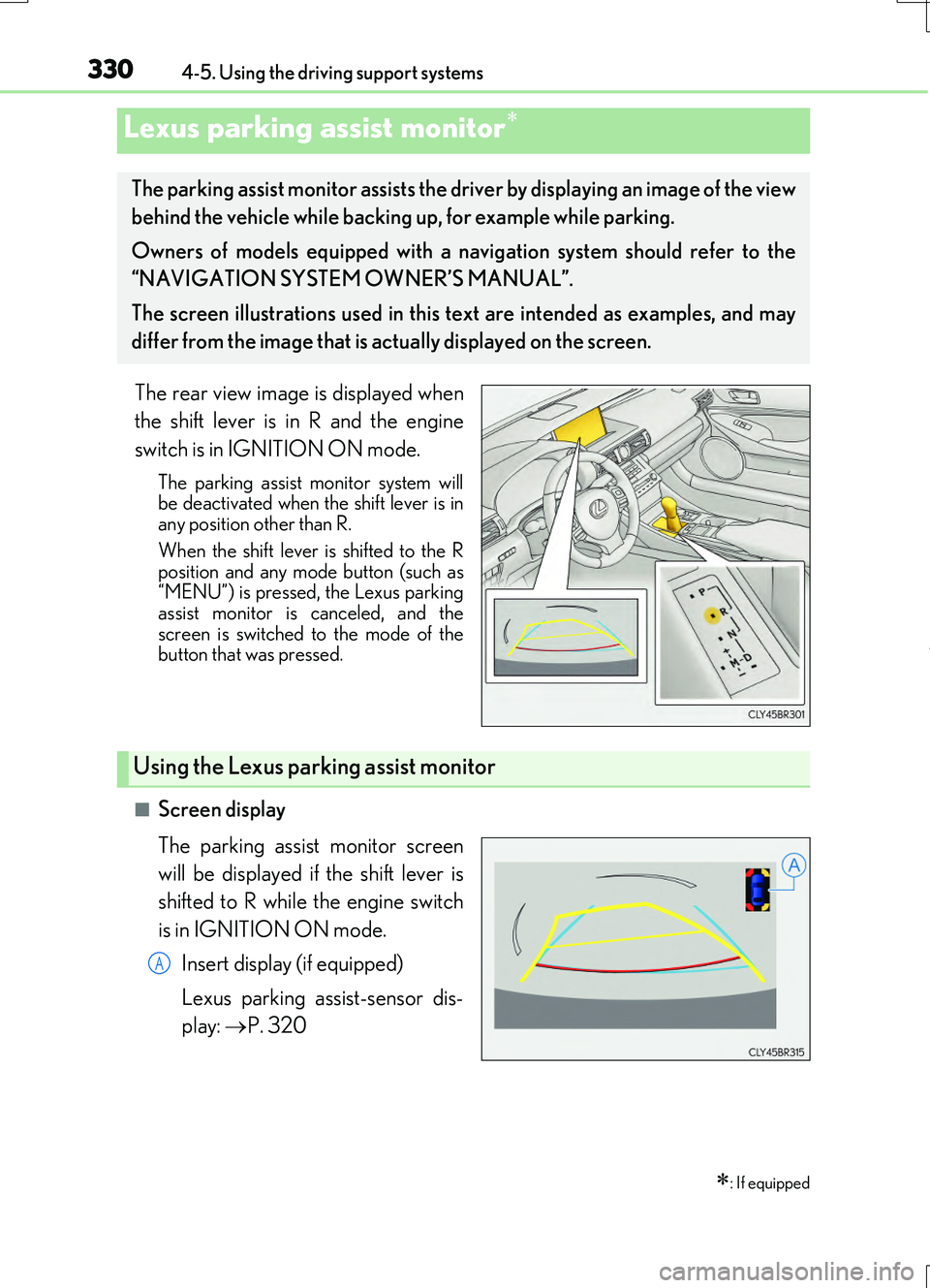
The rear view image is displayed when
the shift lever is in R and the engine
switch is in IGNITION ON mode.
The parking assist monitor system will be deactivated when the shift lever is inany position other than R.
When the shift lever is shifted to the R position and any mode button (such as“MENU”) is pressed, the Lexus parking
assist monitor is canceled, and the screen is switched to the mode of thebutton that was pressed.
■Screen display
The parking assist monitor screen
will be displayed if the shift lever is
shifted to R while the engine switch
is in IGNITION ON mode.
Insert display (if equipped)
Lexus parking assist-sensor dis-
play: P. 320
Lexus parking assist monitor
: If equipped
The parking assist monitor assists the driver by displaying an image of the view
behind the vehicle while backing up, for example while parking.
Owners of models equipped with a navi gation system should refer to the
“NAVIGATION SYSTEM OWNER’S MANUAL”.
The screen illustrations used in this text are intended as examples, and may
differ from the image that is ac tually displayed on the screen.
Using the Lexus parking assist monitor
A
Page 380 of 724
3804-5. Using the driving support systems
RC200t_RC F_EE(OM24728E)
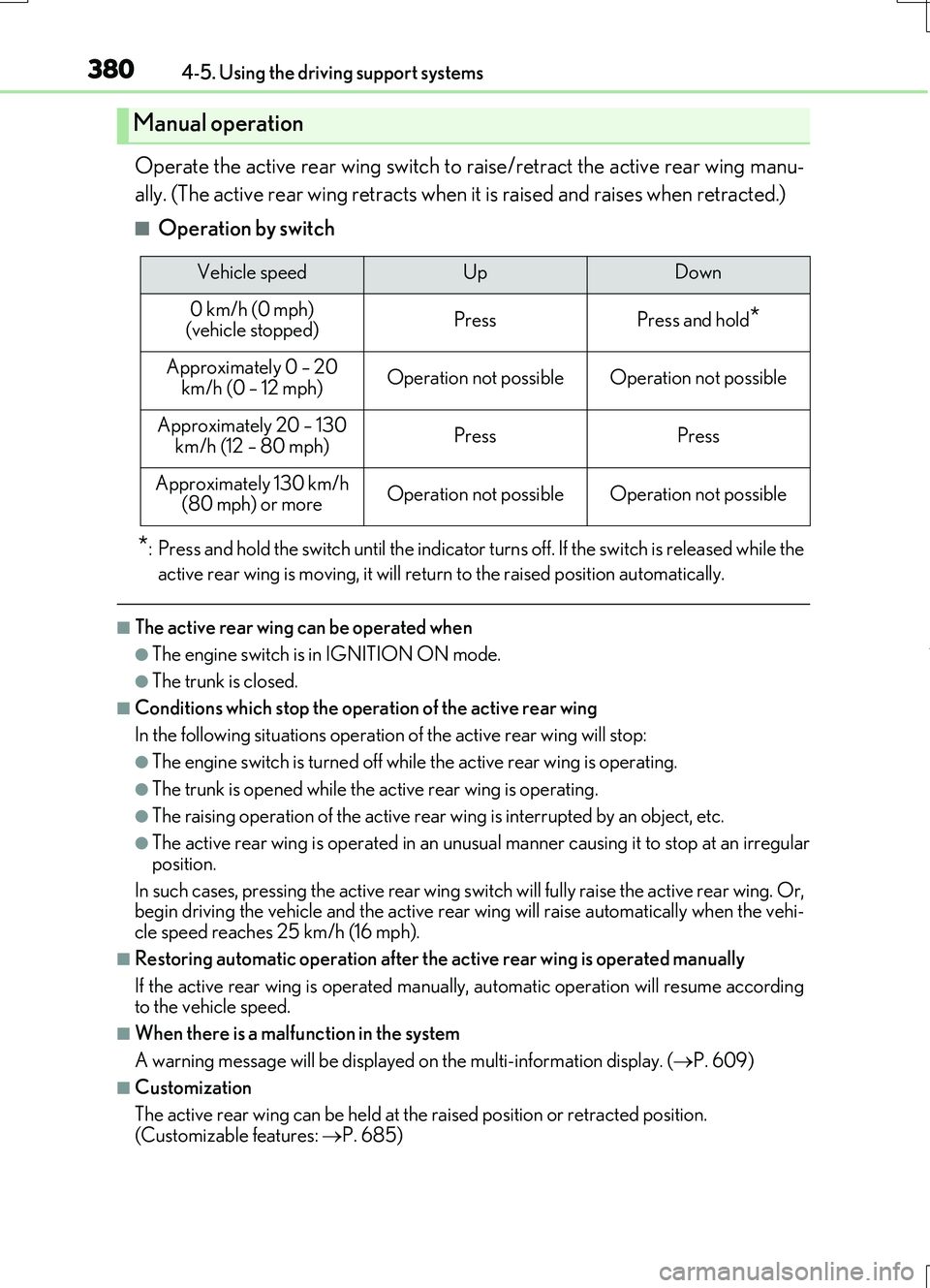
Operate the active rear wing switch to raise/retract the active rear wing manu-
ally. (The active rear wing retracts when it is raised and raises when retracted.)
■Operation by switch
*: Press and hold the switch unti l the indicator turns off. If the switch is released while the
active rear wing is moving, it will return to the raised position automatically.
■The active rear wing can be operated when
●The engine switch is in IGNITION ON mode.
●The trunk is closed.
■Conditions which stop the operation of the active rear wing
In the following situations operation of the active rear wing will stop:
●The engine switch is turned off while the active rear wing is operating.
●The trunk is opened while the active rear wing is operating.
●The raising operation of the active rear wing is interrupted by an object, etc.
●The active rear wing is operated in an unusual manner causing it to stop at an irregular
position.
In such cases, pressing the active rear wing switch will fully raise the active rear wing. Or, begin driving the vehicle and th e active rear wing will raise automatically when the vehi-
cle speed reaches 25 km/h (16 mph).
■Restoring automatic operation after the active rear wing is operated manually
If the active rear wing is operated manual ly, automatic operation will resume according to the vehicle speed.
■When there is a malfunction in the system
A warning message will be displayed on the multi-information display. (P. 609)
■Customization
The active rear wing can be held at the raised position or retracted position.
(Customizable features: P. 685)
Manual operation
Vehicle speedUpDown
0 km/h (0 mph) (vehicle stopped)PressPress and hold*
Approximately 0 – 20
km/h (0 – 12 mph)Operation not possibleOperation not possible
Approximately 20 – 130 km/h (12 – 80 mph)PressPress
Approximately 130 km/h (80 mph) or moreOperation not possibleOperation not possible
Page 382 of 724
3824-5. Using the driving support systems
RC200t_RC F_EE(OM24728E)
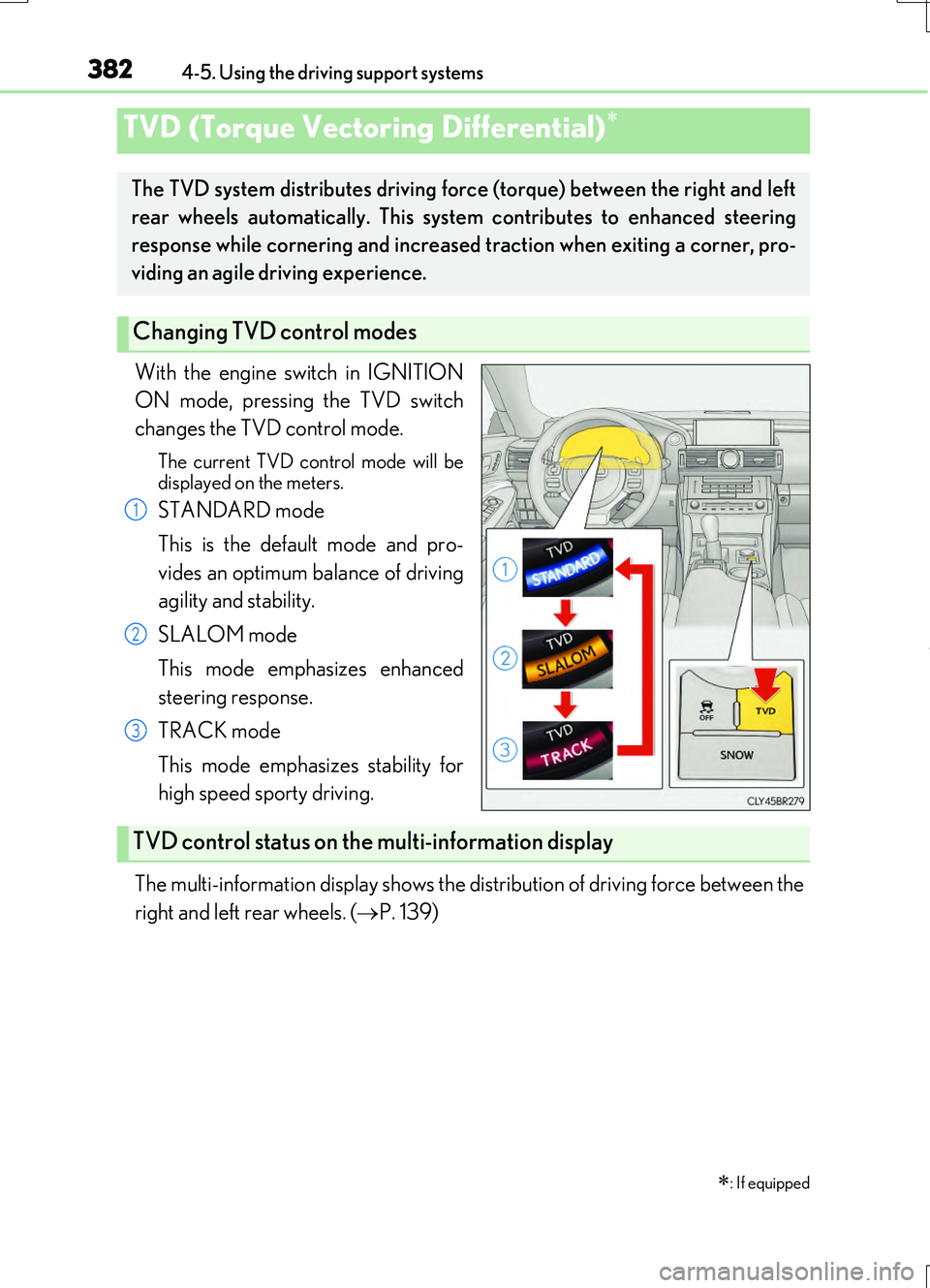
With the engine switch in IGNITION
ON mode, pressing the TVD switch
changes the TVD control mode.
The current TVD control mode will be
displayed on the meters.
STANDARD mode
This is the default mode and pro-
vides an optimum balance of driving
agility and stability.
SLALOM mode
This mode emphasizes enhanced
steering response.
TRACK mode
This mode emphasizes stability for
high speed sporty driving.
The multi-information display shows the distribution of driving force between the
right and left rear wheels. ( P. 139)
TVD (Torque Vectoring Differential)
: If equipped
The TVD system distributes driving fo rce (torque) between the right and left
rear wheels automatically. This system contributes to enhanced steering
response while cornering and increased traction when exiting a corner, pro-
viding an agile driving experience.
Changing TVD control modes
1
2
3
TVD control status on the multi-information display
Page 383 of 724
3834-5. Using the driving support systems
4
Driving
RC200t_RC F_EE(OM24728E)
■Automatic cancelation of the selected TVD control mode
SLALOM and TRACK mode are canceled when the engine switch is turned off. When the engine switch is turned to IGNITION ON mode, the TVD system will be in STAN- DARD mode.
■Automatic disabling of the TVD system
If a malfunction is detected in the TVD sy stem, a warning message will be displayed on the multi-information display ( P. 607) and the TVD system will be disabled automati-
cally. If the system is disabled, driving force will not be distributed by the TVD but through normal differential operation.
■To protect the system
The TVD fluid temperature may become excessively high when driving for a long time under extremely high load conditions. In th is case, a warning message will be displayed on the multi-information display. ( P. 607)
WARNING
■Cautions regarding the use of the system
The driver is solely responsible for safe driv ing. Do not overly rely on the TVD system. Always drive safely, taking care to observe your surroundings.
Page 438 of 724
4385-7. Connecting Bluetooth®
RC200t_RC F_EE(OM24728E)
When you register a phone, auto connection will be activated. Always set it to
this mode and leave the Bluetooth® phone in a place where a connection can be
established.
When the engine switch is turned to ACCESSORY or IGNITION ON mode,
the system will search for a nearby cellular phone you have registered.
Next, the system automatically connects with the most recent phone that was
connected. The connected result is displayed.
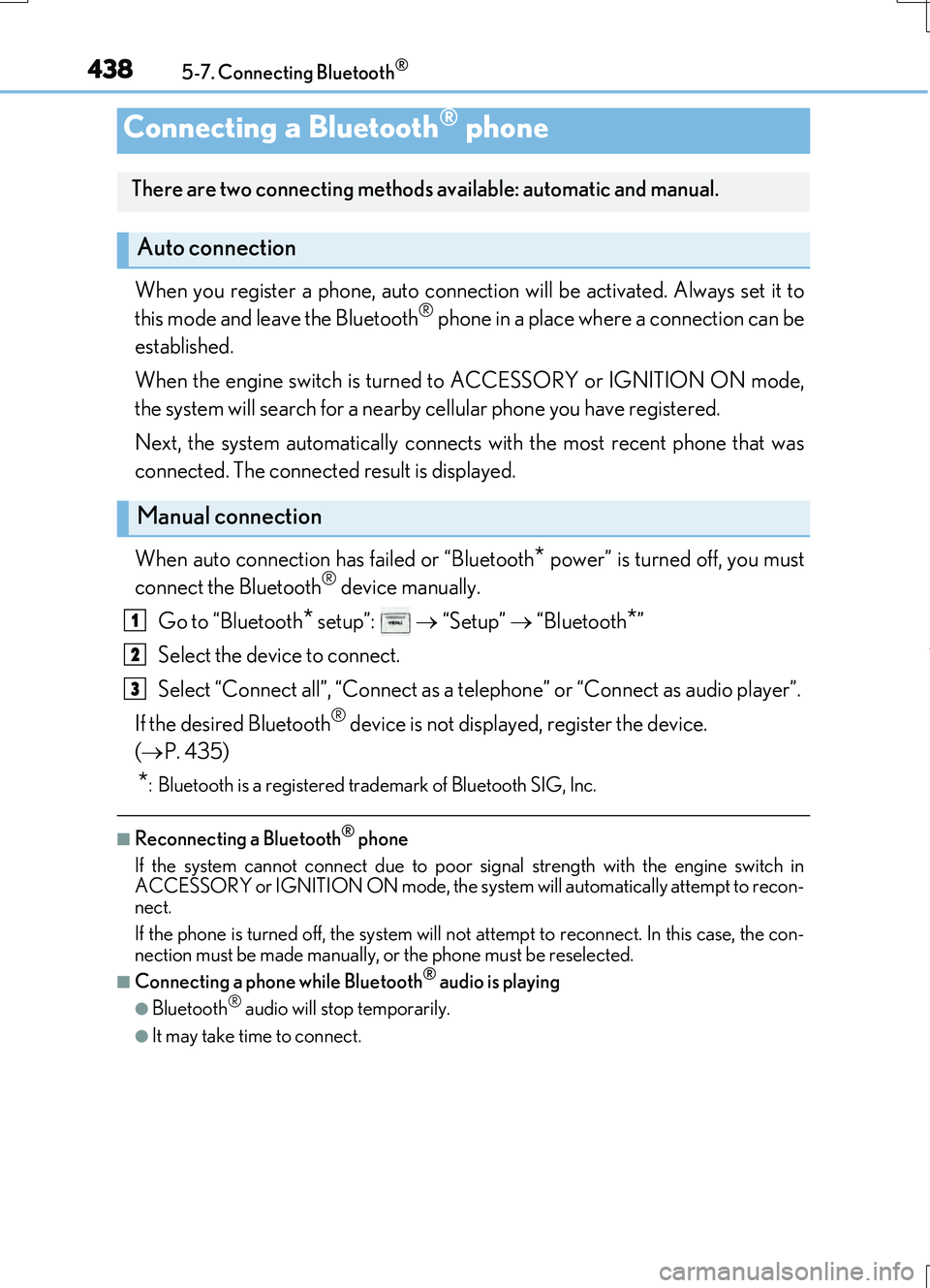
When auto connection has failed or “Bluetooth
* power” is turned off, you must
connect the Bluetooth® device manually.
Go to “Bluetooth
* setup”: “Setup” “Bluetooth*”
Select the device to connect.
Select “Connect all”, “Connect as a telephone” or “Connect as audio player”.
If the desired Bluetooth
® device is not displayed, register the device.
( P. 435)
*: Bluetooth is a registered trademark of Bluetooth SIG, Inc.
■Reconnecting a Bluetooth® phone
If the system cannot connect due to poor signal strength with the engine switch in
ACCESSORY or IGNITION ON mode, the syst em will automatically attempt to recon-
nect.
If the phone is turned off, the system will no t attempt to reconnect. In this case, the con-
nection must be made manually, or the phone must be reselected.
■Connecting a phone while Bluetooth® audio is playing
●Bluetooth® audio will stop temporarily.
●It may take time to connect.
Connecting a Bluetooth® phone
There are two connecting methods available: automatic and manual.
Auto connection
Manual connection
1
2
3
Page 466 of 724
4665-11. Bluetooth®
RC200t_RC F_EE(OM24728E)
■Compatible models
The Bluetooth® audio system supports portable audio players with the following specifi- cations
●Bluetooth® specifications: Ver. 2.0, or higher (Recommend ed: Ver. 3.0+EDR or higher)
●Profiles:
• A2DP (Advanced Audio Distribution Profile) Ver. 1.0, or higher (Recommended: Ver. 1.2 or higher) This is a profile to transmit stereo audio or high quality sound to the audio system.
• AVRCP (Audio/Video Remote Control Profile) Ver. 1.0 or higher (Recommended: Ver. 1.4 or higher) This is a profile to allow remote control of the A/V equipment.
However, please note that some functions may be limited depending on the type of por- table audio player connected.
The hands-free system supports cellular ph ones with the following specifications.
●Bluetooth® specification: Ver. 2.0 or higher (Recommended: Ver. 3.0+EDR or higher)
●Profiles:
• HFP (Hands Free Profile) Ver. 1.0 or higher (Recommended: Ver. 1.6 or higher) This is a profile to allow hands-free phone calls using a cellular phone or head set. It has outgoing and incoming call functions.
• OPP (Object Push Profile) Ver. 1.1 or higher (Recommended: Ver. 1.1) This is a profile to transfer phonebook data. When a Bluetooth® compatible cellular phone has both PBAP and OPP, OPP cannot be used.
• PBAP (Phone Book Access Profile) Ver. 1.0 or higher (Recommended: Ver. 1.1) This is a profile to tr ansfer phonebook data.
• MAP (Message Access Profile) Ver.1.0 or higher This is a profile to using phone message.If the cellular phone does not support HFP, you cannot register it with the hands-free sys-
tem. OPP, PBAP or MAP services must be selected individually.
■Reconnecting the portable audio player
If the portable audio player is disconnect ed due to poor reception when the engine
switch is in ACCESSORY or IGNITION ON mode, the system automatically recon- nects the portable audio player.
If you have switched off the portable audio player yourself, follow the instructions below
to reconnect:
●Select the portable audio player again
●Enter the portable audio player
■When you sell your car
Be sure to delete your personal data. ( P. 402)
Page 491 of 724
4916-1. Using the air conditioning system
6
Interior features
RC200t_RC F_EE(OM24728E)
●The heated steering wheel can be used when the engine switch is in IGNITION ON mode.
●The heated steering wheel will automatically turn off after about 30 minutes.
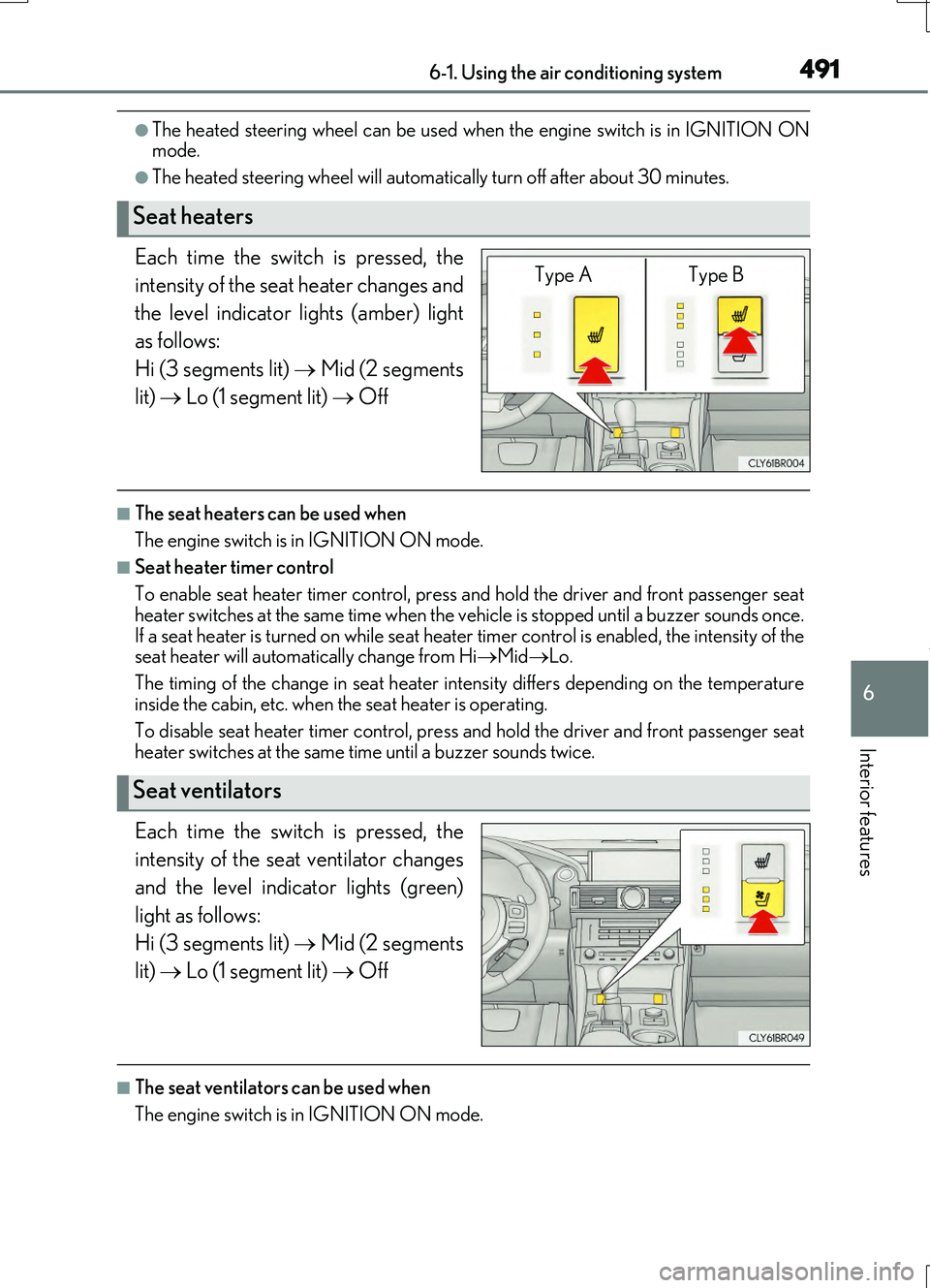
Each time the switch is pressed, the
intensity of the seat heater changes and
the level indicator lights (amber) light
as follows:
Hi (3 segments lit) Mid (2 segments
lit) Lo (1 segment lit) Off
■The seat heaters can be used when
The engine switch is in IGNITION ON mode.
■Seat heater timer control
To enable seat heater timer control, press and hold the driver and front passenger seat heater switches at the same time when the vehicle is stopped until a buzzer sounds once.
If a seat heater is turned on while seat heater timer control is enabled, the intensity of the seat heater will automa tically change from HiMidLo.
The timing of the change in seat heater intensity differs depending on the temperature
inside the cabin, etc. when the seat heater is operating.
To disable seat heater timer control, press and hold the driver and front passenger seat heater switches at the same time until a buzzer sounds twice.
Each time the switch is pressed, the
intensity of the seat ventilator changes
and the level indicator lights (green)
light as follows:
Hi (3 segments lit) Mid (2 segments
lit) Lo (1 segment lit) Off
■The seat ventilators can be used when
The engine switch is in IGNITION ON mode.
Seat heaters
Type A Type B
Seat ventilators
Page 496 of 724
4966-3. Using the storage features
RC200t_RC F_EE(OM24728E)
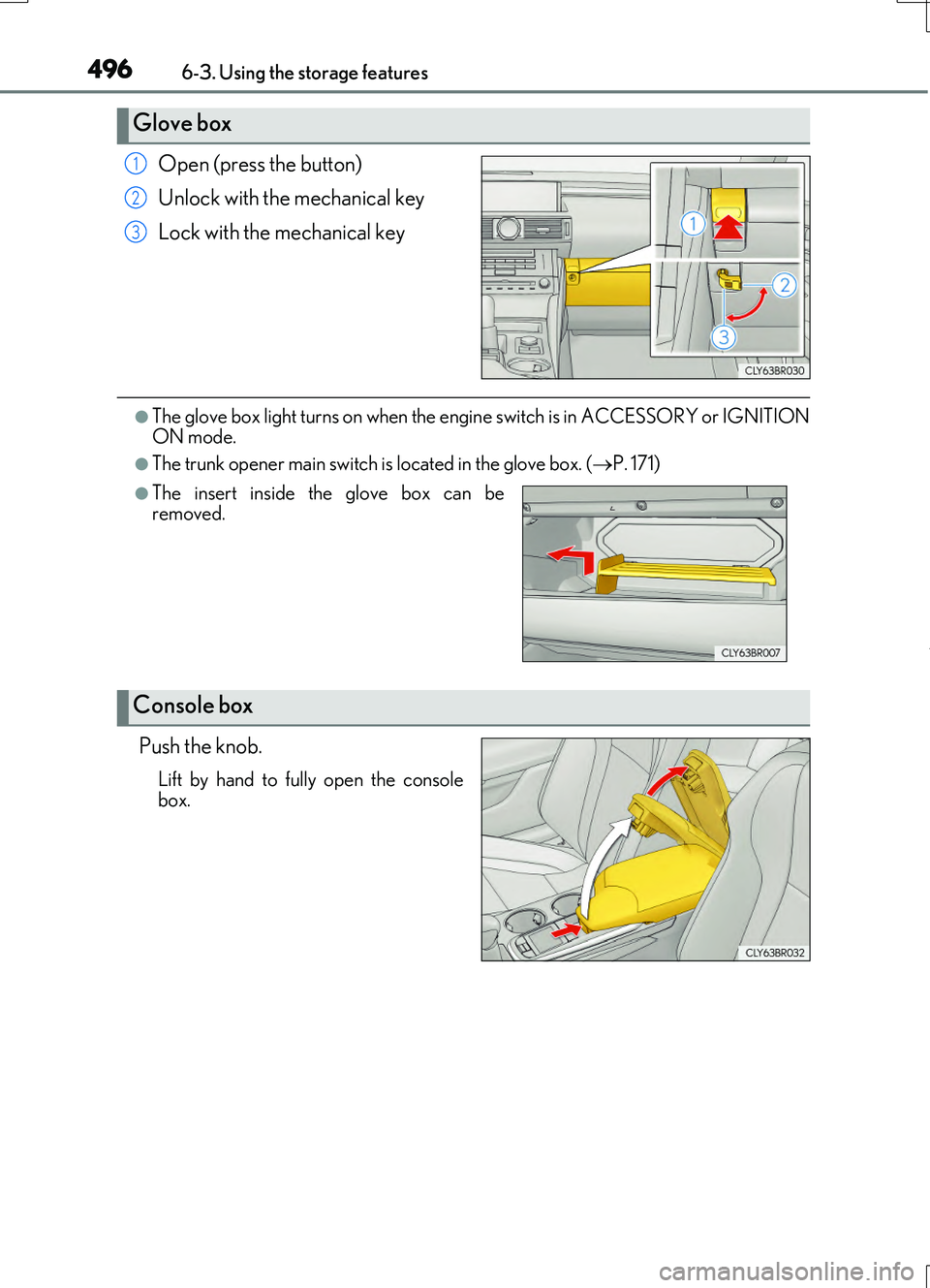
Open (press the button)
Unlock with the mechanical key
Lock with the mechanical key
●The glove box light turns on when the engi ne switch is in ACCESSORY or IGNITION
ON mode.
●The trunk opener main switch is located in the glove box. (P. 171)
Push the knob.
Lift by hand to fully open the console
box.
Glove box
1
2
3
●The insert inside the glove box can be
removed.
Console box
Page 517 of 724
5177-3. Do-it-yourself maintenance
7
Maintenance and care
RC200t_RC F_EE(OM24728E)
WARNING
The engine compartment contains many mechanisms and fluids that may move suddenly, become hot, or become electrically energize d. To avoid death or serious injury, observe the following precautions.
■When working on the engine compartment
●Keep hands, clothing and tools away from the moving fan and engine drive belt.
●Be careful not to touch the engine, radiator, exhaust manifold, etc. right after driving
as they may be hot. Oil and other fluids may also be hot.
●Do not leave anything that may burn easily, such as paper and rags, in the engine compartment.
●Do not smoke, cause sparks or expose an open flame to fuel or the battery. Fuel andbattery fumes are flammable.
●Be extremely cautious when working on the battery. It contains poisonous and corro-
sive sulfuric acid.
●Take care because brake fluid can harm your hands or eyes and damage painted sur- faces. If fluid gets on your hands or in your eyes, flush the affected area with clean
water immediately. If you still experience discomfort, consult a doctor.
■When working near the electric cooling fans or radiator grille
Be sure the engine switch is off. With the engine switch in IGNITION ON mode, the electric cooling fans may auto-matically start to run if the air conditioning is on and/or the coolant temperature is high.
( P. 529)
■Safety glasses
Wear safety glasses to prevent flying or falling material, fluid spray, etc. from getting in
your eyes.
NOTICE
■If you remove the air cleaner filter
Driving with the air cleaner filter removed may cause excessive engine wear due to dirt in the air.
■If the fluid level is low or high
It is normal for the brake fluid level to go down slightly as the brake pads wear or when the fluid level in the accumulator is high.
If the reservoir needs frequent refillin g, it may indicate a serious problem.
Page 538 of 724
5387-3. Do-it-yourself maintenance
RC200t_RC F_EE(OM24728E)
■How to initialize the tire pressure warning system
Park the vehicle in a safe place and turn the engine switch off.
Initialization cannot be perfor med while the vehicle is moving.
Adjust the tire inflation pressure to the specified cold tire inflation pressure
level. ( P. 679)
Make sure to adjust the tire pressure to the specified cold tire inflation pressure level. The tire pressure warning system will operate based on this pressure level.
Turn the engine switch to IGNITION ON mode.
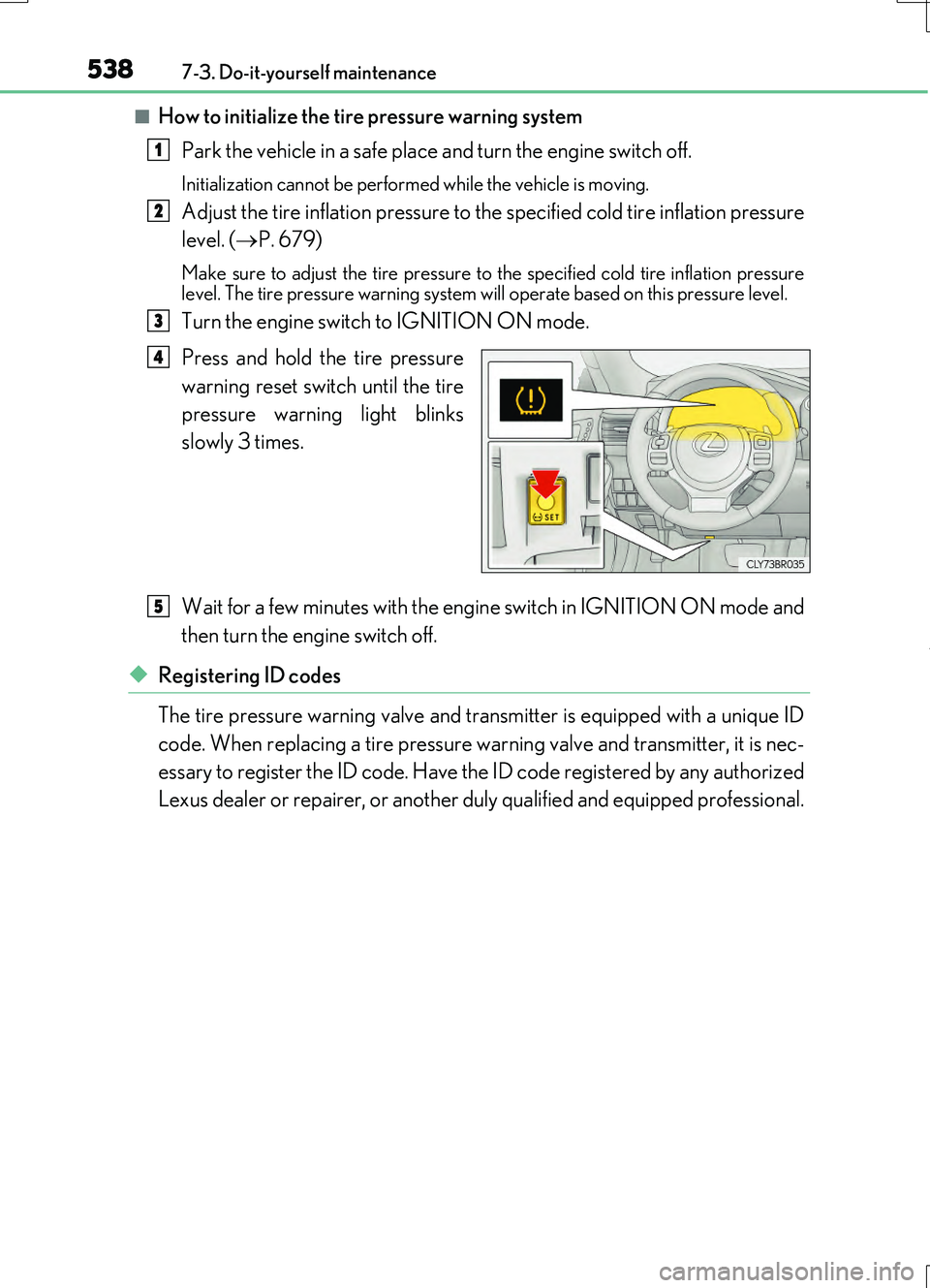
Press and hold the tire pressure
warning reset switch until the tire
pressure warning light blinks
slowly 3 times.
Wait for a few minutes with the engine switch in IGNITION ON mode and
then turn the engine switch off.
◆Registering ID codes
The tire pressure warning valve and transmitter is equipped with a unique ID
code. When replacing a tire pressure wa rning valve and transmitter, it is nec-
essary to register the ID code. Have the ID code registered by any authorized
Lexus dealer or repairer, or another duly qualified and equipped professional.
1
2
3
4
5