trunk LEXUS RC200T 2017 Repair Manual
[x] Cancel search | Manufacturer: LEXUS, Model Year: 2017, Model line: RC200T, Model: LEXUS RC200T 2017Pages: 724, PDF Size: 42.04 MB
Page 283 of 724
2834-4. Refueling
4
Driving
RC200t_RC F_EE(OM24728E)
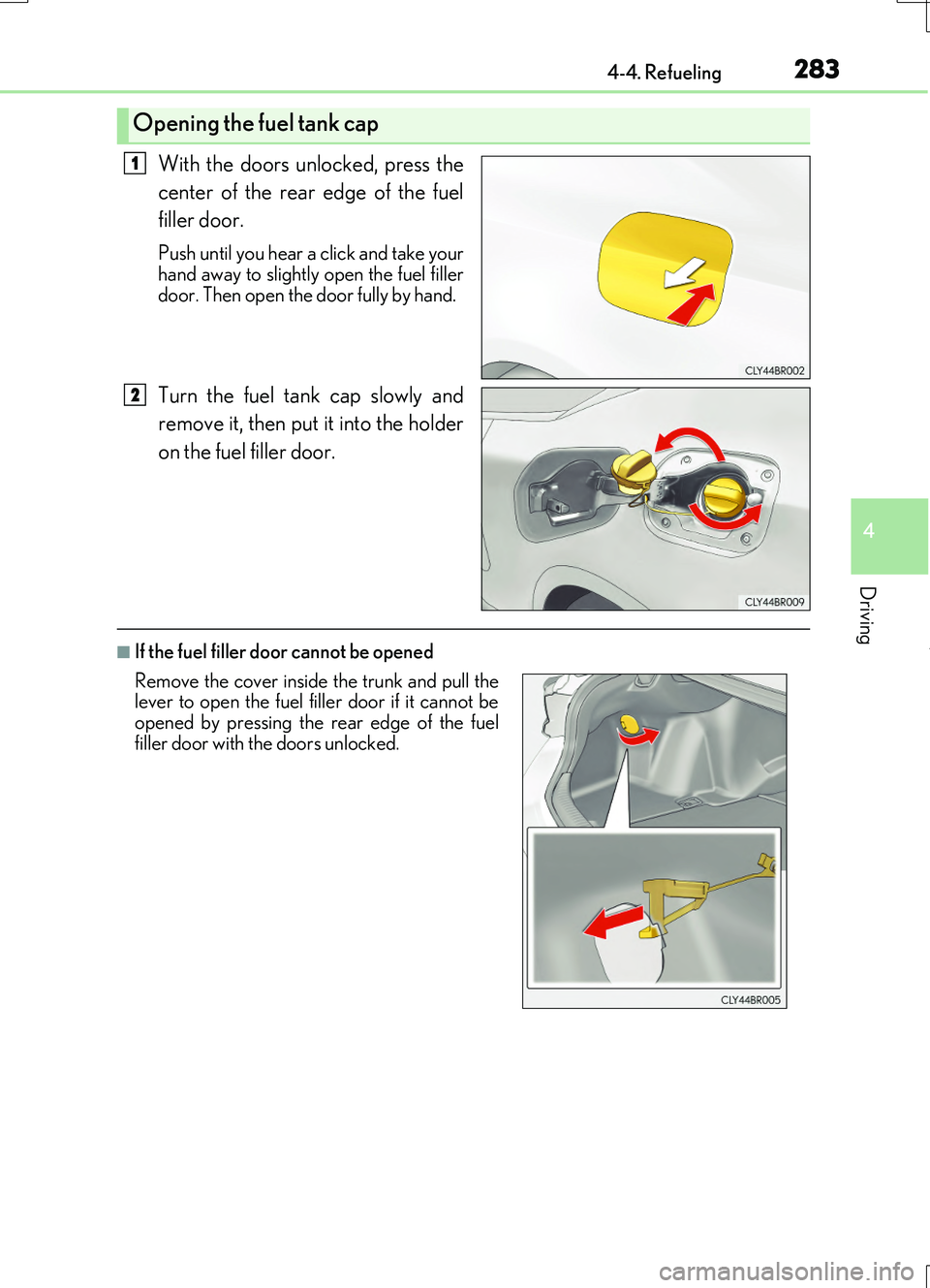
With the doors unlocked, press the
center of the rear edge of the fuel
filler door.
Push until you hear a click and take your hand away to slightly open the fuel filler
door. Then open the door fully by hand.
Turn the fuel tank cap slowly and
remove it, then put it into the holder
on the fuel filler door.
■If the fuel filler door cannot be opened
Opening the fuel tank cap
1
2
Remove the cover inside the trunk and pull the lever to open the fuel filler door if it cannot be
opened by pressing the rear edge of the fuel filler door with the doors unlocked.
Page 312 of 724
3124-5. Using the driving support systems
RC200t_RC F_EE(OM24728E)
WARNING
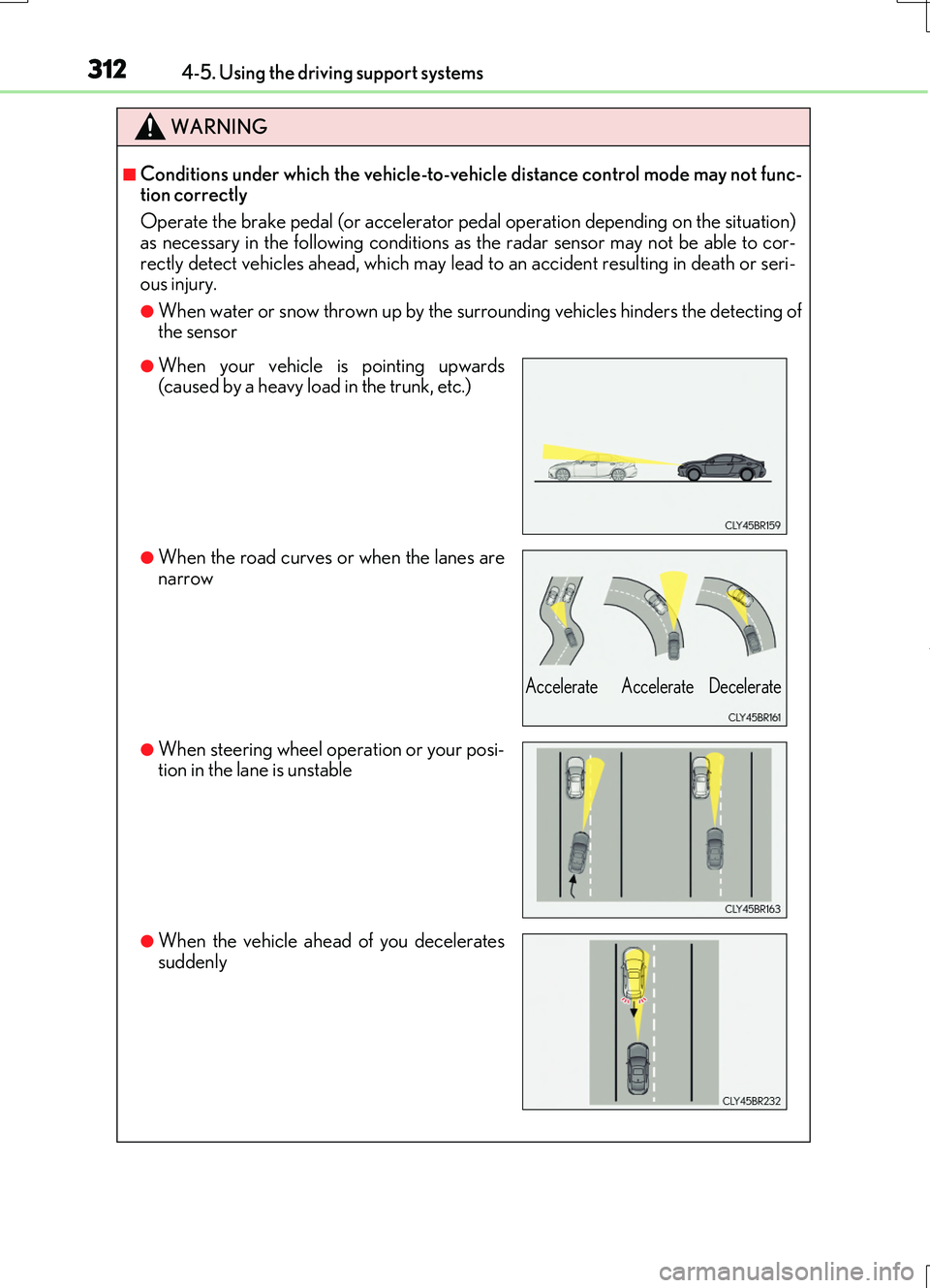
■Conditions under which the vehicle-to-vehicle distance control mode may not func- tion correctly
Operate the brake pedal (or accelerator pedal operation depending on the situation)
as necessary in the following conditions as the radar sensor may not be able to cor- rectly detect vehicles ahead, which may lead to an accident resulting in death or seri-ous injury.
●When water or snow thrown up by the surrounding vehicles hinders the detecting ofthe sensor
●When your vehicle is pointing upwards(caused by a heavy load in the trunk, etc.)
●When the road curves or when the lanes arenarrow
●When steering wheel operation or your posi-tion in the lane is unstable
●When the vehicle ahead of you decelerates
suddenly
Accelerate Accelerate Decelerate
Page 342 of 724
3424-5. Using the driving support systems
RC200t_RC F_EE(OM24728E)
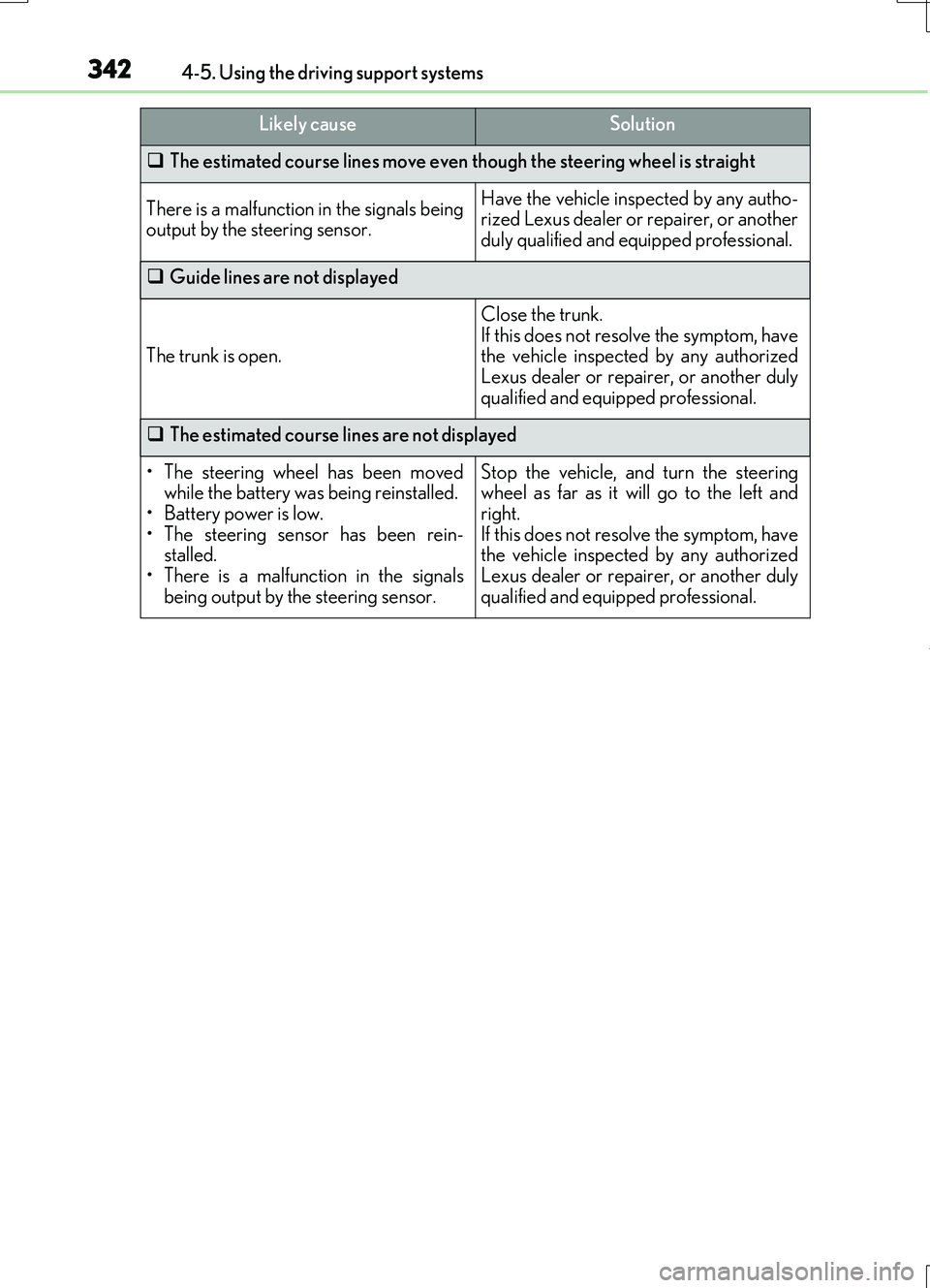
The estimated course lines move even though the steering wheel is straight
There is a malfunction in the signals being output by the steering sensor.
Have the vehicle inspected by any autho-rized Lexus dealer or repairer, or another
duly qualified and equipped professional.
Guide lines are not displayed
The trunk is open.
Close the trunk. If this does not resolve the symptom, havethe vehicle inspected by any authorized
Lexus dealer or repairer, or another duly qualified and equipped professional.
The estimated course lines are not displayed
• The steering wheel has been moved while the battery was being reinstalled.
• Battery power is low. • The steering sensor has been rein-stalled.
• There is a malfunct ion in the signals being output by the steering sensor.
Stop the vehicle, and turn the steeringwheel as far as it will go to the left and
right. If this does not resolve the symptom, havethe vehicle inspected by any authorized
Lexus dealer or repairer, or another duly qualified and equipped professional.
Likely causeSolution
Page 343 of 724
3434-5. Using the driving support systems
4
Driving
RC200t_RC F_EE(OM24728E)
WARNING
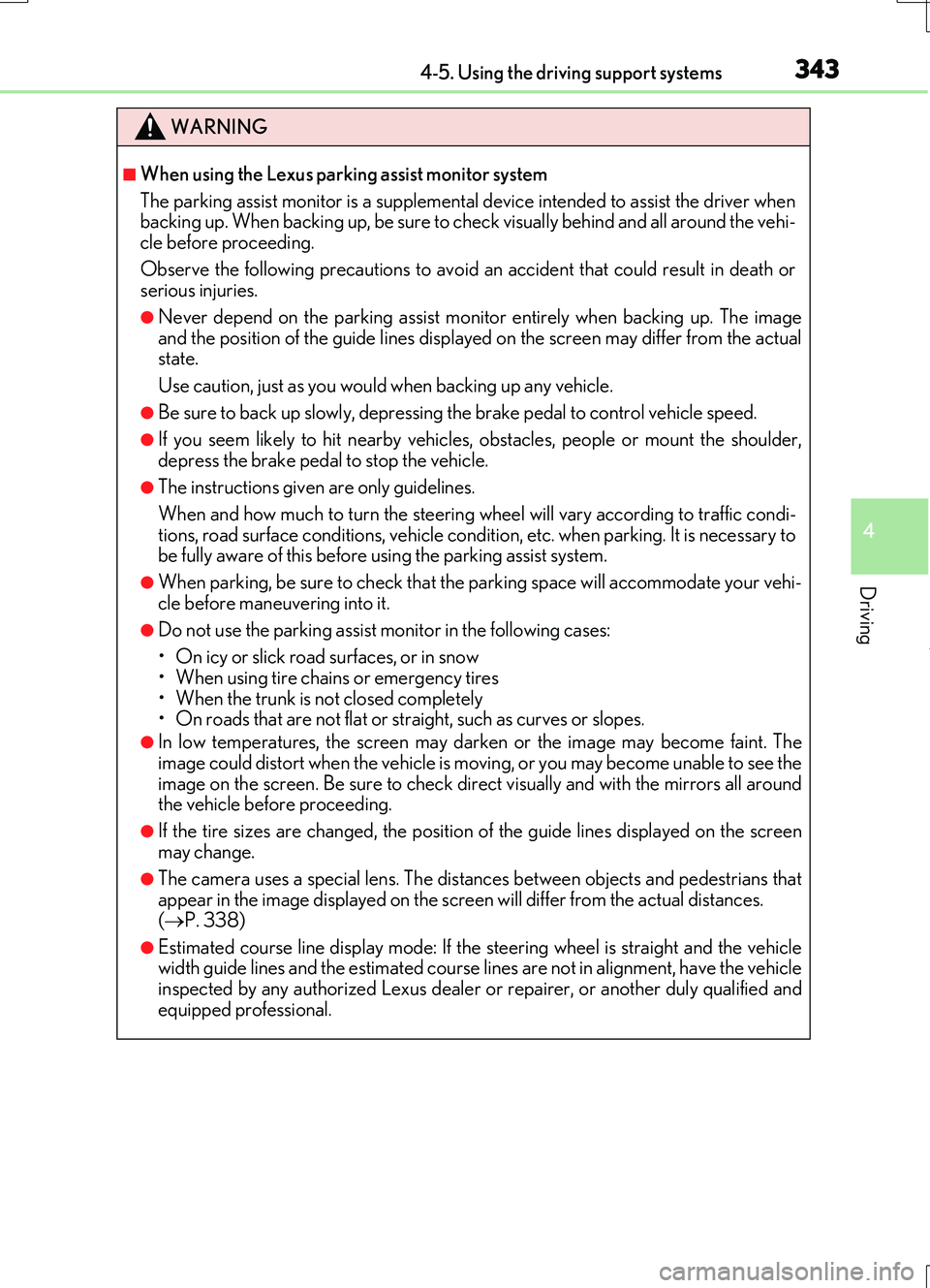
■When using the Lexus parking assist monitor system
The parking assist monitor is a supplemental device intended to assist the driver when backing up. When backing up, be sure to check visually behind and all around the vehi-
cle before proceeding.
Observe the following precautions to avoid an accident that could result in death or serious injuries.
●Never depend on the parking assist monitor entirely when backing up. The imageand the position of the guide lines displayed on the screen may differ from the actualstate.
Use caution, just as you would when backing up any vehicle.
●Be sure to back up slowly, depressing the brake pedal to control vehicle speed.
●If you seem likely to hit nearby vehicles , obstacles, people or mount the shoulder,
depress the brake pedal to stop the vehicle.
●The instructions given are only guidelines.
When and how much to turn the steering wheel will vary according to traffic condi-
tions, road surface conditions, vehicle condition, etc. when parking. It is necessary to be fully aware of this before using the parking assist system.
●When parking, be sure to check that th e parking space will accommodate your vehi-
cle before maneuvering into it.
●Do not use the parking assist monitor in the following cases:
• On icy or slick road surfaces, or in snow
• When using tire chains or emergency tires • When the trunk is not closed completely• On roads that are not flat or straight, such as curves or slopes.
●In low temperatures, the screen may darken or the image may become faint. Theimage could distort when the vehicle is moving, or you may become unable to see the
image on the screen. Be sure to check direct visually and with the mirrors all around the vehicle before proceeding.
●If the tire sizes are changed, the position of the guide lines displayed on the screen
may change.
●The camera uses a special lens. The distances between objects and pedestrians that appear in the image displayed on the screen will differ from the actual distances.
( P. 338)
●Estimated course line display mode: If the steering wheel is straight and the vehicle width guide lines and the estimated course lin es are not in alignment, have the vehicle
inspected by any authorized Lexus dealer or repairer, or another duly qualified and equipped professional.
Page 358 of 724
3584-5. Using the driving support systems
RC200t_RC F_EE(OM24728E)
■The pre-crash safety system is operational when
The pre-crash safety system is enable d and the following conditions are met:
●Pre-crash warning:
• Vehicle speed is greater than about 15 km/h (10 mph).
• The speed at which your vehicle is approaching the obstacle or the vehicle running ahead of you is greater than about 15 km/h (10 mph).
●Pre-crash brake assist:
• The VSC system is not disabled. • Vehicle speed is greater than about 30 km/h (19 mph).
• The speed at which your vehicle is approaching the obstacle or the vehicle running ahead of you is greater than about 30 km/h (19 mph).• The brake pedal is depressed.
●Pre-crash braking:
• The VSC system is not disabled.
• Vehicle speed is greater than about 15 km/h (10 mph). • The speed at which your vehicle is approaching the obstacle or the vehicle runningahead of you is greater than about 15 km/h (10 mph).
●Suspension control:
• Vehicle speed is greater than about 5 km/h (4 mph).
• The speed at which your vehicle is approaching the obstacle or the vehicle running ahead of you is greater than about 30 km/h (19 mph).
■Conditions that may trigger the system even if there is no danger of a collision
In any of the following situations where the frontal area of the radar sensor is interrupted, the radar sensor may detect possibility of a frontal collision and the system may be acti- vated.
●When passing by an oncoming vehicle in a curve or a turn to the right or the left
●When rapidly approaching an obstacle ahead (e.g. preceding vehicle, toll gate barrier, etc.)
●When there is a structural object (billboard, low ceiling, fluorescent light, etc.) above the uphill road ahead
●When driving on a narrow road or throug h under a low overhead structure (bridge,
tunnel, fly-under, etc.)
●When driving on an uneven road surface
●When there is a metal object, bump, or protrusion on the road surface
●When vehicle’s front part is raised or lowered depending on loading conditions
●When the direction of radar sensor is misaligned by strong impact applied on an area
around the radar sensor, etc.
●When there is an obstacle (guard rail, etc.) by the roadside at the entrance to a curve
●When the front of your vehicle is pointing upwards (caused by putting a heavy load in
the trunk etc.)
When the system is activated in the situations described above, there is also a possibility that the brakes may be applied with a force greater than normal.
Page 380 of 724
3804-5. Using the driving support systems
RC200t_RC F_EE(OM24728E)
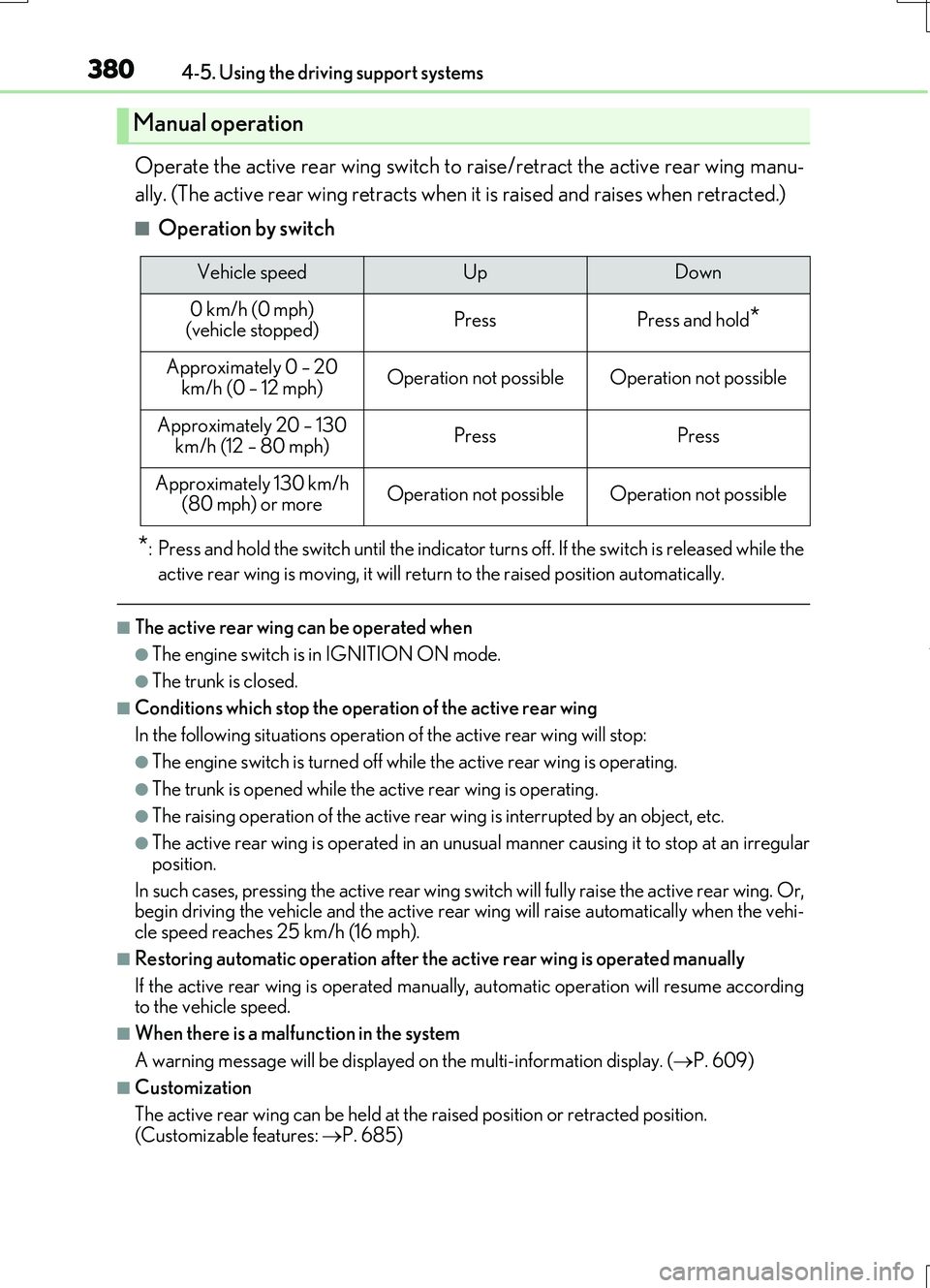
Operate the active rear wing switch to raise/retract the active rear wing manu-
ally. (The active rear wing retracts when it is raised and raises when retracted.)
■Operation by switch
*: Press and hold the switch unti l the indicator turns off. If the switch is released while the
active rear wing is moving, it will return to the raised position automatically.
■The active rear wing can be operated when
●The engine switch is in IGNITION ON mode.
●The trunk is closed.
■Conditions which stop the operation of the active rear wing
In the following situations operation of the active rear wing will stop:
●The engine switch is turned off while the active rear wing is operating.
●The trunk is opened while the active rear wing is operating.
●The raising operation of the active rear wing is interrupted by an object, etc.
●The active rear wing is operated in an unusual manner causing it to stop at an irregular
position.
In such cases, pressing the active rear wing switch will fully raise the active rear wing. Or, begin driving the vehicle and th e active rear wing will raise automatically when the vehi-
cle speed reaches 25 km/h (16 mph).
■Restoring automatic operation after the active rear wing is operated manually
If the active rear wing is operated manual ly, automatic operation will resume according to the vehicle speed.
■When there is a malfunction in the system
A warning message will be displayed on the multi-information display. (P. 609)
■Customization
The active rear wing can be held at the raised position or retracted position.
(Customizable features: P. 685)
Manual operation
Vehicle speedUpDown
0 km/h (0 mph) (vehicle stopped)PressPress and hold*
Approximately 0 – 20
km/h (0 – 12 mph)Operation not possibleOperation not possible
Approximately 20 – 130 km/h (12 – 80 mph)PressPress
Approximately 130 km/h (80 mph) or moreOperation not possibleOperation not possible
Page 477 of 724
477
6Interior features
RC200t_RC F_EE(OM24728E)
6-1. Using the air conditioning
system
Automatic air conditioning
system .......................................... 478
Heated steering wheel/
seat heaters/
seat ventilators ........................ 490
6-2. Using the interior lights
Interior lights list ......................... 492
• Interior lights .......................... 493
• Personal lights ....................... 494
6-3. Using the storage features
List of storage features ............ 495
• Glove box ............................... 496
• Console box .......................... 496
• Cup holders ........................... 497
Trunk features .............................498
6-4. Using the other interior
features
Other interior features ........... 500
• Sun visors ............................... 500
• Vanity mirrors ...................... 500
• Clock ......................................... 501
• Power outlet............................ 501
• Armrest....................................502
• Trunk storage
extension .................................503
• Assist grips .............................504
• Coat hooks .............................504
Page 496 of 724
4966-3. Using the storage features
RC200t_RC F_EE(OM24728E)
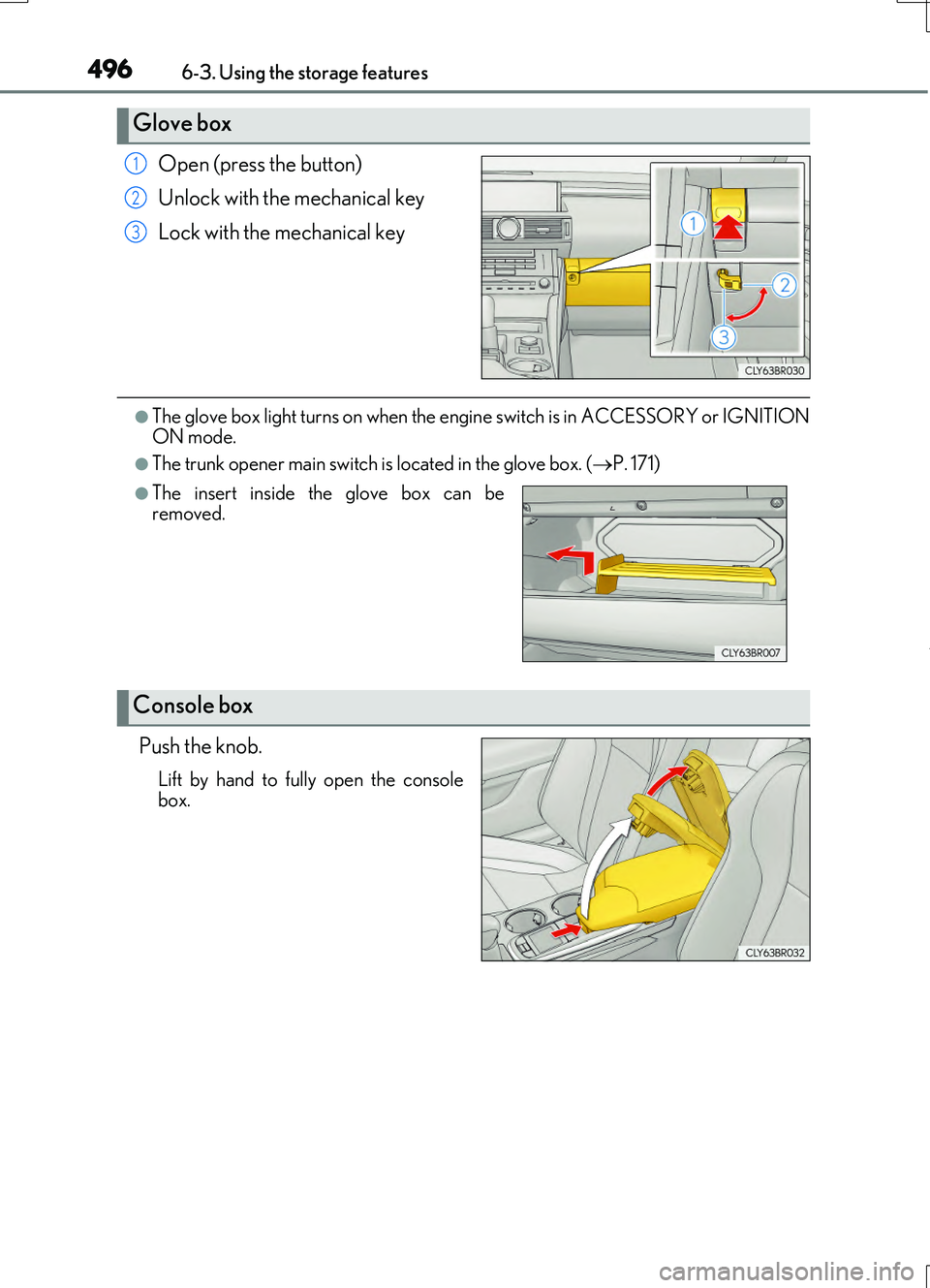
Open (press the button)
Unlock with the mechanical key
Lock with the mechanical key
●The glove box light turns on when the engi ne switch is in ACCESSORY or IGNITION
ON mode.
●The trunk opener main switch is located in the glove box. (P. 171)
Push the knob.
Lift by hand to fully open the console
box.
Glove box
1
2
3
●The insert inside the glove box can be
removed.
Console box
Page 498 of 724
4986-3. Using the storage features
RC200t_RC F_EE(OM24728E)
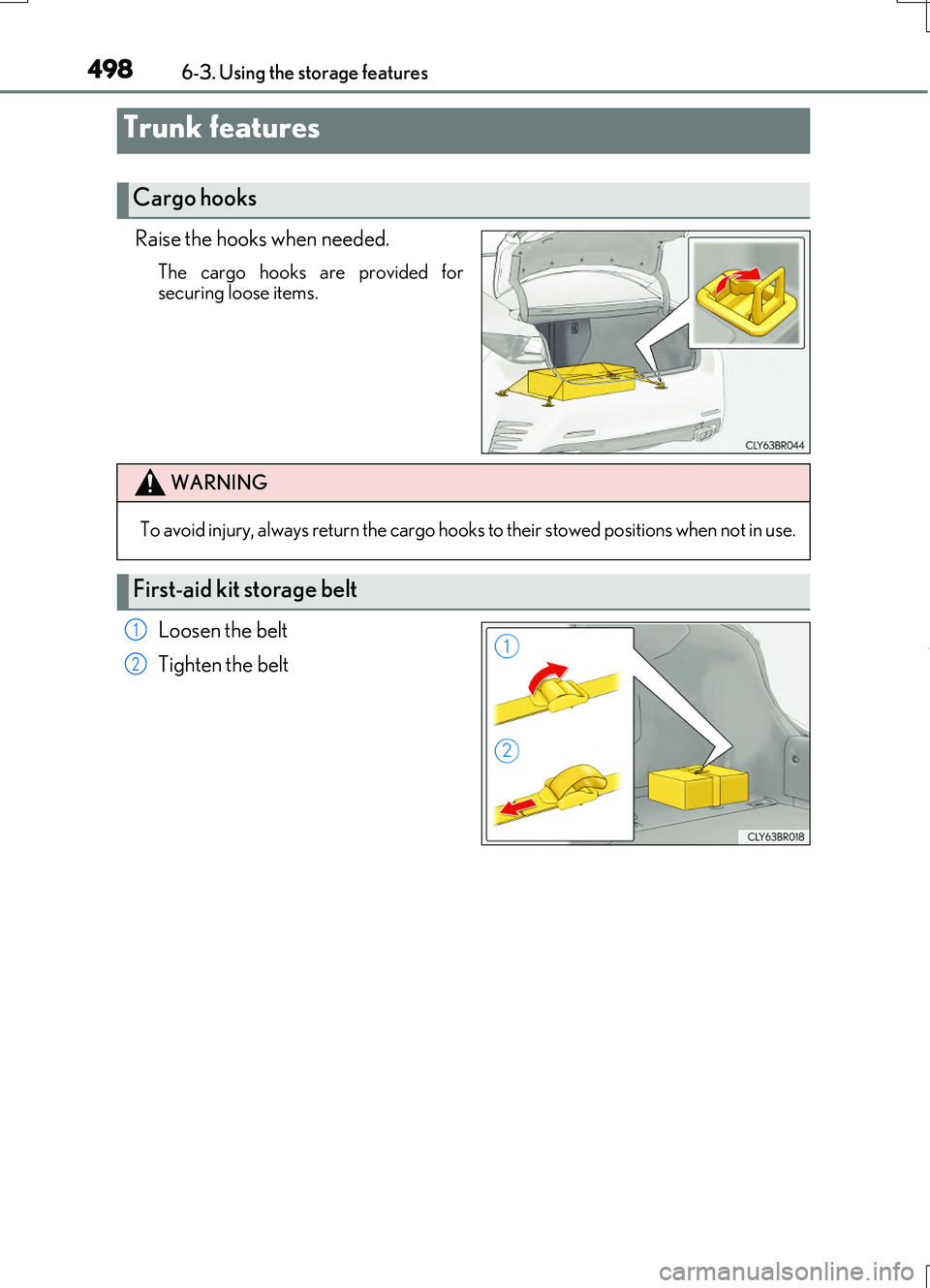
Raise the hooks when needed.
The cargo hooks are provided for securing loose items.
Loosen the belt
Tighten the belt
Trunk features
Cargo hooks
WARNING
To avoid injury, always return the cargo hooks to their stowed positions when not in use.
First-aid kit storage belt
1
2
Page 503 of 724
5036-4. Using the other interior features
6
Interior features
RC200t_RC F_EE(OM24728E)
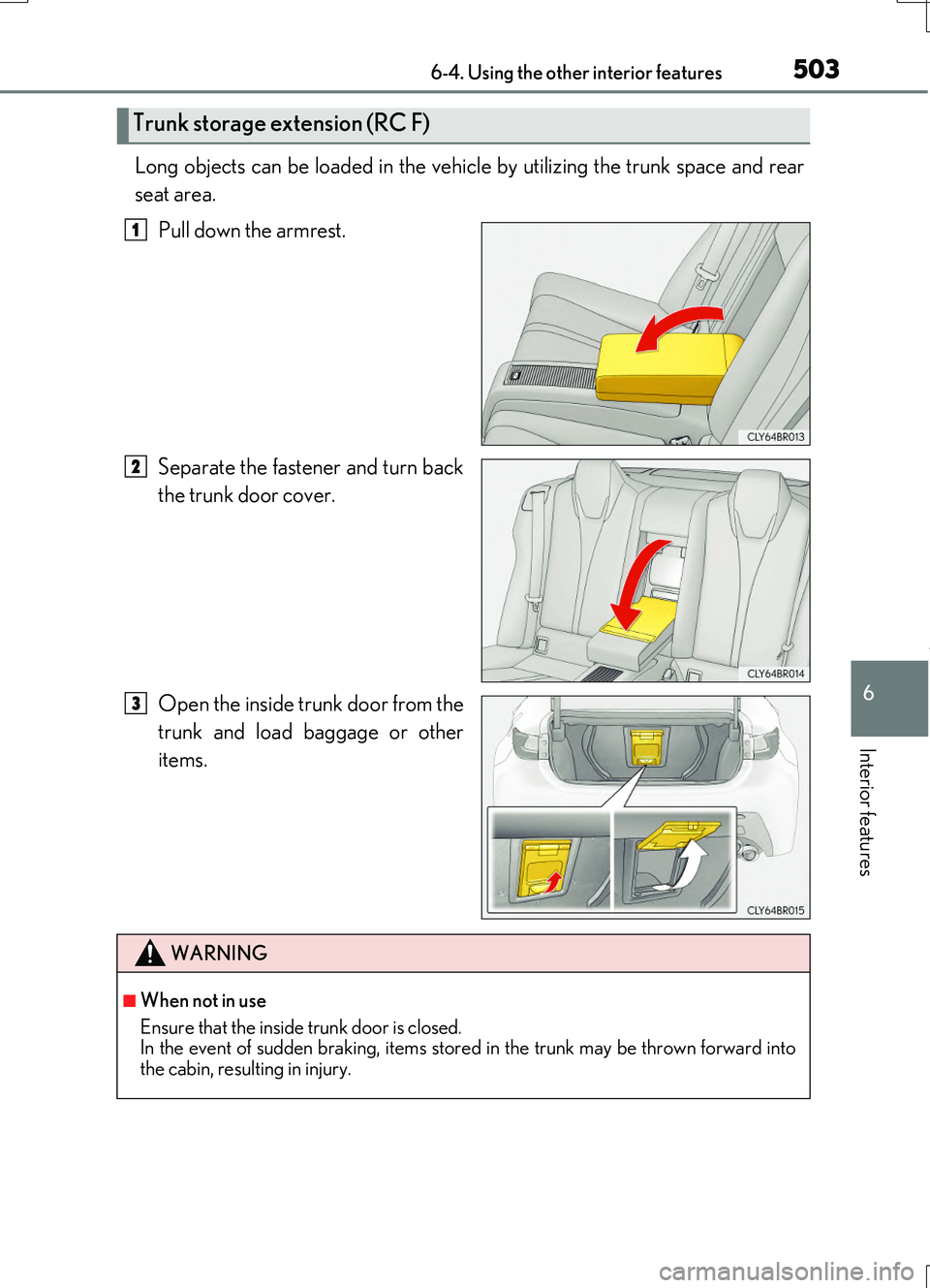
Long objects can be loaded in the vehicle by utilizing the trunk space and rear
seat area.
Pull down the armrest.
Separate the fastener and turn back
the trunk door cover.
Open the inside trunk door from the
trunk and load baggage or other
items.
Trunk storage extension (RC F)
1
2
3
WARNING
■When not in use
Ensure that the inside trunk door is closed. In the event of sudden braking, items stored in the trunk may be thrown forward into
the cabin, resulting in injury.