reset LEXUS RC200T 2017 Owners Manual
[x] Cancel search | Manufacturer: LEXUS, Model Year: 2017, Model line: RC200T, Model: LEXUS RC200T 2017Pages: 724, PDF Size: 42.04 MB
Page 19 of 724
19Pictorial index
RC200t_RC F_EE(OM24728E)
Automatic high beam switch*1. . . . . . . . . . . . . . . . . . . . . . . . . . . . . . . . . . . . . . P. 267
Windshield wiper de-icer switch*1. . . . . . . . . . . . . . . . . . . . . . . . . . . . . . . . . P. 485
Active rear wing switch . . . . . . . . . . . . . . . . . . . . . . . . . . . . . . . . . . . . . . . . . . . . . P. 379
Odometer/trip meter/trip meter reset button. . . . . . . . . . . . . . . . .P. 121, 128
Instrument panel light control switches. . . . . . . . . . . . . . . . . . . . . . . . P. 122, 129
Lexus parking assist-sensor switch*1, 2 . . . . . . . . . . . . . . . . . . . . . . . . . . . . .P. 320
BSM (Blind Spot Monitor) main switch*1. . . . . . . . . . . . . . . . . . . . . . . . . . . P. 364
ASC switch*1. . . . . . . . . . . . . . . . . . . . . . . . . . . . . . . . . . . . . . . . . . . . . . . . . . . . . . . . P. 262
*1: If equipped
*2: For vehicles with a navigation or multimedia system, refer to “NAVIGATION AND
MULTIMEDIA SYSTEM OWNER’S MANUAL”.
1
2
3
4
5
6
7
8
Page 20 of 724
20Pictorial index
RC200t_RC F_EE(OM24728E)
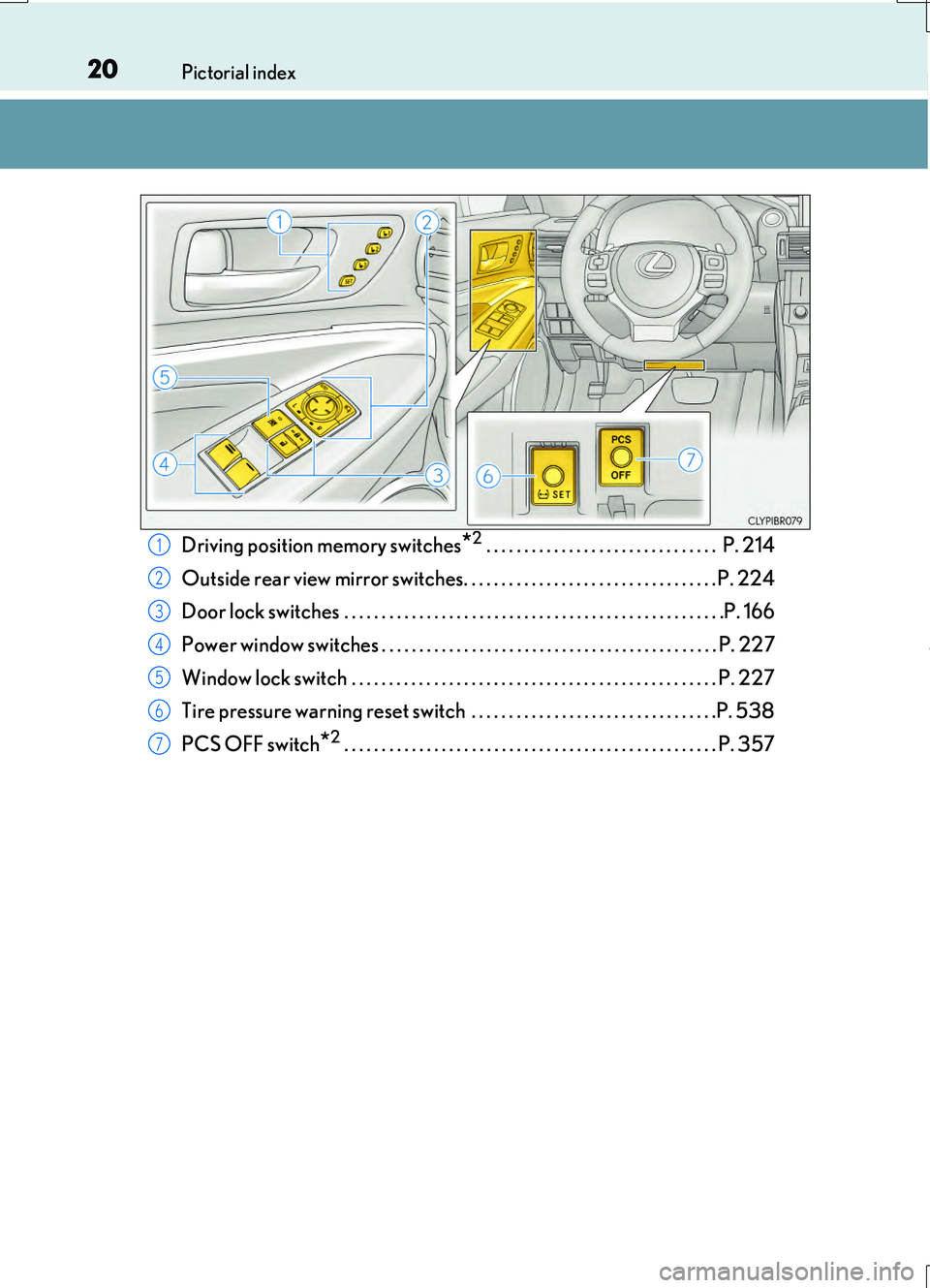
Driving position memory switches*2 . . . . . . . . . . . . . . . . . . . . . . . . . . . . . . . P. 214
Outside rear view mirror switches. . . . . . . . . . . . . . . . . . . . . . . . . . . . . . . . . . P. 224
Door lock switches . . . . . . . . . . . . . . . . . . . . . . . . . . . . . . . . . . . . . . . . . . . . . . . . . . .P. 166
Power window switches . . . . . . . . . . . . . . . . . . . . . . . . . . . . . . . . . . . . . . . . . . . . . P. 227
Window lock switch . . . . . . . . . . . . . . . . . . . . . . . . . . . . . . . . . . . . . . . . . . . . . . . . . P. 227
Tire pressure warning reset switch . . . . . . . . . . . . . . . . . . . . . . . . . . . . . . . . .P. 538
PCS OFF switch*2 . . . . . . . . . . . . . . . . . . . . . . . . . . . . . . . . . . . . . . . . . . . . . . . . . . P. 357
1
2
3
4
5
6
7
Page 30 of 724
30Pictorial index
RC200t_RC F_EE(OM24728E)
Instrument panel light control switches. . . . . . . . . . . . . . . . . . . . . . . . . . . . . P. 129
Odometer/trip meter/trip meter reset button. . . . . . . . . . . . . . . . . . . . . P. 128
Automatic high beam switch*1. . . . . . . . . . . . . . . . . . . . . . . . . . . . . . . . . . . . . . P. 267
BSM (Blind Spot Monitor) main switch*1. . . . . . . . . . . . . . . . . . . . . . . . . . . P. 364
Lexus parking assist-sensor switch*1, 2 . . . . . . . . . . . . . . . . . . . . . . . . . . . . .P. 320
Active rear wing switch . . . . . . . . . . . . . . . . . . . . . . . . . . . . . . . . . . . . . . . . . . . . . P. 379
ASC switch*1. . . . . . . . . . . . . . . . . . . . . . . . . . . . . . . . . . . . . . . . . . . . . . . . . . . . . . . . P. 262
1
2
3
4
5
6
7
Page 31 of 724
31Pictorial index
RC200t_RC F_EE(OM24728E)
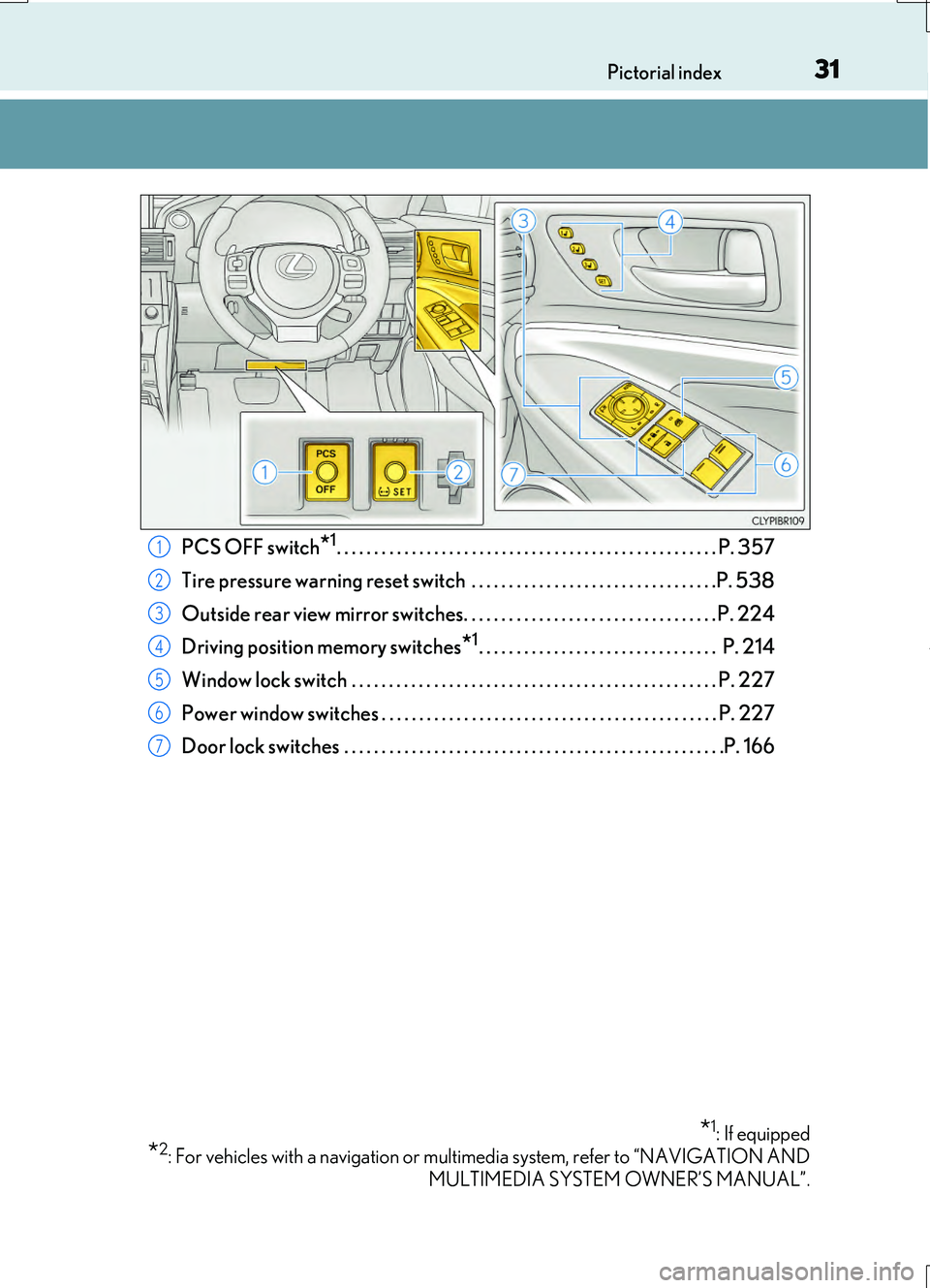
PCS OFF switch*1. . . . . . . . . . . . . . . . . . . . . . . . . . . . . . . . . . . . . . . . . . . . . . . . . . . P. 357
Tire pressure warning reset switch . . . . . . . . . . . . . . . . . . . . . . . . . . . . . . . . .P. 538
Outside rear view mirror switches. . . . . . . . . . . . . . . . . . . . . . . . . . . . . . . . . . P. 224
Driving position memory switches*1. . . . . . . . . . . . . . . . . . . . . . . . . . . . . . . . P. 214
Window lock switch . . . . . . . . . . . . . . . . . . . . . . . . . . . . . . . . . . . . . . . . . . . . . . . . . P. 227
Power window switches . . . . . . . . . . . . . . . . . . . . . . . . . . . . . . . . . . . . . . . . . . . . . P. 227
Door lock switches . . . . . . . . . . . . . . . . . . . . . . . . . . . . . . . . . . . . . . . . . . . . . . . . . . .P. 166
*1: If equipped
*2: For vehicles with a navigation or multimedia system, refer to “NAVIGATION AND
MULTIMEDIA SYSTEM OWNER’S MANUAL”.
1
2
3
4
5
6
7
Page 119 of 724
1192. Instrument cluster
2
Instrument cluster
RC200t_RC F_EE(OM24728E)
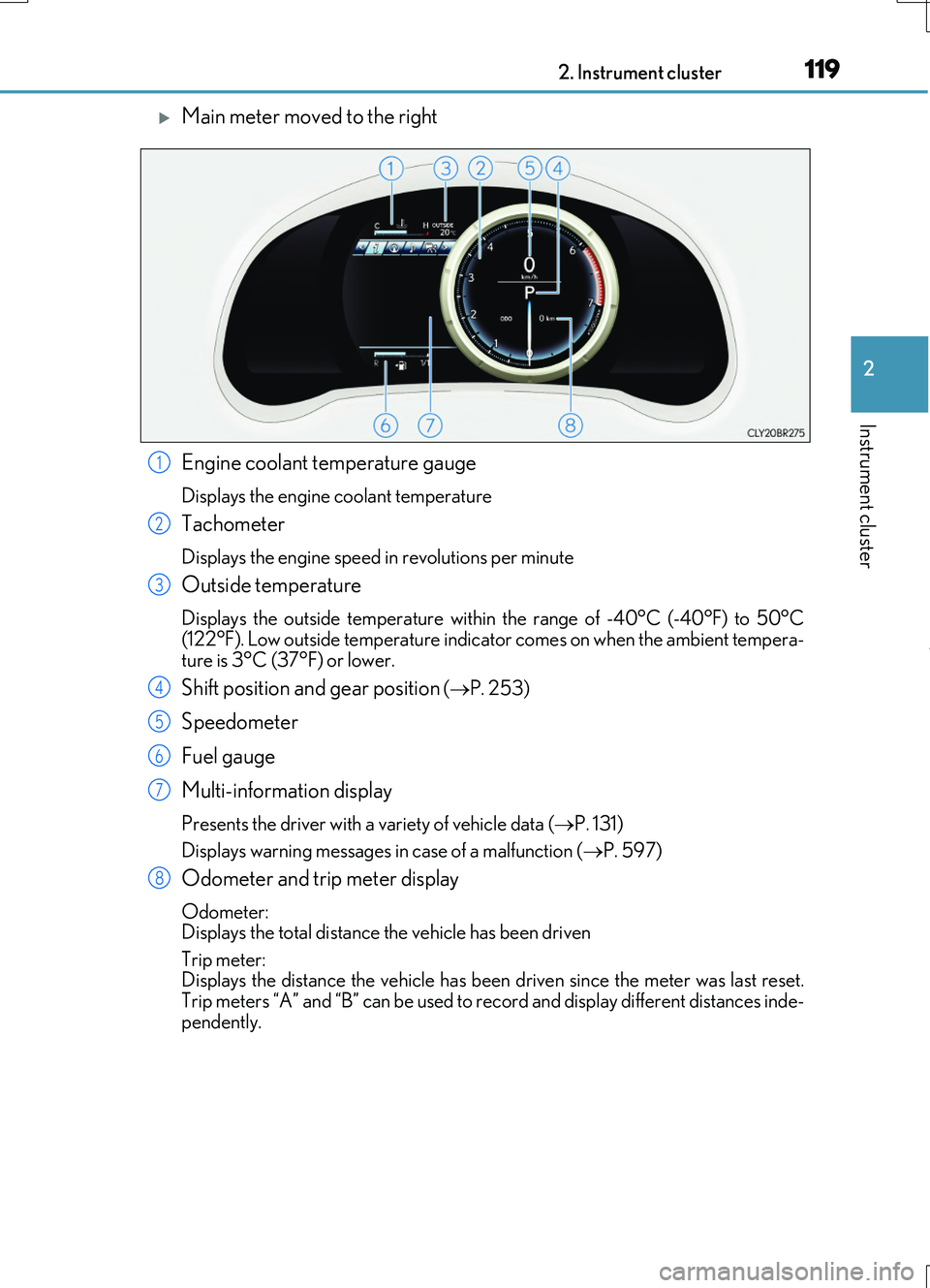
Main meter moved to the right
Engine coolant temperature gauge
Displays the engine coolant temperature
Tachometer
Displays the engine speed in revolutions per minute
Outside temperature
Displays the outside temperature within the range of -40°C (-40°F) to 50°C (122°F). Low outside temperature indicator comes on when the ambient tempera-
ture is 3°C (37°F) or lower.
Shift position and gear position ( P. 253)
Speedometer
Fuel gauge
Multi-information display
Presents the driver with a variety of vehicle data ( P. 131)
Displays warning messages in case of a malfunction ( P. 597)
Odometer and trip meter display
Odometer: Displays the total distance the vehicle has been driven
Trip meter: Displays the distance the vehicle has been driven since the meter was last reset.
Trip meters “A” and “B” can be used to record and display different distances inde- pendently.
1
2
3
4
5
6
7
8
Page 121 of 724
1212. Instrument cluster
2
Instrument cluster
RC200t_RC F_EE(OM24728E)
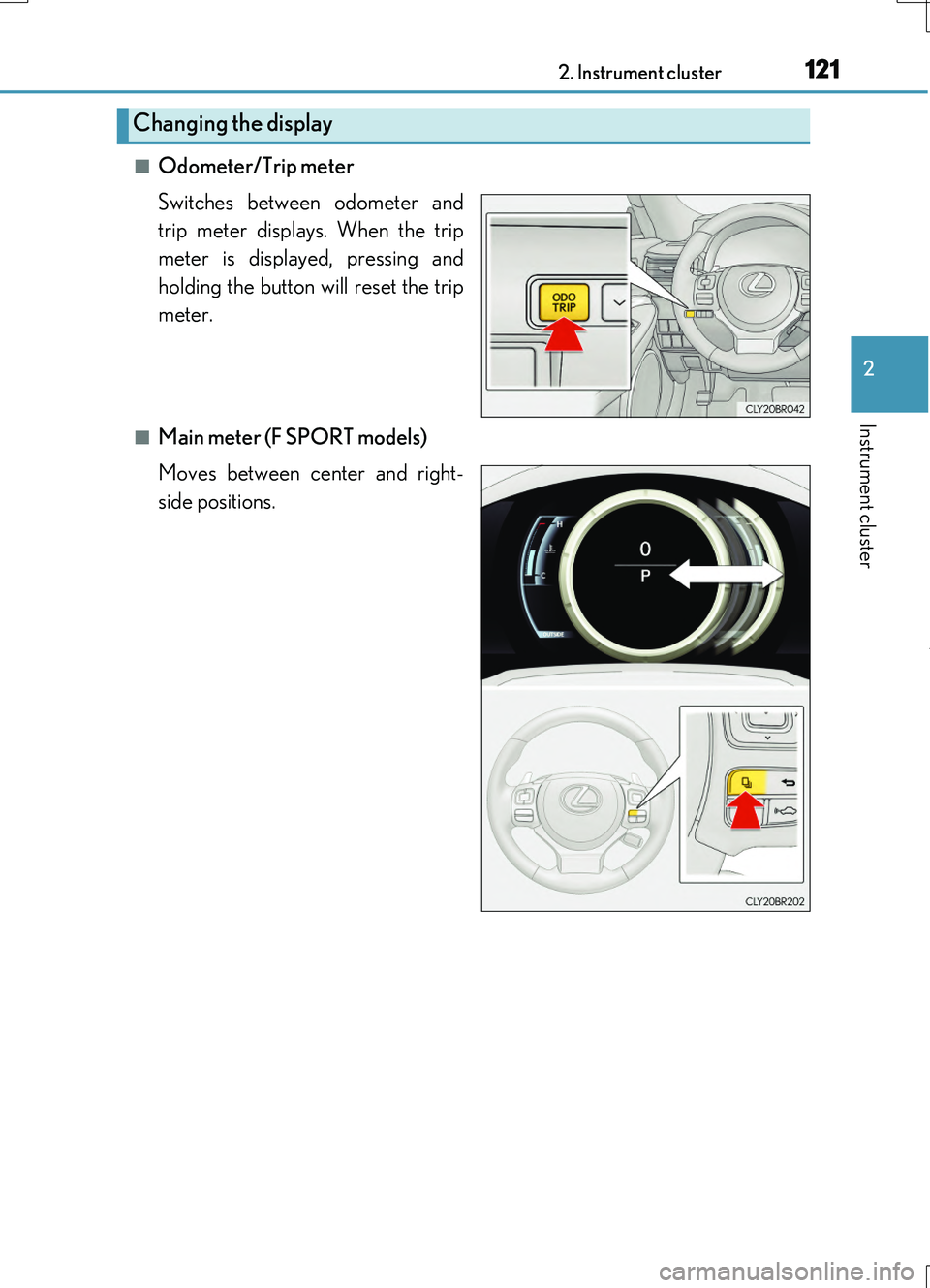
■Odometer/Trip meter
Switches between odometer and
trip meter displays. When the trip
meter is displayed, pressing and
holding the button will reset the trip
meter.
■Main meter (F SPORT models)
Moves between center and right-
side positions.
Changing the display
Page 126 of 724
1262. Instrument cluster
RC200t_RC F_EE(OM24728E)
Multi-information display
Presents the driver with a variety of vehicle data (P. 139)
Displays warning messages in case of a malfunction (P. 597)
Fuel gauge
Engine coolant temperature gauge
Displays the engine coolant temperature. If the engine coolant temperature gauge
indicator ( ) enters the red zone, a buzzer will sound and the indicator will turn red
and start flashing. Also, a warning message will be displayed.
Engine oil temperature gauge
Displays the engine oil temperature. If the engine oil temperature gauge indicator
( ) enters the red zone, the indicator will turn red and start flashing.
Outside temperature
Displays the outside temperature within the range of -40°C (-40°F) to 50°C
(122°F). Low outside temperature indicator comes on when the ambient temperature
is 3°C (37°F) or lower.
Tachometer
Displays the engine speed in revolutions per minute
Digital speedometer
Analog speedometer
Shift position and gear position
( P. 253)
Odometer and trip meter display
Odometer:
Displays the total distance the vehicle has been driven
Trip meter:
Displays the distance the vehicle has been driven since the meter was last reset. Trip
meters “A” and “B” can be used to record and display different distances inde-
pendently.
Eco driving meter
Displays the vehicle acceleration. The more rapidly the vehicle is accelerated, the
lower the number of blue segments displayed, indicating that your driving is less eco-
friendly. This meter is designed as a guid eline to show the eco-friendliness of your
driving.
1
2
3
4
5
6
7
8
9
10
11
Page 128 of 724
1282. Instrument cluster
RC200t_RC F_EE(OM24728E)
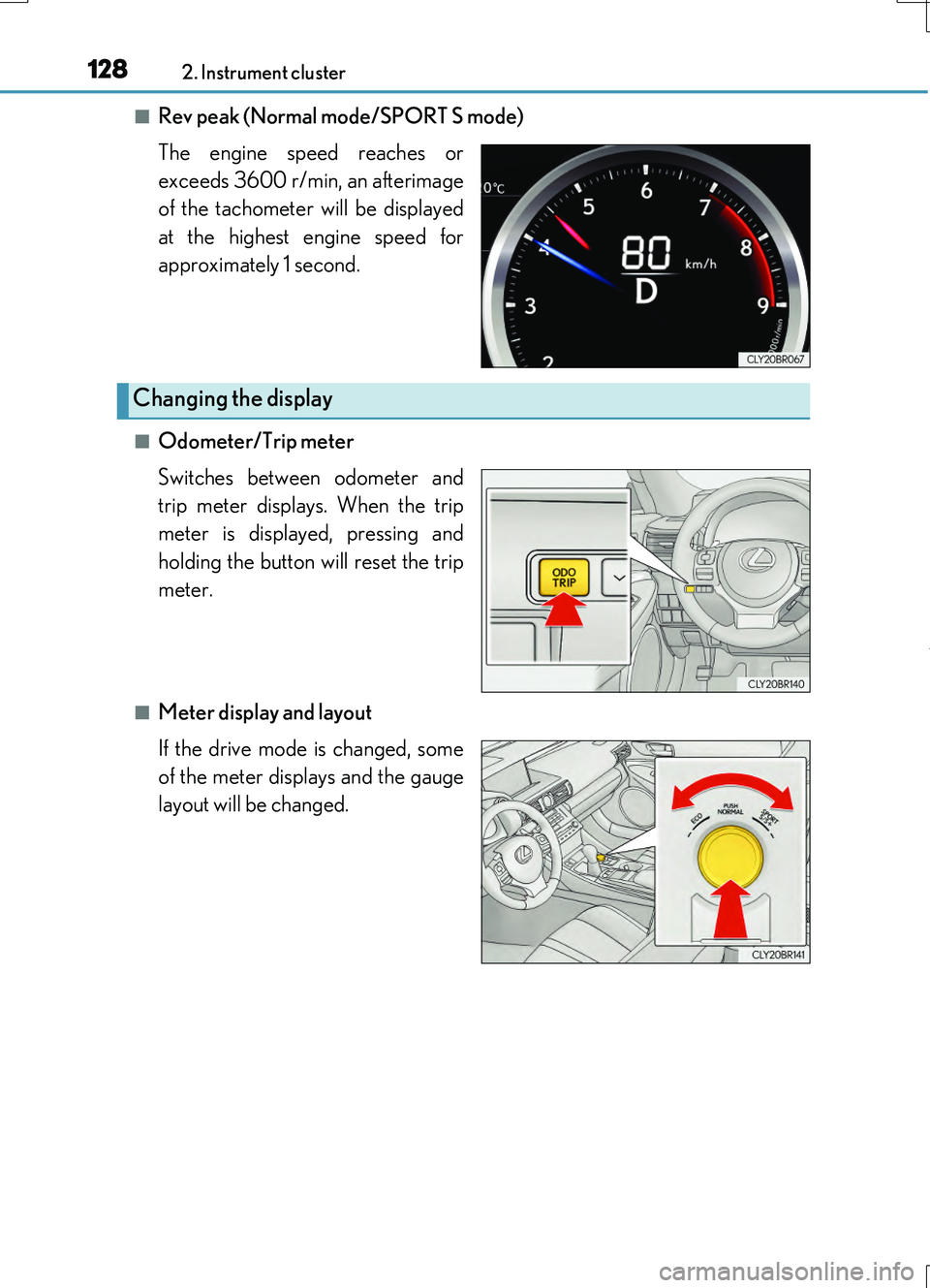
■Rev peak (Normal mode/SPORT S mode)
The engine speed reaches or
exceeds 3600 r/min, an afterimage
of the tachometer will be displayed
at the highest engine speed for
approximately 1 second.
■Odometer/Trip meter
Switches between odometer and
trip meter displays. When the trip
meter is displayed, pressing and
holding the button will reset the trip
meter.
■Meter display and layout
If the drive mode is changed, some
of the meter displays and the gauge
layout will be changed.
Changing the display
Page 133 of 724
1332. Instrument cluster
2
Instrument cluster
RC200t_RC F_EE(OM24728E)
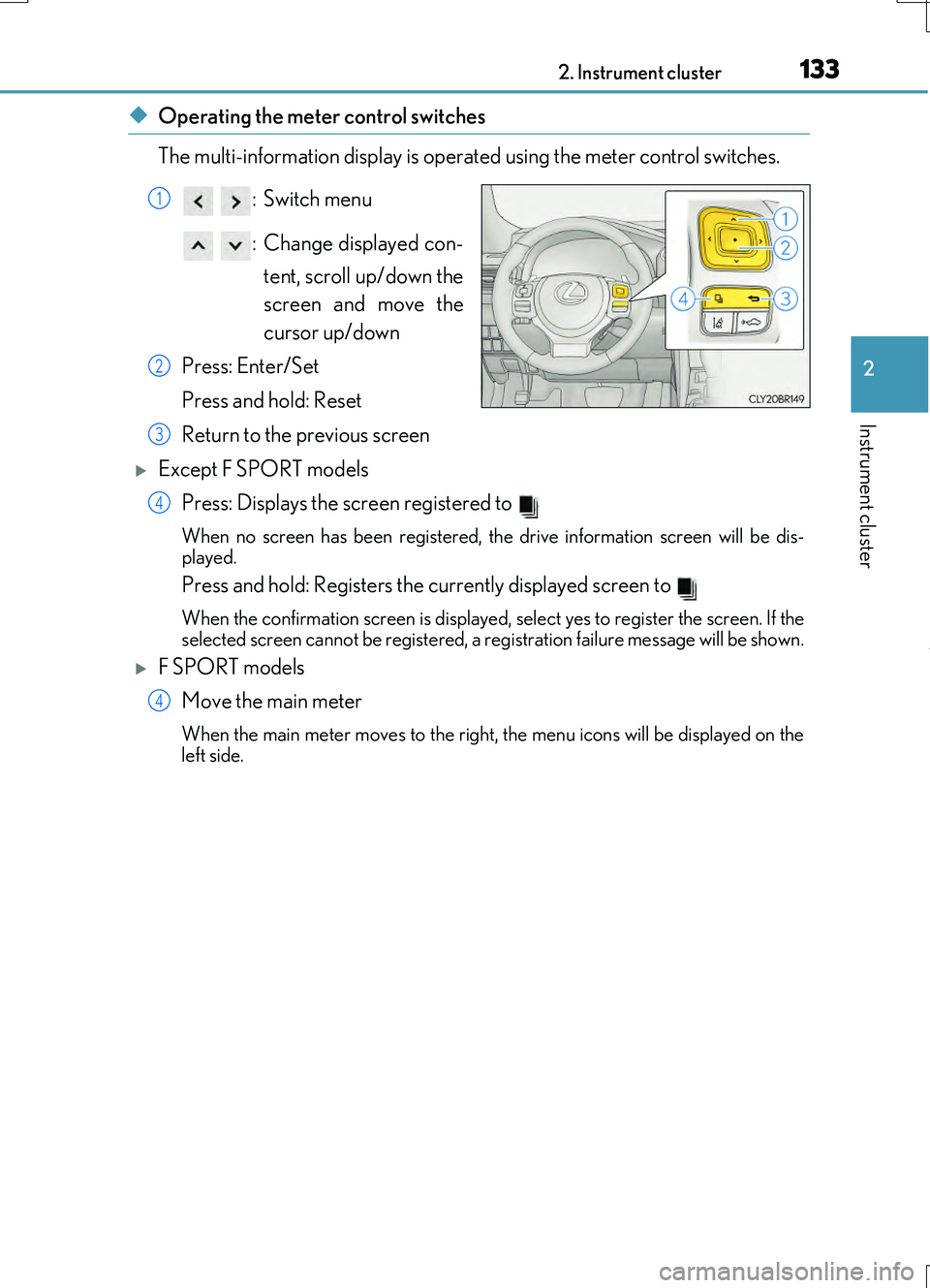
◆Operating the meter control switches
The multi-information display is operated using the meter control switches.
:Switch menu
: Change displayed con- tent, scroll up/down the
screen and move the
cursor up/down
Press: Enter/Set
Press and hold: Reset
Return to the previous screen
Except F SPORT models Press: Displays the screen registered to
When no screen has been registered, the drive information screen will be dis-
played.
Press and hold: Registers the currently displayed screen to
When the confirmation screen is displayed, select yes to register the screen. If the
selected screen cannot be registered, a re gistration failure message will be shown.
F SPORT models
Move the main meter
When the main meter moves to the right, the menu icons will be displayed on the
left side.
1
2
3
4
4
Page 134 of 724
1342. Instrument cluster
RC200t_RC F_EE(OM24728E)
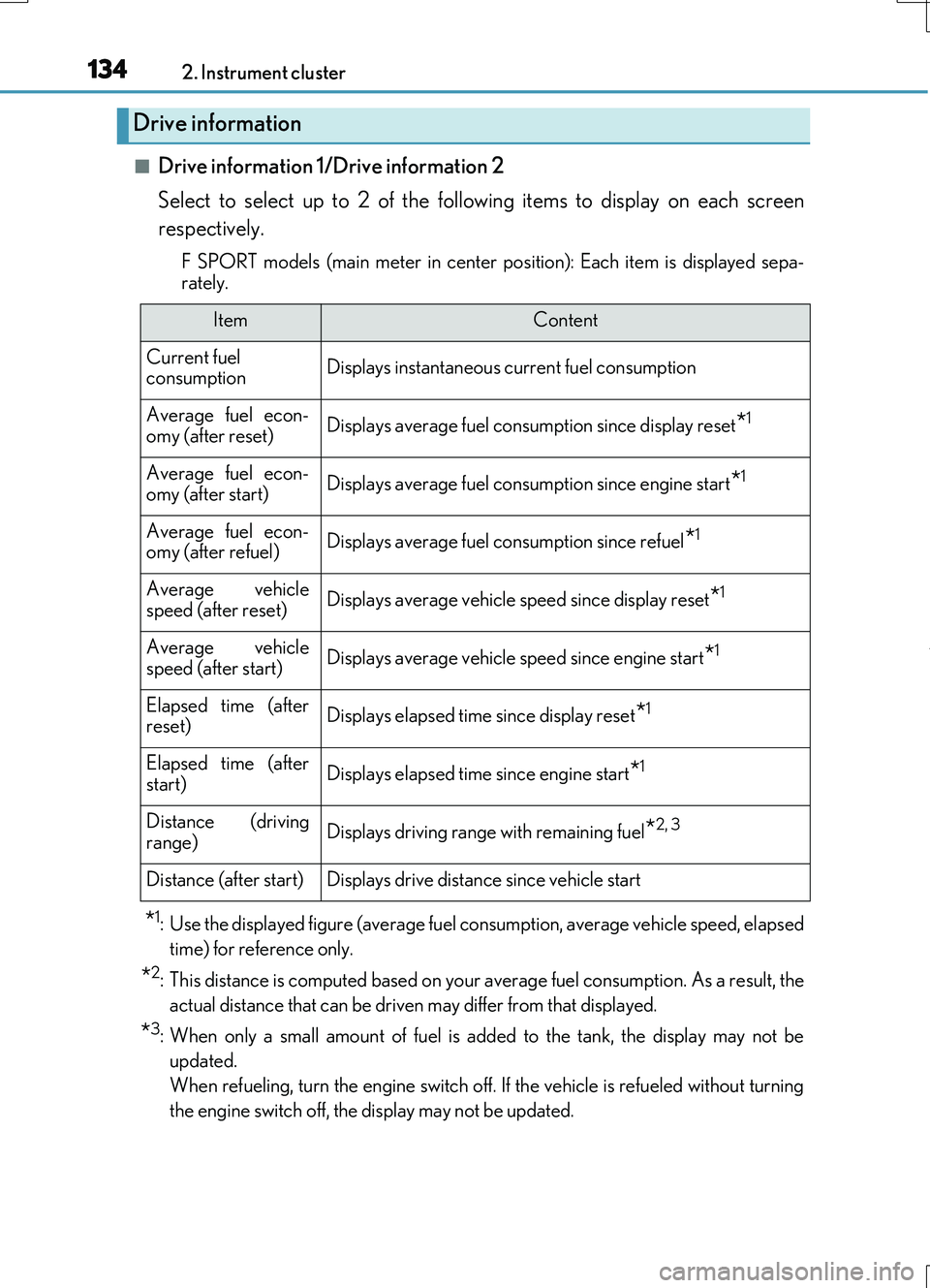
■Drive information 1/Drive information 2
Select to select up to 2 of the following items to display on each screen
respectively.
F SPORT models (main meter in center po sition): Each item is displayed sepa-
rately.
*1: Use the displayed figure (average fuel consumption, average vehicle speed, elapsed
time) for reference only.
*2: This distance is computed based on your average fuel consumption. As a result, the
actual distance that can be driven may differ from that displayed.
*3: When only a small amount of fuel is added to the tank, the display may not be
updated.
When refueling, turn the engine switch off. If the vehicle is refueled without turning
the engine switch off, the display may not be updated.
Drive information
ItemContent
Current fuel consumptionDisplays instantaneous current fuel consumption
Average fuel econ-omy (after reset)Displays average fuel consumption since display reset*1
Average fuel econ-
omy (after start)Displays average fuel cons umption since engine start*1
Average fuel econ- omy (after refuel)Displays average fuel consumption since refuel*1
Average vehiclespeed (after reset)Displays average vehicle speed since display reset*1
Average vehicle
speed (after start)Displays average vehicle speed since engine start*1
Elapsed time (after reset)Displays elapsed time since display reset*1
Elapsed time (afterstart)Displays elapsed time since engine start*1
Distance (driving
range)Displays driving range with remaining fuel*2, 3
Distance (after start)Displays drive distance since vehicle start