steering LEXUS RC300 2016 User Guide
[x] Cancel search | Manufacturer: LEXUS, Model Year: 2016, Model line: RC300, Model: LEXUS RC300 2016Pages: 700, PDF Size: 14.12 MB
Page 49 of 700
491-1. For safe use
1
For safety and security
RC350_RC300_RC200t_RC F_U (OM24671U)
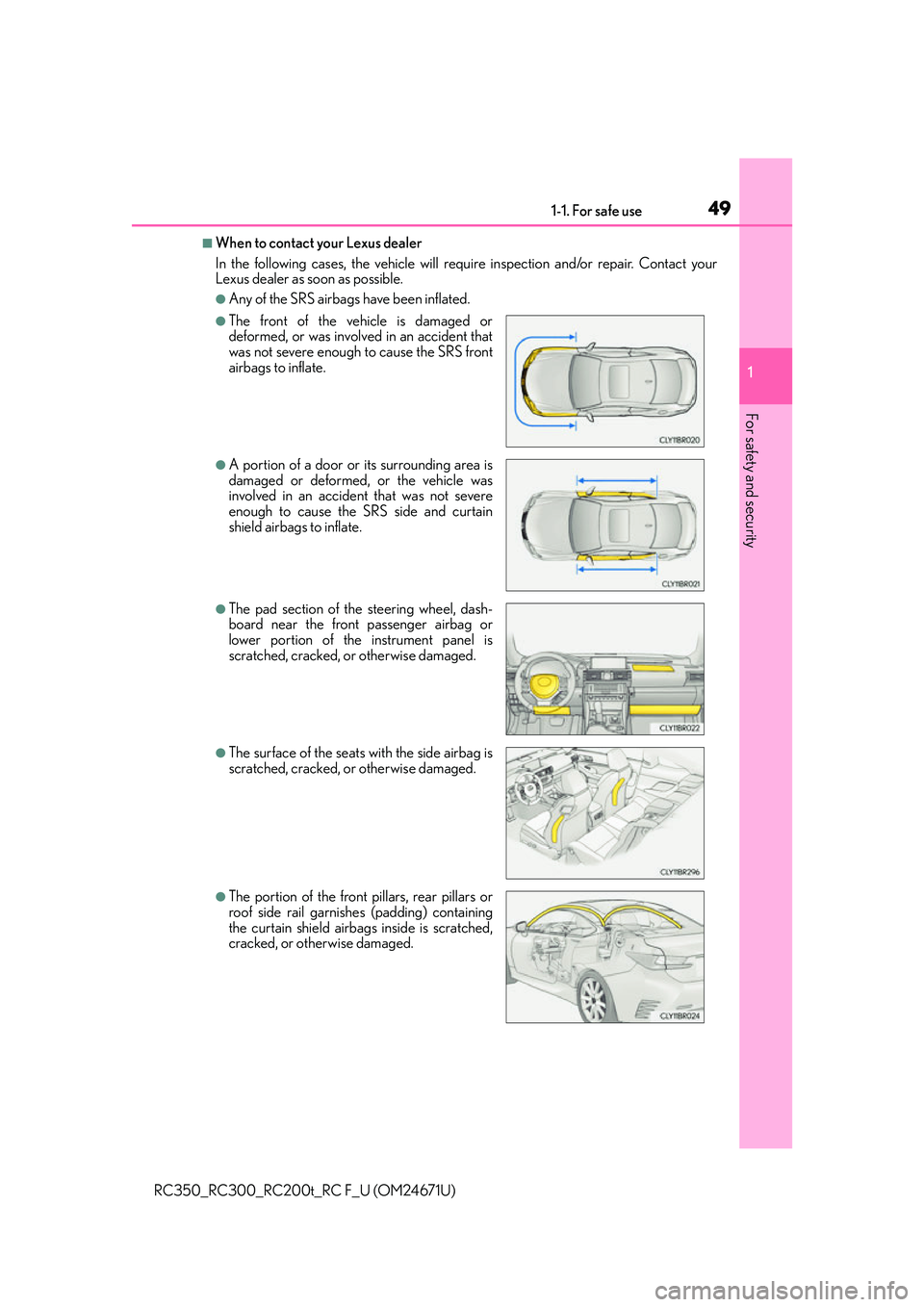
■When to contact your Lexus dealer
In the following cases, the vehicle will require inspection and/or repair. Contact your
Lexus dealer as soon as possible.
●Any of the SRS airbags have been inflated.
●The front of the vehicle is damaged or
deformed, or was involv ed in an accident that
was not severe enough to cause the SRS front
airbags to inflate.
●A portion of a door or its surrounding area is
damaged or deformed, or the vehicle was
involved in an accident that was not severe
enough to cause the SRS side and curtain
shield airbags to inflate.
●The pad section of the steering wheel, dash-
board near the front passenger airbag or
lower portion of the instrument panel is
scratched, cracked, or otherwise damaged.
●The surface of the seats with the side airbag is
scratched, cracked, or otherwise damaged.
●The portion of the front pillars, rear pillars or
roof side rail garnishes (padding) containing
the curtain shield airbag s inside is scratched,
cracked, or otherwise damaged.
Page 86 of 700
862. Instrument cluster
RC350_RC300_RC200t_RC F_U (OM24671U)
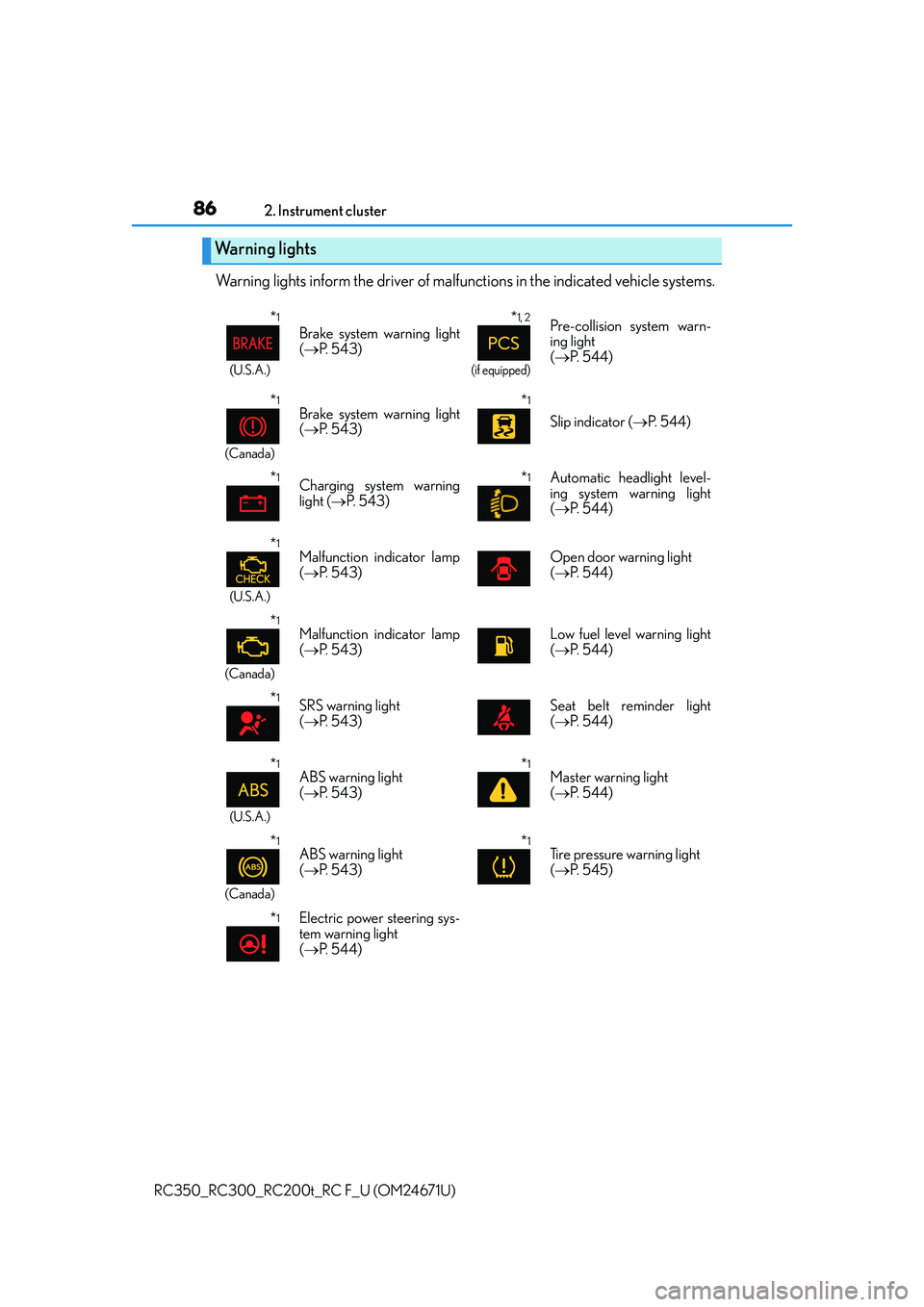
Warning lights inform the driver of malfun ctions in the indicated vehicle systems.
Warning lights
*1
(U.S.A.)
Brake system warning light
( P. 5 4 3 )
*1, 2
(if equipped)
Pre-collision system warn-
ing light
( P. 5 4 4 )
*1
(Canada)
Brake system warning light
( P. 5 4 3 )*1
Slip indicator ( P. 544)
*1Charging system warning
light ( P. 5 4 3 )*1 Automatic headlight level-
ing system warning light
( P. 5 4 4 )
*1
(U.S.A.)
Malfunction indicator lamp
( P. 5 4 3 )Open door warning light
( P. 5 4 4 )
*1
(Canada)
Malfunction indicator lamp
( P. 5 4 3 )Low fuel level warning light
( P. 5 4 4 )
*1SRS warning light
( P. 5 4 3 )Seat belt reminder light
( P. 5 4 4 )
*1
(U.S.A.)
ABS warning light
( P. 5 4 3 )*1Master warning light
( P. 5 4 4 )
*1
(Canada)
ABS warning light
( P. 5 4 3 )*1Tire pressure warning light
( P. 545)
*1Electric power steering sys-
tem warning light
( P. 5 4 4 )
Page 120 of 700
1202. Instrument cluster
RC350_RC300_RC200t_RC F_U (OM24671U)
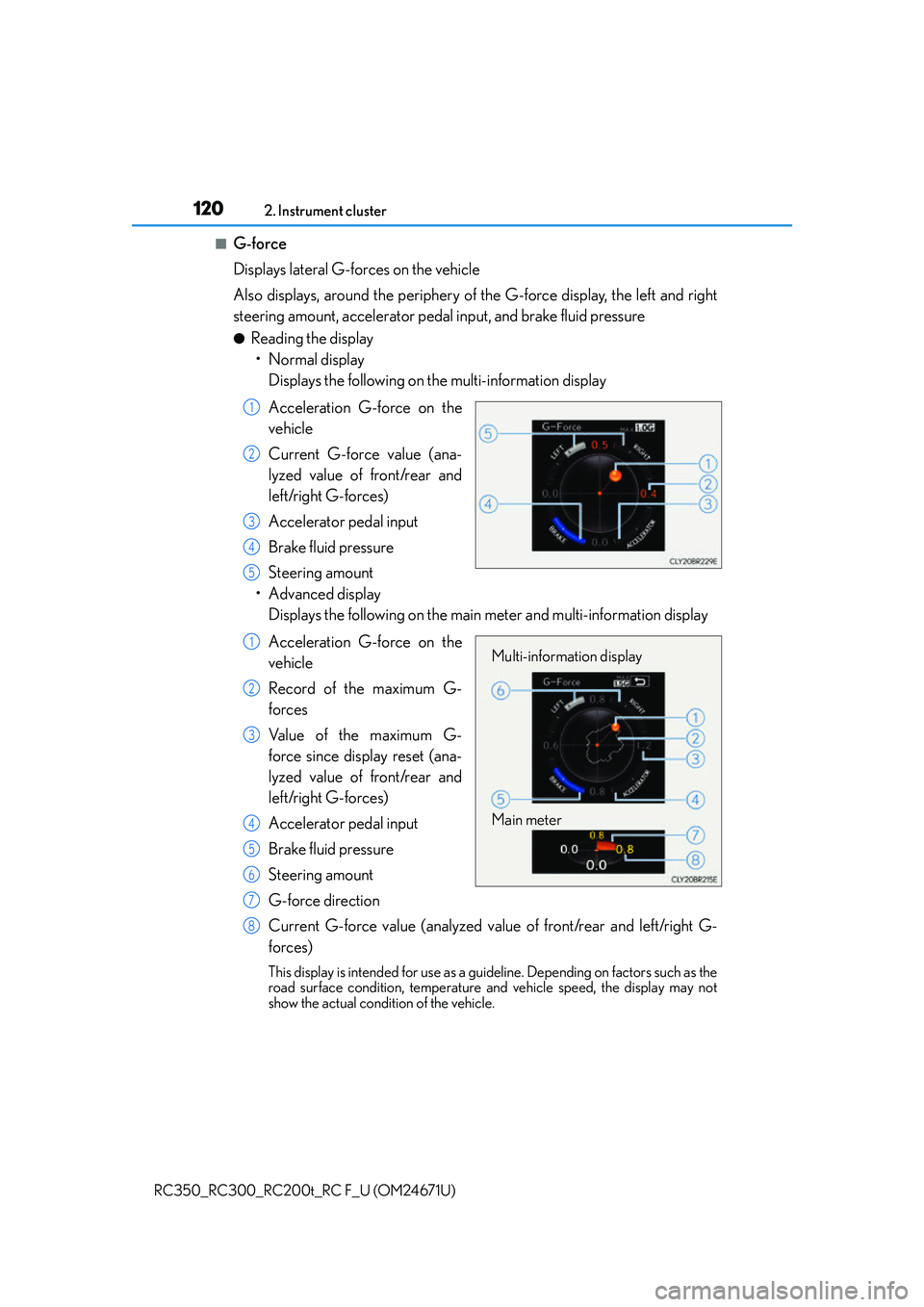
■G-force
Displays lateral G-forces on the vehicle
Also displays, around the periphery of the G-force display, the left and right
steering amount, accelerator pedal input, and brake fluid pressure
●Reading the display • Normal display Displays the following on the multi-information display
Acceleration G-force on the
vehicle
Current G-force value (ana-
lyzed value of front/rear and
left/right G-forces)
Accelerator pedal input
Brake fluid pressure
Steering amount
• Advanced display Displays the following on the main meter and multi-information display
Acceleration G-force on the
vehicle
Record of the maximum G-
forces
Value of the maximum G-
force since display reset (ana-
lyzed value of front/rear and
left/right G-forces)
Accelerator pedal input
Brake fluid pressure
Steering amount
G-force direction
Current G-force value (analyzed value of front/rear and left/right G-
forces)
This display is intended fo r use as a guideline. Depending on factors such as the
road surface condition, temperature and vehicle speed, the display may not
show the actual condition of the vehicle.
1
2
3
4
5
Multi-information display
Main meter1
2
3
4
5
6
7
8
Page 123 of 700
1232. Instrument cluster
2
Instrument cluster
RC350_RC300_RC200t_RC F_U (OM24671U)
■Speed indicator
Select to set the speed indicator on/off.
When set to on, proceed to set the vehicle speed at which the speed indicator
will be displayed.
Selectable speed range:
30 mph to 100 mph (50 km/h to 160 km/h)
*
*
: Always observe the legal speed limit when driving on public roads.
■Rear wing
Select to enable/disable the active rear wing.
■SPORT gauges
The SPORT S or SPORT S+ mode meter display can be selected and set as
the customized display for either SPORT S or SPORT S+ mode.
■Initialization
Select to reset the meter display settings. ( P. 6 5 2 )
■Start-up display
When the engine is started, the name of the vehicle is displayed on the multi-information
display.
While the start-up display is being displaye d, the meter display cannot be changed even
if the drive mode is changed. When the start-up display is finished, the meter display for
the currently selected mode will be displayed.
■Torque distribution display (if equipped)
Torque distribution may not be displayed correctly in some cases, such as when the vehi-
cle passes over road expansion joints.
■G-force display
●The G-force values may not be zero even when the vehicle is parked, such as when it is
parked on an incline.
●The steering amount, accelerator pedal input, and brake fluid pressure displays are dis-
abled until the engine has warmed up (the variable red zone of the tachometer has
retracted to 7300 rpm).
After the engine has warmed up, these displays will be enabled.
●Depending on the vehicle usage conditions, the brake fluid pressure display may not
reach its maximum reading even though the brake pedal is fully depressed.
●If a battery terminal is disconnected and reconnected, the steering amount display may
be disabled temporarily. After driving the vehi cle for a while, the display will be enabled.
Page 131 of 700
131
Operation of
each component
3
RC350_RC300_RC200t_RC F_U (OM24671U)
3-1. Key information
Keys .................................................. 132
3-2. Opening, closing and locking the doors and trunk
Doors ................................................ 137
Trunk ................................................. 143
Smart access system with push-button start...................... 148
3-3. Adjusting the seats Front seats ...................................... 155
Rear seats ....................................... 158
Driving position memory ......... 160
Head restraints ............................ 164
3-4. Adjusting the steering wheel and mirrors
Steering wheel .............................. 167
Inside rear view mirror...............169
Outside rear view mirrors ............................................ 171
3-5. Opening, closing the windows and moon roof
Power windows ............................. 174
Moon roof .......................................178
Page 160 of 700
1603-3. Adjusting the seats
RC350_RC300_RC200t_RC F_U (OM24671U)
Your preferred driving position (the posi tion of the driver's seat, steering wheel
and outside rear view mirrors) can be recorded and recalled by pressing a but-
ton.
Three different driving positions can be recorded into memory.
■Recording procedure
Check that the shift lever is in P.
Turn the engine switch to IGNITION ON mode.
Adjust the driver’s seat, steering wheel, and outside rear view mirrors to the
desired positions.
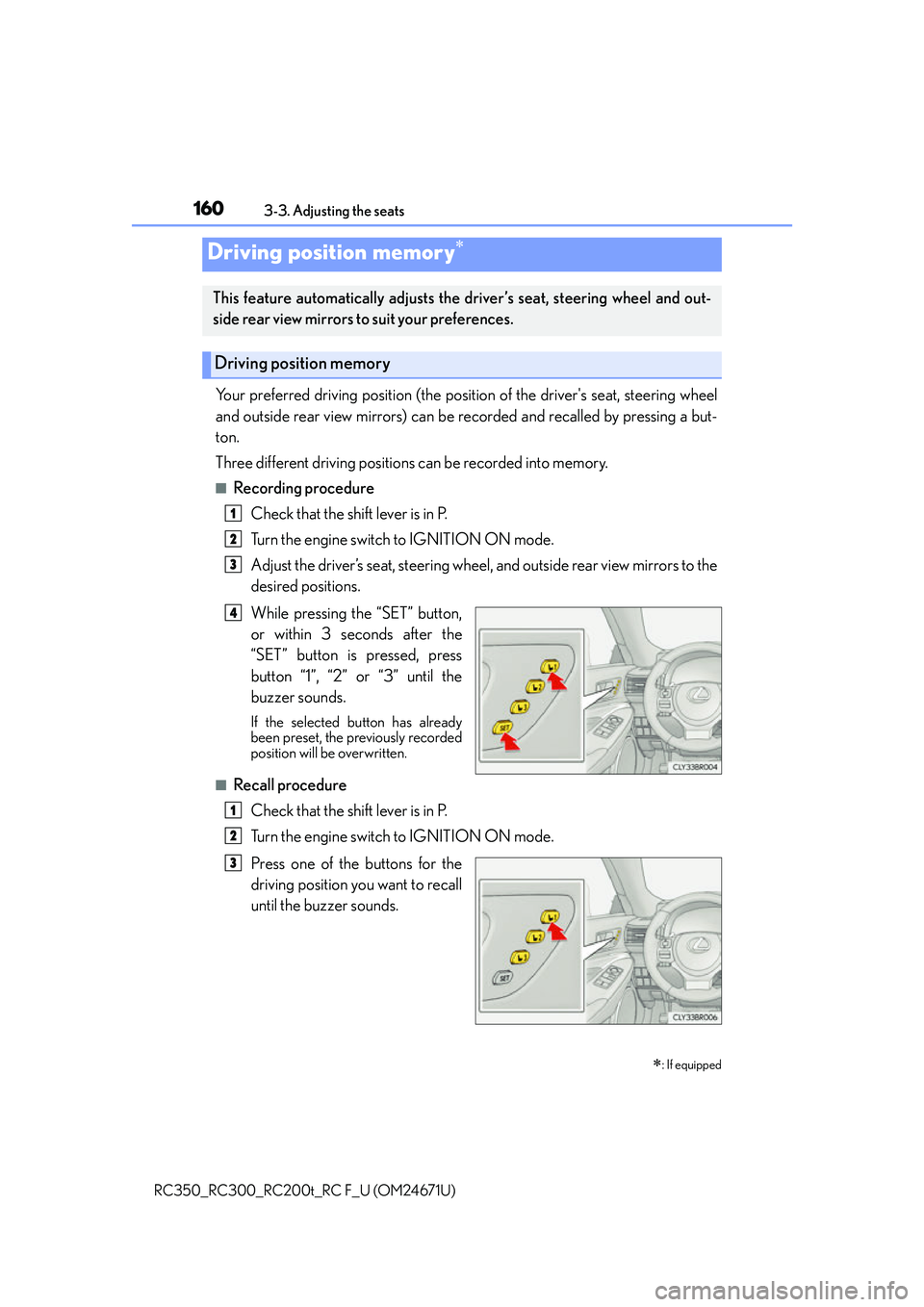
While pressing the “SET” button,
or within 3 seconds after the
“SET” button is pressed, press
button “1”, “2” or “3” until the
buzzer sounds.
If the selected button has already
been preset, the previously recorded
position will be overwritten.
■Recall procedure
Check that the shift lever is in P.
Turn the engine switch to IGNITION ON mode.
Press one of the buttons for the
driving position you want to recall
until the buzzer sounds.
Driving position memory
: If equipped
This feature automatically adjusts the driver’s seat, steering wheel and out-
side rear view mirrors to suit your preferences.
Driving position memory
1
2
3
4
1
2
3
Page 161 of 700
1613-3. Adjusting the seats
3
Operation of each component
RC350_RC300_RC200t_RC F_U (OM24671U)
■To stop the position recall operation part-way through
Perform any of the following:
●Press the “SET” button.
●Press button “1”, “2” or “3”.
●Operate any of the seat adjustment switches (only cancels seat position recall).
●Operate the tilt and telescopic steering co ntrol switch (only cancels steering wheel
position recall).
■Seat positions that can be memorized ( P. 1 5 5 )
The adjusted positions other than the position adjusted by lumbar support switch can be
recorded.
■Operating the driving position memory after turning the engine switch off
Recorded seat positions can be activated up to 180 seconds after the driver's door is
opened and another 60 seconds after it is closed again.
■In order to correctly use the dr iving position memory function
If a seat position is already in the furthest po ssible position and the seat is operated in the
same direction, the recorded position may be slightly different when it is recalled.
Page 162 of 700
1623-3. Adjusting the seats
RC350_RC300_RC200t_RC F_U (OM24671U)
Each electronic key (including a card key) can be registered to recall your pre-
ferred driving position.
■Registering procedure
Record your driving position to button “1”, “2” or “3” before performing the
following:
Carry only the key you want to register, and then close the driver’s door.
If 2 or more keys are in the vehicle, the driving position cannot be recorded
properly.
Check that the shift lever is in P.
Turn the engine switch to IGNITION ON mode.
Recall the driving position that you want to record.
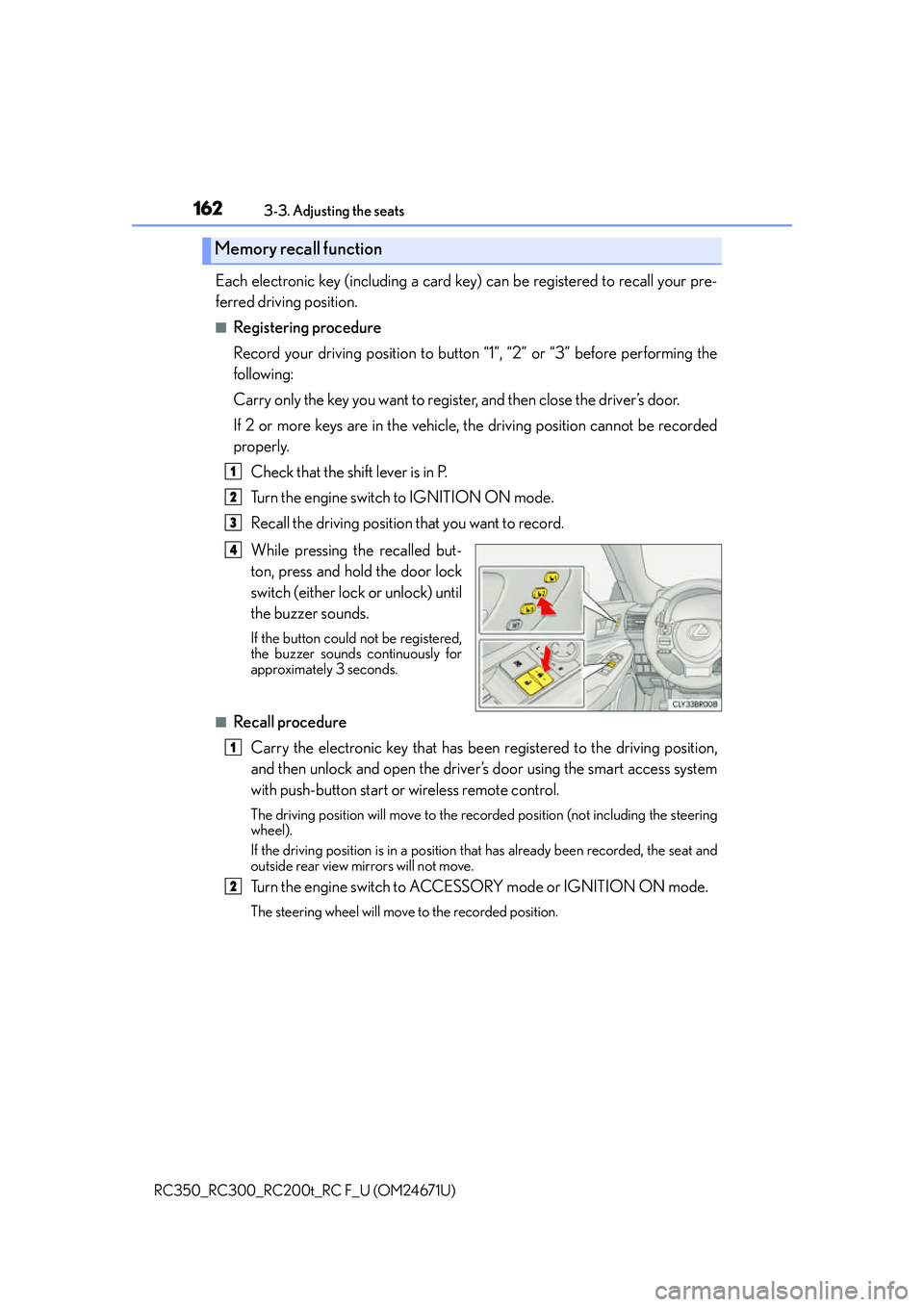
While pressing the recalled but-
ton, press and hold the door lock
switch (either lock or unlock) until
the buzzer sounds.
If the button could not be registered,
the buzzer sounds continuously for
approximately 3 seconds.
■Recall procedureCarry the electronic key that has been registered to the driving position,
and then unlock and open the driver’s door using the smart access system
with push-button start or wireless remote control.
The driving position will move to the reco rded position (not including the steering
wheel).
If the driving position is in a position th at has already been recorded, the seat and
outside rear view mirrors will not move.
Turn the engine switch to ACCESS ORY mode or IGNITION ON mode.
The steering wheel will move to the recorded position.
Memory recall function
1
2
3
4
1
2
Page 163 of 700
1633-3. Adjusting the seats
3
Operation of each component
RC350_RC300_RC200t_RC F_U (OM24671U)
■Cancelation procedure
Carry only the key you want to cancel and then close the driver’s door.
If 2 or more keys are in the vehicle, the driving position cannot be canceled
properly.
Turn the engine switch to IGNITION ON mode.
While pressing the “SET” button, press and hold the door lock switch
(either lock or unlock) unt il the buzzer sounds twice.
If the button could not be canceled, the buzzer sounds continuously for approxi-
mately 3 seconds.
■Recalling the driving position using the memory recall function
●Different driving positions can be registered for each electronic key. Therefore, the
driving position that is recalled may be different depending on the key being carried.
●If a door other than the driver’s door is unlocked with the smart access system with
push-button start, the driving position cannot be recalled. In this case, press the driving
position button which has been set.
■Customization
The unlock door settings of the memory recall function can be changed.
(Customizable features: P. 6 5 1 )
WA R N I N G
■Seat adjustment caution
Take care during seat adjustment so that th e seat does not strike the rear passenger or
squeeze your body against the steering wheel.
1
2
Page 167 of 700
167
3
Operation of each component
RC350_RC300_RC200t_RC F_U (OM24671U)3-4. Adjusting the steering wheel and mirrors
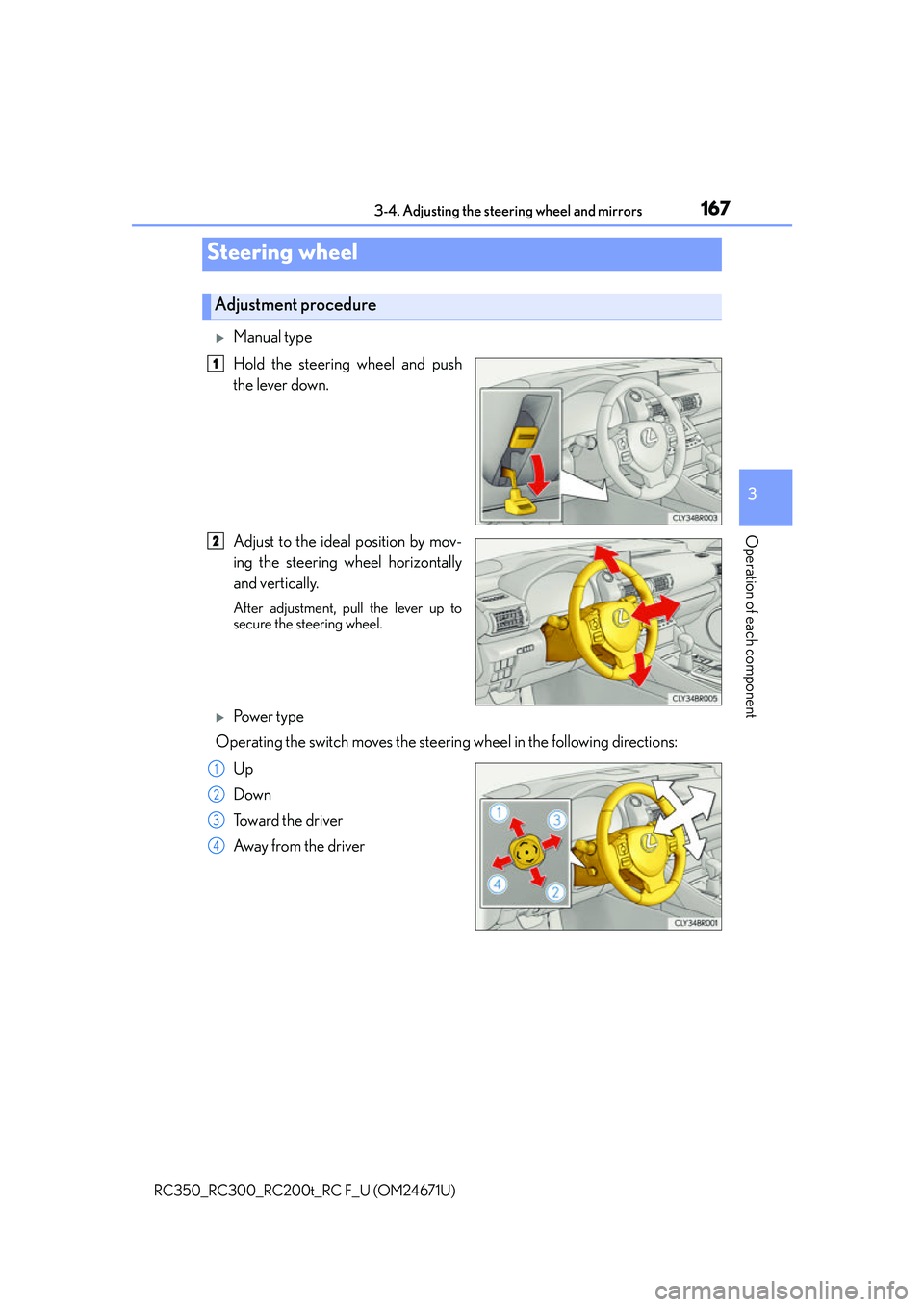
Manual type
Hold the steering wheel and push
the lever down.
Adjust to the ideal position by mov-
ing the steering wheel horizontally
and vertically.
After adjustment, pull the lever up to
secure the steering wheel.
Po w e r t y p e
Operating the switch moves the steering wheel in the following directions:
Up
Down
Toward the driver
Away from the driver
Steering wheel
Adjustment procedure
1
2
1
2
3
4