air conditioning LEXUS RC300 2017 User Guide
[x] Cancel search | Manufacturer: LEXUS, Model Year: 2017, Model line: RC300, Model: LEXUS RC300 2017Pages: 724, PDF Size: 15.76 MB
Page 429 of 724
4295-12. Other function
5
Lexus Display Audio system
■Microphone
→P. 398
■When using the microphone
●It is unnecessary to speak directly into the microphone when giving a command.
●Wait for the confirmation beep before speaking a command.
●Voice commands may not be recognized if:
• Spoken too quickly.
• Spoken at a low or high volume.
• The roof or windows are open.
• Passengers are talking while voice commands are spoken.
• The air conditioning speed is set high.
• The air conditioning vents are turned towards the microphone.
●In the following conditions, the system ma y not recognize the command properly and
using voice commands may not be possible:
• The command is incorrect or unclear. No te that certain words, accents or speech
patterns may be difficult for the system to recognize.
• There is excessive background noise, such as wind noise.
■When searching for a track
●A USB memory or iPod must be connected to enable track searching and playback.
( → P. 347)
●When a USB memory or iPod is connected, recognition data is created so tracks can
be searched using voice commands.
●Recognition data is updated un der the following conditions:
• When the USB memory or iPod data has changed.
• When the voice recognition language is changed. ( →P. 350)
●While the recognition data is being created or being updated, a track search cannot be
performed using a voice command.
■The Gracenote® media database
→ P. 373
Due to natural language speech recognit ion technology, this system enables rec-
ognition of a command when spoken na turally. However, the system cannot rec-
ognize every variation of each command.
In some situations, it is possible to omit the command for the procedure and
directly state the desired operation.
This function is available in English, Spanish and French.
Casual speech recognition
Page 433 of 724

433
Interior features6
6-1. Using the air conditioning system
Automatic air conditioning system ..........................................434
Heated steering wheel/ seat heaters/
seat ventilators .........................445
6-2. Using the interior lights Interior lights list......................... 448• Interior lights ..........................449
• Personal lights ...................... 450
6-3. Using the storage features List of storage features.............. 451• Glove box ...............................452
• Console box ...........................452
• Cup holders............................453
Trunk features..............................454 6-4. Using the other interior
features
Other interior features ............455 • Sun visors ................................455
• Vanity mirrors .......................455
• Clock ........................................ 456
• Power outlet........................... 456
• Armrest .................................... 457
•Trunk storage extension .................................458
• Assist grips.............................. 459
• Coat hooks ............................. 459
Garage door opener ...............460
Compass .......................................468
LEXUS Enform Safety Connect ...................................... 472
LEXUS Enform Remote ......... 477
LEXUS Enform Service Connect ...................................... 478
Page 434 of 724
4346-1. Using the air conditioning system
Automatic air conditioning system
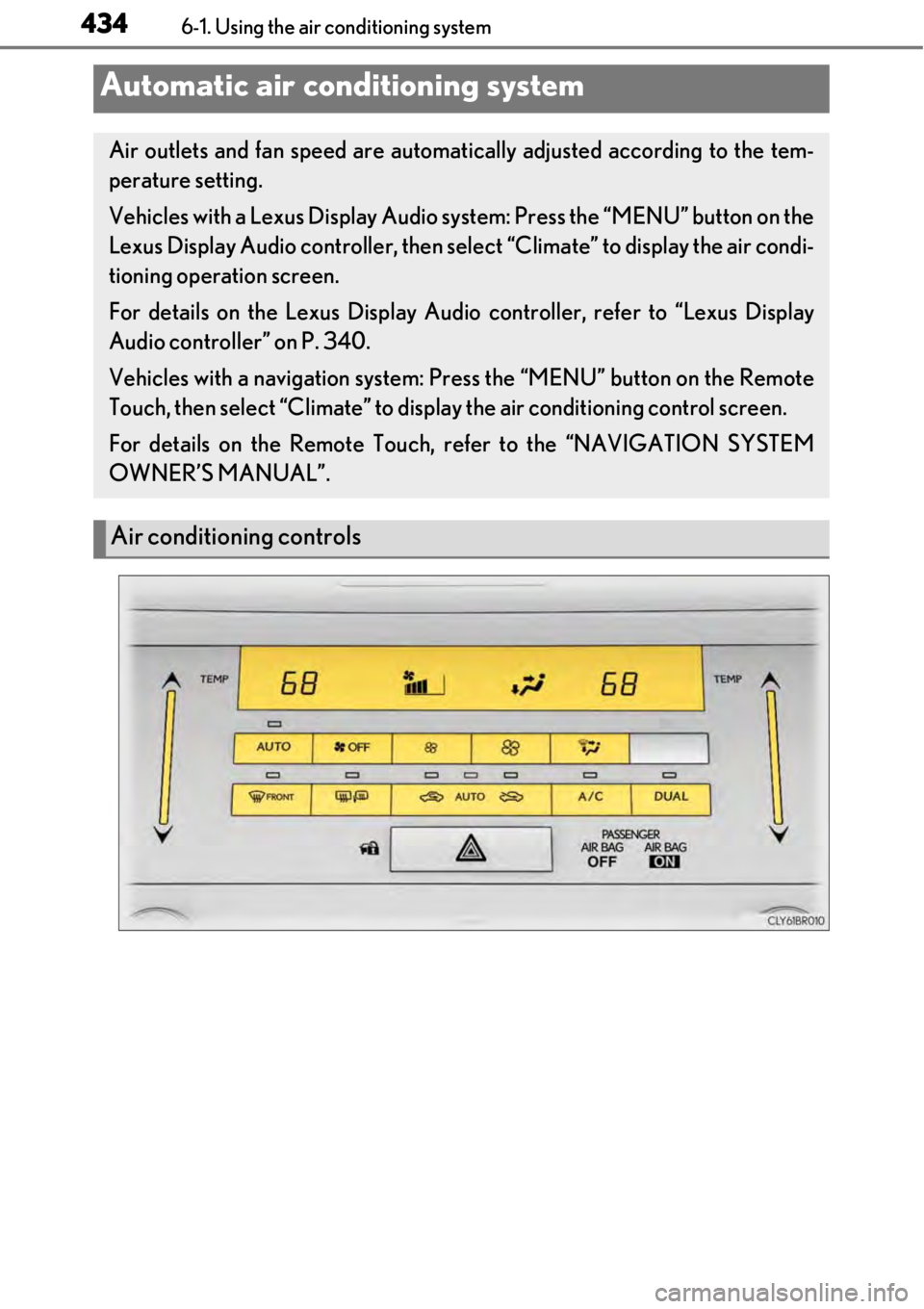
Air outlets and fan speed are automatically adjusted according to the tem-
perature setting.
Vehicles with a Lexus Display Audio sy stem: Press the “MENU” button on the
Lexus Display Audio controller, then sele ct “Climate” to display the air condi-
tioning operation screen.
For details on the Lexus Display Audio controller, refer to “Lexus Display
Audio controller” on P. 340.
Vehicles with a navigation system: Press the “MENU” button on the Remote
Touch, then select “Climate” to displa y the air conditioning control screen.
For details on the Remote Touch, refer to the “NAVIGATION SYSTEM
OWNER’S MANUAL”.
Air conditioning controls
Page 435 of 724
4356-1. Using the air conditioning system
6
Interior features
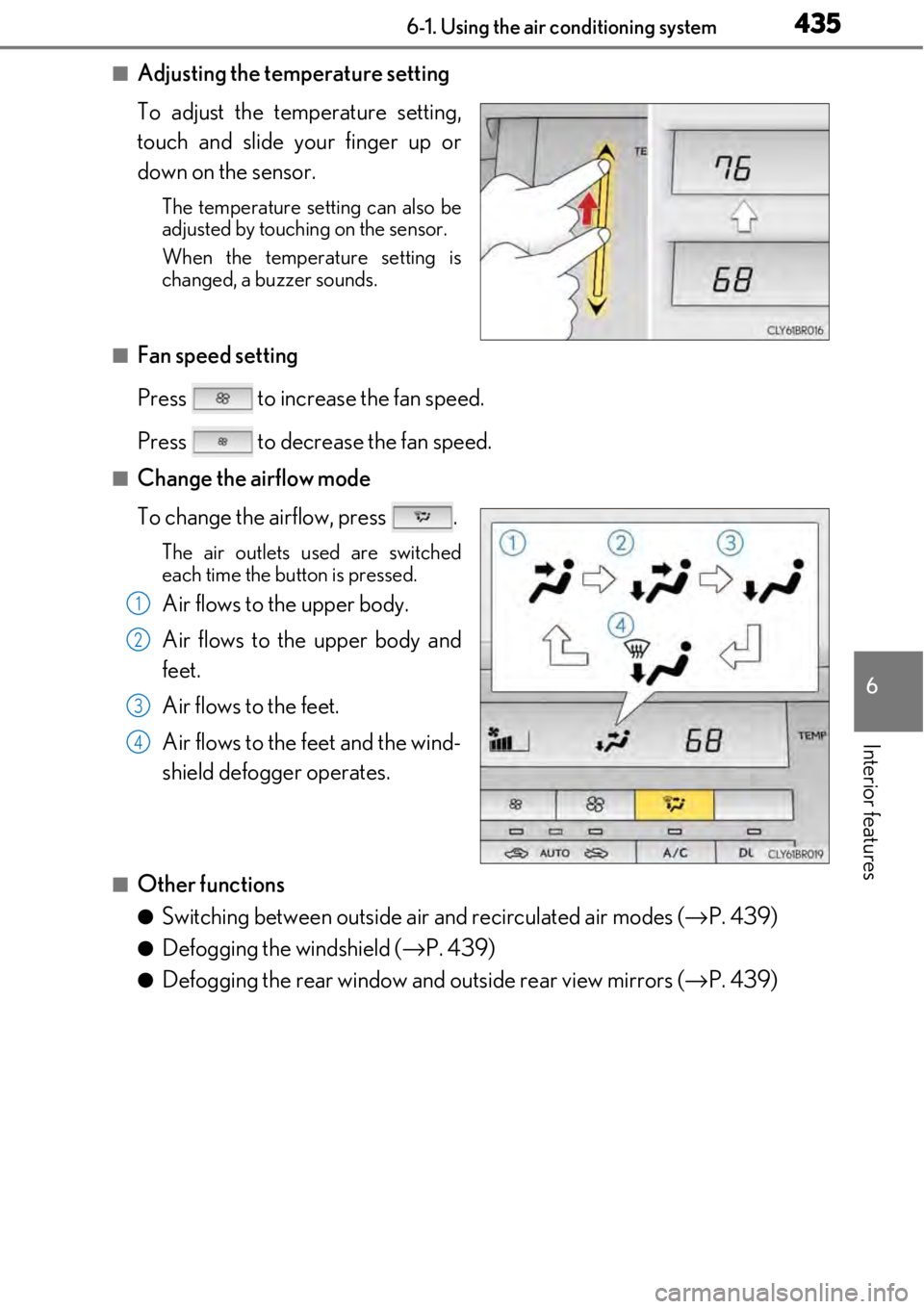
■Adjusting the temperature setting
To adjust the temperature setting,
touch and slide your finger up or
down on the sensor.
The temperature setting can also be
adjusted by touching on the sensor.
When the temperature setting is
changed, a buzzer sounds.
■Fan speed setting
Press to increase the fan speed.
Press to decrease the fan speed.
■Change the airflow mode
To change the airflow, press .
The air outlets used are switched
each time the button is pressed.
Air flows to the upper body.
Air flows to the upper body and
feet.
Air flows to the feet.
Air flows to the feet and the wind-
shield defogger operates.
■Other functions
●Switching between outside air and recirculated air modes (→P. 439)
●Defogging the windshield ( →P. 439)
●Defogging the rear window and outside rear view mirrors ( →P. 439)
1
2
3
4
Page 436 of 724
4366-1. Using the air conditioning system
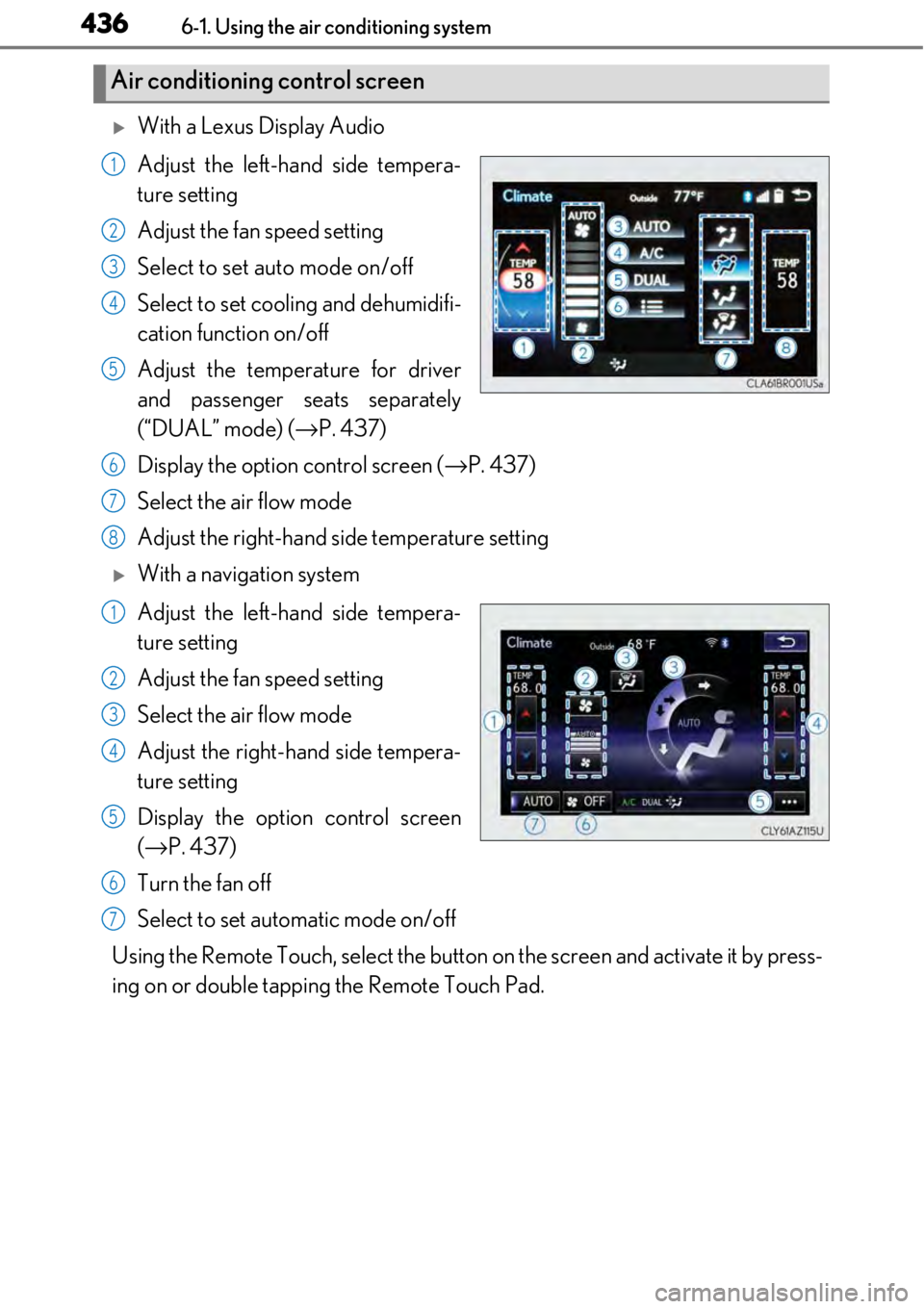
With a Lexus Display Audio
Adjust the left-hand side tempera-
ture setting
Adjust the fan speed setting
Select to set auto mode on/off
Select to set cooling and dehumidifi-
cation function on/off
Adjust the temperature for driver
and passenger seats separately
(“DUAL” mode) (→P. 437)
Display the option control screen ( →P. 437)
Select the air flow mode
Adjust the right-hand side temperature setting
With a navigation system
Adjust the left-hand side tempera-
ture setting
Adjust the fan speed setting
Select the air flow mode
Adjust the right-hand side tempera-
ture setting
Display the option control screen
(→ P. 437)
Turn the fan off
Select to set automatic mode on/off
Using the Remote Touch, select the button on the screen and activate it by press-
ing on or double tappin g the Remote Touch Pad.
Air conditioning control screen
1
2
3
4
5
6
7
8
1
2
3
4
5
6
7
Page 437 of 724
4376-1. Using the air conditioning system
6
Interior features
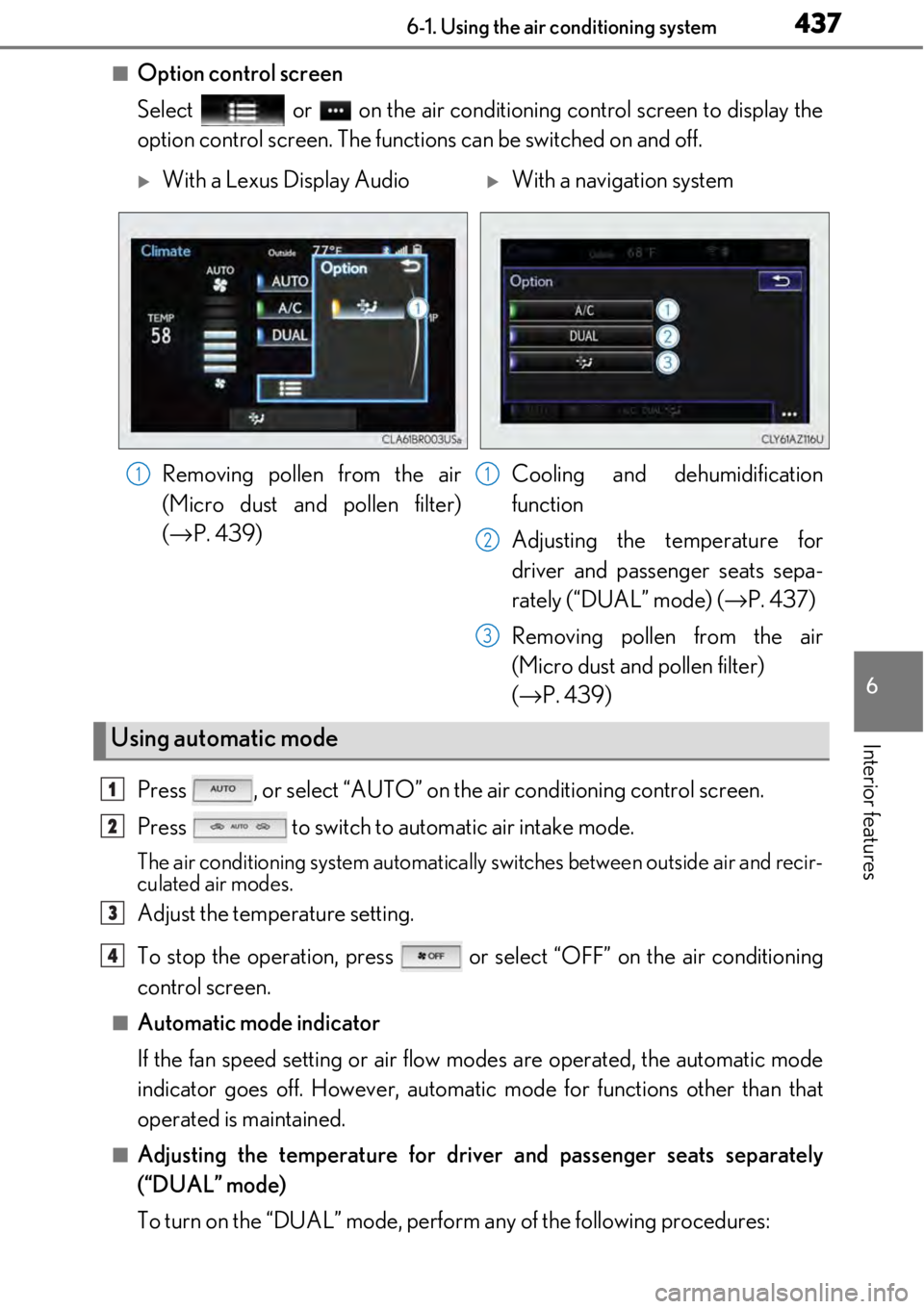
■Option control screen
Select or on the air conditioning control screen to display the
option control screen. The functi ons can be switched on and off.
Press , or select “AUTO” on the air conditioning control screen.
Press to switch to automatic air intake mode.
The air conditioning system automatically switches between outside air and recir-
culated air modes.
Adjust the temperature setting.
To stop the operation, press or select “OFF” on the air conditioning
control screen.
■Automatic mode indicator
If the fan speed setting or air flow modes are operated, the automatic mode
indicator goes off. However, automati c mode for functions other than that
operated is maintained.
■Adjusting the temperature for driv er and passenger seats separately
(“DUAL” mode)
To turn on the “DUAL” mode, perfor m any of the following procedures:
With a Lexus Display AudioWith a navigation system
Removing pollen from the air
(Micro dust an d pollen filter)
(→ P. 439) Cooling and dehumidification
function
Adjusting the te
mperature for
driver and passenger seats sepa-
rately (“DUAL” mode) ( →P. 437)
Removing pollen from the air
(Micro dust and pollen filter)
(→ P. 439)
Using automatic mode
11
2
3
1
2
3
4
Page 438 of 724

4386-1. Using the air conditioning system
●Press .
●Select “DUAL” on the air conditioning control screen.
●Adjust the passenger’s side temperature setting.
The indicator comes on when the “DUAL” mode is on.
While in “DUAL” mode, the temperature of the rear air outlets is set at the right-
hand side temperature setting.
Page 439 of 724
4396-1. Using the air conditioning system
6
Interior features
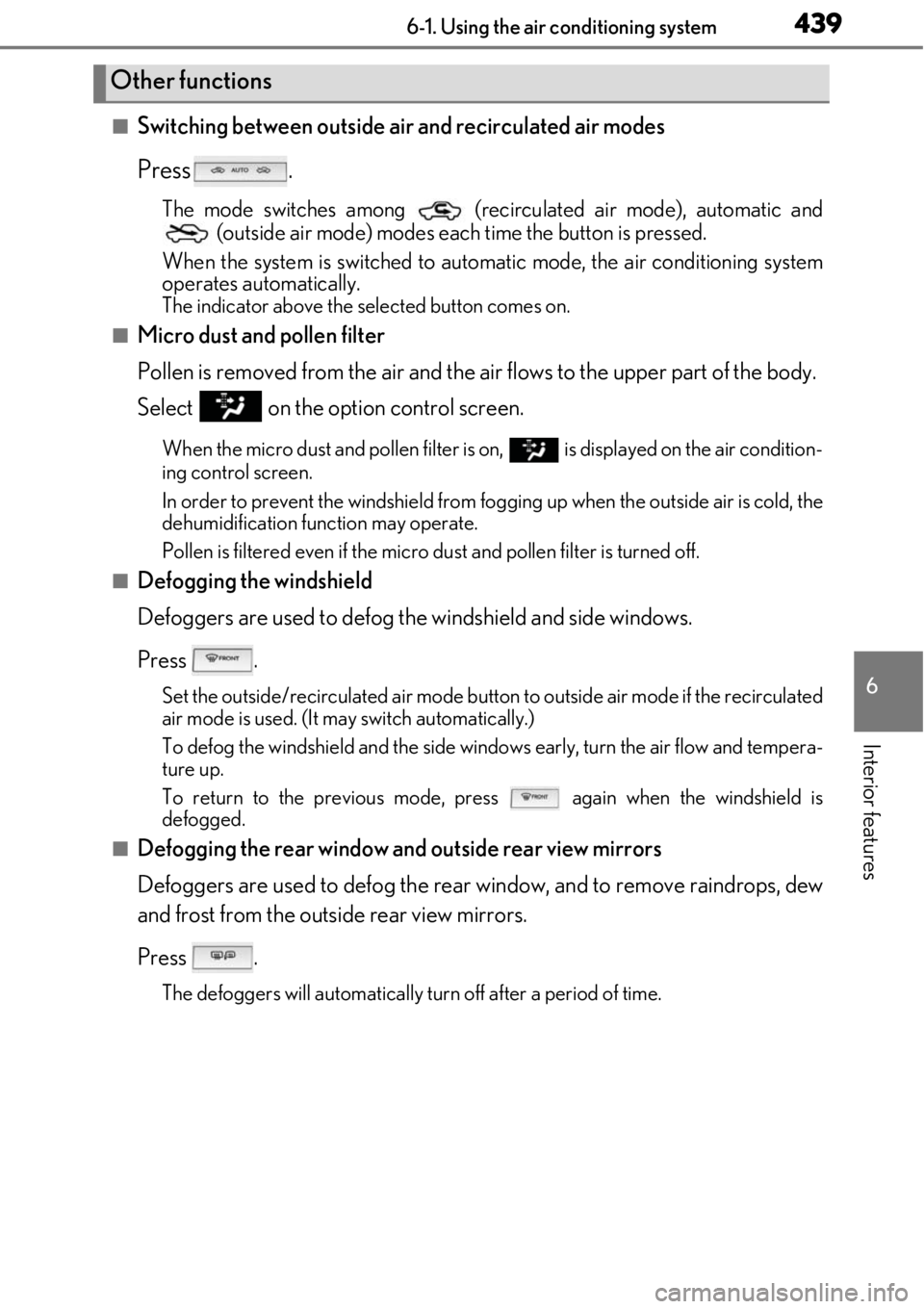
■Switching between outside air and recirculated air modes
Press .
The mode switches among (recirculated air mode), automatic and (outside air mode) modes each time the button is pressed.
When the system is switched to auto matic mode, the air conditioning system
operates automatically.
The indicator above the selected button comes on.
■Micro dust and pollen filter
Pollen is removed from the air and the air flows to the upper part of the body.
Select on the option control screen.
When the micro dust and pollen filter is on, is displayed on the air condition-
ing control screen.
In order to prevent the windshield from fo gging up when the outside air is cold, the
dehumidification function may operate.
Pollen is filtered even if the micro du st and pollen filter is turned off.
■Defogging the windshield
Defoggers are used to defog the windshield and side windows.
Press .
Set the outside/recirculated air mode button to outside air mode if the recirculated
air mode is used. (It may switch automatically.)
To defog the windshield and the side wind ows early, turn the air flow and tempera-
ture up.
To return to the previous mode, press
again when the windshield is
defogged.
■Defogging the rear window and outside rear view mirrors
Defoggers are used to defog the rear window, and to remove raindrops, dew
and frost from the outside rear view mirrors.
Press .
The defoggers will automatically turn off after a period of time.
Other functions
Page 440 of 724
4406-1. Using the air conditioning system
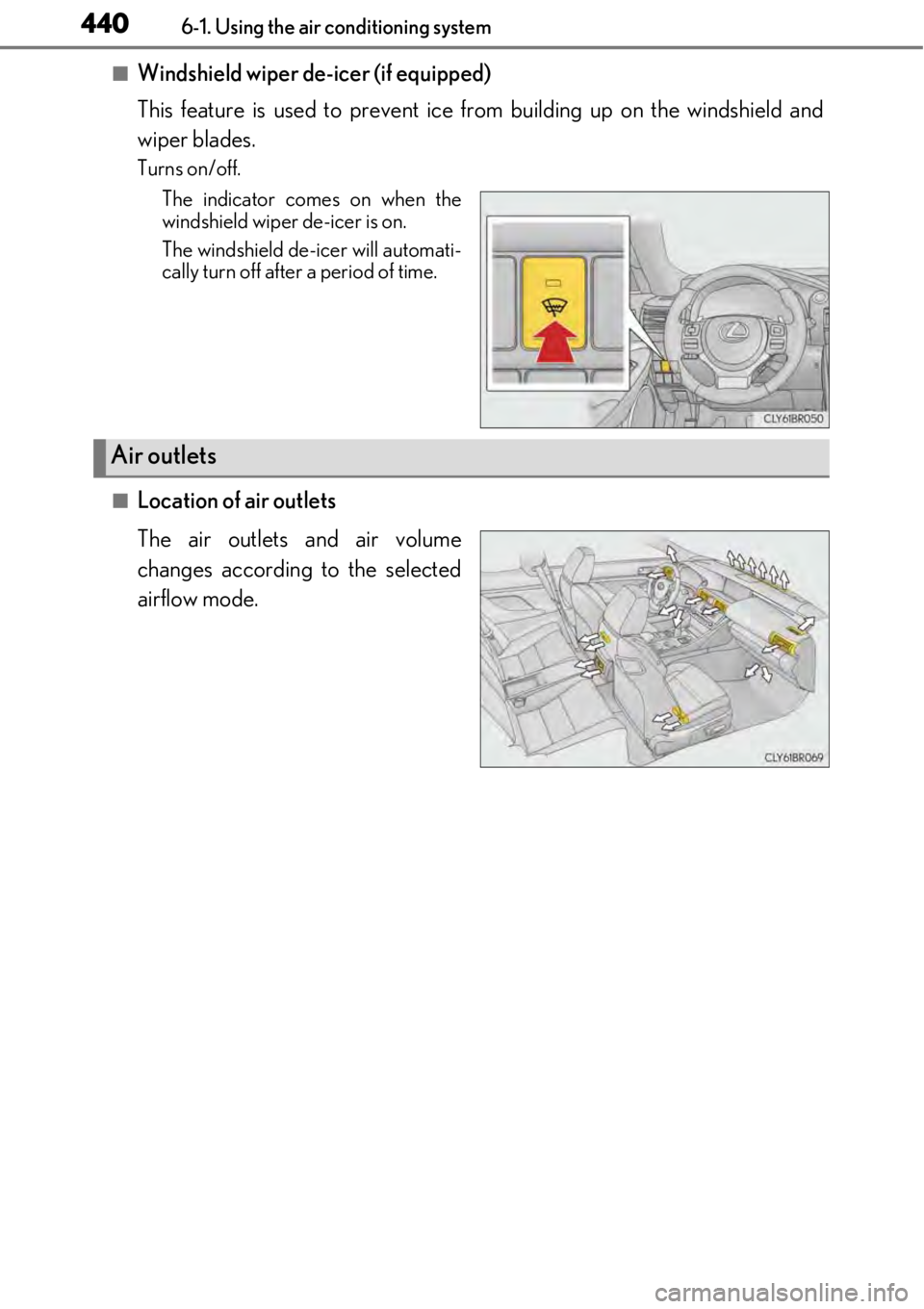
■Windshield wiper de-icer (if equipped)
This feature is used to prevent ice from building up on the windshield and
wiper blades.
Turns on/off.
The indicator comes on when the
windshield wiper de-icer is on.
The windshield de-icer will automati-
cally turn off after a period of time.
■Location of air outlets
The air outlets and air volume
changes according to the selected
airflow mode.
Air outlets
Page 441 of 724
4416-1. Using the air conditioning system
6
Interior features
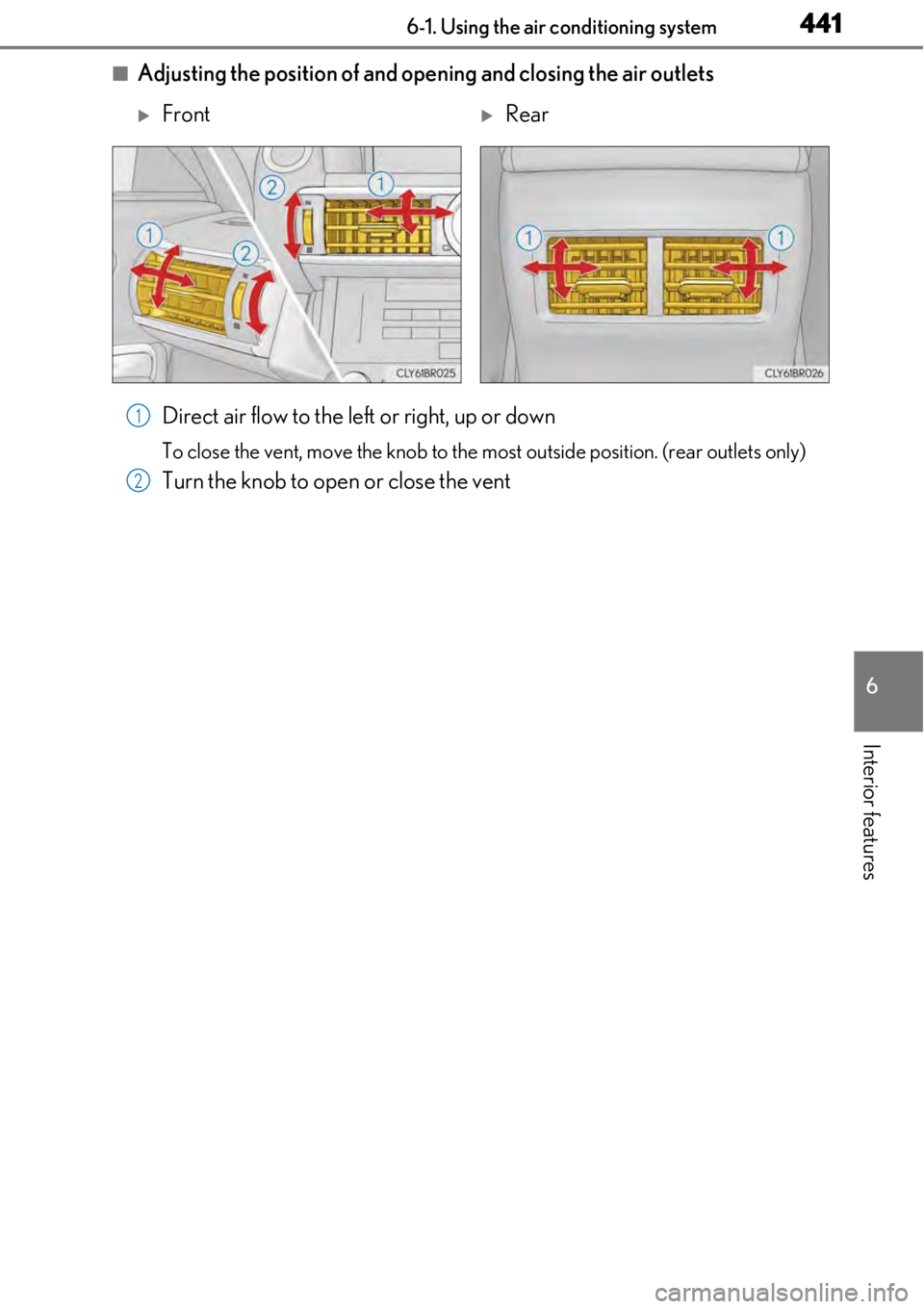
■Adjusting the position of and opening and closing the air outletsDirect air flow to the left or right, up or down
To close the vent, move the knob to the most outside position. (rear outlets only)
Turn the knob to open or close the vent
FrontRear
1
2