ECU LEXUS RC300 2017 Workshop Manual
[x] Cancel search | Manufacturer: LEXUS, Model Year: 2017, Model line: RC300, Model: LEXUS RC300 2017Pages: 724, PDF Size: 15.76 MB
Page 197 of 724
1974-1. Before driving
4
Driving
WARNING
Observe the following precautions.
Failure to do so may result in death or serious injury.
■If a brake pad wear warning message is displayed (RC F)
Have the brake pads visually checked and replaced by your Lexus dealer as soon as
possible.
Rotor damage may result if the pads are not replaced when needed.
Moderate levels of the brake pad and disc wear allow enhanced braking power. As a
result, the discs may wear more quickly than conventional brake discs. Therefore, when
replacing the brake pads, Lexu s recommends that you also have the thickness of the
discs measured.
It is dangerous to drive the vehicle when the wear limits of the brake pads and/or those
of the brake discs are exceeded.
■When the vehicle is stopped
●Do not race the engine.
If the vehicle is in any gear other than P or N, the vehicle may accelerate suddenly
and unexpectedly, causing an accident.
●In order to prevent accidents due to the ve hicle rolling away, always keep depressing
the brake pedal while the engine is running, and apply the parking brake as neces-
sary.
●If the vehicle is stopped on an incline, in order to prevent accidents caused by the
vehicle rolling forward or backward, alwa ys depress the brake pedal and securely
apply the parking brake as needed.
●Avoid revving or racing the engine.
Running the engine at high speed while the vehicle is stopped may cause the exhaust
system to overheat, which could result in a fire if combustible material is nearby.
Page 199 of 724
1994-1. Before driving
4
Driving
WARNING
Observe the following precautions.
Failure to do so may result in death or serious injury.
■When braking
●When the brakes are wet, drive more cautiously.
Braking distance increases when the brakes are wet, and this may cause one side of
the vehicle to brake differently than the other side. Also, the parking brake may not
securely hold the vehicle.
●If the power brake assist function does not operate, do not follow other vehicles
closely and avoid hills or sharp turns that require braking.
In this case, braking is still possible, but the brake pedal should be depressed more
firmly than usual. Also, the braking distan ce will increase. Have your brakes fixed
immediately.
●Do not pump the brake pedal if the engine stalls.
Each push on the brake pedal uses up the reserve for the power-assisted brakes.
●The brake system consists of 2 individual hy draulic systems; if one of the systems fails,
the other will still operate. In this case, the brake pedal should be depressed more
firmly than usual and the braking distance will increase. Have your brakes fixed imme-
diately.
■If the vehicle becomes stuck
Do not spin the wheels excessive ly when any of the tires is up in the air, or the vehicle is
stuck in sand, mud, etc. This may damage the driveline components or propel the vehi-
cle forward or backward, causing an accident.
Page 203 of 724
2034-1. Before driving
4
Driving
WARNING
■Things that must not be carried in the trunk
The following things may cause a fire if loaded in the trunk:
●Receptacles containing gasoline
●Aerosol cans
■Storage precautions
Observe the following precautions.
Failure to do so may prevent the pedals from being depressed properly, may block the
driver’s vision, or may result in items hitting the driver or passengers, possibly causing
an accident.
●Stow cargo and lugg age in the trunk whenever possible.
●RC350/RC300/RC200t: To prevent carg o and luggage from sliding forward
during braking, do not stack anything in the enlarged trunk. Keep cargo and luggage
low, as close to the floor as possible.
●RC350/RC300/RC200t: When you fold down the rear seats, long items should
not be placed directly behind the front seats.
●RC350/RC300/RC200t: Never allow anyone to ride in the enlarged trunk. It is not
designed for passengers. They should ride in their seats with thei r seat belts properly
fastened.
●Do not place cargo or luggage in or on the following locations.
• At the feet of the driver
• On the front passenger or re ar seats (when stacking items)
• On the package tray
• On the instrument panel
•On the dashboard
• In front of the navigation system scre en (if equipped) or Lexus Display Audio
screen (if equipped)
●Secure all items in the occupant compartment.
■Capacity and distribution
●Do not exceed the maximum axle weight rating or the total vehicle weight rating.
●Even if the total load of occupant’s weight and the cargo load is less than the total load
capacity, do not apply the load unevenly. Improper loading may cause deterioration
of steering or braking control whic h may cause death or serious injury.
Page 232 of 724
2324-3. Operating the lights and wipers
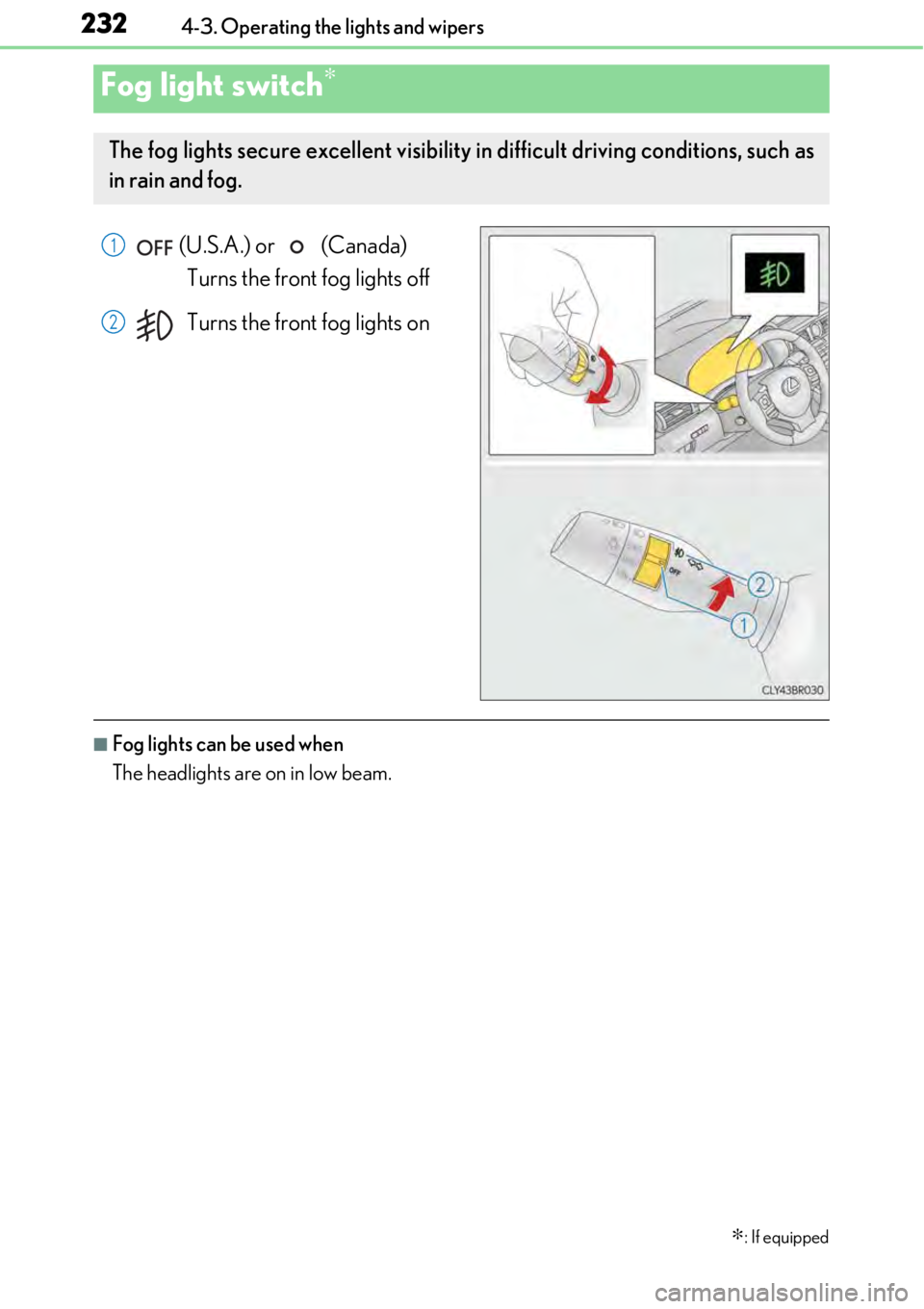
(U.S.A.) or (Canada) Turns the front fog lights off
Turns the front fog lights on
■Fog lights can be used when
The headlights are on in low beam.
Fog light switch∗
∗
: If equipped
The fog lights secure excellent visibility in difficult driving conditions, such as
in rain and fog.
1
2
Page 241 of 724
241
4
Driving
4-4. Refueling
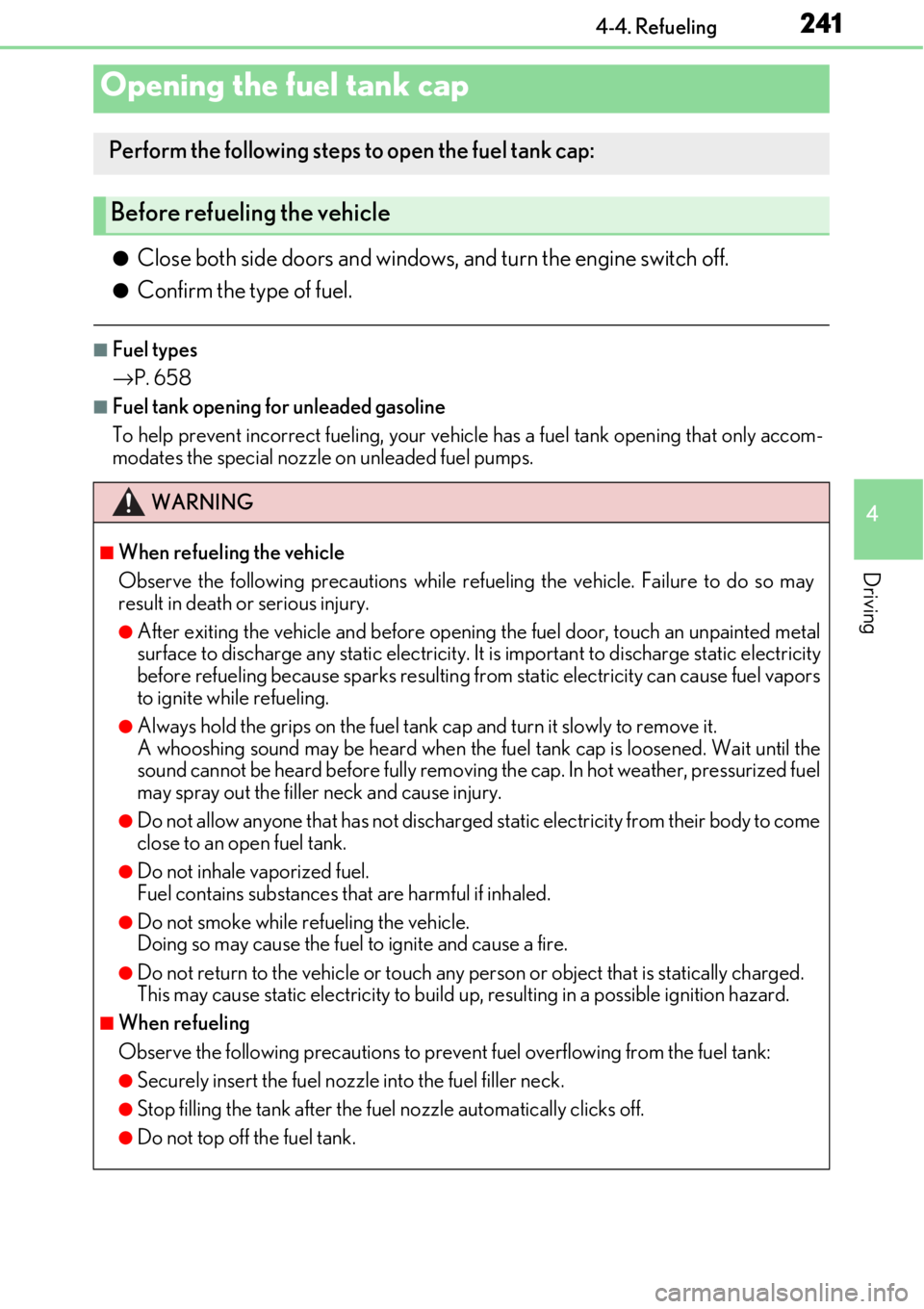
●Close both side doors and windows, and turn the engine switch off.
●Confirm the type of fuel.
■Fuel types
→P. 658
■Fuel tank opening for unleaded gasoline
To help prevent incorrect fueling, your vehi cle has a fuel tank opening that only accom-
modates the specia l nozzle on unleaded fuel pumps.
Opening the fuel tank cap
Perform the following steps to open the fuel tank cap:
Before refueling the vehicle
WARNING
■When refueling the vehicle
Observe the following precautions while refueling the vehicle. Failure to do so may
result in death or serious injury.
●After exiting the vehicle and before opening the fuel door, touch an unpainted metal
surface to discharge any static electricity. It is important to discharge static electricity
before refueling because sparks resulting fr om static electricity can cause fuel vapors
to ignite while refueling.
●Always hold the grips on the fuel tank cap and turn it slowly to remove it.
A whooshing sound may be heard when the fu el tank cap is loosened. Wait until the
sound cannot be heard before fully removing the cap. In hot weather, pressurized fuel
may spray out the filler neck and cause injury.
●Do not allow anyone that has not discharged static electricity from their body to come
close to an open fuel tank.
●Do not inhale vaporized fuel.
Fuel contains substances th at are harmful if inhaled.
●Do not smoke while refueling the vehicle.
Doing so may cause the fuel to ignite and cause a fire.
●Do not return to the vehicle or touch any pe rson or object that is statically charged.
This may cause static electricity to build up, resulting in a possible ignition hazard.
■When refueling
Observe the following precautions to prevent fuel overflowing from the fuel tank:
●Securely insert the fuel nozzle into the fuel filler neck.
●Stop filling the tank after the fuel nozzle automatically clicks off.
●Do not top off the fuel tank.
Page 320 of 724

3204-5. Using the driving support systems
■Conditions under which the BSM function may not function correctly
●The BSM function may not detect vehicles correctly in the following situations:
• When the sensor is misaligned due to a strong impact to the sensor or its surround-
ing area
• When mud, snow, ice, a sticke r, etc. is covering the sensor or surrounding area on
the rear bumper
• When driving on a road surf ace that is wet with standing water during bad weather,
such as heavy rain, snow, or fog
• When multiple vehicles are approaching with only a small gap between each vehicle
• When the distance between your vehicle and a following vehicle is short
• When there is a significant difference in speed between your vehicle and the vehicle that enters the detection area
• When the difference in speed between your vehicle and another vehicle is changing
• When a vehicle enters a detection area traveling at about the same speed as your vehicle
• As your vehicle starts from a stop, a vehicle remains in the detection area
• When driving up and down cons ecutive steep inclines, such as hills, dips in the road,
etc.
• When driving on roads with sharp bends, consecutive curves, or uneven surfaces
• When vehicle lanes are wide, or when driving on the edge of a lane, and the vehicle in an adjacent lane is far away from your vehicle
• When a bicycle carrier or other accessory is installed to the rear of the vehicle
• When there is a significant difference in height between your vehicle and the vehicle that enters the detection area
• Immediately after the BSM main switch is turned on
●Instances of the BSM function unnecessarily detecting a vehicle and/or object may
increase in the following situations:
• When the sensor is misaligned due to a stro ng impact to the sensor or its surround-
ing area
• When the distance between your vehicle and a guardrail, wall, etc. that enters the detection area is short
• When driving up and down cons ecutive steep inclines, such as hills, dips in the road,
etc.
• When vehicle lanes are narrow, or when driv ing on the edge of a lane, and a vehicle
traveling in a lane other than the adjacent lanes enters the detection area
• When driving on roads with sharp bends, consecutive curves, or uneven surfaces
• When the tires are slipping or spinning
• When the distance between your vehicle and a following vehicle is short
• When a bicycle carrier or other accessory is installed to the rear of the vehicle
Page 368 of 724
3685-4. Using the radio
It is prohibited to copy, decompile, disasse mble, reverse engineer, hack, manipulate, or
otherwise make available any te chnology or software incorporated in receivers compat-
ible with the XM Satellite Radio System or that support the XM website, the Online Ser-
vice or any of its content. Furthermore, the AMBE
® voice compression software
included in this product is protected by intellectual prop erty rights including patent
rights, copyrights, and trade secret s of Digital Voice Systems, Inc.
Note: this applies to XM receiver s only and not XM Ready devices.
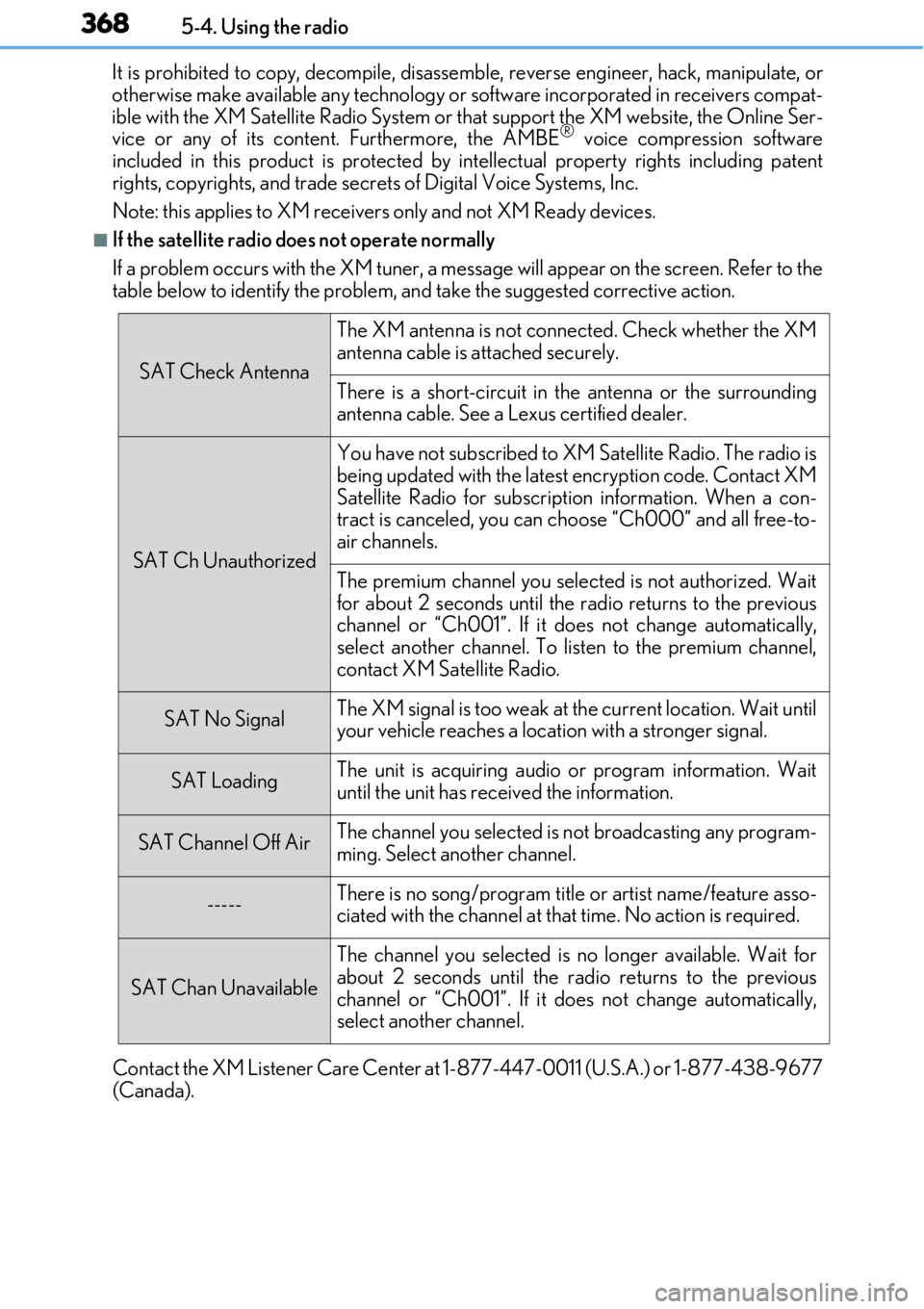
■If the satellite radio does not operate normally
If a problem occurs with the XM tuner, a message will appear on the screen. Refer to the
table below to identify the problem, an d take the suggested corrective action.
Contact the XM Listener Care Center at 1-877-447-0011 (U.S.A.) or 1-877-438-9677
(Canada).
SAT Check Antenna
The XM antenna is not connected. Check whether the XM
antenna cable is attached securely.
There is a short-circuit in the antenna or the surrounding
antenna cable. See a Lexus certified dealer.
SAT Ch Unauthorized
You have not subscribed to XM Satellite Radio. The radio is
being updated with the latest encryption code. Contact XM
Satellite Radio for subscripti on information. When a con-
tract is canceled, you can choose “Ch000” and all free-to-
air channels.
The premium channel you selected is not authorized. Wait
for about 2 seconds until the radio returns to the previous
channel or “Ch001”. If it does not change automatically,
select another channel. To listen to the premium channel,
contact XM Satellite Radio.
SAT No SignalThe XM signal is too weak at the current location. Wait until
your vehicle reaches a location with a stronger signal.
SAT LoadingThe unit is acquiring audio or program information. Wait
until the unit has rece ived the information.
SAT Channel Off AirThe channel you selected is not broadcasting any program-
ming. Select another channel.
-----There is no song/program title or artist name/feature asso-
ciated with the channel at that time. No action is required.
SAT Chan Unavailable
The channel you selected is no longer available. Wait for
about 2 seconds until the radio returns to the previous
channel or “Ch001”. If it does not change automatically,
select another channel.
Page 387 of 724
3875-7. Connecting Bluetooth®
5
Lexus Display Audio system
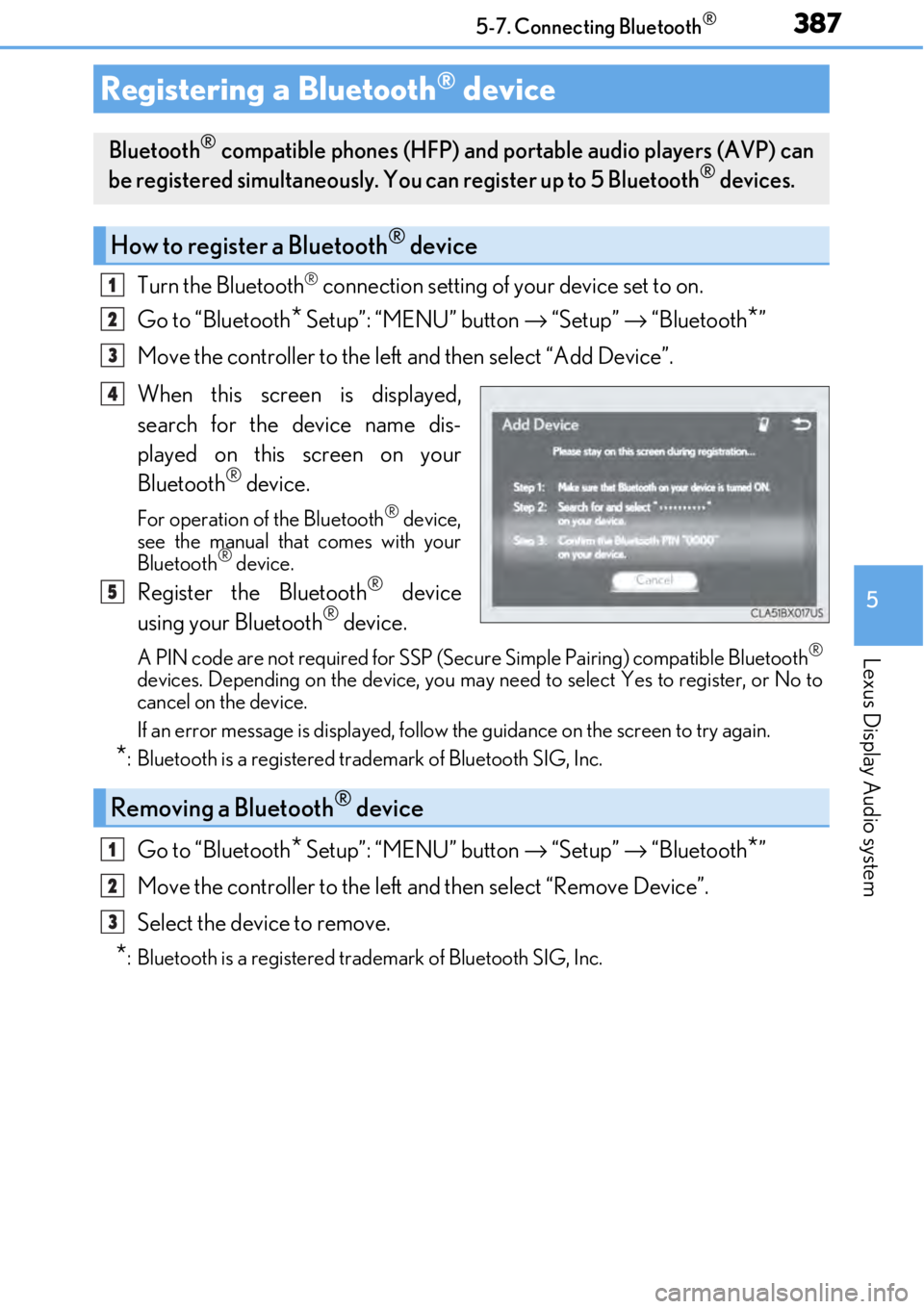
Turn the Bluetooth® connection setting of your device set to on.
Go to “Bluetooth
* Setup”: “MENU” button → “Setup” → “Bluetooth*”
Move the controller to the left and then select “Add Device”.
When this screen is displayed,
search for the device name dis-
played on this screen on your
Bluetooth
® device.
For operation of the Bluetooth® device,
see the manual that comes with your
Bluetooth
® device.
Register the Bluetooth® device
using your Bluetooth® device.
A PIN code are not required for SSP (Secur e Simple Pairing) compatible Bluetooth®
devices. Depending on the device, you may need to select Yes to register, or No to
cancel on the device.
If an error message is displayed, follow the guidance on the screen to try again.
*: Bluetooth is a registered trademark of Bluetooth SIG, Inc.
Go to “Bluetooth* Setup”: “MENU” button → “Setup” → “Bluetooth*”
Move the controller to the left and then select “Remove Device”.
Select the device to remove.
*: Bluetooth is a registered trademark of Bluetooth SIG, Inc.
Registering a Bluetooth® device
Bluetooth® compatible phones (HFP) and portable audio players (AVP) can
be registered simultaneously. You can register up to 5 Bluetooth® devices.
How to register a Bluetooth® device
1
2
3
4
5
Removing a Bluetooth® device
1
2
3
Page 417 of 724
4175-11. Bluetooth®
5
Lexus Display Audio system
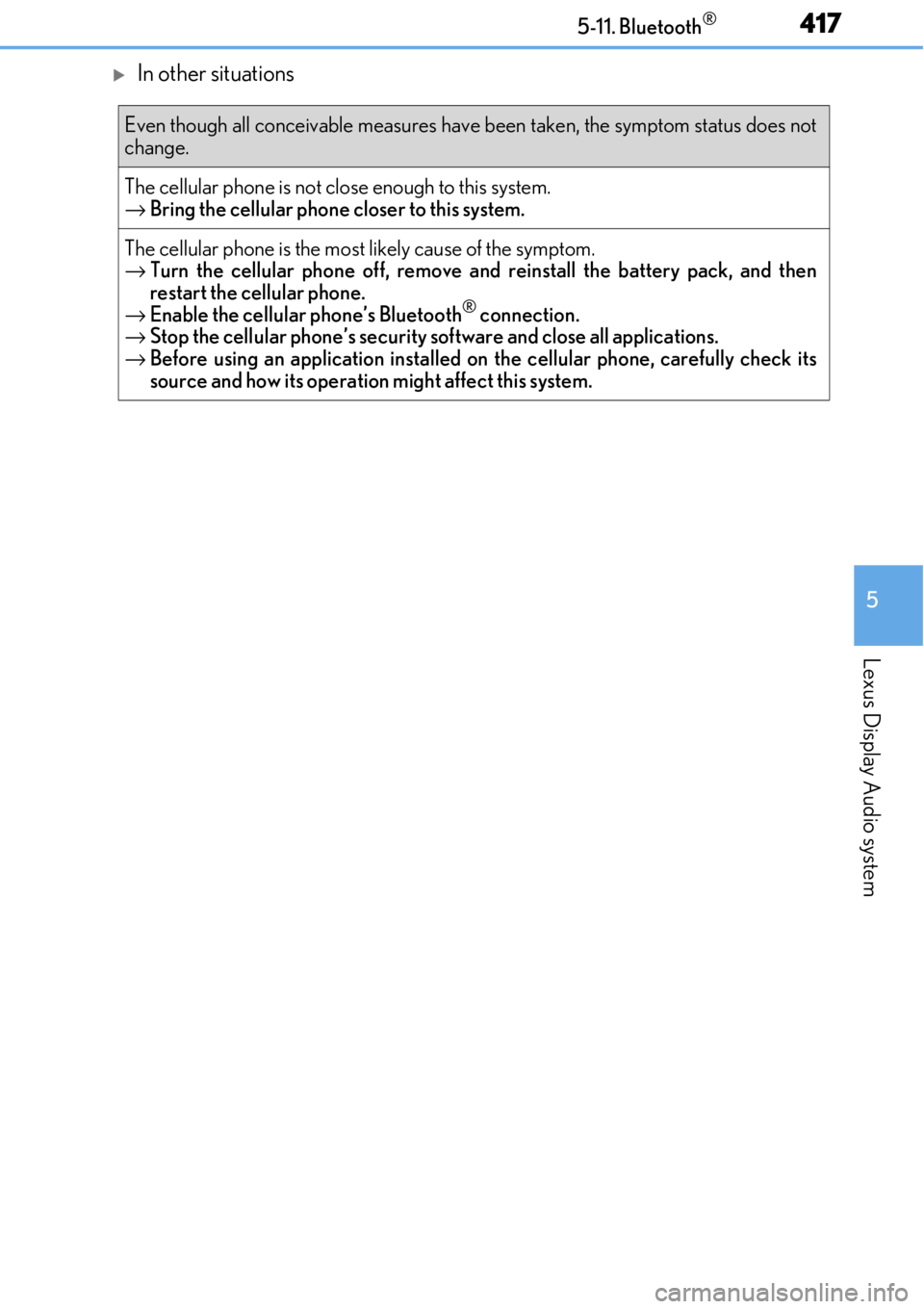
In other situations
Even though all conceivable measures have been taken, the symptom status does not
change.
The cellular phone is not close enough to this system.
→ Bring the cellular phone closer to this system.
The cellular phone is the most likely cause of the symptom.
→ Turn the cellular phone off, remove and reinstall the battery pack, and then
restart the cellular phone.
→ Enable the cellular phone’s Bluetooth
® connection.
→ Stop the cellular phone’s security software and close all applications.
→ Before using an application installed on the cellular phone, carefully check its
source and how its operation might affect this system.
Page 454 of 724
4546-3. Using the storage features
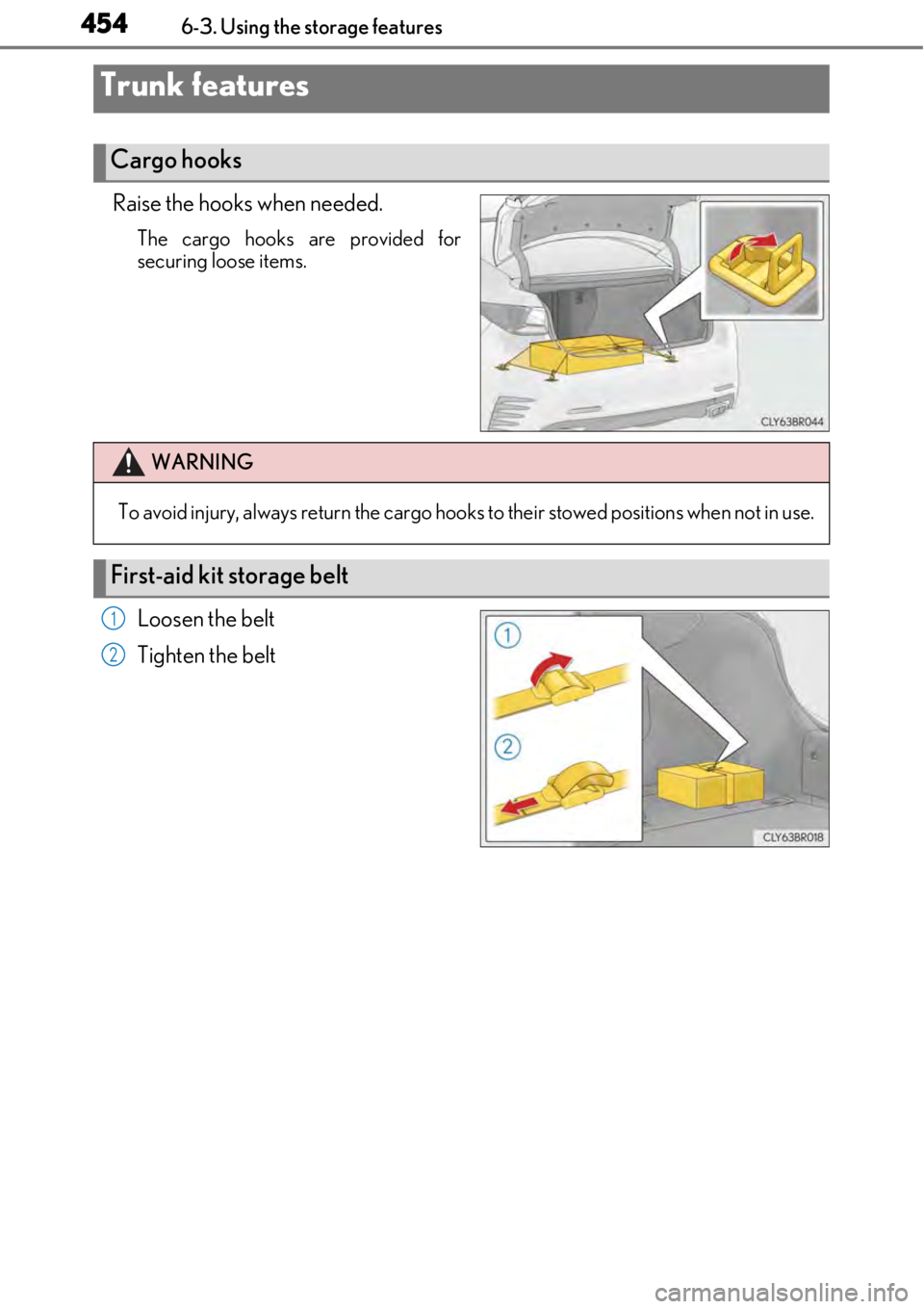
Raise the hooks when needed.
The cargo hooks are provided for
securing loose items.
Loosen the belt
Tighten the belt
Trunk features
Cargo hooks
WARNING
To avoid injury, always return the cargo hooks to their stow ed positions when not in use.
First-aid kit storage belt
1
2