warning light LEXUS RC300 2018 Owner's Manual
[x] Cancel search | Manufacturer: LEXUS, Model Year: 2018, Model line: RC300, Model: LEXUS RC300 2018Pages: 636, PDF Size: 6.88 MB
Page 84 of 636
84
RC350_RC300 AWD_RC3 00_RC F_U(OM24748U)2. Instrument cluster
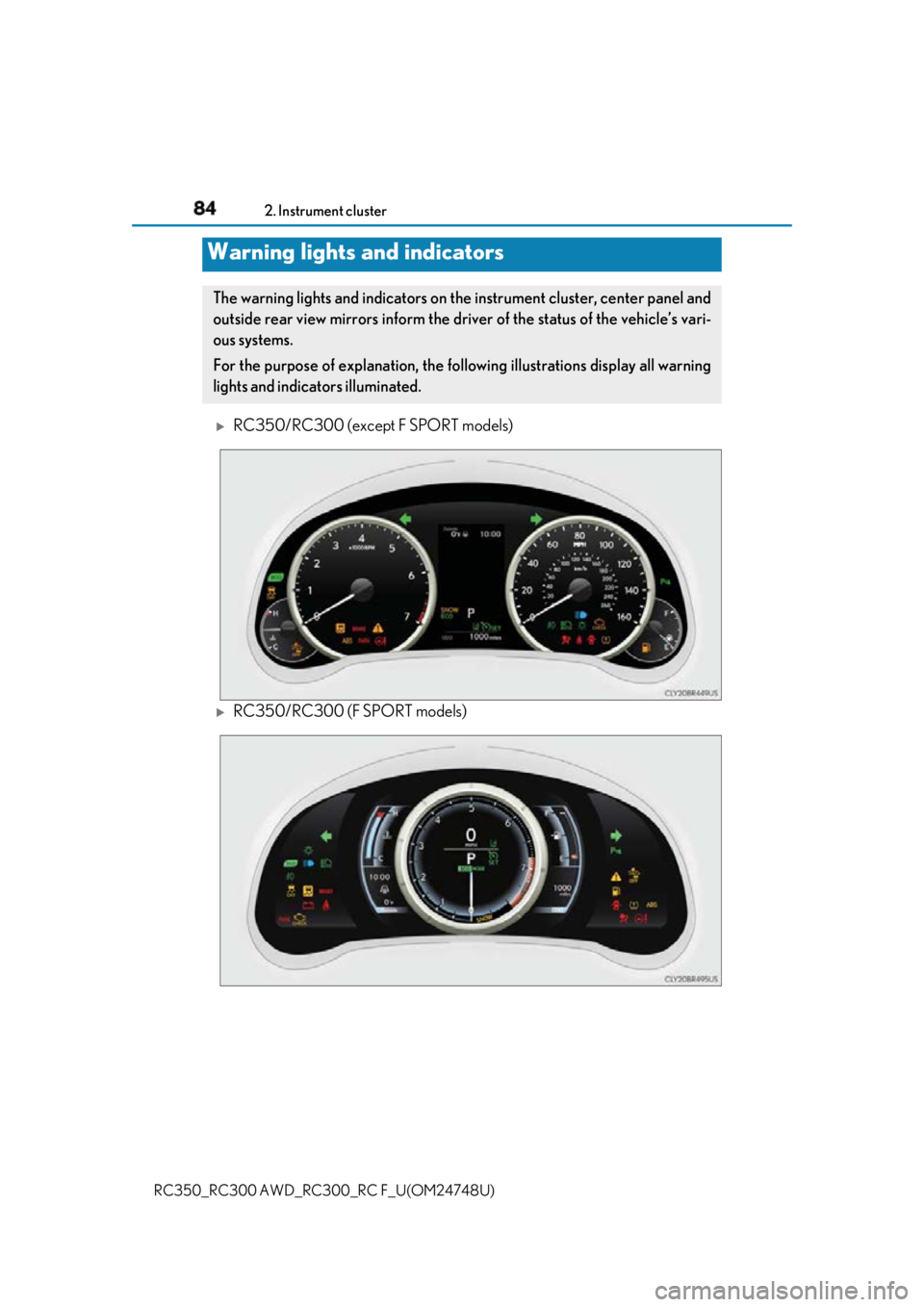
RC350/RC300 (except F SPORT models)
RC350/RC300 (F SPORT models)Warning lights and indicators The warning lights and indicators on th e instrument cluster, center panel and
outside rear view mirrors inform the driv er of the status of the vehicle’s vari-
ous systems.
For the purpose of explanation, the following illustrations display all warning
lights and indicators illuminated.
Page 86 of 636
86 2. Instrument cluster
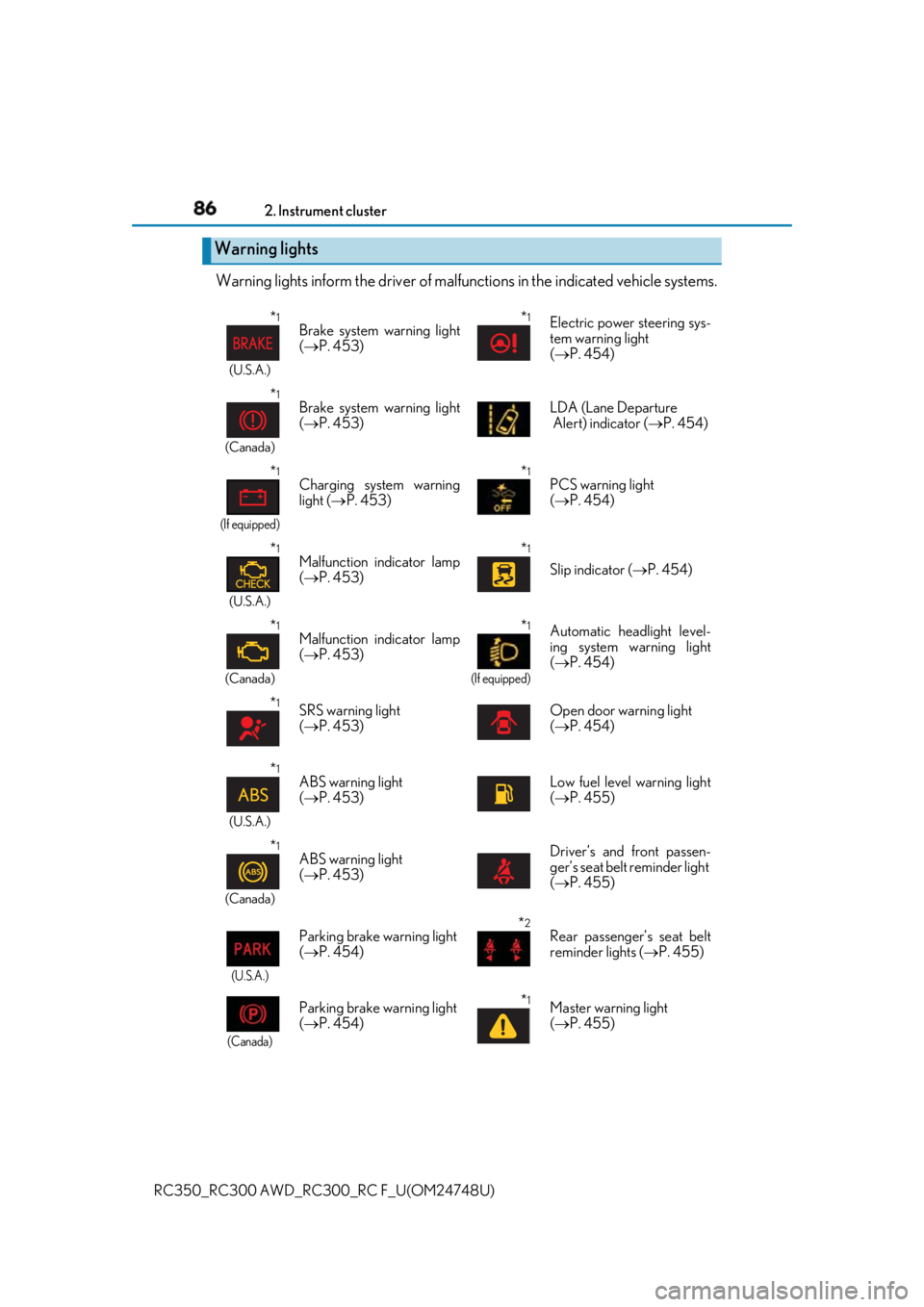
RC350_RC300 AWD_RC3 00_RC F_U(OM24748U)Warning lights inform the driv er of malfunctions in th e indicated vehicle systems.
Warning lights * 1
(U.S.A.)
Brake system warning light
( P. 453)
* 1
Electric power steering sys-
tem warning light
( P. 454)
* 1
(Canada)
Brake system warning light
( P. 453) LDA (Lane Departure
Alert) indicator ( P. 454)
* 1
(If equipped)
Charging system warning
light ( P. 453)
* 1
PCS warning light
( P. 454)
* 1
(U.S.A.)
Malfunction indicator lamp
( P. 453)
* 1
Slip indicator ( P. 454)
* 1
(Canada)
Malfunction indicator lamp
( P. 453) * 1
(If equipped)
Automatic headlight level-
ing system warning light
( P. 454)
* 1
SRS warning light
( P. 453) Open door warning light
( P. 454)
* 1
(U.S.A.)
ABS warning light
( P. 453) Low fuel level warning light
( P. 455)
* 1
(Canada)
ABS warning light
( P. 453) Driver’s and front passen-
ger’s seat belt reminder light
( P. 455)
(U.S.A.) Parking brake warning light
( P. 454) * 2
Rear passenger’s seat belt
reminder lights ( P. 455)
(Canada) Parking brake warning light
( P. 454) * 1
Master warning light
( P. 455)
Page 87 of 636
872. Instrument cluster
2
Instrument cluster
RC350_RC300 AWD_RC3 00_RC F_U(OM24748U)* 1
: These lights turn on when the engine switch is turned to IGNITION ON mode to
indicate that a system check is being performed. They will turn off after the engine is
started, or after a few seconds. There may be a malfunction in a sy stem if a light does
not come on, or turn off. Have the ve hicle inspected by your Lexus dealer.
* 2
: This light illuminates on the center panel.
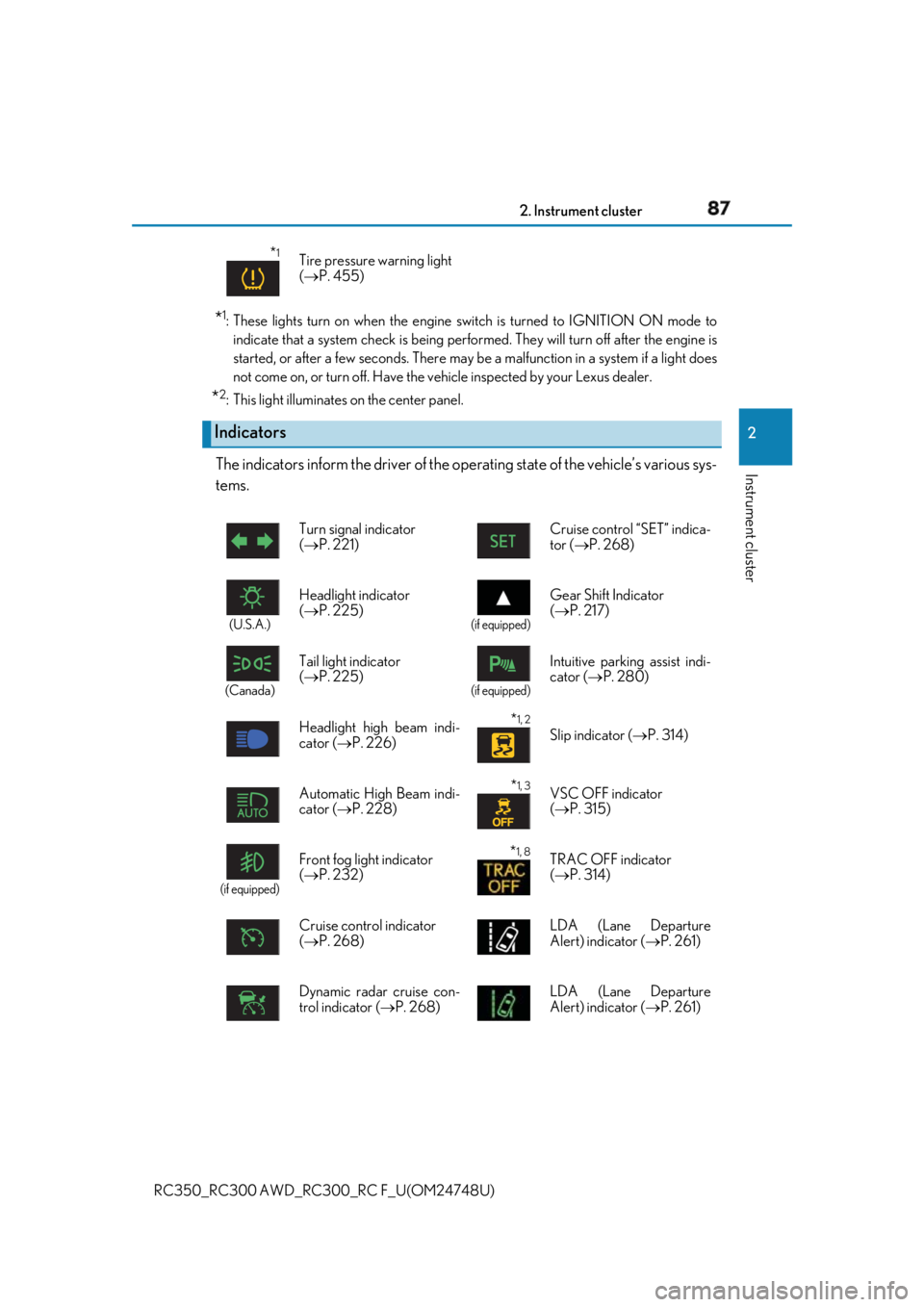
The indicators inform the driver of the op erating state of the vehicle’s various sys-
tems. * 1
Tire pressure warning light
( P. 455)
Indicators Turn signal indicator
( P. 221) Cruise control “SET” indica-
tor ( P. 268)
(U.S.A.)
Headlight indicator
( P. 225) (if equipped)
Gear Shift Indicator
( P. 217)
(Canada)
Tail light indicator
( P. 225)
(if equipped)
Intuitive parkin g assist indi-
cator ( P. 280)
Headlight high beam indi-
cator ( P. 226)
* 1, 2
Slip indicator ( P. 314)
Automatic High Beam indi-
cator ( P. 228) * 1, 3
VSC OFF indicator
( P. 315)
(if equipped)
Front fog light indicator
( P. 232) * 1, 8
TRAC OFF indicator
( P. 314)
Cruise control indicator
( P. 268) LDA (Lane Departure
Alert) indicator ( P. 261)
Dynamic radar cruise con-
trol indicator ( P. 268) LDA (Lane Departure
Alert) indicator ( P. 261)
Page 88 of 636
88 2. Instrument cluster
RC350_RC300 AWD_RC3 00_RC F_U(OM24748U)●
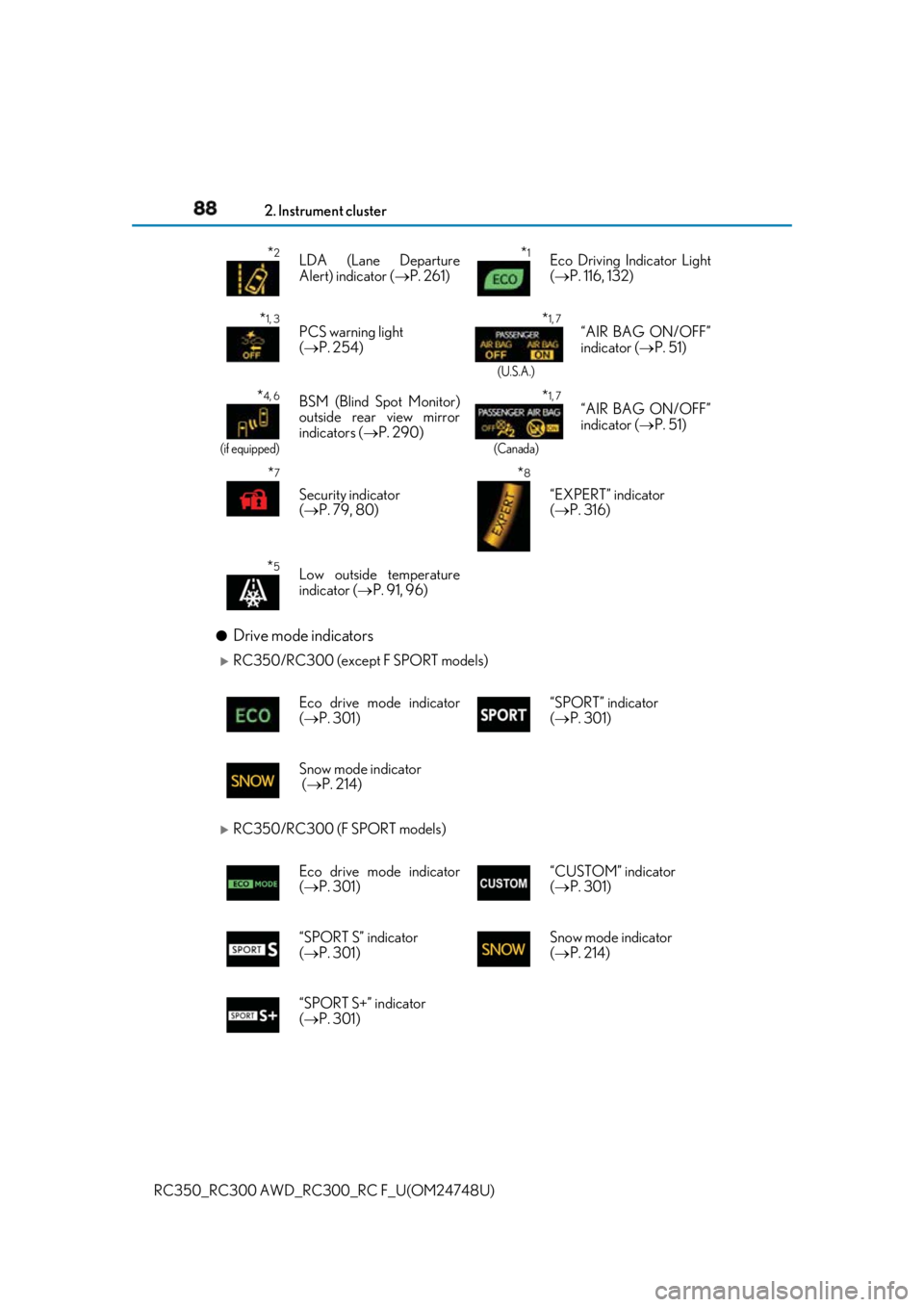
Drive mode indicators
RC350/RC300 (except F SPORT models)
RC350/RC300 (F SPORT models) * 2
LDA (Lane Departure
Alert) indicator ( P. 261)
* 1
Eco Driving Indicator Light
( P. 116, 132)
* 1, 3
PCS warning light
( P. 254)
* 1, 7
(U.S.A.)
“AIR BAG ON/OFF”
indicator ( P. 51)
* 4, 6
(if equipped)
BSM (Blind Spot Monitor)
outside rear view mirror
indicators ( P. 290)
* 1, 7
(Canada)
“AIR BAG ON/OFF”
indicator ( P. 51)
* 7
Security indicator
( P. 79, 80) * 8
“EXPERT” indicator
( P. 316)
* 5
Low outside temperature
indicator ( P. 91, 96)
Eco drive mode indicator
( P. 301) “SPORT” indicator
( P. 301)
Snow mode indicator
( P. 214)
Eco drive mode indicator
( P. 301) “CUSTOM” indicator
( P. 301)
“SPORT S” indicator
( P. 301) Snow mode indicator
( P. 214)
“SPORT S+” indicator
( P. 301)
Page 90 of 636

90 2. Instrument cluster
RC350_RC300 AWD_RC3 00_RC F_U(OM24748U)WARNING ■
If a safety system warnin g light does not come on
Should a safety system light such as the ABS and SRS warning light not come on when
you start the engine, this could mean that these systems are not available to help pro-
tect you in an accident, which could result in death or serious injury. Have the vehicle
inspected by your Lexus dealer immediately if this occurs.
Page 116 of 636
116 2. Instrument cluster
RC350_RC300 AWD_RC3 00_RC F_U(OM24748U)■
Eco Driving Indicator
Eco Driving Indicator will not operate under the following conditions: ●
The shift lever is in any position other than D. ●
A paddle shift swit ch is operated.●
Neither normal mode nor Eco drive mode is selected. ( P. 301)●
The vehicle speed is approximately 80 mph (130 km/h) or higher. ■
Background color of the indicator/shift posi tion display area (except F SPORT models)
The background color of the indicator/shift po sition display area is changed according to
the driving mode as follows ( P. 301):●
Eco drive mode: Blue ●
Sport mode: Red ■
G-force display (if equipped)
The G-force values may not be zero even when the vehicle is parked, such as when it is
parked on an incline. ■
Suspension of the settings display ●
Some settings cannot be changed while driv ing. When changing settings, park the
vehicle in a safe place. ●
If a warning message is displa yed, operation of the settin gs display will be suspended.■
Tire pressure ●
It may take a few minutes to display the tire inflation pressure after the engine switch is
turned to IGNITION ON mode. It may also take a few minutes to display the tire infla-
tion pressure after inflation pressure has been adjusted.●
“---” may be displayed if the tire position information cannot be determined due to
unfavorable radio wave conditions. ●
Tire inflation pressure changes with temperat ure. The displayed values may also be dif-
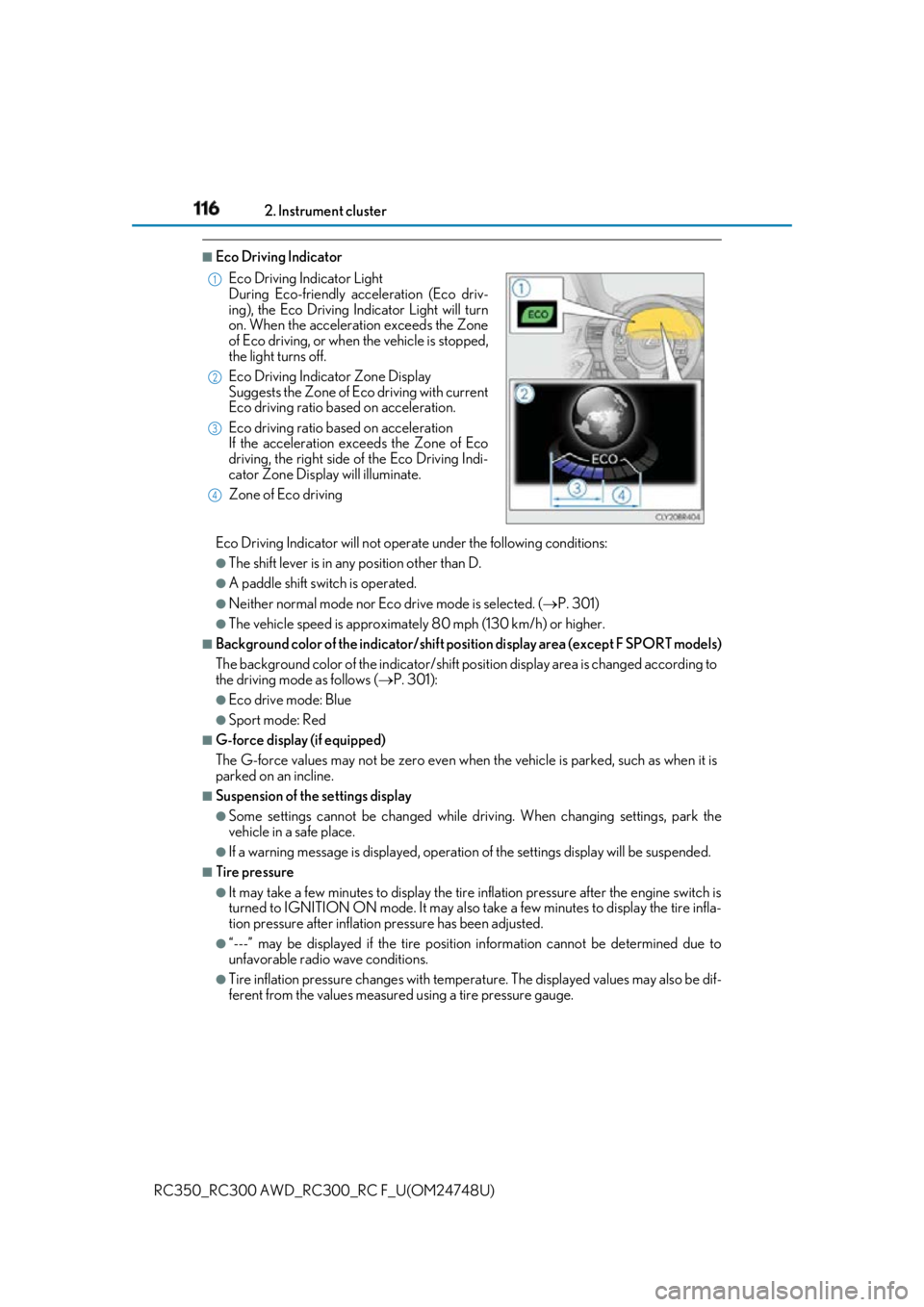
ferent from the values measured using a tire pressure gauge.Eco Driving Indicator Light
During Eco-friendly acceleration (Eco driv-
ing), the Eco Driving Indicator Light will turn
on. When the acceleration exceeds the Zone
of Eco driving, or when the vehicle is stopped,
the light turns off.
Eco Driving Indicator Zone Display
Suggests the Zone of Eco driving with current
Eco driving ratio based on acceleration.
Eco driving ratio based on acceleration
If the acceleration exceeds the Zone of Eco
driving, the right side of the Eco Driving Indi-
cator Zone Display will illuminate.
Zone of Eco driving 1
2
3
4
Page 117 of 636
1172. Instrument cluster
2
Instrument cluster
RC350_RC300 AWD_RC3 00_RC F_U(OM24748U)■
Liquid crystal display
Small spots or light spots may appear on the display. This phenomenon is characteristic
of liquid crystal displays, and there is no problem continuing to use the display. ■
Customization
Some functions can be customized. ( P. 111, 569)
WARNING ■
Caution for use while driving ●
When operating the multi-information display while driving, pay extra attention to the
safety of the area around the vehicle. ●
Do not look continuously at the multi-info rmation display while dr iving as you may fail
to see pedestrians, objects on the road, etc. ahead of the vehicle. ■
The information display at low temperatures
Allow the interior of the vehicle to warm up before using the liquid crystal information
display. At extremely low temperatures, th e information display monitor may respond
slowly, and display changes may be delayed.
For example, there is a lag between the dr iver’s shifting and the new gear number
appearing on the display. This lag could ca use the driver to downshift again, causing
rapid and excessive engine braking and possibly an accident resulting in death or
injury. ■
Cautions during setting up the display
As the engine needs to be running during sett ing up the display, en sure that the vehicle
is parked in a place with adequate ventilation. In a closed area such as a garage,
exhaust gases including harmful carbon mo noxide (CO) may collect and enter the
vehicle. This may lead to death or a serious health hazard.
NOTICE ■
While setting up the display
To prevent battery discharge, ensure that the engine is running while setting up the dis-
play features.
Page 133 of 636

1332. Instrument cluster
2
Instrument cluster
RC350_RC300 AWD_RC3 00_RC F_U(OM24748U)■
G-force display ●
The G-force values may not be zero even when the vehicle is parked, such as when it is
parked on an incline. ●
The steering amount, accelerator pedal input, and brake fluid pressure displays are dis-
abled until the engine has warmed up (the variable red zone of the tachometer has
retracted to 7300 rpm).
After the engine has warmed up, these displays will be enabled. ●
Depending on the vehicle usage conditions, the brake fluid pressure display may not
reach its maximum reading even though the brake pedal is fully depressed. ●
If a battery terminal is disconnected and reconnected, the steering amount display may
be disabled temporarily. Afte r driving the vehicle for a while , the display will be enabled.■
Suspension of the settings display
In the following situations, op eration of the settings disp lay will be temporarily sus-
pended. ●
When a warning message appears on the multi-information display●
When the vehicle begins to move ■
Tire pressure ●
It may take a few minutes to display the tire inflation pressure after the engine switch is
turned to IGNITION ON mode. It may also take a few minutes to display the tire infla-
tion pressure after inflation pressure has been adjusted.●
“---” may be displayed if the tire position information cannot be determined due to
unfavorable radio wave conditions. ●
Tire inflation pressure changes with temperat ure. The displayed values may also be dif-
ferent from the values measured using a tire pressure gauge. ■
When disconnecting and reco nnecting battery terminals
The following information data will be reset: ●
Drive information ●
Lap timer: Measured lap times, history ●
G-force: Record of the maximum G-forces■
Using the lap timer
If the engine is stopped while a lap is being timed, the lap timer will stop and the lap time
up to that point will be recorded. ■
Liquid crystal display
Small spots or light spots may appear on the display. This phenomenon is characteristic
of liquid crystal displays, and there is no problem continuing to use the display.
Page 155 of 636
1553-2. Opening, closing and locking the doors and trunk
3
Operation of each component
RC350_RC300 AWD_RC3 00_RC F_U(OM24748U)WARNING ■
Using the trunk
Observe the following precautions.
Failure to do so may cause parts of the body to be caught, resulting in serious injury.●
Remove any heavy loads, such as snow and ice, from the trunk lid before opening it.
Failure to do so may cause the trunk lid to suddenly shut again after it is opened.●
When opening or closing the trunk lid, thoroughly check to make sure the surround-
ing area is safe. ●
If anyone is in the vicinity, make sure they are safe and let them know that the trunk is
about to open or close. ●
Use caution when opening or closing the tr unk lid in windy weather as it may move
abruptly in strong wind. ●
On an incline it is more difficult to open or close the trunk lid th an on a level surface,
so beware of the trunk lid un expectedly opening or closin g by itself. Make sure that
the trunk lid is fully open and secure before using the trunk.
●
Do not attach any accessories other than genuine Lexus parts to the trunk lid. Such
additional weight on the trunk lid may cause the lid to suddenly shut again after it is
opened. ●
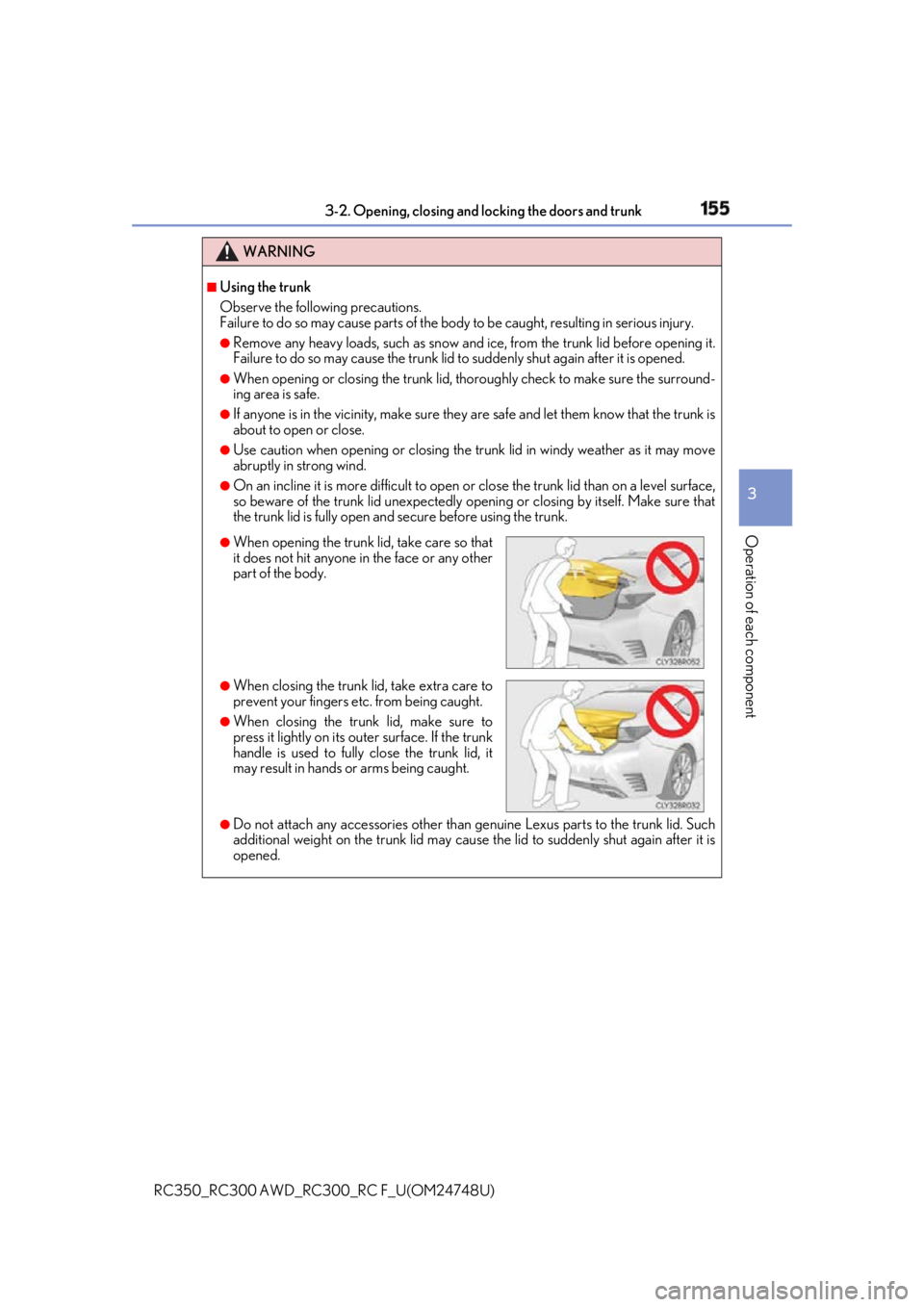
When opening the trunk lid, take care so that
it does not hit anyone in the face or any other
part of the body.
●
When closing the trunk li d, take extra care to
prevent your fingers etc. from being caught. ●
When closing the trunk lid, make sure to
press it lightly on its outer surface. If the trunk
handle is used to fully close the trunk lid, it
may result in hands or arms being caught.
Page 165 of 636
1653-3. Adjusting the seats
3
Operation of each component
RC350_RC300 AWD_RC3 00_RC F_U(OM24748U)WARNING
Observe the following precautions. Failure to do so may result in death or serious injury.■
When folding the re ar seatbacks down●
Do not fold the seatbacks down while driving. ●
Stop the vehicle on level ground, set the pa rking brake and shift the shift lever to P.●
Do not allow anyone to sit on a folded seatback or in the trunk while driving.●
Do not allow children to enter the trunk. ■
After returning the rear seat back to the upright position
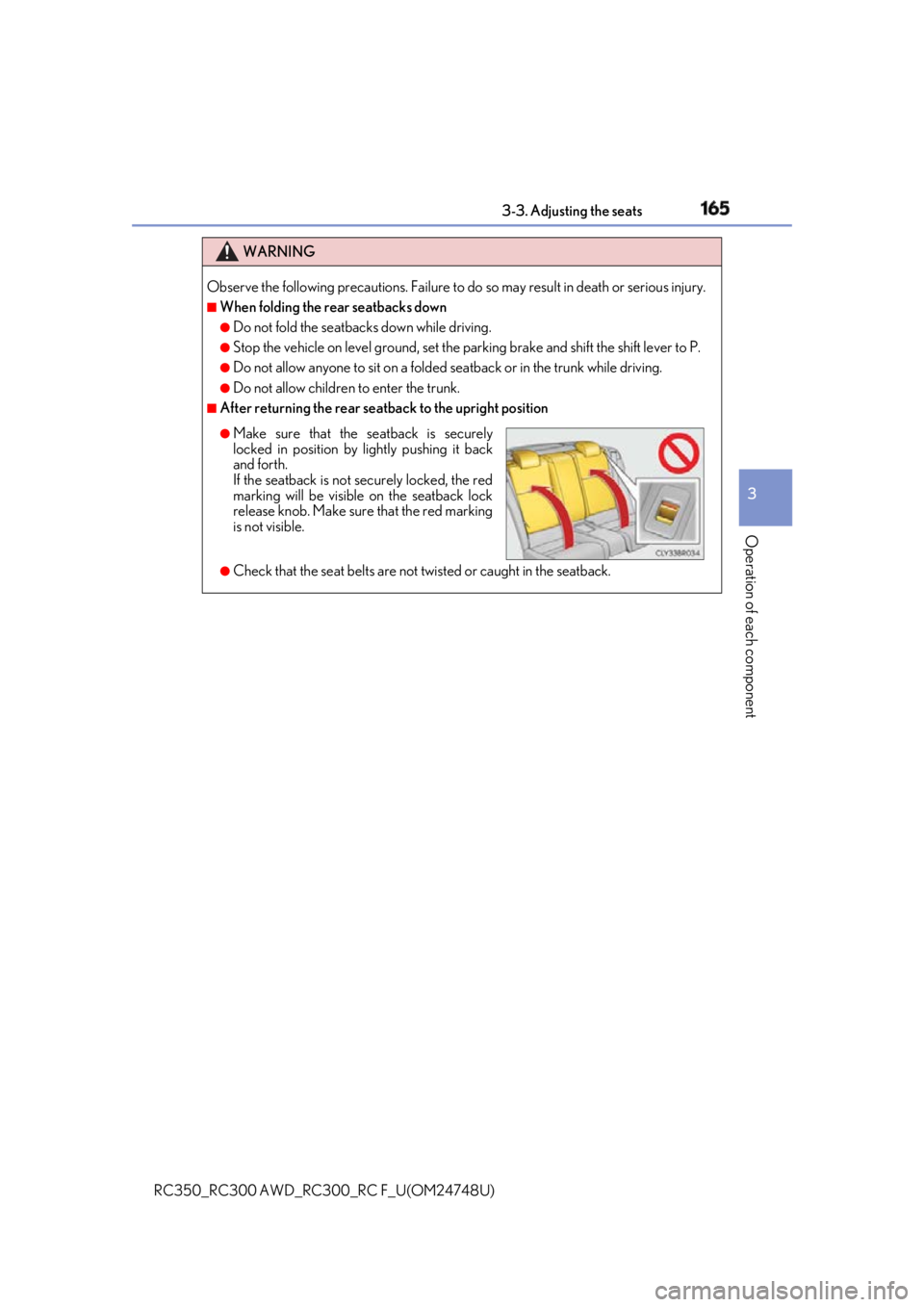
●
Check that the seat belts are not twisted or caught in the seatback. ●
Make sure that the seatback is securely
locked in position by lightly pushing it back
and forth.
If the seatback is not securely locked, the red
marking will be visible on the seatback lock
release knob. Make sure that the red marking
is not visible.