light LEXUS RC300 2018 Service Manual
[x] Cancel search | Manufacturer: LEXUS, Model Year: 2018, Model line: RC300, Model: LEXUS RC300 2018Pages: 636, PDF Size: 6.88 MB
Page 113 of 636

1132. Instrument cluster
2
Instrument cluster
RC350_RC300 AWD_RC3 00_RC F_U(OM24748U)■
Vehicle settings
■
Meter settings Item Settings Details
Scheduled maintenance
Maintenance data reset Select to reset the message indicating
maintenance is re quired, after the
required maintenance is performed.
( P. 385)
Oil maintenance
Engine oil maintenance data reset Select to reset the engine oil mainte-
nance information (message indicat-
ing maintenance is required and
distance until the next oil change)
after engine oil maintenance is per-
formed. ( P. 403)
Item Settings Details
Language Select to change the language dis-
played.
Units Select to change the units of measure
displayed.
(Eco Driving
Indicator Light) On
Select to enable/dis able the Eco Driv-
ing Indicator Light. ( P. 109)
Off
Switch settings (except F SPORT mod-
els) Select to display how to change the
top screen.
Drive information 1 Select to select up to 2 items that will
be displayed on ea ch Drive informa-
tion screen (Drive information 1
screen, Drive information 2 screen,
and Drive inform ation 3 screen)
respectively.
(Selectable items: P. 108)Drive information 2
Drive information 3
Page 116 of 636
116 2. Instrument cluster
RC350_RC300 AWD_RC3 00_RC F_U(OM24748U)■
Eco Driving Indicator
Eco Driving Indicator will not operate under the following conditions: ●
The shift lever is in any position other than D. ●
A paddle shift swit ch is operated.●
Neither normal mode nor Eco drive mode is selected. ( P. 301)●
The vehicle speed is approximately 80 mph (130 km/h) or higher. ■
Background color of the indicator/shift posi tion display area (except F SPORT models)
The background color of the indicator/shift po sition display area is changed according to
the driving mode as follows ( P. 301):●
Eco drive mode: Blue ●
Sport mode: Red ■
G-force display (if equipped)
The G-force values may not be zero even when the vehicle is parked, such as when it is
parked on an incline. ■
Suspension of the settings display ●
Some settings cannot be changed while driv ing. When changing settings, park the
vehicle in a safe place. ●
If a warning message is displa yed, operation of the settin gs display will be suspended.■
Tire pressure ●
It may take a few minutes to display the tire inflation pressure after the engine switch is
turned to IGNITION ON mode. It may also take a few minutes to display the tire infla-
tion pressure after inflation pressure has been adjusted.●
“---” may be displayed if the tire position information cannot be determined due to
unfavorable radio wave conditions. ●
Tire inflation pressure changes with temperat ure. The displayed values may also be dif-
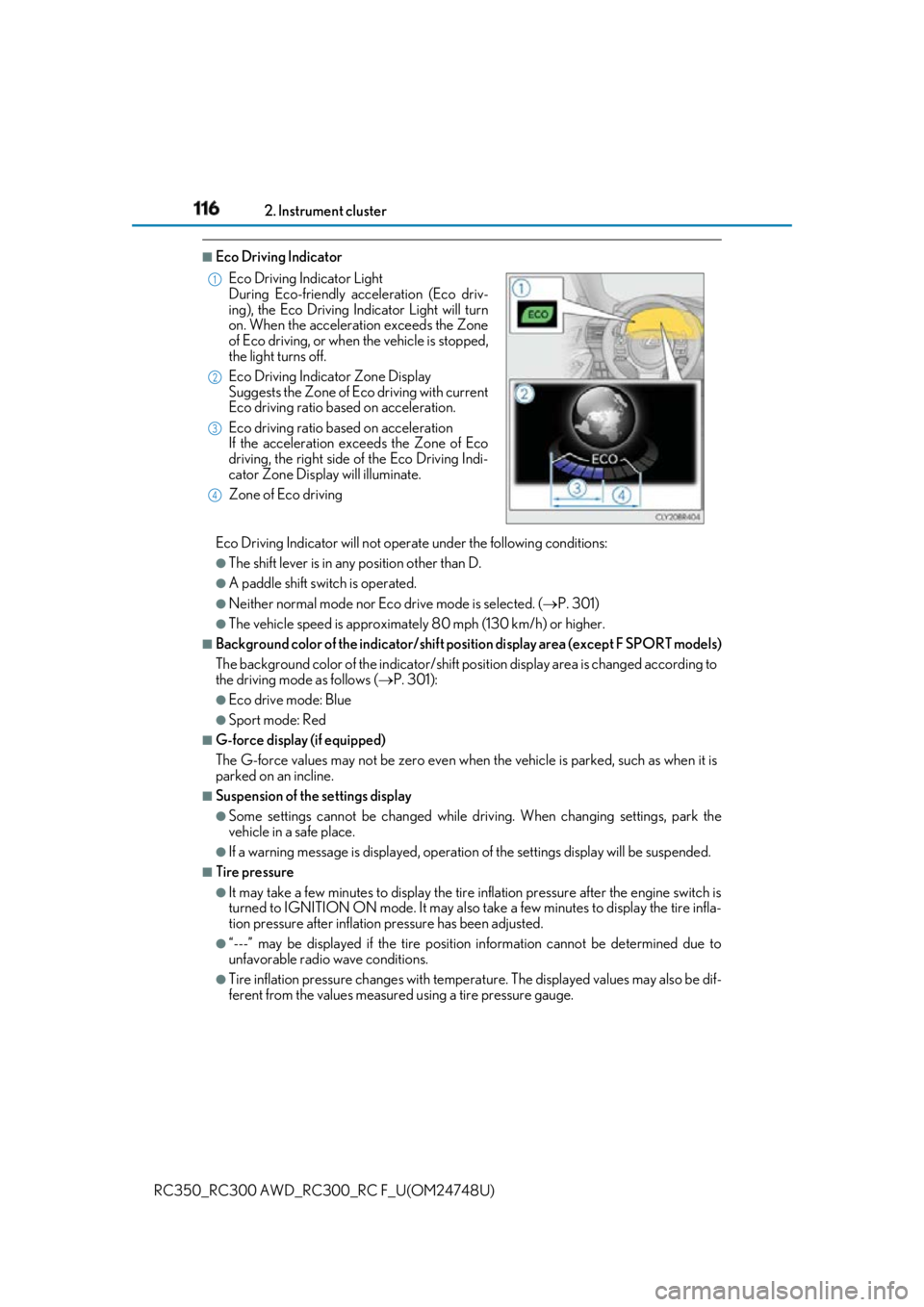
ferent from the values measured using a tire pressure gauge.Eco Driving Indicator Light
During Eco-friendly acceleration (Eco driv-
ing), the Eco Driving Indicator Light will turn
on. When the acceleration exceeds the Zone
of Eco driving, or when the vehicle is stopped,
the light turns off.
Eco Driving Indicator Zone Display
Suggests the Zone of Eco driving with current
Eco driving ratio based on acceleration.
Eco driving ratio based on acceleration
If the acceleration exceeds the Zone of Eco
driving, the right side of the Eco Driving Indi-
cator Zone Display will illuminate.
Zone of Eco driving 1
2
3
4
Page 117 of 636
1172. Instrument cluster
2
Instrument cluster
RC350_RC300 AWD_RC3 00_RC F_U(OM24748U)■
Liquid crystal display
Small spots or light spots may appear on the display. This phenomenon is characteristic
of liquid crystal displays, and there is no problem continuing to use the display. ■
Customization
Some functions can be customized. ( P. 111, 569)
WARNING ■
Caution for use while driving ●
When operating the multi-information display while driving, pay extra attention to the
safety of the area around the vehicle. ●
Do not look continuously at the multi-info rmation display while dr iving as you may fail
to see pedestrians, objects on the road, etc. ahead of the vehicle. ■
The information display at low temperatures
Allow the interior of the vehicle to warm up before using the liquid crystal information
display. At extremely low temperatures, th e information display monitor may respond
slowly, and display changes may be delayed.
For example, there is a lag between the dr iver’s shifting and the new gear number
appearing on the display. This lag could ca use the driver to downshift again, causing
rapid and excessive engine braking and possibly an accident resulting in death or
injury. ■
Cautions during setting up the display
As the engine needs to be running during sett ing up the display, en sure that the vehicle
is parked in a place with adequate ventilation. In a closed area such as a garage,
exhaust gases including harmful carbon mo noxide (CO) may collect and enter the
vehicle. This may lead to death or a serious health hazard.
NOTICE ■
While setting up the display
To prevent battery discharge, ensure that the engine is running while setting up the dis-
play features.
Page 131 of 636
1312. Instrument cluster
2
Instrument cluster
RC350_RC300 AWD_RC3 00_RC F_U(OM24748U) (Eco Driving
Indicator Light) On
Select to enable/dis able the Eco Driv-
ing Indicator Light. ( P. 116)
Off
Switch settings Select to display how to change the
top screen.
Drive information 1 Select to select up to 2 items that will
be displayed on ea ch Drive informa-
tion screen (Drive information 1
screen, Drive information 2 screen,
and Drive inform ation 3 screen)
respectively.
(Selectable items: P. 122)Drive information 2
Drive information 3
Pop-up display Intersection Guid-
ance (if equipped)
Select to enable/disable the pop-up
display.Telephone
Audio Feedback
Volume Feedback
Adjust Brightness
TVD MODE (if
equipped)
Rev indicator On
Select to enable/disable the Rev indi-
cator. ( P. 99)
Off
Rev setting Select to set the desired engine speed
at which the Rev indicator will begin
to be displayed.
Rev peak On
Select to enable/disable the Rev peak.
( P. 100)
Off
Gauge options 2-4 Available meter
displays (depending
on drive mode) Select to change the displayed
meters for each applicable drive
mode.
Default setting Select to reset the meter display set-
tings to the default setting.Item Settings Details
Page 132 of 636
132 2. Instrument cluster
RC350_RC300 AWD_RC3 00_RC F_U(OM24748U)■
Odometer
Displays the total distance the vehicle has been driven. ■
Trip meter A/trip meter B
Displays the distance the vehicle has been driven since the meter was last
reset. Trip meters A and B can be used to record and display different dis-
tances independently. To reset, display the desired trip meter and press and hold the odometer/trip meter
and trip meter reset button.■
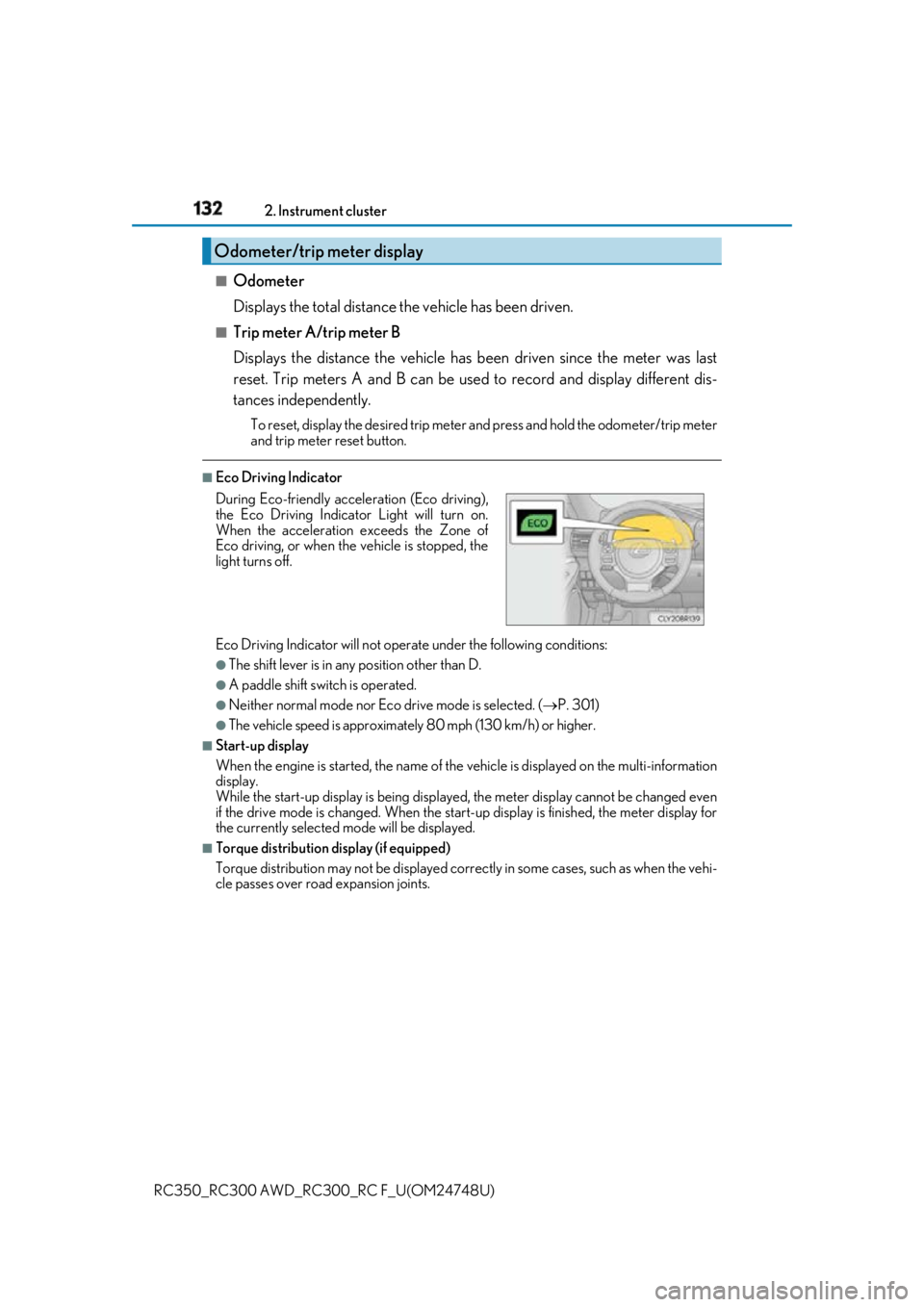
Eco Driving Indicator
Eco Driving Indicator will not operate under the following conditions: ●
The shift lever is in any position other than D. ●
A paddle shift swit ch is operated.●
Neither normal mode nor Eco drive mode is selected. ( P. 301)●
The vehicle speed is approximatel y 80 mph (130 km/h) or higher.■
Start-up display
When the engine is started, the name of the vehicle is displayed on the multi-information
display.
While the start-up display is being displaye d, the meter display cannot be changed even
if the drive mode is changed. When the start- up display is finished, the meter display for
the currently selected mode will be displayed.■
Torque distribution display (if equipped)
Torque distribution may not be displayed correctly in some ca ses, such as when the vehi-
cle passes over road expansion joints.Odometer/trip meter display
During Eco-friendly acceleration (Eco driving),
the Eco Driving Indicator Light will turn on.
When the acceleration exceeds the Zone of
Eco driving, or when the vehicle is stopped, the
light turns off.
Page 133 of 636

1332. Instrument cluster
2
Instrument cluster
RC350_RC300 AWD_RC3 00_RC F_U(OM24748U)■
G-force display ●
The G-force values may not be zero even when the vehicle is parked, such as when it is
parked on an incline. ●
The steering amount, accelerator pedal input, and brake fluid pressure displays are dis-
abled until the engine has warmed up (the variable red zone of the tachometer has
retracted to 7300 rpm).
After the engine has warmed up, these displays will be enabled. ●
Depending on the vehicle usage conditions, the brake fluid pressure display may not
reach its maximum reading even though the brake pedal is fully depressed. ●
If a battery terminal is disconnected and reconnected, the steering amount display may
be disabled temporarily. Afte r driving the vehicle for a while , the display will be enabled.■
Suspension of the settings display
In the following situations, op eration of the settings disp lay will be temporarily sus-
pended. ●
When a warning message appears on the multi-information display●
When the vehicle begins to move ■
Tire pressure ●
It may take a few minutes to display the tire inflation pressure after the engine switch is
turned to IGNITION ON mode. It may also take a few minutes to display the tire infla-
tion pressure after inflation pressure has been adjusted.●
“---” may be displayed if the tire position information cannot be determined due to
unfavorable radio wave conditions. ●
Tire inflation pressure changes with temperat ure. The displayed values may also be dif-
ferent from the values measured using a tire pressure gauge. ■
When disconnecting and reco nnecting battery terminals
The following information data will be reset: ●
Drive information ●
Lap timer: Measured lap times, history ●
G-force: Record of the maximum G-forces■
Using the lap timer
If the engine is stopped while a lap is being timed, the lap timer will stop and the lap time
up to that point will be recorded. ■
Liquid crystal display
Small spots or light spots may appear on the display. This phenomenon is characteristic
of liquid crystal displays, and there is no problem continuing to use the display.
Page 138 of 636

138 2. Instrument cluster
RC350_RC300 AWD_RC3 00_RC F_U(OM24748U)Display the vehicle information on the side display ( P. 332), and then select
or to display the desired screen. The image is an example only, and may va ry slightly from actual conditions.■
Trip information screen (Type A)
Displays the average fuel consump-
tion and regenerated energy for the
past 10 minutes in 1 minute intervals,
as well as the cruising range. Use the displayed average fuel con-
sumption as a reference.
■
Trip information screen (Type B)
Displays the cruising range, latest
fuel consumption and the amount of
time elapsed since the engine was
started. Use the displayed average fuel con-
sumption as a reference.
■
History
Displays the average fuel consump-
tion and highest fuel consumption. Use the displayed average fuel con-
sumption as a reference.Using the side display (vehicles with a 10.3-inch display)
Page 141 of 636
1413-1. Key information
3
Operation of each component
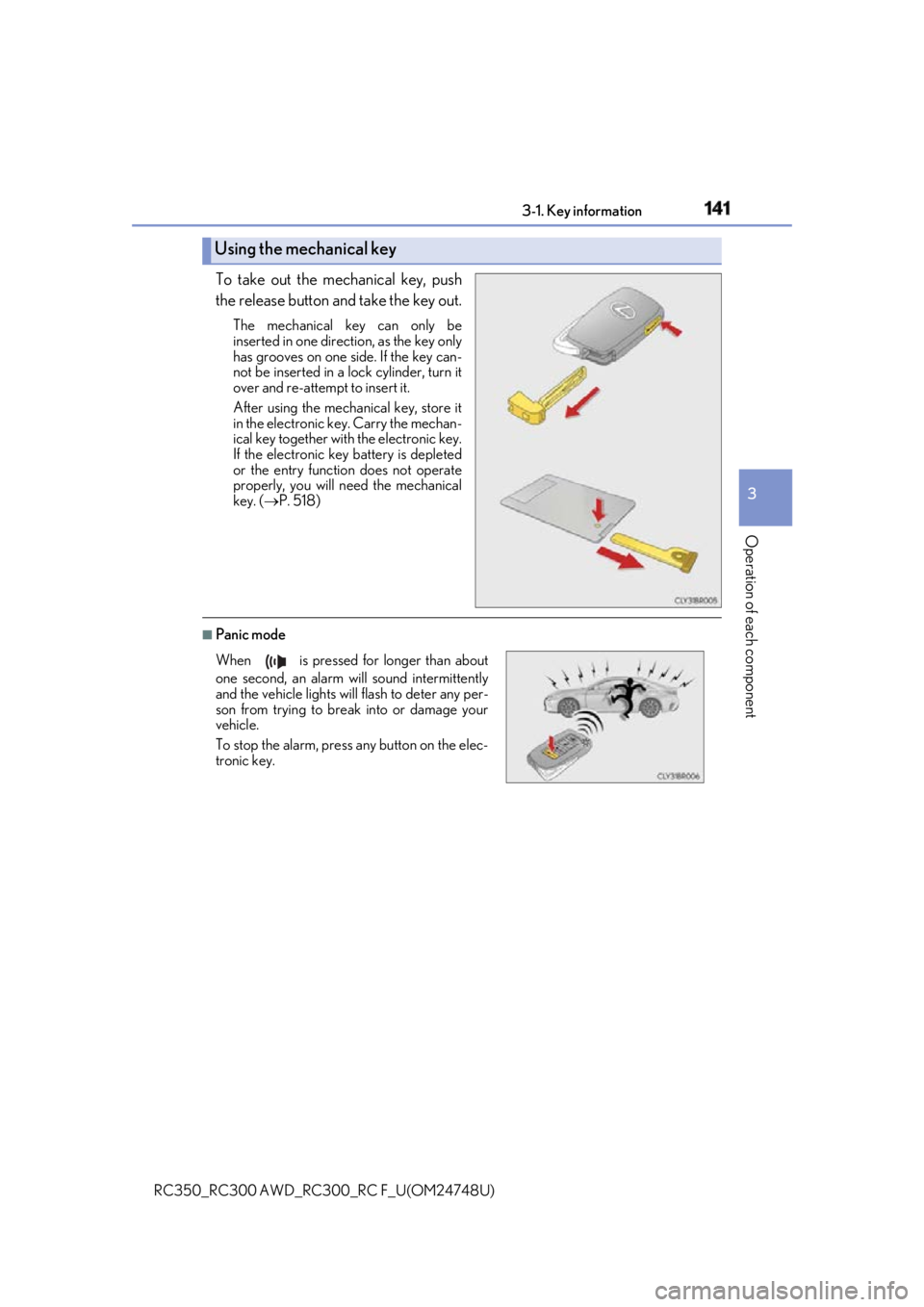
RC350_RC300 AWD_RC3 00_RC F_U(OM24748U)To take out the mechanical key, push
the release button and take the key out. The mechanical key can only be
inserted in one direction, as the key only
has grooves on one side. If the key can-
not be inserted in a lock cylinder, turn it
over and re-attempt to insert it.
After using the mechanical key, store it
in the electronic ke y. Carry the mechan-
ical key together with the electronic key.
If the electronic key battery is depleted
or the entry function does not operate
properly, you will need the mechanical
key. ( P. 518)
■
Panic modeUsing the mechanical key
When is pressed for longer than about
one second, an alarm will sound intermittently
and the vehicle lights will flash to deter any per-
son from trying to break into or damage your
vehicle.
To stop the alarm, press any button on the elec-
tronic key.
Page 144 of 636

144 3-1. Key information
RC350_RC300 AWD_RC3 00_RC F_U(OM24748U)NOTICE ■
To prevent key damage ●
Do not drop the keys, subject them to strong shocks or bend them.●
Do not expose the keys to high temp eratures for long periods of time.●
Do not get the keys wet or wash th em in an ultrasonic washer etc.●
Do not attach metallic or magnetic materials to the keys or place the keys close to
such materials. ●
Do not disassemble the keys. ●
Do not attach a sticker or anything else to the surface of the electronic key. ●
Do not place the keys near objects that pr oduce magnetic fields, such as TVs, audio
systems and induction cookers. ■
Carrying the electronic key on your person
Carry the electronic key 3.9 in. (10 cm) or mo re away from electric appliances that are
turned on. Radio waves emitted from electric appliances within 3.9 in. (10 cm) of the
electronic key may interfere with the key, causing the key to not function properly.■
In case of a smart access system with pu sh-button start malfunction or other key-
related problems
Take your vehicle with all the electronic keys provided with your vehicle, including the
card key, to your Lexus dealer. ■
When an electronic key is lost
If the electronic key re mains lost, the risk of vehicle th eft increases significantly. Visit
your Lexus dealer immediately with all rema ining electronic keys and the card key that
were provided with your vehicle. ■
Handling the card key (if equipped) ●
Do not apply excess force when inserting th e mechanical key into the card key. Doing
so may damage the card key. ●
If the battery or card key terminals get wet, the battery may corrode.
If the key is dropped into water, or if drin king water etc. is spilled on the key, immedi-
ately remove the battery cover and wipe th e battery and terminals. (To remove the
battery cover, lightly grasp and pull it.) If the battery is corroded, have your Lexus
dealer replace the battery. ●
Do not crush the battery cover or use a screwdriver to remove the battery cover.
Forcibly removing the battery cover may bend or damage the key. ●
If the battery cover is frequently removed, the battery cover may become loose. ●
When installing the battery, make sure to check the direction of the battery.
Installing the battery in the wrong directio n may cause the battery to deplete rapidly.●
The surface of the card key may be damaged, or its coating may peel off in the follow-
ing situations:
• The card key is carried together with hard objects, such as coins and keys.
• The card key is scraped with a sharp object, such as the tip of a mechanical pencil.
• The surface of the card key is wiped with thinner or benzene.
Page 146 of 636
146 3-2. Opening, closing and locking the doors and trunk
RC350_RC300 AWD_RC3 00_RC F_U(OM24748U)■
Operation signals
A buzzer sounds and the emergency flashers flash to indicate that the doors have been
locked/unlocked. (Locked: once; Unlocked: twice)
A buzzer sounds to indicate that th e windows and moon roof are operating.■
Security feature
If a door is not opened within approximately 60 seconds after the vehicle is unlocked, the
security feature automatically locks the vehicle again. ■
Welcome light illumination control
The side marker, parking, tail and license plate lights automati cally turn on at night when
the doors are unlocked using the entry function or wireless remote control if the light
switch is in the “AUTO” position. ■
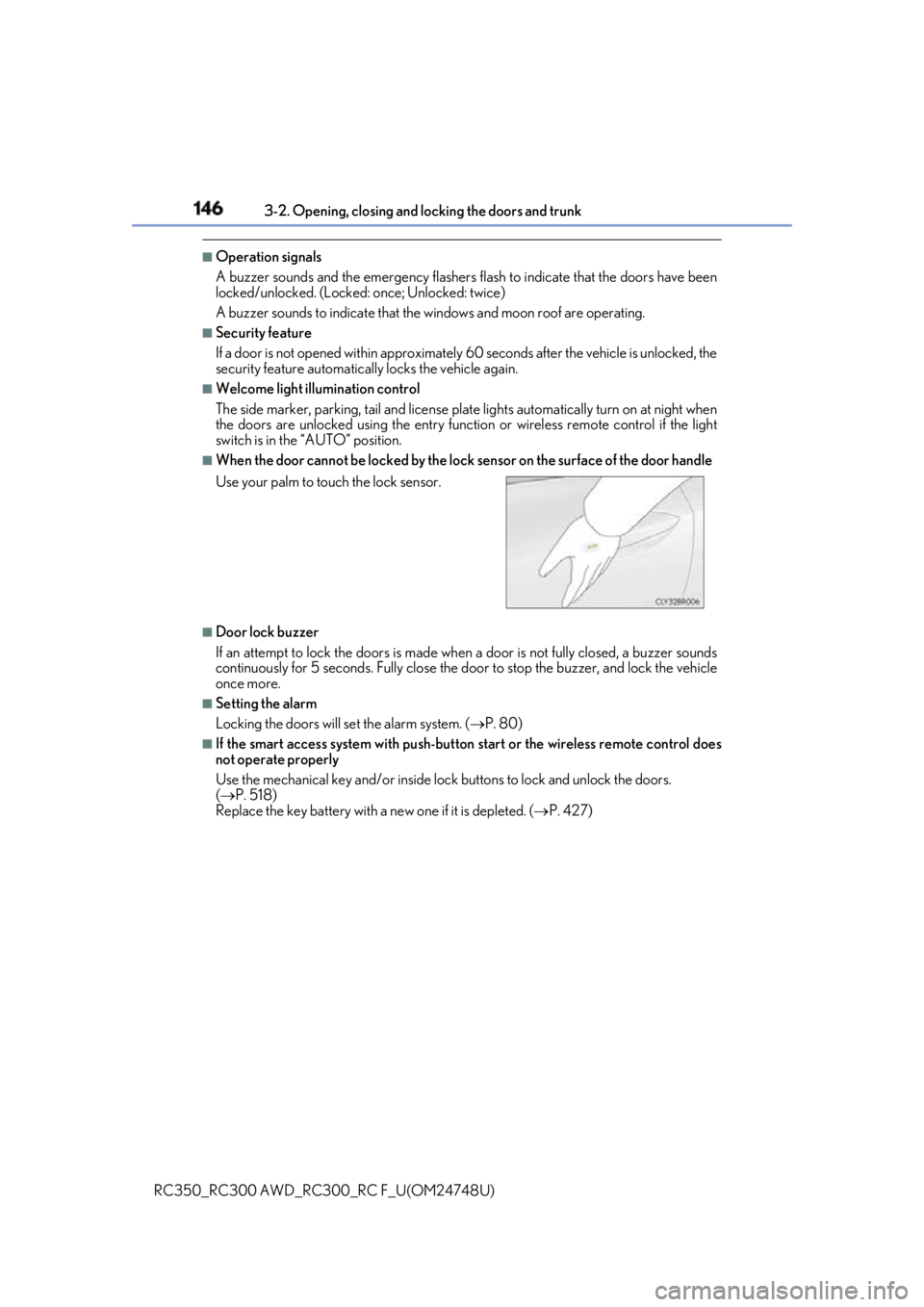
When the door cannot be locked by the lock sensor on the surface of the door handle
■
Door lock buzzer
If an attempt to lock the doors is made when a door is not fully closed, a buzzer sounds
continuously for 5 seconds. Fully close the d oor to stop the buzzer, and lock the vehicle
once more. ■
Setting the alarm
Locking the doors will set the alarm system. ( P. 80)■
If the smart access system with push-button start or the wireless remote control does
not operate properly
Use the mechanical key and/or inside lock buttons to lock and unlock the doors.
( P. 518)
Replace the key battery with a new one if it is depleted. ( P. 427)Use your palm to touch the lock sensor.