light LEXUS RC300 2018 Workshop Manual
[x] Cancel search | Manufacturer: LEXUS, Model Year: 2018, Model line: RC300, Model: LEXUS RC300 2018Pages: 636, PDF Size: 6.88 MB
Page 149 of 636
1493-2. Opening, closing and locking the doors and trunk
3
Operation of each component
RC350_RC300 AWD_RC3 00_RC F_U(OM24748U)■
Side window open/close function linked to door operation
When a door is opened, its window opens s lightly. When a door is closed, its window
closes completely. ■
Switching the door unlock function
It is possible to set which doors the entry function unlock s using the wireless remote con-
trol.
Turn the engine switch off.
When the indicator light on the key surface is not on, press and hold , or
for approximately 5 seconds while pressing and holding .
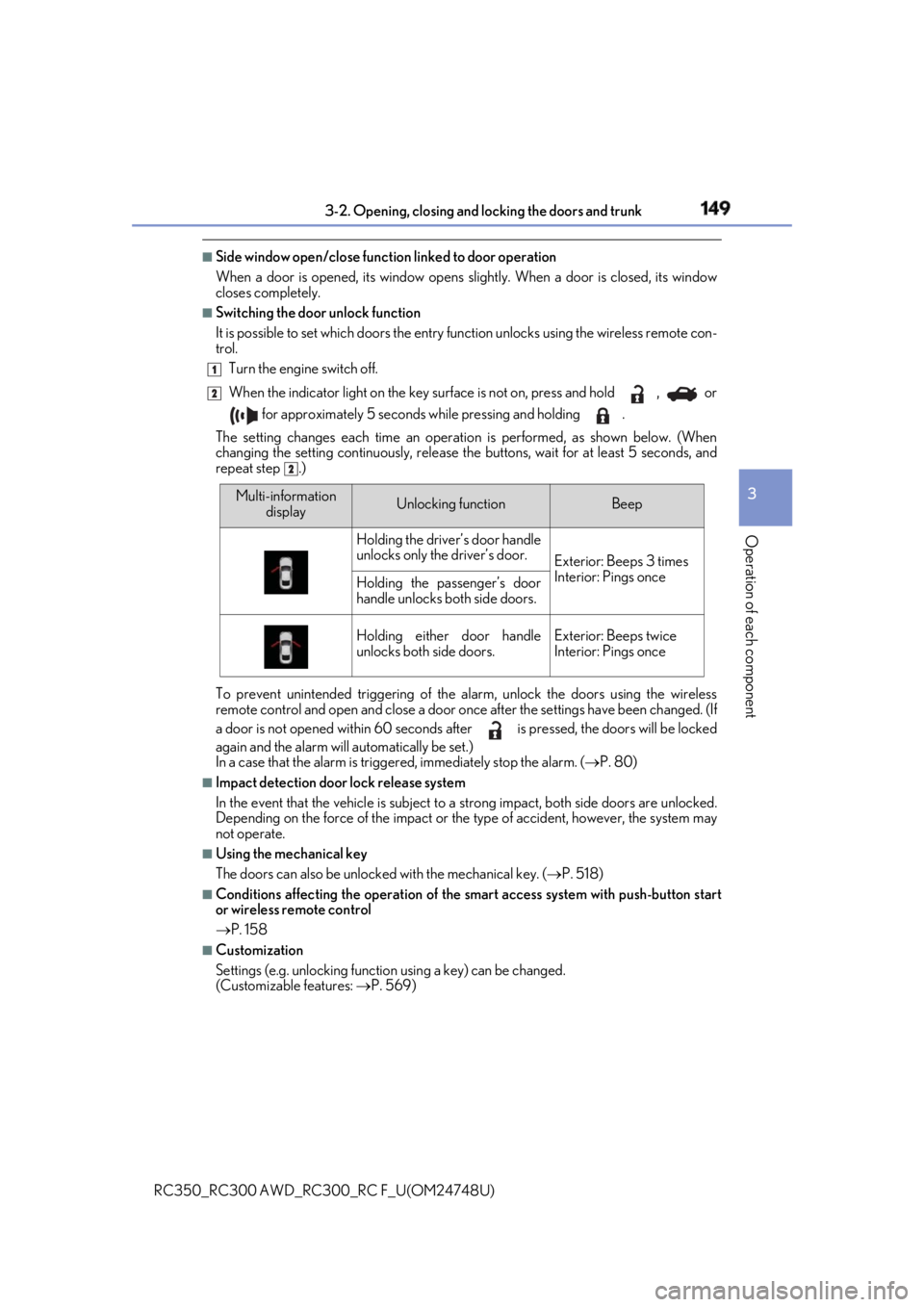
The setting changes each time an operation is performed, as shown below. (When
changing the setting continuously, release the buttons, wait for at least 5 seconds, and
repeat step .)
To prevent unintended triggering of the alarm, unlock the doors using the wireless
remote control and open and close a door once after the settings have been changed. (If
a door is not opened within 60 seconds af ter is pressed, the doors will be locked
again and the alarm will automatically be set.)
In a case that the alarm is triggered, immediately stop the alarm. ( P. 80)■
Impact detection door lock release system
In the event that the vehicle is subject to a strong impact, both side doors are unlocked.
Depending on the force of the impact or the type of accident, however, the system may
not operate. ■
Using the mechanical key
The doors can also be unlocked with the mechanical key. ( P. 518)■
Conditions affecting the oper ation of the smart access sy stem with push-button start
or wireless remote control
P. 158 ■
Customization
Settings (e.g. unlocking function using a key) can be changed.
(Customizable features: P. 569) 1
2
2
Multi-information
display Unlocking function Beep
Holding the driver’s door handle
unlocks only the driver’s door.
Exterior: Beeps 3 times
Interior: Pings once
Holding the passenger’s door
handle unlocks both side doors.
Holding either door handle
unlocks both side doors. Exterior: Beeps twice
Interior: Pings once
Page 153 of 636
1533-2. Opening, closing and locking the doors and trunk
3
Operation of each component
RC350_RC300 AWD_RC3 00_RC F_U(OM24748U)■
Trunk light ●
The trunk light turns on when the trunk is opened. ●
If the trunk light is left on when the engine sw itch is turned off, the light will go off auto-
matically after 20 minutes. ■
Function to prevent the trunk being lo cked with the electronic key inside ●
When both side doors are locked, closing the trunk lid with the electronic key left inside
the trunk will sound an alarm.
In this case, the trunk lid can be opened by pressing the trunk release button on the
trunk lid. ●
If the spare electronic key is put in the trunk with both side doors locked, the key con-
finement prevention function is activated so the trunk can be opened. In order to pre-
vent theft, take all el ectronic keys with you when leaving the vehicle.●
If the electronic key is put in the trunk with both side doors locked, the key may not be
detected depending on the location of the key and the surrounding radio wave condi-
tions. In this case, the key confinement prev ention function cannot be activated, causing
the doors to lock when the trunk is closed. Make sure to check where the key is before
closing the trunk. ●
The key confinement prevention function cannot be activated if either door is unlocked.
In this case, open the trunk using the trunk opener. ■
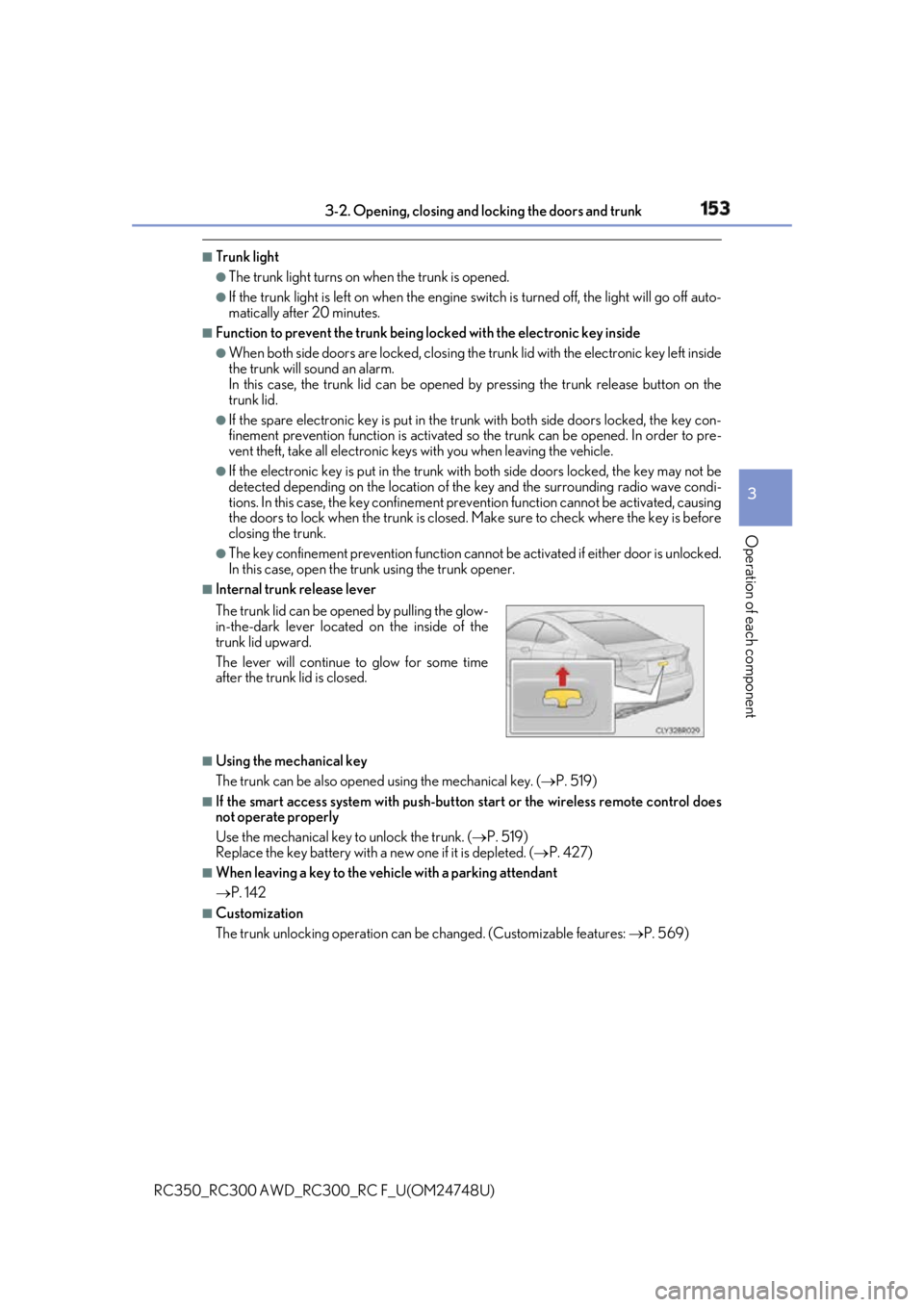
Internal trunk release lever
■
Using the mechanical key
The trunk can be also opened using the mechanical key. ( P. 519)■
If the smart access system with push-button start or the wireless remote control does
not operate properly
Use the mechanical key to unlock the trunk. ( P. 519)
Replace the key battery with a new one if it is depleted. ( P. 427)■
When leaving a key to the vehicle with a parking attendant
P. 142 ■
Customization
The trunk unlocking operation can be changed. (Customizable features: P. 569)The trunk lid can be open ed by pulling the glow-
in-the-dark lever located on the inside of the
trunk lid upward.
The lever will continue to glow for some time
after the trunk lid is closed.
Page 155 of 636
1553-2. Opening, closing and locking the doors and trunk
3
Operation of each component
RC350_RC300 AWD_RC3 00_RC F_U(OM24748U)WARNING ■
Using the trunk
Observe the following precautions.
Failure to do so may cause parts of the body to be caught, resulting in serious injury.●
Remove any heavy loads, such as snow and ice, from the trunk lid before opening it.
Failure to do so may cause the trunk lid to suddenly shut again after it is opened.●
When opening or closing the trunk lid, thoroughly check to make sure the surround-
ing area is safe. ●
If anyone is in the vicinity, make sure they are safe and let them know that the trunk is
about to open or close. ●
Use caution when opening or closing the tr unk lid in windy weather as it may move
abruptly in strong wind. ●
On an incline it is more difficult to open or close the trunk lid th an on a level surface,
so beware of the trunk lid un expectedly opening or closin g by itself. Make sure that
the trunk lid is fully open and secure before using the trunk.
●
Do not attach any accessories other than genuine Lexus parts to the trunk lid. Such
additional weight on the trunk lid may cause the lid to suddenly shut again after it is
opened. ●
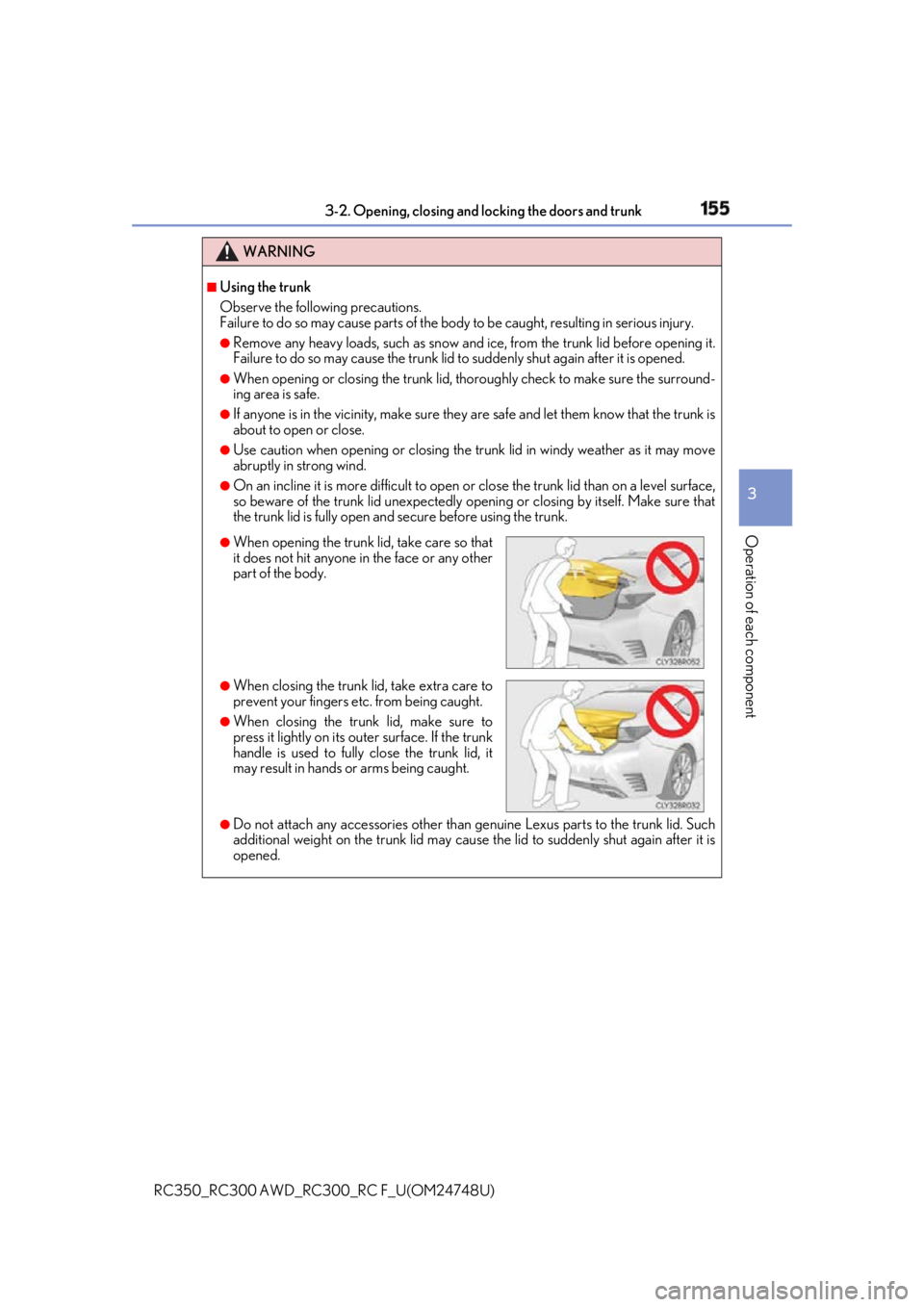
When opening the trunk lid, take care so that
it does not hit anyone in the face or any other
part of the body.
●
When closing the trunk li d, take extra care to
prevent your fingers etc. from being caught. ●
When closing the trunk lid, make sure to
press it lightly on its outer surface. If the trunk
handle is used to fully close the trunk lid, it
may result in hands or arms being caught.
Page 162 of 636

162 3-3. Adjusting the seats
RC350_RC300 AWD_RC3 00_RC F_U(OM24748U)Fold the seatback completely for-
ward. The front seat will move forward
automatically.
■
Returning the front seat to its original position
Move the seatback backward until it locks. The front seat will return to its orig-
inal position automatically. ■
Power easy access system
The driver’s seat and steering wheel move in accordance with engine switch mode and
the driver’s seat belt condition. ( P. 166)■
When adjusting the seat ●
Take care when adjusting the seat so that the head restraint does not touch the ceiling. ●
RC350/RC300: When folding down a rear seat back, if it interferes with a front seat-
back, adjust the front seat position so that the seats no longer interfere with each other.
However, if adjusting the fron t seat position causes the correct driving posture to not be
maintained, return the rear seatba ck to its original position. ( P. 164)■
Lever-operated “Front, Fold & Return” seat ●
After the front seat is moved forward by oper ating the “Front, Fold & Return” seat lever,
if a power seat adjustin g switch or a driving position memo ry switch is pressed, the front
seat will not return to its original position even if the front seatback is moved backward
until it locks. ●
The lever-operated “Front, Fold & Return” seat will not operate in the following situa-
tions:
• The front seat belt of the seat to be operated is fastened.
• The engine switch is in IGNITION ON mode and the shift lever is in a position other
than P (driver's seat only). ●
Operation of the lever-operated “Front, Fold & Return” seat w ill stop in the following sit-
uations:
• A power seat adjusting switch or a driv ing position memory switch is pressed.
• The front seat belt of the seat which is operating is fastened.
• The engine switch is in IGNITION ON mo de and the shift lever is moved to a posi-
tion other than P (driver's seat only).■
Jam protection function
While the lever-operated “Front, Fold & Return” seat is operating, if an object is stuck
either in front of or behind the front seat, the front seat will stop and then move in the
opposite direction slightly. 2
Page 165 of 636
1653-3. Adjusting the seats
3
Operation of each component
RC350_RC300 AWD_RC3 00_RC F_U(OM24748U)WARNING
Observe the following precautions. Failure to do so may result in death or serious injury.■
When folding the re ar seatbacks down●
Do not fold the seatbacks down while driving. ●
Stop the vehicle on level ground, set the pa rking brake and shift the shift lever to P.●
Do not allow anyone to sit on a folded seatback or in the trunk while driving.●
Do not allow children to enter the trunk. ■
After returning the rear seat back to the upright position
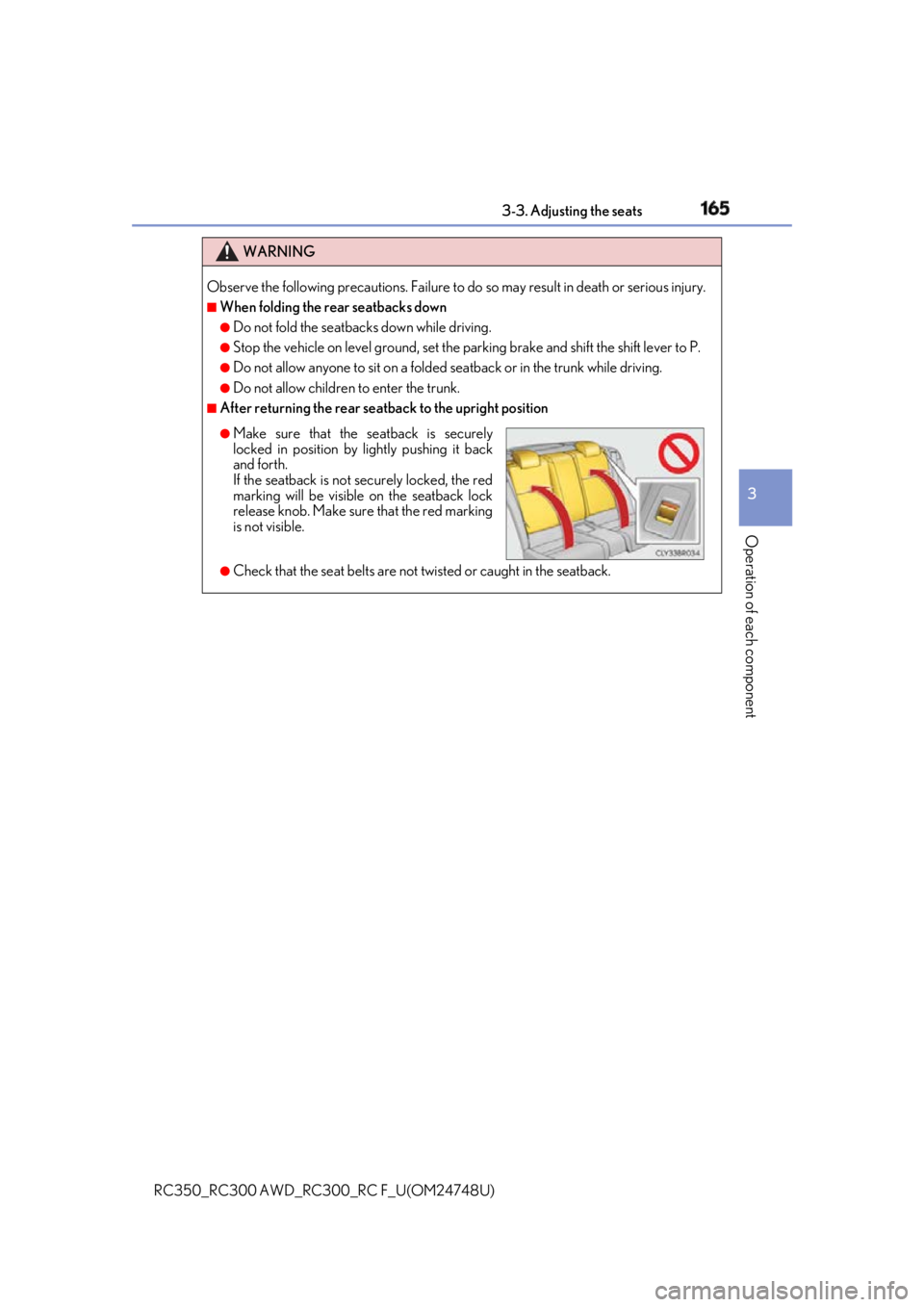
●
Check that the seat belts are not twisted or caught in the seatback. ●
Make sure that the seatback is securely
locked in position by lightly pushing it back
and forth.
If the seatback is not securely locked, the red
marking will be visible on the seatback lock
release knob. Make sure that the red marking
is not visible.
Page 168 of 636

168 3-3. Adjusting the seats
RC350_RC300 AWD_RC3 00_RC F_U(OM24748U)■
To stop the position recall operation part-way through
Perform any of the following: ●
Press the “SET” button. ●
Press button “1”, “2” or “3”. ●
Operate any of the seat adjustment switches (only cancels seat position recall). ●
Operate the tilt and telescopic steering control switch (only cancels steering wheel
position recall). ■
Seat positions that can be memorized ( P. 161)
The adjusted positions other than the position adjusted by lumbar support switch can be
recorded. ■
Operating the driving position memory after turning the engine switch off
Recorded seat positions can be activated up to 180 seconds after the driver's door is
opened and another 60 second s after it is closed again.■
In order to correctly use the dr iving position memory function
If a seat position is already in the furthest po ssible position and the seat is operated in the
same direction, the recorded position may be slightly di fferent when it is recalled.
Page 169 of 636

1693-3. Adjusting the seats
3
Operation of each component
RC350_RC300 AWD_RC3 00_RC F_U(OM24748U)Each electronic key (including a card key) can be registered to recall your pre-
ferred driving position. ■
Registering procedure
Record your driving position to button “1”, “2” or “3” before performing the
following:
Carry only the key you want to regist er, and then close the driver’s door.
If 2 or more keys are in the vehicle, the driving position cannot be recorded
properly.
Check that the shift lever is in P.
Turn the engine switch to IGNITION ON mode.
Recall the driving position that you want to record.
While pressing the recalled but-
ton, press and hold the door lock
switch (either lock or unlock) until
the buzzer sounds. If the button could not be registered,
the buzzer sounds continuously for
approximately 3 seconds.
■
Recall procedure
Make sure that the doors are locked before recalling the driving position.
Carry the electronic key that has been registered to the driving position,
and then unlock and open the driver’s door using the smart access system
with push-button start or wireless remote control. The driving position will move to the recorded position (not including the steering
wheel). However, the seat will move to a position slightly behind the re corded posi-
tion in order to make entering the vehicle easier.
If the driving position is in a position th at has already been recorded, the seat and
outside rear view mirrors will not move.
Turn the engine switch to ACCESS ORY mode or IGNITION ON mode,
or fasten a seat belt. The seat and steering wheel will move to the recorded position.Memory recall function (if equipped) 1
2
3
4
1
2
Page 176 of 636
176 3-4. Adjusting the steering wheel and mirrors
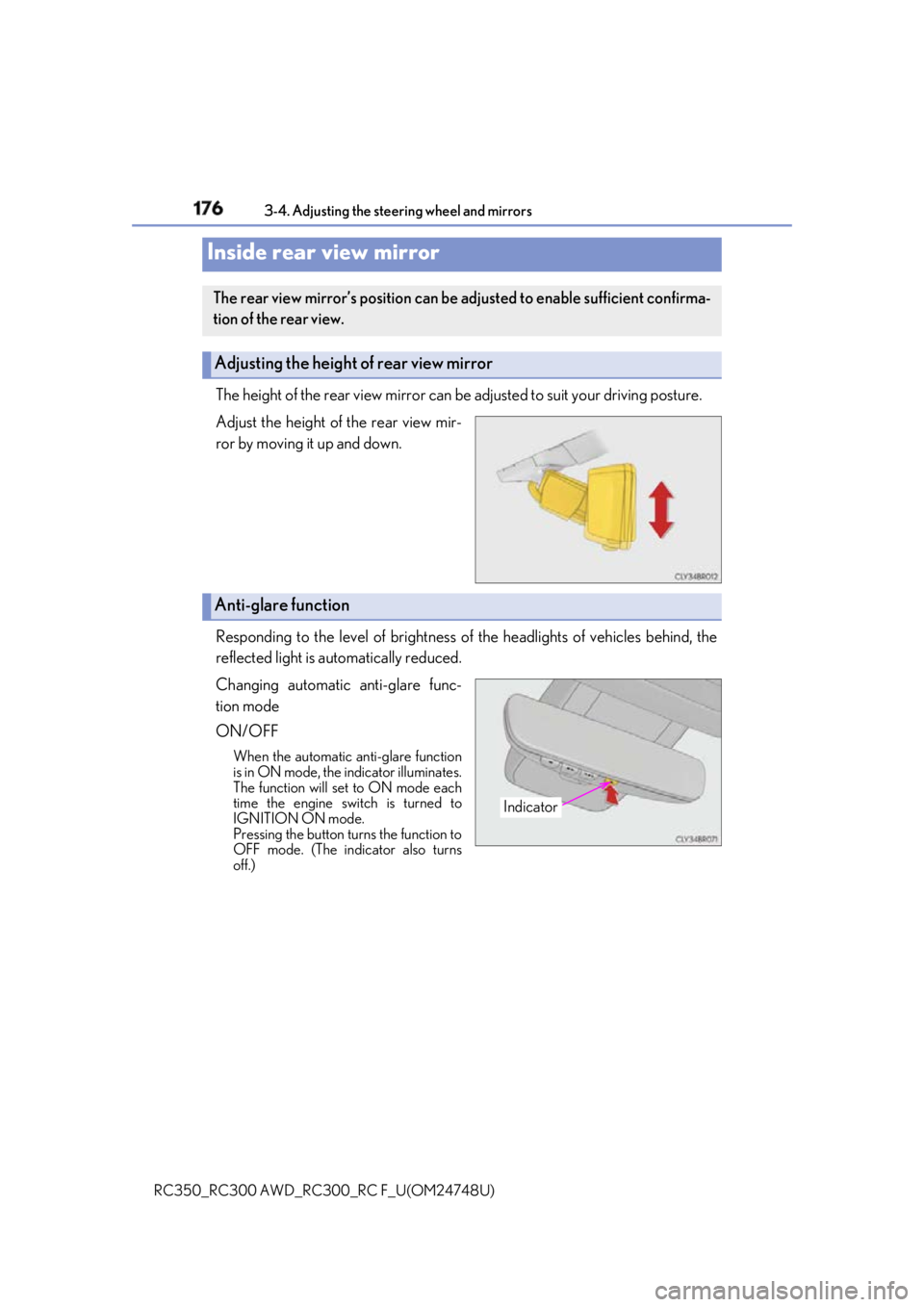
RC350_RC300 AWD_RC3 00_RC F_U(OM24748U)The height of the rear view mirror can be adjusted to suit your driving posture.
Adjust the height of the rear view mir-
ror by moving it up and down.
Responding to the level of brightness of the headlights of vehicles behind, the
reflected light is automatically reduced.
Changing automatic anti-glare func-
tion mode
ON/OFF When the automatic anti-glare function
is in ON mode, the indicator illuminates.
The function will set to ON mode each
time the engine switch is turned to
IGNITION ON mode.
Pressing the button turns the function to
OFF mode. (The indicator also turns
off.)Inside rear view mirror The rear view mirror’s position can be adjusted to enable sufficient confirma-
tion of the rear view.
Adjusting the height of rear view mirror
Anti-glare function
Indicator
Page 180 of 636

180 3-4. Adjusting the steering wheel and mirrors
RC350_RC300 AWD_RC3 00_RC F_U(OM24748U)■
Mirror angle can be adjusted when
The engine switch is in ACCESSORY or IGNITION ON mode. ■
When the mirrors are fogged up
The outside rear view mirrors can be cleare d using the mirror defoggers. Turn on the
rear window defogger to turn on the outside rear view mirror defoggers. ( P. 338)■
Automatic adjustment of the mirror angle (if equipped)
A desired mirror face angle can be entered to memory and recalled automatically by the
driving position memory. ( P. 166)■
Auto anti-glare function (if equipped)
When the anti-glare inside re ar view mirror is set to automatic mode, the outside rear
view mirrors will activate in conjunction with the anti-glare inside rear view mirror to
reduce reflected light. ( P. 176)
Page 183 of 636

1833-5. Opening, closing the windows and moon roof
3
Operation of each component
RC350_RC300 AWD_RC3 00_RC F_U(OM24748U)■
The power windows can be operated when
The engine switch is in IGNITION ON mode. ■
Operating the power windows after turning the engine off
The power windows can be operated for ap proximately 45 seco nds after the engine
switch is turned to ACCESSORY mode or turned off. They cannot, however, be oper-
ated once either door is opened. ■
Jam protection function
If an object becomes jammed between the window and the window frame while the win-
dow is closing, window movement is stop ped and the window is opened slightly.■
Catch protection function
If an object becomes caught between the door and window while the window is opening,
window movement is stopped. ■
When the window cannot be opened or closed
When the jam protection functi on or catch protection func tion operates unusually and
the door window cannot be opened or closed, perform the following operations with the
power window switch of that door. ●
Stop the vehicle. With the engine switch in IGNITION ON mode, within 4 seconds of
the jam protection function or catch protecti on function activating, continuously oper-
ate the power window switch in the one-to uch closing direction or one-touch opening
direction so that the door wind ow can be opened and closed.●
If the door window cannot be opened and closed even when performing the above
operations, perform the following procedure for function initialization.
Turn the engine switch to IGNITION ON mode.
Pull and hold the power window switch in the one-touch closing direction and com-
pletely close the door window.
Release the power window sw itch for a moment, resume pulling the switch in the
one-touch closing direction, and hold it there for approximately 6 seconds or more.
Press and hold the power window switch in the one-touch opening direction. After
the door window is completely opened, cont inue holding the switch for an additional
1 second or more.
Release the power window switch for a mo ment, resume pushing the switch in the
one-touch opening direction, and hold it there for approximately 4 seconds or
more.
Pull and hold the power window switch in the one-touch closing direction again.
After the door window is completely clos ed, continue holding the switch for a fur-
ther 1 second or more.
If you release the switch while the window is moving, start again from the beginning.
If the window reverses and cannot be fully cl osed or opened, have the vehicle inspected
by your Lexus dealer. 1
2
3
4
5
6